tow GMC SIERRA DENALI 2010 Service Manual
[x] Cancel search | Manufacturer: GMC, Model Year: 2010, Model line: SIERRA DENALI, Model: GMC SIERRA DENALI 2010Pages: 550, PDF Size: 4.17 MB
Page 230 of 550
BATTERY LOW START VEHICLE
When the vehicle’s battery is severely discharged, this
message will display and four chimes will sound. Start
the vehicle immediately. If the vehicle is not started and
the battery continues to discharge, the climate controls,
heated seats, and audio systems will shut off and the
vehicle may require a jump start. These systems will
function again after the vehicle is started.
CHANGE ENGINE OIL SOON
This message displays when the engine oil needs to be
changed. When you change the engine oil, be sure to
reset the CHANGE ENGINE OIL SOON message. See
Engine Oil Life System
on page 6‑20for information on
how to reset the message. See Engine Oilon
page 6‑18and Scheduled Maintenanceon page 7‑3for more information.
CHECK TRAILER WIRING
On vehicles with the Integrated Trailer Brake Control
(ITBC) system, this message may display and a chime
may sound when one of the following conditions exists:
.A trailer with electric brakes becomes
disconnected from the vehicle.
‐If the disconnect occurs while the vehicle is
stopped, this message clears itself after a
short time.
‐ If the disconnect occurs while the vehicle is
moving, this message stays on until the ignition
is turned off.
.There is a short in the wiring to the electric trailer
brakes.
When this message displays, power is no longer
available to the trailer brakes.
As soon as it is safe to do so, carefully pull your vehicle
over to the side of the road and turn the ignition off.
Check the wiring connection to the trailer and turn the
ignition back on. This message clears if the trailer is
reconnected. This message also clears if you
acknowledge it. If this message still displays, either
your vehicle or the trailer needs service. See your
dealer/retailer.
See “Integrated Trailer Brake Control System” under
Towing a Trailer
on page 5‑42for more information.
4-58
Page 236 of 550
SERVICE TRAILER BRAKE SYSTEM
On vehicles with the Integrated Trailer Brake Control
(ITBC) system, this message displays and a chime
sounds when there is a problem with the ITBC system.
When this message displays, power is no longer
available to the trailer brakes.
As soon as it is safe to do so, carefully pull your vehicle
over to the side of the road and turn the ignition off.
Check the wiring connection to the trailer and turn the
ignition back on. If this message still displays, either
your vehicle or the trailer needs service. See your
dealer/retailer.
See“Integrated Trailer Brake Control System” under
Towing a Trailer
on page 5‑42for more information.
STABILITRAK OFF
If your vehicle has StabiliTrak, this message displays
when you turn off StabiliTrak, or when the stability
control has been automatically disabled. To limit wheel
spin and realize the full benefits of the stability
enhancement system, you should normally leave
StabiliTrak on. However, you should turn StabiliTrak off
if your vehicle gets stuck in sand, mud, ice, or snow and
you want to rock your vehicle to attempt to free it, or if
you are driving in extreme off-road conditions and
require more wheel spin. See If Your Vehicle is Stuck in Sand, Mud, Ice, or Snow
on page 5‑6. To turn the
StabiliTrak system on or off, see StabiliTrak®Systemon page 5‑6.
There are several conditions that can cause this
message to appear.
.One condition is overheating, which could occur if
StabiliTrak activates continuously for an extended
period of time.
.The message also displays if the brake system
warning light is on. See Brake System Warning
Light on page 4‑34.
.The message could display if the stability system
takes longer than usual to complete its diagnostic
checks due to driving conditions.
.The message displays if an engine or vehicle
related problem has been detected and the vehicle
needs service. See your dealer/retailer.
The message turns off as soon as the conditions that
caused the message to be displayed are no longer
present.
4-64
Page 238 of 550
TRACTION CONTROL OFF
If your vehicle has StabiliTrak, this message displays
when the Traction Control System (TCS) is turned off.
Adjust your driving accordingly. SeeStabiliTrak
®
Systemon page 5‑6for more information.
TRAILER CONNECTED
On vehicles with the Integrated Trailer Brake Control
(ITBC) system, this message displays briefly when a
trailer with electric brakes is first connected to the
vehicle.
This message clears itself after several seconds. This
message also clears if you acknowledge it. After this
message clears, the TRAILER GAIN/OUTPUT display
appears in the DIC.
See“TRAILER GAIN/OUTPUT” underDIC Operation
and Displays (Using Trip Odometer Reset Stem)
on
page 4‑44or DIC Operation and Displays (Using DIC
Buttons)on page 4‑48and “Integrated Trailer Brake
Control System” underTowing a Traileron page 5‑42for more information.
TRANSMISSION HOT IDLE ENGINE
Notice: If you drive your vehicle while the
transmission fluid is overheating and the
transmission temperature warning is displayed on
the instrument panel cluster and/or DIC, you can
damage the transmission. This could lead to costly
repairs that would not be covered by your warranty.
Do not drive your vehicle with overheated
transmission fluid or while the transmission
temperature warning is displayed.
This message displays along with four chimes if the
transmission fluid in the vehicle gets hot. Driving with
the transmission fluid temperature high can cause
damage to the vehicle. Stop the vehicle and let it idle to
allow the transmission to cool. This message clears and
the chime stops when the fluid temperature reaches a
safe level.
TURN SIGNAL ON
This message displays and a chime sounds if a turn
signal is left on for 3/4 of a mile (1.2 km). Move the turn
signal/multifunction lever to the off position.
4-66
Page 306 of 550
Tips and Troubleshooting Chart (cont'd)
ProblemRecommended Action
Sometimes the wireless
headphone audio cuts out
or buzzes. Check for obstructions, low
batteries, reception range,
and interference from
cellular telephone towers or
by using a cellular
telephone in the vehicle.
Check that the headphones
are on correctly using the
L (left) and R (right) on the
headphones.
I lost the remote and/or the
headphones. See your dealer/retailer for
assistance.
The DVD is playing, but
there is no picture or
sound. Check that the RSE video
screen is sourced to the
DVD player.
DVD Display Error Messages
The DVD display error message depends on the radio
that is in the vehicle. The video screen can display one
of the following:
Disc Load/Eject Error :
This message displays when
there are disc load or eject problems.
Disc Format Error : This message displays, if the disc
is inserted with the disc label wrong side up, or if the
disc is damaged.
Disc Region Error : This message displays, if the disc
is not from a correct region.
No Disc Inserted : This message displays, if no disc is
present when
ZEJECT or DVD AUX is pressed on
the radio.
DVD Distortion
Video distortion can occur when operating cellular
phones, scanners, CB radios, Global Position Systems
(GPS)*, two-way radios, mobile fax, or walkie talkies.
It might be necessary to turn off the DVD player when
operating one of these devices in or near the vehicle.
*Excludes the OnStar
®System.
Cleaning the RSE Overhead Console
When cleaning the RSE overhead console surface, use
only a clean cloth dampened with clean water.
4-134
Page 313 of 550
Section 5 Driving Your Vehicle
Your Driving, the Road, and the Vehicle. . . . . . . . . .5-2
Defensive Driving . . . . . . . . . . . . . . . . . . . . . . . . . . . . . . . 5-2
Drunk Driving . . . . . . . . . . . . . . . . . . . . . . . . . . . . . . . . . . . 5-2
Control of a Vehicle . . . . . . . . . . . . . . . . . . . . . . . . . . . . . 5-3
Braking . . . . . . . . . . . . . . . . . . . . . . . . . . . . . . . . . . . . . . . . . 5-3
Antilock Brake System (ABS) . . . . . . . . . . . . . . . . . . . 5-4
Braking in Emergencies . . . . . . . . . . . . . . . . . . . . . . . . . 5-5
StabiliTrak
®System . . . . . . . . . . . . . . . . . . . . . . . . . . . . . 5-6
Locking Rear Axle . . . . . . . . . . . . . . . . . . . . . . . . . . . . . . 5-8
All-Wheel Drive (AWD) System . . . . . . . . . . . . . . . . . 5-9
Steering . . . . . . . . . . . . . . . . . . . . . . . . . . . . . . . . . . . . . . . . . 5-9
Off-Road Recovery . . . . . . . . . . . . . . . . . . . . . . . . . . . . 5-10
Passing . . . . . . . . . . . . . . . . . . . . . . . . . . . . . . . . . . . . . . . . 5-11
Loss of Control . . . . . . . . . . . . . . . . . . . . . . . . . . . . . . . . 5-11
Off-Road Driving . . . . . . . . . . . . . . . . . . . . . . . . . . . . . . . 5-12
Driving at Night . . . . . . . . . . . . . . . . . . . . . . . . . . . . . . . . 5-24
Driving in Rain and on Wet Roads . . . . . . . . . . . . . 5-24 Before Leaving on a Long Trip . . . . . . . . . . . . . . . . . 5-25
Highway Hypnosis . . . . . . . . . . . . . . . . . . . . . . . . . . . . . 5-26
Hill and Mountain Roads . . . . . . . . . . . . . . . . . . . . . . . 5-26
Winter Driving . . . . . . . . . . . . . . . . . . . . . . . . . . . . . . . . . 5-27
If Your Vehicle is Stuck in Sand, Mud, Ice,
or Snow . . . . . . . . . . . . . . . . . . . . . . . . . . . . . . . . . . . . . 5-29
Rocking Your Vehicle to Get It Out . . . . . . . . . . . . . 5-30
Recovery Hooks . . . . . . . . . . . . . . . . . . . . . . . . . . . . . . . 5-30
Loading the Vehicle . . . . . . . . . . . . . . . . . . . . . . . . . . . . 5-31
Truck-Camper Loading Information . . . . . . . . . . . . 5-37
Pickup Conversion to Chassis Cab . . . . . . . . . . . . 5-37
Towing . . . . . . . . . . . . . . . . . . . . . . . . . . . . . . . . . . . . . . . . . . . . 5-38
Towing Your Vehicle . . . . . . . . . . . . . . . . . . . . . . . . . . . 5-38
Recreational Vehicle Towing . . . . . . . . . . . . . . . . . . . 5-38
Towing a Trailer . . . . . . . . . . . . . . . . . . . . . . . . . . . . . . . . 5-42
Trailer Recommendations . . . . . . . . . . . . . . . . . . . . . . 5-61
5-1
Page 342 of 550
Rocking Your Vehicle to Get It Out
Turn the steering wheel left and right to clear the area
around the front wheels. Turn off any traction or stability
system. Shift back and forth between R (Reverse) and a
forward gear, spinning the wheels as little as possible.
To prevent transmission wear, wait until the wheels stop
spinning before shifting gears. Release the accelerator
pedal while shifting, and press lightly on the accelerator
pedal when the transmission is in gear. Slowly spinning
the wheels in the forward and reverse directions causes
a rocking motion that could free the vehicle. If that does
not get the vehicle out after a few tries, it might need to
be towed out. Recovery hooks can be used, if the
vehicle has them. If the vehicle does need to be towed
out, seeTowing Your Vehicle on page 5‑38.
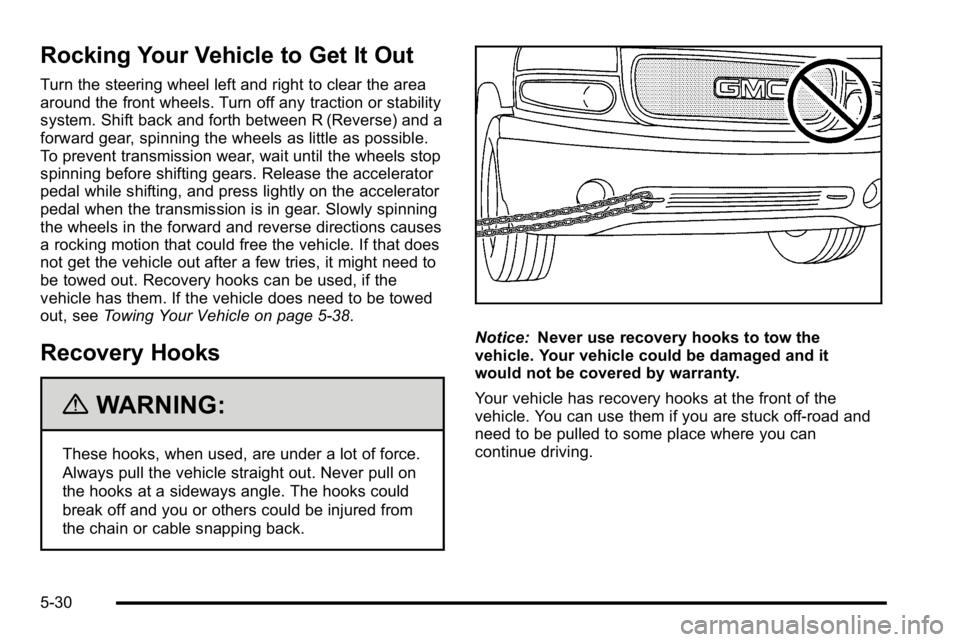
Recovery Hooks
{WARNING:
These hooks, when used, are under a lot of force.
Always pull the vehicle straight out. Never pull on
the hooks at a sideways angle. The hooks could
break off and you or others could be injured from
the chain or cable snapping back.
Notice:Never use recovery hooks to tow the
vehicle. Your vehicle could be damaged and it
would not be covered by warranty.
Your vehicle has recovery hooks at the front of the
vehicle. You can use them if you are stuck off-road and
need to be pulled to some place where you can
continue driving.
5-30
Page 344 of 550
The Tire and Loading Information label also
shows the size of the original equipment tires (C)
and the recommended cold tire inflation
pressures (D). For more information on tires and
inflation seeTires
on page 6‑62andInflation - Tire
Pressure
on page 6‑71.
There is also important loading information on the
vehicle Certification/Tire label. It tells you the
Gross Vehicle Weight Rating (GVWR) and the
Gross Axle Weight Rating (GAWR) for the front
and rear axles. See “Certification/Tire Label” later
in this section.
Steps for Determining Correct Load Limit
1.Locate the statement “The combined weight
of occupants and cargo should never exceed
XXX kg or XXX lbs” on your vehicle's placard.
2.Determine the combined weight of the driver
and passengers that will be riding in your
vehicle.
3.Subtract the combined weight of the driver
and passengers from XXX kg or XXX lbs.
4.The resulting figure equals the available
amount of cargo and luggage load capacity.
For example, if the“XXX”amount equals
1400 lbs and there will be five 150 lb
passengers in your vehicle, the amount of
available cargo and luggage load capacity is
650 lbs (1400 −750 (5 x 150) = 650 lbs).
5.Determine the combined weight of luggage
and cargo being loaded on the vehicle. That
weight may not safely exceed the available
cargo and luggage load capacity calculated in
Step 4.
6.If your vehicle will be towing a trailer, the load
from your trailer will be transferred to your
vehicle. Consult this manual to determine
how this reduces the available cargo and
luggage load capacity of your vehicle.
SeeTowing a Trailer
on page 5‑42for
important information on towing a trailer,
towing safety rules and trailering tips.
5-32
Page 350 of 550
Towing
Towing Your Vehicle
To avoid damage, the disabled vehicle should be towed
with all four wheels off the ground. Consult your dealer/
retailer or a professional towing service if the disabled
vehicle must be towed. SeeRoadside Assistance
Program on page 8‑7.
To tow the vehicle behind another vehicle for
recreational purposes, such as behind a motorhome,
see “Recreational Vehicle Towing” following.
Recreational Vehicle Towing
Recreational vehicle towing means towing the vehicle
behind another vehicle–such as behind a motorhome.
The two most common types of recreational vehicle
towing are known as “dinghy towing”(towing the vehicle
with all four wheels on the ground) and “dolly towing”
(towing the vehicle with two wheels on the ground and
two wheels up on a device known as a “dolly”).Here are some important things to consider before
recreational vehicle towing:
.What is the towing capacity of the towing vehicle?
Be sure to read the tow vehicle manufacturer's
recommendations.
.What is the distance that will be travelled? Some
vehicles have restrictions on how far and how long
they can tow.
.Is the proper towing equipment going to be used?
See your dealer/retailer or trailering professional
for additional advice and equipment
recommendations.
.Is the vehicle ready to be towed? Just as preparing
the vehicle for a long trip, make sure the vehicle is
prepared to be towed. See
Before Leaving on a
Long Trip on page 5‑25.
5-38
Page 351 of 550
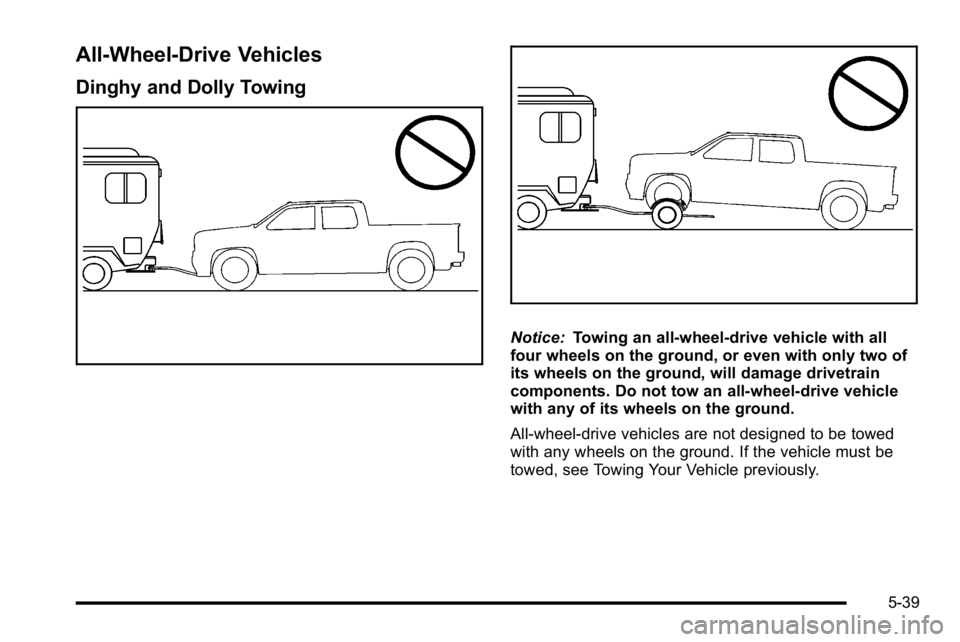
All-Wheel-Drive Vehicles
Dinghy and Dolly Towing
Notice:Towing an all-wheel-drive vehicle with all
four wheels on the ground, or even with only two of
its wheels on the ground, will damage drivetrain
components. Do not tow an all-wheel-drive vehicle
with any of its wheels on the ground.
All-wheel-drive vehicles are not designed to be towed
with any wheels on the ground. If the vehicle must be
towed, see Towing Your Vehicle previously.
5-39
Page 352 of 550
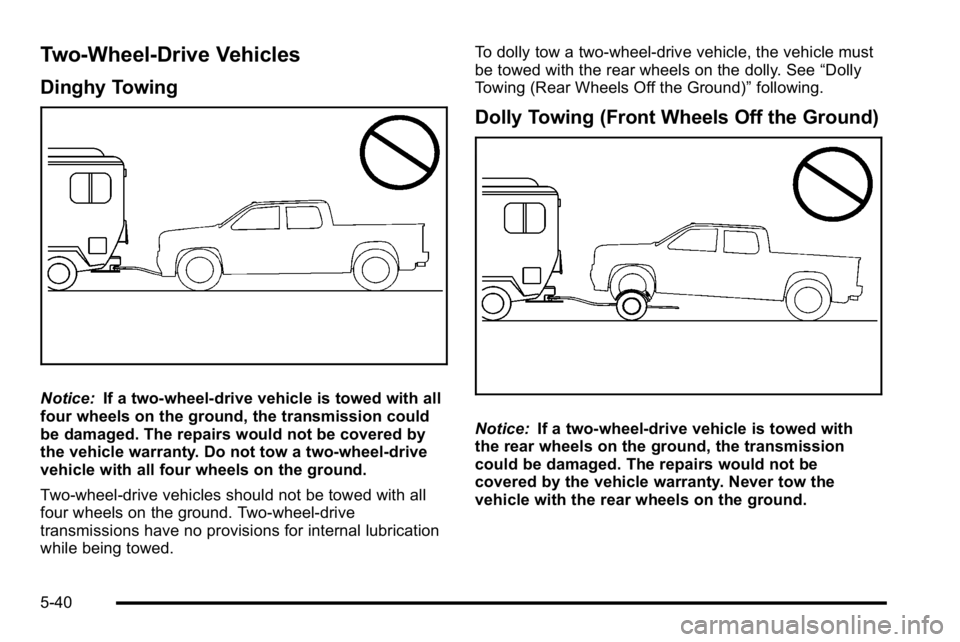
Two-Wheel-Drive Vehicles
Dinghy Towing
Notice:If a two-wheel-drive vehicle is towed with all
four wheels on the ground, the transmission could
be damaged. The repairs would not be covered by
the vehicle warranty. Do not tow a two-wheel-drive
vehicle with all four wheels on the ground.
Two-wheel-drive vehicles should not be towed with all
four wheels on the ground. Two-wheel-drive
transmissions have no provisions for internal lubrication
while being towed. To dolly tow a two‐wheel‐drive vehicle, the vehicle must
be towed with the rear wheels on the dolly. See
“Dolly
Towing (Rear Wheels Off the Ground)” following.
Dolly Towing (Front Wheels Off the Ground)
Notice:If a two-wheel-drive vehicle is towed with
the rear wheels on the ground, the transmission
could be damaged. The repairs would not be
covered by the vehicle warranty. Never tow the
vehicle with the rear wheels on the ground.
5-40