service GMC SIERRA DENALI 2017 Owner's Guide
[x] Cancel search | Manufacturer: GMC, Model Year: 2017, Model line: SIERRA DENALI, Model: GMC SIERRA DENALI 2017Pages: 511, PDF Size: 6.88 MB
Page 161 of 511
GMC Sierra/Sierra Denali Owner Manual (GMNA-Localizing-U.S./Canada/
Mexico-9955992) - 2017 - crc - 4/18/17
160 Instruments and Controls and allow the vehicle to idle until it
cools down. See Engine Coolant
Temperature Gauge 0 138 .
OIL PRESSURE LOW STOP
ENGINE This message displays if low oil
pressure levels occur. Stop the
vehicle as soon as safely possible
and do not operate it until the cause
of the low oil pressure has been
corrected. Check the oil as soon as
possible and have the vehicle
serviced by your dealer. See Engine
Oil 0 364 .
Engine Power Messages ENGINE POWER IS REDUCED This message displays and a chime
may sound when the cooling system
temperature gets too hot and the
engine further enters the engine
coolant protection mode. See
Engine Overheating 0 376 for more
information.
This message also displays when
the vehicle's engine power is
reduced. Reduced engine power
can affect the vehicle's ability to accelerate. If this message is on,
but there is no reduction in
performance, proceed to your
destination. The performance may
be reduced the next time the vehicle
is driven. The vehicle may be driven
at a reduced speed while this
message is on, but acceleration and
speed may be reduced. Anytime
this message stays on, or displays
repeatedly, the vehicle should be
taken to your dealer for service as
soon as possible.
Fuel System Messages FUEL LEVEL LOW This message displays and a chime
may sound if the fuel level is low.
Refuel as soon as possible.
See Fuel Gauge 0 136 and Fuel
0 315 .
TIGHTEN GAS CAP
This message may display along
with the malfunction indicator lamp
on the instrument cluster if the
vehicle's fuel cap is not tightened
properly. See Malfunction Indicator
Lamp (Check Engine Light) 0 144 . Reinstall the fuel cap fully. See
Filling the Tank 0 317 . The
diagnostic system can determine if
the fuel cap has been left off or
improperly installed. A loose or
missing fuel cap allows fuel to
evaporate into the atmosphere.
A few driving trips with the cap
properly installed should turn this
light and message off.
Key and Lock Messages REPLACE BATTERY IN
REMOTE KEY This message displays if a Remote
Keyless Entry (RKE) transmitter
battery is low. The battery needs to
be replaced in the transmitter. See
“ Battery Replacement ” under
Remote Keyless Entry (RKE)
System Operation 0 36 .
Lamp Messages TURN SIGNAL ON
This message displays and a chime
sounds if a turn signal is left on for
1.2 km (0.75 mi). Move the turn
signal lever to the off position.
Page 162 of 511
GMC Sierra/Sierra Denali Owner Manual (GMNA-Localizing-U.S./Canada/
Mexico-9955992) - 2017 - crc - 4/18/17
Instruments and Controls 161
Object Detection System
Messages FORWARD COLLISION
ALERT OFF This message displays when the
Forward Collision Alert has been
turned off.
FRONT CAMERA BLOCKED
CLEAN WINDSHIELD This message displays when the
camera is blocked. Cleaning the
outside of the windshield behind the
rearview mirror may correct the
issue. The Lane Departure Warning
(LDW), Lane Keep Assist (LKA),
and Forward Collision Alert (FCA)
will not operate.
LANE DEPARTURE WARNING
UNAVAILABLE
This message displays when
attempting to activate the Lane
Departure Warning (LDW) system
when it is temporarily unavailable.
The LDW system does not need
service. This message could be due to the
camera being blocked. Cleaning the
outside of the windshield behind the
rearview mirror may correct the
issue.
LANE KEEPING ASSIST
UNAVAILABLE This message displays when the
Lane Keep Assist (LKA) and Lane
Departure Warning (LDW) system is
temporarily unavailable. The LKA
system does not need service.
This message could be due to the
camera being blocked. Cleaning the
outside of the windshield behind the
rearview mirror may correct the
issue.
PARK ASSIST OFF This message displays when the
Parking Assist system has been
turned off or when there is a
temporary condition causing the
system to be disabled.
SERVICE FRONT CAMERA
If this message remains on after
continued driving, the vehicle needs
service. Do not use the Lane Keep Assist (LKA), Lane Departure
Warning (LDW), and Forward
Collision Alert (FCA) features. Take
the vehicle to your dealer.
SERVICE PARKING ASSIST This message displays if there is a
problem with the Parking Assist
system. Do not use this system to
help you park. See your dealer for
service.
Ride Control System
Messages SERVICE STABILITRAK If this message displays, it means
there may be a problem with the
StabiliTrak system. If you see this
message, try to reset the system.
Stop; turn off the engine for at least
15 seconds; then start the engine
again. If this message still comes
on, it means there is a problem. You
should see your dealer for service.
The vehicle is safe to drive;
however, you do not have the
benefit of StabiliTrak, so reduce
your speed and drive accordingly.
Page 163 of 511
GMC Sierra/Sierra Denali Owner Manual (GMNA-Localizing-U.S./Canada/
Mexico-9955992) - 2017 - crc - 4/18/17
162 Instruments and Controls SERVICE TRACTION
CONTROL This message displays when there
is a problem with the Traction
Control System (TCS). When this
message displays, the system will
not limit wheel spin. Adjust your
driving accordingly. See your dealer
for service. See Traction Control/
Electronic Stability Control 0 299 .
STABILITRAK INITIALIZING This message may come on if the
StabiliTrak system has not fully
initialized because of road
conditions or the incorrect tire size.
When the StabiliTrak system is fully
initialized, the message will turn off.
See Traction Control/Electronic
Stability Control 0 299 . If this
message continues to be displayed
for multiple ignition cycles and on
different road surfaces, see your
dealer for service.
TRACTION CONTROL OFF
This message displays when the
traction control has been turned off.
See Traction Control/Electronic
Stability Control 0 299 . TRACTION CONTROL ON This message displays when the
traction control is active. See
Traction Control/Electronic Stability
Control 0 299 .
STABILITRAK OFF This message displays when the
StabiliTrak system has been turned
off. Adjust your driving accordingly.
To limit wheel spin and realize the
full benefits of the stability
enhancement system, you should
normally leave StabiliTrak on. See
Traction Control/Electronic Stability
Control 0 299 .
STABILITRAK OFF may also
display when the stability control
has been automatically disabled.
The following conditions can cause
this message to appear:
.
The system is overheating,
which could occur if StabiliTrak
activates continuously for an
extended period of time.
.
The brake system warning light
is on. See Brake System
Warning Light 0 145 . .
The stability system takes longer
than usual to complete its
diagnostic checks due to driving
conditions.
.
An engine or vehicle-related
problem has been detected and
the vehicle needs service. See
your dealer.
.
The transfer case is in
Four-Wheel Drive Low.
The message turns off as soon as
the conditions that caused the
message to be displayed are no
longer present.
Airbag System Messages SERVICE AIRBAG This message displays if there is a
problem with the airbag system.
Take the vehicle to your dealer for
service.
Page 164 of 511
GMC Sierra/Sierra Denali Owner Manual (GMNA-Localizing-U.S./Canada/
Mexico-9955992) - 2017 - crc - 4/18/17
Instruments and Controls 163
Safety Belt Messages SHIFTER LOCKED. BUCKLE
SEATBELT This message displays if the vehicle
is equipped with the Safety Belt
Assurance System and the driver
and front outboard passenger,
if present, safety belts are not
buckled. The vehicle will not shift
out of P (Park). Buckle the safety
belt(s) to unlock the shift lever.
This system may not allow the
vehicle to shift out of P (Park) if an
object — such as a briefcase,
handbag, grocery bag, laptop,
or other electronic device — is on
the front outboard passenger seat.
If this happens, remove the object
from the seat or buckle the
safety belt.
If the driver or front outboard
passenger unbuckles their safety
belt while driving, the safety belt
reminder chime and light(s) will
come on. See Safety Belt
Reminders 0 140 . SHIFTER UNLOCKED. BRAKE
TO SHIFT This message displays when the
Safety Belt Assurance System times
out and allows the vehicle to be
shifted out of P (Park) after
30 seconds following brake apply.
See “ Safety Belts ” and “ Child
Restraints ” in the Index for
information about the importance of
proper restraint use.
This system may not function
properly if the airbag readiness light
is on. See Airbag Readiness Light
0 141 .
Security Messages SERVICE THEFT DETERRENT
SYSTEM This message displays when there
is a problem with the theft-deterrent
system. The vehicle may or may not
restart, so you may want to take the
vehicle to your dealer before turning
off the engine. See Immobilizer
Operation 0 45 . Steering System
Messages STEERING ASSIST IS
REDUCED DRIVE WITH CARE This message may display if a
problem occurs with the electric
power steering system. If this
message appears, steering effort
may be slightly higher than normal.
The vehicle is still safe to drive. Use
caution while in reduced assist
mode. If this message is persistent
or appears repeatedly, take the
vehicle to your dealer for service.
See Steering 0 255 .
SERVICE POWER STEERING
(1500 Series) This message displays when there
is a problem with electric power
steering. If this message displays
and a reduction in steering
performance or loss of power
steering assistance is noticed. See
your dealer. See Steering 0 255 .
Page 165 of 511
GMC Sierra/Sierra Denali Owner Manual (GMNA-Localizing-U.S./Canada/
Mexico-9955992) - 2017 - crc - 4/18/17
164 Instruments and Controls SERVICE POWER STEERING
(2500/3500 Series) This message displays when there
is a problem with the power steering
assist system. If this message
displays the vehicle can be driven
but should be repaired as soon as
possible. See your dealer. See
Steering 0 255 .
Tire Messages SERVICE TIRE MONITOR
SYSTEM If equipped with the Tire Pressure
Monitor System (TPMS), this
message displays if a part on the
system is not working properly. The
tire pressure light also flashes and
then remains on during the same
ignition cycle. See Tire Pressure
Light 0 150 . Several conditions may
cause this message to appear. See
Tire Pressure Monitor Operation
0 411 . If the warning comes on and
stays on, there may be a problem
with the TPMS. See your dealer. TIRE LEARNING ACTIVE If equipped with the Tire Pressure
Monitor System (TPMS), this
message displays when the system
is relearning the tire positions on
your vehicle. The tire positions must
be relearned after rotating the tires
or after replacing a tire or sensor.
See Tire Inspection 0 414 , Tire
Rotation 0 415 , Tire Pressure
Monitor System 0 410 , and Tire
Pressure 0 408 .
TIRE PRESSURE LOW ADD
AIR TO TIRE If equipped with the Tire Pressure
Monitor System (TPMS), this
message displays when the
pressure in one or more of the
vehicle's tires is low. This message
also displays with a vehicle picture
to indicate the location of the low
tire. The low tire pressure warning
light will also come on. See Tire
Pressure Light 0 150 . You can
receive more than one tire pressure
message at a time. If a tire pressure
message appears on the DIC, stop
as soon as you can. Have the tire
pressures checked and set to those shown on the Tire and Loading
Information label. See Tires 0 400 ,
Vehicle Load Limits 0 265 , and Tire
Pressure 0 408 . The DIC also
shows the tire pressure values.
See Driver Information Center (DIC)
(Base Level Cluster) 0 152 or Driver
Information Center (DIC) (Uplevel
and Denali Cluster) 0 154 .
Transmission Messages 4WD OFF If equipped with four-wheel drive,
this message displays when the
four-wheel-drive system is
temporarily disabled due to an
overheated condition. The vehicle
will run in two-wheel drive when this
message is present. Once the
four-wheel-drive system cools down,
the message turns off and the
four-wheel-drive system returns to
normal operation.
4WD SHIFT IN PROGRESS
This message will display while the
four-wheel-drive system is shifting.
Page 166 of 511
GMC Sierra/Sierra Denali Owner Manual (GMNA-Localizing-U.S./Canada/
Mexico-9955992) - 2017 - crc - 4/18/17
Instruments and Controls 165FOR 4WD LOW SHIFT TO
NEUTRAL If a four-wheel drive shift into 4
n is
requested, and the vehicle speed is
correct, but the transmission is not
in N (Neutral), this message will
display until the transmission is
shifted to N (Neutral).
FOR 4WD LOW SLOW TO XXX If a four-wheel drive shift into 4
n is
requested, but the vehicle speed is
too high, this message will display
until the correct vehicle speed is
reached.
GRADE BRAKING ACTIVE This message displays when grade
braking has been activated while
driving on downhill grades. This
message will only appear the first
time the feature is activated in an
ignition cycle. See Tow/Haul Mode
0 288 , Automatic Transmission
0 283 , and Cruise Control 0 302 . GRADE BRAKING OFF This message displays when grade
braking has been disabled with the
Tow/Haul Mode button on the end of
the shift lever. See Tow/Haul Mode
0 288 , Automatic Transmission
0 283 , and Cruise Control 0 302 .
GRADE BRAKING ON This message displays when grade
braking has been enabled with the
Tow/Haul Mode button on the end of
the shift lever. See Tow/Haul Mode
0 288 , Automatic Transmission
0 283 , and Cruise Control 0 302 .
SERVICE 4WD If the vehicle has four-wheel drive,
this message may display if a
problem occurs with the
four-wheel-drive system. If this
message appears, stop as soon as
possible and turn off the vehicle.
Make sure the key is in the LOCK/
OFF position for at least
one minute, then restart the vehicle
and check for the message on the
DIC display. If the message is still
displayed or appears again when you begin driving, the
four-wheel-drive system needs
service. See your dealer.
SHIFT DENIED This message displays when the
shift lever is in L (Manual Mode) and
a transmission range has been
selected that is unavailable at the
current vehicle speed.
TO EXIT 4WD LOW SHIFT TO
NEUTRAL If a four-wheel drive shift out of 4
n is
requested, and the vehicle speed is
correct, but the transmission is not
in N (Neutral), this message will
display until the transmission is
shifted to N (Neutral).
TO EXIT 4WD LOW SLOW
TO XXX
If a four-wheel drive shift out of 4
n is
requested, but the vehicle speed is
too high, this message will display
until the correct vehicle speed is
reached.
Page 167 of 511
GMC Sierra/Sierra Denali Owner Manual (GMNA-Localizing-U.S./Canada/
Mexico-9955992) - 2017 - crc - 4/18/17
166 Instruments and Controls TRANSMISSION HOT IDLE
ENGINE This message displays and a chime
may sound if the transmission fluid
in the vehicle gets hot. Driving with
the transmission fluid temperature
high can cause damage to the
vehicle. Stop the vehicle and let it
idle to allow the transmission to
cool. This message clears and the
chime stops when the fluid
temperature reaches a safe level.
When towing, use Tow/Haul Mode
to prevent damage to the engine or
transmission. See Tow/Haul Mode
0 288 .
VEHICLE IN 4WD LOW This message will display if the
vehicle is driven in 4
n for about
10 minutes above 72 km/h (45 mph). Vehicle Reminder
Messages CHECK TRAILER WIRING On vehicles with the Integrated
Trailer Brake Control (ITBC) system,
this message may display and a
chime may sound when one of the
following conditions exists:
.
A trailer with electric brakes
becomes disconnected from the
vehicle.
‐ If the disconnect occurs while
the vehicle is stopped, this
message clears itself after a
short time.
‐ If the disconnect occurs while
the vehicle is moving, this
message stays on until the
ignition is turned off.
.
There is a short in the wiring to
the electric trailer brakes.
When this message displays, power
is no longer available to the trailer
brakes. As soon as it is safe to do so,
carefully pull the vehicle over to the
side of the road and turn the ignition
off. Check the wiring connection to
the trailer and turn the ignition back
on. This message clears if the trailer
is reconnected. This message also
clears if you acknowledge it. If this
message still displays, either the
vehicle or the trailer needs service.
See your dealer.
See “ Integrated Trailer Brake
Control System ” under Towing
Equipment 0 340 .
ICE POSSIBLE DRIVE
WITH CARE This message displays when ice
conditions are possible.
TRAILER CONNECTED On vehicles with the Integrated
Trailer Brake Control (ITBC) system,
this message displays briefly when
a trailer with electric or electric over
hydraulic brakes is first connected
to the vehicle.
Page 184 of 511
GMC Sierra/Sierra Denali Owner Manual (GMNA-Localizing-U.S./Canada/
Mexico-9955992) - 2017 - crc - 4/18/17
Lighting 183change. This causes the turn
signals to automatically flash three
times. It will flash six times if Tow/
Haul Mode is active. Holding the
turn signal lever for more than
one second will cause the turn
signals to flash until the lever is
released.
The lever returns to its starting
position whenever it is released.
If after signaling a turn or a lane
change the arrows flash rapidly or
do not come on, a signal bulb could
be burned out. If equipped with LED
turn signals, see your dealer.
Replace any burned out bulbs. If a
bulb is not burned out, check the
fuse. See Fuses 0 393 .
Turn Signal On Chime
If the turn signal is left on for more
than 1.2 km (0.75 mi), a chime
sounds at each flash of the turn
signal. The message TURN
SIGNAL ON will also appear in the
Driver Information Center (DIC). To
turn the chime and message off,
move the turn signal lever to the off
position. Fog Lamps
If equipped, the control is on the
center of the exterior lamp control,
to the left of the steering column.
The ignition must be in the ON/RUN
position for the fog lamps to
come on.
# (Fog Lamps) : Press to turn the
fog lamps on or off. A light will come
on in the instrument cluster.
When the fog lamps are turned on,
the parking lamps automatically
turn on.
When the headlamps are changed
to high beam, the fog lamps go off.
When the high-beam headlamps are
turned off, the fog lamps will come
on again. Some localities have laws that
require the headlamps to be on with
the fog lamps.
Auxiliary
Roof-Mounted Lamp If equipped, this button includes
wiring provisions for a dealer or a
qualified service center to install an
auxiliary roof lamp.
This button is on the overhead
console.
When the wiring is connected to an
auxiliary roof-mounted lamp,
pressing the bottom of the button
will activate the lamp and illuminate
an indicator light at the bottom of
Page 201 of 511
GMC Sierra/Sierra Denali Owner Manual (GMNA-Localizing-U.S./Canada/
Mexico-9955992) - 2017 - crc - 4/18/17
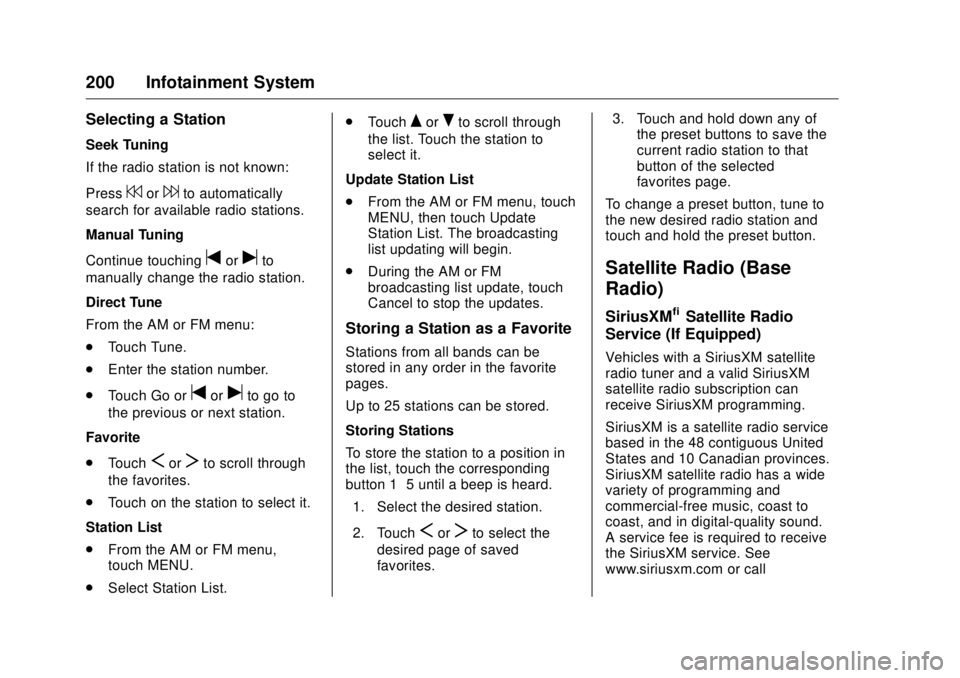
200 Infotainment System Selecting a Station Seek Tuning
If the radio station is not known:
Press
7 or
6 to automatically
search for available radio stations.
Manual Tuning
Continue touching
t or
u to
manually change the radio station.
Direct Tune
From the AM or FM menu:
.
Touch Tune.
.
Enter the station number.
.
Touch Go or
t or
u to go to
the previous or next station.
Favorite
.
Touch
S or
T to scroll through
the favorites.
.
Touch on the station to select it.
Station List
.
From the AM or FM menu,
touch MENU.
.
Select Station List. .
Touch
Q or
R to scroll through
the list. Touch the station to
select it.
Update Station List
.
From the AM or FM menu, touch
MENU, then touch Update
Station List. The broadcasting
list updating will begin.
.
During the AM or FM
broadcasting list update, touch
Cancel to stop the updates.
Storing a Station as a Favorite Stations from all bands can be
stored in any order in the favorite
pages.
Up to 25 stations can be stored.
Storing Stations
To store the station to a position in
the list, touch the corresponding
button 1 − 5 until a beep is heard.
1. Select the desired station.
2. Touch
S or
T to select the
desired page of saved
favorites. 3. Touch and hold down any of
the preset buttons to save the
current radio station to that
button of the selected
favorites page.
To change a preset button, tune to
the new desired radio station and
touch and hold the preset button.
Satellite Radio (Base
Radio) SiriusXM ®
Satellite Radio
Service (If Equipped) Vehicles with a SiriusXM satellite
radio tuner and a valid SiriusXM
satellite radio subscription can
receive SiriusXM programming.
SiriusXM is a satellite radio service
based in the 48 contiguous United
States and 10 Canadian provinces.
SiriusXM satellite radio has a wide
variety of programming and
commercial-free music, coast to
coast, and in digital-quality sound.
A service fee is required to receive
the SiriusXM service. See
www.siriusxm.com or call
Page 202 of 511
GMC Sierra/Sierra Denali Owner Manual (GMNA-Localizing-U.S./Canada/
Mexico-9955992) - 2017 - crc - 4/18/17
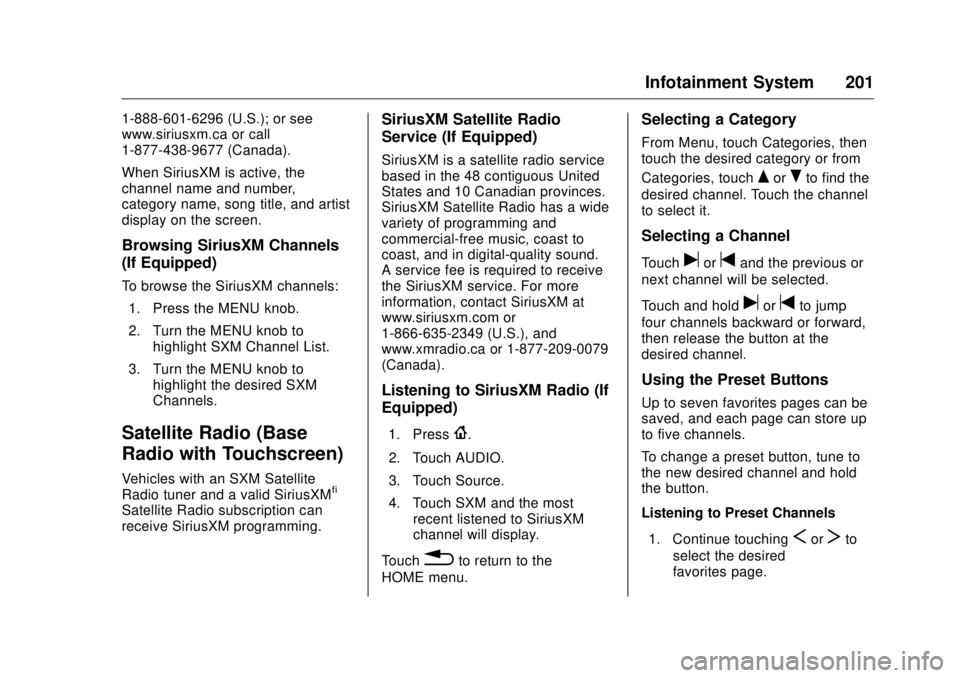
Infotainment System 2011-888-601-6296 (U.S.); or see
www.siriusxm.ca or call
1-877-438-9677 (Canada).
When SiriusXM is active, the
channel name and number,
category name, song title, and artist
display on the screen.
Browsing SiriusXM Channels
(If Equipped) To browse the SiriusXM channels:
1. Press the MENU knob.
2. Turn the MENU knob to
highlight SXM Channel List.
3. Turn the MENU knob to
highlight the desired SXM
Channels.
Satellite Radio (Base
Radio with Touchscreen) Vehicles with an SXM Satellite
Radio tuner and a valid SiriusXM ®
Satellite Radio subscription can
receive SiriusXM programming. SiriusXM Satellite Radio
Service (If Equipped) SiriusXM is a satellite radio service
based in the 48 contiguous United
States and 10 Canadian provinces.
SiriusXM Satellite Radio has a wide
variety of programming and
commercial-free music, coast to
coast, and in digital-quality sound.
A service fee is required to receive
the SiriusXM service. For more
information, contact SiriusXM at
www.siriusxm.com or
1-866-635-2349 (U.S.), and
www.xmradio.ca or 1-877-209-0079
(Canada).
Listening to SiriusXM Radio (If
Equipped) 1. Press
{ .
2. Touch AUDIO.
3. Touch Source.
4. Touch SXM and the most
recent listened to SiriusXM
channel will display.
Touch
0 to return to the
HOME menu. Selecting a Category From Menu, touch Categories, then
touch the desired category or from
Categories, touch
Q or
R to find the
desired channel. Touch the channel
to select it.
Selecting a Channel Touch
u or
t and the previous or
next channel will be selected.
Touch and hold
u or
t to jump
four channels backward or forward,
then release the button at the
desired channel.
Using the Preset Buttons Up to seven favorites pages can be
saved, and each page can store up
to five channels.
To change a preset button, tune to
the new desired channel and hold
the button.
Listening to Preset Channels
1. Continue touching
S or
T to
select the desired
favorites page.