fuel cap GMC SIERRA DENALI 2018 User Guide
[x] Cancel search | Manufacturer: GMC, Model Year: 2018, Model line: SIERRA DENALI, Model: GMC SIERRA DENALI 2018Pages: 505, PDF Size: 8.27 MB
Page 439 of 505
GMC Sierra/Sierra Denali Owner Manual (GMNA-Localizing-U.S./Canada/
Mexico-11349177) - 2018 - CRC - 10/17/17
438 Vehicle Care CautionUsing silicone-based products
may damage the bedliner, reduce
the slip-resistant texture, and
attract dirt.
Cleaning Exterior Lamps/
Lenses, Emblems, Decals and
Stripes Use only lukewarm or cold water, a
soft cloth, and a car washing soap
to clean exterior lamps, lenses,
emblems, decals and stripes. Follow
instructions under "Washing the
Vehicle" previously in this section.
Lamp covers are made of plastic,
and some have a UV protective
coating. Do not clean or wipe them
while they are dry.
Do not use any of the following on
lamp covers:
.
Abrasive or caustic agents. .
Washer fluids and other cleaning
agents in higher concentrations
than suggested by the
manufacturer.
.
Solvents, alcohols, fuels,
or other harsh cleaners.
.
Ice scrapers or other hard items.
.
Aftermarket appearance caps or
covers while the lamps are
illuminated, due to excessive
heat generated.
CautionFailure to clean lamps properly
can cause damage to the lamp
cover that would not be covered
by the vehicle warranty.
Caution
Using wax on low gloss black
finish stripes can increase the
gloss level and create a
(Continued) Caution (Continued) non-uniform finish. Clean low
gloss stripes with soap and
water only.
Air Intakes Clear debris from the air intakes,
between the hood and windshield,
when washing the vehicle.
Windshield and Wiper Blades Clean the outside of the windshield
with glass cleaner.
Clean rubber blades using a lint-free
cloth or paper towel soaked with
windshield washer fluid or a mild
detergent. Wash the windshield
thoroughly when cleaning the
blades. Bugs, road grime, sap, and
a buildup of vehicle wash/wax
treatments may cause wiper
streaking.
Page 463 of 505
GMC Sierra/Sierra Denali Owner Manual (GMNA-Localizing-U.S./Canada/
Mexico-11349177) - 2018 - CRC - 10/17/17
462 Technical Data Application Capacities
Metric English
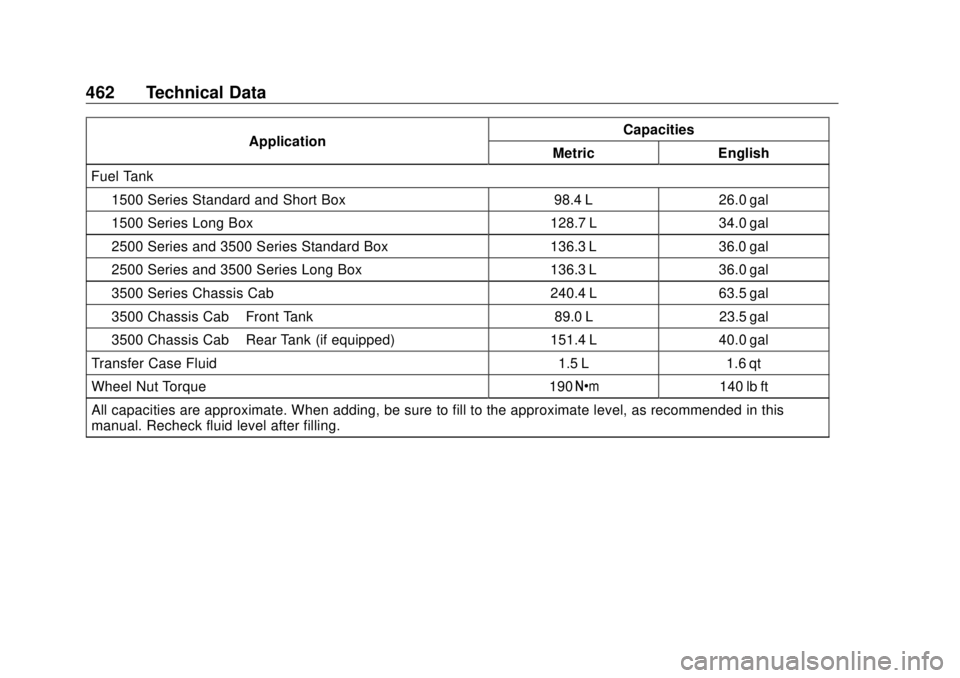
Fuel Tank
1500 Series Standard and Short Box 98.4 L 26.0 gal
1500 Series Long Box 128.7 L 34.0 gal
2500 Series and 3500 Series Standard Box 136.3 L 36.0 gal
2500 Series and 3500 Series Long Box 136.3 L 36.0 gal
3500 Series Chassis Cab 240.4 L 63.5 gal
3500 Chassis Cab – Front Tank 89.0 L 23.5 gal
3500 Chassis Cab – Rear Tank (if equipped) 151.4 L 40.0 gal
Transfer Case Fluid 1.5 L 1.6 qt
Wheel Nut Torque 190 Y 140 lb ft
All capacities are approximate. When adding, be sure to fill to the approximate level, as recommended in this
manual. Recheck fluid level after filling.
Page 485 of 505
GMC Sierra/Sierra Denali Owner Manual (GMNA-Localizing-U.S./Canada/
Mexico-11349177) - 2018 - CRC - 10/17/17
484 OnStar 3. Say the entire number without
pausing, including a “ 1 ” and the
area code. System responds:
“ OK, calling. ”
Calling 911 Emergency 1. Press
= . System responds:
“ OnStar ready. ”
2. Say “ Call. ” System responds:
“ Call. Please say the name or
number to call. ”
3. Say “ 911 ” without pausing.
System responds: “ 911. ”
4. Say “ Call. ” System responds:
“ OK, dialing 911. ”
Retrieve My Number 1. Press
= . System responds:
“ OnStar ready. ”
2. Say “ My number. ” System
responds: “ Your OnStar
Hands-Free Calling number is, ”
then says the number. End a Call Press
= . System responds: “ Call
ended. ”
Verify Minutes and Expiration Press
= and say “ Minutes ” then
“ Verify ” to check how many minutes
remain and their expiration date.
Diagnostics By monitoring and reporting on the
vehicle ’ s key systems, OnStar
Advanced Diagnostics provides a
way to keep up on maintenance.
Capabilities vary by model. See
www.onstar.com for details and
system limitations. Message and
data rates may apply.
Includes:
.
Diagnostic Alerts: Set
preferences to receive real-time
e-mails, texts, or monthly
reports of the vehicle ’ s health.
Or press
Q to have an Advisor
initiate a remote diagnostic
report. .
Proactive Alerts: Receive a
real-time e-mail or text message
regarding potential issues with
key vehicle components, such
as the battery, fuel system,
or starter system. Alerts for
potential issues appear on the
infotainment display. Proactive
Alerts are designed to help
predict specific types of issues
based on information collected
from the vehicle. Other factors
may affect vehicle performance.
Not all issues will deliver alerts.
In some cases, a dealer service
check may be required to
confirm the accuracy of the
alerts.
.
Dealer Maintenance Notification:
Have the vehicle notify your
preferred dealer when it is time
for maintenance. Your dealer will
then contact you to set up an
appointment.
To begin, press
Q to speak to an
Advisor, or see www.onstar.com.
Page 486 of 505
GMC Sierra/Sierra Denali Owner Manual (GMNA-Localizing-U.S./Canada/
Mexico-11349177) - 2018 - CRC - 10/17/17
OnStar 485
OnStar Additional
Information OnStar Smart Driver OnStar Smart Driver provides
information about driving behavior to
help maximize overall vehicle
performance, reduce wear and tear,
and enhance fuel efficiency. An
Insurance Discounts Eligibility
feature is also offered within OnStar
Smart Driver. See www.onstar.com
for details regarding vehicle
eligibility and system limitations.
OnStar, General Motors, and their
affiliates are not insurance
providers. Obtain insurance only
from licensed insurance providers.
In-Vehicle Audio Messages Audio messages may play important
information at the following times:
.
Prior to vehicle purchase.
Press
Q to set up an account.
.
With the OnStar Basic Plan,
every 60 days. .
After change in ownership and
at 90 days.
Transferring Service Press
Q to request account transfer
eligibility information. The Advisor
can cancel or change account
information.
Selling/Transferring the
Vehicle Call 1-888-4ONSTAR
(1-888-466-7827) immediately to
terminate your OnStar services if
the vehicle is disposed of, sold,
transferred, or if the lease ends.
Reactivation for Subsequent
Owners Press
Q and follow the prompts to
speak to an Advisor as soon as
possible. The Advisor will update
vehicle records and explain OnStar
service options.
How OnStar Service Works
Automatic Crash Response,
Emergency Services, Crisis Assist,
Stolen Vehicle Assistance, Advanced Vehicle Diagnostics,
Remote Services, Roadside
Assistance, Turn-by-Turn
Navigation, and Hands-Free Calling
are available on most vehicles. Not
all OnStar services are available
everywhere or on all vehicles. For
more information, a full description
of OnStar services, system
limitations, and OnStar User Terms,
Privacy Statement, and Software
Terms:
.
Call 1-888-4ONSTAR
(1-888-466-7827).
.
See www.onstar.com (U.S.).
.
See www.onstar.ca (Canada).
.
Call TTY 1-877-248-2080.
.
Press
Q to speak with an
Advisor.
OnStar services cannot work unless
the vehicle is in a place where
OnStar has an agreement with a
wireless service provider for service
in that area. The wireless service
provider must also have coverage,
network capacity, reception, and
technology compatible with OnStar