seats GMC SIERRA DENALI 2018 Manual Online
[x] Cancel search | Manufacturer: GMC, Model Year: 2018, Model line: SIERRA DENALI, Model: GMC SIERRA DENALI 2018Pages: 505, PDF Size: 8.27 MB
Page 135 of 505
GMC Sierra/Sierra Denali Owner Manual (GMNA-Localizing-U.S./Canada/
Mexico-11349177) - 2018 - CRC - 10/17/17
134 Instruments and Controls Caution (Continued)outlets are designed for
accessory power plugs only, such
as cell phone charge cords.
Power Outlet 110/120 Volt
Alternating Current
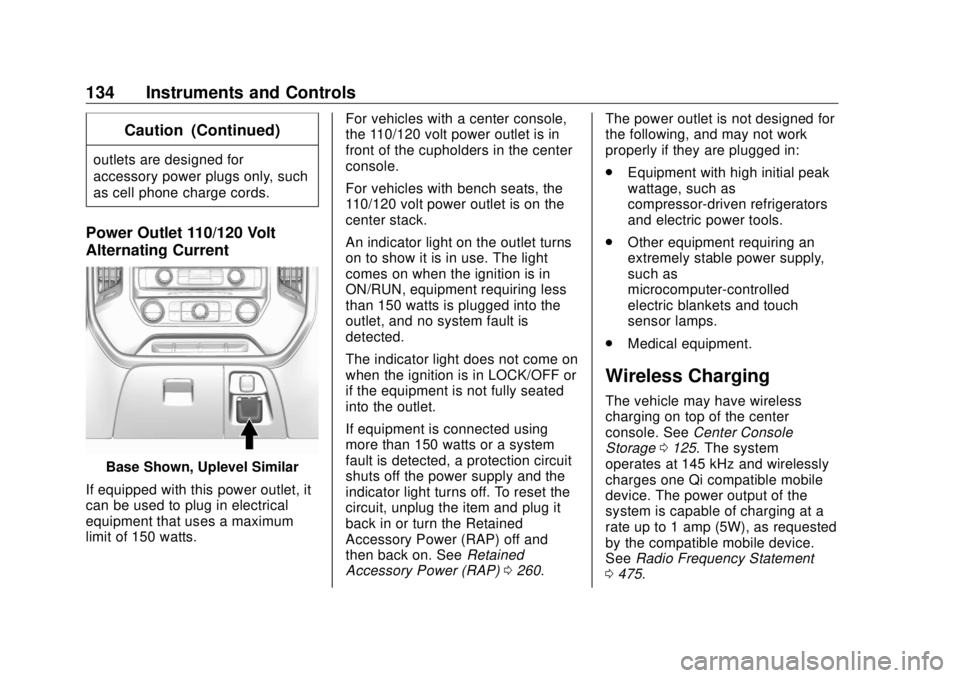
Base Shown, Uplevel Similar
If equipped with this power outlet, it
can be used to plug in electrical
equipment that uses a maximum
limit of 150 watts. For vehicles with a center console,
the 110/120 volt power outlet is in
front of the cupholders in the center
console.
For vehicles with bench seats, the
110/120 volt power outlet is on the
center stack.
An indicator light on the outlet turns
on to show it is in use. The light
comes on when the ignition is in
ON/RUN, equipment requiring less
than 150 watts is plugged into the
outlet, and no system fault is
detected.
The indicator light does not come on
when the ignition is in LOCK/OFF or
if the equipment is not fully seated
into the outlet.
If equipment is connected using
more than 150 watts or a system
fault is detected, a protection circuit
shuts off the power supply and the
indicator light turns off. To reset the
circuit, unplug the item and plug it
back in or turn the Retained
Accessory Power (RAP) off and
then back on. See Retained
Accessory Power (RAP) 0 260 . The power outlet is not designed for
the following, and may not work
properly if they are plugged in:
.
Equipment with high initial peak
wattage, such as
compressor-driven refrigerators
and electric power tools.
.
Other equipment requiring an
extremely stable power supply,
such as
microcomputer-controlled
electric blankets and touch
sensor lamps.
.
Medical equipment.
Wireless Charging The vehicle may have wireless
charging on top of the center
console. See Center Console
Storage 0 125 . The system
operates at 145 kHz and wirelessly
charges one Qi compatible mobile
device. The power output of the
system is capable of charging at a
rate up to 1 amp (5W), as requested
by the compatible mobile device.
See Radio Frequency Statement
0 475 .
Page 169 of 505
GMC Sierra/Sierra Denali Owner Manual (GMNA-Localizing-U.S./Canada/
Mexico-11349177) - 2018 - CRC - 10/17/17
168 Instruments and Controls Comfort and Convenience Select and the following may
display:
.
Auto Memory Recall
.
Easy Exit Options
.
Chime Volume
.
Reverse Tilt Mirror
.
Auto Mirror Folding
Auto Memory Recall
This feature automatically recalls
the previously stored 1 or 2 button
positions when the ignition is
changed from off to on or ACC/
ACCESSORY. See Memory Seats
0 62 .
Select Off orOn.
Easy Exit Options
This feature automatically recalls
the previously stored Exit button
position when exiting the vehicle.
See Memory Seats 0 62 .
Select Off or On. Chime Volume
This allows the selection of the
chime volume level.
Touch + or − to adjust the volume.
Reverse Tilt Mirror
When on, both the driver and
passenger, driver, or passenger
outside mirrors will tilt downward
when the vehicle is shifted to
R (Reverse) to improve visibility of
the ground near the rear wheels.
They will return to their previous
driving position when the vehicle is
shifted out of R (Reverse) or the
engine is turned off. See Reverse
Tilt Mirrors 0 51 .
Select Off, On - Driver and
Passenger, On - Driver, or On -
Passenger.
Auto Mirror Folding
When on, the outside mirrors will
automatically fold or unfold when
the Remote Keyless Entry (RKE)
transmitter lock or unlock button is
pressed and held. See Folding
Mirrors 0 49 . Select Off or On.
Lighting Select and the following may
display:
.
Vehicle Locator Lights
.
Exit Lighting
Vehicle Locator Lights
This feature will flash the exterior
lamps and allows some of the
exterior lamps and most of the
interior lamps to turn on briefly
when
K on the Remote Keyless
Entry (RKE) transmitter is pressed
to locate the vehicle.
Select Off or On.
Exit Lighting
This allows the selection of how
long the exterior lamps stay on
when leaving the vehicle when it is
dark outside.
Select Off, 30 Seconds, 60 Seconds,
or 120 Seconds.
Page 170 of 505
GMC Sierra/Sierra Denali Owner Manual (GMNA-Localizing-U.S./Canada/
Mexico-11349177) - 2018 - CRC - 10/17/17
Instruments and Controls 169Power Door Locks Select and the following may
display:
.
Auto Door Unlock
.
Delayed Door Lock
Auto Door Unlock
This allows selection of which of the
doors will automatically unlock when
the vehicle is shifted into P (Park).
Select Off, All Doors, or Driver Door.
Delayed Door Lock
When on, this feature will delay the
locking of the doors. To override the
delay, press the power door lock
switch on the door.
Select Off or On.
Remote Lock, Unlock, Start
Select and the following may
display:
.
Remote Unlock Light Feedback
.
Remote Lock Feedback
.
Remote Door Unlock
.
Remote Start Auto Cool Seats .
Remote Start Auto Heat Seats
.
Remote Left in Vehicle Alert
Remote Unlock Light Feedback
When on, the exterior lamps will
flash when unlocking the vehicle
with the RKE transmitter.
Select Off or Flash Lights.
Remote Lock Feedback
This allows selection of what type of
feedback is given when locking the
vehicle with the RKE transmitter.
Select Off, Lights and Horn, Lights
Only, or Horn Only.
Remote Door Unlock
This allows selection of which doors
will unlock when pressing
K on the
RKE transmitter.
Select All Doors or Driver Door.
Remote Start Auto Cool Seats
If equipped and turned on, this
feature will turn the ventilated seats
on when using remote start on
warm days.
Select Off or On. Remote Start Auto Heat Seats
If equipped and turned on, this
feature will turn the heated seats on
when using remote start on
cold days.
Select Off or On.
Remote Left in Vehicle Alert
This feature sounds an alert when
the RKE transmitter is left in the
vehicle.
Select Off or On.
Bluetooth Select and the following may
display:
.
Pair New Device
.
Discoverable
.
Device Management
.
Ringtones
.
Voice Mail Numbers
.
Text Message Alerts
Page 186 of 505
GMC Sierra/Sierra Denali Owner Manual (GMNA-Localizing-U.S./Canada/
Mexico-11349177) - 2018 - CRC - 10/17/17
Lighting 185moving up or down. This is normal.
If there is a problem, an alert will be
displayed.
The battery can be discharged at
idle if the electrical loads are very
high. This is true for all vehicles.
This is because the generator
(alternator) may not be spinning fast
enough at idle to produce all the
power that is needed for very high
electrical loads.
A high electrical load occurs when
several of the following are on, such
as: headlamps, high beams, fog
lamps, rear window defogger,
climate control fan at high speed,
heated seats, engine cooling fans,
trailer loads, and loads plugged into
accessory power outlets.
EPM works to prevent excessive
discharge of the battery. It does this
by balancing the generator's output
and the vehicle's electrical needs.
It can increase engine idle speed to
generate more power, whenever
needed. It can temporarily reduce
the power demands of some
accessories. Normally, these actions occur in
steps or levels, without being
noticeable. In rare cases at the
highest levels of corrective action,
this action may be noticeable to the
driver. If so, a DIC message might
be displayed and it is recommended
that the driver reduce the electrical
loads as much as possible.
Battery Power Protection This feature shuts off the dome and
reading lamps, if they are left on for
more than 10 minutes after the
ignition is turned off. The cargo
lamp shuts off after 20 minutes. This
prevents the battery from
running down.
Exterior Lighting Battery
Saver The exterior lamps turn off about
10 minutes after the ignition is
turned off, if the parking lamps or
headlamps have been manually left
on. This protects against draining
the battery. To restart the 10-minute timer, turn the exterior lamp control
to the
O position and then back to
the
; or
2 position.
To keep the lamps on for more than
10 minutes, the ignition must be on
or in ACC/ACCESSORY.
Page 232 of 505
GMC Sierra/Sierra Denali Owner Manual (GMNA-Localizing-U.S./Canada/
Mexico-11349177) - 2018 - CRC - 10/17/17
Climate Controls 231The climate control system uses the
information from these sensors to
maintain comfort settings by
adjusting the outlet temperature, fan
speed, and the air delivery mode.
The system may also supply cooler
air to the side of the vehicle facing
the sun. The recirculation mode will
also be used as needed to maintain
cool outlet temperatures.
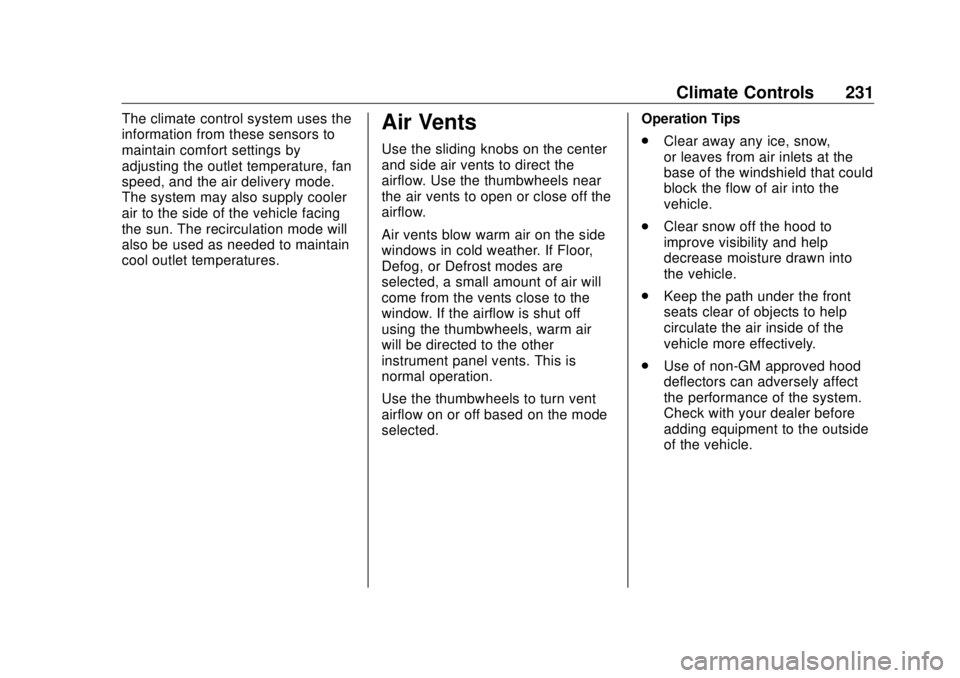
Air Vents Use the sliding knobs on the center
and side air vents to direct the
airflow. Use the thumbwheels near
the air vents to open or close off the
airflow.
Air vents blow warm air on the side
windows in cold weather. If Floor,
Defog, or Defrost modes are
selected, a small amount of air will
come from the vents close to the
window. If the airflow is shut off
using the thumbwheels, warm air
will be directed to the other
instrument panel vents. This is
normal operation.
Use the thumbwheels to turn vent
airflow on or off based on the mode
selected. Operation Tips
.
Clear away any ice, snow,
or leaves from air inlets at the
base of the windshield that could
block the flow of air into the
vehicle.
.
Clear snow off the hood to
improve visibility and help
decrease moisture drawn into
the vehicle.
.
Keep the path under the front
seats clear of objects to help
circulate the air inside of the
vehicle more effectively.
.
Use of non-GM approved hood
deflectors can adversely affect
the performance of the system.
Check with your dealer before
adding equipment to the outside
of the vehicle.
Page 253 of 505
GMC Sierra/Sierra Denali Owner Manual (GMNA-Localizing-U.S./Canada/
Mexico-11349177) - 2018 - CRC - 10/17/17
252 Driving and Operating
{ Warning
Things you put inside the
vehicle can strike and injure
people in a sudden stop or
turn, or in a crash. .
Put things in the cargo
area of the vehicle. Try to
spread the weight evenly..
Never stack heavier
things, like suitcases,
inside the vehicle so that
some of them are above
the tops of the seats..
Do not leave an
unsecured child restraint
in the vehicle..
When you carry
something inside the
vehicle, secure it
whenever you can.
.
Do not leave a seat
folded down unless you
need to. There is also important loading
information for off-road driving in
this manual. See “ Loading the
Vehicle for Off-Road Driving “
under Off-Road Driving 0 239 .
Two-Tiered Loading
Depending on the model of the
pickup, an upper load platform
can be created by positioning
three or four 5 cm (2 in) by
15 cm (6 in) wooden planks
across the width of the pickup
box. The planks must be
inserted in the pickup box
depressions.
When using this upper load
platform, be sure the load is
securely tied down to prevent it
from shifting. The load's center
of gravity should be positioned
in a zone over the rear axle. The
zone is located in the area
between the front of each wheel
well and the rear of each wheel well. The center of gravity height
must not extend above the top
of the pickup box flareboard.
Any load that extends beyond
the vehicle's taillamp area must
be properly marked according to
local laws and regulations.
Remember not to exceed the
Gross Axle Weight
Rating (GAWR) of the front or
rear axle.
Add-On Equipment
When carrying removable items,
a limit on how many people
carried inside the vehicle may
be necessary. Be sure to weigh
the vehicle before buying and
installing the new equipment.
Page 257 of 505
GMC Sierra/Sierra Denali Owner Manual (GMNA-Localizing-U.S./Canada/
Mexico-11349177) - 2018 - CRC - 10/17/17
256 Driving and Operating Caution (Continued) premature wear and earlier
replacement. Follow this
breaking-in guideline every
time you get new brake
linings.
.
Do not tow a trailer during
break-in. See Trailer Towing
0 307 for the trailer towing
capabilities of the vehicle
and more information.
Following break-in, engine speed
and load can be gradually
increased.
Adjustable Throttle and
Brake Pedal If equipped, the position of the
throttle and brake pedals can be
changed.
The pedals can only be adjusted
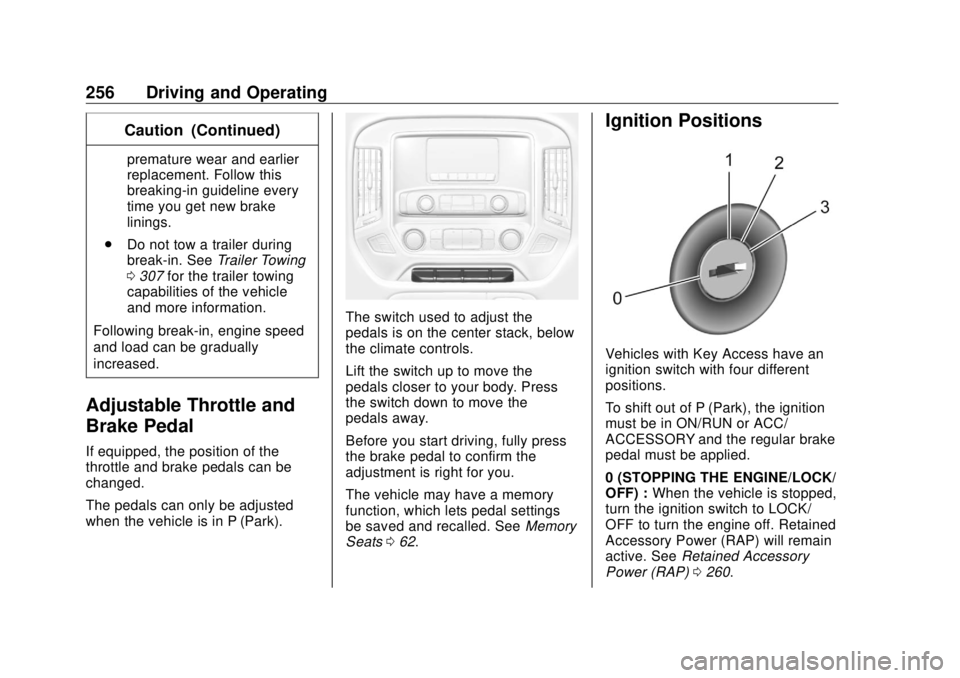
when the vehicle is in P (Park). The switch used to adjust the
pedals is on the center stack, below
the climate controls.
Lift the switch up to move the
pedals closer to your body. Press
the switch down to move the
pedals away.
Before you start driving, fully press
the brake pedal to confirm the
adjustment is right for you.
The vehicle may have a memory
function, which lets pedal settings
be saved and recalled. See Memory
Seats 0 62 . Ignition Positions
Vehicles with Key Access have an
ignition switch with four different
positions.
To shift out of P (Park), the ignition
must be in ON/RUN or ACC/
ACCESSORY and the regular brake
pedal must be applied.
0 (STOPPING THE ENGINE/LOCK/
OFF) : When the vehicle is stopped,
turn the ignition switch to LOCK/
OFF to turn the engine off. Retained
Accessory Power (RAP) will remain
active. See Retained Accessory
Power (RAP) 0 260 .
Page 389 of 505
GMC Sierra/Sierra Denali Owner Manual (GMNA-Localizing-U.S./Canada/
Mexico-11349177) - 2018 - CRC - 10/17/17
388 Vehicle Care Fuses Usage
19 –
20 –
22 Heating, ventilation,
and air conditioning/
Auxiliary heating,
ventilation, and air
conditioning/Ignition
23 Instrument cluster/
Ignition sensing
diagnostic module/
Ignition
24 –
25 Data link connector/
Driver seat module
26 Passive entry/Passive
start/Heating,
ventilation, and air
conditioning
27 – Fuses Usage
28 –
29 Park enable/
Electrically adjustable
pedals
30 Special equipment
option
31 Accessory/Run/Crank
32 Heated steering wheel
33 –
34 Instrument cluster
36 –
37 –
38 4WD transfer case
electronic control
40 Left doors
41 Driver power seat Fuses Usage
43 Left heated, cooled or
ventilated seats (if
equipped)
44 Right heated, cooled
or ventilated seats (if
equipped)
45 –
Relays Usage
49 Retained accessory
power
50 Run/Crank
Page 396 of 505
GMC Sierra/Sierra Denali Owner Manual (GMNA-Localizing-U.S./Canada/
Mexico-11349177) - 2018 - CRC - 10/17/17
Vehicle Care 395would mean that the tire's
sidewall is 75 percent as high as
it is wide.
(4) Construction Code :
A letter
code is used to indicate the type
of ply construction in the tire.
The letter R means radial ply
construction; the letter D means
diagonal or bias ply
construction; and the letter B
means belted-bias ply
construction.
(5) Rim Diameter :
Diameter of
the wheel in inches.
(6) Load Range :
Load Range.
(7) Service Description :
The
service description indicates the
load index and speed rating of a
tire. If two numbers are given as
in the example, 120/116, then
this represents the load index for
single versus dual wheel usage
(single/dual). The speed rating is
the maximum speed a tire is
certified to carry a load. Tire Terminology and
Definitions Air Pressure :
The amount of
air inside the tire pressing
outward on each square inch of
the tire. Air pressure is
expressed in kPa (kilopascal)
or psi (pounds per square inch).
Accessory Weight :
The
combined weight of optional
accessories. Some examples of
optional accessories are
automatic transmission, power
windows, power seats, and air
conditioning.
Aspect Ratio :
The relationship
of a tire's height to its width.
Belt :
A rubber coated layer of
cords between the plies and the
tread. Cords may be made from
steel or other reinforcing
materials. Bead :
The tire bead contains
steel wires wrapped by steel
cords that hold the tire onto
the rim.
Bias Ply Tire :
A pneumatic tire
in which the plies are laid at
alternate angles less than
90 degrees to the centerline of
the tread.
Cold Tire Pressure :
The
amount of air pressure in a tire,
measured in kPa (kilopascal)
or psi (pounds per square inch)
before a tire has built up heat
from driving. See Tire Pressure
0 397 .
Curb Weight :
The weight of a
motor vehicle with standard and
optional equipment including the
maximum capacity of fuel, oil,
and coolant, but without
passengers and cargo.
DOT Markings :
A code molded
into the sidewall of a tire
signifying that the tire is in
compliance with the U.S.
Page 423 of 505
GMC Sierra/Sierra Denali Owner Manual (GMNA-Localizing-U.S./Canada/
Mexico-11349177) - 2018 - CRC - 10/17/17
422 Vehicle Care
{ WarningWheel nuts that are improperly or
incorrectly tightened can cause
the wheels to become loose or
come off. The wheel nuts should
be tightened with a torque wrench
to the proper torque specification
after replacing. Follow the torque
specification supplied by the
aftermarket manufacturer when
using accessory locking wheel
nuts. See Capacities and
Specifications 0 461 for original
equipment wheel nut torque
specifications.
Caution
Improperly tightened wheel nuts
can lead to brake pulsation and
rotor damage. To avoid expensive
brake repairs, evenly tighten the
wheel nuts in the proper
sequence and to the proper
(Continued) Caution (Continued) torque specification. See
Capacities and Specifications
0 461 for the wheel nut torque
specification.
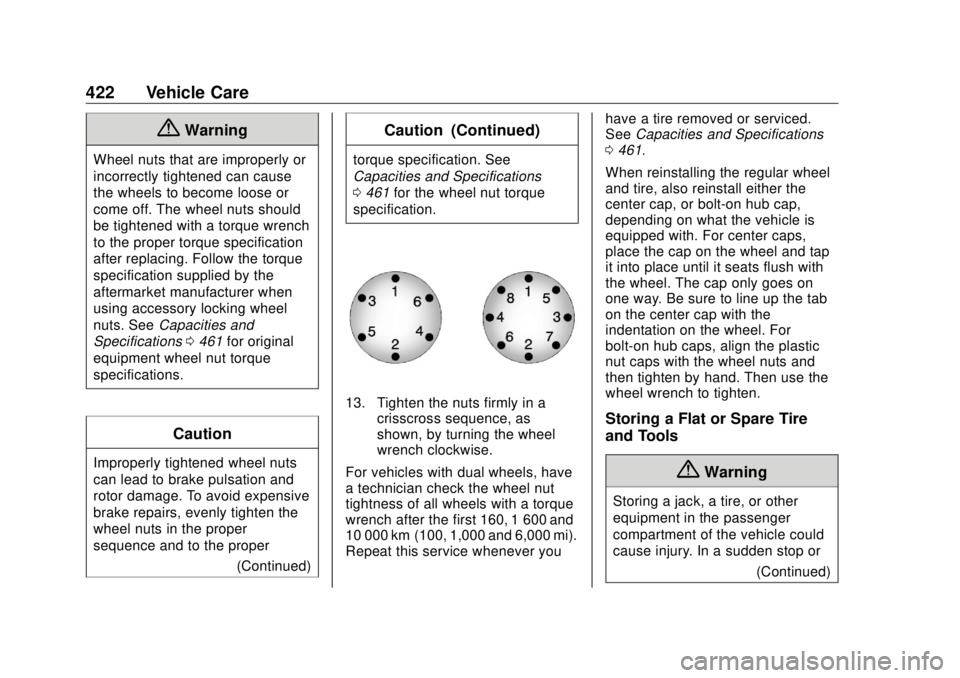
13. Tighten the nuts firmly in a
crisscross sequence, as
shown, by turning the wheel
wrench clockwise.
For vehicles with dual wheels, have
a technician check the wheel nut
tightness of all wheels with a torque
wrench after the first 160, 1 600 and
10 000 km (100, 1,000 and 6,000 mi).
Repeat this service whenever you have a tire removed or serviced.
See Capacities and Specifications
0 461 .
When reinstalling the regular wheel
and tire, also reinstall either the
center cap, or bolt-on hub cap,
depending on what the vehicle is
equipped with. For center caps,
place the cap on the wheel and tap
it into place until it seats flush with
the wheel. The cap only goes on
one way. Be sure to line up the tab
on the center cap with the
indentation on the wheel. For
bolt-on hub caps, align the plastic
nut caps with the wheel nuts and
then tighten by hand. Then use the
wheel wrench to tighten.
Storing a Flat or Spare Tire
and Tools
{ Warning
Storing a jack, a tire, or other
equipment in the passenger
compartment of the vehicle could
cause injury. In a sudden stop or
(Continued)