cruise control GMC SIERRA DENALI 2019 User Guide
[x] Cancel search | Manufacturer: GMC, Model Year: 2019, Model line: SIERRA DENALI, Model: GMC SIERRA DENALI 2019Pages: 472, PDF Size: 8.98 MB
Page 208 of 472
GMC Sierra/Sierra Denali Owner Manual (GMNA-Localizing-U.S./Canada/
Mexico-1500-11698638) - 2019 - crc - 5/16/18
Driving and Operating 207freezing rain begins to fall. Avoid
driving on wet ice or in freezing rain
until roads can be treated.
For Slippery Road Driving:
.
Accelerate gently. Accelerating
too quickly causes the wheels to
spin and makes the surface
under the tires slick.
.
Turn on Traction Control. See
Traction Control/Electronic
Stability Control 0 243 .
.
The Antilock Brake System
(ABS) improves vehicle stability
during hard stops, but the
brakes should be applied sooner
than when on dry pavement.
See Antilock Brake System
(ABS) 0 240 .
.
Allow greater following distance
and watch for slippery spots. Icy
patches can occur on otherwise
clear roads in shaded areas.
The surface of a curve or an
overpass can remain icy when
the surrounding roads are clear.
Avoid sudden steering
maneuvers and braking while
on ice. .
Turn off cruise control.
Blizzard Conditions Stop the vehicle in a safe place and
signal for help. Stay with the vehicle
unless there is help nearby.
If possible, use Roadside
Assistance. See Roadside
Assistance Program 0 437 . To get
help and keep everyone in the
vehicle safe:
.
Turn on the hazard warning
flashers.
.
Tie a red cloth to an outside
mirror.
{ Warning
Snow can trap engine exhaust
under the vehicle. This may
cause exhaust gases to get
inside. Engine exhaust contains
carbon monoxide (CO), which
cannot be seen or smelled. It can
cause unconsciousness and even
death.
(Continued) Warning (Continued) If the vehicle is stuck in snow:
.
Clear snow from the base of
the vehicle, especially any
blocking the exhaust pipe.
.
Open a window about 5 cm
(2 in) on the vehicle side
that is away from the wind,
to bring in fresh air.
.
Fully open the air outlets on
or under the instrument
panel.
.
Adjust the climate control
system to circulate the air
inside the vehicle and set
the fan speed to the highest
setting. See “ Climate
Control Systems. ”
For more information about CO,
see Engine Exhaust 0 228 .
To save fuel, run the engine for
short periods to warm the vehicle
and then shut the engine off and
partially close the window. Moving
about to keep warm also helps.
Page 235 of 472
GMC Sierra/Sierra Denali Owner Manual (GMNA-Localizing-U.S./Canada/
Mexico-1500-11698638) - 2019 - crc - 5/16/18
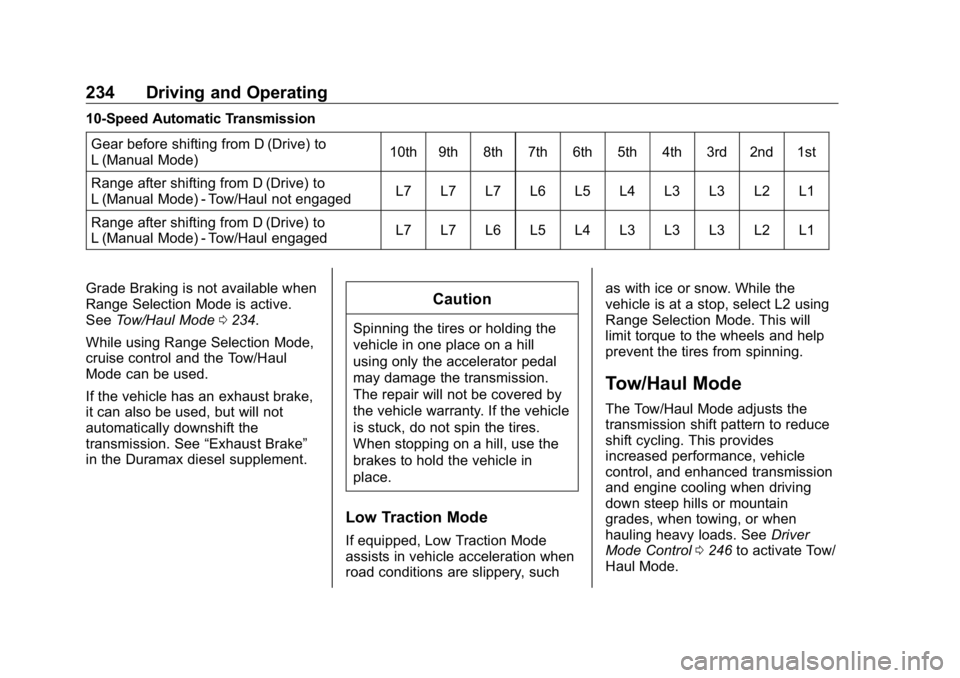
234 Driving and Operating 10-Speed Automatic Transmission
Gear before shifting from D (Drive) to
L (Manual Mode) 10th 9th 8th 7th 6th 5th 4th 3rd 2nd 1st
Range after shifting from D (Drive) to
L (Manual Mode) - Tow/Haul not engaged L7 L7 L7 L6 L5 L4 L3 L3 L2 L1
Range after shifting from D (Drive) to
L (Manual Mode) - Tow/Haul engaged L7 L7 L6 L5 L4 L3 L3 L3 L2 L1
Grade Braking is not available when
Range Selection Mode is active.
See Tow/Haul Mode 0 234 .
While using Range Selection Mode,
cruise control and the Tow/Haul
Mode can be used.
If the vehicle has an exhaust brake,
it can also be used, but will not
automatically downshift the
transmission. See “ Exhaust Brake ”
in the Duramax diesel supplement. CautionSpinning the tires or holding the
vehicle in one place on a hill
using only the accelerator pedal
may damage the transmission.
The repair will not be covered by
the vehicle warranty. If the vehicle
is stuck, do not spin the tires.
When stopping on a hill, use the
brakes to hold the vehicle in
place.
Low Traction Mode
If equipped, Low Traction Mode
assists in vehicle acceleration when
road conditions are slippery, such as with ice or snow. While the
vehicle is at a stop, select L2 using
Range Selection Mode. This will
limit torque to the wheels and help
prevent the tires from spinning.
Tow/Haul Mode The Tow/Haul Mode adjusts the
transmission shift pattern to reduce
shift cycling. This provides
increased performance, vehicle
control, and enhanced transmission
and engine cooling when driving
down steep hills or mountain
grades, when towing, or when
hauling heavy loads. See Driver
Mode Control 0 246 to activate Tow/
Haul Mode.
Page 244 of 472
GMC Sierra/Sierra Denali Owner Manual (GMNA-Localizing-U.S./Canada/
Mexico-1500-11698638) - 2019 - crc - 5/16/18
Driving and Operating 243This feature is designed to prevent
the vehicle from rolling, either
forward or rearward, during vehicle
drive off. HSA will be automatically
activated after the vehicle has come
to a complete standstill on a grade.
During the transition period between
when the brake pedal is released
and the accelerator pedal is
pressed, HSA holds the braking
pressure to ensure that there is no
rolling. The brakes will automatically
release when the accelerator pedal
is applied. It will not activate if the
vehicle is in a drive gear and facing
downhill, or if the vehicle is facing
uphill and in R (Reverse). Ride Control Systems Traction Control/
Electronic Stability
Control System Operation The vehicle has a Traction Control
System (TCS) and StabiliTrak/
Electronic Stability Control (ESC),
an electronic stability control
system. These systems help limit
wheel spin and assist the driver in
maintaining control, especially on
slippery road conditions.
TCS activates if it senses any of the
drive wheels are spinning or
beginning to lose traction. When this
happens, TCS applies the brakes to
the spinning wheels and reduces
engine power to limit wheel spin.
StabiliTrak/ESC activates when the
vehicle senses a difference between
the intended path and the direction
the vehicle is actually traveling.
StabiliTrak/ESC selectively applies
braking pressure to any one of the
vehicle wheel brakes to assist the driver in keeping the vehicle on the
intended path. Trailer Sway Control
(TSC) is also on automatically when
the vehicle is started. See Trailer
Sway Control (TSC) 0 293 .
If cruise control is being used and
traction control or StabiliTrak/ESC
begins to limit wheel spin, cruise
control will disengage. Cruise
control may be turned back on when
road conditions allow.
Both systems come on
automatically when the vehicle is
started and begins to move. The
systems may be heard or felt while
they are operating or while
performing diagnostic checks. This
is normal and does not mean there
is a problem with the vehicle.
It is recommended to leave both
systems on for normal driving
conditions, but it may be necessary
to turn TCS off if the vehicle gets
stuck in sand, mud, ice, or snow.
See If the Vehicle Is Stuck 0 208
and “ Turning the Systems Off and
On ” later in this section.
Page 251 of 472
GMC Sierra/Sierra Denali Owner Manual (GMNA-Localizing-U.S./Canada/
Mexico-1500-11698638) - 2019 - crc - 5/16/18
250 Driving and Operating When Terrain Mode is selected:
.
Auto Engine Start/Stop will be
disabled.
.
The Terrain Mode indicator
displays on the instrument
cluster.
Limited-Slip Differential If equipped, the limited-slip
differential can give more traction on
snow, mud, ice, sand, or gravel.
It works like a standard axle most of
the time, but when traction is low,
this feature allows the drive wheel
with the most traction to move the
vehicle. For vehicles with the
limited-slip differential, driven under
severe conditions, the rear axle fluid
should be changed. See
Maintenance Schedule 0 415 .Locking Rear Axle Vehicles with a locking rear axle can
give more traction on snow, mud,
ice, sand, or gravel. It works like a
standard axle most of the time, but
when traction is low, this feature will
allow the rear wheel with the most
traction to move the vehicle.
Cruise Control
{ WarningCruise control can be dangerous
where you cannot drive safely at
a steady speed. Do not use
cruise control on winding roads or
in heavy traffic.
Cruise control can be dangerous
on slippery roads. On such roads,
fast changes in tire traction can
cause excessive wheel slip, and
you could lose control. Do not use
cruise control on slippery roads.
With cruise control a speed of about
40 km/h (25 mph) or more can be
maintained without keeping your
foot on the accelerator. Cruise
control does not work at speeds
below about 40 km/h (25 mph).
If the cruise control is being used
and the Traction Control System
(TCS) or StabiliTrak/Electronic
Stability Control (ESC) begins to
limit wheel spin, the cruise control
Page 252 of 472
GMC Sierra/Sierra Denali Owner Manual (GMNA-Localizing-U.S./Canada/
Mexico-1500-11698638) - 2019 - crc - 5/16/18
Driving and Operating 251will automatically disengage. See
Traction Control/Electronic Stability
Control 0 243 . If a collision alert
occurs when cruise control is
activated, cruise control is
disengaged. See Forward Collision
Alert (FCA) System 0 260 . When
road conditions allow you to safely
use it again, cruise control can be
turned back on.
Turning off the TCS or StabiliTrak/
ESC system will disengage the
cruise control.
If the brakes are applied, cruise
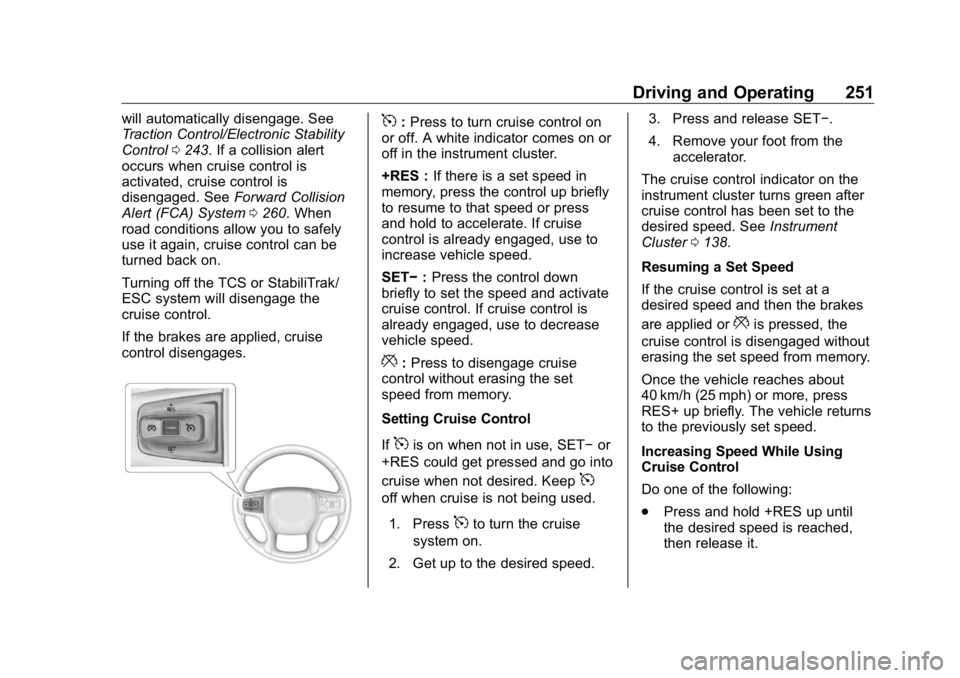
control disengages. 5 : Press to turn cruise control on
or off. A white indicator comes on or
off in the instrument cluster.
+RES : If there is a set speed in
memory, press the control up briefly
to resume to that speed or press
and hold to accelerate. If cruise
control is already engaged, use to
increase vehicle speed.
SET − : Press the control down
briefly to set the speed and activate
cruise control. If cruise control is
already engaged, use to decrease
vehicle speed.
* : Press to disengage cruise
control without erasing the set
speed from memory.
Setting Cruise Control
If
5 is on when not in use, SET − or
+RES could get pressed and go into
cruise when not desired. Keep
5off when cruise is not being used.
1. Press
5 to turn the cruise
system on.
2. Get up to the desired speed. 3. Press and release SET − .
4. Remove your foot from the
accelerator.
The cruise control indicator on the
instrument cluster turns green after
cruise control has been set to the
desired speed. See Instrument
Cluster 0 138 .
Resuming a Set Speed
If the cruise control is set at a
desired speed and then the brakes
are applied or
* is pressed, the
cruise control is disengaged without
erasing the set speed from memory.
Once the vehicle reaches about
40 km/h (25 mph) or more, press
RES+ up briefly. The vehicle returns
to the previously set speed.
Increasing Speed While Using
Cruise Control
Do one of the following:
.
Press and hold +RES up until
the desired speed is reached,
then release it.
Page 253 of 472
GMC Sierra/Sierra Denali Owner Manual (GMNA-Localizing-U.S./Canada/
Mexico-1500-11698638) - 2019 - crc - 5/16/18
252 Driving and Operating .
To increase vehicle speed in
small increments, press +RES
up briefly. For each press, the
vehicle goes about 1 km/h
(1 mph) faster.
The speedometer reading can be
displayed in either English or metric
units. See Instrument Cluster 0 138 .
The increment value used depends
on the units displayed.
Reducing Speed While Using
Cruise Control
Do one of the following:
.
Press and hold SET – down until
the desired lower speed is
reached, then release it.
.
To slow down in small
increments, press SET – down
briefly. For each press, the
vehicle goes about 1 km/h
(1 mph) slower.
The speedometer reading can be
displayed in either English or metric
units. See Instrument Cluster 0 138 .
The increment value used depends
on the units displayed. Passing Another Vehicle While
Using Cruise Control
Use the accelerator pedal to
increase the vehicle speed. When
you take your foot off the pedal, the
vehicle will slow down to the
previously set cruise speed. While
pressing the accelerator pedal or
shortly following the release to
override cruise control, briefly
pressing SET – will result in cruise
control set to the current vehicle
speed.
Using Cruise Control on Hills
How well the cruise control works
on hills depends on the vehicle
speed, the load, and the steepness
of the hills. When going up steep
hills, pressing the accelerator pedal
may be necessary to maintain
vehicle speed.
While going downhill, cruise braking
helps maintain driver selected
speed.
Cruise Grade Braking is enabled
when the vehicle is started and
cruise control is active. It is not
enabled in Range Selection Mode. It assists in maintaining driver
selected speed when driving on
downhill grades by using the engine
and transmission to slow the
vehicle.
For other forms of descent control,
see Hill Descent Control (HDC)
0 245 , Automatic Transmission
0 229 , and Tow/Haul Mode 0 234 .
Ending Cruise Control
There are four ways to end cruise
control:
.
Step lightly on the brake pedal.
.
Press
* .
.
Shift the transmission to
N (Neutral).
.
To turn off cruise control,
press
5 .
Erasing Speed Memory
The cruise control set speed is
erased from memory if
5 is pressed
or the ignition is turned off.
Page 263 of 472
GMC Sierra/Sierra Denali Owner Manual (GMNA-Localizing-U.S./Canada/
Mexico-1500-11698638) - 2019 - crc - 5/16/18
262 Driving and Operating
Without Head-Up Display
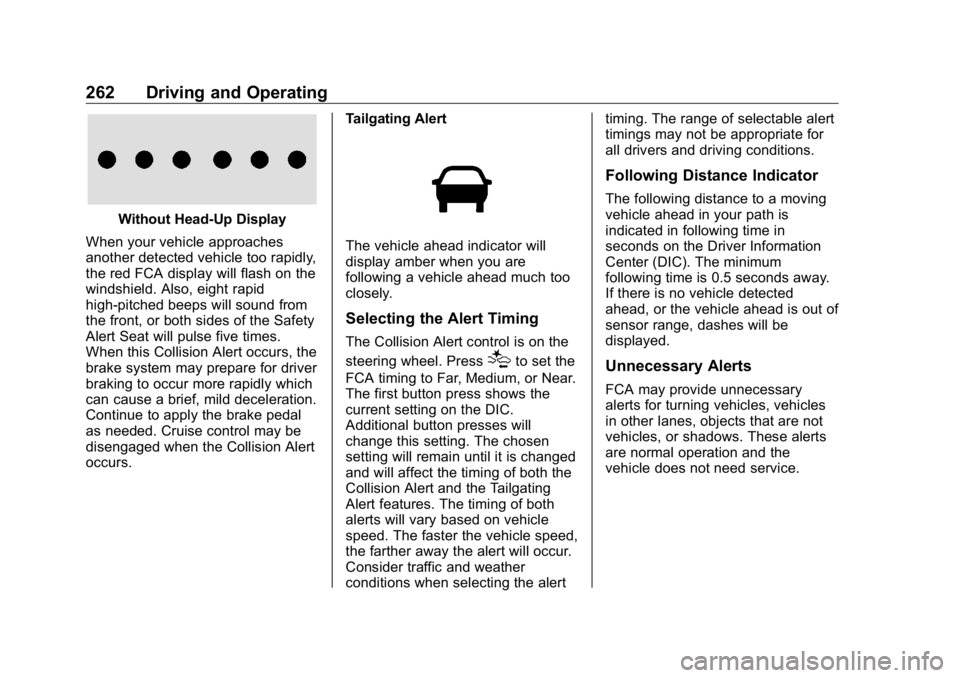
When your vehicle approaches
another detected vehicle too rapidly,
the red FCA display will flash on the
windshield. Also, eight rapid
high-pitched beeps will sound from
the front, or both sides of the Safety
Alert Seat will pulse five times.
When this Collision Alert occurs, the
brake system may prepare for driver
braking to occur more rapidly which
can cause a brief, mild deceleration.
Continue to apply the brake pedal
as needed. Cruise control may be
disengaged when the Collision Alert
occurs. Tailgating Alert
The vehicle ahead indicator will
display amber when you are
following a vehicle ahead much too
closely.
Selecting the Alert Timing The Collision Alert control is on the
steering wheel. Press
[ to set the
FCA timing to Far, Medium, or Near.
The first button press shows the
current setting on the DIC.
Additional button presses will
change this setting. The chosen
setting will remain until it is changed
and will affect the timing of both the
Collision Alert and the Tailgating
Alert features. The timing of both
alerts will vary based on vehicle
speed. The faster the vehicle speed,
the farther away the alert will occur.
Consider traffic and weather
conditions when selecting the alert timing. The range of selectable alert
timings may not be appropriate for
all drivers and driving conditions.
Following Distance Indicator The following distance to a moving
vehicle ahead in your path is
indicated in following time in
seconds on the Driver Information
Center (DIC). The minimum
following time is 0.5 seconds away.
If there is no vehicle detected
ahead, or the vehicle ahead is out of
sensor range, dashes will be
displayed.
Unnecessary Alerts FCA may provide unnecessary
alerts for turning vehicles, vehicles
in other lanes, objects that are not
vehicles, or shadows. These alerts
are normal operation and the
vehicle does not need service.
Page 267 of 472
GMC Sierra/Sierra Denali Owner Manual (GMNA-Localizing-U.S./Canada/
Mexico-1500-11698638) - 2019 - crc - 5/16/18
266 Driving and Operating
Without Head-Up Display
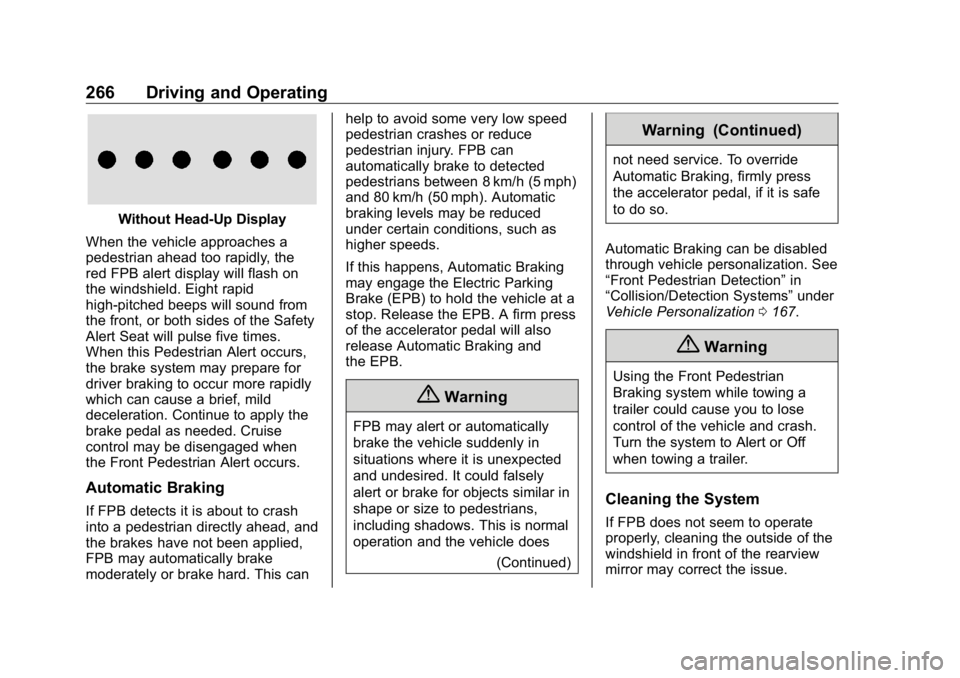
When the vehicle approaches a
pedestrian ahead too rapidly, the
red FPB alert display will flash on
the windshield. Eight rapid
high-pitched beeps will sound from
the front, or both sides of the Safety
Alert Seat will pulse five times.
When this Pedestrian Alert occurs,
the brake system may prepare for
driver braking to occur more rapidly
which can cause a brief, mild
deceleration. Continue to apply the
brake pedal as needed. Cruise
control may be disengaged when
the Front Pedestrian Alert occurs.
Automatic Braking
If FPB detects it is about to crash
into a pedestrian directly ahead, and
the brakes have not been applied,
FPB may automatically brake
moderately or brake hard. This can help to avoid some very low speed
pedestrian crashes or reduce
pedestrian injury. FPB can
automatically brake to detected
pedestrians between 8 km/h (5 mph)
and 80 km/h (50 mph). Automatic
braking levels may be reduced
under certain conditions, such as
higher speeds.
If this happens, Automatic Braking
may engage the Electric Parking
Brake (EPB) to hold the vehicle at a
stop. Release the EPB. A firm press
of the accelerator pedal will also
release Automatic Braking and
the EPB.
{ Warning
FPB may alert or automatically
brake the vehicle suddenly in
situations where it is unexpected
and undesired. It could falsely
alert or brake for objects similar in
shape or size to pedestrians,
including shadows. This is normal
operation and the vehicle does
(Continued) Warning (Continued) not need service. To override
Automatic Braking, firmly press
the accelerator pedal, if it is safe
to do so.
Automatic Braking can be disabled
through vehicle personalization. See
“ Front Pedestrian Detection ” in
“ Collision/Detection Systems ” under
Vehicle Personalization 0 167 .
{ WarningUsing the Front Pedestrian
Braking system while towing a
trailer could cause you to lose
control of the vehicle and crash.
Turn the system to Alert or Off
when towing a trailer.
Cleaning the System
If FPB does not seem to operate
properly, cleaning the outside of the
windshield in front of the rearview
mirror may correct the issue.
Page 278 of 472
GMC Sierra/Sierra Denali Owner Manual (GMNA-Localizing-U.S./Canada/
Mexico-1500-11698638) - 2019 - crc - 5/16/18
Driving and Operating 277.
Vehicles can tow in D (Drive).
Tow/Haul Mode is recommended
for heavier trailers. See Tow/
Haul Mode 0 234 . If the
transmission downshifts too
often, a lower gear may be
selected using Manual Mode.
See Manual Mode 0 232 .
If equipped, the following driver
assistance features should be
turned off when towing a trailer:
.
Cruise Control
.
Lane Keep Assist (LKA)
.
Park Assist
.
Reverse Automatic
Braking (RAB)
If equipped, the following driver
assistance features should be
turned to alert or off when towing a
trailer:
.
Forward Automatic
Braking (FAB)
.
Intelligent Brake Assist (IBA)
.
Front Pedestrian Braking (FPB) If equipped with Lane Change Alert
(LCA), the LCA detection zones that
extend back from the side of the
vehicle do not move further back
when a trailer is towed. Use caution
while changing lanes when towing a
trailer.
If equipped with Rear Cross Traffic
Alert (RCTA), use caution while
backing up when towing a trailer, as
the RCTA detection zones that
extend out from the back of the
vehicle do not move further back
when a trailer is towed.
{ WarningTo prevent serious injury or death
from carbon monoxide (CO),
when towing a trailer:
.
Do not drive with the
liftgate, trunk/hatch,
or rear-most window open.
.
Fully open the air outlets on
or under the instrument
panel.
(Continued) Warning (Continued) .
Adjust the climate control
system to a setting that
brings in only outside air.
See “ Climate Control
Systems ” in the Index.
For more information about
carbon monoxide, see Engine
Exhaust 0 228 .
Towing a trailer requires experience.
The combination of the vehicle and
trailer is longer and not as
responsive as the vehicle itself. Get
used to the handling and braking of
the combination by driving on a
level road surface before driving on
public roads.
The trailer structure, the tires, and
the brakes must all be rated to carry
the intended cargo. Inadequate
trailer equipment can cause the
combination to operate in an
unexpected or unsafe manner.
Before driving, inspect all trailer
hitch parts and attachments, safety
chains, electrical connectors, lamps,
Page 462 of 472

GMC Sierra/Sierra Denali Owner Manual (GMNA-Localizing-U.S./Canada/-
Mexico-1500-11698638) - 2019 - crc - 5/16/18
Index 461Charging
Wireless . . . . . . . . . . . . . . . . . . . . . . 135
Charging System Light . . . . . . . . . 148
Check
Engine Light (Malfunction
Indicator) . . . . . . . . . . . . . . . . . . . . 149
Ignition Transmission Lock . . . 343
Child Restraints
Infants and Young Children . . . 100
Lower Anchors and Tethers
for Children . . . . . . . . . . . . . . . . . 106
Older Children . . . . . . . . . . . . . . . . . . 99
Securing . . . . . . . . . . . . 117, 120, 121
Systems . . . . . . . . . . . . . . . . . . . . . . 103
Circuit Breakers . . . . . . . . . . . . . . . . 350
Cleaning
Exterior Care . . . . . . . . . . . . . . . . . 403
Interior Care . . . . . . . . . . . . . . . . . . 408
Climate Control Systems . . . . . . . 188
Air Conditioning . . . . . . . . . . . . . . 188
Dual Automatic . . . . . . . . . . . . . . . 190
Heating . . . . . . . . . . . . . . . . . . . . . . . 188
Clock . . . . . . . . . . . . . . . . . . . . . . . . . . . 132
Cluster, Instrument . . . . . . . . . . . . . 138
Collision Damage Repair . . . . . . . 440
Compartments
Storage . . . . . . . . . . . . . . . . . . . . . . . 125
Compass . . . . . . . . . . . . . . . . . . . . . . . 132 Connected Services
Connections . . . . . . . . . . . . . . . . . . 456
Diagnostics . . . . . . . . . . . . . . . . . . . 458
Navigation . . . . . . . . . . . . . . . . . . . . 455
Connections
Connected Services . . . . . . . . . . 456
Control
Hill Descent . . . . . . . . . . . . . . . . . . 245
Traction and Electronic
Stability . . . . . . . . . . . . . . . . . . . . . 243
Control Light
Hill Descent . . . . . . . . . . . . . . . . . . 153
Control of a Vehicle . . . . . . . . . . . . . 198
Convex Mirrors . . . . . . . . . . . . . . . . . . 56
Coolant
Engine Temperature Gauge . . 145
Engine Temperature
Warning Light . . . . . . . . . . . . . . . 155
Cooling . . . . . . . . . . . . . . . . . . . . 188, 190
Cooling System . . . . . . . . . . . . . . . . . 327
Courtesy Transportation
Program . . . . . . . . . . . . . . . . . . . . . . . 439
Cruise Control . . . . . . . . . . . . . . . . . . 250
Light . . . . . . . . . . . . . . . . . . . . . . . . . . 158
Cupholders . . . . . . . . . . . . . . . . . . . . . 125
Customer Assistance . . . . . . . . . . . 436
Offices . . . . . . . . . . . . . . . . . . . . . . . . 435 Customer Assistance (cont'd)
Text Telephone (TTY)
Users . . . . . . . . . . . . . . . . . . . . . . . 436
Customer Information
Publications Ordering
Information . . . . . . . . . . . . . . . . . . 442
Customer Satisfaction
Procedure . . . . . . . . . . . . . . . . . . . . . 433
D Damage Repair, Collision . . . . . . . 440
Danger, Warning, and Caution . . . . 2
Data Collection
Infotainment System . . . . . . . . . . 446
OnStar . . . . . . . . . . . . . . . . . . . . . . . 446
Data Recorders, Event . . . . . . . . . 445
Daytime Running
Lamps (DRL) . . . . . . . . . . . . . . . . . . 179
Defensive Driving . . . . . . . . . . . . . . . 198
Delayed Locking . . . . . . . . . . . . . . . . . 45
Diagnostics
Connected Services . . . . . . . . . . 458
Differential, Limited-Slip . . . . . . . . 250
Distracted Driving . . . . . . . . . . . . . . . 197
Dome Lamps . . . . . . . . . . . . . . . . . . . 183
Door
Ajar Light . . . . . . . . . . . . . . . . . . . . . 158
Delayed Locking . . . . . . . . . . . . . . . . 45