cruise control GMC TERRAIN 2010 User Guide
[x] Cancel search | Manufacturer: GMC, Model Year: 2010, Model line: TERRAIN, Model: GMC TERRAIN 2010Pages: 410, PDF Size: 2.55 MB
Page 228 of 410

8-20 Driving and Operating
Winter Driving
Driving on Snow or Ice
Drive carefully when there is snow
or ice between the tires and the
road, creating less traction or grip.
Wet ice can occur at about 0°C
(32°F) when freezing rain begins to
fall, resulting in even less traction.
Avoid driving on wet ice or in
freezing rain until roads can be
treated with salt or sand.
Drive with caution, whatever the
condition. Accelerate gently so
traction is not lost. Accelerating too
quickly causes the wheels to spin
and makes the surface under the
tires slick, so there is even less
traction.
Try not to break the fragile traction.
If you accelerate too fast, the drive
wheels will spin and polish the
surface under the tires even more.The
Antilock Brake System (ABS)
on page 8‑39improves vehicle
stability during hard stops on
slippery roads, but apply the brakes
sooner than when on dry pavement.
Allow greater following distance on
any slippery road and watch for
slippery spots. Icy patches can
occur on otherwise clear roads in
shaded areas. The surface of a
curve or an overpass can remain icy
when the surrounding roads are
clear. Avoid sudden steering
maneuvers and braking while
on ice.
Turn off cruise control, if equipped,
on slippery surfaces.Blizzard Conditions
Being stuck in snow can be in a
serious situation. Stay with the
vehicle unless there is help nearby.
If possible, use the Roadside
Assistance Program
on page 12‑6.
To get help and keep everyone in
the vehicle safe:
.Turn on the hazard warning
flashers.
.Tie a red cloth to an outside
mirror.
{WARNING
Snow can trap engine exhaust
under the vehicle. This may
cause exhaust gases to get
inside. Engine exhaust contains
carbon monoxide (CO) which
cannot be seen or smelled. It can
cause unconsciousness and even
death.
(Continued)
Page 245 of 410
Driving and Operating 8-37
Notice:If the vehicle seems to
accelerate slowly or not shift
gears when you go faster, and
you continue to drive the vehicle
that way, you could damage the
transmission. Have the vehicle
serviced right away. You can
drive in L (Low) when you are
driving less than 56 km/h (35 mph)
and D (Drive) for higher speeds
until then.
M (Manual Mode): Allows the
driver to select the range of gear
positions. If the vehicle has this
feature, see Manual Mode
on
page 8‑37.
Manual Mode
Electronic Range Select
(ERS) Mode
ERS or manual mode allows for the
selection of the range of gear
positions. Use this mode when
driving down hill or towing a trailer
to limit the top gear and vehicle
speed. The shift position indicator
within the Driver Information Center
(DIC) will display a number next to
the M indicating the highest
available gear under manual mode
and the driving conditions when
manual mode was selected.
To use this feature:
1. Move the shift lever to M (Manual Mode).
2. Press the plus/minus button on the shift lever, to increase or
decrease the gear range
available. When shifting to M (Manual Mode),
the transmission will shift to a preset
lower gear range. For this preset
range, the highest gear available is
displayed next to the M in the DIC.
See
Driver Information Center (DIC)
on page 4‑25for more information.
All gears below that number are
available to use. For example, when
4 (Fourth) is shown next to the M,
1 (First) through 4 (Fourth) gears are
shifted automatically. To shift to
5 (Fifth) gear, press the + (Plus)
button or shift into D (Drive).
M (Manual Mode) will prevent
shifting to a lower gear range if the
engine speed is too high. If vehicle
speed is not reduced within the time
allowed, the lower gear range shift
will not be completed. Slow the
vehicle, then press the −(Minus)
button to the desired lower gear
range.
While using the ERS, cruise control
can be used.
Page 251 of 410
Driving and Operating 8-43
When the stability control system
activates, the Traction Control
System (TCS)/StabiliTrak light will
flash on the instrument panel. This
also occurs when traction control is
activated. A noise may be heard or
vibration may be felt in the brake
pedal. This is normal. Continue to
steer the vehicle in the intended
direction.If there is a problem detected with
StabiliTrak, a
“Service StabiliTrak”
message will be displayed on the
Driver Information Center (DIC).
When this message is displayed
and the StabiliTrak light comes on,
the system is not operational.
Driving should be adjusted
accordingly. See Ride Control
System Messages
on page 4‑33.
StabiliTrak comes on automatically
whenever the vehicle is started. To
assist with directional control of the
vehicle, the system should always
be left on.
StabiliTrak can be turned off by
pressing and holding the TCS/
StabiliTrak button, on the console,
until the TCS Off and StabiliTrak Off
lights come on the instrument panel
and “StabiliTrak Off” appears in the
DIC. For information on turning TCS
off and on, see “Traction Control
System (TCS)” earlier in this
section.
If cruise control is being used when
StabiliTrak activates, the cruise
control will automatically disengage.
Press the cruise control button to
reengage when road conditions
allow. See Cruise Control
on
page 8‑44for more information.
Page 252 of 410
8-44 Driving and Operating
Cruise Control
With cruise control, the vehicle can
maintain a speed of about 40 km/h
(25 mph) or more without keeping
your foot on the accelerator. Cruise
control does not work at speeds
below 40 km/h (25 mph).
If the brakes are applied, the cruise
control shuts off.
If the vehicle has the StabiliTrak
®
system and begins to limit wheel
spin while using cruise control, the
cruise control automatically
disengages. SeeStabiliTrak System
on page 8‑42orTraction Control
System (TCS)on page 8‑41. When
road conditions allow you to safely
use it again, the cruise control can
be turned back on.
{WARNING
Cruise control can be dangerous
where you cannot drive safely at
a steady speed. So, do not use
the cruise control on winding
roads or in heavy traffic.
Cruise control can be dangerous
on slippery roads. On such roads,
fast changes in tire traction can
cause excessive wheel slip, and
you could lose control. Do not use
cruise control on slippery roads. Setting Cruise Control{WARNING
If you leave your cruise control on
when you are not using cruise,
you might hit a button and go into
cruise when you do not want to.
You could be startled and even
lose control. Keep the cruise
control switch off until you want to
use cruise control.
Page 253 of 410
Driving and Operating 8-45
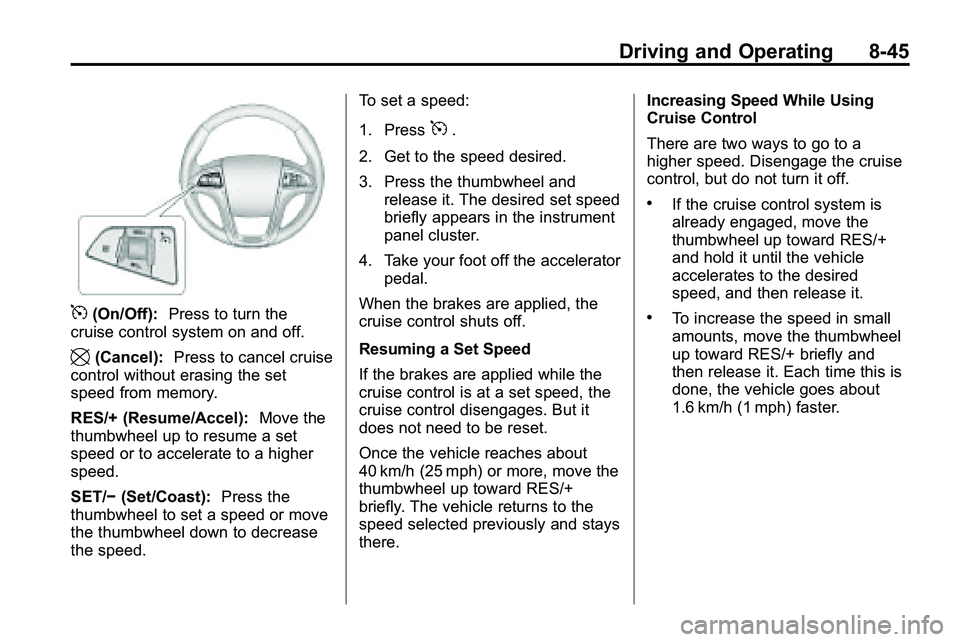
5(On/Off):Press to turn the
cruise control system on and off.
\(Cancel): Press to cancel cruise
control without erasing the set
speed from memory.
RES/+ (Resume/Accel): Move the
thumbwheel up to resume a set
speed or to accelerate to a higher
speed.
SET/− (Set/Coast): Press the
thumbwheel to set a speed or move
the thumbwheel down to decrease
the speed. To set a speed:
1. Press
5.
2. Get to the speed desired.
3. Press the thumbwheel and release it. The desired set speed
briefly appears in the instrument
panel cluster.
4. Take your foot off the accelerator pedal.
When the brakes are applied, the
cruise control shuts off.
Resuming a Set Speed
If the brakes are applied while the
cruise control is at a set speed, the
cruise control disengages. But it
does not need to be reset.
Once the vehicle reaches about
40 km/h (25 mph) or more, move the
thumbwheel up toward RES/+
briefly. The vehicle returns to the
speed selected previously and stays
there. Increasing Speed While Using
Cruise Control
There are two ways to go to a
higher speed. Disengage the cruise
control, but do not turn it off.
.If the cruise control system is
already engaged, move the
thumbwheel up toward RES/+
and hold it until the vehicle
accelerates to the desired
speed, and then release it.
.To increase the speed in small
amounts, move the thumbwheel
up toward RES/+ briefly and
then release it. Each time this is
done, the vehicle goes about
1.6 km/h (1 mph) faster.
Page 254 of 410
8-46 Driving and Operating
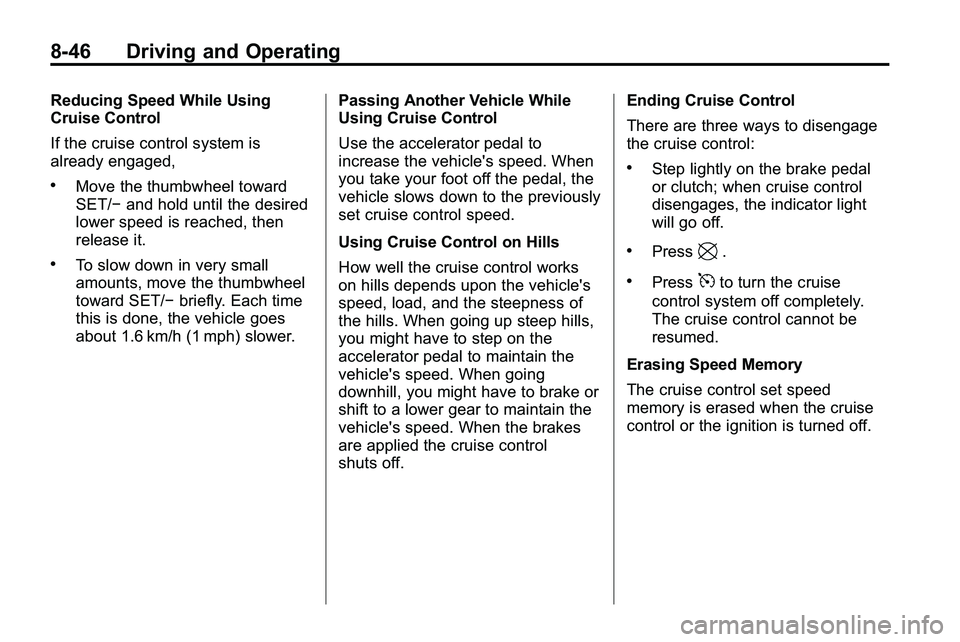
Reducing Speed While Using
Cruise Control
If the cruise control system is
already engaged,
.Move the thumbwheel toward
SET/−and hold until the desired
lower speed is reached, then
release it.
.To slow down in very small
amounts, move the thumbwheel
toward SET/− briefly. Each time
this is done, the vehicle goes
about 1.6 km/h (1 mph) slower. Passing Another Vehicle While
Using Cruise Control
Use the accelerator pedal to
increase the vehicle's speed. When
you take your foot off the pedal, the
vehicle slows down to the previously
set cruise control speed.
Using Cruise Control on Hills
How well the cruise control works
on hills depends upon the vehicle's
speed, load, and the steepness of
the hills. When going up steep hills,
you might have to step on the
accelerator pedal to maintain the
vehicle's speed. When going
downhill, you might have to brake or
shift to a lower gear to maintain the
vehicle's speed. When the brakes
are applied the cruise control
shuts off. Ending Cruise Control
There are three ways to disengage
the cruise control:
.Step lightly on the brake pedal
or clutch; when cruise control
disengages, the indicator light
will go off.
.Press\.
.Press5to turn the cruise
control system off completely.
The cruise control cannot be
resumed.
Erasing Speed Memory
The cruise control set speed
memory is erased when the cruise
control or the ignition is turned off.
Page 401 of 410
INDEX i-3
CleaningExterior Care . . . . . . . . . . . . . . . . . 9-85
Interior Care . . . . . . . . . . . . . . . . . . 9-89
Climate Control Systems . . . . . . . 7-1 Automatic . . . . . . . . . . . . . . . . . . . . . . 7-3
Clock . . . . . . . . . . . . . . . . . . . . . 4-9, 4-10
Cluster, IP . . . . . . . . . . . . . . . . . . . . . 4-12
Collision Damage Repair . . . . . 12-10
Compact Spare Tire . . . . . . . . . . . 9-76
Compass . . . . . . . . . . . . . . . . . . . . . . . 4-9
Compass Messages . . . . . . . . . . . 4-30
Control of a Vehicle . . . . . . . . . . . . . 8-4
Convenience Net . . . . . . . . . . . . . . . 3-2
Convex Mirrors . . . . . . . . . . . . . . . . 1-14
Coolant Engine . . . . . . . . . . . . . . . . . . . . . . . . 9-16
Engine Temperature
Gauge . . . . . . . . . . . . . . . . . . . . . . 4-14
Cooling System . . . . . . . . . . . . . . . . 9-15 Engine Messages . . . . . . . . . . . . 4-31
Courtesy Transportation
Program . . . . . . . . . . . . . . . . . . . . . . 12-8
Covers Engine . . . . . . . . . . . . . . . . . . . . . . . . . 9-9 Cruise Control . . . . . . . . . . . . . . . . . 8-44
Light . . . . . . . . . . . . . . . . . . . . . . . . . . 4-25
Messages . . . . . . . . . . . . . . . . . . . . 4-30
Cupholders . . . . . . . . . . . . . . . . . . . . . 3-1
Customer Assistance . . . . . . . . . . 12-4 Offices . . . . . . . . . . . . . . . . . . . . . . . . 12-3
Text Telephone (TTY)Users . . . . . . . . . . . . . . . . . . . . . . . 12-4
Customer Information Service PublicationsOrdering Information . . . . . . 12-12
Customer Satisfaction Procedure . . . . . . . . . . . . . . . . . . . . 12-1
D
Damage Repair, Collision . . . . . 12-10
Danger, Warnings, andCautions . . . . . . . . . . . . . . . . . . . . . . . . iv
Data Recorders, Event . . . . . . . 12-15
Daytime Running Lamps (DRL) . . . . . . . . . . . . . . . . . . 5-2
Defensive Driving . . . . . . . . . . . . . . . 8-3
Devices, Auxiliary . . . . . . . 6-27, 6-30
Dome Lamps . . . . . . . . . . . . . . . . . . . 5-4 Door
Ajar Messages . . . . . . . . . . . . . . . 4-30
Locks . . . . . . . . . . . . . . . . . . . . . . . . . . 1-6
Power Locks . . . . . . . . . . . . . . . . . . . 1-7
Drive Systems All-Wheel Drive . . . . . . . . . 8-38, 9-26
Driver Information
Center (DIC) . . . . . . . . . . . . . . . . . 4-25
Driving Better Fuel Economy . . . . . . . . . . 8-2
Characteristics andTowing Tips . . . . . . . . . . . . . . . . . 8-58
Defensive . . . . . . . . . . . . . . . . . . . . . . 8-3
Drunk . . . . . . . . . . . . . . . . . . . . . . . . . . 8-3
Highway Hypnosis . . . . . . . . . . . . 8-18
Hill and Mountain Roads . . . . . . 8-19
If the Vehicle is Stuck . . . . . . . . . 8-22
Loss of Control . . . . . . . . . . . . . . . . 8-7
Off-Road . . . . . . . . . . . . . . . . . . . . . . 8-7
Off-Road Recovery . . . . . . . . . . . . 8-6
Vehicle Load Limits . . . . . . . . . . . 8-22
Winter . . . . . . . . . . . . . . . . . . . . . . . . 8-20
DVD Rear Seat EntertainmentSystem . . . . . . . . . . . . . . . . . . . . . . 6-33
DVD/CD Player . . . . . . . . . . . . . . . . 6-21
Page 404 of 410
i-6 INDEX
High-Beam On Light . . . . . . . . . . . 4-24
Highway Hypnosis . . . . . . . . . . . . . 8-18
Hill and Mountain Roads . . . . . . . 8-19
Hill Start Assist (HSA) . . . . . . . . . 8-41
Hood . . . . . . . . . . . . . . . . . . . . . . . . . . . 9-5
Horn . . . . . . . . . . . . . . . . . . . . . . . . . . . . 4-7
How to Wear Safety BeltsProperly . . . . . . . . . . . . . . . . . . . . . . 2-13
I
Ignition Positions . . . . . . . . . . . . . . 8-28
Ignition Transmission LockCheck . . . . . . . . . . . . . . . . . . . . . . . . 9-27
Immobilizer . . . . . . . . . . . . . . . . . . . . 1-13
Infants and Young Children, Restraints . . . . . . . . . . . . . . . . . . . . 2-43
Instrument Cluster . . . . . . . . . . . . . 4-12
Instrument Panel Storage Area . . . . . . . . . . . . . . . . . . 3-1
Instrument Panel Overview . . . . . 4-4
Introduction . . . . . . . . . . . . . . . . . . .iii, 6-1
J
Jump Starting . . . . . . . . . . . . . . . . . . 9-78
K
Key and Lock Messages . . . . . . . 4-33
Keyless Entry Remote (RKE) System . . . . . . . . 1-3
Keyless Entry System . . . . . . . . . . 1-3
Keys . . . . . . . . . . . . . . . . . . . . . . . . . . . . 1-2
L
Labeling, Tire Sidewall . . . . . . . . . 9-46
Lamps Daytime Running (DRL) . . . . . . . 5-2
Dome . . . . . . . . . . . . . . . . . . . . . . . . . . 5-4
Exterior Controls . . . . . . . . . . . . . . . 5-1
License Plate . . . . . . . . . . . . . . . . . 9-37
Malfunction Indicator . . . . . . . . . 4-17
On Reminder . . . . . . . . . . . . . . . . . 4-25
Reading . . . . . . . . . . . . . . . . . . . . . . . 5-4 Lap-Shoulder Belt . . . . . . . . . . . . . 2-18
LATCH System
Replacing Parts After aCrash . . . . . . . . . . . . . . . . . . . . . . . 2-55
Latch, Lower Anchors and Tethers for Children . . . . . . . . . . 2-49
Liftgate
Carbon Monoxide . . . . . . . . . 1-8, 1-9
Light StabiliTrak
®OFF . . . . . . . . . . . . . 4-21
Lighting
Entry . . . . . . . . . . . . . . . . . . . . . . . . . . 5-4
Illumination Control . . . . . . . . . . . . 5-4
Lights Airbag Readiness . . . . . . . . . . . . . 4-15
Antilock Brake System(ABS) Warning . . . . . . . . . . . . . . 4-20
Charging System . . . . . . . . . . . . . 4-16
Cruise Control . . . . . . . . . . . . . . . . 4-25
Engine Oil Pressure . . . . . . . . . . 4-23
Flash-to-Pass . . . . . . . . . . . . . . . . . . 5-2