reset GMC TERRAIN 2010 User Guide
[x] Cancel search | Manufacturer: GMC, Model Year: 2010, Model line: TERRAIN, Model: GMC TERRAIN 2010Pages: 410, PDF Size: 2.55 MB
Page 147 of 410

Infotainment System 6-9
Entering a Character Sequence
1. Turn the MENU/SEL knob tohighlight the character.
2. Press the MENU/SEL button to select the character.
Press the
0BACK button to delete
the last character in the sequence
or press and hold to delete the
entire character sequence.
Audio Settings
The audio settings can be set for
each radio band and each audio
player source.
To quickly reset an audio setting
value to 0:
1. Press the TONE button.
2. Select the audio setting. 3. Press and hold the MENU/SEL
button until the value changes
to 0.
Press the
0BACK button to go
back to the Tone Settings menu.
Adjusting the Treble, Midrange,
and Bass
1. Press the TONE button.
2. Select Treble, Midrange, or Bass.
3. Select the value.
Press the
0BACK button to go
back to the Tone Settings menu. Adjusting the Fader and Balance
1. Press the TONE button.
2. Select Fader or Balance.
3. Select the value.
Press the
0BACK button to go
back to the Tone Settings menu.
Adjusting the EQ (Equalizer)
For vehicles that have an equalizer:
1. Press the TONE button.
2. Select EQ.
3. Select the setting.
Page 149 of 410
Infotainment System 6-11
Radio
AM-FM Radio
Control Buttons
The buttons used to control the
radio are:
RADIO/BAND:Press to turn the
radio on and choose between AM,
FM, and XM™, if equipped.
MENU/SEL: Turn to manually
search for stations.
FAV: Press to open the
favorites list.
lSEEK orgSEEK: Press to
search for stations. Press and hold
to fast forward and rewind time
shifted data. See “Time Shifting
(Radio with CD/DVD and MEM)”
later in this section.
k: Press to pause and resume
time shifted data. See “Time Shifting
(Radio with CD/DVD and MEM)”
later in this section.
1 to 6: Press to select preset
stations.
RDS (Radio Data System)
The radio may have RDS. The RDS
feature is available for use only on
FM stations that broadcast RDS
information. This feature only works
when the information from the radio
station is available. In rare cases, a
radio station could broadcast
incorrect information that causes the
radio features to work improperly.
If this happens, contact the radio
station.
While the radio is tuned to an
FM-RDS station, the station name
or call letters display.
Radio Menus
Radio menus are available for AM
and FM.
Press the MENU/SEL knob to open
the main radio menu for that band.
Selecting a Band
Press the RADIO/BAND button
to choose AM, FM, or XM™,
if equipped. The last station that
was playing starts playing again.
Selecting a Station
Seek Tuning (Radio with CD)
If the radio station is not known:
Briefly press
gSEEK orlSEEK,
to automatically search for the next
available station. If a station is not
found, the radio switches to a more
sensitive search level. If a station
still is not found, the frequency that
was last active begins to play.
Page 152 of 410

6-14 Infotainment System
Satellite Radio
Vehicles with an XM™Satellite
Radio tuner and a valid XM Satellite
Radio subscription can receive XM
programming.
XM Satellite Radio Service
XM is a satellite radio service that is
based in the 48 contiguous United
States and 10 Canadian provinces.
XM Satellite Radio has a wide
variety of programming and
commercial-free music,
coast-to-coast, and in digital-quality
sound. A service fee is required to
receive the XM service. For more
information, contact XM at
www.xmradio.com or call
1-800-929-2100 in the U.S. and
www.xmradio.ca or call
1-877-438-9677 in Canada.
Control Buttons
The buttons used to control the
XM radio are:
RADIO/BAND: Press to turn the
radio on and choose between AM,
FM, and XM™, if equipped.
gSEEK /lSEEK: Press to go
to the previous or next station.
FAV: Press to open the
favorites list.
k: Press to pause and resume
time shifted data. See “Time Shifting
(Radio with CD/DVD and MEM)”
later in this section.
1 to 6: Press to select preset
stations.
MENU/SEL: Turn to select stations.
Press to open the XM Satellite
Radio menu.
Selecting the XM Band
Press the RADIO/BAND button to
choose between the AM, FM and
XM bands. The last channel played
in that band begins to play when
that band is selected.
XM Categories
XM channels are organized in
categories.
Removing or Adding Categories
Channels in a category that have
been removed can still be accessed
by using the
gSEEK orlSEEK
buttons, or the MENU/SEL knob.
To add or remove categories:
1. Press the CONFIG button.
2. Select Radio Settings.
3. Select XM Categories.
4. Turn the MENU/SEL knob to highlight the category.
5. Press the MENU/SEL knob to remove or add the category.
Page 245 of 410
Driving and Operating 8-37
Notice:If the vehicle seems to
accelerate slowly or not shift
gears when you go faster, and
you continue to drive the vehicle
that way, you could damage the
transmission. Have the vehicle
serviced right away. You can
drive in L (Low) when you are
driving less than 56 km/h (35 mph)
and D (Drive) for higher speeds
until then.
M (Manual Mode): Allows the
driver to select the range of gear
positions. If the vehicle has this
feature, see Manual Mode
on
page 8‑37.
Manual Mode
Electronic Range Select
(ERS) Mode
ERS or manual mode allows for the
selection of the range of gear
positions. Use this mode when
driving down hill or towing a trailer
to limit the top gear and vehicle
speed. The shift position indicator
within the Driver Information Center
(DIC) will display a number next to
the M indicating the highest
available gear under manual mode
and the driving conditions when
manual mode was selected.
To use this feature:
1. Move the shift lever to M (Manual Mode).
2. Press the plus/minus button on the shift lever, to increase or
decrease the gear range
available. When shifting to M (Manual Mode),
the transmission will shift to a preset
lower gear range. For this preset
range, the highest gear available is
displayed next to the M in the DIC.
See
Driver Information Center (DIC)
on page 4‑25for more information.
All gears below that number are
available to use. For example, when
4 (Fourth) is shown next to the M,
1 (First) through 4 (Fourth) gears are
shifted automatically. To shift to
5 (Fifth) gear, press the + (Plus)
button or shift into D (Drive).
M (Manual Mode) will prevent
shifting to a lower gear range if the
engine speed is too high. If vehicle
speed is not reduced within the time
allowed, the lower gear range shift
will not be completed. Slow the
vehicle, then press the −(Minus)
button to the desired lower gear
range.
While using the ERS, cruise control
can be used.
Page 253 of 410
Driving and Operating 8-45
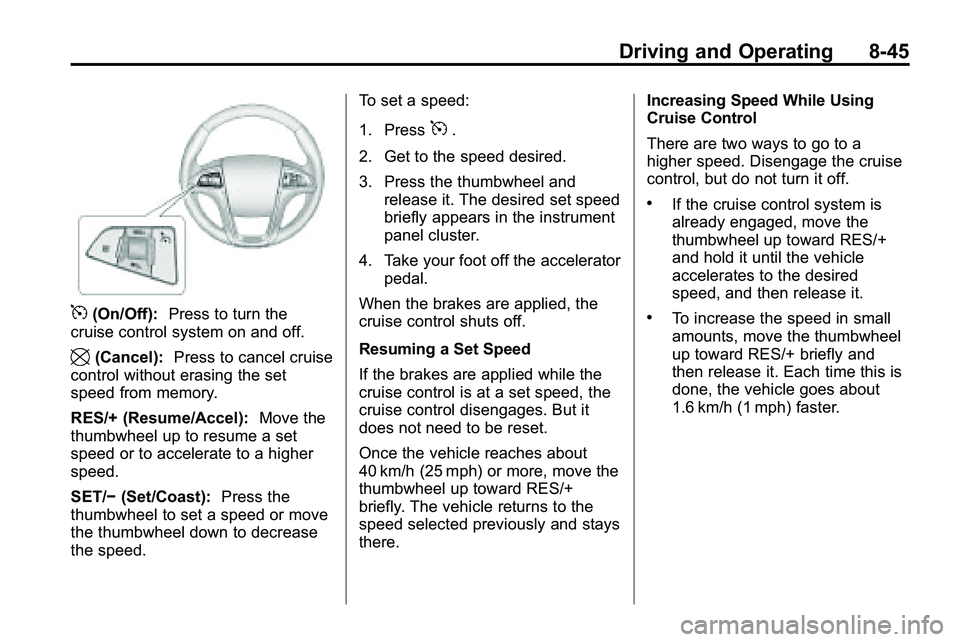
5(On/Off):Press to turn the
cruise control system on and off.
\(Cancel): Press to cancel cruise
control without erasing the set
speed from memory.
RES/+ (Resume/Accel): Move the
thumbwheel up to resume a set
speed or to accelerate to a higher
speed.
SET/− (Set/Coast): Press the
thumbwheel to set a speed or move
the thumbwheel down to decrease
the speed. To set a speed:
1. Press
5.
2. Get to the speed desired.
3. Press the thumbwheel and release it. The desired set speed
briefly appears in the instrument
panel cluster.
4. Take your foot off the accelerator pedal.
When the brakes are applied, the
cruise control shuts off.
Resuming a Set Speed
If the brakes are applied while the
cruise control is at a set speed, the
cruise control disengages. But it
does not need to be reset.
Once the vehicle reaches about
40 km/h (25 mph) or more, move the
thumbwheel up toward RES/+
briefly. The vehicle returns to the
speed selected previously and stays
there. Increasing Speed While Using
Cruise Control
There are two ways to go to a
higher speed. Disengage the cruise
control, but do not turn it off.
.If the cruise control system is
already engaged, move the
thumbwheel up toward RES/+
and hold it until the vehicle
accelerates to the desired
speed, and then release it.
.To increase the speed in small
amounts, move the thumbwheel
up toward RES/+ briefly and
then release it. Each time this is
done, the vehicle goes about
1.6 km/h (1 mph) faster.
Page 261 of 410

Driving and Operating 8-53
A. View displayed by the camera.
B. Corner of the rear bumper.
When the System Does Not
Seem To Work Properly
The RVC system may not work
properly or display a clear image if:
.The RVC is turned off. See
“Turning the Rear Camera
System On or Off”earlier in this
section.
.It is dark.
.The sun or the beam of
headlights is shining directly
into the camera lens.
.Ice, snow, mud, or anything else
builds up on the camera lens.
Clean the lens, rinse it with
water, and wipe it with a soft
cloth.
.The back of the vehicle is in an
accident, the position and
mounting angle of the camera
can change or the camera can
be affected. Be sure to have the
camera and its position and
mounting angle checked at your
dealer/retailer.
The RVC system display in the
rearview mirror may turn off or not
appear as expected due to one of
the following conditions. If this
occurs the left indicator light on the
mirror will flash.
.A slow flash may indicate a loss
of video signal, or no video
signal present during the reverse
cycle.
.A fast flash may indicate that
the display has been on for the
maximum allowable time during
a reverse cycle, or the display
has reached an over
temperature limit.
The fast flash conditions are
used to protect the video
device from high temperature
conditions. Once conditions
return to normal the device will
reset and the green indicator will
stop flashing.
During any of these fault conditions,
the display will be blank and the
indicator will continue to flash as
long as the vehicle is in R (Reverse)
or until the conditions return to
normal.
Pressing and holding
zwhen the
left indicator light is flashing will turn
off the video display along with the
left indicator light.
Page 286 of 410

9-12 Vehicle Care
Engine Oil Life System
When to Change Engine Oil
This vehicle has a computer system
that indicates when to change the
engine oil and filter. This is based
on engine revolutions and engine
temperature, and not on mileage.
Based on driving conditions, the
mileage at which an oil change is
indicated can vary considerably. For
the oil life system to work properly,
the system must be reset every time
the oil is changed.
When the system has calculated
that oil life has been diminished, it
indicates that an oil change is
necessary. A“Change Engine Oil
Soon” message comes on.
See Engine Oil Messages
on
page 4‑31. Change the oil as soon as possible within the next 1 000 km
(600 miles). It is possible that,
if driving under the best conditions,
the oil life system might not indicate
that an oil change is necessary for
over a year. However, the engine oil
and filter must be changed at least
once a year and at this time the
system must be reset. Your dealer/
retailer has trained service people
who will perform this work using
genuine parts and reset the system.
It is also important to check the oil
regularly and keep it at the proper
level.
If the system is ever reset
accidentally, the oil must be
changed at 5 000 km (3,000 miles)
since the last oil change.
Remember to reset the oil life
system whenever the oil is changed.
How to Reset the Engine Oil
Life System
Reset the system whenever the
engine oil is changed so that the
system can calculate the next
engine oil change. To reset the
system:
1. Turn the ignition to ON/RUN with
the engine off.
2. Fully press and release the accelerator pedal three times
within five seconds.
If the vehicle has Driver Information
Center (DIC) buttons:
1. Turn the ignition to ON/RUN, with the engine off.
2. Press the DIC menu button until “Remaining Oil Life” displays.
3. Press and hold the set/clear button until “100%”is displayed.
4. Turn the key to LOCK/OFF.
The system is reset when the
“Change Engine Oil Soon” message
goes off.
Page 304 of 410

9-30 Vehicle Care
5. Align the wiper blade with thearm and hold both ends of the
arm while gently squeezing until
the blade snaps into place.
Do not apply excessive force
during this operation.
Reposition the blade in the arm
and repeat, if blade is not
correctly positioned.
6. Place the wiper arm with the wiper blade attached back on
the liftgate glass.Headlamp Aiming
The headlamp aiming system has
been preset at the factory.
If the vehicle is damaged in an
accident, the aim of the headlamps
may be affected and adjustment
may be necessary.
It is recommended that a dealer/
retailer adjust the headlamps. To
re-aim the headlamps yourself, use
the following procedure.
The vehicle should be properly
prepared as follows. The vehicle:
.Should be placed so the
headlamps are 7.6 m (25 ft) from
a light colored wall.
.Must have all four tires on a
level surface which is level all
the way to the wall.
.Should be placed so it is
perpendicular to the wall or other
flat surface.
.Should not have any snow, ice,
or mud on it.
.Should be fully assembled and
all other work stopped while
headlamp aiming is being
performed.
.Should be normally loaded with
a full tank of fuel and one person
or 75 kg (160 lbs) sitting in the
driver's seat.
.Tires should be properly inflated.
Headlamp aiming is done with the
vehicle's low-beam headlamps. The
high-beam headlamps will be
correctly aimed if the low-beam
headlamps are aimed properly.
Page 333 of 410
Vehicle Care 9-59
After the tires have been
rotated, adjust the front and rear
inflation pressures as shown on
the Tire and Loading Information
label. SeeTire Pressure
on
page 9‑52
and Vehicle Load
Limits
on page 8‑22.
Reset the Tire Pressure Monitor
System. See Tire Pressure
Monitor Operation
on page 9‑55.
Make certain that all wheel nuts
are properly tightened. See
“Wheel Nut Torque” under
Capacities and Specifications
on
page 11‑2
.
{WARNING
Rust or dirt on a wheel, or on the
parts to which it is fastened, can
make wheel nuts become loose
after time. The wheel could come
off and cause an accident. When
changing a wheel, remove any
rust or dirt from places where the
wheel attaches to the vehicle. In
an emergency, use a cloth or a
paper towel to do this; but be sure
to use a scraper or wire brush
later, if needed, to get all the rust
or dirt off. See If a Tire Goes Flat
on page 9‑67.
When It Is Time for New
Tires
Various factors, such as
maintenance, temperatures, driving
speeds, vehicle loading, and road
conditions influence when you need
new tires.
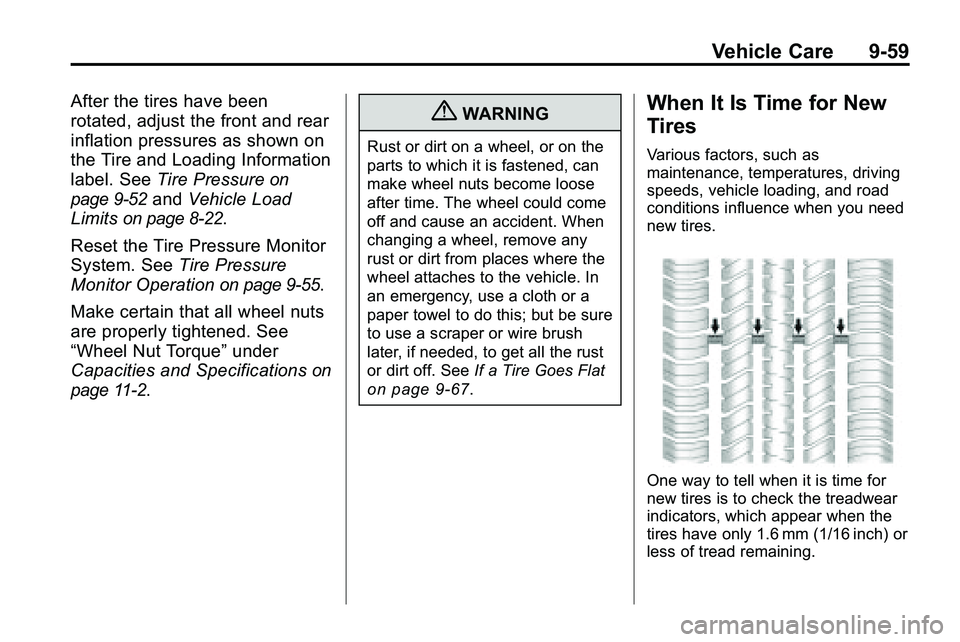
One way to tell when it is time for
new tires is to check the treadwear
indicators, which appear when the
tires have only 1.6 mm (1/16 inch) or
less of tread remaining.
Page 368 of 410
10-2 Service and Maintenance
.Are driven off-road in the
recommended manner. See
Off-Road Driving on page 8‑7.
.Use the recommended fuel.
SeeRecommended Fuelon
page 8‑54.
{WARNING
Performing maintenance work can
be dangerous. Some jobs can
cause serious injury. Perform
maintenance work only if you
have the required know-how and
the proper tools and equipment.
If in doubt, see your dealer/
retailer to have a qualified
technician do the work. See
Doing Your Own Service Work
on
page 9‑4
. At your dealer/retailer, you can be
certain that you will receive the
highest level of service available.
Your dealer/retailer has specially
trained service technicians, uses
genuine replacement parts, as well
as, up to date tools and equipment
to ensure fast and accurate
diagnostics.
The proper replacement parts,
fluids, and lubricants to use are
listed in
Recommended Fluids and
Lubricants
on page 10‑7and
Maintenance Replacement Partson
page 10‑9. We recommend the use
of genuine parts from your dealer/
retailer.
Rotation of New Tires
To maintain ride, handling, and
performance of the vehicle, it is
important that the first rotation
service for new tires be performed
when they have 8 000 to 13 000 km
(5,000 to 8,000 miles). See Tire
Rotation on page 9‑58.
Scheduled
Maintenance
When the Change Engine Oil
Soon Message Displays
Change engine oil and filter. See
Engine Oilon page 9‑10. An
Emission Control Service.
When the Change Engine Oil
Soon message displays, service
is required for the vehicle as
soon as possible, within the next
1 000 km/600 miles. If driving under
the best conditions, the engine oil
life system might not indicate the
need for vehicle service for more
than a year. The engine oil and filter
must be changed at least once a
year and the oil life system must
be reset. Your dealer/retailer has
trained service technicians who
will perform this work and reset
the system. If the engine oil life