air condition GMC TERRAIN 2011 User Guide
[x] Cancel search | Manufacturer: GMC, Model Year: 2011, Model line: TERRAIN, Model: GMC TERRAIN 2011Pages: 426, PDF Size: 5.58 MB
Page 143 of 426

Black plate (25,1)GMC Terrain Owner Manual - 2011
Instruments and Controls 5-25
– – –
Three dashes will be displayed if the
compass needs service. See your
dealer for service.
Cruise Control Messages
APPLY BRAKE BEFORE
CRUISE
If this message displays when
attempting to activate cruise control,
apply the brake pedal and try again.
CRUISE SET TO XXX
This message displays when the
cruise control is set and shows the
speed it was set to. SeeCruise
Control on page 9‑42 for more
information.
Door Ajar Messages
DOOR OPEN
A door open symbol will be
displayed on the DIC showing
which door is open. If the vehicle
has been shifted out of P (Park), a DOOR OPEN message will also
be displayed. Close the door
completely.
MANUALLY CLOSE THE
POWER LIFTGATE
This message will display if the
power liftgate encounters multiple
obstacles on the same power cycle.
After removing the obstructions, the
liftgate will resume normal power
operation.
REAR ACCESS OPEN
This message will display along with
a symbol when the liftgate is open.
Close the liftgate completely.
Engine Cooling System
Messages
A/C OFF DUE TO HIGH
ENGINE TEMP
This message displays when
the engine coolant becomes
hotter than the normal operating
temperature. To avoid added strain
on a hot engine, the air conditioningcompressor automatically turns off.
When the coolant temperature
returns to normal, the air
conditioning compressor turns
back on. You can continue to drive
the vehicle.
If this message continues to appear,
have the system repaired by your
dealer as soon as possible to avoid
damage to the engine.
COOLANT LEVEL LOW ADD
COOLANT
This message will display if the
coolant is low. See
Engine Coolant
on page 10‑17.
ENGINE
OVERHEATED —IDLE
ENGINE
This message displays when the
engine coolant temperature is too
hot. Stop and allow the vehicle to
idle until it cools down.
Page 146 of 426

Black plate (28,1)GMC Terrain Owner Manual - 2011
5-28 Instruments and Controls
SERVICE STABILITRAK
This message displays if there is a
problem with the StabiliTrak system.
StabiliTrak
®System on page 9‑41.
STABILITRAK OFF
This message displays when the
StabiliTrak system is turned off. See
StabiliTrak
®System on page 9‑41
for more information.
TRACTION CONTROL OFF
This message displays when the
Traction Control System (TCS) is
turned off. Adjust your driving
accordingly.
TRACTION CONTROL ON
This message displays when the
Traction Control System (TCS) is
first turned on. See Traction Control
System (TCS) on page 9‑39 for
more information.
Airbag System Messages
SERVICE AIRBAG
This message displays if there is a
problem with the airbag system.
Take the vehicle to your dealer for
service.
Safety Belt Messages
BUCKLE SEATBELT
This message displays as a
reminder when the safety belt is
not buckled.
Anti-Theft Alarm System
Messages
THEFT ATTEMPTED
This message displays if the vehicle
detects a tamper condition.
Service Vehicle Messages
SERVICE AC SYSTEM
This message is displayed if there is
a problem with the air conditioning
system. Take the vehicle to your
dealer for service.
SERVICE POWER STEERING
This message is displayed if there is
a problem with the power steering
system. Take the vehicle to your
dealer for service.
SERVICE VEHICLE SOON
This message is displayed if there is
a problem with the vehicle. Take the
vehicle to your dealer for service.
Tire Messages
SERVICE TIRE MONITOR
SYSTEM
This message displays if there is
a problem with the Tire Pressure
Monitor System (TPMS). See Tire
Pressure Monitor Operation on
page 10‑54 for more information.
Page 147 of 426
Black plate (29,1)GMC Terrain Owner Manual - 2011
Instruments and Controls 5-29
TIRE LEARNING ACTIVE
This message displays when the
system is learning new tires. See
Tire Pressure Monitor Operation on
page 10‑54for more information.
TIRE LOW ADD AIR TO TIRE
This message displays when the
pressure in one or more of the tires
is low.
This message also displays LEFT
FRONT, RIGHT FRONT, LEFT
REAR, or RIGHT REAR to indicate
the location of the low tire.
The low tire pressure warning
light will also come on. See Tire
Pressure Light on page 5‑17.
If a tire pressure message appears
on the DIC, stop as soon as you
can. Inflate the tires by adding air
until the tire pressure is equal to
the values shown on the Tire and
Loading Information label. See Tires
on page 10‑45, Vehicle Load Limits
on page 9‑21, and Tire Pressure on
page 10‑51. You can receive more than one tire
pressure message at a time. The
DIC also shows the tire pressure
values. See
Driver Information
Center (DIC) on page 5‑20.
Transmission Messages
SERVICE TRANSMISSION
This message displays if there is a
problem with the transmission. See
your dealer.
SHIFT TO PARK
This message displays when the
transmission needs to be shifted to
P (Park). This may appear when
attempting to remove the key if the
vehicle is not in P (Park).
TRANSMISSION HOT —IDLE
ENGINE
This message displays and a chime
sounds if the transmission fluid in
the vehicle gets hot. Driving with the
transmission fluid temperature high
can cause damage to the vehicle.
Stop the vehicle and let it idle to allow the transmission to cool. This
message clears when the fluid
temperature reaches a safe level.
Vehicle Reminder
Messages
ICE POSSIBLE DRIVE
WITH CARE
This message is displayed when ice
conditions are possible.
TURN WIPER CONTROL TO
INTERMITTENT FIRST
This message is displayed when
attempting to adjust the intermittent
wiper speed without intermittent
selected on the wiper control. See
Windshield Wiper/Washer on
page 5‑3.
Page 148 of 426

Black plate (30,1)GMC Terrain Owner Manual - 2011
5-30 Instruments and Controls
Vehicle
Personalization
The audio system controls are
used to access the personalization
menus for customizing vehicle
features.
CONFIG (Configuration):Press
to access the Configuration
Settings Menu.
MENU/SEL Knob: Press the
center of this knob to enter the
menus and select menu items.
Turn the knob to scroll through the
menus.
}BACK: Press to exit or move
backwards in a menu.
Entering the Personalization
Menus
1. Turn the infotainment system on and press the CONFIG button
to access the Configuration
Settings menu.
2. Turn the MENU/SEL knob to highlight Vehicle Settings. 3. Press the center of the MENU/
SEL knob to select the Vehicle
Settings menu.
The following list of menu items will
be available:
.Climate and Air Quality
.Comfort and Convenience
.Collision/Detection Systems
.Languages
.Lighting
.Power Door Locks
.Remote Lock/Unlock/Start
.Return to Factory Settings
Turn the MENU/SEL knob to
highlight the menu. Press the knob
to select it. Each of the menus is
detailed in the following information.
All of the menus may not be
available. Only those tied to the
features on your vehicle will be
shown.
Climate and Air Quality
Select the Climate and Air Quality
menu and the following will be
displayed:
.Auto Fan Speed
.Air Conditioning Mode
.Remote Start Auto Heat Seats
Auto Fan Speed
This selection is available on
vehicles with the Automatic Climate
Control System. Choose from the
following blower speed settings:
High: Increased speed.
Low: Reduced speed.
Normal: Moderate speed.
Press the MENU/SEL knob when
Auto Fan Speed is highlighted.
Turn the knob to highlight “High,”
“Normal,” or“Low.” Press the knob
to confirm the selection and go back
to the last menu.
Page 149 of 426

Black plate (31,1)GMC Terrain Owner Manual - 2011
Instruments and Controls 5-31
Air Conditioning Mode
This will allow you to select whether
or not the air conditioning comes
on automatically the next time the
vehicle is started.“On”means that
the air conditioning will be on at
start up, regardless of whether it
was on or off the last time the
vehicle was turned off. “Off”means
the air conditioning will be off at
the next start up, regardless of
whether it was on or off the last
time the vehicle was turned off.
“Last Setting” means that when
the vehicle is started, the air
conditioning will resume whichever
setting it was at the last time the
vehicle was turned off.
Press the MENU/SEL knob
when Air Conditioning Mode is
highlighted. Turn the knob to
highlight “On,” “Off,” or“Last
Setting.” Press the knob to confirm
the selection and go back to the
last menu. Remote Start Auto Heat Seats
When on, this feature will turn the
heated seats on when using remote
start on cold days.
Press the MENU/SEL knob when
“Remote Start Auto Heat Seats”
is
highlighted to toggle between “On”
or “Off.” Press
}BACK to confirm
the selection and go back to the
last menu.
Comfort and Convenience
Select the Comfort and
Convenience menu and the
following will be displayed:
.Easy Exit Driver Seat
.Chime Volume
.Reverse Tilt Mirror
Easy Exit Driver Seat
When on, this feature will move the
driver seat rearward upon turning
the ignition off and the driver door
opening. This may be performed to
make it easier to exit the vehicle.
See the “Easy Exit Driver Seat” information under
Power Seat
Adjustment on page 3‑3 for more
information.
This allows you to turn the easy exit
seat feature on or off.
Press the MENU/SEL knob
when “Easy Exit Driver Seat” is
highlighted. Turn the knob to
select “On”or“Off.” Press the knob
to confirm and go back to the
last menu.
Chime Volume
This allows the selection of the
chime volume level.
Press the MENU/SEL knob when
“Chime Volume” is highlighted.
Turn the knob to select “Normal”or
“High.” Press the knob to confirm
and go back to the last menu.
Reverse Tilt Mirror
When on, both the driver and
passenger mirrors will tilt
downward when vehicle is shifted
to R (Reverse) to improve visibility
of the ground near the rear wheels.
Page 221 of 426
Black plate (1,1)GMC Terrain Owner Manual - 2011
Climate Controls 8-1
Climate Controls
Climate Control Systems
Climate Control Systems . . . . . . 8-1
Automatic Climate ControlSystem . . . . . . . . . . . . . . . . . . . . . . 8-3
Air Vents
Air Vents . . . . . . . . . . . . . . . . . . . . . . 8-5
Maintenance
Passenger Compartment AirFilter . . . . . . . . . . . . . . . . . . . . . . . . . 8-6
Climate Control Systems
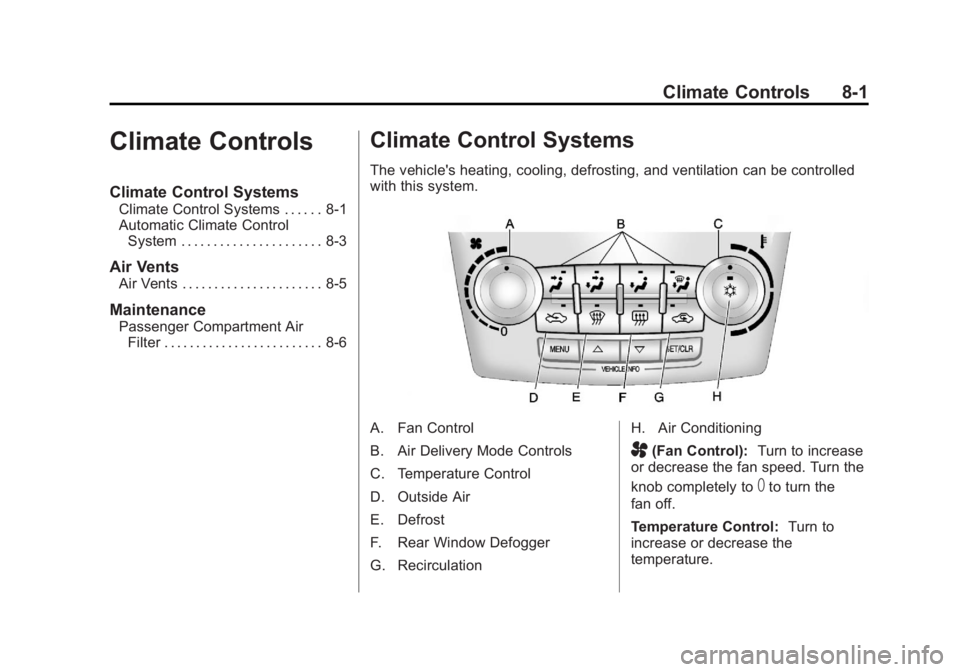
The vehicle's heating, cooling, defrosting, and ventilation can be controlled
with this system.
A. Fan Control
B. Air Delivery Mode Controls
C. Temperature Control
D. Outside Air
E. Defrost
F. Rear Window Defogger
G. Recirculation H. Air Conditioning
A(Fan Control):
Turn to increase
or decrease the fan speed. Turn the
knob completely to
Tto turn the
fan off.
Temperature Control: Turn to
increase or decrease the
temperature.
Page 222 of 426

Black plate (2,1)GMC Terrain Owner Manual - 2011
8-2 Climate Controls
Air Delivery Mode Control:To
change the current mode, select
one of the following:
F (Vent): Air is directed to the
instrument panel outlets.
* (Bi-Level): Air is directed to the
instrument panel outlets and the
floor outlets.
7 (Floor): Air is directed to the
floor outlets.
W(Defog): Clears the windows of
fog or moisture. Air is directed to the
windshield and floor outlets.
0(Defrost): Clears the
windshield of fog or frost more
quickly. Air is directed to the
windshield and side window outlets.
For best results, clear all snow and
ice from the windshield before
defrosting.
Do not drive the vehicle until all the
windows are clear.
Air Conditioning
#(Air Conditioning): Press to
turn the air conditioning on or off.
If the fan is turned off or the outside
temperature falls below freezing, the
air conditioning will not work.
h(Recirculation): Press to turn
on the recirculation. An indicator
light comes on. Air is recirculated
inside the vehicle. It helps to quickly
cool the air inside the vehicle or
prevent outside air and odors from
entering. The air conditioning may
come on under certain conditions.
%(Outside Air): Press to turn
on the outside air. An indicator light
comes on. Outside air is circulated
throughout the vehicle.
Rear Window Defogger
<(Rear Defogger): Press to turn
the rear window defogger on or off.
The rear window defogger turns off
after about 10 minutes. It can also
be turned off by turning the ignition
to ACC/ACCESSORY or LOCK/
OFF. If turned on again, it runs
for about five minutes before
turning off.
Do not drive the vehicle until all the
windows are clear.
Notice: Do not use a razor blade
or sharp object to clear the inside
rear window. Do not adhere
anything to the defogger grid
lines in the rear glass. These
actions may damage the rear
defogger. Repairs would not be
covered by your warranty.
Page 223 of 426

Black plate (3,1)GMC Terrain Owner Manual - 2011
Climate Controls 8-3
Automatic Climate Control System
The vehicle's heating, cooling, defrosting, and ventilation can be controlled
with this system.
A. Fan Control
B. AUTO (Automatic Operation)
C. Air Delivery Mode Controls
D. Defrost
E. Recirculation
F. Temperature ControlG. Power
H. Driver and Passenger Heated
Seats
I. Rear Window Defogger
J. Air Conditioning Automatic Operation
The system automatically controls
the fan speed, air delivery, air
conditioning, and recirculation to
heat or cool the vehicle to the
selected temperature.
When the AUTO indicator light is
on, the system is in full automatic
operation.
To place the system in
automatic mode:
1. Press AUTO.
2. Set the temperature. Allow the
system time to stabilize. Then
adjust the temperature as
needed.
Manual Operation
O(Power): Press to turn the
climate control system on or off.
A(Fan Control): Turn to
increase or decrease the fan
speed. Adjusting the fan speed
while in automatic mode places
the fan under manual control.
Page 224 of 426
Black plate (4,1)GMC Terrain Owner Manual - 2011
8-4 Climate Controls
The AUTO indicator light turns off.
The air delivery mode remains in
automatic control.
Temperature Control:Turn to
increase or decrease the
temperature inside the vehicle.
H/G(Air Delivery Mode
Control): Press mode up or mode
down to cycle through the different
air delivery modes. The current
mode is shown on the display.
Select from the following:
F (Vent): Air is directed to the
instrument panel outlets.
* (Bi-Level): Air is directed to the
instrument panel outlets and the
floor outlets.
7 (Floor): Air is directed to the
floor outlets.
W(Defog): Clears the windows of
fog or moisture. Air is directed to the
windshield and floor outlets.
0(Defrost): Clears the
windshield of fog or frost more
quickly. Air is directed to the
windshield and side window outlets.
Selecting defrost disables the
automatic mode.
For best results, clear all snow and
ice from the windshield before
defrosting.
Do not drive the vehicle until all the
windows are clear.
Air Conditioning
#(Air Conditioning): Press to
turn the air conditioning on or off.
If the fan is turned off or the outside
temperature falls below freezing, the
air conditioning will not work. When
in AUTO, the air conditioning will
come on automatically as needed.
h(Recirculation): Press to
turn on the recirculation. Press to
alternate between recirculation and
outside air, if the vehicle does not
have a separate outside air button. The indicator light turns on when
recirculation is selected. Air is
recirculated inside the vehicle.
It helps quickly cool the air inside
the vehicle or prevent outside air
and odors from entering.
%(Outside Air, If Equipped):
Press to turn on the outside air. An
indicator light comes on. Outside air
is circulated throughout the vehicle.
Rear Window Defogger
<(Rear Defogger): Press to turn
the rear window defogger on or off.
The rear window defogger turns off
after about 10 minutes. It can also
be turned off by turning the ignition
to ACC/ACCESSORY or LOCK/
OFF. If turned on again, it runs
for about five minutes before
turning off.
Do not drive the vehicle until all the
windows are clear.
Page 230 of 426
Black plate (4,1)GMC Terrain Owner Manual - 2011
9-4 Driving and Operating
And, of course, actual stopping
distances vary greatly with the
surface of the road, whether it is
pavement or gravel; the condition
of the road, whether it is wet, dry,
or icy; tire tread; the condition of the
brakes; the weight of the vehicle;
and the amount of brake force
applied.
Avoid needless heavy
braking. Some people drive in
spurts—heavy acceleration
followed by heavy braking —rather
than keeping pace with traffic. This
is a mistake. The brakes might not
have time to cool between hard
stops. The brakes will wear out
much faster with a lot of heavy
braking. Keeping pace with the
traffic and allowing realistic
following distances eliminates
a lot of unnecessary braking.
That means better braking and
longer brake life. If the engine ever stops while the
vehicle is being driven, brake
normally but do not pump the
brakes. If the brakes are pumped,
the pedal could get harder to push
down. If the engine stops, there will
still be some power brake assist but
it will be used when the brake is
applied. Once the power assist is
used up, it can take longer to stop
and the brake pedal will be harder
to push.
Adding non‐dealer accessories can
affect vehicle performance. See
Accessories and Modifications on
page 10‑3.
Steering
Electric Power Steering
(2.4L L4 Engine)
If the engine stalls while driving, the
power steering assist system will
continue to operate until you are
able to stop the vehicle. If power
steering assist is lost because theelectric power steering system is
not functioning, the vehicle can be
steered but it will take more effort.
If you turn the steering wheel in
either direction several times until
it stops, or hold the steering wheel
in the stopped position for an
extended amount of time, you may
notice a reduced amount of power
steering assist. The normal amount
of power steering assist should
return shortly after a few normal
steering movements.
The electric power steering
system does not require regular
maintenance. If you suspect
steering system problems, such as
abnormally high steering effort for a
prolonged period of time, contact
your dealer for service repairs.