clock GMC TERRAIN 2011 User Guide
[x] Cancel search | Manufacturer: GMC, Model Year: 2011, Model line: TERRAIN, Model: GMC TERRAIN 2011Pages: 426, PDF Size: 5.58 MB
Page 310 of 426
Black plate (20,1)GMC Terrain Owner Manual - 2011
10-20 Vehicle Care
{WARNING
You can be burned if you spill
coolant on hot engine parts.
Coolant contains ethylene glycol
and it will burn if the engine parts
are hot enough. Do not spill
coolant on a hot engine.
Notice: In cold weather, water
can freeze and crack the engine,
radiator, heater core and other
parts. Use the recommended
coolant and the proper coolant
mixture.
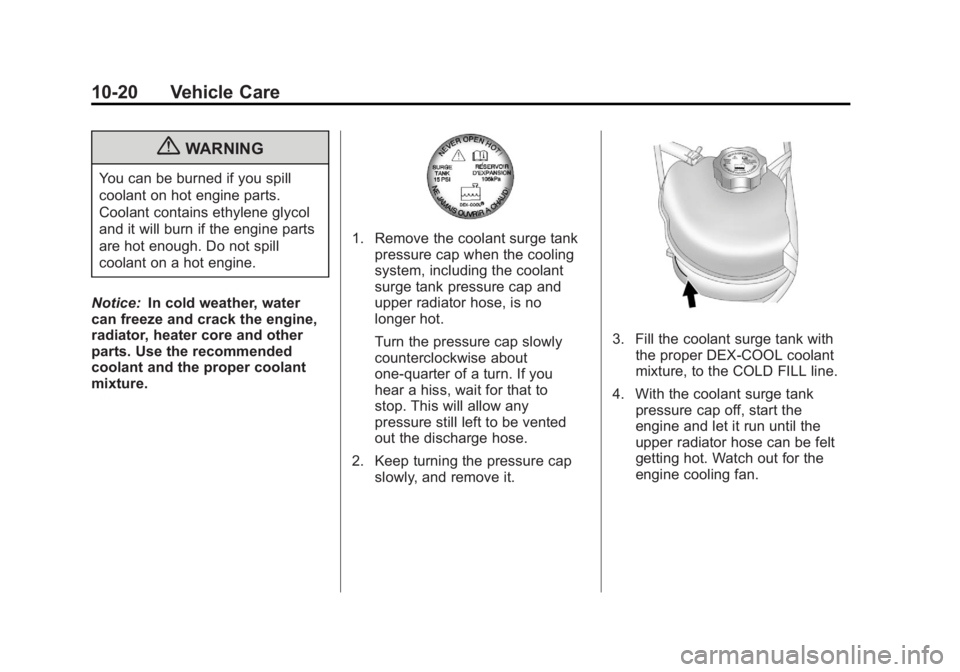
1. Remove the coolant surge tank pressure cap when the cooling
system, including the coolant
surge tank pressure cap and
upper radiator hose, is no
longer hot.
Turn the pressure cap slowly
counterclockwise about
one-quarter of a turn. If you
hear a hiss, wait for that to
stop. This will allow any
pressure still left to be vented
out the discharge hose.
2. Keep turning the pressure cap slowly, and remove it.
3. Fill the coolant surge tank withthe proper DEX-COOL coolant
mixture, to the COLD FILL line.
4. With the coolant surge tank pressure cap off, start the
engine and let it run until the
upper radiator hose can be felt
getting hot. Watch out for the
engine cooling fan.
Page 323 of 426

Black plate (33,1)GMC Terrain Owner Manual - 2011
Vehicle Care 10-33
7. Locate the vertical headlampaiming screws, which are under
the hood near each headlamp
assembly.
8. Turn the vertical aiming screw until the headlamp beam is
aimed to the horizontal tape
line. Turn it clockwise or
counterclockwise to raise or
lower the angle of the beam.
9. Make sure that the light from the
headlamp is positioned at the
bottom edge of the horizontal
tape line. The lamp on the
left (A) shows the correct
headlamp aim. The lamp on the
right (B) shows the incorrect
headlamp aim.
10. Repeat Steps 7 through 9 for the opposite headlamp.
Bulb Replacement
For the proper type of replacement
bulbs, see Replacement Bulbs on
page 10‑38.
For any bulb changing procedure
not listed in this section, contact
your dealer.
Page 324 of 426

Black plate (34,1)GMC Terrain Owner Manual - 2011
10-34 Vehicle Care
Headlamps, Front Turn
Signal, Sidemarker, and
Parking Lamps
A. Low-Beam Headlamp
B. High-Beam headlamp
C. Side Marker Lamp
D. Park/Turn Signal Lamp
To replace one of these bulbs:
1. Turn the tire to reach the accessport cap located in the front of
wheel well cover.
A. Screw
B. Access Port Cap
2. Remove the screw (A) and turn the access port cap (B)
counterclockwise to remove.
3. If replacing a headlamp bulb, remove the dust cover cap from
the back of the headlamp
housing by turning the cap
counterclockwise. 4. Turn the bulb socket
counterclockwise to remove it
from the lamp assembly.
5. Remove the bulb from the socket or disconnect the bulb
assembly from the harness
connector.
6. Install the new bulb.
7. Reinstall the bulb socket to the lamp assembly, turning
clockwise.
8. Replace the dust cover cap on headlamps.
9. Reinstall the wheel well cover access port cap and secure by
installing the screw.
Page 325 of 426
Black plate (35,1)GMC Terrain Owner Manual - 2011
Vehicle Care 10-35
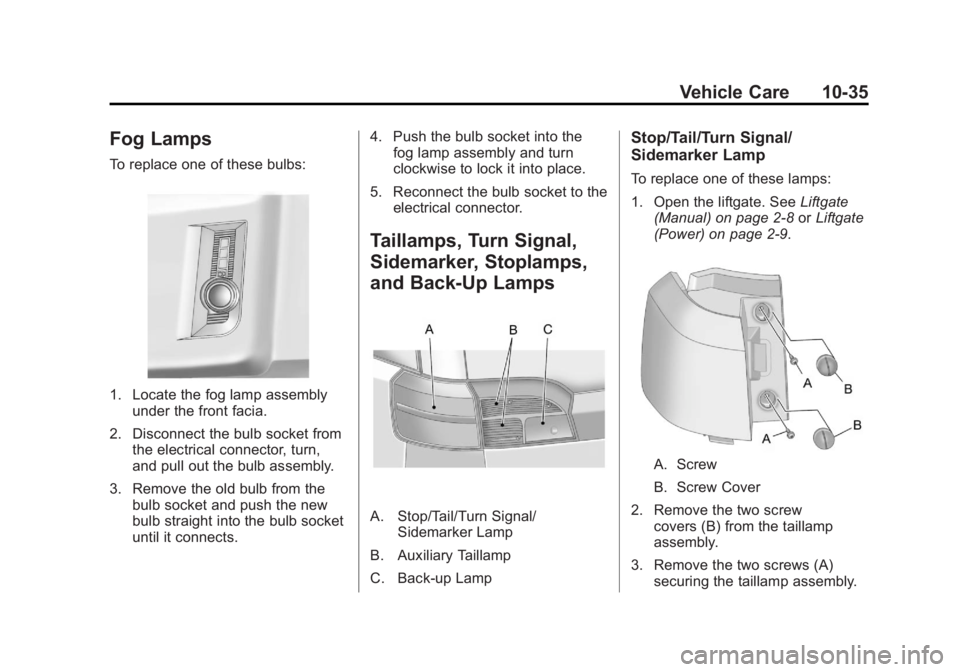
Fog Lamps
To replace one of these bulbs:
1. Locate the fog lamp assemblyunder the front facia.
2. Disconnect the bulb socket from the electrical connector, turn,
and pull out the bulb assembly.
3. Remove the old bulb from the bulb socket and push the new
bulb straight into the bulb socket
until it connects. 4. Push the bulb socket into the
fog lamp assembly and turn
clockwise to lock it into place.
5. Reconnect the bulb socket to the electrical connector.
Taillamps, Turn Signal,
Sidemarker, Stoplamps,
and Back-Up Lamps
A. Stop/Tail/Turn Signal/ Sidemarker Lamp
B. Auxiliary Taillamp
C. Back-up Lamp
Stop/Tail/Turn Signal/
Sidemarker Lamp
To replace one of these lamps:
1. Open the liftgate. See Liftgate
(Manual) on page 2‑8 orLiftgate
(Power) on page 2‑9.
A. Screw
B. Screw Cover
2. Remove the two screw covers (B) from the taillamp
assembly.
3. Remove the two screws (A) securing the taillamp assembly.
Page 326 of 426
Black plate (36,1)GMC Terrain Owner Manual - 2011
10-36 Vehicle Care
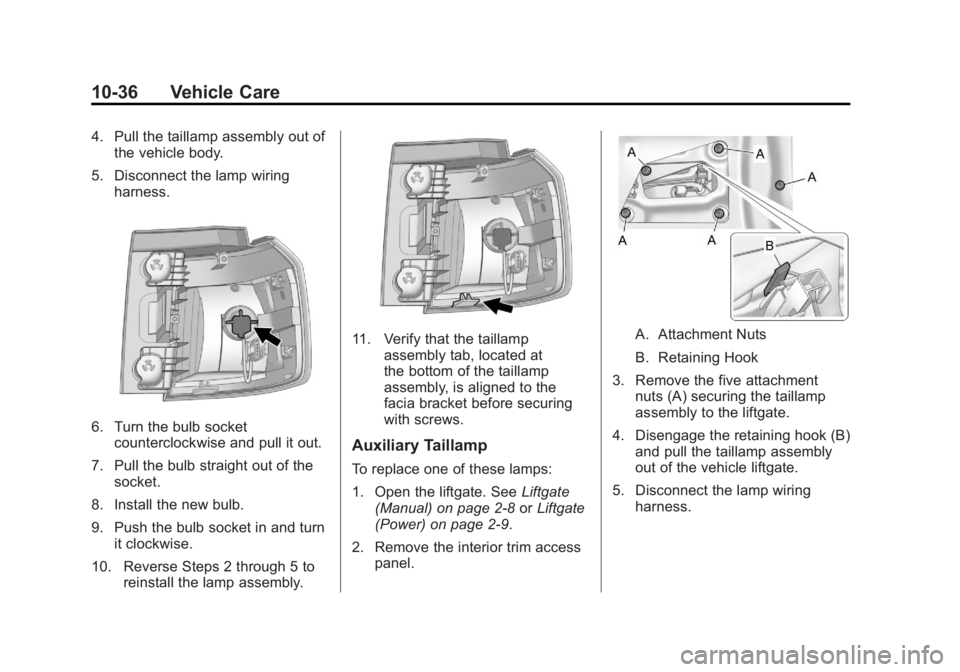
4. Pull the taillamp assembly out ofthe vehicle body.
5. Disconnect the lamp wiring harness.
6. Turn the bulb socketcounterclockwise and pull it out.
7. Pull the bulb straight out of the socket.
8. Install the new bulb.
9. Push the bulb socket in and turn it clockwise.
10. Reverse Steps 2 through 5 to reinstall the lamp assembly.
11. Verify that the taillampassembly tab, located at
the bottom of the taillamp
assembly, is aligned to the
facia bracket before securing
with screws.
Auxiliary Taillamp
To replace one of these lamps:
1. Open the liftgate. See Liftgate
(Manual) on page 2‑8 orLiftgate
(Power) on page 2‑9.
2. Remove the interior trim access panel.
A. Attachment Nuts
B. Retaining Hook
3. Remove the five attachment nuts (A) securing the taillamp
assembly to the liftgate.
4. Disengage the retaining hook (B) and pull the taillamp assembly
out of the vehicle liftgate.
5. Disconnect the lamp wiring harness.
Page 327 of 426
Black plate (37,1)GMC Terrain Owner Manual - 2011
Vehicle Care 10-37
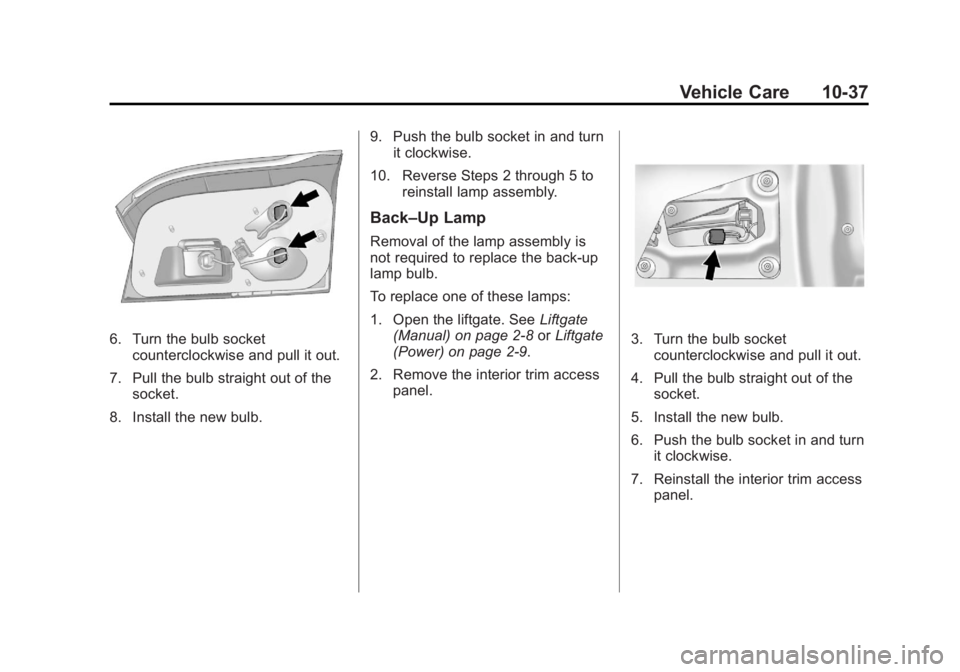
6. Turn the bulb socketcounterclockwise and pull it out.
7. Pull the bulb straight out of the socket.
8. Install the new bulb. 9. Push the bulb socket in and turn
it clockwise.
10. Reverse Steps 2 through 5 to reinstall lamp assembly.
Back–Up Lamp
Removal of the lamp assembly is
not required to replace the back-up
lamp bulb.
To replace one of these lamps:
1. Open the liftgate. See Liftgate
(Manual) on page 2‑8 orLiftgate
(Power) on page 2‑9.
2. Remove the interior trim access panel.
3. Turn the bulb socketcounterclockwise and pull it out.
4. Pull the bulb straight out of the socket.
5. Install the new bulb.
6. Push the bulb socket in and turn it clockwise.
7. Reinstall the interior trim access panel.
Page 328 of 426

Black plate (38,1)GMC Terrain Owner Manual - 2011
10-38 Vehicle Care
License Plate Lamp
To replace one of these bulbs:
1. Open the liftgate partway. SeeLiftgate (Manual) on page 2‑8 or
Liftgate (Power) on page 2‑9.
Passenger Side Shown, Driver
Side Similar
2. Push the left end of the lamp assembly toward the right.
3. Pull the lamp assembly down to remove it from the liftgate.
A. Bulb Socket
B. Bulb
C. Lamp Assembly
4. Turn the bulb socket (A) counterclockwise to remove it
from the lamp assembly (C).
5. Pull the bulb (B) straight out of the bulb socket. 6. Push the replacement bulb
straight into the bulb socket and
turn the bulb socket clockwise to
install into lamp assembly.
7. Turn the lamp assembly into the liftgate engaging the clip side
first.
8. Push on the lamp side opposite the clip until the lamp assembly
snaps into place.Replacement Bulbs
Exterior Lamp Bulb
Number
Auxiliary Taillamp 161LL
Back-Up Lamp 921LL
Fog Lamp H11
Headlamp
High Beam HB3
Headlamp
Low Beam H11
Page 357 of 426
Black plate (67,1)GMC Terrain Owner Manual - 2011
Vehicle Care 10-67
Tire Changing
Removing the Spare Tire and
Tools
To access the spare tire and tools:
1. Open the liftgate. SeeLiftgate
(Manual) on page 2‑8 orLiftgate
(Power) on page 2‑9.
2. Lift the load floor up.
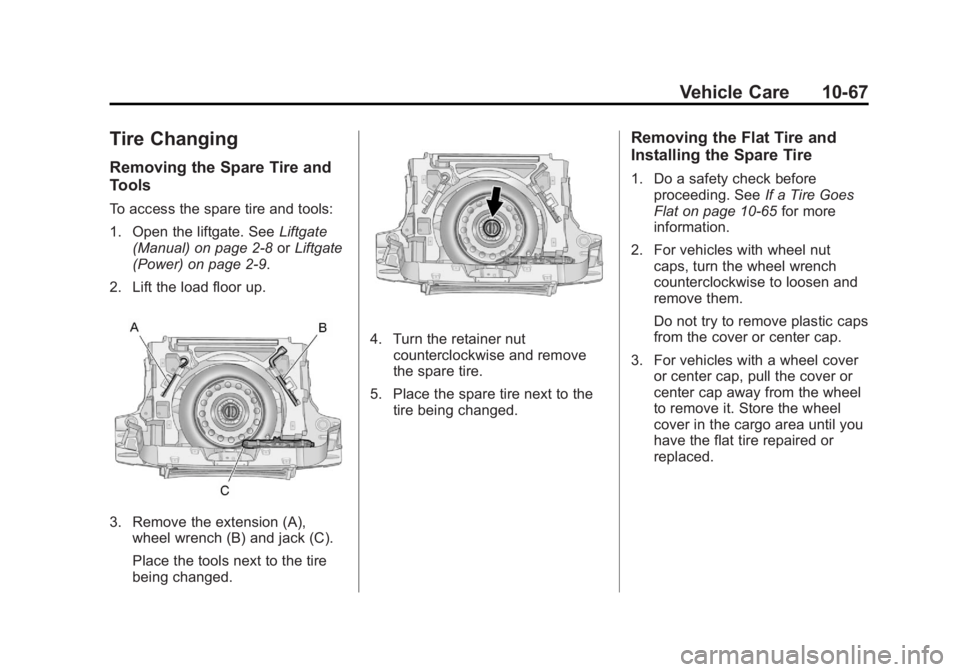
3. Remove the extension (A), wheel wrench (B) and jack (C).
Place the tools next to the tire
being changed.
4. Turn the retainer nutcounterclockwise and remove
the spare tire.
5. Place the spare tire next to the tire being changed.
Removing the Flat Tire and
Installing the Spare Tire
1. Do a safety check beforeproceeding. See If a Tire Goes
Flat on page 10‑65 for more
information.
2. For vehicles with wheel nut caps, turn the wheel wrench
counterclockwise to loosen and
remove them.
Do not try to remove plastic caps
from the cover or center cap.
3. For vehicles with a wheel cover or center cap, pull the cover or
center cap away from the wheel
to remove it. Store the wheel
cover in the cargo area until you
have the flat tire repaired or
replaced.
Page 358 of 426
Black plate (68,1)GMC Terrain Owner Manual - 2011
10-68 Vehicle Care
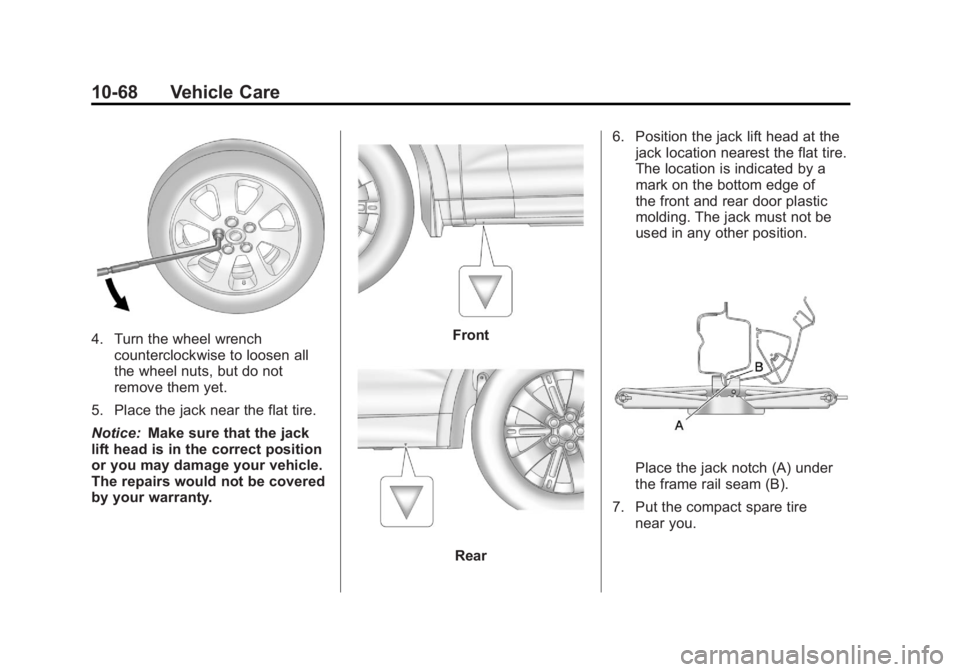
4. Turn the wheel wrenchcounterclockwise to loosen all
the wheel nuts, but do not
remove them yet.
5. Place the jack near the flat tire.
Notice: Make sure that the jack
lift head is in the correct position
or you may damage your vehicle.
The repairs would not be covered
by your warranty.Front
Rear 6. Position the jack lift head at the
jack location nearest the flat tire.
The location is indicated by a
mark on the bottom edge of
the front and rear door plastic
molding. The jack must not be
used in any other position.
Place the jack notch (A) under
the frame rail seam (B).
7. Put the compact spare tire near you.
Page 360 of 426
Black plate (70,1)GMC Terrain Owner Manual - 2011
10-70 Vehicle Care
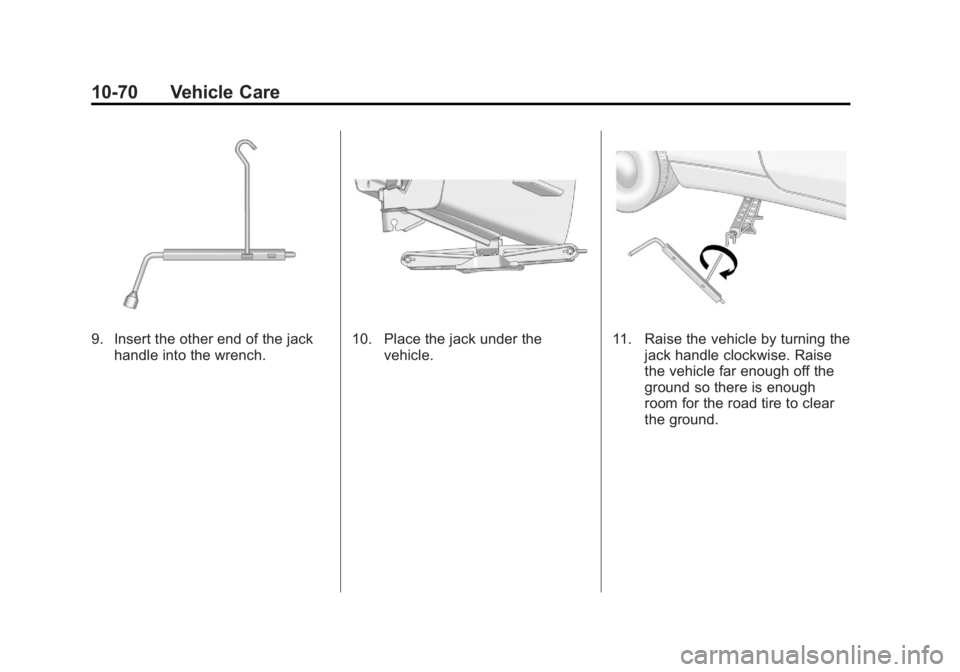
9. Insert the other end of the jackhandle into the wrench.10. Place the jack under the vehicle.11. Raise the vehicle by turning thejack handle clockwise. Raise
the vehicle far enough off the
ground so there is enough
room for the road tire to clear
the ground.