remote control GMC TERRAIN 2011 Owner's Guide
[x] Cancel search | Manufacturer: GMC, Model Year: 2011, Model line: TERRAIN, Model: GMC TERRAIN 2011Pages: 426, PDF Size: 5.58 MB
Page 195 of 426

Black plate (37,1)GMC Terrain Owner Manual - 2011
Infotainment System 7-37
Audio Output
Audio from the DVD player or
auxiliary inputs can be heard
through the following:
.Wireless Headphones
.Vehicle Speakers
The RSE system transmits the
audio signal to the wireless
headphones if an audio signal is
available. See “Headphones” earlier
in this section for more information.
The front seat passengers are able
to listen to playback from the A/V
jacks through the vehicle speakers
by selecting Rear A/V as the source
on the radio.
Video Screens
The video screens are located in the
back of the driver and front
passenger seats.
To use the video screen:
1. Push the release button located on the seatback console.
2. Move the screen to the desired viewing position.
Push the video screen down into its
locked position when it is not in use.
The screen turns off automatically. Only the left RSE seatback console
contains the infrared transmitters
for the wireless headphones. They
may be visible as eight illuminated
LEDs. These LEDs are not on the
right video screen. Both seatback
consoles contain an infrared
receiver for the remote control.
They are located at the top of each
console.
Notice:
Avoid directly touching
the video screen, as damage may
occur. See “Cleaning the Video
Screen” later in this section for
more information.
Video Screen Input Jack
Each video screen is equipped
with a video input jack to allow
video cables to be connected
from an auxiliary device such as a
camcorder or a video game system.
This signal will override any video
provided by the RSE system; either
the DVD or auxiliary A/V jack
source. The RSE system must be
on for this input to operate.
Page 196 of 426
Black plate (38,1)GMC Terrain Owner Manual - 2011
7-38 Infotainment System
Remote Control
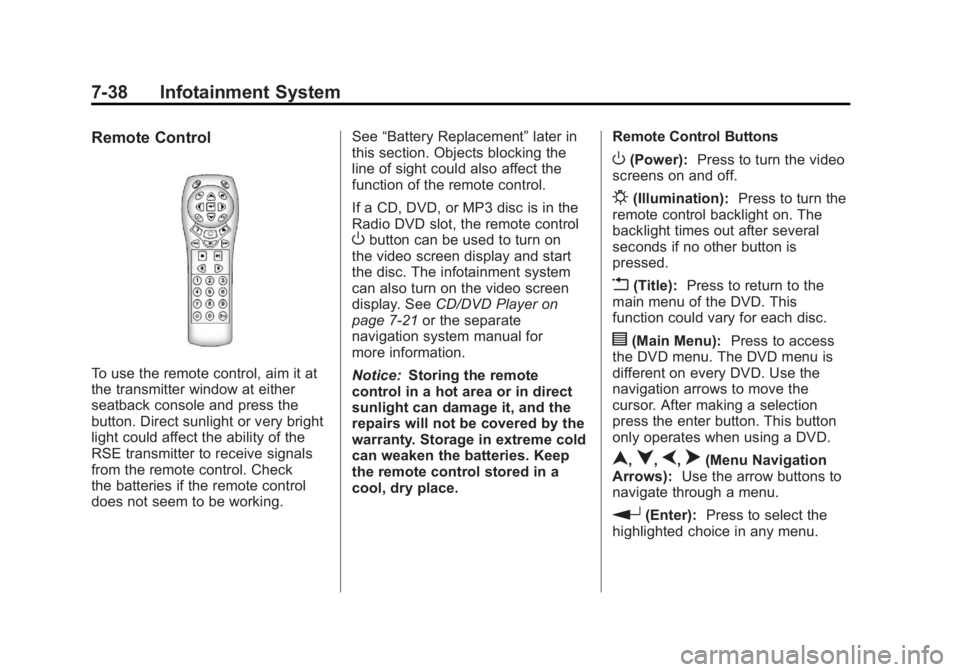
To use the remote control, aim it at
the transmitter window at either
seatback console and press the
button. Direct sunlight or very bright
light could affect the ability of the
RSE transmitter to receive signals
from the remote control. Check
the batteries if the remote control
does not seem to be working.See
“Battery Replacement” later in
this section. Objects blocking the
line of sight could also affect the
function of the remote control.
If a CD, DVD, or MP3 disc is in the
Radio DVD slot, the remote control
Obutton can be used to turn on
the video screen display and start
the disc. The infotainment system
can also turn on the video screen
display. See CD/DVD Player on
page 7‑21 or the separate
navigation system manual for
more information.
Notice: Storing the remote
control in a hot area or in direct
sunlight can damage it, and the
repairs will not be covered by the
warranty. Storage in extreme cold
can weaken the batteries. Keep
the remote control stored in a
cool, dry place. Remote Control Buttons
O(Power):
Press to turn the video
screens on and off.
P(Illumination): Press to turn the
remote control backlight on. The
backlight times out after several
seconds if no other button is
pressed.
v(Title): Press to return to the
main menu of the DVD. This
function could vary for each disc.
y(Main Menu): Press to access
the DVD menu. The DVD menu is
different on every DVD. Use the
navigation arrows to move the
cursor. After making a selection
press the enter button. This button
only operates when using a DVD.
n,q,p,o(Menu Navigation
Arrows): Use the arrow buttons to
navigate through a menu.
r(Enter): Press to select the
highlighted choice in any menu.
Page 198 of 426
Black plate (40,1)GMC Terrain Owner Manual - 2011
7-40 Infotainment System
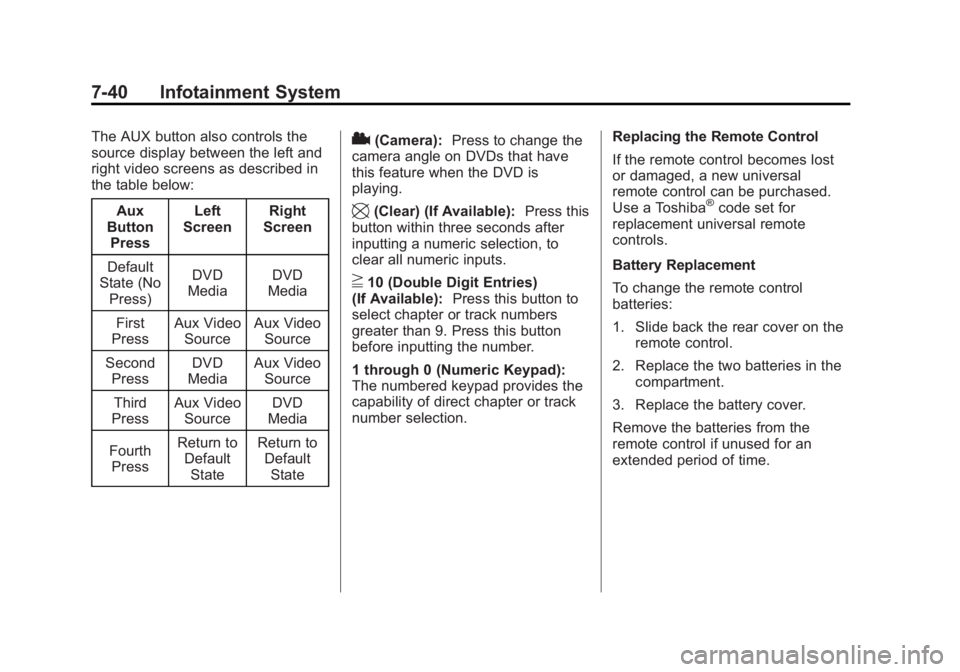
The AUX button also controls the
source display between the left and
right video screens as described in
the table below:Aux
Button
Press Left
Screen Right
Screen
Default
State (No
Press) DVD
Media DVD
Media
First
Press Aux Video
Source Aux Video
Source
Second Press DVD
Media Aux Video
Source
Third
Press Aux Video
Source DVD
Media
Fourth Press Return to
DefaultState Return to
DefaultState2(Camera): Press to change the
camera angle on DVDs that have
this feature when the DVD is
playing.
\(Clear) (If Available): Press this
button within three seconds after
inputting a numeric selection, to
clear all numeric inputs.
}10 (Double Digit Entries)
(If Available): Press this button to
select chapter or track numbers
greater than 9. Press this button
before inputting the number.
1 through 0 (Numeric Keypad):
The numbered keypad provides the
capability of direct chapter or track
number selection. Replacing the Remote Control
If the remote control becomes lost
or damaged, a new universal
remote control can be purchased.
Use a Toshiba
®code set for
replacement universal remote
controls.
Battery Replacement
To change the remote control
batteries:
1. Slide back the rear cover on the remote control.
2. Replace the two batteries in the compartment.
3. Replace the battery cover.
Remove the batteries from the
remote control if unused for an
extended period of time.
Page 199 of 426
Black plate (41,1)GMC Terrain Owner Manual - 2011
Infotainment System 7-41
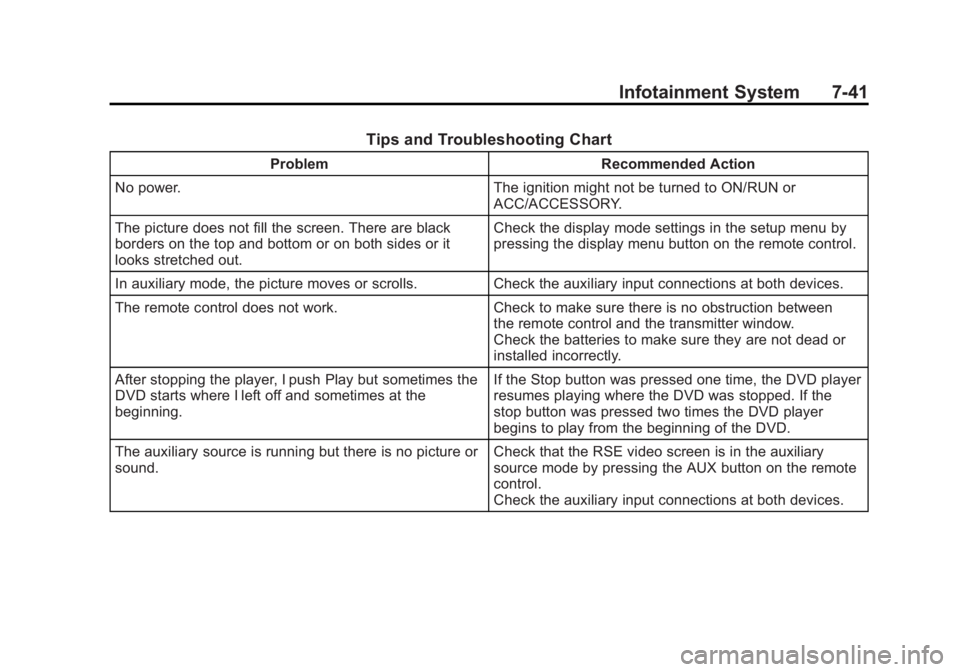
Tips and Troubleshooting Chart
ProblemRecommended Action
No power. The ignition might not be turned to ON/RUN or
ACC/ACCESSORY.
The picture does not fill the screen. There are black
borders on the top and bottom or on both sides or it
looks stretched out. Check the display mode settings in the setup menu by
pressing the display menu button on the remote control.
In auxiliary mode, the picture moves or scrolls. Check the auxiliary input connections at both devices.
The remote control does not work. Check to make sure there is no obstruction between
the remote control and the transmitter window.
Check the batteries to make sure they are not dead or
installed incorrectly.
After stopping the player, I push Play but sometimes the
DVD starts where I left off and sometimes at the
beginning. If the Stop button was pressed one time, the DVD player
resumes playing where the DVD was stopped. If the
stop button was pressed two times the DVD player
begins to play from the beginning of the DVD.
The auxiliary source is running but there is no picture or
sound. Check that the RSE video screen is in the auxiliary
source mode by pressing the AUX button on the remote
control.
Check the auxiliary input connections at both devices.
Page 200 of 426
Black plate (42,1)GMC Terrain Owner Manual - 2011
7-42 Infotainment System
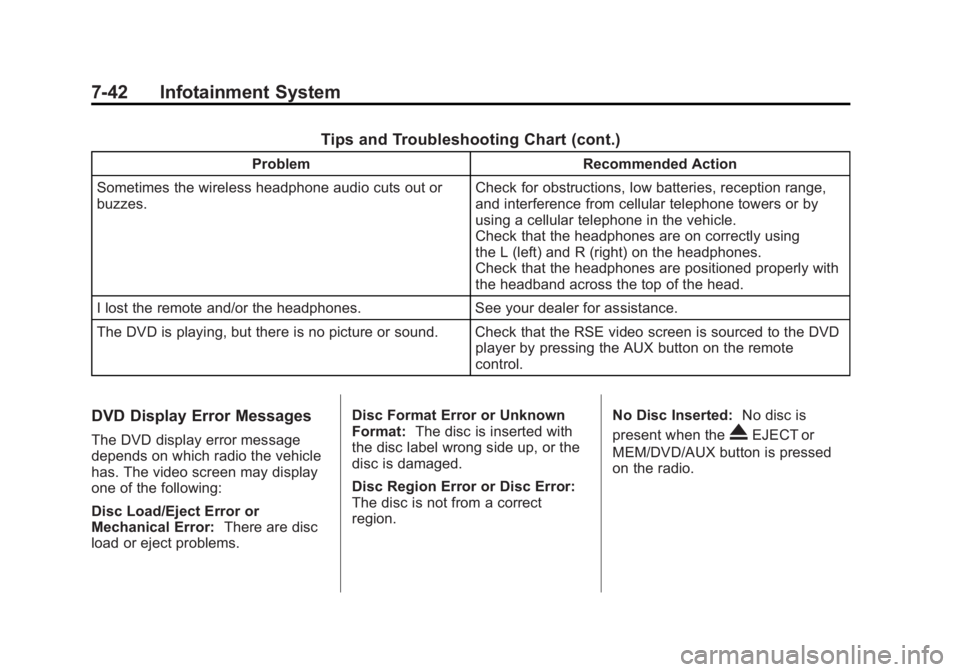
Tips and Troubleshooting Chart (cont.)
ProblemRecommended Action
Sometimes the wireless headphone audio cuts out or
buzzes. Check for obstructions, low batteries, reception range,
and interference from cellular telephone towers or by
using a cellular telephone in the vehicle.
Check that the headphones are on correctly using
the L (left) and R (right) on the headphones.
Check that the headphones are positioned properly with
the headband across the top of the head.
I lost the remote and/or the headphones. See your dealer for assistance.
The DVD is playing, but there is no picture or sound. Check that the RSE video screen is sourced to the DVD player by pressing the AUX button on the remote
control.
DVD Display Error Messages
The DVD display error message
depends on which radio the vehicle
has. The video screen may display
one of the following:
Disc Load/Eject Error or
Mechanical Error:There are disc
load or eject problems. Disc Format Error or Unknown
Format:
The disc is inserted with
the disc label wrong side up, or the
disc is damaged.
Disc Region Error or Disc Error:
The disc is not from a correct
region. No Disc Inserted:
No disc is
present when theXEJECT or
MEM/DVD/AUX button is pressed
on the radio.
Page 225 of 426

Black plate (5,1)GMC Terrain Owner Manual - 2011
Climate Controls 8-5
Notice:Do not use a razor blade
or sharp object to clear the inside
rear window. Do not adhere
anything to the defogger grid
lines in the rear glass. These
actions may damage the rear
defogger. Repairs would not be
covered by your warranty.
L/M(Driver and Passenger
Heated Seats): For vehicles with
heated seats, see Heated Front
Seats on page 3‑8.
Remote Start Climate Control
Operation: For vehicles with the
remote vehicle start feature, the
climate control system may run
when the vehicle is started remotely. The system uses the driver's
previous settings to heat or cool
the inside of the vehicle. The front
heated seats will turn on if it is cold
outside. The heated seat indicator
lights do not come on during a
remote start. See
Remote Vehicle
Start on page 2‑5.Sensors
The solar sensor, located on top
of the instrument panel near the
windshield, monitors the solar heat.
The climate control system
uses the information to adjust
the temperature, fan speed,
recirculation, and air delivery mode.
Do not cover the solar sensor or the
system will not work properly.
Air Vents
Use the air outlets, located in the
center and on the side of the
instrument panel, to direct the
airflow. Use the thumbwheels
located near the center air outlets,
to open or close off the airflow.
Operation Tips
.Clear away any ice, snow,
or leaves from air inlets at the
base of the windshield that could
block the flow of air into the
vehicle.
.Keep the path under the front
seats clear of objects to help
circulate the air inside of the
vehicle more effectively.
.Use of non‐GM approved hood
deflectors can adversely affect
the performance of the system.
Check with your dealer before
adding equipment to the outside
of the vehicle.
Page 235 of 426

Black plate (9,1)GMC Terrain Owner Manual - 2011
Driving and Operating 9-9
Environmental Concerns
Off-road driving can provide
wholesome and satisfying
recreation. However, it also raises
environmental concerns. We
recognize these concerns and urge
every off-roader to follow these
basic rules for protecting the
environment:
.Always use established trails,
roads, and areas that have been
specially set aside for public
off-road recreational driving and
obey all posted regulations.
.Avoid any driving practice
that could damage shrubs,
flowers, trees, or grasses or
disturb wildlife. This includes
wheel-spinning, breaking down
trees, or unnecessary driving
through streams or over soft
ground.
.Always carry a litter bag and
make sure all refuse is removed
from any campsite before
leaving.
.Take extreme care with open
fires (where permitted), camp
stoves, and lanterns.
.Never park your vehicle over
dry grass or other combustible
materials that could catch fire
from the heat of the vehicle's
exhaust system.
Traveling to Remote Areas
It makes sense to plan your trip,
especially when going to a remote
area. Know the terrain and plan
your route. Get accurate maps of
trails and terrain. Check to see if
there are any blocked or closed
roads.
It is also a good idea to travel with
at least one other vehicle in case
something happens to one of them.
For vehicles with a winch, be sure to
read the winch instructions. In a
remote area, a winch can be handy
if you get stuck but you will want to
know how to use it properly.
Getting Familiar with Off-Road
Driving
It is a good idea to practice in an
area that is safe and close to home
before you go into the wilderness.
Off-roading requires some new and
different skills.
Tune your senses to different kinds
of signals. Your eyes need to
constantly sweep the terrain for
unexpected obstacles. Your ears
need to listen for unusual tire or
engine sounds. Use your arms,
hands, feet, and body to respond to
vibrations and vehicle bounce.
Controlling the vehicle is the key to
successful off-road driving. One of
the best ways to control the vehicle
is to control the speed. At higher
speeds:
.You approach things faster and
have less time to react.
.There is less time to scan the
terrain for obstacles.
Page 293 of 426
Black plate (3,1)GMC Terrain Owner Manual - 2011
Vehicle Care 10-3
California Perchlorate
Materials Requirements
Certain types of automotive
applications, such as airbag
initiators, seat belt pretensioners,
and lithium batteries contained in
Remote Keyless Entry transmitters,
may contain perchlorate materials.
Special handling may be necessary.
For additional information, see
www.dtsc.ca.gov/hazardouswaste/
perchlorate.
Accessories and
Modifications
Adding non‐dealer accessories or
making modifications to the vehicle
can affect vehicle performance and
safety, including such things as
airbags, braking, stability, ride
and handling, emissions systems,
aerodynamics, durability, and
electronic systems like antilock
brakes, traction control, and stability
control. These accessories or
modifications could even cause
malfunction or damage not covered
by the vehicle warranty.
Damage to vehicle components
resulting from modifications or the
installation or use of non‐GM
certified parts, including control
module or software modifications, is
not covered under the terms of the
vehicle warranty and may affect
remaining warranty coverage for
affected parts.GM Accessories are designed to
complement and function with other
systems on the vehicle. Your GM
dealer can accessorize the vehicle
using genuine GM Accessories.
When you go to your GM dealer
and ask for GM Accessories, you
will know that GM-trained and
supported service technicians will
perform the work using genuine GM
Accessories.
Also, see
Adding Equipment to
the Airbag-Equipped Vehicle on
page 3‑38.
Page 420 of 426
Black plate (6,1)GMC Terrain Owner Manual - 2011
i-6 INDEX
High-Beam On Light . . . . . . . . . . . 5-19
Highway Hypnosis . . . . . . . . . . . . . 9-18
Hill and Mountain Roads . . . . . . . 9-18
Hill Start Assist (HSA) . . . . . . . . . 9-39
Hood . . . . . . . . . . . . . . . . . . . . . . . . . . 10-5
Horn . . . . . . . . . . . . . . . . . . . . . . . . . . . . 5-3
How to Wear Safety BeltsProperly . . . . . . . . . . . . . . . . . . . . . . 3-14
I
Ignition Positions . . . . . . . . . . . . . . 9-27
Ignition Transmission LockCheck . . . . . . . . . . . . . . . . . . . . . . . 10-29
Immobilizer . . . . . . . . . . . . . . . . . . . . 2-13
Infants and Young Children, Restraints . . . . . . . . . . . . . . . . . . . . 3-43
Infotainment . . . . . . . . . . . . . . . . . . . . 7-1
Instrument Cluster . . . . . . . . . . . . . . 5-8
Instrument Panel Storage Area . . . . . . . . . . . . . . . . . . 4-1
Introduction . . . . . . . . . . . . . . . . . . . . . . . iii
J
Jump Starting . . . . . . . . . . . . . . . . . 10-75
K
Key and Lock Messages . . . . . . . 5-27
Keyless Entry Remote (RKE) System . . . . . . . . 2-3
Keys . . . . . . . . . . . . . . . . . . . . . . . . . . . . 2-2
L
Labeling, Tire Sidewall . . . . . . . . 10-45
Lamps Daytime Running (DRL) . . . . . . . 6-2
Dome . . . . . . . . . . . . . . . . . . . . . . . . . . 6-4
Exterior Controls . . . . . . . . . . . . . . . 6-1
License Plate . . . . . . . . . . . . . . . 10-38
Malfunction Indicator . . . . . . . . . 5-13
On Reminder . . . . . . . . . . . . . . . . . 5-20
Reading . . . . . . . . . . . . . . . . . . . . . . . 6-5
Lap-Shoulder Belt . . . . . . . . . . . . . 3-20
LATCH System Replacing Parts After aCrash . . . . . . . . . . . . . . . . . . . . . . . 3-54
LATCH, Lower Anchors and Tethers for Children . . . . . . . . . . 3-49
Liftgate
Carbon Monoxide . . . . . . . . . 2-8, 2-9 Light
StabiliTrak
®OFF . . . . . . . . . . . . . 5-16
Lighting Entry . . . . . . . . . . . . . . . . . . . . . . . . . . 6-5
Illumination Control . . . . . . . . . . . . 6-4
Lights Airbag Readiness . . . . . . . . . . . . . 5-11
Antilock Brake System
(ABS) Warning . . . . . . . . . . . . . . 5-16
Brake System Warning . . . . . . . 5-15
Charging System . . . . . . . . . . . . . 5-12
Cruise Control . . . . . . . . . . . . . . . . 5-20
Engine Oil Pressure . . . . . . . . . . 5-18
Flash-to-Pass . . . . . . . . . . . . . . . . . . 6-2
Front Fog Lamp . . . . . . . . . . . . . . 5-20
Fuel Economy . . . . . . . . . . . . . . . . 5-18
High-Beam On . . . . . . . . . . . . . . . . 5-19
High/Low Beam Changer . . . . . . 6-2
Low Fuel Warning . . . . . . . . . . . . 5-19
Safety Belt Reminders . . . . . . . . 5-10
Security . . . . . . . . . . . . . . . . . . . . . . 5-19
Tire Pressure . . . . . . . . . . . . . . . . . 5-17
Traction Control System (TCS)/StabiliTrak
®. . . . . . . . . . 5-17
Traction Off . . . . . . . . . . . . . . . . . . . 5-16
Page 423 of 426

Black plate (9,1)GMC Terrain Owner Manual - 2011
INDEX i-9
Rear Vision Camera (RVC) . . . . 9-47
Rear Window Washer/Wiper . . . . 5-4
Rearview MirrorAutomatic Dimming . . . . . . . . . . . 2-15
Reclining Seatbacks . . . . . . . . . . . . 3-6
Recommended Fuel . . . . . . . . . . . . . . . . . . . . . . . . . . 9-52
Recommended Fluids and Lubricants . . . . . . . . . . . . . . . . . . . . 11-6
Records Maintenance . . . . . . . . . . . . . . . . . . 11-9
Recreational Vehicle Towing . . . . . . . . . . . . . . . . . . . . . . 10-79
Reimbursement Program, GM Mobility . . . . . . . . . . . . . . . . . . 13-7
Remote Keyless Entry (RKE)
System . . . . . . . . . . . . . . . . . . . . . . . . 2-3
Remote Vehicle Start . . . . . . . . . . . 2-5
Replacement Bulbs . . . . . . . . . . . 10-38
Replacement Parts Airbags . . . . . . . . . . . . . . . . . . . . . . . 3-40
Maintenance . . . . . . . . . . . . . . . . . . 11-8
Replacing Airbag System . . . . . . 3-40
Replacing LATCH System Parts After a Crash . . . . . . . . . . . 3-54 Replacing Safety Belt
System Parts After a
Crash . . . . . . . . . . . . . . . . . . . . . . . . 3-25
Reporting Safety Defects Canadian Government . . . . . . 13-15
General Motors . . . . . . . . . . . . . 13-16
U.S. Government . . . . . . . . . . . 13-15
Restraints Where to Put . . . . . . . . . . . . . . . . . 3-47
Retained Accessory Power (RAP) . . . . . . . . . . . . . . . . . 9-30
Ride Control Systems Messages . . . . . . . . . . . . . . . . . . . . 5-27
Roads Driving, Wet . . . . . . . . . . . . . . . . . . 9-17
Roadside Assistance
Program . . . . . . . . . . . . . . . . 13-7, 13-9
Roof Sunroof . . . . . . . . . . . . . . . . . . . . . . . 2-18
Roof Rack System . . . . . . . . . . . . . . 4-2
Rotation, Tires . . . . . . . . . . . . . . . . 10-57
Routing, Engine Drive Belt . . . . . 12-4
Running the Vehicle While Parked . . . . . . . . . . . . . . . . . . . . . . . 9-33S
Safety Belts . . . . . . . . . . . . . . . . . . . 3-10Care . . . . . . . . . . . . . . . . . . . . . . . . . . 3-25
Extender . . . . . . . . . . . . . . . . . . . . . . 3-24
How to Wear Safety BeltsProperly . . . . . . . . . . . . . . . . . . . . . 3-14
Lap-Shoulder Belt . . . . . . . . . . . . 3-20
Messages . . . . . . . . . . . . . . . . . . . . 5-28
Reminders . . . . . . . . . . . . . . . . . . . . 5-10
Replacing After a Crash . . . . . . 3-25
Use During Pregnancy . . . . . . . . 3-24
Safety Defects Reporting Canadian Government . . . . . . 13-15
General Motors . . . . . . . . . . . . . 13-16
U.S. Government . . . . . . . . . . . 13-15
Safety Locks . . . . . . . . . . . . . . . . . . . . 2-8
Safety System Check . . . . . . . . . . 3-24
Satellite Radio . . . . . . . . . . . . . . . . . 7-14
Scheduled Maintenance . . . . . . . 11-2
Scheduling Appointments . . . . . 13-10
Seats
Adjustment, Front . . . . . . . . . . . . . . 3-3
Head Restraints . . . . . . . . . . . . . . . 3-2
Heated Front . . . . . . . . . . . . . . . . . . 3-8
Lumbar Adjustment, Front . . . . . 3-6