ECU GMC TERRAIN 2011 Service Manual
[x] Cancel search | Manufacturer: GMC, Model Year: 2011, Model line: TERRAIN, Model: GMC TERRAIN 2011Pages: 426, PDF Size: 5.58 MB
Page 252 of 426
Black plate (26,1)GMC Terrain Owner Manual - 2011
9-26 Driving and Operating
If you put things inside
your vehicle–like suitcases,
tools, packages, or anything
else –they will go as fast as the
vehicle goes. If you have to stop
or turn quickly, or if there is a
crash, they will keep going.
{WARNING
Things inside the vehicle can
strike and injure people in a
sudden stop or turn, or in a
crash.
.Put things in the cargo
area of the vehicle. In the
cargo area, put them as
far forward as possible.
Try to spread the weight
evenly.
(Continued)
WARNING (Continued)
.Never stack heavier
things, like suitcases,
inside the vehicle so that
some of them are above
the tops of the seats.
.Do not leave an
unsecured child restraint
in the vehicle.
.Secure loose items in the
vehicle.
.Do not leave a seat folded
down unless needed.
Starting and
Operating
New Vehicle Break-In
Notice: The vehicle does not
need an elaborate break-in. But it
will perform better in the long run
if you follow these guidelines:
.Do not drive at any one
constant speed, fast or slow,
for the first 805 km (500 mi).
Do not make full-throttle
starts. Avoid downshifting to
brake or slow the vehicle.
.During the first 1 000 km
(600 mi), avoid using more
than moderate acceleration
in lower gears and avoid
vehicle speeds above
110 km/h (68 mph).
.Between the first 1 000 km
(600 mi) and 5 000 km
(3,000 mi), heavy
acceleration in lower
gears can be used.
Page 285 of 426
Black plate (59,1)GMC Terrain Owner Manual - 2011
Driving and Operating 9-59
.Do not use the Fuel Saver Mode
when towing.
.Obey speed limit restrictions.
Do not drive faster than the
maximum posted speed for
trailers, or no more than 90 km/h
(55 mph), to reduce wear on the
vehicle.
.For vehicles with the Ultra
Rear Parking Assist (URPA)
system, turn the system off when
towing a trailer. If the tow bar
is installed while not towing a
trailer, change the URPA system
to the“Tow Bar” setting. See
Ultrasonic Parking Assist on
page 9‑45 for more information.
Driving with a Trailer
Towing a trailer requires experience.
Get familiar with handling and
braking with the added trailer
weight. The vehicle is now longer
and not as responsive as the
vehicle is by itself. Check all trailer hitch parts and
attachments, safety chains,
electrical connectors, lamps, tires
and mirror adjustments. If the trailer
has electric brakes, start the vehicle
and trailer moving and then apply
the trailer brake controller by hand
to be sure the brakes are working.
During the trip, check regularly to be
sure that the load is secure, and the
lamps and trailer brakes are working
properly.
Towing with a Stability Control
System
When towing, the sound of the
stability control system might be
heard. The system is reacting to the
vehicle movement caused by the
trailer, which mainly occurs during
cornering. This is normal when
towing heavier trailers.
Following Distance
Stay at least twice as far behind the
vehicle ahead as you would when
driving the vehicle without a trailer.
This can help to avoid situations
that require heavy braking and
sudden turns.
Passing
More passing distance is needed
when towing a trailer. Because the
rig is longer, it is necessary to go
farther beyond the passed vehicle
before returning to the lane.
Backing Up
Hold the bottom of the steering
wheel with one hand. To move the
trailer to the left, move that hand to
the left. To move the trailer to the
right, move your hand to the right.
Always back up slowly and,
if possible, have someone
guide you.
Page 324 of 426

Black plate (34,1)GMC Terrain Owner Manual - 2011
10-34 Vehicle Care
Headlamps, Front Turn
Signal, Sidemarker, and
Parking Lamps
A. Low-Beam Headlamp
B. High-Beam headlamp
C. Side Marker Lamp
D. Park/Turn Signal Lamp
To replace one of these bulbs:
1. Turn the tire to reach the accessport cap located in the front of
wheel well cover.
A. Screw
B. Access Port Cap
2. Remove the screw (A) and turn the access port cap (B)
counterclockwise to remove.
3. If replacing a headlamp bulb, remove the dust cover cap from
the back of the headlamp
housing by turning the cap
counterclockwise. 4. Turn the bulb socket
counterclockwise to remove it
from the lamp assembly.
5. Remove the bulb from the socket or disconnect the bulb
assembly from the harness
connector.
6. Install the new bulb.
7. Reinstall the bulb socket to the lamp assembly, turning
clockwise.
8. Replace the dust cover cap on headlamps.
9. Reinstall the wheel well cover access port cap and secure by
installing the screw.
Page 325 of 426
Black plate (35,1)GMC Terrain Owner Manual - 2011
Vehicle Care 10-35
Fog Lamps
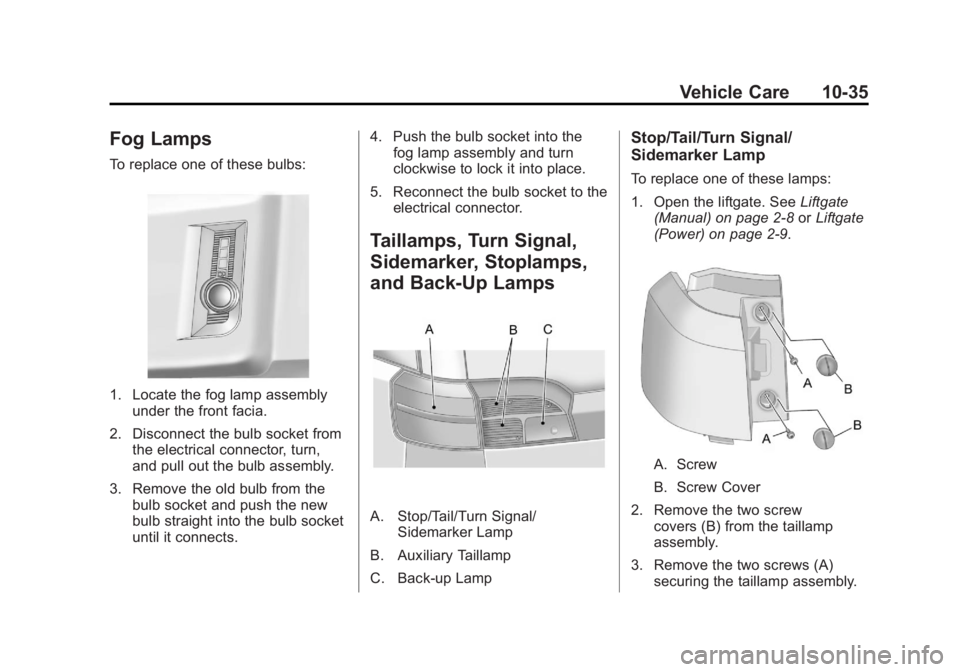
To replace one of these bulbs:
1. Locate the fog lamp assemblyunder the front facia.
2. Disconnect the bulb socket from the electrical connector, turn,
and pull out the bulb assembly.
3. Remove the old bulb from the bulb socket and push the new
bulb straight into the bulb socket
until it connects. 4. Push the bulb socket into the
fog lamp assembly and turn
clockwise to lock it into place.
5. Reconnect the bulb socket to the electrical connector.
Taillamps, Turn Signal,
Sidemarker, Stoplamps,
and Back-Up Lamps
A. Stop/Tail/Turn Signal/ Sidemarker Lamp
B. Auxiliary Taillamp
C. Back-up Lamp
Stop/Tail/Turn Signal/
Sidemarker Lamp
To replace one of these lamps:
1. Open the liftgate. See Liftgate
(Manual) on page 2‑8 orLiftgate
(Power) on page 2‑9.
A. Screw
B. Screw Cover
2. Remove the two screw covers (B) from the taillamp
assembly.
3. Remove the two screws (A) securing the taillamp assembly.
Page 326 of 426
Black plate (36,1)GMC Terrain Owner Manual - 2011
10-36 Vehicle Care
4. Pull the taillamp assembly out ofthe vehicle body.
5. Disconnect the lamp wiring harness.
6. Turn the bulb socketcounterclockwise and pull it out.
7. Pull the bulb straight out of the socket.
8. Install the new bulb.
9. Push the bulb socket in and turn it clockwise.
10. Reverse Steps 2 through 5 to reinstall the lamp assembly.
11. Verify that the taillampassembly tab, located at
the bottom of the taillamp
assembly, is aligned to the
facia bracket before securing
with screws.
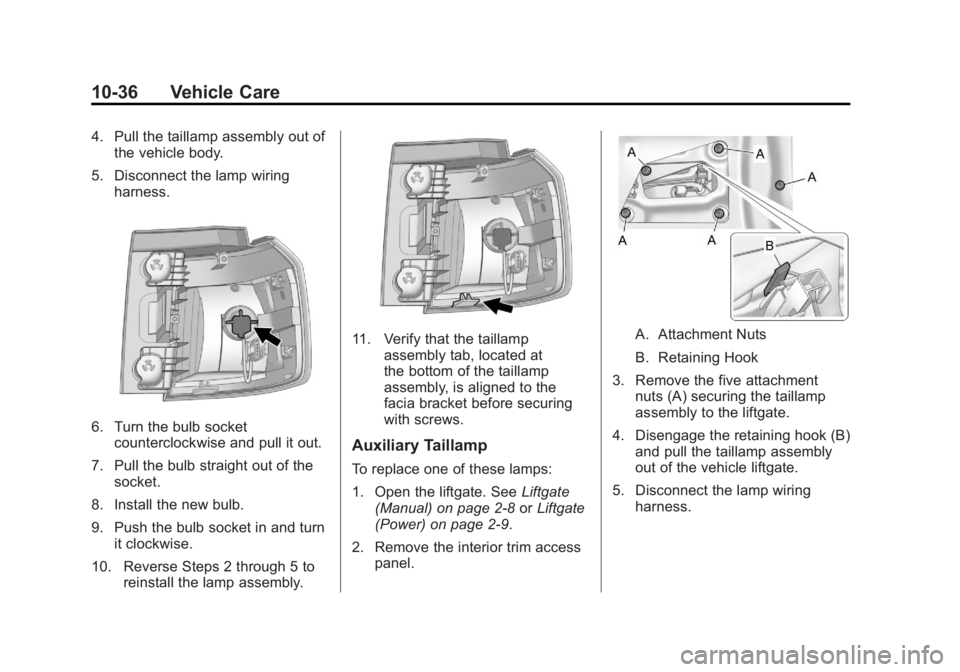
Auxiliary Taillamp
To replace one of these lamps:
1. Open the liftgate. See Liftgate
(Manual) on page 2‑8 orLiftgate
(Power) on page 2‑9.
2. Remove the interior trim access panel.
A. Attachment Nuts
B. Retaining Hook
3. Remove the five attachment nuts (A) securing the taillamp
assembly to the liftgate.
4. Disengage the retaining hook (B) and pull the taillamp assembly
out of the vehicle liftgate.
5. Disconnect the lamp wiring harness.
Page 363 of 426
Black plate (73,1)GMC Terrain Owner Manual - 2011
Vehicle Care 10-73
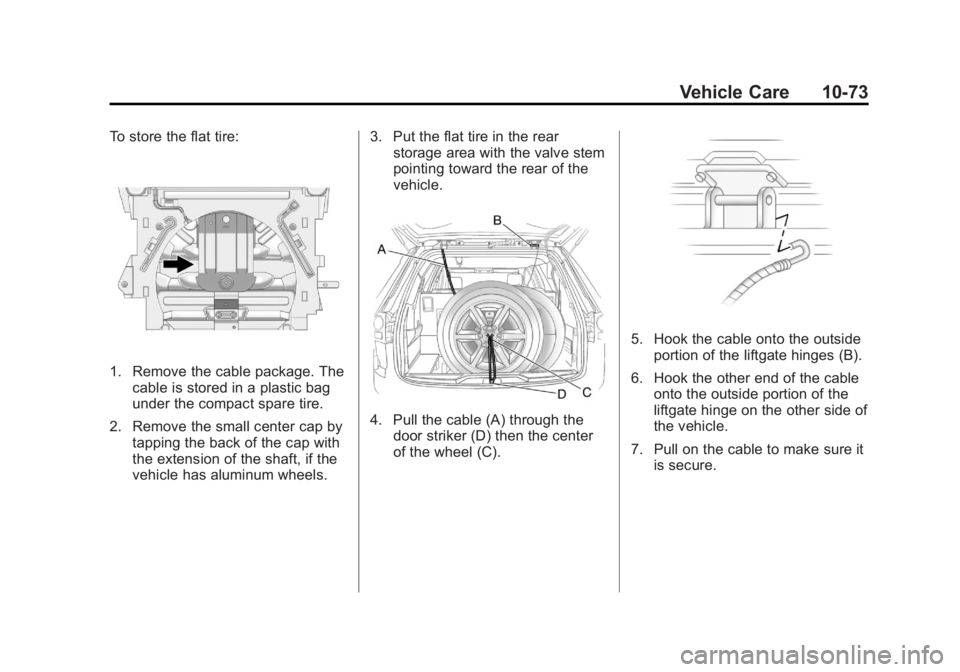
To store the flat tire:
1. Remove the cable package. Thecable is stored in a plastic bag
under the compact spare tire.
2. Remove the small center cap by tapping the back of the cap with
the extension of the shaft, if the
vehicle has aluminum wheels. 3. Put the flat tire in the rear
storage area with the valve stem
pointing toward the rear of the
vehicle.
4. Pull the cable (A) through the
door striker (D) then the center
of the wheel (C).
5. Hook the cable onto the outsideportion of the liftgate hinges (B).
6. Hook the other end of the cable onto the outside portion of the
liftgate hinge on the other side of
the vehicle.
7. Pull on the cable to make sure it is secure.
Page 367 of 426

Black plate (77,1)GMC Terrain Owner Manual - 2011
Vehicle Care 10-77
5. The remote positive (+)terminal (A) is located on the
underhood fuse block, on the
driver side. Lift the red cap to
uncover the terminal.
The remote negative (−)
terminal (B) is a stud behind the
metal tab stamped with GND (−)
near the driver side strut tower.
6. The jumper cables should be in good working condition with no
loose or missing insulation. The
vehicles could be damaged if
they are not. 7. Connect the red positive (+)
cable to the positive (+) terminal
on the vehicle with the dead
battery. Use a remote
positive (+) terminal if the
vehicle has one.
8. Do not let the other end touch metal. Connect it to the
positive (+) terminal of the
good battery. Use a remote
positive (+) terminal if the vehicle
has one.
9. Connect the black negative (−) cable to the negative (−) terminal
of the good battery. Use a
remote negative (−) terminal if
the vehicle has one. Do not let the other end touch
anything until the next step. The
other end of the negative (−)
cable does not go to the dead
battery. It goes to a heavy,
unpainted metal engine part or
to a remote negative (−) terminal
on the vehicle with the dead
battery.
10. Connect the other end of the negative (−) cable away from
the dead battery, but not near
engine parts that move.
11. Start the vehicle with the good battery and run the engine.
12. Press the unlock symbol on the remote keyless entry
transmitter to disarm the
security system, if equipped.
Page 370 of 426
Black plate (80,1)GMC Terrain Owner Manual - 2011
10-80 Vehicle Care
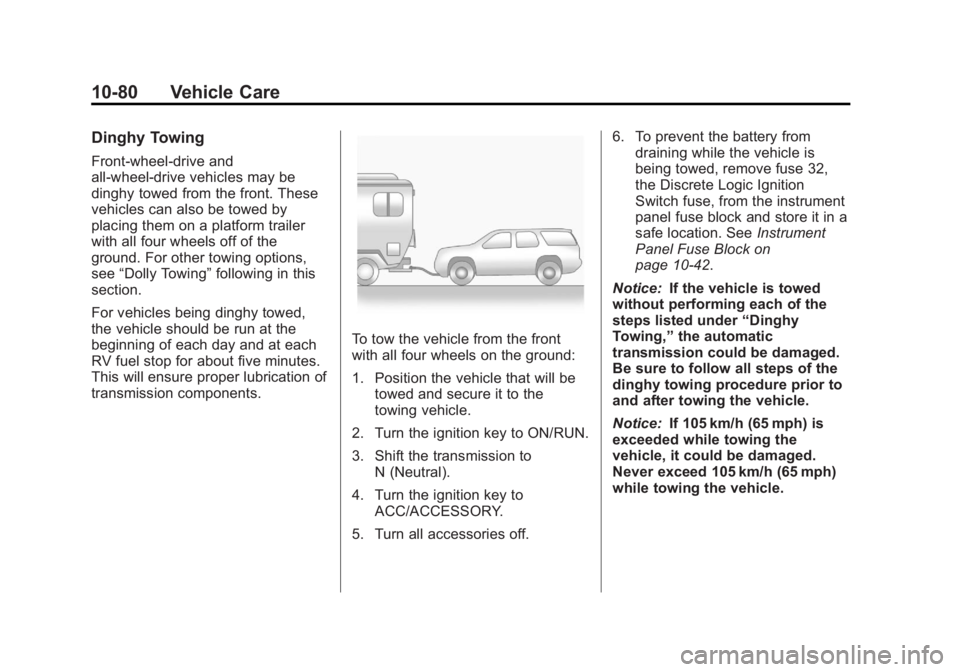
Dinghy Towing
Front-wheel‐drive and
all-wheel-drive vehicles may be
dinghy towed from the front. These
vehicles can also be towed by
placing them on a platform trailer
with all four wheels off of the
ground. For other towing options,
see“Dolly Towing” following in this
section.
For vehicles being dinghy towed,
the vehicle should be run at the
beginning of each day and at each
RV fuel stop for about five minutes.
This will ensure proper lubrication of
transmission components.
To tow the vehicle from the front
with all four wheels on the ground:
1. Position the vehicle that will be towed and secure it to the
towing vehicle.
2. Turn the ignition key to ON/RUN.
3. Shift the transmission to N (Neutral).
4. Turn the ignition key to ACC/ACCESSORY.
5. Turn all accessories off. 6. To prevent the battery from
draining while the vehicle is
being towed, remove fuse 32,
the Discrete Logic Ignition
Switch fuse, from the instrument
panel fuse block and store it in a
safe location. See Instrument
Panel Fuse Block on
page 10‑42.
Notice: If the vehicle is towed
without performing each of the
steps listed under “Dinghy
Towing,” the automatic
transmission could be damaged.
Be sure to follow all steps of the
dinghy towing procedure prior to
and after towing the vehicle.
Notice: If 105 km/h (65 mph) is
exceeded while towing the
vehicle, it could be damaged.
Never exceed 105 km/h (65 mph)
while towing the vehicle.
Page 371 of 426
Black plate (81,1)GMC Terrain Owner Manual - 2011
Vehicle Care 10-81
Once the destination has been
reached:
1. Set the parking brake.
2. Shift the transmission toP (Park).
3. Turn the ignition key to LOCK/OFF.
4. Install fuse 32, the Discrete Logic Ignition Switch fuse. See
Instrument Panel Fuse Block on
page 10‑42.
5. Start the engine and let it idle for more than three minutes before
driving the vehicle.
Notice: Too much or too
little fluid can damage the
transmission. Be sure that the
transmission fluid is at the
proper level before towing with
all four wheels on the ground. Notice:
Do not tow a vehicle with
the front drive wheels on the
ground if one of the front tires
is a compact spare tire. Towing
with two different tire sizes
on the front of the vehicle can
cause severe damage to the
transmission.
Dolly Towing (All-Wheel‐Drive
Vehicles)
All-wheel‐drive vehicles should not
be towed with two wheels on the
ground. To properly tow these
vehicles, they should be placed on
a platform trailer with all four wheels
off of the ground or dinghy towed
from the front.
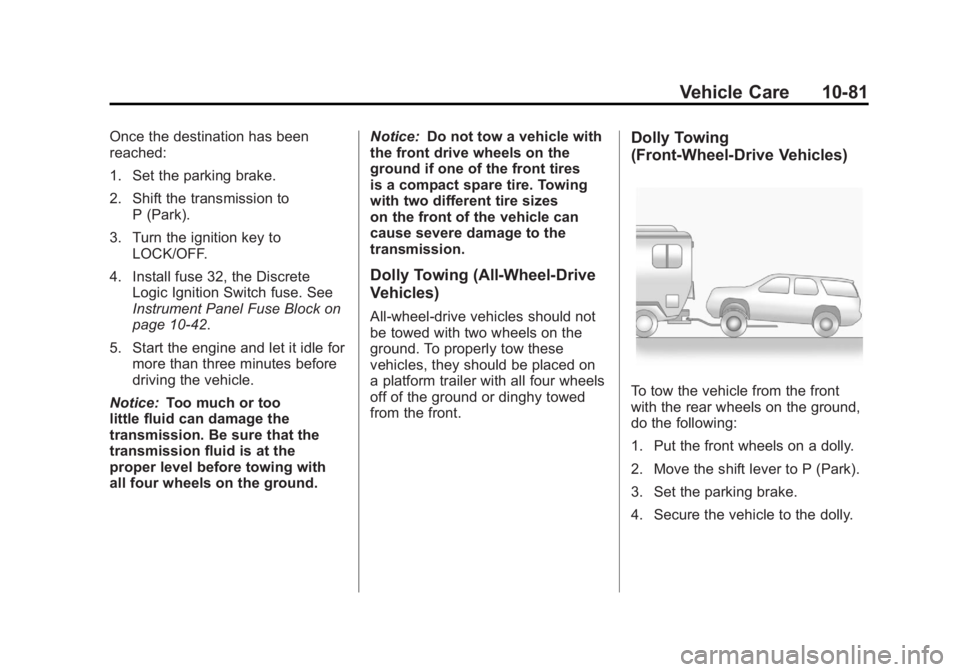
Dolly Towing
(Front-Wheel‐ Drive Vehicles)
To tow the vehicle from the front
with the rear wheels on the ground,
do the following:
1. Put the front wheels on a dolly.
2. Move the shift lever to P (Park).
3. Set the parking brake.
4. Secure the vehicle to the dolly.
Page 380 of 426
Black plate (90,1)GMC Terrain Owner Manual - 2011
10-90 Vehicle Care
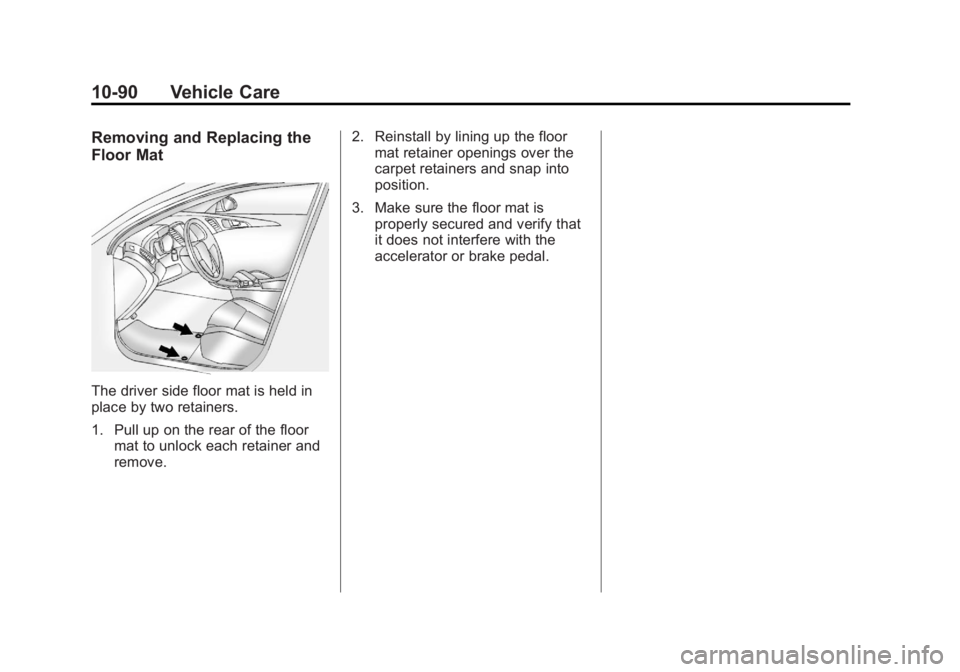
Removing and Replacing the
Floor Mat
The driver side floor mat is held in
place by two retainers.
1. Pull up on the rear of the floormat to unlock each retainer and
remove. 2. Reinstall by lining up the floor
mat retainer openings over the
carpet retainers and snap into
position.
3. Make sure the floor mat is properly secured and verify that
it does not interfere with the
accelerator or brake pedal.