instrument cluster GMC TERRAIN 2012 User Guide
[x] Cancel search | Manufacturer: GMC, Model Year: 2012, Model line: TERRAIN, Model: GMC TERRAIN 2012Pages: 428, PDF Size: 5.45 MB
Page 154 of 428

Black plate (2,1)GMC Terrain Owner Manual (Include Mex) - 2012
6-2 Lighting
Headlamp High/
Low-Beam Changer
2 3
Headlamp High/Low‐Beam
Changer: Push the turn signal/lane
change lever away from you and
release, to turn the high beams on.
To return to low beams, push the
lever again or pull it toward you and
release.
This indicator light turns on in the
instrument panel cluster when the
high‐beam headlamps are on.
Flash-to-Pass
The flash‐to‐pass feature works with
the low beams or Daytime Running
Lamps (DRL) on or off.
To flash the high beams, pull the
turn signal/lane change lever all the
way toward you, then release it.
Daytime Running
Lamps (DRL)
Daytime Running Lamps (DRL)
system makes the low-beam
headlamps come on at a reduced
brightness in daylight when the
following conditions are met:
.The ignition is on.
.The exterior lamp band is in the
automatic position.
.The transmission is not in
P (Park).
.The light sensor determines it is
daytime.
.The parking brake is released. Fully functional Daytime Running
Lamps (DRL) are required on all
vehicles first sold in Canada.
When the DRL are on the taillamps,
sidemarker, instrument panel lights
and other lamps will not be on. The
instrument panel cluster will be lit.
When the exterior lamp band is
turned to the headlamp position, the
low-beam headlamps come on. The
other lamps that come on with the
headlamps will also come on.
To idle your vehicle with the DRL
off, move the shift lever to P (Park).
The DRL will stay off until the shift
lever is moved out of the P (Park)
position.
The regular headlamp system
should be turned on when needed.
Page 155 of 428
Black plate (3,1)GMC Terrain Owner Manual (Include Mex) - 2012
Lighting 6-3
Automatic Headlamp
System
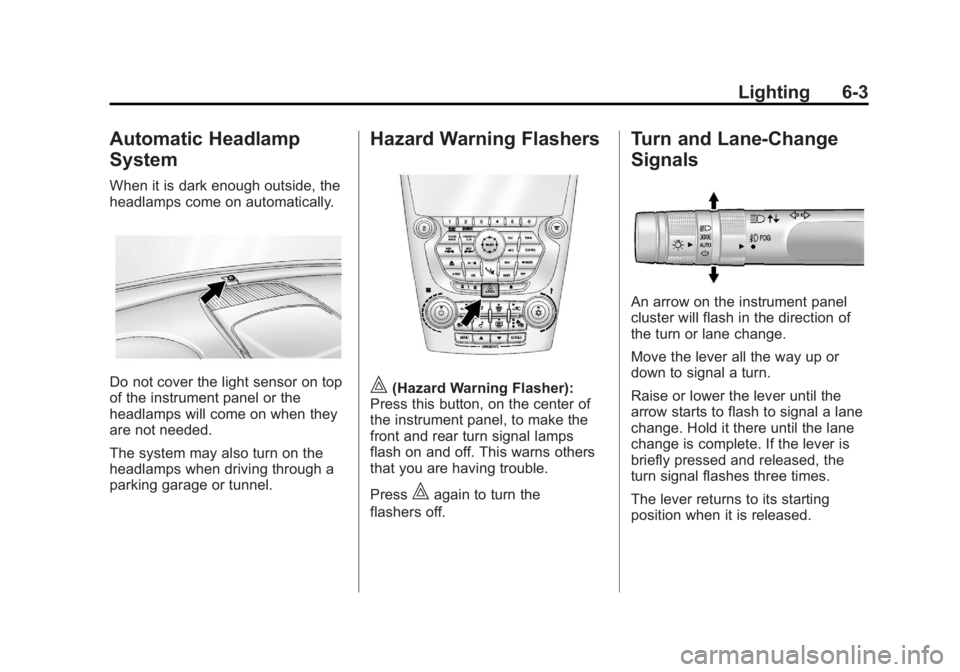
When it is dark enough outside, the
headlamps come on automatically.
Do not cover the light sensor on top
of the instrument panel or the
headlamps will come on when they
are not needed.
The system may also turn on the
headlamps when driving through a
parking garage or tunnel.
Hazard Warning Flashers
|(Hazard Warning Flasher):
Press this button, on the center of
the instrument panel, to make the
front and rear turn signal lamps
flash on and off. This warns others
that you are having trouble.
Press
|again to turn the
flashers off.
Turn and Lane-Change
Signals
An arrow on the instrument panel
cluster will flash in the direction of
the turn or lane change.
Move the lever all the way up or
down to signal a turn.
Raise or lower the lever until the
arrow starts to flash to signal a lane
change. Hold it there until the lane
change is complete. If the lever is
briefly pressed and released, the
turn signal flashes three times.
The lever returns to its starting
position when it is released.
Page 241 of 428
Black plate (31,1)GMC Terrain Owner Manual (Include Mex) - 2012
Driving and Operating 9-31
Manual Mode
Electronic Range Select
(ERS) Mode
ERS or manual mode allows for the
selection of the range of gear
positions. Use this mode when
driving downhill or towing a trailer to
limit the top gear and vehicle speed.
The shift position indicator within the
Driver Information Center (DIC) will
display a number next to the M
indicating the highest available gear
under manual mode and the driving
conditions when manual mode was
selected.
To use this feature:
1. Move the shift lever toM (Manual Mode).
2. Press the plus/minus button on the shift lever, to increase or
decrease the gear range
available. When shifting to M (Manual Mode),
the transmission will shift to a preset
lower gear range. For this preset
range, the highest gear available is
displayed next to the M in the DIC.
See
Driver Information Center (DIC)
on page 5‑23 for more information.
All gears below that number are
available to use. For example, when
4 (Fourth) is shown next to the M,
1 (First) through 4 (Fourth) gears are
shifted automatically. To shift to
5 (Fifth) gear, press the + (Plus)
button or shift into D (Drive).
M (Manual Mode) will prevent
shifting to a lower gear range if the
engine speed is too high. If vehicle
speed is not reduced within the time
allowed, the lower gear range shift
will not be completed. Slow the
vehicle, then press the −(Minus)
button to the desired lower gear
range.
While using the ERS, cruise control
can be used.
Fuel Economy Mode
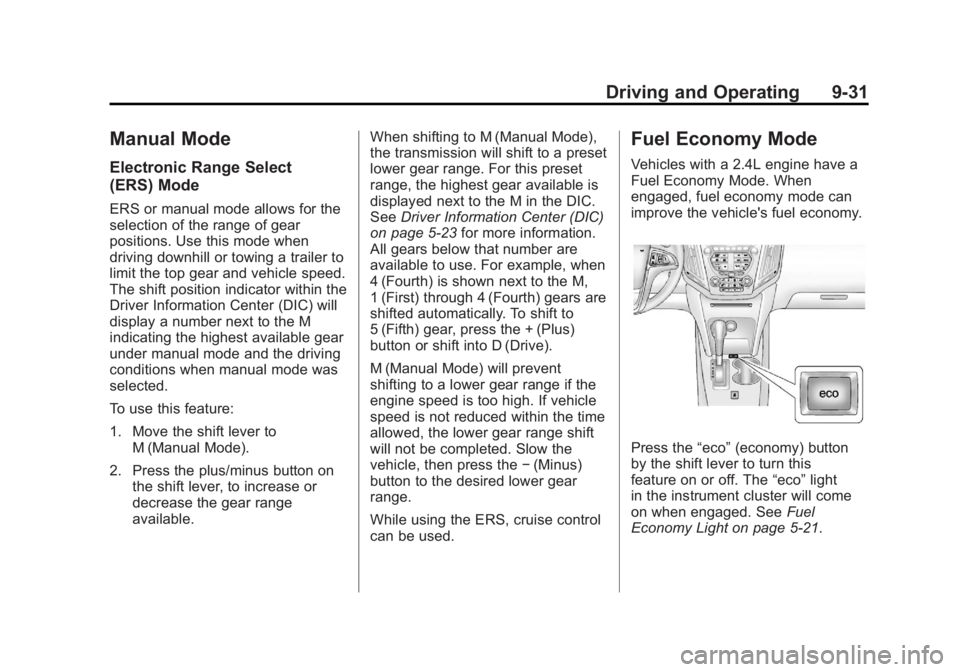
Vehicles with a 2.4L engine have a
Fuel Economy Mode. When
engaged, fuel economy mode can
improve the vehicle's fuel economy.
Press the “eco”(economy) button
by the shift lever to turn this
feature on or off. The “eco”light
in the instrument cluster will come
on when engaged. See Fuel
Economy Light on page 5‑21.
Page 253 of 428
Black plate (43,1)GMC Terrain Owner Manual (Include Mex) - 2012
Driving and Operating 9-43
Unnecessary Alerts
FCA may sometimes set
unnecessary alerts to turning
vehicles, vehicles in other lanes,
objects that are not vehicles,
or shadows. These alerts are
normal operation and the vehicle
does not need service.
Other Messages
There are messages that may
appear on the Driver Information
Center (DIC) in the instrument
cluster to provide information about
FCA. SeeObject Detection System
Messages on page 5‑29.
Cleaning the System
If the FCA system does not seem to
operate properly, clean the outside
of the windshield area in front of the
camera sensor before considering
taking the vehicle in for service.
Ultrasonic Parking Assist
For vehicles with the Ultrasonic
Rear Parking Assist (URPA) system,
it assists the driver with parking and
avoiding objects while in
R (Reverse). URPA operates at
speeds less than 8 km/h (5 mph),
and the sensors on the rear bumper
detect objects up to 2.5 m (8 ft)
behind the vehicle, and at least
20 cm (8 in) off the ground.
{WARNING
The URPA system does not
detect pedestrians, bicyclists,
animals, or any other objects
located below the bumper or that
are too close or too far from the
vehicle. To prevent injury, death,
or vehicle damage, even with
URPA, always check behind the
vehicle and check all mirrors
before backing.
How the System Works
URPA comes on automatically when
the shift lever is moved into
R (Reverse). A single tone sounds
to indicate the system is working.
URPA operates only at speeds less
than 8 km/h (5 mph).
An obstacle is indicated by audible
beeps. The interval between the
beeps becomes shorter as the
vehicle gets closer to the obstacle.
When the distance is less than
30 cm (12 in) the beeping is a
continuous tone for five seconds.
To be detected, objects must be at
least 20 cm (8 in) off the ground and
below liftgate level. Objects must
also be within 2.5 m (8 ft) from the
rear bumper. The distance objects
can be detected may be less during
warmer or humid weather.
Page 317 of 428
Black plate (43,1)GMC Terrain Owner Manual (Include Mex) - 2012
Vehicle Care 10-43
Mini Fuses Usage1 Steering Wheel
Dimming
2 Spare
3 Spare
4 Body Control
Module 1
5 Infotainment
6 Body Control
Module 7
7 Noise Control
Module
8 Body Control
Module 4
9 Radio
10 Special Equipment
Order Battery
11 Ultrasonic Rear
Parking Assist
Module Mini Fuses Usage
12 Heater, Ventilation
and Air Conditioning
Battery
13 Auxiliary Power
Front
14 Heater, Ventilation
and Air Conditioning
Ignition
15 Display
16 Body Control
Module 5
17 Auxiliary
Power Rear
18 Instrument Panel
Cluster Ignition
19 Personal Device
Interface Module
20 Body Control
Module 6
21 Special Equipment
Order Retained
Accessory Power Mini Fuses Usage
22 Sensing and
Diagnostic Module
Ignition
23 Spare
24 Spare
25 Transmission Gear
Shift Position
Indicator
26 Spare
27 Spare
28 Spare
30 Body Control
Module 3
31 Amplifier
32 Discrete Logic
Ignition Switch
33 Communications
Integration Module
34 Body Control
Module 2
Page 318 of 428
Black plate (44,1)GMC Terrain Owner Manual (Include Mex) - 2012
10-44 Vehicle Care
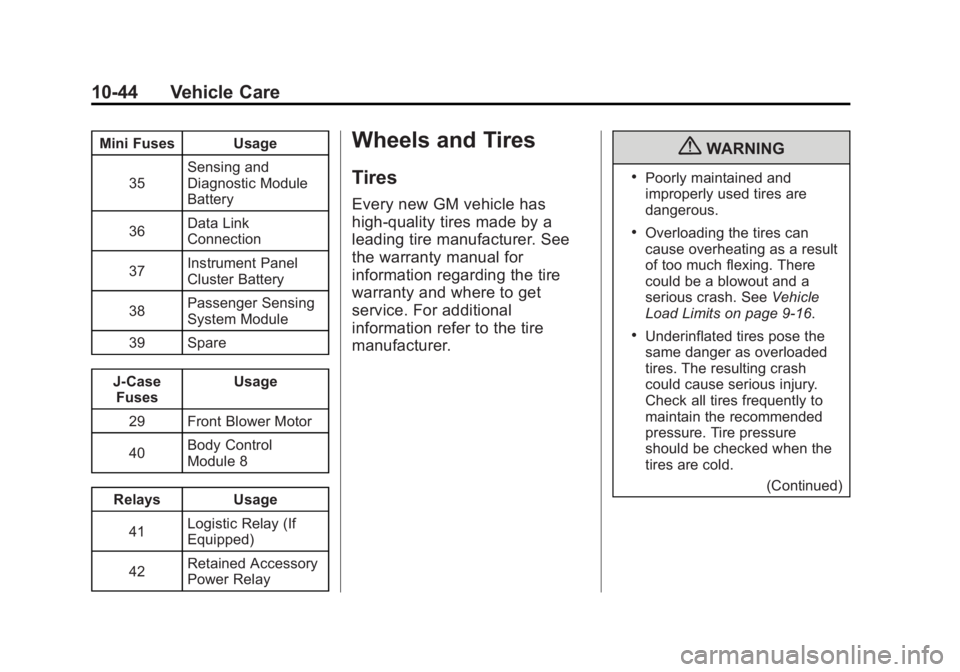
Mini Fuses Usage35 Sensing and
Diagnostic Module
Battery
36 Data Link
Connection
37 Instrument Panel
Cluster Battery
38 Passenger Sensing
System Module
39 Spare
J‐Case Fuses Usage
29 Front Blower Motor
40 Body Control
Module 8
Relays Usage 41 Logistic Relay (If
Equipped)
42 Retained Accessory
Power RelayWheels and Tires
Tires
Every new GM vehicle has
high-quality tires made by a
leading tire manufacturer. See
the warranty manual for
information regarding the tire
warranty and where to get
service. For additional
information refer to the tire
manufacturer.
{WARNING
.Poorly maintained and
improperly used tires are
dangerous.
.Overloading the tires can
cause overheating as a result
of too much flexing. There
could be a blowout and a
serious crash. See
Vehicle
Load Limits on page 9‑16.
.Underinflated tires pose the
same danger as overloaded
tires. The resulting crash
could cause serious injury.
Check all tires frequently to
maintain the recommended
pressure. Tire pressure
should be checked when the
tires are cold.
(Continued)
Page 328 of 428
Black plate (54,1)GMC Terrain Owner Manual (Include Mex) - 2012
10-54 Vehicle Care
Federal Communications
Commission (FCC) Rules and
with Industry Canada
Standards
SeeRadio Frequency Statement on
page 13‑21 for information
regarding Part 15 of the Federal
Communications Commission (FCC)
Rules and with Industry Canada
Standards RSS-GEN/210/220/310.
Tire Pressure Monitor
Operation
This vehicle may have a Tire
Pressure Monitor System (TPMS).
The TPMS is designed to warn the
driver when a low tire pressure
condition exists. TPMS sensors are
mounted onto each tire and wheel
assembly, excluding the spare tire
and wheel assembly. The TPMS
sensors monitor the air pressure in
the tires and transmits the tire
pressure readings to a receiver
located in the vehicle.
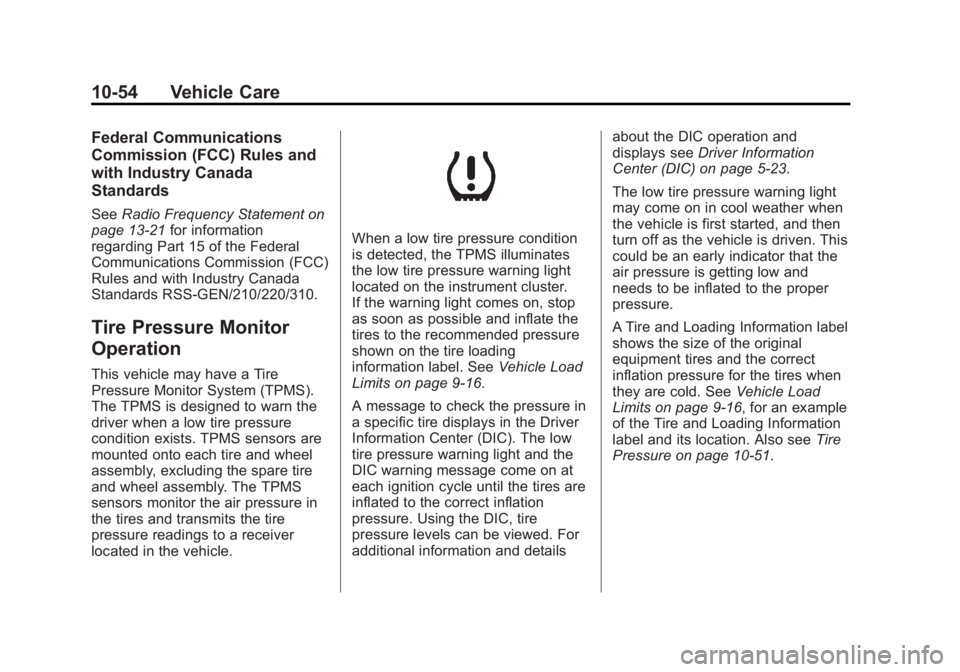
When a low tire pressure condition
is detected, the TPMS illuminates
the low tire pressure warning light
located on the instrument cluster.
If the warning light comes on, stop
as soon as possible and inflate the
tires to the recommended pressure
shown on the tire loading
information label. See Vehicle Load
Limits on page 9‑16.
A message to check the pressure in
a specific tire displays in the Driver
Information Center (DIC). The low
tire pressure warning light and the
DIC warning message come on at
each ignition cycle until the tires are
inflated to the correct inflation
pressure. Using the DIC, tire
pressure levels can be viewed. For
additional information and details about the DIC operation and
displays see
Driver Information
Center (DIC) on page 5‑23.
The low tire pressure warning light
may come on in cool weather when
the vehicle is first started, and then
turn off as the vehicle is driven. This
could be an early indicator that the
air pressure is getting low and
needs to be inflated to the proper
pressure.
A Tire and Loading Information label
shows the size of the original
equipment tires and the correct
inflation pressure for the tires when
they are cold. See Vehicle Load
Limits on page 9‑16, for an example
of the Tire and Loading Information
label and its location. Also see Tire
Pressure on page 10‑51.
Page 360 of 428
Black plate (86,1)GMC Terrain Owner Manual (Include Mex) - 2012
10-86 Vehicle Care
Original manufacturer replacement
parts will provide the corrosion
protection while maintaining the
vehicle warranty.
Finish Damage
Quickly repair minor chips and
scratches with touch-up materials
available from your dealer to avoid
corrosion. Larger areas of finish
damage can be corrected in your
dealer's body and paint shop.
Chemical Paint Spotting
Airborne pollutants can fall upon
and attack painted vehicle surfaces
causing blotchy, ring-shaped
discolorations, and small, irregular
dark spots etched into the paint
surface.
Interior Care
To prevent dirt particle abrasions,
regularly clean the vehicle's interior.
Immediately remove any soils. Note
that newspapers or dark garments
that can transfer color to home
furnishings can also permanently
transfer color to the vehicle's
interior.
Use a soft bristle brush to remove
dust from knobs and crevices on the
instrument cluster. Using a mild
soap solution, immediately remove
hand lotions, sunscreen, and insect
repellant from all interior surfaces or
permanent damage may result.
Your dealer may have products for
cleaning the interior. Use cleaners
specifically designed for the
surfaces being cleaned to prevent
permanent damage. To prevent
overspray, apply all cleaners directly
to the cleaning cloth. Cleaners
should be removed quickly. Never
allow cleaners to remain on the
surface being cleaned for extended
periods of time.Cleaners may contain solvents that
can become concentrated in the
interior. Before using cleaners, read
and adhere to all safety instructions
on the label. While cleaning the
interior, maintain adequate
ventilation by opening the doors and
windows.
To prevent damage, do not clean
the interior using the following
cleaners or techniques:
.Never use a razor or any other
sharp object to remove a soil
from any interior surface.
.Never use a brush with stiff
bristles.
.Never rub any surface
aggressively or with excessive
pressure.
Page 373 of 428

Black plate (9,1)GMC Terrain Owner Manual (Include Mex) - 2012
Service and Maintenance 11-9
Additional
Maintenance and Care
Your vehicle is an important
investment and caring for it properly
may help to avoid future costly
repairs. To maintain vehicle
performance, additional
maintenance services may be
required. It is recommended that
your dealer perform these services
—their trained dealer technicians
know your vehicle best. Your dealer
can also perform a thorough
assessment with a multi‐point
inspection to recommend when your
vehicle may need attention. The
following list is intended to explain
the services and conditions to look
for that may indicate services are
required. Battery
The battery supplies power to start
the engine and operate any
additional electrical accessories.
.To avoid break‐down or failure to
start the vehicle, maintain a
battery with full cranking power.
.Trained dealer technicians have
the diagnostic equipment to test
the battery and ensure that the
connections and cables are
corrosion‐free.
Belts
.Belts may need replacing if they
squeak or show signs of
cracking or splitting.
.Trained dealer technicians can
inspect the belts and
recommend replacement when
necessary. Brakes
Brakes stop the vehicle and are
crucial to safe driving.
.Signs of brake wear may include
chirping, grinding, or squealing
noises, or difficulty stopping.
.Trained dealer technicians have
access to tools and equipment
to inspect the brakes and
recommend quality parts
engineered for the vehicle.
Fluids
Proper fluid levels and approved
fluids protect the vehicle’s systems
and components. See
Recommended Fluids and
Lubricants on page 11‑12 for GM
approved fluids.
.Engine oil and windshield
washer fluid levels should be
checked at every fuel fill.
.Instrument cluster lights may
come on to indicate that fluids
may be low and need to be
filled.
Page 419 of 428
Black plate (3,1)GMC Terrain Owner Manual (Include Mex) - 2012
INDEX i-3
Climate Control Systems . . . . . . . 8-1Air Conditioning . . . . . . . . . . . . . . . 8-1
Automatic . . . . . . . . . . . . . . . . . . . . . . 8-3
Heating . . . . . . . . . . . . . . . . . . . . . . . . 8-1
Clock . . . . . . . . . . . . . . . . . . . . . . . . . . . 5-5
Cluster, Instrument . . . . . . . . . . . . . 5-8
Collision Damage Repair . . . . . 13-15
Compact Spare Tire . . . . . . . . . . 10-75
Compass . . . . . . . . . . . . . . . . . . . . . . . 5-5 Messages . . . . . . . . . . . . . . . . . . . . 5-27
Connections, OnStar
®. . . . . . . . . 14-4
Control of a Vehicle . . . . . . . . . . . . . 9-4
Convenience Net . . . . . . . . . . . . . . . 4-2
Convex Mirrors . . . . . . . . . . . . . . . . 2-15
Coolant Engine . . . . . . . . . . . . . . . . . . . . . . 10-17
Engine Temperature
Gauge . . . . . . . . . . . . . . . . . . . . . . 5-10
Cooling System . . . . . . . . . . . . . . . 10-15 Engine Messages . . . . . . . . . . . . 5-28
Courtesy Transportation
Program . . . . . . . . . . . . . . . . . . . . . 13-13 Cover
Cargo . . . . . . . . . . . . . . . . . . . . . . . . . . 4-2
Engine . . . . . . . . . . . . . . . . . . . . . . . . 10-9
Cruise Control . . . . . . . . . . . . . . . . . 9-38 Light . . . . . . . . . . . . . . . . . . . . . . . . . . 5-22
Messages . . . . . . . . . . . . . . . . . . . . 5-27
Cupholders . . . . . . . . . . . . . . . . . . . . . 4-1
Customer Assistance . . . . . . . . . . 13-6
Offices . . . . . . . . . . . . . . . . . . 13-4, 13-5
Text Telephone (TTY)Users . . . . . . . . . . . . . . . . . . . . . . . 13-6
Customer Information Service PublicationsOrdering Information . . . . . . 13-17
Customer Satisfaction Procedure . . . . . . . . . . . . . . 13-1, 13-3
D
Damage Repair, Collision . . . . . 13-15
Danger, Warnings, and
Cautions . . . . . . . . . . . . . . . . . . . . . . . . iv
Data Recorders, Event . . . . . . . 13-20
Daytime Running Lamps (DRL) . . . . . . . . . . . . . . . . . . 6-2 Defensive Driving . . . . . . . . . . . . . . . 9-3
Devices, Auxiliary . . . . . . . . . . . . . 7-18
Diagnostics, OnStar
®. . . . . . . . . . 14-5
Distracted Driving . . . . . . . . . . . . . . . 9-2
Dome Lamps . . . . . . . . . . . . . . . . . . . 6-4
Door Ajar Messages . . . . . . . . . . . . . . . 5-27
Locks . . . . . . . . . . . . . . . . . . . . . . . . . . 2-7
Power Locks . . . . . . . . . . . . . . . . . . . 2-7
Drive Belt Routing, Engine . . . . . 12-4
Drive Systems All-Wheel Drive . . . . . . . 10-26, 9-32
Driver Information Center (DIC) . . . . . . . . . . . . . . . . . 5-23
Driving Characteristics and
Towing Tips . . . . . . . . . . . . . . . . . 9-57
Defensive . . . . . . . . . . . . . . . . . . . . . . 9-3
Drunk . . . . . . . . . . . . . . . . . . . . . . . . . . 9-3
For Better Fuel Economy . . . . . 1-25
Highway Hypnosis . . . . . . . . . . . . 9-12
Hill and Mountain Roads . . . . . . 9-12
If the Vehicle is Stuck . . . . . . . . . 9-15
Loss of Control . . . . . . . . . . . . . . . . 9-5