ignition GMC TERRAIN 2015 Owner's Manual
[x] Cancel search | Manufacturer: GMC, Model Year: 2015, Model line: TERRAIN, Model: GMC TERRAIN 2015Pages: 357, PDF Size: 4.04 MB
Page 10 of 357
Black plate (3,1)GMC Terrain/Terrain Denali Owner Manual (GMNA-Localizing-U.S./Canada/
Mexico-7707484) - 2015 - crc - 10/1/14
In Brief 1-3
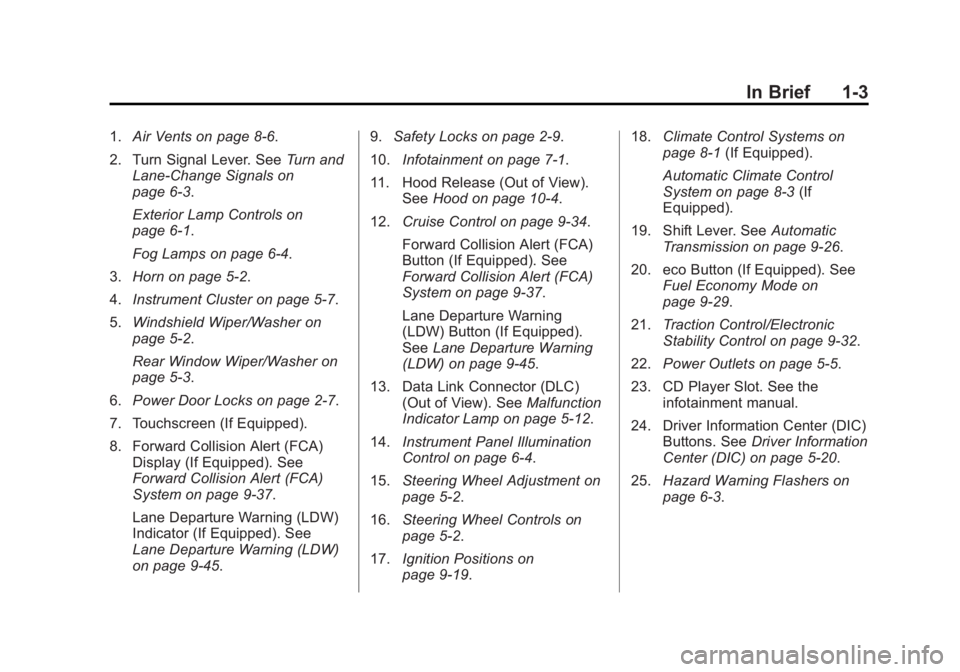
1.Air Vents on page 8-6.
2. Turn Signal Lever. See Turn and
Lane-Change Signals on
page 6-3.
Exterior Lamp Controls on
page 6-1.
Fog Lamps on page 6-4.
3. Horn on page 5-2.
4. Instrument Cluster on page 5-7.
5. Windshield Wiper/Washer on
page 5-2.
Rear Window Wiper/Washer on
page 5-3.
6. Power Door Locks on page 2-7.
7. Touchscreen (If Equipped).
8. Forward Collision Alert (FCA) Display (If Equipped). See
Forward Collision Alert (FCA)
System on page 9-37.
Lane Departure Warning (LDW)
Indicator (If Equipped). See
Lane Departure Warning (LDW)
on page 9-45. 9.
Safety Locks on page 2-9.
10. Infotainment on page 7-1.
11. Hood Release (Out of View). SeeHood on page 10-4.
12. Cruise Control on page 9-34.
Forward Collision Alert (FCA)
Button (If Equipped). See
Forward Collision Alert (FCA)
System on page 9-37.
Lane Departure Warning
(LDW) Button (If Equipped).
SeeLane Departure Warning
(LDW) on page 9-45.
13. Data Link Connector (DLC) (Out of View). See Malfunction
Indicator Lamp on page 5-12.
14. Instrument Panel Illumination
Control on page 6-4.
15. Steering Wheel Adjustment on
page 5-2.
16. Steering Wheel Controls on
page 5-2.
17. Ignition Positions on
page 9-19. 18.
Climate Control Systems on
page 8-1 (If Equipped).
Automatic Climate Control
System on page 8-3 (If
Equipped).
19. Shift Lever. See Automatic
Transmission on page 9-26.
20. eco Button (If Equipped). See Fuel Economy Mode on
page 9-29.
21. Traction Control/Electronic
Stability Control on page 9-32.
22. Power Outlets on page 5-5.
23. CD Player Slot. See the infotainment manual.
24. Driver Information Center (DIC) Buttons. See Driver Information
Center (DIC) on page 5-20.
25. Hazard Warning Flashers on
page 6-3.
Page 11 of 357

Black plate (4,1)GMC Terrain/Terrain Denali Owner Manual (GMNA-Localizing-U.S./Canada/
Mexico-7707484) - 2015 - crc - 10/1/14
1-4 In Brief
Initial Drive
Information
This section provides a brief
overview about some of the
important features that may or may
not be on your specific vehicle.
For more detailed information, refer
to each of the features which can be
found later in this owner manual.
Remote Keyless Entry
(RKE) System
The RKE transmitter may work up to
60 m (197 ft) away from the vehicle.
With Remote Start and PowerLiftgate Shown
Press this button to extend the key.
The key can be used for the ignition
and all locks.
K: Press to unlock the driver door
or all doors.
For vehicles with the manual
liftgate, press
Ktwice within
five seconds to unlock the liftgate.
Q: Press to lock all doors.
Lock and unlock feedback can be
personalized.
Y: If equipped with the power
liftgate, press and hold until the
liftgate begins to move.
7: Press and release to initiate
vehicle locator. Press and hold for at
least three seconds to sound the
panic alarm. Press
7again to
cancel the panic alarm.
/: PressQand release and then
immediately press and hold
/for at
least four seconds to start the
engine from outside the vehicle.
See Keys on page 2-1 andRemote
Keyless Entry (RKE) System
Operation on page 2-3.
Remote Vehicle Start
If equipped, the engine can be
started from outside of the vehicle.
Starting the Vehicle
1. Press and releaseQon the
Remote Keyless Entry (RKE)
transmitter.
Page 16 of 357
Black plate (9,1)GMC Terrain/Terrain Denali Owner Manual (GMNA-Localizing-U.S./Canada/
Mexico-7707484) - 2015 - crc - 10/1/14
In Brief 1-9
The vehicle will also automatically
save driver seat and outside mirror
positions to the current driver
Remote Keyless Entry (RKE)
transmitter when the ignition is
turned off. These automatically
stored positions are referred to as
RKE Memory positions.
SeeMemory Seats on page 3-6 and
Vehicle Personalization on
page 5-31.Heated Seats
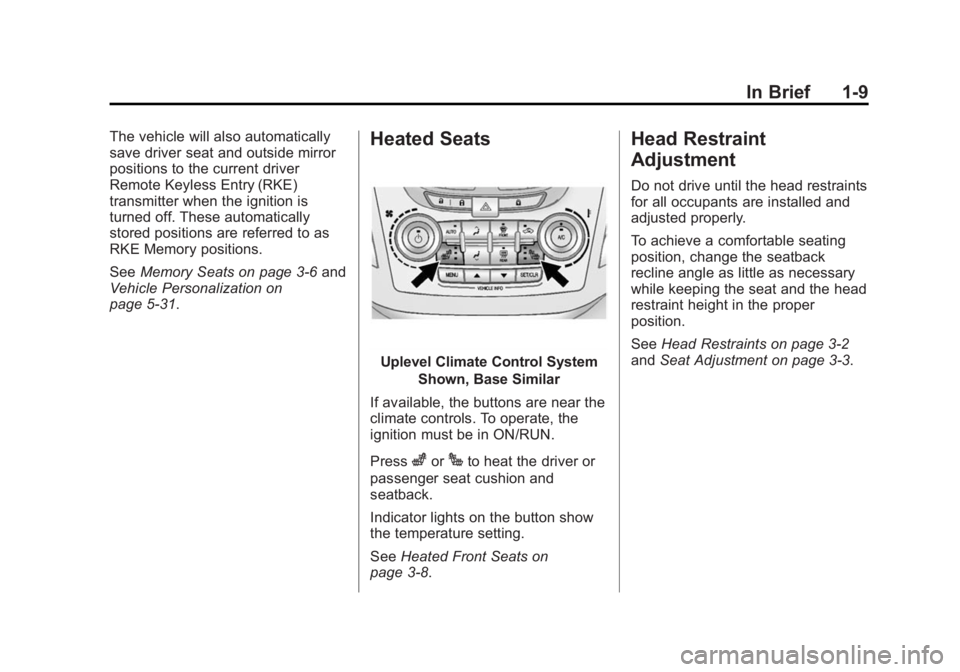
Uplevel Climate Control System
Shown, Base Similar
If available, the buttons are near the
climate controls. To operate, the
ignition must be in ON/RUN.
Press
zorJto heat the driver or
passenger seat cushion and
seatback.
Indicator lights on the button show
the temperature setting.
See Heated Front Seats on
page 3-8.
Head Restraint
Adjustment
Do not drive until the head restraints
for all occupants are installed and
adjusted properly.
To achieve a comfortable seating
position, change the seatback
recline angle as little as necessary
while keeping the seat and the head
restraint height in the proper
position.
See Head Restraints on page 3-2
and Seat Adjustment on page 3-3.
Page 19 of 357

Black plate (12,1)GMC Terrain/Terrain Denali Owner Manual (GMNA-Localizing-U.S./Canada/
Mexico-7707484) - 2015 - crc - 10/1/14
1-12 In Brief
1:The lamps come on
automatically when a door is
opened.
+: Turns the dome lamps on.
The dome lamps can also be turned
on and off by pressing the buttons
next to the lamps.
For more information on interior
lighting, See Instrument Panel
Illumination Control on page 6-4.
Exterior Lighting
The exterior lamp control is on the
turn signal lever.
O: Turn to operate the exterior
lamps.
O: Briefly turn to this position to
turn the automatic light control off or
on again.
AUTO: Turns the exterior lamps on
and off automatically depending on
the exterior light.
;: Turns on the parking lamps
including all lamps, except the
headlamps.
5: Turns on the headlamps,
together with the parking lamps and
instrument panel lights.
See:
.Exterior Lamp Controls on
page 6-1
.Daytime Running Lamps (DRL)
on page 6-2
.Fog Lamps on page 6-4
Windshield Wiper/Washer
The windshield wiper/washer lever
is located on the right side of the
steering column. With the ignition in
ACC/ACCESSORY or ON/RUN/
START, move the windshield wiper
lever to select the wiper speed.
HI: Use for fast wipes.
LO: Use for slow wipes.
Page 22 of 357
Black plate (15,1)GMC Terrain/Terrain Denali Owner Manual (GMNA-Localizing-U.S./Canada/
Mexico-7707484) - 2015 - crc - 10/1/14
In Brief 1-15
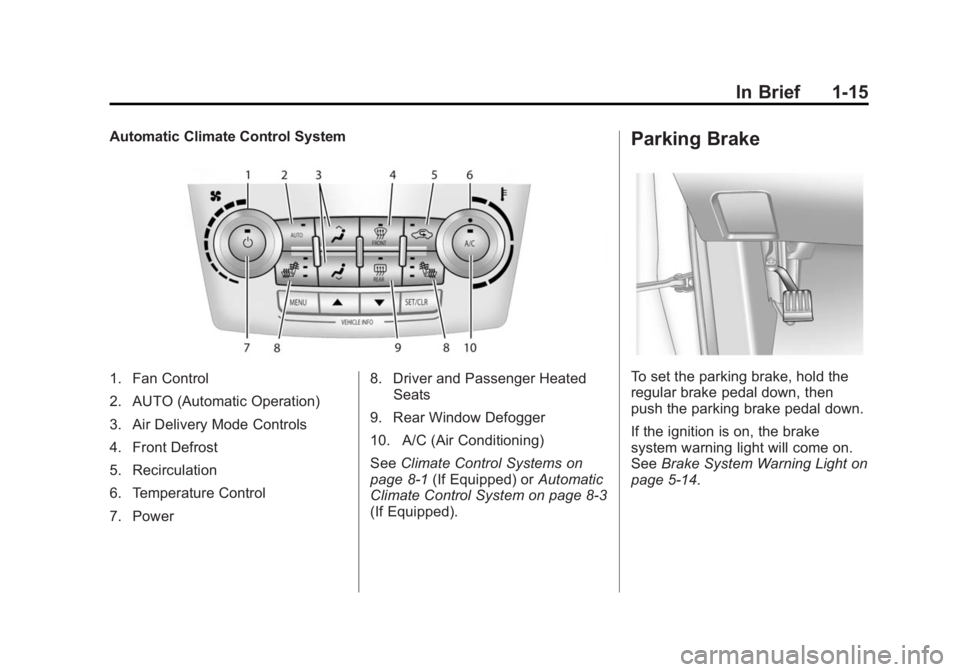
Automatic Climate Control System
1. Fan Control
2. AUTO (Automatic Operation)
3. Air Delivery Mode Controls
4. Front Defrost
5. Recirculation
6. Temperature Control
7. Power8. Driver and Passenger Heated
Seats
9. Rear Window Defogger
10. A/C (Air Conditioning)
See Climate Control Systems on
page 8-1 (If Equipped) or Automatic
Climate Control System on page 8-3
(If Equipped).
Parking Brake
To set the parking brake, hold the
regular brake pedal down, then
push the parking brake pedal down.
If the ignition is on, the brake
system warning light will come on.
See Brake System Warning Light on
page 5-14.
Page 27 of 357
Black plate (20,1)GMC Terrain/Terrain Denali Owner Manual (GMNA-Localizing-U.S./Canada/
Mexico-7707484) - 2015 - crc - 10/1/14
1-20 In Brief
.To turn off both Traction Control
and StabiliTrak, press and
hold
guntilgandiilluminate
and the appropriate DIC
message displays. See Ride
Control System Messages on
page 5-28.
.Pressgagain to turn on both
systems.
See Traction Control/Electronic
Stability Control on page 9-32.
Tire Pressure Monitor
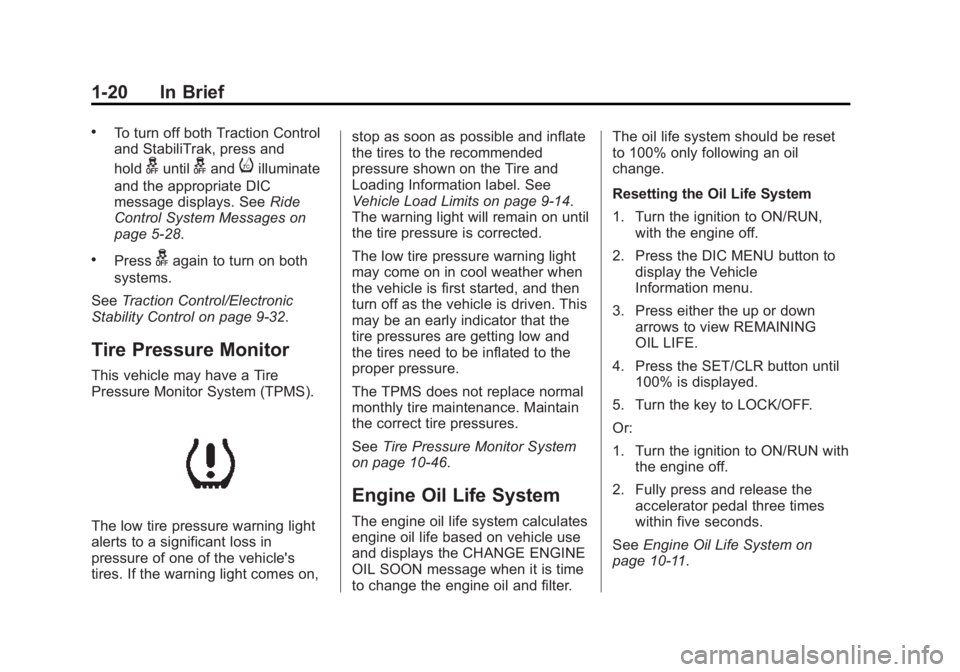
This vehicle may have a Tire
Pressure Monitor System (TPMS).
The low tire pressure warning light
alerts to a significant loss in
pressure of one of the vehicle's
tires. If the warning light comes on, stop as soon as possible and inflate
the tires to the recommended
pressure shown on the Tire and
Loading Information label. See
Vehicle Load Limits on page 9-14.
The warning light will remain on until
the tire pressure is corrected.
The low tire pressure warning light
may come on in cool weather when
the vehicle is first started, and then
turn off as the vehicle is driven. This
may be an early indicator that the
tire pressures are getting low and
the tires need to be inflated to the
proper pressure.
The TPMS does not replace normal
monthly tire maintenance. Maintain
the correct tire pressures.
See
Tire Pressure Monitor System
on page 10-46.
Engine Oil Life System
The engine oil life system calculates
engine oil life based on vehicle use
and displays the CHANGE ENGINE
OIL SOON message when it is time
to change the engine oil and filter. The oil life system should be reset
to 100% only following an oil
change.
Resetting the Oil Life System
1. Turn the ignition to ON/RUN,
with the engine off.
2. Press the DIC MENU button to display the Vehicle
Information menu.
3. Press either the up or down arrows to view REMAINING
OIL LIFE.
4. Press the SET/CLR button until 100% is displayed.
5. Turn the key to LOCK/OFF.
Or:
1. Turn the ignition to ON/RUN with the engine off.
2. Fully press and release the accelerator pedal three times
within five seconds.
See Engine Oil Life System on
page 10-11.
Page 30 of 357
Black plate (1,1)GMC Terrain/Terrain Denali Owner Manual (GMNA-Localizing-U.S./Canada/
Mexico-7707484) - 2015 - crc - 10/1/14
Keys, Doors, and Windows 2-1
Keys, Doors, and
Windows
Keys and Locks
Keys . . . . . . . . . . . . . . . . . . . . . . . . . . 2-1
Remote Keyless Entry (RKE)System . . . . . . . . . . . . . . . . . . . . . . 2-2
Remote Keyless Entry (RKE) System Operation . . . . . . . . . . . 2-3
Remote Vehicle Start . . . . . . . . . 2-5
Door Locks . . . . . . . . . . . . . . . . . . . 2-7
Power Door Locks . . . . . . . . . . . . 2-7
Delayed Locking . . . . . . . . . . . . . . 2-8
Automatic Door Locks . . . . . . . . . 2-8
Lockout Protection . . . . . . . . . . . . 2-8
Safety Locks . . . . . . . . . . . . . . . . . . 2-9
Doors
Liftgate . . . . . . . . . . . . . . . . . . . . . . . . 2-9
Vehicle Security
Vehicle Security . . . . . . . . . . . . . . 2-13
Vehicle Alarm System . . . . . . . 2-13
Immobilizer . . . . . . . . . . . . . . . . . . 2-14
Immobilizer Operation . . . . . . . 2-14
Exterior Mirrors
Convex Mirrors . . . . . . . . . . . . . . 2-15
Power Mirrors . . . . . . . . . . . . . . . . 2-15
Heated Mirrors . . . . . . . . . . . . . . . 2-16
Reverse Tilt Mirrors . . . . . . . . . . 2-16
Interior Mirrors
Interior Rearview Mirrors . . . . . 2-16
Manual Rearview Mirror . . . . . . 2-17
Automatic Dimming Rearview Mirror . . . . . . . . . . . . . . . . . . . . . . . 2-17
Windows
Windows . . . . . . . . . . . . . . . . . . . . . 2-17
Power Windows . . . . . . . . . . . . . 2-17
Sun Visors . . . . . . . . . . . . . . . . . . . 2-18
Roof
Sunroof . . . . . . . . . . . . . . . . . . . . . . 2-19
Keys and Locks
Keys
{Warning
Leaving children in a vehicle with
the ignition key is dangerous and
children or others could be
seriously injured or killed. They
could operate the power windows
or other controls or make the
vehicle move. The windows will
function with the keys in the
ignition, and children or others
could be caught in the path of a
closing window. Do not leave
children in a vehicle with the
ignition key.
Page 31 of 357
Black plate (2,1)GMC Terrain/Terrain Denali Owner Manual (GMNA-Localizing-U.S./Canada/
Mexico-7707484) - 2015 - crc - 10/1/14
2-2 Keys, Doors, and Windows
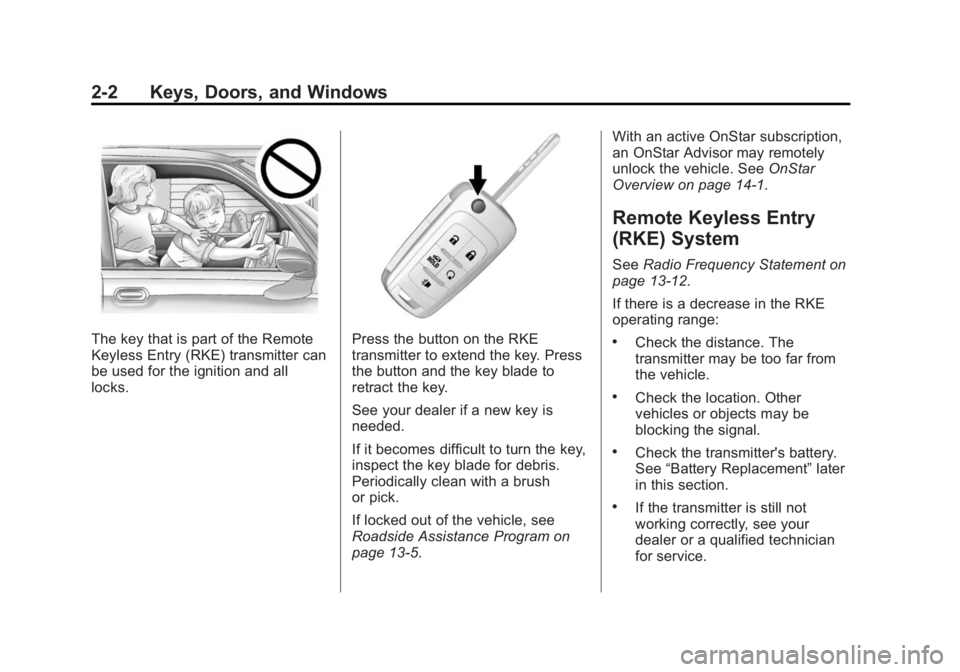
The key that is part of the Remote
Keyless Entry (RKE) transmitter can
be used for the ignition and all
locks.Press the button on the RKE
transmitter to extend the key. Press
the button and the key blade to
retract the key.
See your dealer if a new key is
needed.
If it becomes difficult to turn the key,
inspect the key blade for debris.
Periodically clean with a brush
or pick.
If locked out of the vehicle, see
Roadside Assistance Program on
page 13-5.With an active OnStar subscription,
an OnStar Advisor may remotely
unlock the vehicle. See
OnStar
Overview on page 14-1.
Remote Keyless Entry
(RKE) System
See Radio Frequency Statement on
page 13-12.
If there is a decrease in the RKE
operating range:
.Check the distance. The
transmitter may be too far from
the vehicle.
.Check the location. Other
vehicles or objects may be
blocking the signal.
.Check the transmitter's battery.
See “Battery Replacement” later
in this section.
.If the transmitter is still not
working correctly, see your
dealer or a qualified technician
for service.
Page 32 of 357

Black plate (3,1)GMC Terrain/Terrain Denali Owner Manual (GMNA-Localizing-U.S./Canada/
Mexico-7707484) - 2015 - crc - 10/1/14
Keys, Doors, and Windows 2-3
Remote Keyless Entry
(RKE) System Operation
The RKE transmitter may work up to
60 m (197 ft) away from the vehicle.
Other conditions can affect the
performance of the transmitter. See
Remote Keyless Entry (RKE)
System on page 2-2.
With Remote Start and PowerLiftgate Shown The following may be available:
Q(Lock):
Press to lock all doors.
The turn signal indicators may flash
and/or the horn may sound on
second press to indicate locking.
See Vehicle Personalization on
page 5-31. If a passenger door is
open when
Qis pressed, all
doors lock.
Pressing
Qmay also arm the
theft-deterrent system. See Vehicle
Alarm System on page 2-13.
K(Unlock): Press to unlock the
driver door or all doors. See Vehicle
Personalization on page 5-31. The
turn signal indicators may flash to
indicate unlocking has occurred.
See Vehicle Personalization on
page 5-31. Pressing
Kmay also
disarm the theft-deterrent system.
See Vehicle Alarm System on
page 2-13.
For vehicles with the manual
liftgate, press
Ktwice within
five seconds to unlock the liftgate.
Y(Remote Liftgate Release):
If equipped with the power liftgate,
press and hold until the liftgate
begins to move. Press again to stop
power liftgate.
7(Vehicle Locator/Panic
Alarm): Press and release one
time to initiate vehicle locator. The
exterior lamps flash and the horn
chirps three times. Press and hold
7for at least three seconds to
sound the panic alarm. The horn
sounds and the turn signals flash
until
7is pressed again or the key
is placed in the ignition and turned
to ON/RUN.
/(Remote Vehicle Start):
If equipped, first press and
release
Qthen immediately press
and hold
/for at least
four seconds to start the engine
from outside the vehicle using the
RKE transmitter. See Remote
Vehicle Start on page 2-5.
Page 33 of 357
Black plate (4,1)GMC Terrain/Terrain Denali Owner Manual (GMNA-Localizing-U.S./Canada/
Mexico-7707484) - 2015 - crc - 10/1/14
2-4 Keys, Doors, and Windows
The buttons on the keys are
disabled when there is a key in the
ignition.
Programming Transmitters to
the Vehicle
Only RKE transmitters programmed
to this vehicle will work. If a
transmitter is lost or stolen, a
replacement can be purchased and
programmed through your dealer.
When the replacement transmitter is
programmed to this vehicle, all
remaining transmitters must also be
reprogrammed. Any lost or stolen
transmitters will no longer work
once the new transmitter is
programmed. See your dealer to
have new transmitters programmed.
Programming with a Recognized
Transmitter
To program a new key:
1. Insert the original, alreadyprogrammed key in the ignition
and turn to the key to the ON/
RUN position. 2. Turn the key to LOCK/OFF, and
remove the key.
3. Insert the new key to be programmed and turn it to the
ON/RUN position within
five seconds.
The security light will turn off
once the key has been
programmed.
4. Repeat Steps 1–3 if additional keys are to be programmed.
If a key is lost or damaged, see your
dealer to have a new key made.
Programming without a
Recognized Transmitter
Program a new key to the vehicle
when a recognized key is not
available. Canadian regulations
require that owners see their dealer.
If there are no currently recognized
keys available, follow this procedure
to program the first key.
This procedure will take
approximately 30 minutes to
complete for the first key. The vehicle must be off and all of the
keys you wish to program must be
with you.
1. Insert the new vehicle key into
the ignition.
2. Turn to ON/RUN. The security light will come on.
3. Wait 10 minutes until the security light turns off.
4. Turn the ignition to LOCK/OFF.
5. Repeat Steps 2–4 two more times. After the third time, turn to
ON/RUN; the key is learned and
all previously known keys will no
longer work with the vehicle.
Remaining keys can be learned by
following the procedure in
“Programming with a Recognized
Transmitter.”
Battery Replacement
Replace the battery if the REPLACE
BATTERY IN REMOTE KEY
message displays in the DIC. See
Key and Lock Messages on
page 5-27.