wheel lock GMC TERRAIN 2019 Owner's Guide
[x] Cancel search | Manufacturer: GMC, Model Year: 2019, Model line: TERRAIN, Model: GMC TERRAIN 2019Pages: 434, PDF Size: 6.38 MB
Page 221 of 434
GMC Terrain/Terrain Denali Owner Manual (GMNA-Localizing-U.S./Canada/
Mexico-12146071) - 2019 - crc - 7/27/18
220 Driving and Operating
The vehicle has an Electric Parking
Brake (EPB). The EPB can always
be activated, even if the ignition is
off. To prevent draining the battery,
avoid repeated cycles of the EPB
system when the engine is not
running.
The system has a
Yor PARK
Electric Parking Brake light, and a
8
Service Parking Brake light or
Service Parking Brake message.
See Electric Parking Brake Light
0 136 andService Electric Parking
Brake Light 0136.
Before leaving the vehicle, check for
the
Yor PARK light to ensure that
the parking brake is applied.
EPB Apply
To apply the EPB:
1. Be sure the vehicle is at a complete stop.
2. Press the EPB switch momentarily. The
Yor PARK light will flash and
then stay on once the EPB is fully
applied. If the
Yor PARK light
flashes continuously, then the EPB
is only partially applied or there is a
problem with the EPB. A Driver
Information Center (DIC) message
will display. Release the EPB and
try to apply it again. If the light does
not come on, or keeps flashing,
have the vehicle serviced. Do not
drive the vehicle if the
Yor PARK
light is flashing. See your dealer.
See Electric Parking Brake Light
0 136.
If the
8light or Service Parking
Brake message is on, press the
EPB switch and hold it. Continue to
hold the switch until the
Yor
PARK light remains on. If the
8light
or Service Parking Brake message
remains on, see your dealer.
If the EPB is applied while the
vehicle is moving, the vehicle will
decelerate as long as the switch is pressed. If the switch is pressed
until the vehicle comes to a stop,
the EPB will remain applied.
The vehicle may automatically apply
the EPB in some situations when
the vehicle is not moving. This is
normal, and is done to periodically
check the correct operation of the
EPB system.
If the EPB fails to apply, block the
rear wheels to prevent vehicle
movement.
EPB Release
To release the EPB:
1. Turn the ignition on or to ACC/ ACCESSORY.
2. Apply and hold the brake pedal.
3. Press the EPB switch momentarily.
The EPB is released when the
Y
or PARK light is off.
Page 234 of 434
GMC Terrain/Terrain Denali Owner Manual (GMNA-Localizing-U.S./Canada/
Mexico-12146071) - 2019 - crc - 7/27/18
Driving and Operating 233
Warning (Continued)
a collision with another vehicle
you are following. This can occur
when vehicles suddenly slow or
stop ahead, or enter your lane.
Also see“Alerting the Driver” later
in this section. Complete attention
is always required while driving
and you should be ready to take
action and apply the brakes. See
Defensive Driving 0181.
{Warning
ACC will not detect or brake for
children, pedestrians, animals,
or other objects.
Do not use ACC when:
. On winding and hilly roads
or when the camera sensor
is blocked by snow, ice,
or dirt. The system may not
(Continued)
Warning (Continued)
detect a vehicle ahead.
Keep the windshield and
headlamps clean.
. When visibility is poor due
to rain, snow, fog, dirt,
insect residue, or dust;
when other foreign objects
obscure the camera’s view;
or when the vehicle in front
or oncoming traffic causes
additional environmental
obstructions, such as road
spray. ACC performance is
limited under these
conditions.
. On slippery roads where
fast changes in tire traction
can cause excessive
wheel slip
. With extremely heavy cargo
loaded in the cargo area or
rear seat
. When towing a trailer
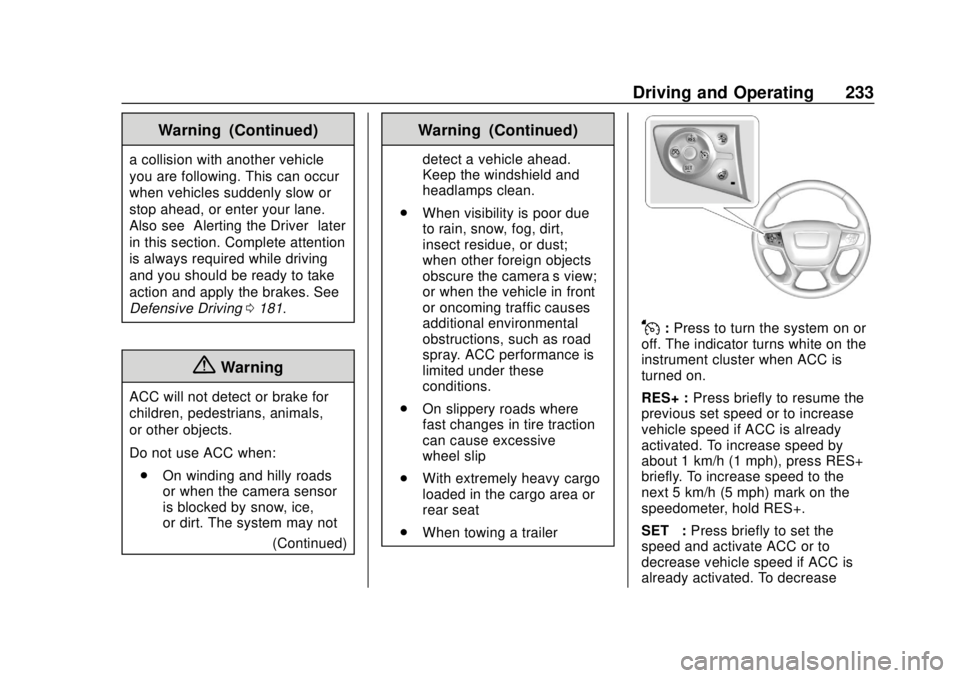
J:Press to turn the system on or
off. The indicator turns white on the
instrument cluster when ACC is
turned on.
RES+ : Press briefly to resume the
previous set speed or to increase
vehicle speed if ACC is already
activated. To increase speed by
about 1 km/h (1 mph), press RES+
briefly. To increase speed to the
next 5 km/h (5 mph) mark on the
speedometer, hold RES+.
SET– :Press briefly to set the
speed and activate ACC or to
decrease vehicle speed if ACC is
already activated. To decrease
Page 250 of 434

GMC Terrain/Terrain Denali Owner Manual (GMNA-Localizing-U.S./Canada/
Mexico-12146071) - 2019 - crc - 7/27/18
Driving and Operating 249
system is maneuvering the vehicle
into a previously detected space.
The APA system does not need
service.
APA will instruct the vehicle to stop
once a large enough space is found.
Follow the displayed instructions.
When instructed to drive in reverse,
shift to R (Reverse) to engage
automatic steering. The steering
wheel will briefly vibrate as a
reminder to remove hands from the
steering wheel. Check surroundings
and continue braking or accelerating
as needed, and be prepared to stop
to avoid vehicles, pedestrians,
or objects.If the vehicle exceeds 10 km/h
(6 mph), APA is automatically
disengaged and automatic steering
will turn off. A progress arrow
displays the status of the parking
maneuver. Depending on the space
size, additional maneuvers may be
required, and there will be additional
instructions. When changing gears,
allow the automatic steering to
complete before continuing the
parking maneuver. Upon successful
completion of a maneuver, APA will
beep and display a PARKING
COMPLETE message. Place the
vehicle in P (Park).
APA may automatically disengage if:
.
The steering wheel is used by
the driver.
. The maximum allowed speed is
exceeded.
. There is a failure with the APA
system.
. Electronic stability control or
antilock brakes are activated. .
A high priority vehicle message
is displayed in the Driver
Information Center (DIC).
To cancel APA, press
Oagain.
When the System Does Not Seem
to Work Properly
The APA system may require a
short period of driving along curves
to calibrate.
Assistance Systems for
Driving
If equipped, when driving the
vehicle in a forward gear, Forward
Collision Alert (FCA), Lane
Departure Warning (LDW), Lane
Keep Assist (LKA), Side Blind Zone
Alert (SBZA), Lane Change Alert
(LCA), Forward Automatic Braking
(FAB), and/or the Front Pedestrian
Braking (FPB) System can help to
avoid a crash or reduce crash
damage.
Page 251 of 434
GMC Terrain/Terrain Denali Owner Manual (GMNA-Localizing-U.S./Canada/
Mexico-12146071) - 2019 - crc - 7/27/18
250 Driving and Operating
Forward Collision Alert
(FCA) System
If equipped, the FCA system may
help to avoid or reduce the harm
caused by front-end crashes. When
approaching a vehicle ahead too
quickly, FCA provides a red flashing
alert on the windshield and rapidly
beeps or pulses the driver seat.
FCA also lights an amber visual
alert if following another vehicle
much too closely.
FCA detects vehicles within a
distance of approximately 60 m
(197 ft) and operates at speeds
above 8 km/h (5 mph).
{Warning
FCA is a warning system and
does not apply the brakes. When
approaching a slower-moving or
stopped vehicle ahead too rapidly,
or when following a vehicle too
closely, FCA may not provide a
warning with enough time to help(Continued)
Warning (Continued)
avoid a crash. It also may not
provide any warning at all. FCA
does not warn of pedestrians,
animals, signs, guardrails,
bridges, construction barrels,
or other objects. Be ready to take
action and apply the brakes. See
Defensive Driving0181.
FCA can be disabled with the FCA
steering wheel control, or if
equipped, through vehicle
personalization. See “Collision/
Detection Systems” underVehicle
Personalization 0152.
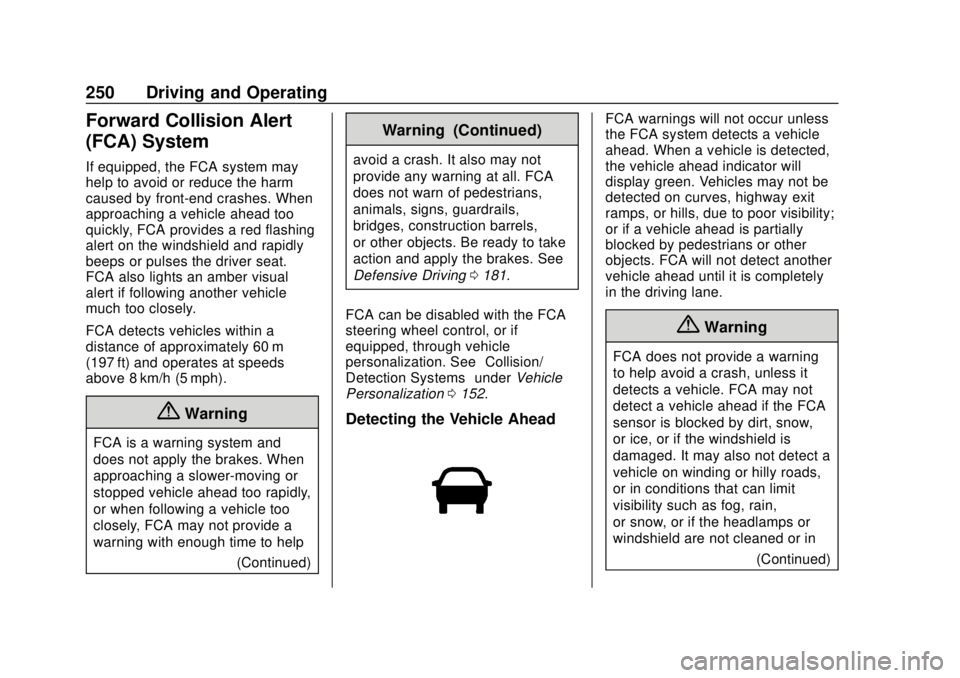
Detecting the Vehicle Ahead
FCA warnings will not occur unless
the FCA system detects a vehicle
ahead. When a vehicle is detected,
the vehicle ahead indicator will
display green. Vehicles may not be
detected on curves, highway exit
ramps, or hills, due to poor visibility;
or if a vehicle ahead is partially
blocked by pedestrians or other
objects. FCA will not detect another
vehicle ahead until it is completely
in the driving lane.
{Warning
FCA does not provide a warning
to help avoid a crash, unless it
detects a vehicle. FCA may not
detect a vehicle ahead if the FCA
sensor is blocked by dirt, snow,
or ice, or if the windshield is
damaged. It may also not detect a
vehicle on winding or hilly roads,
or in conditions that can limit
visibility such as fog, rain,
or snow, or if the headlamps or
windshield are not cleaned or in
(Continued)
Page 259 of 434
GMC Terrain/Terrain Denali Owner Manual (GMNA-Localizing-U.S./Canada/
Mexico-12146071) - 2019 - crc - 7/27/18
258 Driving and Operating
Radio Frequency Information
SeeRadio Frequency Statement
0 405.
Lane Departure
Warning (LDW)
If equipped, LDW may help avoid
crashes due to unintentional lane
departures. It may provide a
warning if the vehicle is crossing a
detected lane marking without using
a turn signal in the lane departure
direction. Since this system is part
of the Lane Keep Assist (LKA)
system, read the entire LKA section
before using this feature.
Lane Keep Assist (LKA)
If equipped, LKA may help avoid
crashes due to unintentional lane
departures. It may assist by gently
turning the steering wheel if the
vehicle approaches a detected lane
marking without using a turn signal
in that direction. It may also provide
a Lane Departure Warning (LDW)
system alert as the lane marking is
crossed. The LKA system will not assist or provide an LDW alert if it
detects that you are actively
steering. Override LKA by turning
the steering wheel. LKA uses a
camera to detect lane markings
between 60 km/h (37 mph) and
180 km/h (112 mph).
{Warning
The LKA system does not
continuously steer the vehicle.
It may not keep the vehicle in the
lane or give a Lane Departure
Warning (LDW) alert, even if a
lane marking is detected.
The LKA and LDW systems
may not:
. Provide an alert or enough
steering assist to avoid a
lane departure or crash.
. Detect lane markings under
poor weather or visibility
conditions. This can occur if
the windshield or
headlamps are blocked by
dirt, snow, or ice, if they are
(Continued)
Warning (Continued)
not in proper condition, or if
the sun shines directly into
the camera.
. Detect road edges.
. Detect lanes on winding or
hilly roads.
If LKA only detects lane markings
on one side of the road, it will
only assist or provide an LDW
alert when approaching the lane
on the side where it has detected
a lane marking. Even with LKA
and LDW, you must steer the
vehicle. Always keep your
attention on the road and
maintain proper vehicle position
within the lane, or vehicle
damage, injury, or death could
occur. Always keep the
windshield, headlamps, and
camera sensors clean and in
good repair. Do not use LKA in
bad weather conditions.
Page 260 of 434
GMC Terrain/Terrain Denali Owner Manual (GMNA-Localizing-U.S./Canada/
Mexico-12146071) - 2019 - crc - 7/27/18
Driving and Operating 259
{Warning
Using LKA while towing a trailer
or on slippery roads could cause
loss of control of the vehicle and
a crash. Turn the system off.
How the System Works
The LKA camera sensor is on the
windshield ahead of the rearview
mirror.
To turn LKA on and off, press
A
on the center console.
When on,
Ais green if LKA is
available to assist and provide LDW
alerts. It may assist by gently
turning the steering wheel and
display
Aas amber if the vehicle
approaches a detected lane marking
without using a turn signal in that
direction. It may also provide an
LDW alert by flashing
Aamber
as the lane marking is crossed.
Additionally, there may be three
beeps, or the driver seat may pulse three times, on the right or left,
depending on the lane departure
direction.
Take Steering
The LKA system does not
continuously steer the vehicle.
If LKA does not detect active driver
steering, then an alert, chime,
or Driver Information Center (DIC)
message may be provided. Steer
the vehicle to dismiss.
When the System Does Not
Seem to Work Properly
The system performance may be
affected by:
.
Close vehicles ahead.
. Sudden lighting changes, such
as when driving through tunnels.
. Banked roads.
. Roads with poor lane markings,
such as two-lane roads.
If the LKA system is not functioning
properly when lane markings are
clearly visible, cleaning the
windshield may help. A system unavailable message may
display if the camera is blocked.
The LKA system does not need
service.
LKA assistance and/or LDW alerts
may occur due to tar marks,
shadows, cracks in the road,
temporary or construction lane
markings, or other road
imperfections. This is normal system
operation; the vehicle does not need
service. Turn LKA off if these
conditions continue.
Page 285 of 434
GMC Terrain/Terrain Denali Owner Manual (GMNA-Localizing-U.S./Canada/
Mexico-12146071) - 2019 - crc - 7/27/18
284 Vehicle Care
Vehicle Care
General Information
General Information . . . . . . . . . . 285
California Proposition65 Warning . . . . . . . . . . . . . . . . . 285
California Perchlorate Materials Requirements . . . . . 286
Accessories and Modifications . . . . . . . . . . . . . . . . 286
Vehicle Checks
Doing Your OwnService Work . . . . . . . . . . . . . . . 286
Hood . . . . . . . . . . . . . . . . . . . . . . . . . 287
Engine Compartment Overview . . . . . . . . . . . . . . . . . . . . 289
Engine Oil . . . . . . . . . . . . . . . . . . . . 294
Engine Oil Life System . . . . . . . 298
Automatic Transmission Fluid . . . . . . . . . . . . . . . . . . . . . . . . 299
Engine Air Cleaner/Filter . . . . . . 299
Cooling System . . . . . . . . . . . . . . 301
Engine Overheating . . . . . . . . . . 305
Washer Fluid . . . . . . . . . . . . . . . . . 307
Brakes . . . . . . . . . . . . . . . . . . . . . . . 307
Brake Fluid . . . . . . . . . . . . . . . . . . . 308
Battery - North America . . . . . . 309
All-Wheel Drive . . . . . . . . . . . . . . . 310 Starter Switch Check . . . . . . . . . 310
Park Brake and P (Park)
Mechanism Check . . . . . . . . . . 311
Wiper Blade Replacement . . . . 311
Windshield Replacement . . . . . 313
Gas Strut(s) . . . . . . . . . . . . . . . . . . 313
Headlamp Aiming
Headlamp Aiming . . . . . . . . . . . . 314
Bulb Replacement
Bulb Replacement . . . . . . . . . . . . 314
Halogen Bulbs . . . . . . . . . . . . . . . . 314
High Intensity Discharge (HID) Lighting . . . . . . . . . . . . . . . . . . . . . 315
LED Lighting . . . . . . . . . . . . . . . . . 315
Front Turn Signal Lamps . . . . . 315
Taillamps . . . . . . . . . . . . . . . . . . . . . 316
License Plate Lamp . . . . . . . . . . 316
Electrical System
Electrical System Overload . . . 317
Fuses and Circuit Breakers . . . 318
Engine Compartment Fuse Block . . . . . . . . . . . . . . . . . . . . . . . . 318
Instrument Panel Fuse Block . . . . . . . . . . . . . . . . . . . . . . . . 321
Rear Compartment Fuse Block . . . . . . . . . . . . . . . . . . . . . . . . 323
Wheels and Tires
Tires . . . . . . . . . . . . . . . . . . . . . . . . . . 325
All-Season Tires . . . . . . . . . . . . . . 326
Winter Tires . . . . . . . . . . . . . . . . . . 326
Summer Tires . . . . . . . . . . . . . . . . 327
Tire Sidewall Labeling . . . . . . . . 327
Tire Designations . . . . . . . . . . . . . 329
Tire Terminology andDefinitions . . . . . . . . . . . . . . . . . . 330
Tire Pressure . . . . . . . . . . . . . . . . . 332
Tire Pressure Monitor System . . . . . . . . . . . . . . . . . . . . . . 334
Tire Pressure Monitor Operation . . . . . . . . . . . . . . . . . . . 335
Tire Inspection . . . . . . . . . . . . . . . . 339
Tire Rotation . . . . . . . . . . . . . . . . . 339
When It Is Time for New Tires . . . . . . . . . . . . . . . . . . . . . . . . 340
Buying New Tires . . . . . . . . . . . . . 341
Different Size Tires and Wheels . . . . . . . . . . . . . . . . . . . . . . 342
Uniform Tire Quality Grading . . . . . . . . . . . . . . . . . . . . . 342
Wheel Alignment and Tire Balance . . . . . . . . . . . . . . . . . . . . . 344
Wheel Replacement . . . . . . . . . . 344
Tire Chains . . . . . . . . . . . . . . . . . . . 345
If a Tire Goes Flat . . . . . . . . . . . . 345
Tire Sealant and Compressor Kit . . . . . . . . . . . . . 347
Page 321 of 434
GMC Terrain/Terrain Denali Owner Manual (GMNA-Localizing-U.S./Canada/
Mexico-12146071) - 2019 - crc - 7/27/18
320 Vehicle Care
FusesUsage
F25 Diesel fuel heater (diesel only)
F26 –
F27 Antilock brake valves
F28 LD trailer
F29 Rear window defogger
F30 Mirror defroster
F31 –
F32 Variable functions
F33 –
F34 Horn
F35 –
F36 Right high-beam headlamp
F37 Left high-beam headlamp
F38 Automatic headlamp leveling
F39 Fog lamps
F40 – Fuses
Usage
F41 Transmission range control module
F42 Motorized headlamp
F43 –
F44 Interior rearview mirror
F45 Passenger side ventilated seat
F46 Driver side ventilated seat
F47 Steering column lock assembly
F48 Rear wiper
F49 –
F50 Heated steering wheel
F51 Right daytime running lamp
F52 Engine control module/
Transmission control
F53 – Fuses
Usage
F54 –
F55 Front wiper speed/ Control
F56 –
F57 Left daytime running lamp
Relays Usage
K01 Starter solenoid
K02 Air conditioning control
K03 Engine control module
K04 Front wiper control
K05 Starter pinion
K06 Fuel heater (diesel only)
K07 –
K08 –
K09 Front wiper speed
K10 –
K11 –
Page 323 of 434
GMC Terrain/Terrain Denali Owner Manual (GMNA-Localizing-U.S./Canada/
Mexico-12146071) - 2019 - crc - 7/27/18
322 Vehicle Care
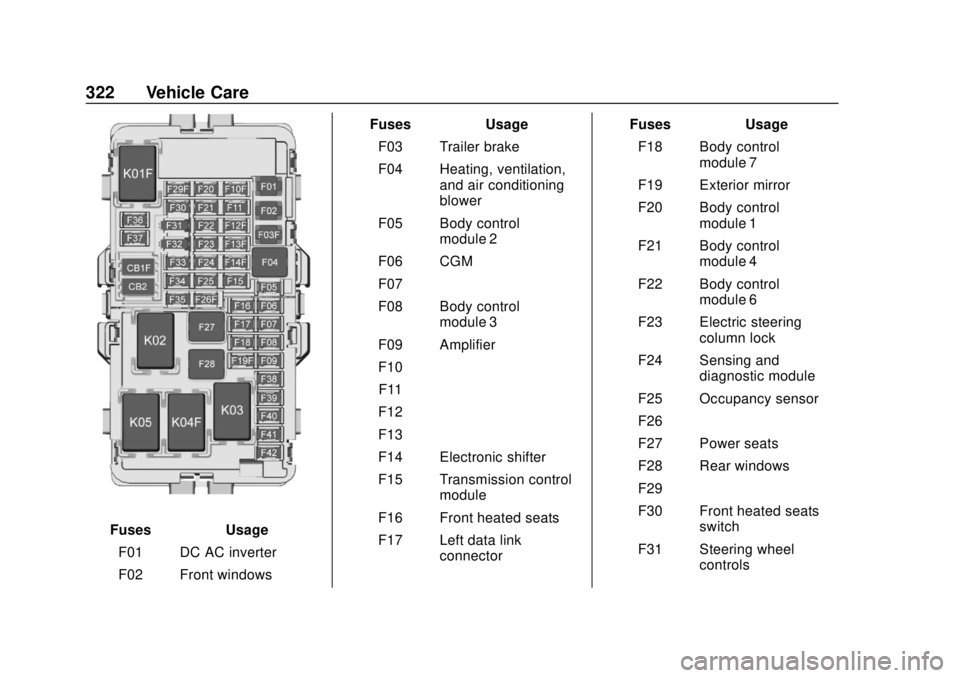
FusesUsage
F01 DC AC inverter
F02 Front windows Fuses
Usage
F03 Trailer brake
F04 Heating, ventilation, and air conditioning
blower
F05 Body control module 2
F06 CGM
F07 –
F08 Body control module 3
F09 Amplifier
F10 –
F11 –
F12 –
F13 –
F14 Electronic shifter
F15 Transmission control module
F16 Front heated seats
F17 Left data link connector Fuses
Usage
F18 Body control module 7
F19 Exterior mirror
F20 Body control module 1
F21 Body control module 4
F22 Body control module 6
F23 Electric steering column lock
F24 Sensing and diagnostic module
F25 Occupancy sensor
F26 –
F27 Power seats
F28 Rear windows
F29 –
F30 Front heated seats switch
F31 Steering wheel controls
Page 343 of 434
GMC Terrain/Terrain Denali Owner Manual (GMNA-Localizing-U.S./Canada/
Mexico-12146071) - 2019 - crc - 7/27/18
342 Vehicle Care
{Warning
Mixing tires of different sizes,
brands, or types may cause
loss of control of the vehicle,
resulting in a crash or other
vehicle damage. Use the
correct size, brand, and type
of tires on all wheels.
{Warning
Using bias-ply tires on the
vehicle may cause the wheel
rim flanges to develop cracks
after many miles of driving.
A tire and/or wheel could fail
suddenly and cause a crash.
Use only radial-ply tires with
the wheels on the vehicle.
If the vehicle tires must be
replaced with a tire that does not
have a TPC Spec number, make
sure they are the same size, load range, speed rating, and
construction (radial) as the
original tires.
Vehicles that have a tire
pressure monitoring system
could give an inaccurate
low-pressure warning if non-TPC
Spec rated tires are installed.
See
Tire Pressure Monitor
System 0334.
The Tire and Loading
Information label indicates the
original equipment tires on the
vehicle. See Vehicle Load Limits
0 191.
Different Size Tires and
Wheels
If wheels or tires are installed that
are a different size than the original
equipment wheels and tires, vehicle
performance, including its braking,
ride and handling characteristics,
stability, and resistance to rollover
may be affected. If the vehicle has
electronic systems such as antilock
brakes, rollover airbags, traction control, electronic stability control,
or All-Wheel Drive, the performance
of these systems can also be
affected.
{Warning
If different sized wheels are used,
there may not be an acceptable
level of performance and safety if
tires not recommended for those
wheels are selected. This
increases the chance of a crash
and serious injury. Only use GM
specific wheel and tire systems
developed for the vehicle, and
have them properly installed by a
GM certified technician.
See Buying New Tires 0341 and
Accessories and Modifications
0 286.
Uniform Tire Quality
Grading
The following information relates
to the system developed by the
United States National Highway