ECU GMC TERRAIN 2019 Owner's Guide
[x] Cancel search | Manufacturer: GMC, Model Year: 2019, Model line: TERRAIN, Model: GMC TERRAIN 2019Pages: 434, PDF Size: 6.38 MB
Page 108 of 434
GMC Terrain/Terrain Denali Owner Manual (GMNA-Localizing-U.S./Canada/
Mexico-12146071) - 2019 - crc - 7/27/18
Seats and Restraints 107
When using the lap-shoulder belt to
secure the child restraint in this
position, follow the instructions that
came with the child restraint and the
following instructions:1. Move the seat as far back as it will go before securing the
forward-facing child restraint.
Move the seat upward or the
seatback to an upright position,
if needed, to get a tight
installation of the child
restraint.
When the passenger sensing
system has turned off the front
outboard passenger frontal
airbag, the OFF indicator on
the passenger airbag status
indicator should light and stay
lit when you start the vehicle.
See Passenger Airbag Status
Indicator 0132.
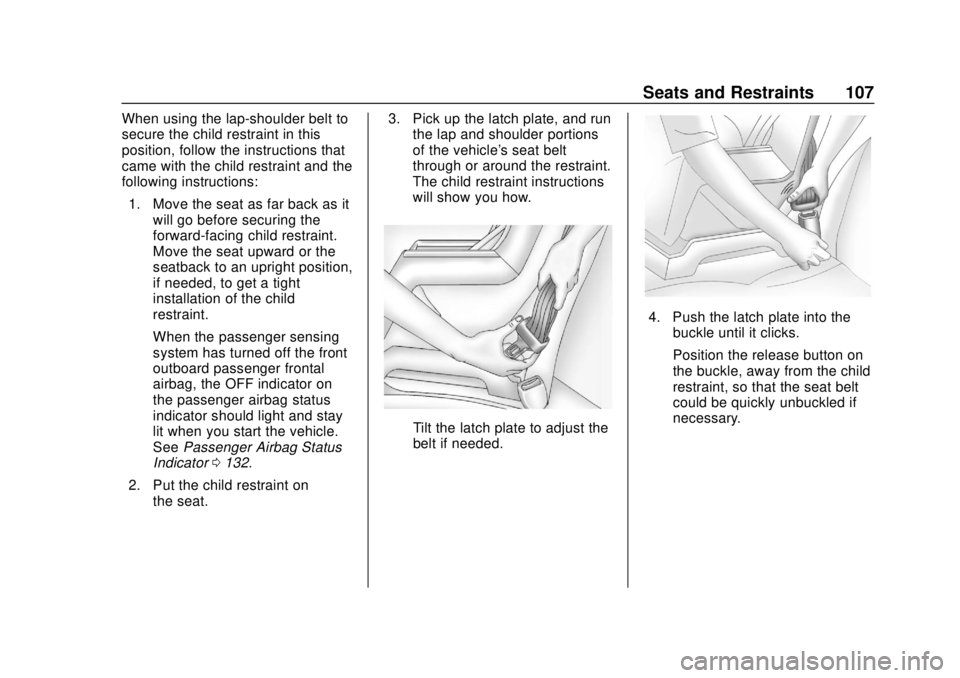
2. Put the child restraint on the seat. 3. Pick up the latch plate, and run
the lap and shoulder portions
of the vehicle's seat belt
through or around the restraint.
The child restraint instructions
will show you how.
Tilt the latch plate to adjust the
belt if needed.
4. Push the latch plate into the
buckle until it clicks.
Position the release button on
the buckle, away from the child
restraint, so that the seat belt
could be quickly unbuckled if
necessary.
Page 109 of 434
GMC Terrain/Terrain Denali Owner Manual (GMNA-Localizing-U.S./Canada/
Mexico-12146071) - 2019 - crc - 7/27/18
108 Seats and Restraints
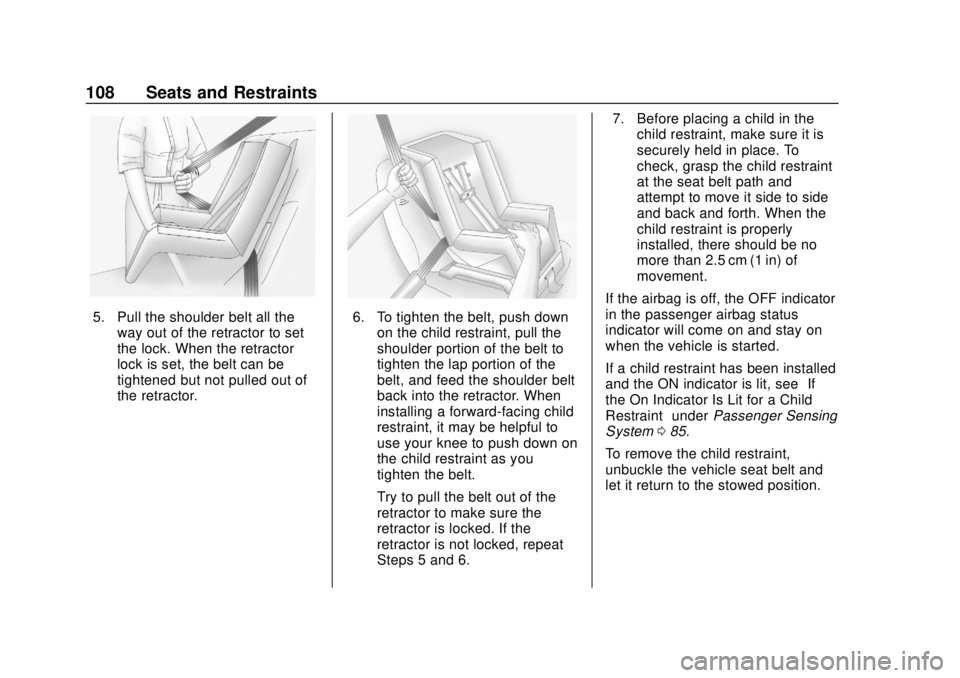
5. Pull the shoulder belt all theway out of the retractor to set
the lock. When the retractor
lock is set, the belt can be
tightened but not pulled out of
the retractor.6. To tighten the belt, push downon the child restraint, pull the
shoulder portion of the belt to
tighten the lap portion of the
belt, and feed the shoulder belt
back into the retractor. When
installing a forward-facing child
restraint, it may be helpful to
use your knee to push down on
the child restraint as you
tighten the belt.
Try to pull the belt out of the
retractor to make sure the
retractor is locked. If the
retractor is not locked, repeat
Steps 5 and 6. 7. Before placing a child in the
child restraint, make sure it is
securely held in place. To
check, grasp the child restraint
at the seat belt path and
attempt to move it side to side
and back and forth. When the
child restraint is properly
installed, there should be no
more than 2.5 cm (1 in) of
movement.
If the airbag is off, the OFF indicator
in the passenger airbag status
indicator will come on and stay on
when the vehicle is started.
If a child restraint has been installed
and the ON indicator is lit, see “If
the On Indicator Is Lit for a Child
Restraint” underPassenger Sensing
System 085.
To remove the child restraint,
unbuckle the vehicle seat belt and
let it return to the stowed position.
Page 111 of 434
GMC Terrain/Terrain Denali Owner Manual (GMNA-Localizing-U.S./Canada/
Mexico-12146071) - 2019 - crc - 7/27/18
110 Storage
Additional Storage
Features
Cargo Cover
{Warning
An unsecured cargo cover could
strike people in a sudden stop or
turn, or in a crash. Store the
cargo cover securely or remove it
from the vehicle.
{Warning
Do not place objects on the cargo
cover. Sudden stops or turns can
cause objects to be thrown in the
vehicle. You or others could be
injured.
If equipped, use the cargo cover to
cover items in the rear of the
vehicle. To remove the cover from the
vehicle, pull both ends toward each
other.
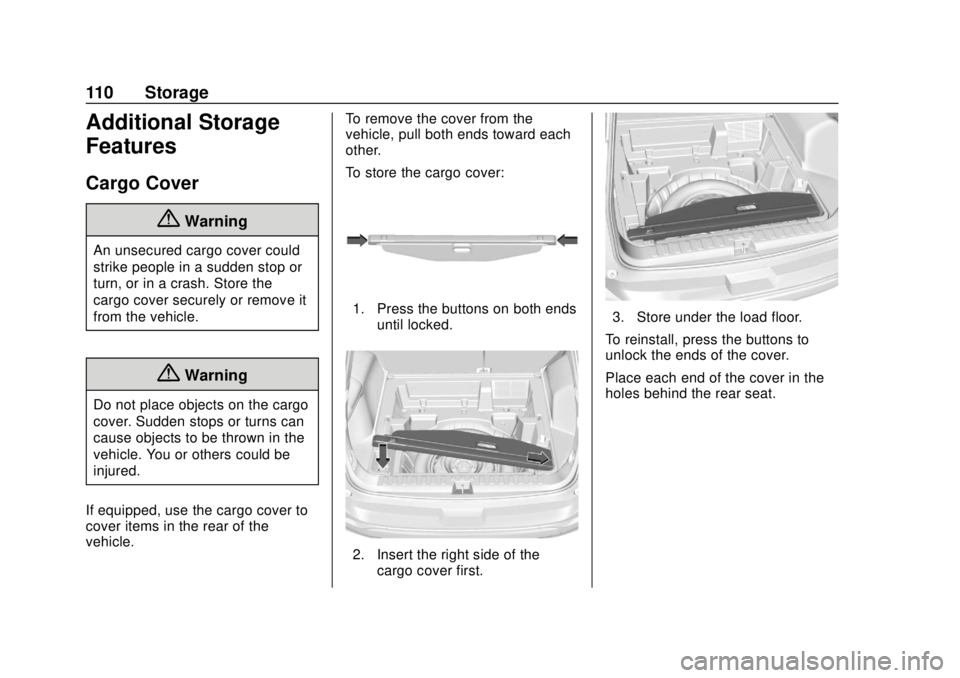
To store the cargo cover:
1. Press the buttons on both ends
until locked.
2. Insert the right side of thecargo cover first.
3. Store under the load floor.
To reinstall, press the buttons to
unlock the ends of the cover.
Place each end of the cover in the
holes behind the rear seat.
Page 113 of 434
GMC Terrain/Terrain Denali Owner Manual (GMNA-Localizing-U.S./Canada/
Mexico-12146071) - 2019 - crc - 7/27/18
112 Storage
Caution
Loading cargo on the roof rack
that weighs more than 100 kg
(220 lb) or hangs over the rear or
sides of the vehicle may damage
the vehicle. Load cargo so that it
rests evenly between the
crossrails, making sure to fasten
cargo securely.
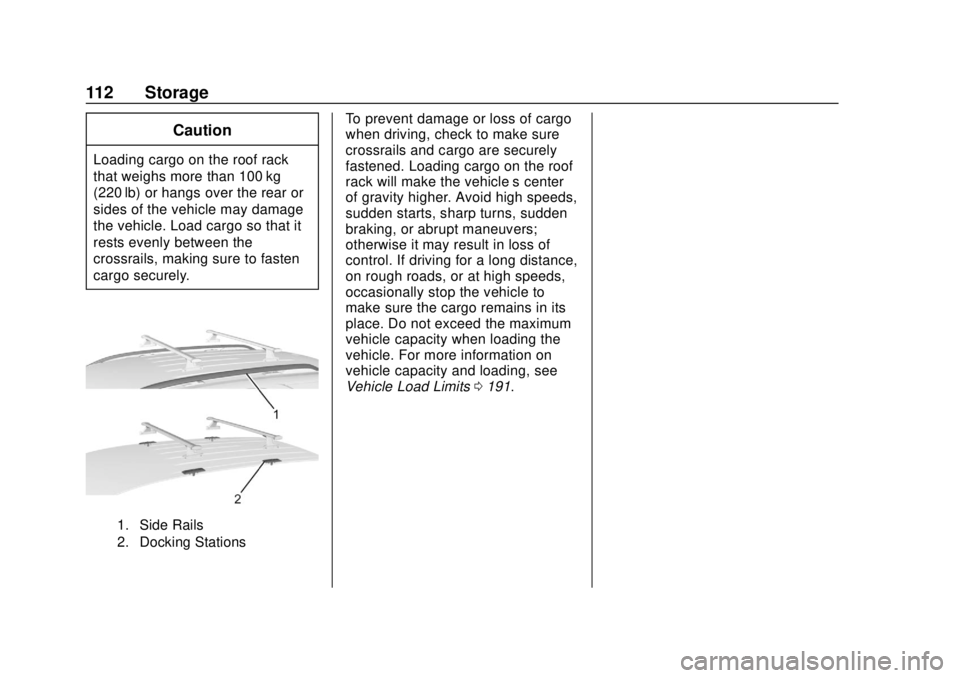
1. Side Rails
2. Docking Stations
To prevent damage or loss of cargo
when driving, check to make sure
crossrails and cargo are securely
fastened. Loading cargo on the roof
rack will make the vehicle’s center
of gravity higher. Avoid high speeds,
sudden starts, sharp turns, sudden
braking, or abrupt maneuvers;
otherwise it may result in loss of
control. If driving for a long distance,
on rough roads, or at high speeds,
occasionally stop the vehicle to
make sure the cargo remains in its
place. Do not exceed the maximum
vehicle capacity when loading the
vehicle. For more information on
vehicle capacity and loading, see
Vehicle Load Limits 0191.
Page 114 of 434
GMC Terrain/Terrain Denali Owner Manual (GMNA-Localizing-U.S./Canada/
Mexico-12146071) - 2019 - crc - 7/27/18
Instruments and Controls 113
Instruments and
Controls
Controls
Steering Wheel Adjustment . . . 114
Steering Wheel Controls . . . . . . 114
Heated Steering Wheel . . . . . . . 114
Horn . . . . . . . . . . . . . . . . . . . . . . . . . . 114
Windshield Wiper/Washer . . . . 114
Rear Window Wiper/Washer . . . . . . . . . . . . . . . . . . . . . . 115
Compass . . . . . . . . . . . . . . . . . . . . . 116
Clock . . . . . . . . . . . . . . . . . . . . . . . . . 117
Power Outlets . . . . . . . . . . . . . . . . 117
Wireless Charging . . . . . . . . . . . . 118
Warning Lights, Gauges, and
Indicators
Warning Lights, Gauges, and Indicators . . . . . . . . . . . . . . . . . . . 121
Instrument Cluster (Base and
Midlevel) . . . . . . . . . . . . . . . . . . . . 122
Instrument Cluster (Uplevel) . . . . . . . . . . . . . . . . . . . . 125
Speedometer . . . . . . . . . . . . . . . . . 128
Odometer . . . . . . . . . . . . . . . . . . . . . 128
Trip Odometer . . . . . . . . . . . . . . . . 128
Tachometer . . . . . . . . . . . . . . . . . . . 128 Fuel Gauge . . . . . . . . . . . . . . . . . . . 129
Engine Coolant Temperature
Gauge . . . . . . . . . . . . . . . . . . . . . . 130
Seat Belt Reminders . . . . . . . . . 131
Airbag Readiness Light . . . . . . . 131
Passenger Airbag Status Indicator . . . . . . . . . . . . . . . . . . . . 132
Charging System Light . . . . . . . 133
Malfunction Indicator Lamp (Check Engine Light) . . . . . . . . 133
Brake System Warning Light . . . . . . . . . . . . . . . . . . . . . . . . 135
Electric Parking Brake Light . . . . . . . . . . . . . . . . . . . . . . . . 136
Service Electric Parking Brake Light . . . . . . . . . . . . . . . . . . . . . . . . 136
Antilock Brake System (ABS) Warning Light . . . . . . . . . . . . . . . 136
Tow/Haul Mode Light . . . . . . . . . 137
Hill Descent Control Light . . . . 137
Lane Keep Assist (LKA) Light . . . . . . . . . . . . . . . . . . . . . . . . 137
Vehicle Ahead Indicator . . . . . . 137
Pedestrian Ahead Indicator . . . 137
Traction Off Light . . . . . . . . . . . . . 138
StabiliTrak OFF Light . . . . . . . . . 138
Traction Control System (TCS)/ StabiliTrak Light . . . . . . . . . . . . . 138
Wait-to-Start Light . . . . . . . . . . . . 139
Tire Pressure Light . . . . . . . . . . . 139 Engine Oil Pressure Light . . . . 139
Low Fuel Warning Light . . . . . . 140
Diesel Exhaust Fluid (DEF)
Warning Light . . . . . . . . . . . . . . . 140
Security Light . . . . . . . . . . . . . . . . . 141
High-Beam On Light . . . . . . . . . . 141
Front Fog Lamp Light . . . . . . . . . 141
Lamps On Reminder . . . . . . . . . 141
Cruise Control Light . . . . . . . . . . 141
Information Displays
Driver Information Center (DIC)
(Base and Midlevel) . . . . . . . . . 142
Driver Information Center (DIC) (Uplevel) . . . . . . . . . . . . . . . . . . . . 147
Vehicle Messages
Vehicle Messages . . . . . . . . . . . . 151
Engine Power Messages . . . . . 152
Vehicle Speed Messages . . . . . 152
Vehicle Personalization
Vehicle Personalization . . . . . . . 152
Universal Remote System
Universal Remote System . . . . 157
Universal Remote SystemProgramming . . . . . . . . . . . . . . . 157
Universal Remote System Operation . . . . . . . . . . . . . . . . . . . 160
Page 142 of 434
GMC Terrain/Terrain Denali Owner Manual (GMNA-Localizing-U.S./Canada/
Mexico-12146071) - 2019 - crc - 7/27/18
Instruments and Controls 141
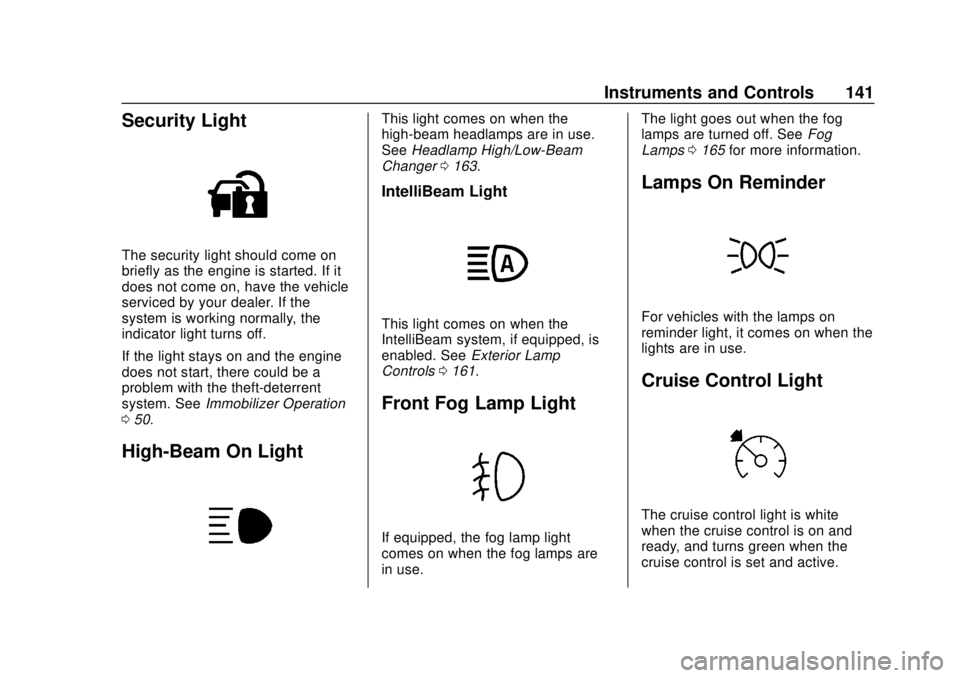
Security Light
The security light should come on
briefly as the engine is started. If it
does not come on, have the vehicle
serviced by your dealer. If the
system is working normally, the
indicator light turns off.
If the light stays on and the engine
does not start, there could be a
problem with the theft-deterrent
system. SeeImmobilizer Operation
0 50.
High-Beam On Light
This light comes on when the
high-beam headlamps are in use.
See Headlamp High/Low-Beam
Changer 0163.
IntelliBeam Light
This light comes on when the
IntelliBeam system, if equipped, is
enabled. See Exterior Lamp
Controls 0161.
Front Fog Lamp Light
If equipped, the fog lamp light
comes on when the fog lamps are
in use. The light goes out when the fog
lamps are turned off. See
Fog
Lamps 0165 for more information.
Lamps On Reminder
For vehicles with the lamps on
reminder light, it comes on when the
lights are in use.
Cruise Control Light
The cruise control light is white
when the cruise control is on and
ready, and turns green when the
cruise control is set and active.
Page 152 of 434
GMC Terrain/Terrain Denali Owner Manual (GMNA-Localizing-U.S./Canada/
Mexico-12146071) - 2019 - crc - 7/27/18
Instruments and Controls 151
engine speed or load varies. This is
normal. If the oil pressure warning
light or DIC message indicates oil
pressure outside the normal
operating range, check the vehicle's
oil as soon as possible.
Coolant Temperature :Displays
the coolant temperature in degrees
Celsius (°C) or degrees Fahrenheit
(°F).
Diesel Exhaust Fluid (DEF) Level
Percent (Diesel Engine Only) :
If equipped, the DEF level will be
displayed as either OK, XX%,
or LOW. When LOW appears on the
display, add DEF as soon as
possible. See Diesel Exhaust Fluid
0 208.
Diesel Exhaust Fluid (DEF) Level
Gauge (Diesel Engine Only) :
If equipped, the DEF level displays
as a horizontal bar gauge with E or
0 and F or 1 at both ends. If more of
the bar is filled green, the vehicle
has a higher level of DEF. When the
estimated level is low, the gauge will
turn red and LOW will display above
the bar. When there is an error, the
bar will be empty and “unavailable”will appear. When LOW appears on
the display, add DEF as soon as
possible. See
Diesel Exhaust Fluid
0 208.
Diesel Exhaust Fluid (DEF) Range
(Diesel Engine Only) : If equipped,
this page displays how far the
vehicle can go before DEF needs to
be replaced. Range is displayed in
mi or km. When the estimated range
is low, LOW will display. If an error
occurs, “−−”will display. When DEF
range is high, a greater than sign is
shown before the range value.
When LOW appears on the display,
add DEF as soon as possible. See
Diesel Exhaust Fluid 0208.Vehicle Messages
Messages displayed on the DIC
indicate the status of the vehicle or
some action that may be needed to
correct a condition. Multiple
messages may appear one after
another.
The messages that do not require
immediate action can be
acknowledged and cleared by
pressing
V. The messages that
require immediate action cannot be
cleared until that action is
performed.
All messages should be taken
seriously; clearing the message
does not correct the problem.
If a SERVICE message appears,
see your dealer.
Follow the instructions given in the
messages. The system displays
messages regarding the following
topics:
. Service Messages
. Fluid Levels
. Vehicle Security
Page 158 of 434
GMC Terrain/Terrain Denali Owner Manual (GMNA-Localizing-U.S./Canada/
Mexico-12146071) - 2019 - crc - 7/27/18
Instruments and Controls 157
Seat Entry Memory
This feature automatically recalls
the current driver’s previously stored
1 or 2 button positions when the
ignition is changed from off to on or
ACC/ACCESSORY. See Memory
Seats 062.
Touch Off or On.
Seat Exit Memory
This feature automatically recalls
the previously stored
B(Exit)
button position when exiting the
vehicle. See Memory Seats 062.
Touch Off or On.
Teen Driver
See “Teen Driver” under“Settings”
in the infotainment manual.
Valet Mode
This will lock the infotainment
system and steering wheel controls.
It may also limit access to vehicle
storage locations, if equipped.
To enable valet mode:
1. Enter a four-digit code on the keypad.
2. Select Enter to go to the confirmation screen.
3. Re-enter the four-digit code.
Touch Lock or Unlock to lock or
unlock the system. Touch Back to
go back to the previous menu.
Universal Remote
System
See Radio Frequency Statement
0 405.
Universal Remote System
Programming
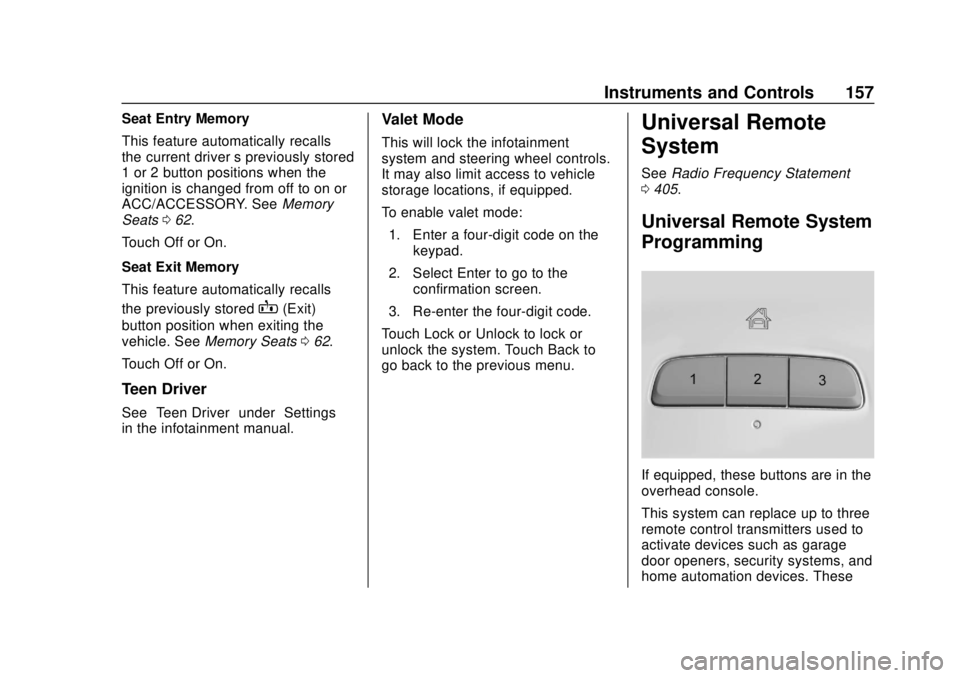
If equipped, these buttons are in the
overhead console.
This system can replace up to three
remote control transmitters used to
activate devices such as garage
door openers, security systems, and
home automation devices. These
Page 177 of 434
GMC Terrain/Terrain Denali Owner Manual (GMNA-Localizing-U.S./Canada/
Mexico-12146071) - 2019 - crc - 7/27/18
176 Climate Controls
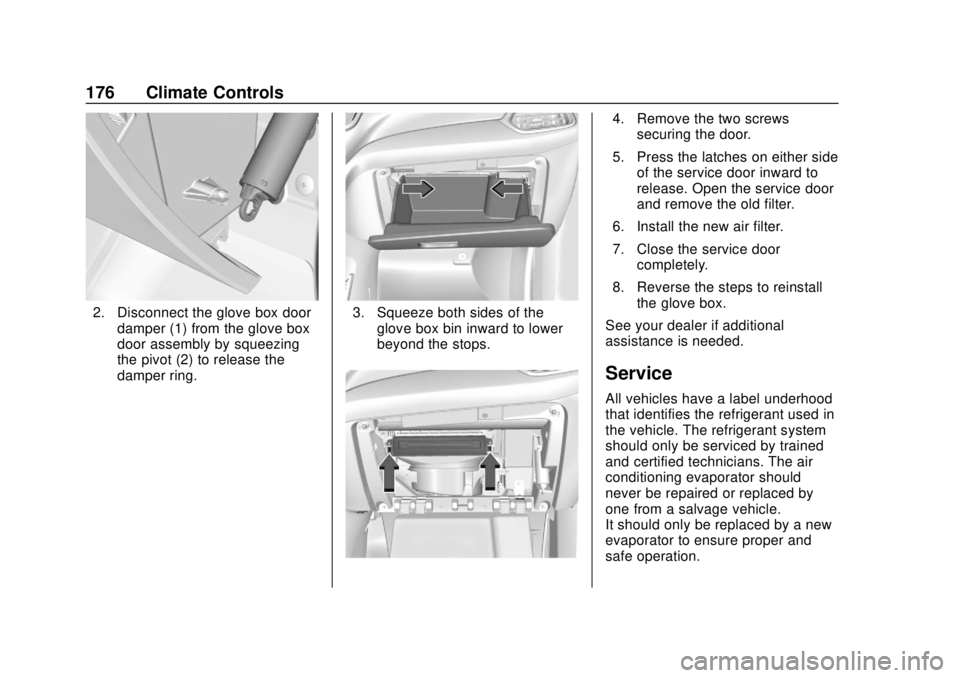
2. Disconnect the glove box doordamper (1) from the glove box
door assembly by squeezing
the pivot (2) to release the
damper ring.3. Squeeze both sides of theglove box bin inward to lower
beyond the stops.
4. Remove the two screwssecuring the door.
5. Press the latches on either side of the service door inward to
release. Open the service door
and remove the old filter.
6. Install the new air filter.
7. Close the service door completely.
8. Reverse the steps to reinstall the glove box.
See your dealer if additional
assistance is needed.
Service
All vehicles have a label underhood
that identifies the refrigerant used in
the vehicle. The refrigerant system
should only be serviced by trained
and certified technicians. The air
conditioning evaporator should
never be repaired or replaced by
one from a salvage vehicle.
It should only be replaced by a new
evaporator to ensure proper and
safe operation.
Page 185 of 434
GMC Terrain/Terrain Denali Owner Manual (GMNA-Localizing-U.S./Canada/
Mexico-12146071) - 2019 - crc - 7/27/18
184 Driving and Operating
{Warning
When driving off-road, bouncing
and quick changes in direction
can easily throw you out of
position. This could cause you to
lose control and crash. You and
your passengers should always
wear seat belts.
Before Driving Off-Road
.Have all necessary maintenance
and service work completed.
. Fuel the vehicle, fill fluid levels,
and check inflation pressure in
all tires, including the spare,
if equipped.
. Read all the information about
all-wheel-drive vehicles in this
manual.
. Make sure all underbody
shields, if equipped, are properly
attached.
. Know the local laws that apply to
off-road driving.
Loading the Vehicle for
Off-Road Driving
{Warning
.Unsecured cargo on the
load floor can be tossed
about when driving over
rough terrain. You or your
passengers can be struck
by flying objects. Secure the
cargo properly.
. Keep cargo in the cargo
area as far forward and as
low as possible. The
heaviest things should be
on the floor, forward of the
rear axle.
. Heavy loads on the roof
raise the vehicle's center of
gravity, making it more likely
to roll over. You can be
seriously or fatally injured if
the vehicle rolls over. Put
heavy loads inside the
cargo area, not on the roof. For more information about loading
the vehicle, see
Vehicle Load Limits
0 191.
Environmental Concerns
.
Always use established trails,
roads, and areas that have been
set aside for public off-road
recreational driving and obey all
posted regulations.
. Do not damage shrubs, flowers,
trees, or grasses or disturb
wildlife.
. Do not park over things that
burn. See Parking over Things
That Burn 0205.
Driving on Hills
Driving safely on hills requires good
judgment and an understanding of
what the vehicle can and cannot do.
{Warning
Many hills are simply too steep
for any vehicle. Driving up hills
can cause the vehicle to stall.
(Continued)