service GMC TERRAIN 2019 Service Manual
[x] Cancel search | Manufacturer: GMC, Model Year: 2019, Model line: TERRAIN, Model: GMC TERRAIN 2019Pages: 434, PDF Size: 6.38 MB
Page 204 of 434
GMC Terrain/Terrain Denali Owner Manual (GMNA-Localizing-U.S./Canada/
Mexico-12146071) - 2019 - crc - 7/27/18
Driving and Operating 203
Torque Lock
Torque lock is when the weight of
the vehicle puts too much force on
the parking pawl in the
transmission. This happens when
parking on a hill and shifting the
transmission into P (Park) is not
done properly and then it is difficult
to shift out of P (Park). To prevent
torque lock, set the parking brake
and then shift into P (Park). To find
out how, see“Shifting Into Park”
listed previously.
On certain steep grades, the
transmission will automatically set
the parking brake to prevent
torque lock.
If torque lock does occur, the
vehicle may need to be pushed
uphill by another vehicle to relieve
the parking pawl pressure, so you
can shift out of P (Park).
Shifting out of Park
This vehicle is equipped with an
electronic transmission. If the
vehicle has an uncharged battery or
a battery with low voltage, try charging or jump starting the
battery. See
Jump Starting - North
America 0360.
To shift out of P (Park): 1. Ensure the engine is running.
2. Apply the brake pedal.
3. Press or pull the desired shift switch on the center stack.
4. The P indicator will turn white and the gear indicator will turn
red when the vehicle is no
longer in P (Park).
If the vehicle cannot shift out of
P (Park), a Driver Information
Center (DIC) message will be
displayed. See your dealer for
service.
Diesel Engine Only
Vehicles with a diesel engine do not
have manual park release. To shift
to N (Neutral) with the engine off.
1. Turn the ignition off.
2. Put the ignition in service mode. See Ignition Positions
0 195 3. Apply the brake pedal.
4. Press and hold the N (Neutral)
button until N is illuminated
in red.
5. When N (Neutral) is no longer needed, shift to P (Park) and
turn the ignition off.
Manual Park Release (Gasoline
Engine Only)
Vehicles with a gasoline engine may
include a manual park release that
can be used to shift the vehicle into
N (Neutral) when the engine is not
running.
{Warning
The transmission will be placed in
N (Neutral) when the manual park
release is pulled. The vehicle can
roll and you or others could be
injured. Ensure the vehicle is on
level ground.
Page 205 of 434
GMC Terrain/Terrain Denali Owner Manual (GMNA-Localizing-U.S./Canada/
Mexico-12146071) - 2019 - crc - 7/27/18
204 Driving and Operating
Caution
The manual park release is not
intended to be used for towing.
Damage may result from using
the manual park release in this
way. The repairs would not be
covered by the vehicle warranty.
Pulling the manual park release
while the vehicle is on, or turning
the ignition on while the manual
park release is pulled, will result in a
Service Transmission message
being displayed.
To place the vehicle in N (Neutral)
using the manual park release: 1. Ensure the vehicle is on level ground and set the parking
brake. Release the brake
pedal.
2. Turn the vehicle off.
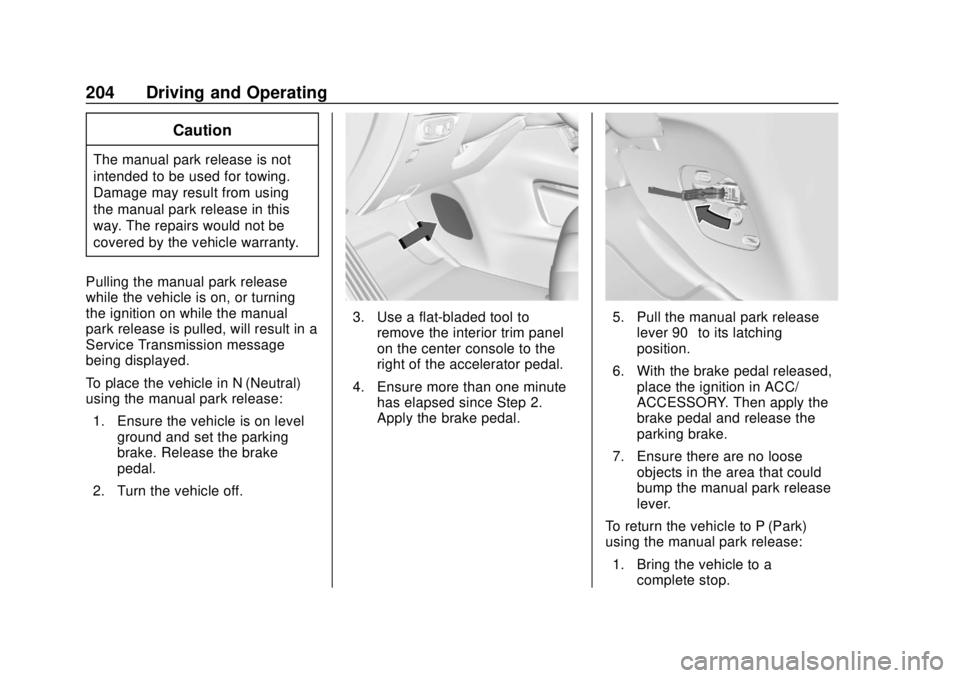
3. Use a flat-bladed tool to remove the interior trim panel
on the center console to the
right of the accelerator pedal.
4. Ensure more than one minute has elapsed since Step 2.
Apply the brake pedal.5. Pull the manual park release
lever 90° to its latching
position.
6. With the brake pedal released, place the ignition in ACC/
ACCESSORY. Then apply the
brake pedal and release the
parking brake.
7. Ensure there are no loose objects in the area that could
bump the manual park release
lever.
To return the vehicle to P (Park)
using the manual park release: 1. Bring the vehicle to a complete stop.
Page 208 of 434
GMC Terrain/Terrain Denali Owner Manual (GMNA-Localizing-U.S./Canada/
Mexico-12146071) - 2019 - crc - 7/27/18
Driving and Operating 207
Diesel Particulate
Filter
The Diesel Particulate Filter (DPF)
system filters soot particles out of
the exhaust gases. The DPF is
under the vehicle in the exhaust
system.
Depending on a number of factors
monitored by the engine computer,
the DPF will need to be cleaned of
accumulated solids. When a
cleaning is needed, the engine
computer will initiate a self-cleaning
function that runs automatically
during driving without any
notification. The filter is cleaned by
periodically burning off the soot
particles at high temperature. This
process takes place automatically
under set driving conditions and
may take up to 25 minutes. Fuel
consumption may be higher during
this period.
While the DPF cleaning is
automatically controlled by the
engine computer, the vehicle will
need to operate continuously for
approximately 25 minutes and atspeeds greater than 50 km/h
(30 mph) to clean the DPF
effectively.
If the vehicle is used for numerous
short trips or extended slow-speed
operation, the engine computer may
not be able to adequately heat up
the exhaust system to clean the
DPF effectively. The engine
computer has been designed to
continuously monitor the condition
of the DPF. When the engine
computer detects that the DPF is
nearly full of particulates and that
the vehicle is not being operated in
a manner that would allow effective
automatic DPF cleaning, a Driver
Information Center (DIC) message
will display. Start the cleaning
process as soon as possible.
Cleaning Process
To activate the cleaning process,
continue driving safely, and keep
vehicle speed above 50 km/h (30
mph) until the warning message in
the DIC turns off.
If the vehicle continues to be driven
with the DPF warning message on,
and the exhaust filter is not cleaned
as required, the malfunction
indicator lamp and the ENGINE
POWER IS REDUCED message
will come on. Dealer service is
necessary.
See
Malfunction Indicator Lamp
(Check Engine Light) 0133.
{Warning
During DPF self cleaning or
during extended idling while
parked, the exhaust system and
exhaust gases are very hot.
Things that burn could touch hot
exhaust parts under the vehicle
and ignite. You or others could be
burned. Do not park, or idle for an
extended period of time, near or
over papers, leaves, dry grass,
or other things that can burn.
Keep the exhaust area clear of
material that could ignite or burn.
See Parking over Things That
Burn 0205 for more information.
Page 209 of 434
GMC Terrain/Terrain Denali Owner Manual (GMNA-Localizing-U.S./Canada/
Mexico-12146071) - 2019 - crc - 7/27/18
208 Driving and Operating
Diesel Exhaust Fluid
{Warning
Avoid getting Diesel Exhaust
Fluid (DEF) on your skin or in
your eyes as it could cause
irritation. For more safety,
handling, and storage information,
see the Diesel Exhaust Fluid
container label.
Diesel Exhaust Fluid (DEF) is used
with diesel engines to reduce the
amount of regulated emissions
produced. Products such as AdBlue
are types of DEF, and are approved
for use in the vehicle as long as
they have an API certification label
or meet ISO 22241.The fluid level in
the DEF tank must be maintained
for the vehicle to run properly. DEF
is not a fuel additive. DEF should
not be mixed with or added to diesel
fuel. DEF freezes when exposed to
temperatures below −11 °C (12 ° F).It is normal to hear the DEF system
purge fluid back into the tank after
the vehicle is shut off.
Locating Diesel Exhaust Fluid
DEF can be purchased at your
dealer. It can also be purchased at
authorized vehicle and truck
dealerships. Additionally, some
diesel truck fueling stations or
retailers may have DEF for
purchase. For vehicles with an
active OnStar or connected services
plan, OnStar can help to locate a
DEF retailer. See
Customer
Assistance Offices 0397 for phone
numbers to assist in contacting a
GM dealer. See Recommended
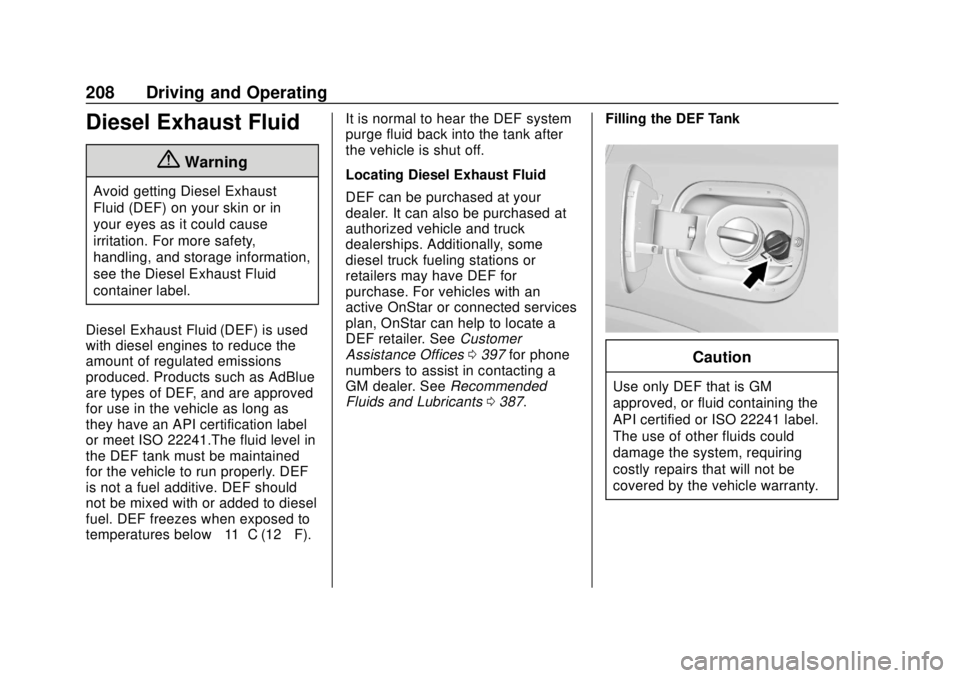
Fluids and Lubricants 0387. Filling the DEF Tank
Caution
Use only DEF that is GM
approved, or fluid containing the
API certified or ISO 22241 label.
The use of other fluids could
damage the system, requiring
costly repairs that will not be
covered by the vehicle warranty.
Page 212 of 434
GMC Terrain/Terrain Denali Owner Manual (GMNA-Localizing-U.S./Canada/
Mexico-12146071) - 2019 - crc - 7/27/18
Driving and Operating 211
All DEF has an expiration date.
If the system detects poor quality,
or contaminated or diluted DEF, the
DIC message EXHAUST FLUID
QUALITY POOR - SEE OWNERS
MANUAL NOW–160 KM (99 MI)
UNTIL 104 KM/H (65 MPH) MAX
SPEED displays. The displayed
mileage will decrease as driving
continues. A warning light also
comes on. Adding fresh DEF to the
system may resolve the problem,
depending on several factors. If the
DIC message persists, see your
dealer or additional DIC messages
may display.
When the mileage countdown is
zero, a DIC message EXHAUST
FLUID QUALITY POOR - SEE
OWNERS MANUAL NOW -
TRANSITIONING TO 104 KM/H
(65 MPH) MAX SPEED displays.
A warning light and a chime also
come on. Vehicle speed will be
reduced to a maximum speed limit
of 104 km/h (65 mph).
After the transition to 104 km/h
(65 mph) is complete, the DIC
message EXHAUST FLUID QUALITY POOR - SEE OWNERS
MANUAL NOW - SPEED LIMITED
TO 104 KM/H (65 MPH)
–120 KM
(75 MI) UNTIL 88 KM/H (55 MPH)
MAX SPEED displays. The
displayed mileage will decrease as
driving continues. A warning light
and a chime also come on.
When the mileage countdown is
zero, the DIC message EXHAUST
FLUID QUALITY POOR - SEE
OWNERS MANUAL NOW -
TRANSITIONING TO 88 KM/H
(55 MPH) MAX SPEED displays.
A flashing warning light and a chime
also come on. Vehicle speed will be
reduced to a maximum speed limit
of 88 km/h (55 mph).
After the transition to 88 km/h
(55 mph) is complete, a DIC
message EXHAUST FLUID
QUALITY POOR - SEE OWNERS
MANUAL NOW - SPEED LIMITED
TO 88 KM/H (55 MPH) –120 KM
(75 MI) UNTIL 8 KM/H (5 MPH) MAX
SPEED displays. The displayed
mileage will decrease as driving
continues. A flashing warning light
and a chime also come on. When the mileage countdown is
zero, a DIC message EXHAUST
FLUID QUALITY POOR - SEE
OWNERS MANUAL NOW -
TRANSITIONING TO 8 KM/H (5
MPH) MAX SPEED displays.
A flashing warning light and a chime
also come on. Vehicle speed will be
reduced to a maximum speed limit
of 8 km/h (5 mph).
After the transition to 8 km/h (5 mph)
is complete, a DIC message
EXHAUST FLUID QUALITY POOR
- SEE OWNERS MANUAL NOW -
SPEED LIMITED TO 8 KM/H (5
MPH) displays. A flashing warning
light and a chime also come on.
Service Exhaust Fluid System
If a problem occurs with the DEF
system, the DIC message SERVICE
EXHAUST FLUID SYSTEM - SEE
OWNERS MANUAL NOW
–160 KM
(99 MI) UNTIL 104 KM/H (65 MPH)
MAX SPEED displays. The
displayed mileage will decrease as
driving continues. A warning light
also comes on. In some cases this
message will clear itself, indicating
that the DEF system was able to
Page 213 of 434
GMC Terrain/Terrain Denali Owner Manual (GMNA-Localizing-U.S./Canada/
Mexico-12146071) - 2019 - crc - 7/27/18
212 Driving and Operating
correct the condition. If the DIC
message persists, see your dealer
or additional DIC messages may
display.
When the mileage countdown is
zero, the DIC message SERVICE
EXHAUST FLUID SYSTEM - SEE
OWNERS MANUAL NOW -
TRANSITIONING TO 104 KM/H
(65 MPH) MAX SPEED displays.
A warning light and a chime also
come on. Vehicle speed will be
reduced to a maximum speed limit
of 104 km/h (65 mph).
After the transition to 104 km/h
(65 mph) is complete, a DIC
message SERVICE EXHAUST
FLUID SYSTEM - SEE OWNERS
MANUAL NOW - SPEED LIMITED
TO 104 KM/H (65 MPH)–120 KM
(75 MI) UNTIL 88 KM/H (55 MPH)
MAX SPEED displays. The
displayed mileage will decrease as
driving continues. A warning light
and a chime also come on.
When the mileage countdown is
zero, the DIC message SERVICE
EXHAUST FLUID SYSTEM - SEE
OWNERS MANUAL NOW - TRANSITIONING TO 88 KM/H
(55 MPH) MAX SPEED displays.
A flashing warning light and a chime
also come on. Vehicle speed will be
reduced down to a maximum speed
limit of 88 km/h (55 mph).
After the transition to 88 km/h
(55 mph) is complete, the DIC
message SERVICE EXHAUST
FLUID SYSTEM - SEE OWNERS
MANUAL NOW - SPEED LIMITED
TO 88 KM/H (55 MPH)
–120 KM
(75 MI) UNTIL 8 KM/H (5 MPH) MAX
SPEED displays. The displayed
mileage will decrease as driving
continues. A flashing warning light
and a chime also come on.
When the mileage countdown is
zero, the DIC message SERVICE
EXHAUST FLUID SYSTEM - SEE
OWNERS MANUAL NOW -
TRANSITIONING TO 8 KM/H (5
MPH) MAX SPEED displays.
A flashing warning light and a chime
also come on. Vehicle speed will be
reduced to a maximum speed limit
of 8 km/h (5 mph). After the transition to 8 km/h (5 mph)
is complete, the DIC message
SERVICE EXHAUST FLUID
SYSTEM - SEE OWNERS
MANUAL NOW - SPEED LIMITED
TO 8 KM/H (5 MPH) displays.
A flashing warning light and a chime
also come on.
Service Emission System
If a problem occurs with the vehicle
emission system, the DIC message
SERVICE EMISSION SYSTEM -
SEE OWNERS MANUAL NOW
–
282 KM (175 MI) UNTIL 104 KM/H
(65 MPH) MAX SPEED displays.
The displayed mileage will decrease
as driving continues. In some cases
this message will clear itself,
indicating that the emission system
was able to correct the condition.
If the DIC message persists, see
your dealer or additional DIC
messages may display.
When the mileage countdown is
zero, the DIC message SERVICE
EMISSION SYSTEM - SEE
OWNERS MANUAL NOW -
TRANSITIONING TO 104 KM/H
(65 MPH) MAX SPEED displays.
Page 214 of 434
GMC Terrain/Terrain Denali Owner Manual (GMNA-Localizing-U.S./Canada/
Mexico-12146071) - 2019 - crc - 7/27/18
Driving and Operating 213
A chime also comes on. Vehicle
speed will be reduced to a
maximum speed limit of 104 km/h
(65 mph).
After the transition to 104 km/h
(65 mph) is complete, the DIC
message SERVICE EMISSION
SYSTEM - SEE OWNERS
MANUAL NOW - SPEED LIMITED
TO 104 KM/H (65 MPH)–120 KM
(75 MI) UNTIL 88 KM/H (55 MPH)
MAX SPEED displays. The
displayed mileage will decrease as
driving continues. A chime also
comes on.
When the mileage countdown is
zero, the DIC message SERVICE
EMISSION SYSTEM - SEE
OWNERS MANUAL NOW -
TRANSITIONING TO 88 KM/H
(55 MPH) MAX SPEED displays.
A chime also comes on. Vehicle
speed will be reduced to a
maximum speed limit of 88 km/h
(55 mph). After the transition to 88 km/h
(55 mph) is complete, the DIC
message SERVICE EMISSION
SYSTEM - SEE OWNERS
MANUAL NOW - SPEED LIMITED
TO 88 KM/H (55 MPH) displays.
A chime also comes on.Automatic
Transmission
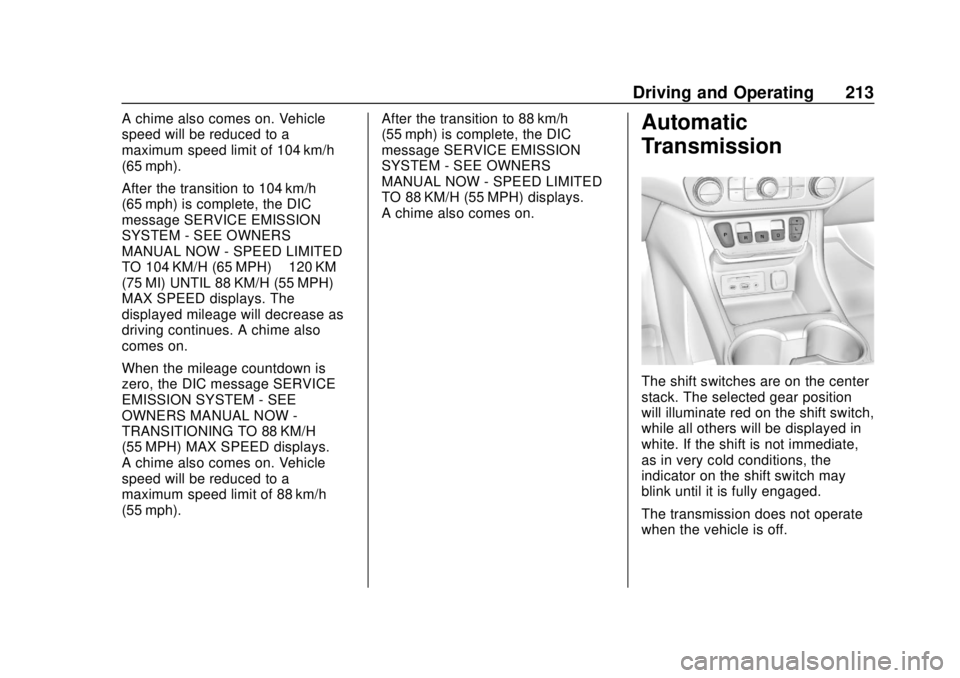
The shift switches are on the center
stack. The selected gear position
will illuminate red on the shift switch,
while all others will be displayed in
white. If the shift is not immediate,
as in very cold conditions, the
indicator on the shift switch may
blink until it is fully engaged.
The transmission does not operate
when the vehicle is off.
Page 221 of 434
GMC Terrain/Terrain Denali Owner Manual (GMNA-Localizing-U.S./Canada/
Mexico-12146071) - 2019 - crc - 7/27/18
220 Driving and Operating
The vehicle has an Electric Parking
Brake (EPB). The EPB can always
be activated, even if the ignition is
off. To prevent draining the battery,
avoid repeated cycles of the EPB
system when the engine is not
running.
The system has a
Yor PARK
Electric Parking Brake light, and a
8
Service Parking Brake light or
Service Parking Brake message.
See Electric Parking Brake Light
0 136 andService Electric Parking
Brake Light 0136.
Before leaving the vehicle, check for
the
Yor PARK light to ensure that
the parking brake is applied.
EPB Apply
To apply the EPB:
1. Be sure the vehicle is at a complete stop.
2. Press the EPB switch momentarily. The
Yor PARK light will flash and
then stay on once the EPB is fully
applied. If the
Yor PARK light
flashes continuously, then the EPB
is only partially applied or there is a
problem with the EPB. A Driver
Information Center (DIC) message
will display. Release the EPB and
try to apply it again. If the light does
not come on, or keeps flashing,
have the vehicle serviced. Do not
drive the vehicle if the
Yor PARK
light is flashing. See your dealer.
See Electric Parking Brake Light
0 136.
If the
8light or Service Parking
Brake message is on, press the
EPB switch and hold it. Continue to
hold the switch until the
Yor
PARK light remains on. If the
8light
or Service Parking Brake message
remains on, see your dealer.
If the EPB is applied while the
vehicle is moving, the vehicle will
decelerate as long as the switch is pressed. If the switch is pressed
until the vehicle comes to a stop,
the EPB will remain applied.
The vehicle may automatically apply
the EPB in some situations when
the vehicle is not moving. This is
normal, and is done to periodically
check the correct operation of the
EPB system.
If the EPB fails to apply, block the
rear wheels to prevent vehicle
movement.
EPB Release
To release the EPB:
1. Turn the ignition on or to ACC/ ACCESSORY.
2. Apply and hold the brake pedal.
3. Press the EPB switch momentarily.
The EPB is released when the
Y
or PARK light is off.
Page 222 of 434
GMC Terrain/Terrain Denali Owner Manual (GMNA-Localizing-U.S./Canada/
Mexico-12146071) - 2019 - crc - 7/27/18
Driving and Operating 221
If the8light or Service Parking
Brake message is on, release the
EPB by pressing and holding the
EPB switch. Continue to hold the
switch until the
Yor PARK light is
off. If either light stays on after
release is attempted, see your
dealer.
Caution
Driving with the parking brake on
can overheat the brake system
and cause premature wear or
damage to brake system parts.
Make sure that the parking brake
is fully released and the brake
warning light is off before driving.
Automatic EPB Release
The EPB will automatically release if
the vehicle is running, placed into
gear, and an attempt is made to
drive away. Avoid rapid acceleration
when the EPB is applied, to
preserve parking brake lining life.
Brake Assist
The Brake Assist feature is
designed to assist the driver in
stopping or decreasing vehicle
speed in emergency driving
conditions. This feature uses the
stability system hydraulic brake
control module to supplement the
power brake system under
conditions where the driver has
quickly and forcefully applied the
brake pedal in an attempt to quickly
stop or slow down the vehicle. The
stability system hydraulic brake
control module increases brake
pressure at each corner of the
vehicle until the ABS activates.
Minor brake pedal pulsation or
pedal movement during this time is
normal and the driver should
continue to apply the brake pedal as
the driving situation dictates. The
Brake Assist feature will
automatically disengage when the
brake pedal is released or brake
pedal pressure is quickly
decreased.
Hill Start Assist (HSA)
This vehicle has a Hill Start Assist
(HSA) feature, which may be useful
when the vehicle is stopped on a
grade sufficient enough to activate
HSA. This feature is designed to
prevent the vehicle from rolling,
either forward or rearward, during
vehicle drive off. After the driver
completely stops and holds the
vehicle in a complete standstill on a
grade, HSA will be automatically
activated. During the transition
period between when the driver
releases the brake pedal and starts
to accelerate to drive off on a grade,
HSA holds the braking pressure for
a maximum of two seconds to
ensure that there is no rolling. The
brakes will automatically release
when the accelerator pedal is
applied within the two-second
window. It will not activate if the
vehicle is in a drive gear and facing
downhill, or if the vehicle is facing
uphill and in R (Reverse). To
change the duration, see “Extended
Hill Start Assist” inVehicle
Personalization 0152.
Page 241 of 434
GMC Terrain/Terrain Denali Owner Manual (GMNA-Localizing-U.S./Canada/
Mexico-12146071) - 2019 - crc - 7/27/18
240 Driving and Operating
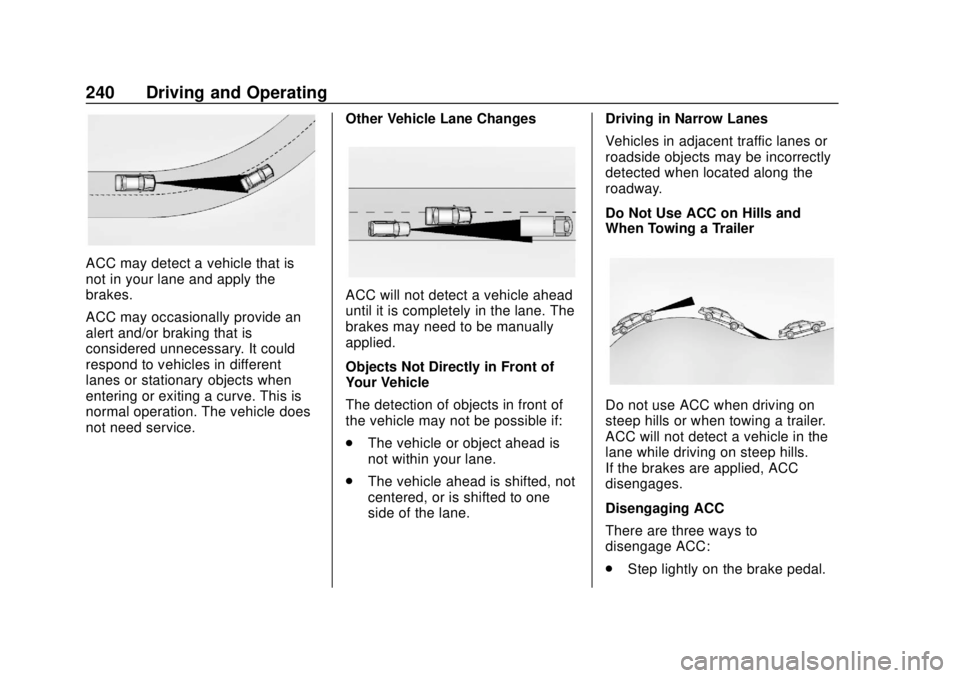
ACC may detect a vehicle that is
not in your lane and apply the
brakes.
ACC may occasionally provide an
alert and/or braking that is
considered unnecessary. It could
respond to vehicles in different
lanes or stationary objects when
entering or exiting a curve. This is
normal operation. The vehicle does
not need service.Other Vehicle Lane Changes
ACC will not detect a vehicle ahead
until it is completely in the lane. The
brakes may need to be manually
applied.
Objects Not Directly in Front of
Your Vehicle
The detection of objects in front of
the vehicle may not be possible if:
.
The vehicle or object ahead is
not within your lane.
. The vehicle ahead is shifted, not
centered, or is shifted to one
side of the lane. Driving in Narrow Lanes
Vehicles in adjacent traffic lanes or
roadside objects may be incorrectly
detected when located along the
roadway.
Do Not Use ACC on Hills and
When Towing a Trailer
Do not use ACC when driving on
steep hills or when towing a trailer.
ACC will not detect a vehicle in the
lane while driving on steep hills.
If the brakes are applied, ACC
disengages.
Disengaging ACC
There are three ways to
disengage ACC:
.
Step lightly on the brake pedal.