ignition GMC TERRAIN 2019 Workshop Manual
[x] Cancel search | Manufacturer: GMC, Model Year: 2019, Model line: TERRAIN, Model: GMC TERRAIN 2019Pages: 434, PDF Size: 6.38 MB
Page 215 of 434
GMC Terrain/Terrain Denali Owner Manual (GMNA-Localizing-U.S./Canada/
Mexico-12146071) - 2019 - crc - 7/27/18
214 Driving and Operating
If the vehicle is in ACC/
ACCESSORY, the transmission can
be shifted into P (Park).
If ENGINE START/STOP is pressed
twice while at a relatively high
speed, the engine will turn off and
the transmission will automatically
shift to N (Neutral). Once the vehicle
is stopped, P (Park) can be
selected.
P :This position locks the drive
wheels. Use P (Park) when starting
the vehicle to ensure the vehicle
does not move.
{Warning
It is dangerous to get out of the
vehicle if the transmission is not
in P (Park) with the parking brake
set. The vehicle can roll.
Do not leave the vehicle when the
engine is running. If the engine
has been left running, the vehicle
can move suddenly. You or others
could be injured. To be sure the
(Continued)
Warning (Continued)
vehicle will not move, even when
on fairly level ground, always set
the parking brake and place the
transmission into P (Park).
SeeShifting Into Park 0202 and
Driving Characteristics and
Towing Tips 0274.
This vehicle is equipped with an
electronic transmission. The
R (Reverse) and D (Drive) shift
switches are designed to prevent
inadvertent shifting out of P (Park)
unless the ignition is on, and the
brake pedal is applied.
For vehicles with a diesel engine,
the vehicle does not need to be on
to shift out of P (Park).
When the vehicle is stopped, press
ENGINE START/STOP to turn off
the vehicle. The transmission will
shift to P (Park) automatically.
The vehicle will not shift into
P (Park) if it is moving too fast. Stop
the vehicle and shift into P (Park). To shift in and out of P (Park), see
Shifting Into Park
0202 andShifting
out of Park 0203.
R : Use this gear to back up.
If the vehicle is shifted from either
R (Reverse) to D (Drive),
or D (Drive) to R (Reverse) while the
speed is too high, the vehicle will
shift to N (Neutral). Reduce the
vehicle speed and try the shift
again.
To shift into R (Reverse): 1. Bring the vehicle to a complete stop.
2. Pull the R (Reverse) switch on the center stack.
To shift out of R (Reverse):
1. Bring the vehicle to a complete stop.
2. Shift to the desired gear.
At low vehicle speeds, R (Reverse)
can be used to rock the vehicle
back and forth to get out of snow,
ice, or sand without damaging the
transmission. See If the Vehicle Is
Stuck 0190.
Page 221 of 434
GMC Terrain/Terrain Denali Owner Manual (GMNA-Localizing-U.S./Canada/
Mexico-12146071) - 2019 - crc - 7/27/18
220 Driving and Operating
The vehicle has an Electric Parking
Brake (EPB). The EPB can always
be activated, even if the ignition is
off. To prevent draining the battery,
avoid repeated cycles of the EPB
system when the engine is not
running.
The system has a
Yor PARK
Electric Parking Brake light, and a
8
Service Parking Brake light or
Service Parking Brake message.
See Electric Parking Brake Light
0 136 andService Electric Parking
Brake Light 0136.
Before leaving the vehicle, check for
the
Yor PARK light to ensure that
the parking brake is applied.
EPB Apply
To apply the EPB:
1. Be sure the vehicle is at a complete stop.
2. Press the EPB switch momentarily. The
Yor PARK light will flash and
then stay on once the EPB is fully
applied. If the
Yor PARK light
flashes continuously, then the EPB
is only partially applied or there is a
problem with the EPB. A Driver
Information Center (DIC) message
will display. Release the EPB and
try to apply it again. If the light does
not come on, or keeps flashing,
have the vehicle serviced. Do not
drive the vehicle if the
Yor PARK
light is flashing. See your dealer.
See Electric Parking Brake Light
0 136.
If the
8light or Service Parking
Brake message is on, press the
EPB switch and hold it. Continue to
hold the switch until the
Yor
PARK light remains on. If the
8light
or Service Parking Brake message
remains on, see your dealer.
If the EPB is applied while the
vehicle is moving, the vehicle will
decelerate as long as the switch is pressed. If the switch is pressed
until the vehicle comes to a stop,
the EPB will remain applied.
The vehicle may automatically apply
the EPB in some situations when
the vehicle is not moving. This is
normal, and is done to periodically
check the correct operation of the
EPB system.
If the EPB fails to apply, block the
rear wheels to prevent vehicle
movement.
EPB Release
To release the EPB:
1. Turn the ignition on or to ACC/ ACCESSORY.
2. Apply and hold the brake pedal.
3. Press the EPB switch momentarily.
The EPB is released when the
Y
or PARK light is off.
Page 228 of 434
GMC Terrain/Terrain Denali Owner Manual (GMNA-Localizing-U.S./Canada/
Mexico-12146071) - 2019 - crc - 7/27/18
Driving and Operating 227
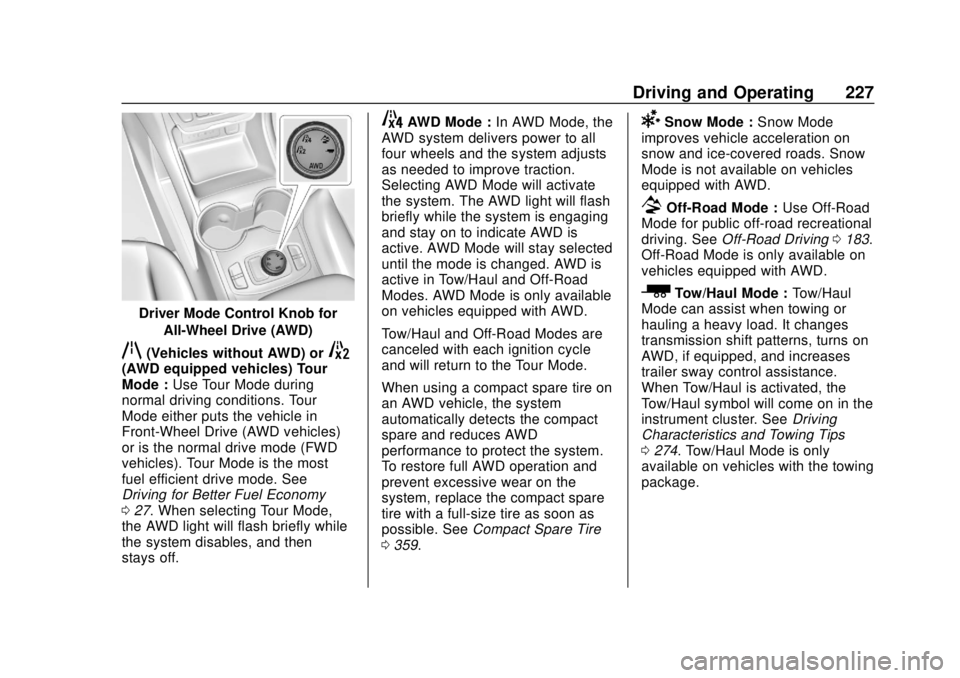
Driver Mode Control Knob forAll-Wheel Drive (AWD)
q(Vehicles without AWD) or5(AWD equipped vehicles) Tour
Mode : Use Tour Mode during
normal driving conditions. Tour
Mode either puts the vehicle in
Front-Wheel Drive (AWD vehicles)
or is the normal drive mode (FWD
vehicles). Tour Mode is the most
fuel efficient drive mode. See
Driving for Better Fuel Economy
0 27. When selecting Tour Mode,
the AWD light will flash briefly while
the system disables, and then
stays off.
4AWD Mode : In AWD Mode, the
AWD system delivers power to all
four wheels and the system adjusts
as needed to improve traction.
Selecting AWD Mode will activate
the system. The AWD light will flash
briefly while the system is engaging
and stay on to indicate AWD is
active. AWD Mode will stay selected
until the mode is changed. AWD is
active in Tow/Haul and Off-Road
Modes. AWD Mode is only available
on vehicles equipped with AWD.
Tow/Haul and Off-Road Modes are
canceled with each ignition cycle
and will return to the Tour Mode.
When using a compact spare tire on
an AWD vehicle, the system
automatically detects the compact
spare and reduces AWD
performance to protect the system.
To restore full AWD operation and
prevent excessive wear on the
system, replace the compact spare
tire with a full-size tire as soon as
possible. See Compact Spare Tire
0 359.6Snow Mode : Snow Mode
improves vehicle acceleration on
snow and ice-covered roads. Snow
Mode is not available on vehicles
equipped with AWD.
7Off-Road Mode : Use Off-Road
Mode for public off-road recreational
driving. See Off-Road Driving 0183.
Off-Road Mode is only available on
vehicles equipped with AWD.
_Tow/Haul Mode : Tow/Haul
Mode can assist when towing or
hauling a heavy load. It changes
transmission shift patterns, turns on
AWD, if equipped, and increases
trailer sway control assistance.
When Tow/Haul is activated, the
Tow/Haul symbol will come on in the
instrument cluster. See Driving
Characteristics and Towing Tips
0 274. Tow/Haul Mode is only
available on vehicles with the towing
package.
Page 230 of 434
GMC Terrain/Terrain Denali Owner Manual (GMNA-Localizing-U.S./Canada/
Mexico-12146071) - 2019 - crc - 7/27/18
Driving and Operating 229
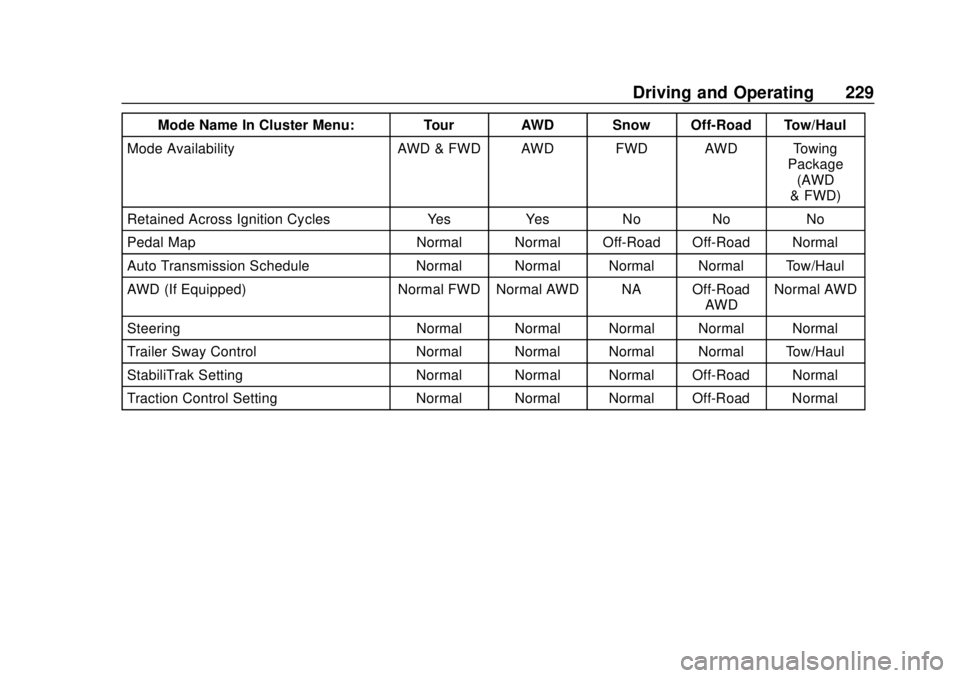
Mode Name In Cluster Menu: Tour AWD Snow Off-Road Tow/Haul
Mode Availability AWD & FWD AWD FWD AWD Towing Package
(AWD
& FWD)
Retained Across Ignition Cycles Yes Yes No No No
Pedal Map Normal Normal Off-Road Off-Road Normal
Auto Transmission Schedule Normal Normal Normal Normal Tow/Haul
AWD (If Equipped) Normal FWD Normal AWD NA Off-Road AWDNormal AWD
Steering Normal Normal Normal Normal Normal
Trailer Sway Control Normal Normal Normal Normal Tow/Haul
StabiliTrak Setting Normal Normal Normal Off-Road Normal
Traction Control Setting Normal Normal Normal Off-Road Normal
Page 233 of 434
GMC Terrain/Terrain Denali Owner Manual (GMNA-Localizing-U.S./Canada/
Mexico-12146071) - 2019 - crc - 7/27/18
232 Driving and Operating
vehicle will slow down to the
previous set cruise speed. While
pressing the accelerator pedal or
shortly following the release to
override cruise control, briefly
pressing–SET will result in cruise
control set to the current vehicle
speed.
Using Cruise Control on Hills
How well the cruise control works
on hills depends upon the vehicle
speed, load, and the steepness of
the hills. When going up steep hills,
you might have to step on the
accelerator pedal to maintain the
vehicle speed. When going
downhill, you might have to brake or
shift to a lower gear to keep your
speed down. If the brake pedal is
applied, cruise control will
disengage.
Ending Cruise Control
There are four ways to end cruise
control:
. Step lightly on the brake pedal.
. Press
*. .
Shift the transmission to
N (Neutral).
. To turn off cruise control,
press
5.
Erasing Speed Memory
The cruise control set speed is
erased from memory if
5is pressed
or if the ignition is turned off.
Adaptive Cruise Control
If equipped, Adaptive Cruise Control
(ACC) allows the cruise control set
speed and following gap to be
selected. Read this entire section
before using this system. The
following gap is the following time
between your vehicle and a vehicle
detected directly ahead in your path,
moving in the same direction. If no
vehicle is detected in your path,
ACC works like regular cruise
control. ACC uses a windshield
mounted front camera sensor.
If a vehicle is detected in your path,
ACC can apply acceleration or
limited, moderate braking to
maintain the selected following gap. To disengage ACC, apply the brake.
If ACC is controlling the vehicle
speed when the Traction Control
System (TCS) or StabiliTrak/
Electronic Stability Control (ESC)
system activates, ACC may
automatically disengage. See
Traction Control/Electronic Stability
Control
0222. When road
conditions allow ACC to be safely
used, ACC can be turned back on.
Disabling the TCS or StabiliTrak/
ESC system will disengage and
prevent engagement of ACC.
ACC can reduce the need for you to
frequently brake and accelerate,
especially when used on
expressways, freeways, and
interstate highways. When used on
other roads, you may need to take
over the control of braking or
acceleration more often.
{Warning
ACC has limited braking ability
and may not have time to slow
the vehicle down enough to avoid
(Continued)
Page 240 of 434
GMC Terrain/Terrain Denali Owner Manual (GMNA-Localizing-U.S./Canada/
Mexico-12146071) - 2019 - crc - 7/27/18
Driving and Operating 239
{Warning
Leaving the vehicle without
placing it in P (Park) can be
dangerous. Do not leave the
vehicle while it is being held at a
stop by ACC. Always place the
vehicle in P (Park) and turn off
the ignition before leaving the
vehicle.
ACC Override
If using the accelerator pedal while
ACC is active, the ACC indicator
turns blue on the instrument cluster
indicating ACC braking will not
occur. ACC will resume operation
when the accelerator pedal is not
being pressed.
{Warning
The ACC will not automatically
apply the brakes if your foot is
resting on the accelerator pedal.
You could crash into a vehicle
ahead of you. Curves in the Road
{Warning
On curves, ACC may not detect a
vehicle ahead in your lane. You
could be startled if the vehicle
accelerates up to the set speed,
especially when following a
vehicle exiting or entering exit
ramps. You could lose control of
the vehicle or crash. Do not use
ACC while driving on an entrance
or exit ramp. Always be ready to
use the brakes if necessary.
{Warning
On curves, ACC may respond to
a vehicle in another lane, or may
not have time to react to a vehicle
in your lane. You could crash into
a vehicle ahead of you, or lose
control of your vehicle. Give extra
attention in curves and be ready
(Continued)
Warning (Continued)
to use the brakes if necessary.
Select an appropriate speed while
driving in curves.
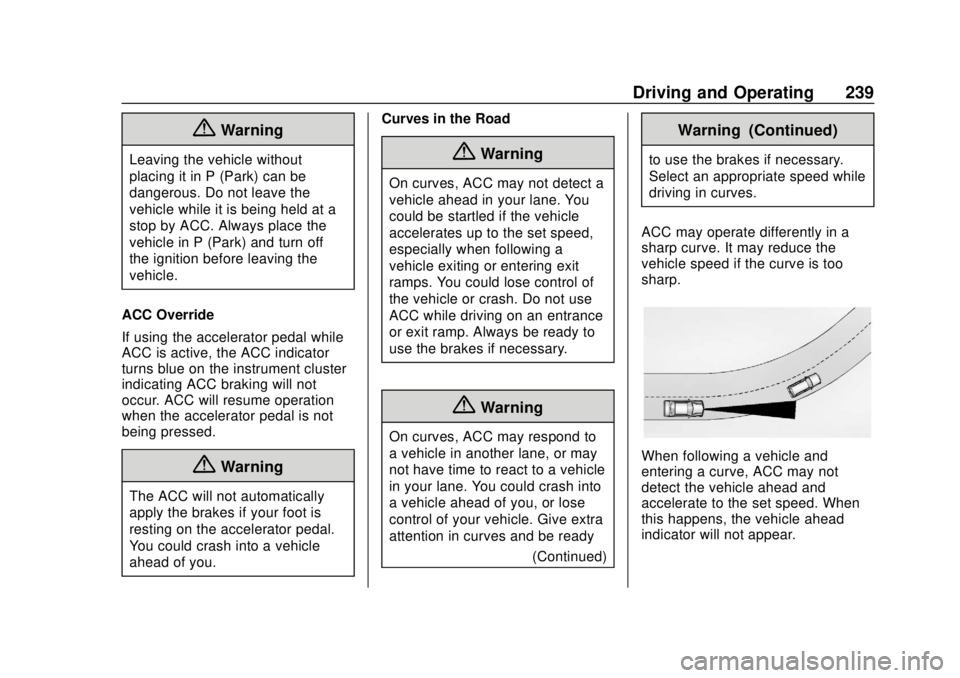
ACC may operate differently in a
sharp curve. It may reduce the
vehicle speed if the curve is too
sharp.
When following a vehicle and
entering a curve, ACC may not
detect the vehicle ahead and
accelerate to the set speed. When
this happens, the vehicle ahead
indicator will not appear.
Page 242 of 434
GMC Terrain/Terrain Denali Owner Manual (GMNA-Localizing-U.S./Canada/
Mexico-12146071) - 2019 - crc - 7/27/18
Driving and Operating 241
.Press*.
. Press
J.
Erasing Speed Memory
The ACC set speed is erased from
memory if
Jis pressed or if the
ignition is turned off.
Weather Conditions Affecting ACC
If the interior temperature is
extremely high, the instrument
cluster may indicate that ACC is
temporarily unavailable. This can be
caused by extreme hot weather
conditions with direct sunlight on the
front camera. ACC will return to
normal operation once the cabin
temperature is lower.
Conditions that are associated with
low visibility, such as fog, rain,
snow, or road spray, may limit ACC
performance. Water droplets from
rain or snow that remain on the
windshield may also limit ACC’s
ability to detect objects. Lighting Conditions Affecting ACC
The ACC front camera can be
affected by poor lighting conditions,
and ACC may have limited
performance when:
.
There are changes in brightness,
such as entering and exiting
tunnels, bridges, and
overpasses.
. Low sun angles cause the
camera to not detect objects,
or it is more difficult to detect
objects in the same traffic lane.
. Lighting is poor in the evening or
early morning
. There are multiple changes in
brightness or shadows along the
vehicle roadway.
. In a tunnel without the
headlamps on, or in a tunnel
when there is a vehicle in front
that does not have its
taillamps on. .
Subjected to strong light from
opposing lane traffic in the front
of the vehicle, such as
high-beam headlamps from
oncoming traffic.
Accessory Installations and
Vehicle Modifications
Do not install or place any object
around the front camera windshield
area that would obstruct the front
camera view.
Do not install objects on top of the
vehicle that overhang and obstruct
the front camera, such as a canoe,
kayak, or other items that can be
transported on a roof rack system.
See Roof Rack System 0111.
Do not modify the hood, headlamps,
or fog lamps, as this may limit the
camera’s ability to detect an object.
Page 265 of 434
GMC Terrain/Terrain Denali Owner Manual (GMNA-Localizing-U.S./Canada/
Mexico-12146071) - 2019 - crc - 7/27/18
264 Driving and Operating
As a renewable fuel, biodiesel
provides some environmental
benefits. However, biodiesel has
unique properties and needs to be
handled differently than diesel fuel.
Its use presents additional risks and
may not be appropriate in all
situations. Certain vehicle operating
modes increase these risks and
should be avoided.
Biodiesel fuel quality degrades with
time and exposure to high
temperature quicker than Ultra Low
Sulfur Diesel fuel. More frequent
refueling provides the best
opportunity to have a supply of fresh
fuel. Storage at hot ambient
temperatures will accelerate
biodiesel degradation.
If the vehicle is not driven often and
uses little fuel, or if it is stored for
extended periods of time, avoid the
use of biodiesel blended fuels
above 5% by volume. When the
vehicle is stored for longer than one
month, it should be run out of
biodiesel to below one-quarter tank,refueled with biodiesel-free fuel, and
driven several kilometers (miles)
before storage.
Cold Weather Operation
(Diesel)
In cold weather, the fuel filter may
become clogged by wax naturally
present in the fuel. To unclog it,
move the vehicle to a warm garage
area and allow the filter to warm up.
The fuel filter may need to be
replaced. See
Fuel Filter
Replacement (Diesel) 0268.
At temperatures below 0 °C (32 °F),
it is recommended to avoid using
biodiesel blends above 5% blend.
This blend may cause fuel filter
plugging, system gelling, and
freezing that may affect vehicle
starting. You may need to turn the
ignition on and off a few times
before the vehicle will start. Also,
idle the vehicle for a couple of
minutes before accelerating.
It is recommended to use Ultra Low
Sulfur No. 1-D diesel fuel or a blend
of No. 1-D and No. 2-D diesel fuel to enhance vehicle operation in cold
weather at temperatures below 0 °C
(32 °F). Use of No. 1-D diesel fuel
may lower the fuel economy. For
additional information for better cold
weather operation, see
Engine
Heater 0200.
Water in Fuel (Diesel)
Improper fuel tank inspection or
cleaning, or contaminated fuel from
suppliers, can cause water to be
pumped into the fuel tank along with
the diesel fuel. If a WATER IN FUEL
- CONTACT SERVICE message
displays, the water must be drained
immediately.
{Warning
Diesel fuel containing water is still
combustible. You or others could
be burned. If the fuel needs to be
drained, keep sparks, flames, and
smoking materials away from the
mixture.
Page 266 of 434
GMC Terrain/Terrain Denali Owner Manual (GMNA-Localizing-U.S./Canada/
Mexico-12146071) - 2019 - crc - 7/27/18
Driving and Operating 265
Caution
Water in the diesel fuel can
corrode internal components of
the fuel system and lead to
severe damage. It can also
support fungus or bacteria
growth, which can damage the
fuel system and Fuel Operated
Heater (FOH) (if equipped). Even
with a diesel fuel biocide, the fuel
system may still need to be
cleaned. Your dealer can advise
of the appropriate solution.
If the fuel tank needs to be
purged to remove water, see your
dealer or a qualified technician.
Improper purging can damage the
fuel system and block the FOH.
As an added precaution, drain the
diesel fuel filter of residual water at
every engine oil change. If the
WATER IN FUEL - CONTACT
SERVICE message comes on
frequently, even after draining water
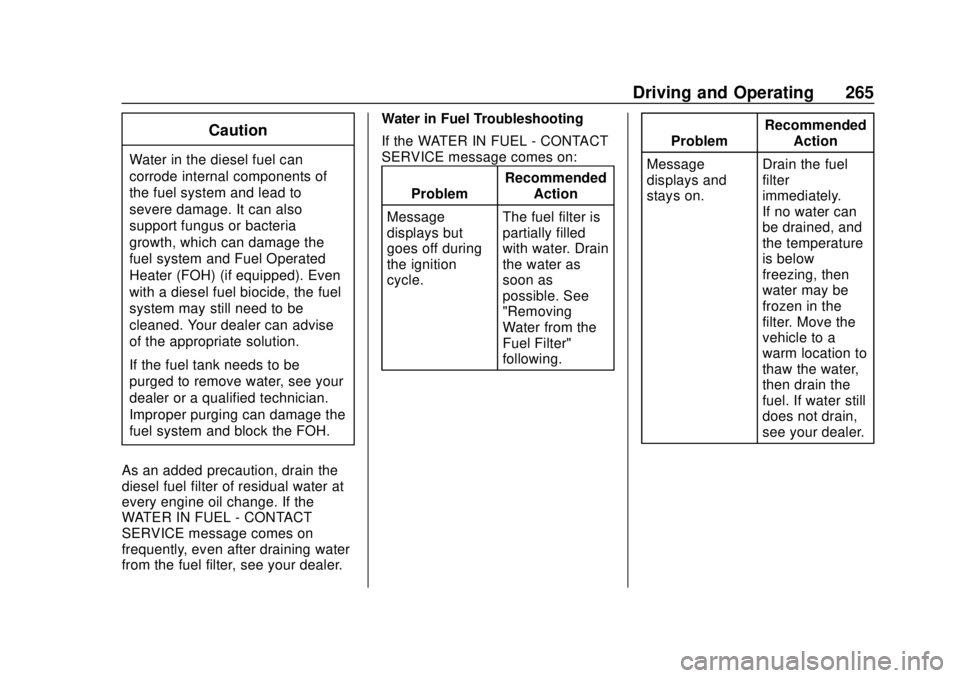
from the fuel filter, see your dealer. Water in Fuel Troubleshooting
If the WATER IN FUEL - CONTACT
SERVICE message comes on:
Problem Recommended
Action
Message
displays but
goes off during
the ignition
cycle. The fuel filter is
partially filled
with water. Drain
the water as
soon as
possible. See
"Removing
Water from the
Fuel Filter"
following. Problem
Recommended
Action
Message
displays and
stays on. Drain the fuel
filter
immediately.
If no water can
be drained, and
the temperature
is below
freezing, then
water may be
frozen in the
filter. Move the
vehicle to a
warm location to
thaw the water,
then drain the
fuel. If water still
does not drain,
see your dealer.
Page 267 of 434
GMC Terrain/Terrain Denali Owner Manual (GMNA-Localizing-U.S./Canada/
Mexico-12146071) - 2019 - crc - 7/27/18
266 Driving and Operating
ProblemRecommended
Action
Immediately
after refueling,
message
displays and
stays on. A large amount
of water is in the
fuel tank. Drain
the fuel filter
immediately.
If the message
stays on or
comes back on
without
refueling, then
fuel tank purging
is required. See
your dealer.
If the message
displays and the
engine stalls or
runs rough, do
not drive until
the water
contaminated
fuel is drained.Caution
Driving with this message on can
damage the fuel injection system
and the engine. If the message
comes on right after a refuel,
water was pumped into the fuel
tank. Turn off the engine and
drain the water immediately.
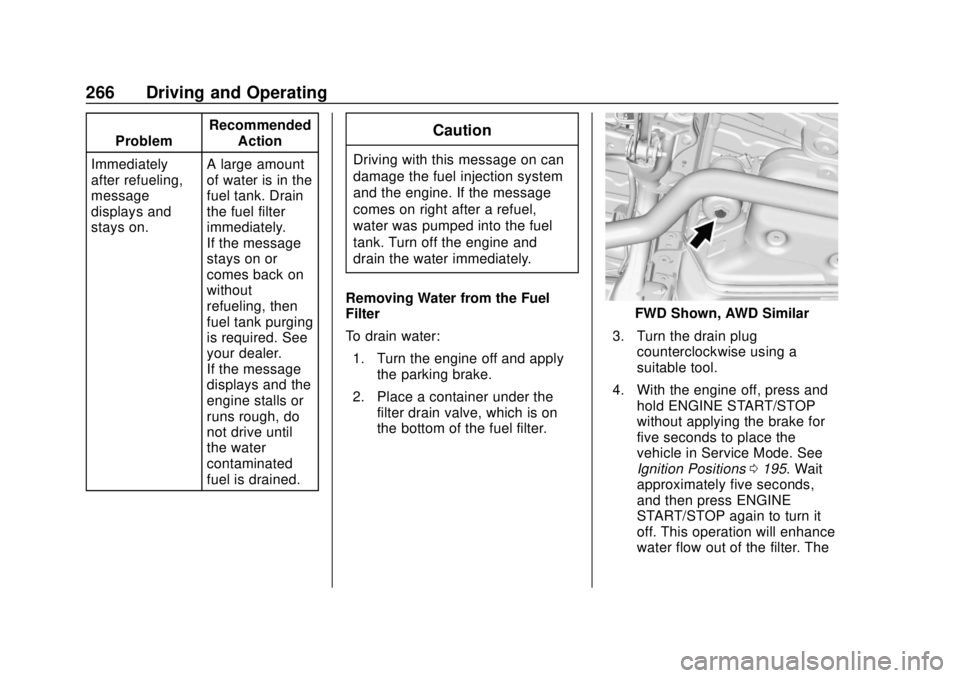
Removing Water from the Fuel
Filter
To drain water: 1. Turn the engine off and apply the parking brake.
2. Place a container under the filter drain valve, which is on
the bottom of the fuel filter.
FWD Shown, AWD Similar
3. Turn the drain plug counterclockwise using a
suitable tool.
4. With the engine off, press and hold ENGINE START/STOP
without applying the brake for
five seconds to place the
vehicle in Service Mode. See
Ignition Positions 0195. Wait
approximately five seconds,
and then press ENGINE
START/STOP again to turn it
off. This operation will enhance
water flow out of the filter. The