warning light GMC TERRAIN 2019 Owner's Manual
[x] Cancel search | Manufacturer: GMC, Model Year: 2019, Model line: TERRAIN, Model: GMC TERRAIN 2019Pages: 434, PDF Size: 6.38 MB
Page 4 of 434
GMC Terrain/Terrain Denali Owner Manual (GMNA-Localizing-U.S./Canada/
Mexico-12146071) - 2019 - crc - 7/27/18
Introduction 3
About Driving the Vehicle
As with other vehicles of this type,
failure to operate this vehicle
correctly may result in loss of
control or a crash. Be sure to read
the driving guidelines in this manual
in the section called“Driving and
Operating” and specifically Driver
Behavior 0179, Driving
Environment 0180, and Vehicle
Design 0180.
Danger, Warning, and
Caution
Warning messages found on vehicle
labels and in this manual describe
hazards and what to do to avoid or
reduce them.
{Danger
Danger indicates a hazard with a
high level of risk which will result
in serious injury or death.
{Warning
Warning indicates a hazard that
could result in injury or death.
Caution
Caution indicates a hazard that
could result in property or vehicle
damage.
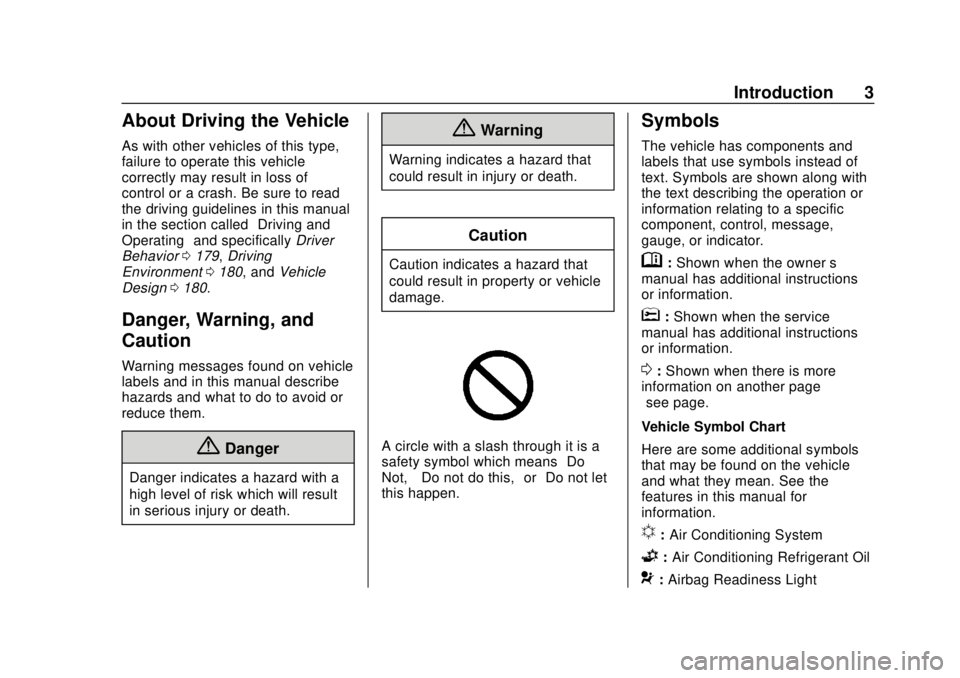
A circle with a slash through it is a
safety symbol which means “Do
Not,” “Do not do this,” or“Do not let
this happen.”
Symbols
The vehicle has components and
labels that use symbols instead of
text. Symbols are shown along with
the text describing the operation or
information relating to a specific
component, control, message,
gauge, or indicator.
M: Shown when the owner ’s
manual has additional instructions
or information.
*: Shown when the service
manual has additional instructions
or information.
0: Shown when there is more
information on another page —
“see page.”
Vehicle Symbol Chart
Here are some additional symbols
that may be found on the vehicle
and what they mean. See the
features in this manual for
information.
u: Air Conditioning System
G:Air Conditioning Refrigerant Oil
9:Airbag Readiness Light
Page 5 of 434
GMC Terrain/Terrain Denali Owner Manual (GMNA-Localizing-U.S./Canada/
Mexico-12146071) - 2019 - crc - 7/27/18
4 Introduction
!:Antilock Brake System (ABS)
$:Brake System Warning Light
9:Dispose of Used Components
Properly
P: Do Not Apply High Pressure
Water
B: Engine Coolant Temperature
_: Flame/Fire Prohibited
H:Flammable
[:Forward Collision Alert
R: Fuse Block Cover Lock
Location
+: Fuses
j:ISOFIX/LATCH System Child
Restraints
Q: Keep Fuse Block Covers
Properly Installed
|: Lane Change Alert
@:Lane Departure Warning
A:Lane Keep Assist
*:Malfunction Indicator Lamp
::Oil Pressure
X:Park Assist
~:Pedestrian Ahead Indicator
O:Power
7: Rear Cross Traffic Alert
I:Registered Technician
/:Remote Vehicle Start
>: Seat Belt Reminders
I:Side Blind Zone Alert
h:Stop/Start
7: Tire Pressure Monitor
d:Traction Control/StabiliTrak/
Electronic Stability Control (ESC)
a: Under Pressure
V:Vehicle Ahead Indicator
Page 8 of 434

GMC Terrain/Terrain Denali Owner Manual (GMNA-Localizing-U.S./Canada/
Mexico-12146071) - 2019 - crc - 7/27/18
In Brief 7
1.Air Vents 0175.
2. Turn Signal Lever. See Turn
and Lane-Change Signals
0 165.
IntelliBeam System Button (If
Equipped). See Exterior Lamp
Controls 0161.
3. Instrument Cluster (Base and
Midlevel) 0122 orInstrument
Cluster (Uplevel) 0125.
Driver Information Center (DIC)
Display.
See Driver Information Center
(DIC) (Base and Midlevel)
0 142 orDriver Information
Center (DIC) (Uplevel) 0147.
4. Windshield Wiper/Washer
0114.
5. Infotainment 0169.
6. Light Sensor. See Automatic
Headlamp System 0164.
7. Hazard Warning Flashers
0164.
8. Climate Control Systems 0170
(If Equipped). Dual Automatic Climate Control
System
0172 (If Equipped).
9. Shift Switches. See Automatic
Transmission 0213.
10. Power Outlets 0117.
11. Assistance Systems for
Parking or Backing 0243 (If
Equipped).
12. Heated and Ventilated Front
Seats 065 (If Equipped).
13. Wireless Charging 0118 (If
Equipped).
14. Driver Mode Control 0226 (If
Equipped).
15. Lane Keep Assist (LKA) 0258
(If Equipped).
Hill Descent Control (HDC)
0 225 (If Equipped).
16. USB Port. See the infotainment manual.
Auxiliary Jack. See the
infotainment manual.
17. ENGINE START/STOP Button. SeeIgnition Positions 0195. 18. Steering Wheel Controls. See
the infotainment manual.
19. Horn 0114.
20. Steering Wheel Adjustment
0114 (Out of View).
21. Hood Release. See Hood
0 287.
22. Cruise Control 0230.
Heated Steering Wheel 0114
(If Equipped).
Forward Collision Alert (FCA)
System 0250 (If Equipped).
23. Data Link Connector (DLC) (Out of View). See Malfunction
Indicator Lamp (Check Engine
Light) 0133.
24. Electric Parking Brake 0219.
25. Exterior Lamp Controls 0161.
Instrument Panel Illumination
Control 0166.
Fog Lamps 0165 (If
Equipped).
Page 23 of 434
GMC Terrain/Terrain Denali Owner Manual (GMNA-Localizing-U.S./Canada/
Mexico-12146071) - 2019 - crc - 7/27/18
22 In Brief
SeeLane Departure Warning (LDW)
0 258 andLane Keep Assist (LKA)
0 258.
Lane Change Alert (LCA)
If equipped, the LCA system is a
lane-changing aid that assists
drivers with avoiding lane change
crashes that occur with moving
vehicles in the side blind zone (or
spot) areas or with vehicles rapidly
approaching these areas from
behind. The LCA warning display
will light up in the corresponding
outside mirror and will flash if the
turn signal is on. The Side Blind
Zone Alert (SBZA) system is
included as part of the LCA system.
See Side Blind Zone Alert (SBZA)
0 255 andLane Change Alert (LCA)
0 256.
Surround Vision
If equipped, views around the
vehicle appear in the infotainment
display to aid with parking and
low-speed maneuvers. See
“Surround Vision” under
Assistance Systems for Parking or
Backing 0243.
Front Vision Camera
If equipped, a view of the area in
front of the vehicle appears on the
infotainment display to aid with
parking and low-speed maneuvers.
See “Front Vision Camera” under
Assistance Systems for Parking or
Backing 0243.
Rear Vision
Camera (RVC)
The RVC displays a view of the
area behind the vehicle on the
infotainment display when the
vehicle is shifted into R (Reverse) to
aid with parking and low-speed
backing maneuvers.
See Assistance Systems for Parking
or Backing 0243.
Rear Cross Traffic Alert
(RCTA) System
If equipped, the RCTA system
shows a triangle with an arrow on
the infotainment display to warn of
traffic behind your vehicle that may
cross your vehicle's path while in
R (Reverse). In addition, beeps will
sound, or the driver seat will pulse.
See Assistance Systems for Parking
or Backing 0243.
Park Assist
If equipped, Rear Park Assist (RPA)
uses sensors on the rear bumper to
assist with parking and avoiding
objects while in R (Reverse).
It operates at speeds less than
8 km/h (5 mph). RPA may show a
warning triangle on the infotainment
display and a graphic on the
instrument cluster to provide the
object distance. In addition, multiple
beeps or seat pulses may occur if
very close to an object.
The vehicle may also have the Front
Park Assist system.
Page 26 of 434
GMC Terrain/Terrain Denali Owner Manual (GMNA-Localizing-U.S./Canada/
Mexico-12146071) - 2019 - crc - 7/27/18
In Brief 25
Performance and
Maintenance
Traction Control/
Electronic Stability
Control
The Traction Control System (TCS)
limits wheel slip. The system is on
when the vehicle is started.
The StabiliTrak/Electronic Stability
Control (ESC) system assists with
directional control of the vehicle in
difficult driving conditions. The
system is on when the vehicle is
started.
TCS and StabiliTrak/ESC can be
turned off or on using the Driver
Information Center (DIC) controls.
SeeTraction Control/Electronic
Stability Control 0222.
Tire Pressure Monitor
This vehicle may have a Tire
Pressure Monitor System (TPMS).
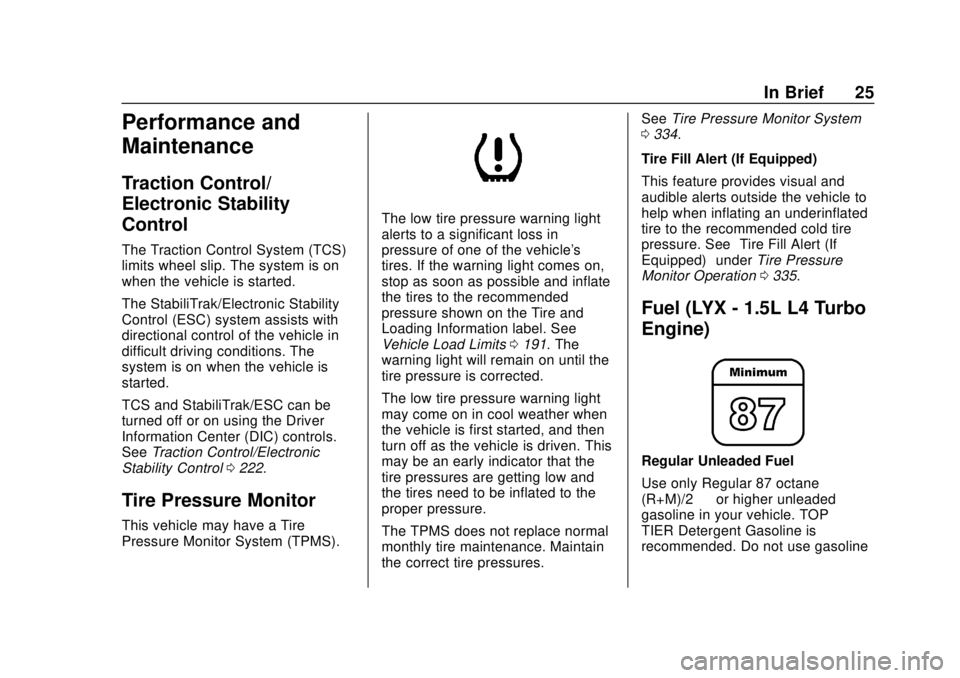
The low tire pressure warning light
alerts to a significant loss in
pressure of one of the vehicle's
tires. If the warning light comes on,
stop as soon as possible and inflate
the tires to the recommended
pressure shown on the Tire and
Loading Information label. See
Vehicle Load Limits 0191. The
warning light will remain on until the
tire pressure is corrected.
The low tire pressure warning light
may come on in cool weather when
the vehicle is first started, and then
turn off as the vehicle is driven. This
may be an early indicator that the
tire pressures are getting low and
the tires need to be inflated to the
proper pressure.
The TPMS does not replace normal
monthly tire maintenance. Maintain
the correct tire pressures. See
Tire Pressure Monitor System
0 334.
Tire Fill Alert (If Equipped)
This feature provides visual and
audible alerts outside the vehicle to
help when inflating an underinflated
tire to the recommended cold tire
pressure. See “Tire Fill Alert (If
Equipped)” underTire Pressure
Monitor Operation 0335.
Fuel (LYX - 1.5L L4 Turbo
Engine)
Regular Unleaded Fuel
Use only Regular 87 octane —
(R+M)/2 —or higher unleaded
gasoline in your vehicle. TOP
TIER Detergent Gasoline is
recommended. Do not use gasoline
Page 54 of 434
GMC Terrain/Terrain Denali Owner Manual (GMNA-Localizing-U.S./Canada/
Mexico-12146071) - 2019 - crc - 7/27/18
Keys, Doors, and Windows 53
The vehicle aerodynamics are
designed to improve fuel economy
performance. This may result in a
pulsing sound when either rear
window is down and the front
windows are up. To reduce the
sound, open either a front window
or the sunroof, if equipped.
Power Windows
{Warning
Children could be seriously
injured or killed if caught in the
path of a closing window. Never
leave the Remote Keyless Entry
(RKE) transmitter in a vehicle with
children. When there are children
in the rear seat, use the window
lockout switch to prevent
operation of the windows. See
Keys029.The power windows work when the
ignition is on, in ACC/ACCESSORY,
or in Retained Accessory Power
(RAP). See Retained Accessory
Power (RAP) 0202.
Using the window switch, press to
open or pull to close the window.
The windows may be temporarily
disabled if they are used repeatedly
within a short time.
Window Lockout
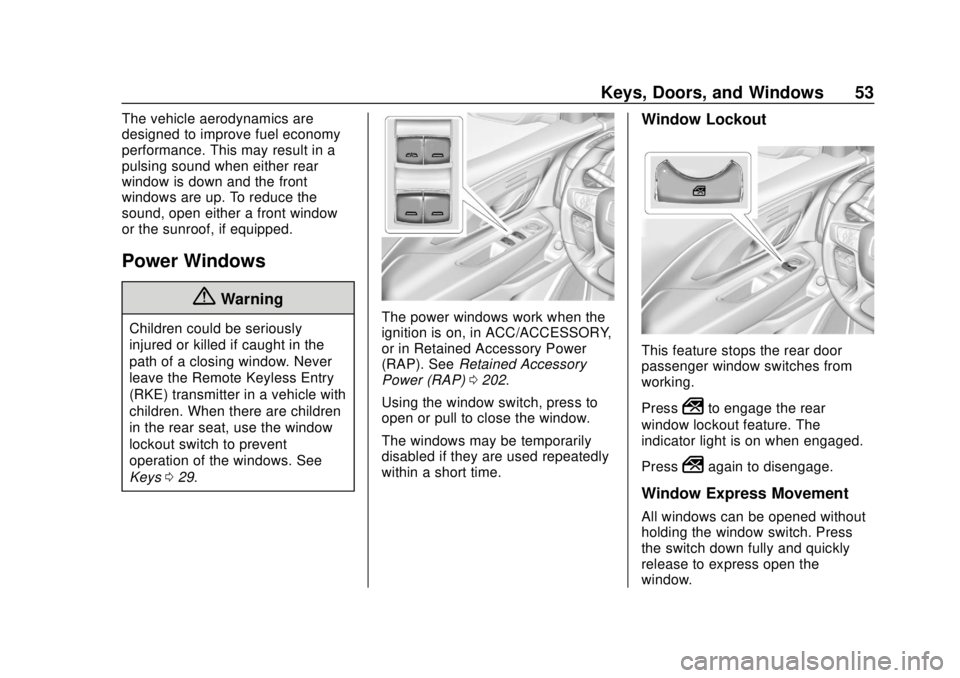
This feature stops the rear door
passenger window switches from
working.
Press
2to engage the rear
window lockout feature. The
indicator light is on when engaged.
Press
2again to disengage.
Window Express Movement
All windows can be opened without
holding the window switch. Press
the switch down fully and quickly
release to express open the
window.
Page 67 of 434
GMC Terrain/Terrain Denali Owner Manual (GMNA-Localizing-U.S./Canada/
Mexico-12146071) - 2019 - crc - 7/27/18
66 Seats and Restraints
PressJorzto heat the driver or
passenger cushion and seatback.
Press
Cor{, if equipped, to
ventilate the driver or passenger
seat. A ventilated seat has a fan
that pulls air through the cushion
and seatback. The air is not cooled.
Press the button once for the
highest setting. With each press of
the button, the seat will change to
the next lower setting, and then to
the off setting. The indicator lights
next to the buttons indicate three for
the highest setting and one for the
lowest.
Remote Start Heated and
Ventilated Seats
During a remote start, the heated or
ventilated seats, if equipped, can be
turned on automatically. When it is
cold outside, the heated seats turn
on, and when it is hot outside the
ventilated seats turn on. The heated
or ventilated seats are canceled
when the ignition is turned on. Press
the heated or ventilated seat button
to use the heated or ventilated seats
after the vehicle is started. The heated or ventilated seat
indicator lights do not turn on during
a remote start.
The temperature performance of an
unoccupied seat may be reduced.
This is normal.
The remote start heated or
ventilated seats may be enabled or
disabled in the vehicle
personalization menu.
See
Remote Vehicle Start 036 and
Vehicle Personalization 0152.
Folding Seatback
The front passenger seatback
folds flat.
{Warning
If you fold the seatback forward to
carry longer objects, such as skis,
be sure any such cargo is not
near an airbag. In a crash, an
inflating airbag might force that
object toward a person. This
could cause severe injury or even
(Continued)
Warning (Continued)
death. Secure objects away from
the area in which an airbag would
inflate. For more information, see
Where Are the Airbags? 081 and
Vehicle Load Limits 0191.
{Warning
Things you put on this seatback
can strike and injure people in a
sudden stop or turn, or in a crash.
Remove or secure all items
before driving.
To fold the seatback: 1. Lower the head restraint all the way. See Head Restraints
0 58.
2. Move the seat as far back as possible. See Seat Adjustment
0 60.
Page 71 of 434
GMC Terrain/Terrain Denali Owner Manual (GMNA-Localizing-U.S./Canada/
Mexico-12146071) - 2019 - crc - 7/27/18
70 Seats and Restraints
1. Ensure the seat belt is in thebelt stowage clip.
2. Lift the seatback up and push it rearward to lock it in place.
A tab near the seatback lever
retracts when the seatback is
locked in place.
3. Return the head restraint to the upright position. See Head
Restraints 058.
4. Push and pull the top of the seatback to be sure it is locked
into position.
5. Repeat the steps to raise the other seatback, if necessary.
When the seat is not in use, it
should be kept in the upright, locked
position.Heated Rear Seats
{Warning
If temperature change or pain to
the skin cannot be felt, the seat
heater may cause burns. See the
Warning under Heated and
Ventilated Front Seats 065.
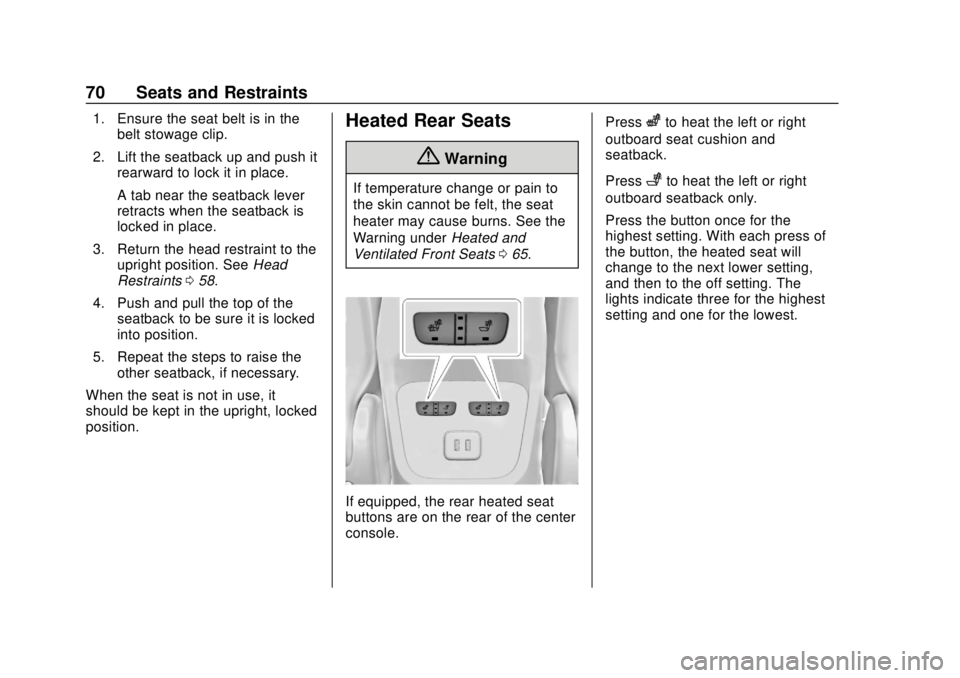
If equipped, the rear heated seat
buttons are on the rear of the center
console. Press
zto heat the left or right
outboard seat cushion and
seatback.
Press
+to heat the left or right
outboard seatback only.
Press the button once for the
highest setting. With each press of
the button, the heated seat will
change to the next lower setting,
and then to the off setting. The
lights indicate three for the highest
setting and one for the lowest.
Page 79 of 434
GMC Terrain/Terrain Denali Owner Manual (GMNA-Localizing-U.S./Canada/
Mexico-12146071) - 2019 - crc - 7/27/18
78 Seats and Restraints
Safety System Check
Periodically check the seat belt
reminder, seat belts, buckles, latch
plates, retractors, shoulder belt
height adjusters (if equipped), and
seat belt anchorages to make sure
they are all in working order. Look
for any other loose or damaged seat
belt system parts that might keep a
seat belt system from performing
properly. See your dealer to have it
repaired. Torn, frayed, or twisted
seat belts may not protect you in a
crash. Torn or frayed seat belts can
rip apart under impact forces. If a
belt is torn or frayed, have it
replaced immediately. If a belt is
twisted, it may be possible to
untwist by reversing the latch plate
on the webbing. If the twist cannot
be corrected, ask your dealer to
fix it.
Make sure the seat belt reminder
light is working. SeeSeat Belt
Reminders 0131.
Keep seat belts clean and dry. See
Seat Belt Care 078.
Seat Belt Care
Keep belts clean and dry.
Seat belts should be properly cared
for and maintained.
Seat belt hardware should be kept
dry and free of dust or debris. As
necessary, exterior hard surfaces
and seat belt webbing may be lightly
cleaned with mild soap and water.
Ensure there is not excessive dust
or debris in the mechanism. If dust
or debris exists in the system please
see the dealer. Parts may need to
be replaced to ensure proper
functionality of the system.
{Warning
Do not bleach or dye seat belt
webbing. It may severely weaken
the webbing. In a crash, they
might not be able to provide
adequate protection. Clean and
rinse seat belt webbing only with
mild soap and lukewarm water.
Allow the webbing to dry.
Replacing Seat Belt
System Parts after a
Crash
{Warning
A crash can damage the seat belt
system in the vehicle. A damaged
seat belt system may not properly
protect the person using it,
resulting in serious injury or even
death in a crash. To help make
sure the seat belt systems are
working properly after a crash,
have them inspected and any
necessary replacements made as
soon as possible.
After a minor crash, replacement of
seat belts may not be necessary.
But the seat belt assemblies that
were used during any crash may
have been stressed or damaged.
See your dealer to have the seat
belt assemblies inspected or
replaced.
Page 80 of 434
GMC Terrain/Terrain Denali Owner Manual (GMNA-Localizing-U.S./Canada/
Mexico-12146071) - 2019 - crc - 7/27/18
Seats and Restraints 79
New parts and repairs may be
necessary even if the seat belt
system was not being used at the
time of the crash.
Have the seat belt pretensioners
checked if the vehicle has been in a
crash, or if the airbag readiness light
stays on after you start the vehicle
or while you are driving. SeeAirbag
Readiness Light 0131.Airbag System
The vehicle has the following
airbags:
.
A frontal airbag for the driver
. A frontal airbag for the front
outboard passenger
. A seat-mounted side impact
airbag for the driver
. A seat-mounted side impact
airbag for the front outboard
passenger
. A roof-rail airbag for the driver
and the passenger seated
directly behind the driver
. A roof-rail airbag for the front
outboard passenger and the
passenger seated directly
behind the front outboard
passenger
All vehicle airbags have the word
AIRBAG on the trim or on a label
near the deployment opening. For frontal airbags, the word
AIRBAG is on the center of the
steering wheel for the driver and on
the instrument panel for the front
outboard passenger.
For seat-mounted side impact
airbags, the word AIRBAG is on the
side of the seat closest to the door.
For roof-rail airbags, the word
AIRBAG is on the ceiling or trim.
Airbags are designed to supplement
the protection provided by seat
belts. Even though today's airbags
are also designed to help reduce
the risk of injury from the force of an
inflating bag, all airbags must inflate
very quickly to do their job.
Here are the most important things
to know about the airbag system:
{Warning
You can be severely injured or
killed in a crash if you are not
wearing your seat belt, even with
airbags. Airbags are designed to
(Continued)