keyless entry GMC TERRAIN 2020 User Guide
[x] Cancel search | Manufacturer: GMC, Model Year: 2020, Model line: TERRAIN, Model: GMC TERRAIN 2020Pages: 425, PDF Size: 6.59 MB
Page 32 of 425
GMC Terrain/Terrain Denali Owner Manual (GMNA-Localizing-U.S./Canada/
Mexico-13556230) - 2020 - CRC - 9/4/19
Keys, Doors, and Windows 29
The system has one or more RKE
transmitters matched to an
immobilizer control unit in your
vehicle. Only a correctly matched
RKE transmitter will start the
vehicle. If the transmitter is ever
damaged, you may not be able to
start your vehicle.
When trying to start the vehicle, the
security light may come on briefly
when the ignition is turned on.
If the engine does not start and the
security light stays on, there is a
problem with the system. Turn the
ignition off and try again.
If the ignition will not change from
off to on or ACC/ACCESSORY, and
the RKE transmitter appears to be
undamaged, try another transmitter.
Or, you may try placing the
transmitter in the cupholder in the
center console.If the ignition mode will not change
with the other transmitter or with the
transmitter in the cupholder, your
vehicle needs service. If the ignition
does change modes, the first
transmitter may be faulty. See your
dealer who can service the
theft-deterrent system and have a
new RKE transmitter programmed to
the vehicle.
It is possible for the immobilizer
system to learn new or replacement
RKE transmitters. Up to eight
transmitters can be programmed to
the vehicle. To program additional
transmitters, see
“Programming
Transmitters to the Vehicle” under
Remote Keyless Entry (RKE)
System Operation 08.
Do not leave the transmitter or
device that disarms or deactivates
the theft-deterrent system in the
vehicle.Exterior Mirrors
Convex Mirrors
{Warning
A convex mirror can make things,
like other vehicles, look farther
away than they really are. If you
cut too sharply into the right lane,
you could hit a vehicle on the
right. Check the inside mirror or
glance over your shoulder before
changing lanes.
The passenger side mirror is convex
shaped. A convex mirror's surface is
curved so more can be seen from
the driver seat.
Page 35 of 425
GMC Terrain/Terrain Denali Owner Manual (GMNA-Localizing-U.S./Canada/
Mexico-13556230) - 2020 - CRC - 9/4/19
32 Keys, Doors, and Windows
The vehicle aerodynamics are
designed to improve fuel economy
performance. This may result in a
pulsing sound when either rear
window is down and the front
windows are up. To reduce the
sound, open either a front window
or the sunroof, if equipped.
Power Windows
{Warning
Children could be seriously
injured or killed if caught in the
path of a closing window. Never
leave the Remote Keyless Entry
(RKE) transmitter in a vehicle with
children. When there are children
in the rear seat, use the window
lockout switch to prevent
operation of the windows. See
Keys07.The power windows work when the
ignition is on, in ACC/ACCESSORY,
or in Retained Accessory Power
(RAP). See Retained Accessory
Power (RAP) 0187.
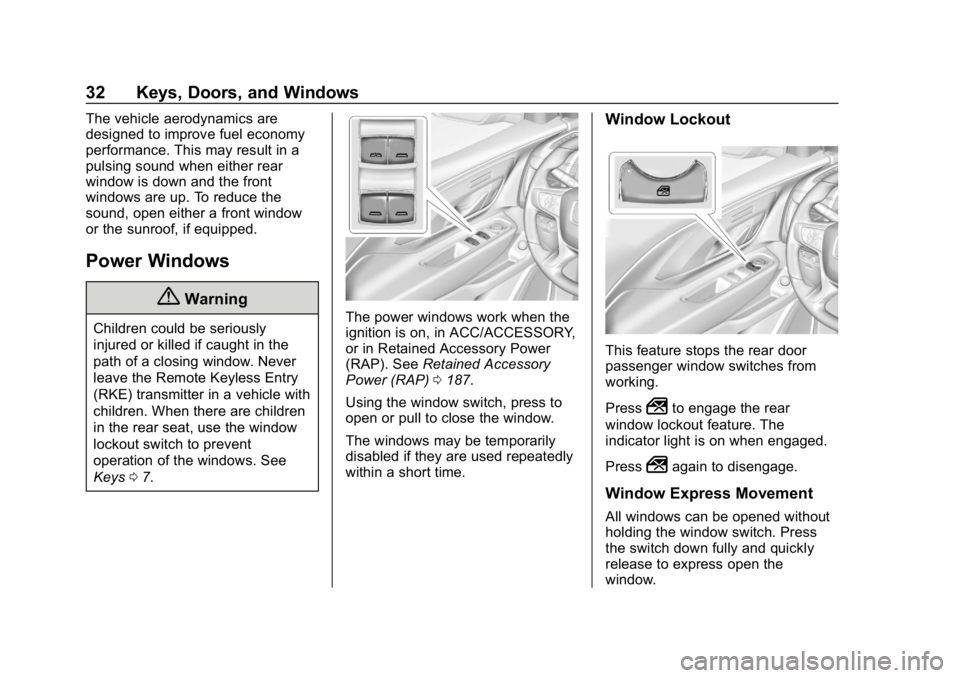
Using the window switch, press to
open or pull to close the window.
The windows may be temporarily
disabled if they are used repeatedly
within a short time.
Window Lockout
This feature stops the rear door
passenger window switches from
working.
Press
2to engage the rear
window lockout feature. The
indicator light is on when engaged.
Press
2again to disengage.
Window Express Movement
All windows can be opened without
holding the window switch. Press
the switch down fully and quickly
release to express open the
window.
Page 45 of 425
GMC Terrain/Terrain Denali Owner Manual (GMNA-Localizing-U.S./Canada/
Mexico-13556230) - 2020 - CRC - 9/4/19
42 Seats and Restraints
2, orB(Exit) until two beeps
sound. To manually recall these
positions, press and hold 1, 2, or
B
until the saved position is reached.
Follow the instructions under
“Saving Memory Positions.”
The vehicle identifies the current
driver ’s RKE transmitter number
(1–8). See Remote Keyless Entry
(RKE) System Operation 08. Only
RKE transmitters 1 and 2 can be
used for automatic memory recalls.
A Driver Information Center (DIC)
welcome message indicating the
transmitter number may display for
the first few ignition cycles following
a transmitter change. For Seat Entry
Memory to work properly, save the
positions to the memory button (1 or
2) matching the RKE transmitter
number displayed in the DIC
welcome message. Carry the linked
RKE transmitter when entering the
vehicle.
Vehicle Personalization Settings
. To have the Seat Entry Memory
movement begin when the
vehicle is started, select the Settings menu, then Vehicle,
then Seating Position, and then
Seat Entry Memory. Select On or
Off. See
“Seat Entry Memory”
later in this section.
. To begin Seat Exit Memory
movement when the vehicle is
turned off and the driver door is
opened, or when the vehicle is
turned off with the driver door
already opened, select the
Settings menu, then Vehicle,
then Seating Position, and then
Seat Exit Memory. Select On or
Off. See “Seat Exit Memory”
later in this section.
. See Vehicle Personalization
0 135 for additional setting
information.
Identifying Driver Number
To identify the driver number: 1. Move your RKE transmitter away from the vehicle.
2. Start the vehicle with another key or RKE transmitter. The
DIC should display the driver
number for the other RKE transmitter. Turn the vehicle off
and remove the key or RKE
transmitter from the vehicle.
3. Start the vehicle with the initial key or RKE transmitter. The
DIC should display the driver
number of your RKE
transmitter.
Saving Memory Positions
Read these instructions completely
before saving memory positions.
To save preferred driving positions
1 and 2: 1. Turn the vehicle on or to ACC/ ACCESSORY.
A DIC welcome message may
indicate driver number 1 or 2.
2. Adjust all available memory features to the desired driving
position.
3. Press and release SET; a beep will sound.
Page 46 of 425
GMC Terrain/Terrain Denali Owner Manual (GMNA-Localizing-U.S./Canada/
Mexico-13556230) - 2020 - CRC - 9/4/19
Seats and Restraints 43
4. Immediately press and hold the1 or 2 memory button matching
the above DIC welcome
message until two beeps
sound.
If too much time passes
between releasing SET and
pressing 1, the memory
position will not be saved and
two beeps will not sound.
Repeat Steps 3 and 4.
1 or 2 corresponds to the driver
number. See “Identifying Driver
Number” previously in this
section.
5. Repeat Steps 1–4 for a second driver using 1 or 2.
To save the position for
Band
Seat Exit Memory features, repeat
Steps 1–4 using
B. This saves the
position for getting out of the
vehicle.
Save preferred memory feature
positions to both 1 and 2 if you are
the only driver. Manually Recalling Memory
Positions
Press and hold 1, 2, or
Bto recall
the previously saved memory
positions if you are driver 1 or 2
identified in the DIC welcome
message. RKE transmitters 3–8 will
not recall memory positions.
To stop Manual Memory recall
movement, release 1, 2, or
Bor
press any of the following controls:
. Power seat
. Memory SET
. Power mirror, with the driver or
passenger side mirror selected
Seat Entry Memory
The vehicle identifies the number of
the current driver ’s RKE transmitter
(1–8). See Remote Keyless Entry
(RKE) System Operation 08. If the
RKE transmitter is 1 or 2, and Seat
Entry Memory is enabled in vehicle
personalization, the positions saved
to the same memory button number
1 or 2 are automatically recalled
when the vehicle is turned on, or turned from off to ACC/
ACCESSORY. RKE transmitters 3–8
will not provide automatic memory
recalls.
To turn Seat Entry Memory on or off,
see
“Vehicle Personalization
Settings” previously in this section
and Vehicle Personalization 0135.
The vehicle must be in P (Park) to
start Seat Entry Memory. Seat Entry
Memory recall will complete if the
vehicle is shifted out of P (Park)
prior to reaching the saved memory
position.
To stop Seat Entry Memory recall
movement, turn the vehicle off or
press any of the following controls:
. Power seat
. Memory SET, 1, 2, or
B
.Power mirror, with the driver or
passenger side mirror selected
If the saved memory seat position
does not automatically recall or
recalls to the wrong positions, the
driver ’s RKE transmitter number
(1 or 2) may not match the memory
button number that positions were
Page 141 of 425

GMC Terrain/Terrain Denali Owner Manual (GMNA-Localizing-U.S./Canada/
Mexico-13556230) - 2020 - CRC - 9/4/19
138 Instruments and Controls
Auto Wipe in Reverse Gear
When on and the front wiper is on,
the rear wiper will automatically
activate when the vehicle is shifted
to R (Reverse).
Touch Off or On.
Extended Hill Start Assist
This allows the duration of the Hill
Start Assist to be changed.
Touch Extended Hold or
Standard Hold.
Lighting
Touch and the following may
display:
.Vehicle Locator Lights
. Exit Lighting
Vehicle Locator Lights
This feature will flash the exterior
lamps and allows some of the
exterior lamps and most of the
interior lamps to turn on briefly
when
Kon the Remote Keyless
Entry (RKE) transmitter is pressed
to locate the vehicle. Touch Off or On.
Exit Lighting
This allows the selection of how
long the exterior lamps stay on
when leaving the vehicle when it is
dark outside.
Touch Off, 30 Seconds, 60 Seconds,
or 120 Seconds.
Power Door Locks
Touch and the following may
display:
.
Open Door Anti Lockout
. Auto Door Unlock
. Delayed Door Lock
Open Door Anti Lock Out
This setting prevents the driver door
from locking when the door is open.
If this setting is on, the Delayed
Door Lock menu will not be
available.
Touch Off or On. Auto Door Unlock
This allows selection of which of the
doors will automatically unlock when
the vehicle is shifted into P (Park).
Touch Off, All Doors, or Driver Door.
Delayed Door Lock
This setting delays the locking of
the vehicle’
s doors.
Touch Off or On.Remote Lock, Unlock, Start
Touch and the following may
display:
. Remote Unlock Light Feedback
. Remote Lock Feedback
. Remote Door Unlock
. Remote Start Auto Cool Seats
. Remote Start Auto Heat Seats
. Remote Window Operation
. Passive Door Unlock
. Passive Door Lock
. Remote Left in Vehicle Alert
Page 142 of 425

GMC Terrain/Terrain Denali Owner Manual (GMNA-Localizing-U.S./Canada/
Mexico-13556230) - 2020 - CRC - 9/4/19
Instruments and Controls 139
Remote Unlock Light Feedback
This setting flashes the exterior
lamps when the vehicle is unlocked
with the RKE transmitter.
Touch Off or Flash Lights.
Remote Lock Feedback
This setting specifies how the
vehicle responds when the vehicle
is locked with the RKE transmitter.
Touch Off, Lights and Horn, Lights
Only, or Horn Only.
Remote Door Unlock
This setting specifies whether all
doors, or just the driver door, unlock
when pressing
Kon the RKE
transmitter.
Touch All Doors or Driver Door.
Remote Start Auto Cool Seats
If equipped and turned on, this
feature will turn on the ventilated
seats when using remote start on
warm days. See Heated and
Ventilated Front Seats 044 and
Remote Vehicle Start 015.
Touch Off or On. Remote Start Auto Heat Seats
If equipped and turned on, this
feature will turn on the heated seats
when using remote start on
cold days. See
Heated and
Ventilated Front Seats 044 and
Remote Vehicle Start 015.
Touch Off or On.
Remote Window Operation
This allows the windows to be
opened when pressing and
holding
Kon the RKE transmitter.
See Remote Keyless Entry (RKE)
System Operation 08.
Touch Off or On.
Passive Door Unlock
This setting specifies which doors
unlock when using the button on the
driver door handle to unlock the
vehicle.
Touch All Doors or Driver Door Only. Passive Door Lock
This setting specifies if the vehicle
will automatically lock, or lock and
provide an alert after all the doors
are closed, and you walk away from
the vehicle with the remote key. See
Remote Keyless Entry (RKE)
System Operation
08.
Touch Off, On with Horn
Chirp, or On.
Remote Left in Vehicle Alert
This feature sounds an alert when
the RKE transmitter is left in the
vehicle. This menu also enables the
Remote No Longer In Vehicle Alert.
Touch Off or On.
Seating Position
Touch and the following may
display:
. Seat Entry Memory
. Seat Exit Memory
Page 153 of 425

GMC Terrain/Terrain Denali Owner Manual (GMNA-Localizing-U.S./Canada/
Mexico-13556230) - 2020 - CRC - 9/4/19
150 Lighting
Front Reading Lamps
The front reading lamps are in the
overhead console.
Press the lamp lenses to turn the
front reading lamps on or off.
Rear Reading Lamps
Press the lamp lens to turn the rear
passenger reading lamps on or off.
Lighting Features
Entry Lighting
Some exterior lamps and interior
lamps turn on briefly at night, or in
areas with limited lighting, when
K
is pressed on the Remote Keyless
Entry (RKE) transmitter. When a
door is opened, the interior lamps
come on. They stay on for about
20 seconds. When all of the doors
have been closed or the ignition is
turned on, they gradually fade out.
This feature can be changed. See
“Vehicle Locator Lights” under
Vehicle Personalization 0135.
Exit Lighting
Some exterior lamps and interior
lamps come on at night, or in areas
with limited lighting, when the driver
door is opened after the ignition is
turned off. The dome lamp comes
on after the ignition is turned off.
The exterior lamps and dome lamp
remain on for a set amount of time,
then automatically turn off.
Page 183 of 425
GMC Terrain/Terrain Denali Owner Manual (GMNA-Localizing-U.S./Canada/
Mexico-13556230) - 2020 - CRC - 9/4/19
180 Driving and Operating
The Remote Keyless Entry (RKE)
transmitter must be in the vehicle for
the system to operate. If the
pushbutton start is not working, the
vehicle may be near a strong radio
antenna signal causing interference
to the Keyless Access system. See
Remote Keyless Entry (RKE)
System Operation08.
To shift out of P (Park), vehicles with
a gasoline engine must be turned
on, and the brake pedal must be
applied. For vehicles with a diesel
engine, the vehicle does not need to
be on to shift out of P (Park). See
Shifting out of Park 0188.
Stopping the Engine/Off (No
Indicator Lights) : When the
vehicle is stopped, press ENGINE
START/STOP once to turn the
engine off.
If the vehicle is in P (Park), the
ignition will turn off, and Retained
Accessory Power (RAP) will remain
active. See Retained Accessory
Power (RAP) 0187. If the vehicle is in R (Reverse),
D (Drive) or L (Low), the vehicle will
shift to P (Park), the ignition will turn
off, and Retained Accessory Power
(RAP) will remain active. See
Retained Accessory Power (RAP)
0
187.
If the vehicle is in N (Neutral), the
ignition will return to ACC/
ACCESSORY and display the
message SHIFT TO PARK in the
Driver Information Center (DIC).
When the vehicle is shifted into
P (Park), the ignition system will
turn off.
The vehicle may have an electric
steering column lock. The lock is
activated when the vehicle is turned
off and either front door is opened.
A sound may be heard as the lock
actuates or releases. The steering
column lock may not release with
the wheels turned off center. If this
happens, the vehicle may not start.
Move the steering wheel from left to
right while attempting to start the
vehicle. If this does not work, the
vehicle needs service. Do not turn the engine off when the
vehicle is moving. This will cause a
loss of power assist in the brake
and steering systems and disable
the airbags.
If the vehicle must be turned off in
an emergency:
1. Brake using a firm and steady pressure. Do not pump the
brakes repeatedly. This may
deplete power assist, requiring
increased brake pedal force.
2. Shift the vehicle to N (Neutral). This can be done while the
vehicle is moving. After shifting
to N (Neutral), firmly apply the
brakes and steer the vehicle to
a safe location.
3. Come to a complete stop and shift to P (Park).
4. Set the parking brake. See Electric Parking Brake 0207.
Press ENGINE START/STOP
to turn the vehicle off.
Page 185 of 425

GMC Terrain/Terrain Denali Owner Manual (GMNA-Localizing-U.S./Canada/
Mexico-13556230) - 2020 - CRC - 9/4/19
182 Driving and Operating
Gasoline Engine Starting
Procedure1. With the Keyless Access system, the Remote Keyless
Entry (RKE) transmitter must
be in the vehicle. Press
ENGINE START/STOP with the
brake pedal applied. When the
engine begins cranking, let go
of the button.
The idle speed will go down as
the engine gets warm. Do not
race the engine immediately
after starting it.
If the RKE transmitter is not in
the vehicle, if there is
interference, or if the RKE
battery is low, a Driver
Information Center (DIC) will
display a message. See
Remote Keyless Entry (RKE)
System Operation 08.Caution
Cranking the engine for long
periods of time, by trying to start
the engine immediately after
cranking has ended, can overheat
and damage the cranking motor,
and drain the battery. Wait at
least 15 seconds between each
try, to let the cranking motor
cool down.
2. If the engine does not start after five to 10 seconds,
especially in very cold weather
(below −18 °C or 0 °F), it could
be flooded with too much
gasoline. Try pushing the
accelerator pedal all the way to
the floor and holding it there as
you press ENGINE START/
STOP. Wait at least 15 seconds
between each try, to allow the
cranking motor to cool down.
When the engine starts,
release the accelerator. If the
vehicle starts briefly but then
stops again, do the same thing. This clears the extra gasoline
from the engine. Do not race
the engine immediately after
starting it. Operate the engine
and transmission gently until
the oil warms up and lubricates
all moving parts.
Diesel Engine Starting Procedure
The diesel engine starts differently
than a gasoline engine. 1. With the Keyless Access system, the RKE transmitter
must be in the vehicle. Press
ENGINE START/STOP with the
brake pedal applied to start. If it
is too cold, the wait-to-start
light will come on and there will
be a short delay before
starting. See Wait-to-Start Light
0 121. This light may not come
on if the engine is warm.
The engine has a fast warm-up
glow plug system. The
wait-to-start light will illuminate
for a much shorter time than
most diesel engines, due to the
rapid heating of the glow plug
system.
Page 418 of 425

GMC Terrain/Terrain Denali Owner Manual (GMNA-Localizing-U.S./Canada/-
Mexico-13556230) - 2020 - CRC - 9/4/19
Index 415
H
Halogen Bulbs . . . . . . . . . . . . . . . . . . 303
Hazard Warning Flashers . . . . . . . 147
Head Restraints . . . . . . . . . . . . . . . . . 37
HeadlampsAiming . . . . . . . . . . . . . . . . . . . . . . . . 303
Automatic . . . . . . . . . . . . . . . . . . . . . 147
Bulb Replacement . . . . . . . . . . . . 303
Daytime RunningLamps (DRL) . . . . . . . . . . . . . . . . 146
Flash-to-Pass . . . . . . . . . . . . . . . . . 146
High Intensity Discharge (HID) Lighting . . . . . . . . . . . . . . . 304
High-Beam On Light . . . . . . . . . . 123
High/Low Beam Changer . . . . . 146
Lamps On Reminder . . . . . . . . . 123
Heated Rear Seats . . . . . . . . . . . . . . . . . . . . . 49
Steering Wheel . . . . . . . . . . . . . . . . . 95
Heated and Ventilated Front Seats . . . . . . . . . . . . . . . . . . . . . . . . . . 44
Heated Mirrors . . . . . . . . . . . . . . . . . . . 30
Heater Engine . . . . . . . . . . . . . . . . . . . . . . . . 186
Heating . . . . . . . . . . . . . . . . . . . . 153, 155
High-Beam On Light . . . . . . . . . . . . 123
Hill and Mountain Roads . . . . . . . . 172
Hill Descent Control (HDC) . . . . . 213 Hill Descent Control Light . . . . . . . 119
Hill Start Assist (HSA) . . . . . . . . . . 209
Hood . . . . . . . . . . . . . . . . . . . . . . . . . . . 276
Horn . . . . . . . . . . . . . . . . . . . . . . . . . . . . . 95
How to Wear Seat Belts
Properly . . . . . . . . . . . . . . . . . . . . . . . . 51
HVAC . . . . . . . . . . . . . . . . . . . . . . 153, 155
I
Ignition Positions . . . . . . . . . . . . . . . 179
Immobilizer . . . . . . . . . . . . . . . . . . . . . . 28
Indicator
Pedestrian Ahead . . . . . . . . . . . . 120
Vehicle Ahead . . . . . . . . . . . . . . . . .119
Infants and Young Children, Restraints . . . . . . . . . . . . . . . . . . . . . . 72
Information
Publication Ordering . . . . . . . . . . 394
Infotainment . . . . . . . . . . . . . . . . . . . . 152
Infotainment System . . . . . . . . . . . . 398
Instrument Cluster . . . . . . . . . 103, 107
Instrument Panel Overview . . . . . . . 5
Interior Rearview Mirrors . . . . . . . . . 31
Introduction . . . . . . . . . . . . . . . . . . . . . . . 2
J
Jump Starting - North America . . . . . . . . . . . . . . . . . . . . . . . 349
K
Keyless EntryRemote (RKE) System . . . . . . . . . . 8
Keys . . . . . . . . . . . . . . . . . . . . . . . . . . . . . . 7
L
Labeling, Tire Sidewall . . . . . . . . . . 316
Lamps Courtesy . . . . . . . . . . . . . . . . . . . . . . 149
Daytime Running (DRL) . . . . . . 146
Dome . . . . . . . . . . . . . . . . . . . . . . . . . 149
Exterior Controls . . . . . . . . . . . . . . 144
Exterior Lighting BatterySaver . . . . . . . . . . . . . . . . . . . . . . . 151
Front Turn Signal . . . . . . . . . . . . . 304
License Plate . . . . . . . . . . . . . . . . . 305
Malfunction Indicator
(Check Engine) . . . . . . . . . . . . . .115
On Reminder . . . . . . . . . . . . . . . . . 123
Reading . . . . . . . . . . . . . . . . . . . . . . 149
Taillamps . . . . . . . . . . . . . . . . . . . . . 304
Lane Change Alert (LCA) . . . . . . . 243
Lane Keep Assist (LKA) . . . . . . . . 245
Lane Keep Assist Light . . . . . . . . . 119
Lap-Shoulder Belt . . . . . . . . . . . . . . . 53
LATCH System Replacing Parts after aCrash . . . . . . . . . . . . . . . . . . . . . . . . . 84