instrument cluster GMC TERRAIN 2020 Owner's Guide
[x] Cancel search | Manufacturer: GMC, Model Year: 2020, Model line: TERRAIN, Model: GMC TERRAIN 2020Pages: 425, PDF Size: 6.59 MB
Page 196 of 425
GMC Terrain/Terrain Denali Owner Manual (GMNA-Localizing-U.S./Canada/
Mexico-13556230) - 2020 - CRC - 9/4/19
Driving and Operating 193
{Warning
During DPF self-cleaning or
during extended idling in P (Park),
the exhaust system and exhaust
gases are very hot. Things that
burn could touch hot exhaust
parts under the vehicle and ignite.
You or others could be burned.
Do not park, or idle for an
extended period of time, near or
over papers, leaves, dry grass,
or other things that can burn.
Keep the exhaust area clear of
material that could ignite or burn.
SeeParking over Things That
Burn 0190.
Caution
Avoid extended idling because
the DPF system is not capable of
self-cleaning at idle. During
extended idling, monitor the
instrument cluster lights and DIC
(Continued)
Caution (Continued)
for messages and take
appropriate action. Continued
idling with the warning light/
message on could cause damage
to the DPF requiring repair and
possible replacement that might
not be covered by the vehicle
warranty.
During self-cleaning there will be a
change in the exhaust sound and
engine idle speed. Along with this, a
burning smell and reduction in fuel
economy may be noticed. This is
normal.
If the vehicle is idled or driven on
very short trips with the DPF
warning message on and the
exhaust filter is not cleaned as
required, the malfunction indicator
lamp and a DIC message will
display. See your dealer. Also see
Malfunction Indicator Lamp (Check
Engine Light) 0115. If equipped with Power
Take-Off (PTO), monitor the
instrument cluster for lights related
to the DPF.
See
Accessories and Modifications
0 275 if you are adding accessories
or modifying the vehicle.
Manual Regeneration of Diesel
Particulate Filter
This feature is only available on
Fleet and Commercial vehicles.
To verify that the vehicle has this
feature, refer to the Vehicle Service
Parts Identification label (SPID) for
RPO code FPF or see
www.gmupfitter.com to contact the
GM Upfitter Integration Group.
If equipped, this feature allows for
manual cleaning/regeneration of the
DPF when it is unable to clean
itself. It may be necessary to
perform manual regeneration if
driving conditions —such as
extended slow speed, stop-and-go
traffic, extended idling, short drive
cycles, or stationary PTO operation
— prevent DPF self-cleaning.
Page 213 of 425

GMC Terrain/Terrain Denali Owner Manual (GMNA-Localizing-U.S./Canada/
Mexico-13556230) - 2020 - CRC - 9/4/19
210 Driving and Operating
vehicle wheel brakes to assist the
driver in keeping the vehicle on the
intended path.
If cruise control is being used and
TCS or StabiliTrak/ESC begins to
limit wheel spin, cruise control will
disengage. Cruise control may be
turned back on when road
conditions allow.
Both systems come on
automatically when the vehicle is
started and begins to move. The
systems may be heard or felt while
they are operating or while
performing diagnostic checks. This
is normal and does not mean there
is a problem with the vehicle.
It is recommended to leave both
systems on for normal driving
conditions, but it may be necessary
to turn TCS off if the vehicle gets
stuck in sand, mud, ice, or snow.
SeeIf the Vehicle Is Stuck 0174
and “Turning the Systems Off and
On” later in this section.
The indicator light for both systems
is in the instrument cluster. This
light will:
.
Flash when TCS is limiting
wheel spin
. Flash when StabiliTrak/ESC is
activated
. Turn on and stay on when either
system is not working
If either system fails to turn on or to
activate, a message displays in the
Driver Information Center (DIC),
and
dcomes on and stays on to
indicate that the system is inactive
and is not assisting the driver in
maintaining control. The vehicle is
safe to drive, but driving should be
adjusted accordingly. If
dcomes on and stays on:
1. Stop the vehicle.
2. Turn the engine off and wait 15 seconds.
3. Start the engine.
Drive the vehicle. If
dcomes on
and stays on, the vehicle may need
more time to diagnose the problem.
If the condition persists, see your
dealer.
Turning the Systems Off and
On (Uplevel Cluster)
Caution
Do not repeatedly brake or
accelerate heavily when TCS is
off. The vehicle driveline could be
damaged.
At speeds of 56 km/h (35 mph) or
above, this ability to turn off or on is
disabled.
Page 214 of 425

GMC Terrain/Terrain Denali Owner Manual (GMNA-Localizing-U.S./Canada/
Mexico-13556230) - 2020 - CRC - 9/4/19
Driving and Operating 211
TCS and StabiliTrak/ESC can be
turned off or on using the DIC
controls as follows:
Pressoorpto scroll to the
Options application.
Press
worxto scroll through the
items in the Options menu.
Press
Vto select the Traction and
Stability page, then press
Vto
select the menu. Use
worxto
select Traction (TCS) or
Stability (ESC). To turn TCS off, select Traction,
then press
V. The TCS icon on the
DIC will change from On to Off
and
iilluminates in the instrument
cluster.
To turn TCS back on, select
Traction, then press
V. The TCS
icon on the DIC will change from Off
to On and
igoes out in the
instrument cluster. TCS cannot be
on when StabiliTrak/ESC is off.
To turn StabiliTrak/ESC off, select
Stability, then press
V. The
StabiliTrak/ESC icon on the DIC will
change from On to Off. If TCS was
on when StabiliTrak/ESC was
turned off, both will turn off and
i
andgilluminate.
To turn StabiliTrak/ESC back on,
select Stability then press
V. The
StabiliTrak/ESC icon on the DIC will
change from Off to On and
ggoes
out in the instrument cluster. To turn both StabiliTrak/ESC and
TCS back on, select Traction, then
press
V. The StabiliTrak/ESC and
TCS icons on the DIC will change
from Off to On and
gandigo out
in the instrument cluster.
Adding accessories can affect the
vehicle performance. See
Accessories and Modifications
0 275.
Turning the Systems Off and
On (Midlevel Cluster)
Caution
Do not repeatedly brake or
accelerate heavily when TCS is
off. The vehicle driveline could be
damaged.
At speeds of 56 km/h (35 mph) or
above, this ability to turn off or on is
disabled.
Page 215 of 425

GMC Terrain/Terrain Denali Owner Manual (GMNA-Localizing-U.S./Canada/
Mexico-13556230) - 2020 - CRC - 9/4/19
212 Driving and Operating
TCS and StabiliTrak/ESC can be
turned off or on using the DIC
controls as follows:
Pressoto access the cluster
applications. Use
worxto scroll
through the list of available
applications.
Press
Vto select the Options
application, then press
pto enter
the Options menu. Use
worxto
scroll through items in the
Options menu. Press
Vto select the Traction and
Stability page, then press
pto
select Traction menu. Use
worx
to select Traction (TCS) or
Stability (ESC).
To turn TCS off, select Traction,
then press
V. The TCS icon on the
DIC will change from On to Off
and
iilluminates in the instrument
cluster.
To turn TCS back on, select
Traction, then press
V. The TCS
icon on the DIC will change from Off
to On and
igoes out in the
instrument cluster. TCS cannot be
on when StabiliTrak/ESC is off.
To turn StabiliTrak/ESC off, select
Stability, then press
V. The
StabiliTrak/ESC icon on the DIC will
change from On to Off. If TCS was
on when StabiliTrak/ESC was
turned off, both will turn off and
i
andgilluminate. To turn StabiliTrak/ESC back on,
select Stability then press
V. The
StabiliTrak/ESC icon on the DIC will
change from Off to On and
ggoes
out in the instrument cluster.
To turn both StabiliTrak/ESC and
TCS back on, select Traction, then
press
V. The StabiliTrak/ESC and
TCS icons on the DIC will change
from Off to On and
gandigo out
in the instrument cluster.
Adding accessories can affect the
vehicle performance. See
Accessories and Modifications
0 275.
Turning the Systems Off and
On (Base Level DIC)
Caution
Do not repeatedly brake or
accelerate heavily when TCS is
off. The vehicle driveline could be
damaged.
Page 216 of 425
GMC Terrain/Terrain Denali Owner Manual (GMNA-Localizing-U.S./Canada/
Mexico-13556230) - 2020 - CRC - 9/4/19
Driving and Operating 213
At speeds of 56 km/h (35 mph) or
above, this ability to turn off or on is
disabled.
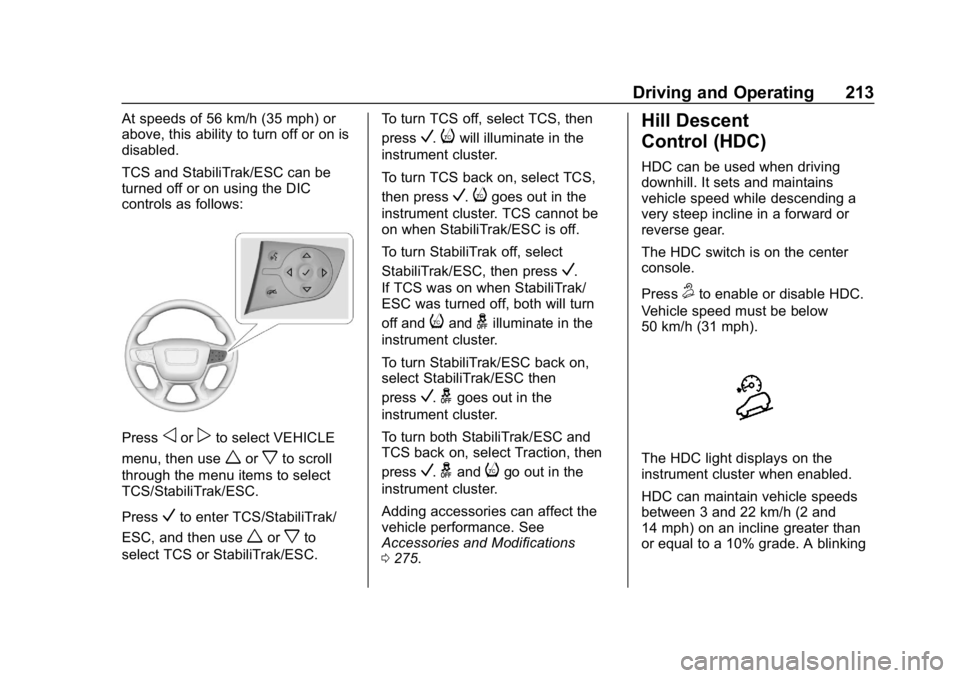
TCS and StabiliTrak/ESC can be
turned off or on using the DIC
controls as follows:
Pressoorpto select VEHICLE
menu, then use
worxto scroll
through the menu items to select
TCS/StabiliTrak/ESC.
Press
Vto enter TCS/StabiliTrak/
ESC, and then use
worxto
select TCS or StabiliTrak/ESC. To turn TCS off, select TCS, then
press
V.iwill illuminate in the
instrument cluster.
To turn TCS back on, select TCS,
then press
V.igoes out in the
instrument cluster. TCS cannot be
on when StabiliTrak/ESC is off.
To turn StabiliTrak off, select
StabiliTrak/ESC, then press
V.
If TCS was on when StabiliTrak/
ESC was turned off, both will turn
off and
iandgilluminate in the
instrument cluster.
To turn StabiliTrak/ESC back on,
select StabiliTrak/ESC then
press
V.ggoes out in the
instrument cluster.
To turn both StabiliTrak/ESC and
TCS back on, select Traction, then
press
V.gandigo out in the
instrument cluster.
Adding accessories can affect the
vehicle performance. See
Accessories and Modifications
0 275.
Hill Descent
Control (HDC)
HDC can be used when driving
downhill. It sets and maintains
vehicle speed while descending a
very steep incline in a forward or
reverse gear.
The HDC switch is on the center
console.
Press
5to enable or disable HDC.
Vehicle speed must be below
50 km/h (31 mph).
The HDC light displays on the
instrument cluster when enabled.
HDC can maintain vehicle speeds
between 3 and 22 km/h (2 and
14 mph) on an incline greater than
or equal to a 10% grade. A blinking
Page 220 of 425
GMC Terrain/Terrain Denali Owner Manual (GMNA-Localizing-U.S./Canada/
Mexico-13556230) - 2020 - CRC - 9/4/19
Driving and Operating 217
Cruise Control
The cruise control lets the vehicle
maintain a speed of about 40 km/h
(25 mph) or more without keeping
your foot on the accelerator. Cruise
control does not work at speeds
below 40 km/h (25 mph).
{Warning
Cruise control can be dangerous
where you cannot drive safely at
a steady speed. Do not use
cruise control on winding roads or
in heavy traffic.
Cruise control can be dangerous
on slippery roads. On such roads,
fast changes in tire traction can
cause excessive wheel slip, and
you could lose control. Do not use
cruise control on slippery roads.With the Traction Control System
(TCS) or StabiliTrak/Electronic
Stability Control (ESC), the system
may begin to limit wheel spin while
you are using cruise control. If this
happens, the cruise control will
automatically disengage. See
Traction Control/Electronic Stability
Control
0209. If a collision alert
occurs when cruise control is
activated, cruise control is
disengaged. See Forward Collision
Alert (FCA) System 0237. When
road conditions allow you to safely
use it again, cruise control can be
turned back on.
Cruise control will disengage if
either TCS or StabiliTrak/ESC is
turned off.
If Hill Descent Control (HDC) is
engaged, cruise control disengages.
See Hill Descent Control (HDC)
0 213.
If the brakes are applied, cruise
control disengages.
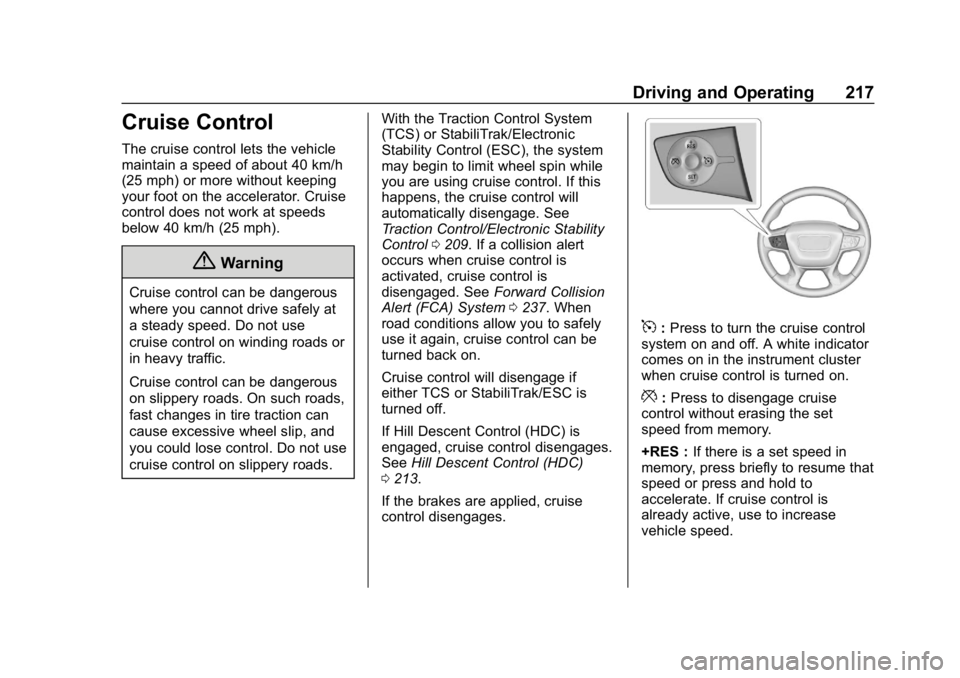
5: Press to turn the cruise control
system on and off. A white indicator
comes on in the instrument cluster
when cruise control is turned on.
*: Press to disengage cruise
control without erasing the set
speed from memory.
+RES : If there is a set speed in
memory, press briefly to resume that
speed or press and hold to
accelerate. If cruise control is
already active, use to increase
vehicle speed.
Page 221 of 425

GMC Terrain/Terrain Denali Owner Manual (GMNA-Localizing-U.S./Canada/
Mexico-13556230) - 2020 - CRC - 9/4/19
218 Driving and Operating
–SET :Press briefly to set the
speed and activate cruise control.
If cruise control is already active,
use to decrease vehicle speed.
Setting Cruise Control
If
5is on when not in use, –SET or
+RES could get bumped and go into
cruise when not desired. Keep
5
off when cruise is not being used.
To set a speed:
1. Press
5to turn the cruise
system on.
2. Get up to the desired speed.
3. Press and release –SET. The
desired set speed briefly
appears in the instrument
cluster.
4. Remove your foot from the accelerator pedal.
The cruise control indicator on the
instrument cluster turns green after
cruise control has been set to the
desired speed. See Instrument
Cluster (Base and Midlevel) 0103
or
Instrument Cluster (Uplevel) 0107. Resuming a Set Speed
If the cruise control is set at a
desired speed and then the brakes
are applied or
*is pressed, the
cruise control is disengaged without
erasing the set speed from memory.
Once the vehicle speed reaches
about 40 km/h (25 mph) or more,
briefly press +RES. The vehicle
returns to the previous set speed.
Increasing Speed While Using
Cruise Control
If the cruise control system is
already activated:
. Press and hold +RES on the
steering wheel until the vehicle
accelerates to the desired
speed, then release it.
. To increase the speed in small
increments, briefly press +RES.
For each press, the vehicle goes
about 1 km/h (1 mph) faster. The speedometer reading can be
displayed in either English or metric
units. See
Instrument Cluster (Base
and Midlevel) 0103 or
Instrument Cluster (Uplevel) 0107.
The increment value used depends
on the units displayed.
Reducing Speed While Using
Cruise Control
If the cruise control system is
already activated:
. Press and hold –SET until the
desired lower speed is reached,
then release it.
. To slow down in small
increments, briefly press –SET.
For each press, the vehicle goes
about 1 km/h (1 mph) slower.
The speedometer reading can be
displayed in either English or metric
units. See Instrument Cluster (Base
and Midlevel) 0103 or
Instrument Cluster (Uplevel) 0107.
The increment value used depends
on the units displayed.
Page 224 of 425

GMC Terrain/Terrain Denali Owner Manual (GMNA-Localizing-U.S./Canada/
Mexico-13556230) - 2020 - CRC - 9/4/19
Driving and Operating 221
J:Press to turn the system on or
off. The indicator turns white on the
instrument cluster when ACC is
turned on.
RES+ : Press briefly to resume the
previous set speed or to increase
vehicle speed if ACC is already
activated. To increase speed by
about 1 km/h (1 mph), press RES+
briefly. To increase speed to the
next 5 km/h (5 mph) mark on the
speedometer, hold RES+.
SET– :Press briefly to set the
speed and activate ACC or to
decrease vehicle speed if ACC is
already activated. To decrease
speed by about 1 km/h (1 mph),
press SET– briefly. To decrease
speed to the next 5 km/h (5 mph)
mark on the speedometer,
hold SET–.
*: Press to disengage ACC
without erasing the selected set
speed.
[: Press to select a following gap
setting for ACC of Far, Medium,
or Near. The speedometer reading can be
displayed in either English or metric
units. See
Instrument Cluster (Base
and Midlevel) 0103 or
Instrument Cluster (Uplevel) 0107.
The increment value used depends
on the units displayed.
Switching Between ACC and
Regular Cruise Control
To switch between ACC and regular
cruise control, press and hold
*.
A Driver Information Display (DIC)
message displays. See Vehicle
Messages 0134.
ACC IndicatorRegular Cruise
Control Indicator When ACC is engaged, a green
o
indicator will be lit on the instrument
cluster and the following gap will be
displayed. When the regular cruise
control is engaged, a green
J
indicator will be lit on the instrument
cluster; the following gap will not
display.
When the vehicle is turned on, the
cruise control mode will be set to
the last mode used before the
vehicle was turned off.
{Warning
Always check the cruise control
indicator on the instrument cluster
to determine which mode cruise
control is in before using the
feature. If ACC is not active, the
vehicle will not automatically
brake for other vehicles, which
could cause a crash if the brakes
are not applied manually. You and
others could be seriously injured
or killed.
Page 225 of 425

GMC Terrain/Terrain Denali Owner Manual (GMNA-Localizing-U.S./Canada/
Mexico-13556230) - 2020 - CRC - 9/4/19
222 Driving and Operating
Setting Adaptive Cruise Control
If
Jis on when not in use, SET–/
RES+ could be pressed by mistake
and engage ACC when not desired.
Keep
Joff when cruise is not
being used.
Select the set speed desired for
ACC. This is the vehicle speed
when no vehicle is detected in
your path.
While the vehicle is moving, ACC
will not set at a speed less than
25 km/h (15 mph), although it can be
resumed when driving at lower
speeds.
To set ACC while moving:
1. Press
J.
2. Get up to the desired speed.
3. Press and release SET–.
4. Remove foot from the accelerator.
After ACC is set, it may immediately
apply the brakes if a vehicle ahead
is detected closer than the selected
following gap.
ACC can also be set while the
vehicle is stopped if ACC is on and
the brake pedal is applied.
The ACC indicator displays on the
instrument cluster. When ACC is
turned on, the indicator will be lit
white.
Be mindful of speed limits,
surrounding traffic speeds, and
weather conditions when selecting
the set speed.
Resuming a Set Speed
If the ACC is set at a desired speed
and then the brakes are applied,
ACC is disengaged without erasing
the set speed from memory.
To begin using ACC again, press
RES+ briefly while moving more
than 5 km/h (5 mph). The vehicle
returns to the previous set speed. A green ACC indicator and the set
speed display on the instrument
cluster. The vehicle ahead indicator
may be flashing if a vehicle ahead
was present and moved. See
“Approaching and Following a
Vehicle”
later in this section.
Once ACC has resumed, if there is
no vehicle ahead, if the vehicle
ahead is beyond the selected
following gap, or if the vehicle has
exited a sharp curve, then the
vehicle speed will increase to the
set speed.
Increasing Speed While ACC Is at
a Set Speed
If ACC is already activated, do one
of the following:
. Use the accelerator to get to the
higher speed. Press SET–.
Release SET– and the
accelerator pedal. The vehicle
will now cruise at the higher
speed.
Page 226 of 425
GMC Terrain/Terrain Denali Owner Manual (GMNA-Localizing-U.S./Canada/
Mexico-13556230) - 2020 - CRC - 9/4/19
Driving and Operating 223
When the accelerator pedal is
pressed, ACC will not brake
because it is overridden. The
ACC indicator will turn blue on
the instrument cluster.
. Press and hold RES+ until the
desired set speed is displayed,
then release it.
. To increase vehicle speed in
smaller increments, press RES+
briefly. For each press, the
vehicle goes about 1 km/h
(1 mph) faster.
. To increase vehicle speed in
larger increments, hold RES+.
While holding RES+, the vehicle
speed increases to the next
5 km/h (5 mph) step, then
continues to increase by 5 km/h
(5 mph) at a time.
The set speed can also be
increased while the vehicle is
stopped.
. If stopped with the brake
applied, press RES+ until the
desired set speed is displayed. .
Pressing RES+ when there is no
longer a vehicle ahead or the
vehicle ahead is pulling away
and the brake is not applied will
cause ACC to resume.
When it is determined that there is
no vehicle ahead or the vehicle
ahead is beyond the selected
following gap, then the vehicle
speed will increase to the set speed.
Reducing Speed While ACC Is at a
Set Speed
If ACC is already activated, do one
of the following:
. Use the brake to get to the
desired lower speed. Release
the brake and press SET–. The
vehicle will now cruise at the
lower speed.
. Press and hold SET– until the
desired lower speed is reached,
then release it.
. To decrease the vehicle speed in
smaller increments, press SET−
briefly. For each press, the
vehicle goes about 1 km/h
(1 mph) slower. .
To decrease the vehicle speed in
larger increments, hold SET−.
While holding SET−, the vehicle
speed decreases to the next
5 km/h (5 mph) step, then
continues to decrease by 5 km/h
(5 mph) at a time.
The set speed can also be
decreased while the vehicle is
stopped.
. If stopped with the brake
applied, press or hold SET− until
the desired set speed is
displayed.
Selecting the Follow Distance Gap
When a slower moving vehicle is
detected ahead within the selected
following gap, ACC will adjust the
vehicle's speed and attempt to
maintain the follow distance gap
selected.
Press
[on the steering wheel to
adjust the following gap. Each press
cycles the gap button through three
settings: Far, Medium, or Near.