turn signal GMC TERRAIN 2022 Owner's Manual
[x] Cancel search | Manufacturer: GMC, Model Year: 2022, Model line: TERRAIN, Model: GMC TERRAIN 2022Pages: 371, PDF Size: 17.71 MB
Page 239 of 371

GMC Terrain/Terrain Denali Owner Manual (GMNA-Localizing-U.S./Canada/
Mexico-16540740) - 2023 - CRC - 6/16/22
238 Driving and Operating
for parallel parking spaces to the right of
the vehicle up to the sensors’range of 1.5 m
(5 ft). To search for a parking space to the
left, turn on the left turn signal or,
if available, change the side selection in the
infotainment display. To switch the parking
mode between parallel and perpendicular
press and hold
Owhile searching for a
valid parking spot or, if available, change the
parking mode in the infotainment display.
APA cannot park in all empty parking spots.
The parking spot must:
.Be sufficiently large to fit the vehicle
comfortably.
.Have an adjacent vehicle, wall, or pillar
for the system to align to.
After completely passing an eligible parking
spot, a beep sounds and a red stop symbol
is displayed in the driver information center. Generally, APA selects the nearest empty
parking spot behind the vehicle, but under
some conditions may select a space that is
further back. Slow down and bring the
vehicle to a complete stop to begin.
Follow the displayed instructions. When
instructed to drive in reverse, shift to
R (Reverse) while holding the brakes. The
steering wheel will vibrate briefly as a
reminder to remove hands from the steering
wheel. After the vibration stops, check your
surroundings and release the brakes to
begin automatic parking. As the vehicle
automatically steers, into the parking spot,
check surroundings and continue to apply
brakes, acceleration and shift gears as
needed. Be prepared to stop to avoid
vehicles, pedestrians, or objects. If the
vehicle exceeds 8 km/h (5 mph), APA is
automatically disengaged.
A progress arrow displays the status of the
parking maneuver. Once automatic parking
is finished and the vehicle is braked to a full
stop, APA will beep and display a message
indicating parking is complete. Secure the
vehicle against rolling away by applying
parking brake and place the vehicle in
P (Park).
Automatic Parking
Automatic Unparking
How to Cancel Automatic Parking
To cancel automatic parking or automatic
unparking at any time, press
O. Be
prepared to resume full control of the
vehicle by pressing the brake and taking
control of steering.
Page 246 of 371

GMC Terrain/Terrain Denali Owner Manual (GMNA-Localizing-U.S./Canada/
Mexico-16540740) - 2023 - CRC - 6/16/22
Driving and Operating 245
{Warning
FPB may alert or automatically brake the
vehicle suddenly in situations where it is
unexpected and undesired. It could falsely
alert or brake for objects similar in shape
or size to pedestrians, including shadows.
This is normal operation and the vehicle
does not need service. To override
Automatic Braking, firmly press the
accelerator pedal, if it is safe to do so.
Automatic Braking can be disabled through
vehicle personalization. To view available
settings from the infotainment screen, touch
Settings > Vehicle > Collision/Detection
Systems > Front Pedestrian Detection.
{Warning
Using the Front Pedestrian Braking
system while towing a trailer could cause
you to lose control of the vehicle and
crash. Turn the system to Alert or Off
when towing a trailer.
Cleaning the System
If FPB does not seem to operate properly,
cleaning the outside of the windshield in
front of the rearview mirror may correct the
issue.
Side Blind Zone Alert (SBZA)
If equipped, the SBZA system is a
lane-changing aid that assists drivers with
avoiding crashes that occur with moving
vehicles in the side blind zone, or blind spot
areas. When the vehicle is in a forward gear,
the left or right side mirror display will light
up if a moving vehicle is detected in that
blind zone. If the turn signal is activated and
a vehicle is also detected on the same side,
the display will flash as an extra warning
not to change lanes. Since this system is
part of the Lane Change Alert (LCA) system,
read the entire LCA section before using this
feature.
Lane Change Alert (LCA)
If equipped, the LCA system is a
lane-changing aid that assists drivers with
avoiding lane change crashes that occur with
moving vehicles in the side blind zone (or
spot) areas or with vehicles rapidly
approaching these areas from behind. The LCA warning display will light up in the
corresponding outside mirror and will flash
if the turn signal is on.
{Warning
LCA does not alert the driver to vehicles
outside of the system detection zones,
pedestrians, bicyclists, or animals. It may
not provide alerts when changing lanes
under all driving conditions. Failure to use
proper care when changing lanes may
result in injury, death, or vehicle damage.
Before making a lane change, always
check mirrors, glance over your shoulder,
and use the turn signals.
LCA Detection Zones
1. SBZA Detection Zone
2. LCA Detection Zone
Page 247 of 371

GMC Terrain/Terrain Denali Owner Manual (GMNA-Localizing-U.S./Canada/
Mexico-16540740) - 2023 - CRC - 6/16/22
246 Driving and Operating
The LCA sensor covers a zone of
approximately one lane over from both
sides of the vehicle, or 3.5 m (11 ft). The
height of the zone is approximately between
0.5 m (1.5 ft) and 2 m (6 ft) off the ground.
The Side Blind Zone Alert (SBZA) warning
area starts at approximately the middle of
the vehicle and goes back 5 m (16 ft). Drivers
are also warned of vehicles rapidly
approaching from up to 70 m (230 ft) behind
the vehicle.
How the System Works
The LCA symbol lights up in the side mirrors
when the system detects a moving vehicle
in the next lane over that is in the side
blind zone or rapidly approaching that zone
from behind. A lit LCA symbol indicates it
may be unsafe to change lanes. Before
making a lane change, check the LCA
display, check mirrors, glance over your
shoulder, and use the turn signals.
Left Side MirrorDisplayRight Side Mirror Display When the vehicle is started, both outside
mirror LCA displays will briefly come on to
indicate the system is operating. When the
vehicle is in a forward gear, the left or right
side mirror display will light up if a moving
vehicle is detected in the next lane over in
that blind zone or rapidly approaching that
zone. If the turn signal is activated in the
same direction as a detected vehicle, this
display will flash as an extra warning not to
change lanes.
LCA can be disabled through vehicle settings.
To view available settings from the
infotainment screen, touch Settings >
Vehicle > Collision/Detection Systems. If LCA
is disabled by the driver, the LCA mirror
displays will not light up.
When the System Does Not Seem to
Work Properly
The LCA system requires some driving for
the system to calibrate to maximum
performance. This calibration may occur
more quickly if the vehicle is driving on a
straight highway road with traffic and
roadside objects (e.g., guardrails, barriers).
LCA displays may not come on when
passing a vehicle quickly, for a stopped
vehicle, or when towing a trailer. The LCA
detection zones that extend back from the
side of the vehicle do not move further back
when a trailer is towed. Use caution while
changing lanes when towing a trailer. LCA
may alert to objects attached to the vehicle,
such as a trailer, bicycle, or object extending
out to either side of the vehicle. Attached
objects may also interfere with the
detection of vehicles. This is normal system
operation; the vehicle does not need service.
LCA may not always alert the driver to
vehicles in the next lane over, especially in
wet conditions or when driving on sharp
curves. The system does not need to be
serviced. The system may light up due to
guardrails, signs, trees, shrubs, and other
non-moving objects. This is normal system
operation; the vehicle does not need service.
LCA may not operate when the LCA sensors
in the left or right corners of the rear
bumper are covered with mud, dirt, snow,
ice, or slush, or in heavy rainstorms. For
cleaning instructions, see "Washing the
Vehicle" under
Exterior Care0319. If the
Driver Information Center (DIC) displays the
system unavailable message after cleaning
both sides of the vehicle toward the rear
corners of the vehicle, see your dealer.
Page 248 of 371

GMC Terrain/Terrain Denali Owner Manual (GMNA-Localizing-U.S./Canada/
Mexico-16540740) - 2023 - CRC - 6/16/22
Driving and Operating 247
If the LCA displays do not light up when
moving vehicles are in the side blind zone or
are rapidly approaching this zone and the
system is clean, the system may need
service. Take the vehicle to your dealer.
Radio Frequency Information
SeeRadio Frequency Statement 0347.
Lane Keep Assist (LKA)
If equipped, LKA may help avoid crashes due
to unintentional lane departures. This
system uses a camera to detect lane
markings. The LKA system can be ready to
assist at speeds between approximately
60 km/h (37 mph) and 180 km/h (112 mph).
On some vehicles, the system will instead
operate above 50 km/h (31 mph). LKA may
assist by gently turning the steering wheel
if the vehicle approaches a detected lane
marking. It may also provide a Lane
Departure Warning (LDW) alert if the vehicle
crosses a detected lane marking. This system
is not intended to keep the vehicle centered
in the lane. LKA will not assist and alert if
the turn signal is active in the direction of
lane departure, or if it detects that you are
accelerating, braking or actively steering.
LKA can be overridden by turning the
steering wheel. If the system detects you are steering intentionally across a lane
marker, the LDW will not be given. Do not
expect the LDW to occur when you are
intentionally crossing a lane marker.
{Warning
The LKA system does not continuously
steer the vehicle. It may not keep the
vehicle in the lane or give a Lane
Departure Warning (LDW) alert, even if a
lane marking is detected.
The LKA and LDW systems may not:
.Provide an alert or enough steering
assist to avoid a lane departure or
crash.
.Detect lane markings under poor
weather or visibility conditions. This
can occur if the windshield or
headlamps are blocked by dirt, snow,
or ice; if they are not in proper
condition; or if the sun shines directly
into the camera.
.Detect road edges.
.Detect lanes on winding or hilly roads.
(Continued)
Warning (Continued)
If LKA only detects lane markings on one
side of the road, it will only assist or
provide an LDW alert when approaching
the lane on the side where it has
detected a lane marking. Even with LKA
and LDW, you must steer the vehicle.
Always keep your attention on the road
and maintain proper vehicle position
within the lane, or vehicle damage,
injury, or death could occur. Always keep
the windshield, headlamps, and camera
sensors clean and in good repair. Do not
use LKA in bad weather conditions or on
roads with unclear lane markings, such as
construction zones.
{Warning
Using LKA on slippery roads could cause
loss of control of the vehicle and a crash.
Turn the system off.
Page 255 of 371

GMC Terrain/Terrain Denali Owner Manual (GMNA-Localizing-U.S./Canada/
Mexico-16540740) - 2023 - CRC - 6/16/22
254 Driving and Operating
Make wider turns than normal when towing,
so trailer will not go over soft shoulders,
over curbs, or strike road signs, trees,
or other objects. Always signal turns well in
advance. Do not steer or brake suddenly.
Driving on Grades
Reduce speed and shift to a lower gear
before starting down a long or steep
downhill grade. If the transmission is not
shifted down, the brakes may overheat and
result in reduced braking efficiency.
The vehicle can tow in D (Drive). Shift the
transmission to a lower gear if the
transmission shifts too often under heavy
loads and/or hilly conditions.
When towing at higher altitudes, engine
coolant will boil at a lower temperature
than at lower altitudes. If the engine is
turned off immediately after towing at high
altitude on steep uphill grades, the vehicle
could show signs similar to engine
overheating. To avoid this, let the engine
run, preferably on level ground, with the
transmission in P (Park) for a few minutes
before turning the engine off. If the
overheat warning comes on, seeEngine
Overheating 0273.
Parking on Hills
{Warning
To prevent serious injury or death,
always park your vehicle and trailer on a
level surface when possible.
When parking your vehicle and your trailer
on a hill: 1. Press the brake pedal, but do not shift into P (Park) yet. Turn the wheels into
the curb if facing downhill or into traffic
if facing uphill.
2. Have someone place chocks under the trailer wheels.
3. When the wheel chocks are in place, gradually release the brake pedal to
allow the chocks to absorb the load of
the trailer.
4. Reapply the brake pedal. Then apply the parking brake and shift into P (Park).
5. Release the brake pedal.
Leaving After Parking on a Hill
1. Apply and hold the brake pedal.
.Start the engine.
.Shift into a gear.
.Release the parking brake. 2. Let up on the brake pedal.
3. Drive slowly until the trailer is clear of
the chocks.
4. Stop and have someone pick up and store the chocks.
Maintenance When Trailer Towing
The vehicle needs service more often when
used to tow trailers. See Maintenance
Schedule 0328. It is especially important to
check the automatic transmission fluid,
engine oil, axle lubricant, belts, cooling
system, and brake system before and during
each trip.
Check periodically that all nuts and bolts on
the trailer hitch are tight.
Engine Cooling When Trailer Towing
The cooling system may temporarily
overheat during severe operating conditions.
See Engine Overheating 0273.
Trailer Towing
Caution
Towing a trailer improperly can damage
the vehicle and result in costly repairs
not covered by the vehicle warranty. To
(Continued)
Page 259 of 371
GMC Terrain/Terrain Denali Owner Manual (GMNA-Localizing-U.S./Canada/
Mexico-16540740) - 2023 - CRC - 6/16/22
258 Driving and Operating
2. Pull the bottom edge of the coverrearward.
3. Disengage the cover at the upper attachments (1) and remove.
Consider using mechanical sway controls
with any trailer. Ask a trailering professional
about sway controls or refer to the trailer
manufacturer's recommendations and
instructions.
Tires
.Do not tow a trailer while using a
compact spare tire on the vehicle.
.Tires must be properly inflated to support
loads while towing a trailer. See Tires
0 290 for instructions on proper tire
inflation.
Safety Chains
Always attach chains between the vehicle
and the trailer, and attach the chains to the
holes on the trailer hitch platform.
Instructions about safety chains may be
provided by the hitch manufacturer or by
the trailer manufacturer.
Cross the safety chains under the tongue of
the trailer to help prevent the tongue from
contacting the road if it becomes separated from the hitch. Always leave just enough
slack so the combination can turn. Never
allow safety chains to drag on the ground.
Trailer Brakes
Loaded trailers over 450 kg (1,000 lb) must
be equipped with brake systems and with
brakes for each axle. Trailer braking
equipment conforming to Canadian
Standards Association (CSA) requirement
CAN3-D313, or its equivalent, is
recommended.
State or local regulations may require
trailers to have their own braking system if
the loaded weight of the trailer exceeds
certain minimums that can vary from state
to state. Read and follow the instructions for
the trailer brakes so they are installed,
adjusted, and maintained properly. Never
attempt to tap into your vehicle's hydraulic
brake system. If you do, both the vehicle
anti-lock brakes and the trailer brakes may
not function, which could result in a crash.
Trailer Lamps
Always check all trailer lamps are working at
the beginning of each trip, and periodically
on longer trips.
Turn Signals When Towing a Trailer
When properly connected, the trailer turn
signals will illuminate to indicate the vehicle
is turning, changing lanes, or stopping.
When towing a trailer, the arrows on the
instrument cluster will illuminate even if the
trailer is not properly connected or the bulbs
are burned out.
Trailer Tires
Special Trailer (ST) tires differ from vehicle
tires. Trailer tires are designed with stiff
sidewalls to help prevent sway and to
support heavy loads. These features can
make it difficult to determine if the trailer
tire pressures are low only based on a visual
inspection.
Always check all trailer tire pressures before
each trip when the tires are cool. Low trailer
tire pressure is a leading cause of trailer tire
blow-outs.
Trailer tires deteriorate over time. The trailer
tire sidewall will show the week and year
the tire was manufactured. Many trailer tire
manufacturers recommend replacing tires
more than six years old.
Page 261 of 371
GMC Terrain/Terrain Denali Owner Manual (GMNA-Localizing-U.S./Canada/
Mexico-16540740) - 2023 - CRC - 6/16/22
260 Vehicle Care
Vehicle Care
General Information
General Information . . . . . . . . . . . . . . . . . . . 261
California Perchlorate MaterialsRequirements . . . . . . . . . . . . . . . . . . . . . . . . 261
Accessories and Modifications . . . . . . . . . 261
Vehicle Checks
Doing Your Own Service Work . . . . . . . . 262
Hood . . . . . . . . . . . . . . . . . . . . . . . . . . . . . . . . . . 262
Engine Compartment Overview . . . . . . . 264
Engine Oil . . . . . . . . . . . . . . . . . . . . . . . . . . . . . 265
Engine Oil Life System . . . . . . . . . . . . . . . . 267
Automatic Transmission Fluid . . . . . . . . . 268
Engine Air Filter Life System . . . . . . . . . . 268
Engine Air Cleaner/Filter . . . . . . . . . . . . . . 268
Cooling System . . . . . . . . . . . . . . . . . . . . . . . 270
Engine Overheating . . . . . . . . . . . . . . . . . . . . 273
Washer Fluid . . . . . . . . . . . . . . . . . . . . . . . . . . 274
Brakes . . . . . . . . . . . . . . . . . . . . . . . . . . . . . . . . . 274
Brake Fluid . . . . . . . . . . . . . . . . . . . . . . . . . . . . 275
Battery - North America . . . . . . . . . . . . . . . 276
All-Wheel Drive . . . . . . . . . . . . . . . . . . . . . . . . 277
Park Brake and P (Park) Mechanism Check . . . . . . . . . . . . . . . . . . . . . . . . . . . . . . . . 277
Wiper Blade Replacement . . . . . . . . . . . . . 277
Windshield Replacement . . . . . . . . . . . . . . 278
Gas Strut(s) . . . . . . . . . . . . . . . . . . . . . . . . . . . 279
Headlamp Aiming
Front Headlamp Aiming . . . . . . . . . . . . . . . 280
Bulb Replacement
Bulb Replacement . . . . . . . . . . . . . . . . . . . . . 280
Halogen Bulbs . . . . . . . . . . . . . . . . . . . . . . . . 280
High Intensity Discharge (HID) Lighting . . . . . . . . . . . . . . . . . . . . . . . . . . . . . 280
LED Lighting . . . . . . . . . . . . . . . . . . . . . . . . . . 280
Front Turn Signal Lamps . . . . . . . . . . . . . . 280
License Plate Lamp . . . . . . . . . . . . . . . . . . . . 281
Electrical System
Electrical System Overload . . . . . . . . . . . . 282
Fuses and Circuit Breakers . . . . . . . . . . . . . 283
Engine Compartment Fuse Block . . . . . . 284
Instrument Panel Fuse Block . . . . . . . . . . 286
Rear Compartment Fuse Block . . . . . . . . . 288
Wheels and Tires
Tires . . . . . . . . . . . . . . . . . . . . . . . . . . . . . . . . . . 290
All-Season Tires . . . . . . . . . . . . . . . . . . . . . . . 290
Winter Tires . . . . . . . . . . . . . . . . . . . . . . . . . . . 291
Tire Sidewall Labeling . . . . . . . . . . . . . . . . . 291
Tire Designations . . . . . . . . . . . . . . . . . . . . . . 293
Tire Terminology and Definitions . . . . . . 293
Tire Pressure . . . . . . . . . . . . . . . . . . . . . . . . . . 295
Tire Pressure Monitor System . . . . . . . . . 296
Tire Pressure Monitor Operation . . . . . . 297
Tire Inspection . . . . . . . . . . . . . . . . . . . . . . . . 300
Tire Rotation . . . . . . . . . . . . . . . . . . . . . . . . . . 300 When It Is Time for New Tires . . . . . . . . 301
Buying New Tires . . . . . . . . . . . . . . . . . . . . . 302
Different Size Tires and Wheels . . . . . . . 303
Uniform Tire Quality Grading . . . . . . . . . 303
Wheel Alignment and Tire Balance . . . . 305
Wheel Replacement . . . . . . . . . . . . . . . . . . . 305
Tire Chains . . . . . . . . . . . . . . . . . . . . . . . . . . . . 305
If a Tire Goes Flat . . . . . . . . . . . . . . . . . . . . . 306
Tire Changing . . . . . . . . . . . . . . . . . . . . . . . . . 307
Compact Spare Tire . . . . . . . . . . . . . . . . . . . . 312
Jump Starting
Jump Starting - North America . . . . . . . . . 313
Towing the Vehicle
Transporting a Disabled Vehicle . . . . . . . . 315
Recreational Vehicle Towing . . . . . . . . . . . 317
Appearance Care
Exterior Care . . . . . . . . . . . . . . . . . . . . . . . . . . . 319
Interior Care . . . . . . . . . . . . . . . . . . . . . . . . . . . 323
Floor Mats . . . . . . . . . . . . . . . . . . . . . . . . . . . . 326
Page 281 of 371
GMC Terrain/Terrain Denali Owner Manual (GMNA-Localizing-U.S./Canada/
Mexico-16540740) - 2023 - CRC - 6/16/22
280 Vehicle Care
Headlamp Aiming
Front Headlamp Aiming
Headlamp aim has been preset and should
need no further adjustment.
If the vehicle is damaged in a crash, the
headlamp aim may be affected.
If adjustment to the headlamps is necessary,
see your dealer.
Bulb Replacement
For the proper type of replacement bulbs,
or any bulb changing procedure not listed in
this section, contact your dealer.
Caution
Do not replace incandescent bulbs with
aftermarket LED replacement bulbs. This
can cause damage to the vehicle electrical
system.
Halogen Bulbs
{Warning
Halogen bulbs have pressurized gas inside
and can burst if you drop or scratch the
bulb. You or others could be injured. Be
sure to read and follow the instructions
on the bulb package.
High Intensity Discharge (HID)
Lighting
{Warning
The High Intensity Discharge (HID)
lighting system operates at a very high
voltage. If you try to service any of the
system components, you could be
seriously injured. Have your dealer or a
qualified technician service them.
After an HID headlamp bulb has been
replaced, the beam might be a slightly
different shade than it was originally. This is
normal.
LED Lighting
This vehicle has several LED lamps. For
replacement of any LED lighting assembly,
contact your dealer.
Front Turn Signal Lamps
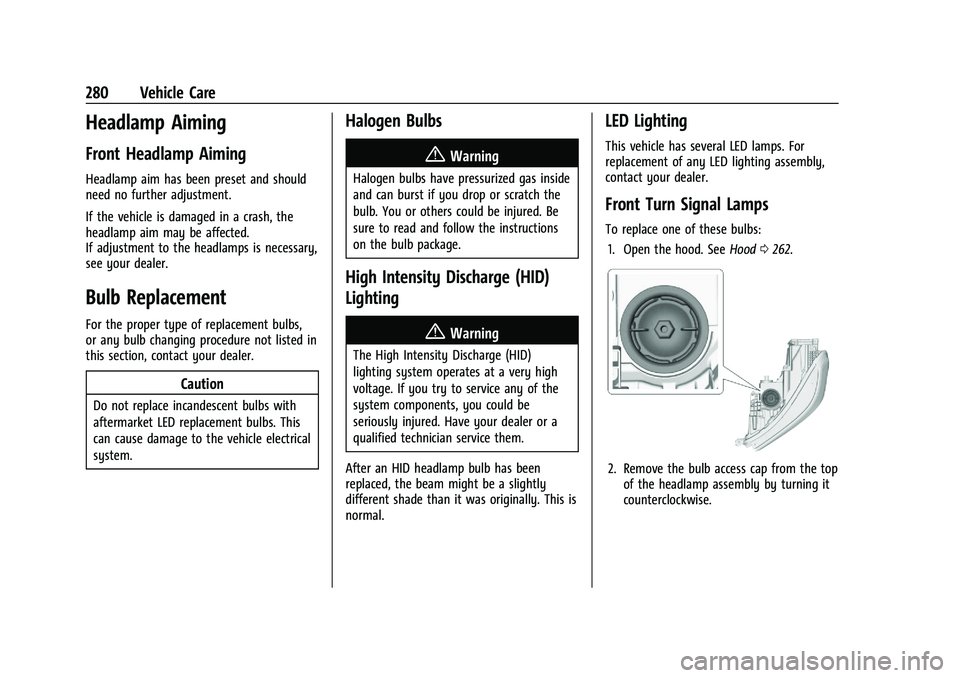
To replace one of these bulbs: 1. Open the hood. See Hood0262.
2. Remove the bulb access cap from the top
of the headlamp assembly by turning it
counterclockwise.
Page 290 of 371

GMC Terrain/Terrain Denali Owner Manual (GMNA-Localizing-U.S./Canada/
Mexico-16540740) - 2023 - CRC - 6/16/22
Vehicle Care 289
Remove the trim plate to access the fuse
block.
The vehicle may not be equipped with all of
the fuses and relays shown.
FusesUsage
F1 Power Seat
F2 Liftgate Fuses
Usage
F3 Trailer Auxiliary Power
F4 –
F5 Memory Seat Module
F6 Sunroof F7 Side Blind Zone Alert
F8 Trailer Reverse Lamps
F9 Rear Heated Seat 1
F10 Park Lamps F11 Rear Heated Seat 2
F12 –
F13 Trailer Parking Lamp
F14 Right Trailer Stoplamp/ Turn Signal Lamp
F15 –
F16 –
F17 Video Processing Module
F18 Left Trailer Stoplamp/ Turn Signal Lamp
F19 All-Wheel Drive
F20 Lumbar
Page 291 of 371

GMC Terrain/Terrain Denali Owner Manual (GMNA-Localizing-U.S./Canada/
Mexico-16540740) - 2023 - CRC - 6/16/22
290 Vehicle Care
FusesUsage
F21 Rear Auxiliary Power Outlet
F22 Rear Drive Unit
Relays Usage
K1 Right Trailer Stoplamp/ Turn Signal Lamp
K2 Trailer Reverse Lamps
K3 Left Trailer Stoplamp/ Turn Signal Lamp
K4 Park Lamps K5 –
Wheels and Tires
Tires
Every new GM vehicle has high-quality
tires made by a leading tire
manufacturer. See the warranty manual
for information regarding the tire
warranty and where to get service. For
additional information refer to the tire
manufacturer.
{Warning
.Poorly maintained and improperly
used tires are dangerous.
.Overloading the tires can cause
overheating as a result of too
much flexing. There could be a
blowout and a serious crash. See
Vehicle Load Limits 0196.
.Underinflated tires pose the same
danger as overloaded tires. The
resulting crash could cause serious
injury. Check all tires frequently to
maintain the recommended
pressure. Tire pressure should be
checked when the tires are cold.
.Overinflated tires are more likely
to be cut, punctured, or broken by
a sudden impact —such as when
hitting a pothole. Keep tires at the
recommended pressure.
.Worn or old tires can cause a
crash. If the tread is badly worn,
replace them.
(Continued)
Warning (Continued)
.Replace any tires that have been
damaged by impacts with
potholes, curbs, etc.
.Improperly repaired tires can cause
a crash. Only your dealer or an
authorized tire service center
should repair, replace, dismount,
and mount the tires.
.Do not spin the tires in excess of
56 km/h (35 mph) on slippery
surfaces such as snow, mud, ice,
etc. Excessive spinning may cause
the tires to explode.
All-Season Tires
This vehicle may come with all-season tires.
These tires are designed to provide good
overall performance on most road surfaces
and weather conditions. Original equipment
tires designed to GM's specific tire
performance criteria have a TPC specification
code molded onto the sidewall. Original
equipment all-season tires can be identified
by the last two characters of this TPC code,
which will be “MS.”