transmission GMC YUKON 2005 Owner's Guide
[x] Cancel search | Manufacturer: GMC, Model Year: 2005, Model line: YUKON, Model: GMC YUKON 2005Pages: 530, PDF Size: 3.2 MB
Page 151 of 530
Instrument Panel Overview...............................3-4
Hazard Warning Flashers................................3-6
Other Warning Devices...................................3-6
Horn.............................................................3-6
Tilt Wheel.....................................................3-6
Turn Signal/Multifunction Lever.........................3-7
Turn and Lane-Change Signals........................3-8
Headlamp High/Low-Beam Changer..................3-8
Flash-to-Pass.................................................3-9
Windshield Wipers..........................................3-9
Windshield Washer.......................................3-10
Cruise Control..............................................3-11
Headlamps..................................................3-14
Headlamps on Reminder................................3-15
Daytime Running Lamps (DRL).......................3-15
Automatic Headlamp System..........................3-16
Fog Lamps..................................................3-17
Auxiliary Roof Mounted Lamp.........................3-17
Instrument Panel Brightness...........................3-18
Dome Lamps...............................................3-18
Dome Lamp Override....................................3-18
Entry Lighting...............................................3-18
Exit Lighting.................................................3-18
Front Reading Lamps....................................3-19
Battery Run-Down Protection..........................3-19
Accessory Power Outlets...............................3-20
Ashtrays and Cigarette Lighter........................3-20Climate Controls............................................3-21
Climate Control System.................................3-21
Dual Climate Control System..........................3-22
Dual Automatic Climate Control System...........3-24
Outlet Adjustment.........................................3-30
Rear Air Conditioning System.........................3-30
Rear Air Conditioning and Heating System.......3-31
Rear Air Conditioning and Heating System and
Electronic Climate Controls.........................3-34
Warning Lights, Gages, and Indicators............3-36
Instrument Panel Cluster................................3-37
Speedometer and Odometer...........................3-38
Trip Odometer..............................................3-38
Tachometer.................................................3-38
Safety Belt Reminder Light.............................3-39
Airbag Readiness Light..................................3-39
Passenger Airbag Status Indicator...................3-40
Battery Warning Light....................................3-42
Voltmeter Gage............................................3-42
Brake System Warning Light..........................3-43
Anti-Lock Brake System Warning Light.............3-44
Traction Off Light..........................................3-45
Engine Coolant Temperature Gage..................3-46
Transmission Temperature Gage.....................3-46
Tire Pressure Light.......................................3-48
Malfunction Indicator Lamp.............................3-48
Oil Pressure Gage........................................3-51
Section 3 Instrument Panel
3-1
Page 155 of 530
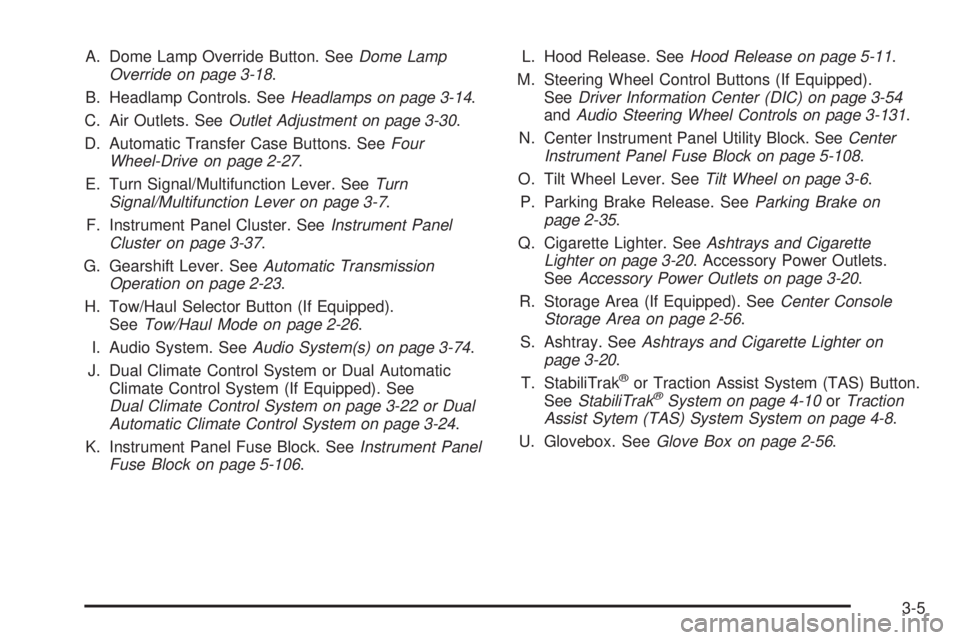
A. Dome Lamp Override Button. SeeDome Lamp
Override on page 3-18.
B. Headlamp Controls. SeeHeadlamps on page 3-14.
C. Air Outlets. SeeOutlet Adjustment on page 3-30.
D. Automatic Transfer Case Buttons. SeeFour
Wheel-Drive on page 2-27.
E. Turn Signal/Multifunction Lever. SeeTurn
Signal/Multifunction Lever on page 3-7.
F. Instrument Panel Cluster. SeeInstrument Panel
Cluster on page 3-37.
G. Gearshift Lever. SeeAutomatic Transmission
Operation on page 2-23.
H. Tow/Haul Selector Button (If Equipped).
SeeTow/Haul Mode on page 2-26.
I. Audio System. SeeAudio System(s) on page 3-74.
J. Dual Climate Control System or Dual Automatic
Climate Control System (If Equipped). See
Dual Climate Control System on page 3-22 or Dual
Automatic Climate Control System on page 3-24.
K. Instrument Panel Fuse Block. SeeInstrument Panel
Fuse Block on page 5-106.L. Hood Release. SeeHood Release on page 5-11.
M. Steering Wheel Control Buttons (If Equipped).
SeeDriver Information Center (DIC) on page 3-54
andAudio Steering Wheel Controls on page 3-131.
N. Center Instrument Panel Utility Block. SeeCenter
Instrument Panel Fuse Block on page 5-108.
O. Tilt Wheel Lever. SeeTilt Wheel on page 3-6.
P. Parking Brake Release. SeeParking Brake on
page 2-35.
Q. Cigarette Lighter. SeeAshtrays and Cigarette
Lighter on page 3-20. Accessory Power Outlets.
SeeAccessory Power Outlets on page 3-20.
R. Storage Area (If Equipped). SeeCenter Console
Storage Area on page 2-56.
S. Ashtray. SeeAshtrays and Cigarette Lighter on
page 3-20.
T. StabiliTrak
®or Traction Assist System (TAS) Button.
SeeStabiliTrak®System on page 4-10orTraction
Assist Sytem (TAS) System System on page 4-8.
U. Glovebox. SeeGlove Box on page 2-56.
3-5
Page 163 of 530

Increasing Speed While Using Cruise
Control
There are two ways to go to a higher speed:
Use the accelerator pedal to get to the higher
speed. Press the set button at the end of the lever,
then release the button and the accelerator
pedal. You’ll now cruise at the higher speed. If the
accelerator pedal is held longer than 60 seconds,
cruise control will turn off.
Move the cruise switch from on to
resume/accelerate. Hold it there until you get up to
the speed you want, and then release the switch.
To increase your speed in very small amounts,
move the switch briey to resume/accelerate.
Each time you do this, your vehicle will go about
1 mph (1.6 km/h) faster.
Reducing Speed While Using Cruise
Control
Press in the button at the end of the lever until you
reach the lower speed you want, then release it.
To slow down in very small amounts, briey press
the set button. Each time you do this, you’ll go
about 1 mph (1.6 km/h) slower.
Passing Another Vehicle While Using
Cruise Control
Use the accelerator pedal to increase your speed.
When you take your foot off the pedal, your vehicle will
slow down to the cruise control speed you set earlier.
Using Cruise Control on Hills
How well your cruise control will work on hills depends
upon your speed, load and the steepness of the
hills. When going up steep hills, you may want to step
on the accelerator pedal to maintain your speed.
When going downhill, you may have to brake or shift to
a lower gear to keep your speed down. Of course,
applying the brake takes you out of cruise control. Many
drivers nd this to be too much trouble and don’t use
cruise control on steep hills.
Ending Cruise Control
There are four ways to turn off the cruise control:
Step lightly on the brake pedal,
move the cruise control switch to off, or
shift the transmission to NEUTRAL (N).
If your vehicle has the StabiliTrak®feature, cruise
control will turn off if road conditions cause
StabiliTrak
®to activate.
If the accelerator pedal is held for 60 seconds or
longer, cruise control will turn off.
3-13
Page 165 of 530

A circuit breaker protects your headlamps. If you have
an electrical overload, your headlamps will icker on and
off. Have your headlamp wiring checked right away if
this happens.
Headlamps on Reminder
A reminder chime will sound when your headlamps or
parking lamps are manually turned on and your ignition
is off, in LOCK, ACCESSORY, or your door is open.
To disable the chime, turn the light off then back on.
Daytime Running Lamps (DRL)
Daytime Running Lamps (DRL) can make it easier for
others to see the front of your vehicle during the
day. DRL can be helpful in many different driving
conditions, but they can be especially helpful in the short
periods after dawn and before sunset. Fully functional
daytime running lamps are required on all vehicles
rst sold in Canada.The DRL system will come on when the following
conditions are met:
The ignition is on
The exterior lamps control is in AUTO
The automatic transmission is not in PARK (P)
The light sensor determines it is daytime
When the DRL are on, only your DRL lamps will be on.
The taillamps, sidemarker and other lamps won’t be
on. The instrument panel won’t be lit up either.
When it begins to get dark, the automatic headlamp
system will switch from DRL to the headlamps.
When you turn the headlamp switch off, the headlamps
will go off, and your DRL lamps will illuminate,
provided it is not dark outside.
Shifting the transmission into PARK (P) will allow you
to idle the vehicle with the DRL off. The DRL will stay
off until you shift the transmission out of PARK (P).
This procedure applies only to vehicles rst sold in the
United States.
3-15
Page 187 of 530
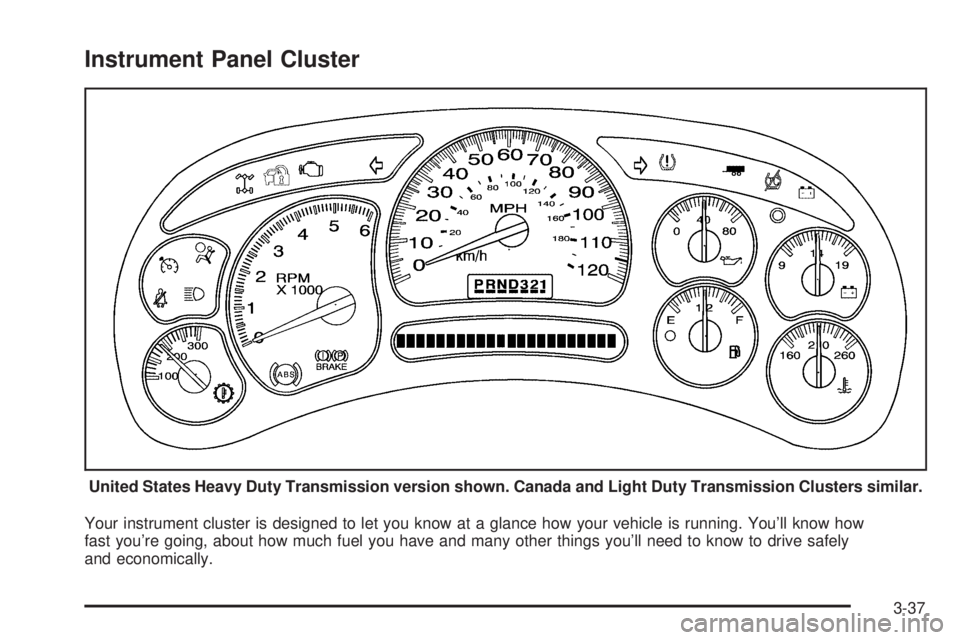
Instrument Panel Cluster
Your instrument cluster is designed to let you know at a glance how your vehicle is running. You’ll know how
fast you’re going, about how much fuel you have and many other things you’ll need to know to drive safely
and economically.United States Heavy Duty Transmission version shown. Canada and Light Duty Transmission Clusters similar.
3-37
Page 196 of 530
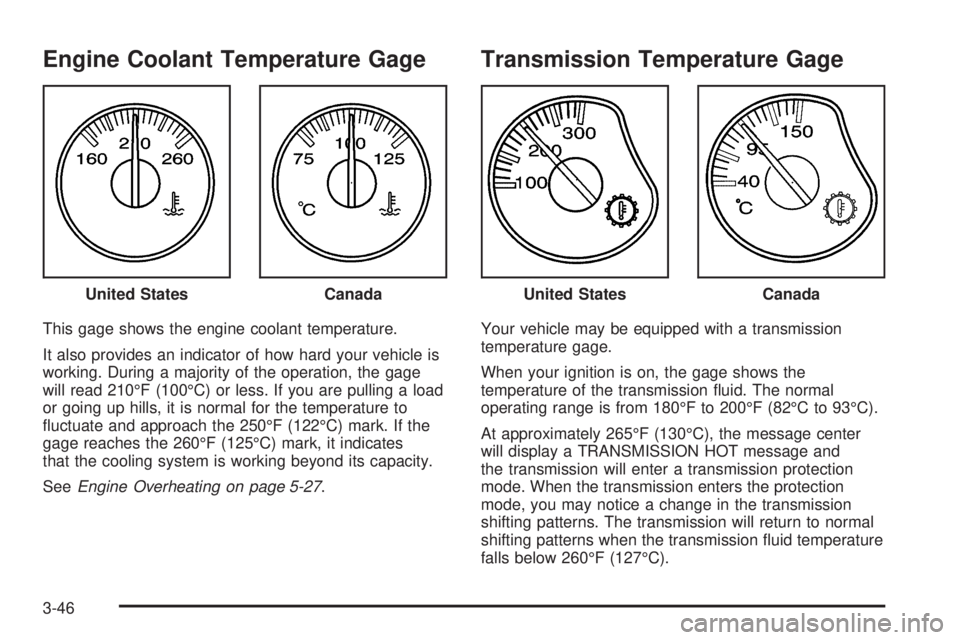
Engine Coolant Temperature Gage
This gage shows the engine coolant temperature.
It also provides an indicator of how hard your vehicle is
working. During a majority of the operation, the gage
will read 210°F (100°C) or less. If you are pulling a load
or going up hills, it is normal for the temperature to
uctuate and approach the 250°F (122°C) mark. If the
gage reaches the 260°F (125°C) mark, it indicates
that the cooling system is working beyond its capacity.
SeeEngine Overheating on page 5-27.
Transmission Temperature Gage
Your vehicle may be equipped with a transmission
temperature gage.
When your ignition is on, the gage shows the
temperature of the transmission uid. The normal
operating range is from 180°F to 200°F (82°C to 93°C).
At approximately 265°F (130°C), the message center
will display a TRANSMISSION HOT message and
the transmission will enter a transmission protection
mode. When the transmission enters the protection
mode, you may notice a change in the transmission
shifting patterns. The transmission will return to normal
shifting patterns when the transmission uid temperature
falls below 260°F (127°C). United States
CanadaUnited StatesCanada
3-46
Page 197 of 530
SeeDriver Information Center (DIC) on page 3-54for
further information.
If the transmission uid reaches temperatures of
approximately 275°F (135°C) or greater, the Driver
Information Center will display a TRANS HOT IDLE
ENGINE warning message, and a chime will sound.
Pull the vehicle off the roadway when it is safe to do
so. Set the parking brake, place the transmission
in PARK (P) and allow the engine to idle until the
transmission temperature falls below 260°F (127°C).
If the transmission continues to operate above
265°F (130°C), contact your nearest dealer or the
GM Roadside Assistance Center. SeeRoadside
Assistance Program on page 7-5.
Notice:If you drive your vehicle with the
transmission temperature gage above normal
operating range, you can damage the transmission.
This could lead to costly repairs that would not
be covered by your warranty. Do not drive your
vehicle while the transmission temperature gage
reading is above normal. See your dealer for service.The following situations can cause the transmission to
operate at higher temperatures:
Towing a trailer
Hot outside air temperatures
Hauling a large or heavy load
Vehicle overloading
Low transmission uid level
High transmission uid level
Restricted air ow to the radiator and the auxiliary
transmission oil cooler (if equipped).
A temporary solution to hotter transmission operating
temperatures may be to let the transmission cool down.
If the transmission is operated at higher temperatures
on a frequent basis, seeScheduled Maintenance
on page 6-4for the proper transmission maintenance
intervals.
3-47
Page 199 of 530

Notice:Modications made to the engine,
transmission, exhaust, intake, or fuel system of
your vehicle or the replacement of the original tires
with other than those of the same Tire Performance
Criteria (TPC) can affect your vehicle’s emission
controls and may cause this light to come on.
Modications to these systems could lead to costly
repairs not covered by your warranty. This may
also result in a failure to pass a required Emission
Inspection/Maintenance test.
This light should come on, as a check to show you it
is working, when the ignition is on and the engine is not
running. If the light does not come on, have it repaired.
This light will also come on during a malfunction in
one of two ways:
Light Flashing— A misre condition has been
detected. A misre increases vehicle emissions
and may damage the emission control system on
your vehicle. Diagnosis and service may be
required.
Light On Steady— An emission control system
malfunction has been detected on your vehicle.
Diagnosis and service may be required.
If the Light is Flashing
The following may prevent more serious damage to
your vehicle:
Reducing vehicle speed
Avoiding hard accelerations
Avoiding steep uphill grades
If you are towing a trailer, reduce the amount of
cargo being hauled as soon as it is possible
If the light stops ashing and remains on steady, see
“If the Light Is On Steady” following.
If the light continues to ash, when it is safe to do so,
stop the vehicle. Find a safe place to park your vehicle.
Turn the key off, wait at least 10 seconds and restart
the engine. If the light remains on steady, see “If
the Light Is On Steady” following. If the light is still
ashing, follow the previous steps, and see your dealer
for service as soon as possible.
3-49
Page 217 of 530

If an engine or vehicle related problem has been
detected and the vehicle needs service, the
message will appear. See your GM dealer.
The message will also appear if the vehicle is
shifted into 4LO.
The message will turn off as soon as the conditions that
caused the message to be displayed are no longer
present.
TIGHTEN FUEL CAP
If the vehicle’s fuel cap is not tightened properly, this
message may appear along with the check engine light
on the instrument panel. SeeMalfunction Indicator Lamp
on page 3-48. Reinstall the fuel cap, making sure to fully
install the cap. SeeFilling the Tank on page 5-8. The
diagnostic system can determine if the fuel cap has been
left off or improperly installed. A loose or missing fuel cap
will allow fuel to evaporate into the atmosphere. A few
driving trips with the cap properly installed should turn the
light and message off.
TRACTION ACTIVE
When the traction control system has detected that any
of the vehicle’s wheels are spinning, the traction
control system will activate and this message will appear
on the DIC. For more information, seeTraction Assist
System (TAS) on page 4-8.
TRACTION SYS LIMITED
If the brake traction control system activates constantly
or if the brakes have heated up due to high-speed
braking, brake traction control will be displayed and the
TRACTION SYS LIMITED message will be displayed.
The system will return to normal operation after the
brakes have cooled.
TRANS HOT IDLE ENGINE
If the transmission uid in the vehicle gets hot, this
message will appear on the DIC and you will hear a
chime. The chime will stop when the transmission uid
temperature is less that 265°F (129°C). Driving with
the transmission uid temperature high can cause
damage to the vehicle. Stop the vehicle and let it idle to
allow the transmission to cool. This message will
clear when the uid temperature reaches a safe level.
SeeTransmission Temperature Gage on page 3-46.
Notice:If you drive your vehicle while the
transmission uid is overheating and the
transmission temperature warning is displayed on
the instrument panel cluster and/or DIC, you
can damage the transmission. This could lead to
costly repairs that would not be covered by
your warranty. Do not drive your vehicle with
overheated transmission uid or while transmission
temperature warning is displayed.
3-67
Page 218 of 530
TRANSMISSION HOT
If the transmission uid temperature becomes high, this
message will appear on the DIC.
When the transmission enters the protection mode, you
may notice a change in the transmission shifting
patterns. When the transmission uid temperature
returns to normal, the display will turn off and the
transmission shifting patterns will return to normal.
Notice:If you drive your vehicle while the
transmission uid is overheating and the
transmission temperature warning is displayed on
the instrument panel cluster and/or DIC, you
can damage the transmission. This could lead to
costly repairs that would not be covered by
your warranty. Do not drive your vehicle with
overheated transmission uid or while transmission
temperature warning is displayed.
The following situations can cause the transmission to
operate at higher temperatures:
Towing a trailer
Hot outside air temperatures
Hauling a large or heavy load
Over-loading
Low transmission uid level
High transmission uid level
Restricted air ow to the radiator and the auxiliary
transmission oil cooler
A temporary solution to hotter transmission operating
temperatures may be to let the transmission cool down. If
the transmission is operated at higher temperatures on a
frequent basis, seeScheduled Maintenance on page 6-4
for the proper transmission maintenance intervals.
TURN SIGNAL ON
If a turn signal is left on for 3/4 of a mile (1.2 km), this
message will appear on the display and you will hear a
chime. Move the turn signal/multifunction lever to the
off position. Pressing any of the four DIC buttons,
if equipped, will acknowledge the message and clear it
from the DIC display. If your vehicle is not equipped
with the four DIC buttons, pressing the trip odometer
reset stem will acknowledge the message and clear it
from the DIC display.
DIC Vehicle Customization
Your vehicle may have customization capabilities that
allow you to program some features to one setting
based on your preference. All of the customizable
options listed may not be available on your vehicle. Only
the options available will be displayed on your Driver
Information Center (DIC).
3-68