section 3 GMC YUKON 2006 User Guide
[x] Cancel search | Manufacturer: GMC, Model Year: 2006, Model line: YUKON, Model: GMC YUKON 2006Pages: 540, PDF Size: 3.14 MB
Page 152 of 540
Reprogramming a Single Universal
Home Remote Button
To program a device to Universal Home Remote using
a Universal Home Remote button previously trained,
follow these steps:
1. Press and hold the desired Universal Home
Remote button. Do not release the button.
2. The indicator light will begin to ash after
20 seconds. While still holding the Universal
Home Remote button, proceed with Step 2 under
“Programming Universal Home Remote” shown
earlier in this section.
For additional information on Universal Home Remote,
seeCustomer Assistance Offices on page 7-4.
Storage Areas
Glove Box
Open the glove box by pulling the bottom of the
handle upward.
Cupholder(s)
Your vehicle may have cupholders located in the front
and rear oor console or in the fold down armrest,
and in the quarter trim.
Front Storage Area
Your vehicle may be equipped with a center armrest
storage compartment in the front bench seat.
To open it, fold down the armrest and press the latch
handle located at the front of the armrest. Then, let
the lid pop up and swing open.
The storage compartment may have a cassette/compact
disc holder.
2-56
Page 161 of 540
Instrument Panel Overview...............................3-4
Hazard Warning Flashers................................3-6
Other Warning Devices...................................3-6
Horn.............................................................3-6
Tilt Wheel.....................................................3-6
Turn Signal/Multifunction Lever.........................3-7
Turn and Lane-Change Signals........................3-8
Headlamp High/Low-Beam Changer..................3-8
Flash-to-Pass.................................................3-9
Windshield Wipers..........................................3-9
Windshield Washer.......................................3-10
Rear Window Wiper/Washer...........................3-10
Cruise Control..............................................3-11
Headlamps..................................................3-14
Headlamps on Reminder................................3-15
Daytime Running Lamps (DRL).......................3-16
Automatic Headlamp System..........................3-16
Fog Lamps..................................................3-18
Auxiliary Roof Mounted Lamp.........................3-19
Instrument Panel Brightness...........................3-19
Dome Lamps...............................................3-19
Dome Lamp Override....................................3-20Entry Lighting...............................................3-20
Exit Lighting.................................................3-20
Front Reading Lamps....................................3-20
Battery Run-Down Protection..........................3-20
Accessory Power Outlet(s).............................3-20
Ashtray(s) and Cigarette Lighter......................3-21
Climate Controls............................................3-22
Climate Control System.................................3-22
Dual Climate Control System..........................3-23
Dual Automatic Climate Control System...........3-25
Outlet Adjustment.........................................3-31
Rear Air Conditioning and Heating System.......3-32
Rear Air Conditioning and Heating System
and Electronic Climate Controls...................3-33
Warning Lights, Gages, and Indicators............3-35
Instrument Panel Cluster................................3-36
Speedometer and Odometer...........................3-37
Trip Odometer..............................................3-37
Tachometer.................................................3-37
Safety Belt Reminder Light.............................3-37
Airbag Readiness Light..................................3-38
Section 3 Instrument Panel
3-1
Page 162 of 540
Passenger Airbag Status Indicator...................3-38
Battery Warning Light....................................3-40
Voltmeter Gage............................................3-41
Brake System Warning Light..........................3-42
Anti-Lock Brake System Warning Light.............3-43
Engine Coolant Temperature Gage..................3-43
Transmission Temperature Gage.....................3-44
Tire Pressure Light.......................................3-45
Malfunction Indicator Lamp.............................3-46
Oil Pressure Gage........................................3-48
Security Light...............................................3-49
Cruise Control Light......................................3-49
Highbeam On Light.......................................3-50
Four-Wheel-Drive Light..................................3-50
Tow/Haul Mode Light....................................3-50
Fuel Gage...................................................3-51
Low Fuel Warning Light.................................3-51
Driver Information Center (DIC).......................3-52
DIC Operation and Displays...........................3-53
DIC Warnings and Messages.........................3-56
DIC Vehicle Customization.............................3-67Audio System(s).............................................3-74
Setting the Time for Radios without
Radio Data Systems (RDS)........................3-75
Setting the Time for Radios with Radio
Data Systems (RDS)..................................3-75
AM-FM Radio...............................................3-76
Radio with CD..............................................3-79
Radio with Cassette and CD..........................3-90
Radio with Six-Disc CD................................3-104
Navigation/Radio System..............................3-118
Rear Seat Entertainment System...................3-118
Rear Seat Audio (RSA)................................3-130
Theft-Deterrent Feature................................3-132
Audio Steering Wheel Controls......................3-132
Radio Reception.........................................3-133
Care of the Cassette Tape Player.................3-134
Care of Your CDs and DVDs........................3-135
Care of the CD and DVD Player...................3-135
Fixed Mast Antenna....................................3-136
XM™ Satellite Radio Antenna System............3-136
Chime Level Adjustment...............................3-136
Section 3 Instrument Panel
3-2
Page 185 of 540
Rear Window Defogger
The lines you see on the rear window warm the glass.
The rear window defogger uses a warming grid to
remove fog from the rear window.
<(Rear):Press this button to turn the rear window
defogger on or off. An indicator light in the button
will come on to let you know that the rear window
defogger is activated.
The rear window defogger will automatically turn off
several minutes after the button is pressed. Pressing the
button while the defogger is running can also turn off
the defogger.
If your vehicle is equipped with heated mirrors this
button will activate them.
Notice:Do not use anything sharp on the inside of
the rear window. If you do, you could cut or
damage the warming grid, and the repairs would not
be covered by your warranty. Do not attach a
temporary vehicle license, tape, a decal or anything
similar to the defogger grid.
Dual Automatic Climate Control
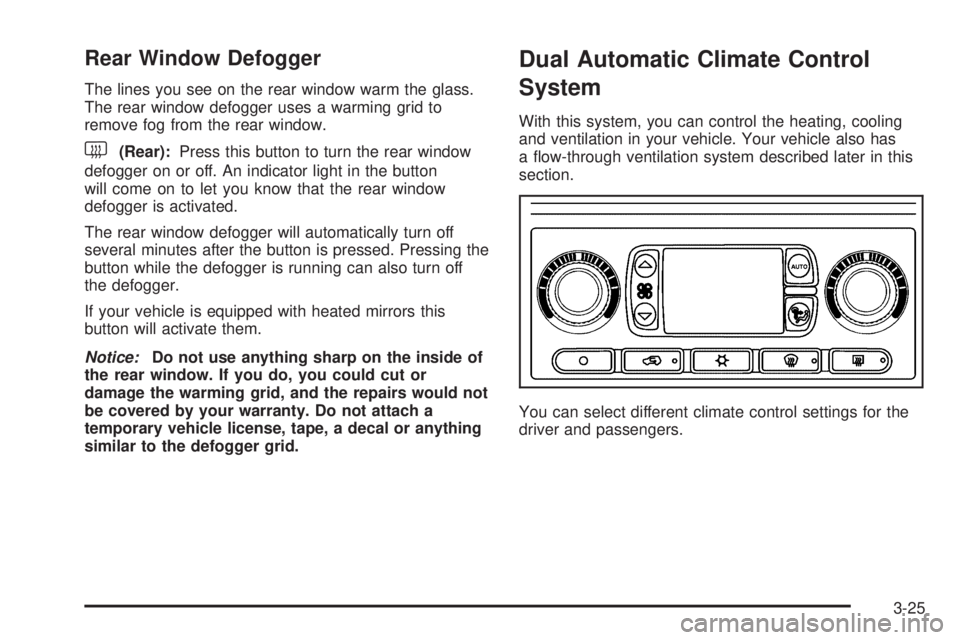
System
With this system, you can control the heating, cooling
and ventilation in your vehicle. Your vehicle also has
a ow-through ventilation system described later in this
section.
You can select different climate control settings for the
driver and passengers.
3-25
Page 186 of 540
Driver’s Side Temperature Knob
The driver’s side knob is used to adjust the temperature
of the air coming through the system on the driver’s
side. The temperature can be adjusted even if the
system is turned off. This is possible since outside air
will always ow through the system as the vehicle
is moving forward unless it is set to recirculation mode.
See “Recirculation” later in this section.
Turn the knob counterclockwise or clockwise to lower or
increase the cabin temperature. The display will show
the temperature setting decreasing or increasing and an
arrow pointing to the driver will be displayed under
and to the left of the temperature setting.
Passenger’s Side Temperature Knob
The passenger’s side knob can be used to change the
temperature of the air coming through the system
on the passenger’s side of the vehicle. The temperature
can be adjusted even if the system is turned off.
This is possible since outside air will always ow through
the system as the vehicle is moving forward unless it
is set to recirculation mode. See “Recirculation” later in
this section.
Turn the knob counterclockwise or clockwise to
lower or increase the temperature inside the vehicle.
The display will show the temperature setting decreasing
or increasing and an arrow pointing to the passenger
will be displayed under and to the right of the
temperature setting.
The passenger’s temperature setting can be set to
match the driver’s temperature setting by pressing and
holding the AUTO button for four seconds. Both the
driver and passenger arrows will be displayed.
3-26
Page 188 of 540

Manual Operation
You may manually adjust the air delivery mode or fan
speed.
w9x(Fan):The switch with the fan symbol allows
you to manually adjust the fan speed. Press the up arrow
to increase fan speed and the down arrow to decrease
fan speed.
Pressing this button when the system is off will turn the
system on.
C(Mode):Press this button to manually change the
direction of the airow in your vehicle; repeatedly press
the button until the desired mode appears on the display.
If you press the mode button to select an air delivery
mode, the display will change to show you the selected
air mode delivery. The display will then show the current
status of the system. When the system is turned off, the
display will go blank after displaying the current status of
the system.
H(Panel):This setting will deliver air to the
instrument panel outlets.
)(Bi-Level):This setting will deliver warmer air to the
oor and cooler air to the instrument panel outlets.
6(Floor):This setting will deliver air to the oor
outlets.
-(Defog):See “Defogging and Defrosting” later in
this section.
@(Recirculation):Press this button to limit the
amount of outside air entering your vehicle. The light on
the recirculation button will glow. This is helpful when you
are trying to limit odors entering your vehicle and for
maximum air conditioning performance in hot weather.
Press this button again to allow outside air to enter the
vehicle. The light on the recirculation button will go off.
Pressing this button also cancels the auto recirculation
feature. To resume the auto recirculation function, press
the AUTO button. Each time the vehicle is started, the
system will revert to the auto recirculation function.
3-28
Page 193 of 540
Rear Air Conditioning and Heating
System and Electronic Climate
Controls
With this system, the front or rear passengers can
control the air temperature, airow and fan speed for
the rear seat passengers. The climate control has
an overhead control near the driver and a control on the
back of the center console.
Driver Overhead Control
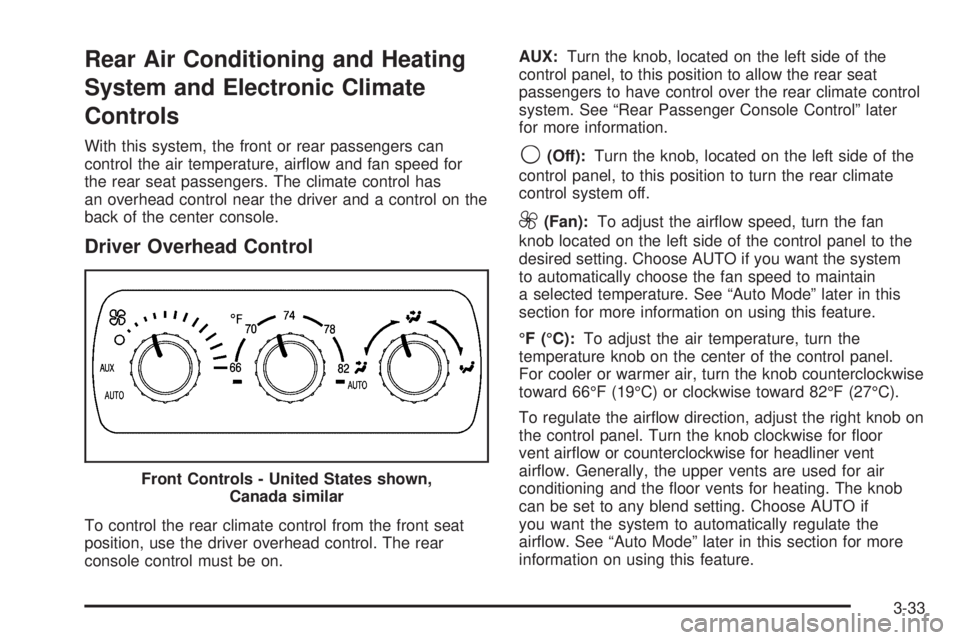
To control the rear climate control from the front seat
position, use the driver overhead control. The rear
console control must be on.AUX:Turn the knob, located on the left side of the
control panel, to this position to allow the rear seat
passengers to have control over the rear climate control
system. See “Rear Passenger Console Control” later
for more information.
9(Off):Turn the knob, located on the left side of the
control panel, to this position to turn the rear climate
control system off.
9(Fan):To adjust the airow speed, turn the fan
knob located on the left side of the control panel to the
desired setting. Choose AUTO if you want the system
to automatically choose the fan speed to maintain
a selected temperature. See “Auto Mode” later in this
section for more information on using this feature.
°F (°C):To adjust the air temperature, turn the
temperature knob on the center of the control panel.
For cooler or warmer air, turn the knob counterclockwise
toward 66°F (19°C) or clockwise toward 82°F (27°C).
To regulate the airow direction, adjust the right knob on
the control panel. Turn the knob clockwise for oor
vent airow or counterclockwise for headliner vent
airow. Generally, the upper vents are used for air
conditioning and the oor vents for heating. The knob
can be set to any blend setting. Choose AUTO if
you want the system to automatically regulate the
airow. See “Auto Mode” later in this section for more
information on using this feature. Front Controls - United States shown,
Canada similar
3-33
Page 194 of 540
Rear Passenger Console Control
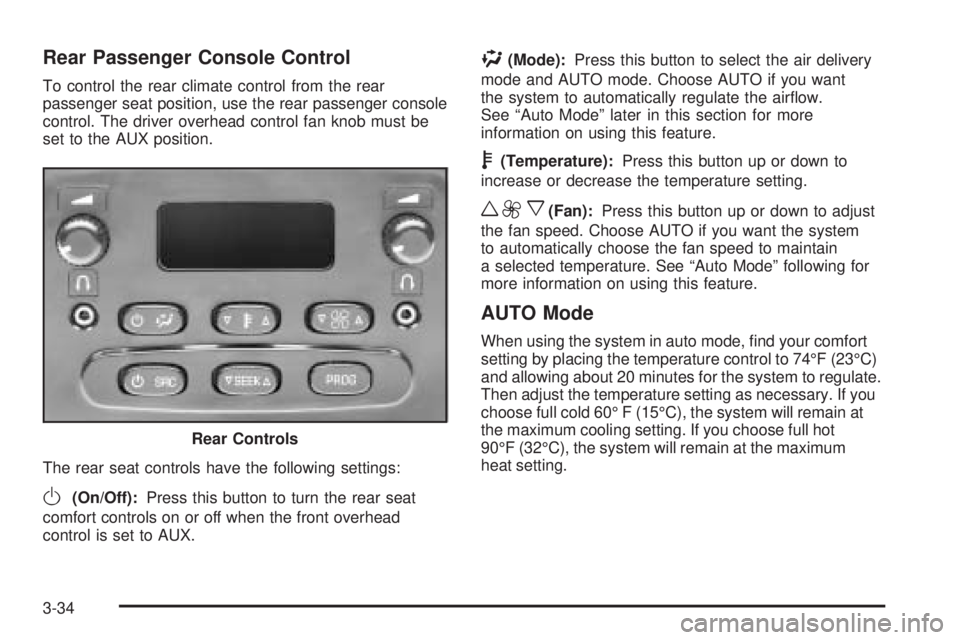
To control the rear climate control from the rear
passenger seat position, use the rear passenger console
control. The driver overhead control fan knob must be
set to the AUX position.
The rear seat controls have the following settings:
O(On/Off):Press this button to turn the rear seat
comfort controls on or off when the front overhead
control is set to AUX.
%(Mode):Press this button to select the air delivery
mode and AUTO mode. Choose AUTO if you want
the system to automatically regulate the airow.
See “Auto Mode” later in this section for more
information on using this feature.
b(Temperature):Press this button up or down to
increase or decrease the temperature setting.
w9x(Fan):Press this button up or down to adjust
the fan speed. Choose AUTO if you want the system
to automatically choose the fan speed to maintain
a selected temperature. See “Auto Mode” following for
more information on using this feature.
AUTO Mode
When using the system in auto mode, nd your comfort
setting by placing the temperature control to 74°F (23°C)
and allowing about 20 minutes for the system to regulate.
Then adjust the temperature setting as necessary. If you
choose full cold 60° F (15°C), the system will remain at
the maximum cooling setting. If you choose full hot
90°F (32°C), the system will remain at the maximum
heat setting. Rear Controls
3-34
Page 195 of 540

Warning Lights, Gages, and
Indicators
This part describes the warning lights and gages on
your vehicle. The pictures will help you locate them.
Warning lights and gages can signal that something is
wrong before it becomes serious enough to cause
an expensive repair or replacement. Paying attention to
your warning lights and gages could also save you
or others from injury.
Warning lights come on when there may be or is a
problem with one of your vehicle’s functions. As you
will see in the details on the next few pages, some
warning lights come on briey when you start the engine
just to let you know they are working. If you are familiar
with this section, you should not be alarmed when this
happens.Gages can indicate when there may be or is a problem
with one of your vehicle’s functions. Often gages
and warning lights work together to let you know when
there is a problem with your vehicle.
When one of the warning lights comes on and stays on
when you are driving, or when one of the gages shows
there may be a problem, check the section that tells you
what to do about it. Please follow this manual’s advice.
Waiting to do repairs can be costly – and even
dangerous. So please get to know your warning lights
and gages. They are a big help.
Your vehicle also has a Driver Information Center (DIC)
that works along with warning lights and gages.
SeeDIC Warnings and Messages on page 3-56.
3-35
Page 247 of 540

Playing a CD
Insert a CD part way into the slot, label side up.
The player will pull it in and the CD should begin playing.
If you want to insert a CD with the ignition off, rst
press the eject button or the INFO knob.
If the ignition or radio is turned off with the CD in the
player, it will stay in the player. When the ignition
or radio is turned on, the CD will start playing where it
stopped, if it was the last selected audio source.
When a CD is inserted, the CD symbol will appear on
the display. As each new track starts to play, the
track number will appear on the display.
The CD player can play the smaller 3 inch (8 cm)
single CDs with an adapter ring. Full-size CDs and the
smaller CDs are loaded in the same manner.
If playing a CD-R, the sound quality may be reduced
due to CD-R quality, the method of recording, the quality
of the music that has been recorded, and the way the
CD-R has been handled. There may be an increase
in skipping, difficulty in nding tracks, and/or difficulty in
loading and ejecting. If these problems occur, checkthe bottom surface of the CD. If the surface of the
CD is damaged, such as cracked, broken, or scratched,
the CD will not play properly. If the surface of the
CD is soiled, seeCare of Your CDs and DVDs on
page 3-135for more information.
If there is no apparent damage, try a known good CD.
Do not add any label to a CD, it could get caught in the
CD player. If a CD is recorded on a personal computer
and a description label is needed, try labeling the top of
the recorded CD with a marking pen instead.
Notice:If you add any label to a CD, insert more
than one CD into the slot at a time, or attempt to play
scratched or damaged CDs, you could damage the
CD player. When using the CD player, use only CDs
in good condition without any label, load one CD at a
time, and keep the CD player and the loading slot free
of foreign materials, liquids, and debris.
If an error appears on the display, see “CD Messages”
later in this section.
3-87