wheel GMC YUKON 2006 Owner's Guide
[x] Cancel search | Manufacturer: GMC, Model Year: 2006, Model line: YUKON, Model: GMC YUKON 2006Pages: 540, PDF Size: 3.14 MB
Page 129 of 540
Leaving Your Vehicle With the Engine
Running
{CAUTION:
It can be dangerous to leave your vehicle
with the engine running. Your vehicle could
move suddenly if the shift lever is not fully in
PARK (P) with the parking brake rmly set.
If you have four-wheel drive and your transfer
case is in NEUTRAL, your vehicle will be free
to roll, even if your shift lever is in PARK (P).
So be sure the transfer case is in a drive
gear — not in NEUTRAL.
And, if you leave the vehicle with the engine
running, it could overheat and even catch re.
You or others could be injured. Do not leave
your vehicle with the engine running unless
you have to.If you have to leave your vehicle with the engine running,
be sure your vehicle is in PARK (P) and the parking
brake is rmly set before you leave it. After you move
the shift lever into PARK (P), hold the regular brake pedal
down. Then, see if you can move the shift lever away
from PARK (P) without rst pulling it toward you. If you
can, it means that the shift lever was not fully locked
into PARK (P).
Torque Lock
If you are parking on a hill and you do not shift your
transmission into PARK (P) properly, the weight of
the vehicle may put too much force on the parking
pawl in the transmission. You may nd it difficult to
pull the shift lever out of PARK (P). This is called
“torque lock.” To prevent torque lock, set the parking
brake and then shift into PARK (P) properly before you
leave the driver’s seat. To nd out how, seeShifting
Into Park (P) on page 2-32.
When you are ready to drive, move the shift lever out
of PARK (P) before you release the parking brake.
If torque lock does occur, you may need to have
another vehicle push yours a little uphill to take some of
the pressure from the parking pawl in the transmission,
so you can pull the shift lever out of PARK (P).
2-33
Page 133 of 540
{CAUTION:
Four-wheel drive vehicles with the transfer
case in NEUTRAL will allow the vehicle to roll,
even if your shift lever is in PARK (P). So, be
sure the transfer case is in a drive gear — not
in NEUTRAL. Always set your parking brake.
Follow the proper steps to be sure your vehicle will
not move. SeeShifting Into Park (P) on page 2-32.
If you are pulling a trailer, seeTowing a Trailer
on page 4-60.
Mirrors
Manual Rearview Mirror
Pull the tab under the mirror toward you to reduce glare
from headlamps behind you after dark. Push the tab
away from you for normal daytime operation.
Automatic Dimming Rearview Mirror
with OnStar
®and Compass
Your vehicle may have an automatic-dimming rearview
mirror with a compass and the OnStar®system.
There are three additional buttons for the OnStar
®
system. See your dealer for more information on
the system and how to subscribe to OnStar®.
SeeOnStar®System on page 2-50for more
information about the services OnStar®provides.
2-37
Page 147 of 540

Directions and Connections®Plan
All Safe and Sound Plan Services
Driving Directions
RideAssist
Information and Convenience Services
OnStar®Personal Calling
As an OnStar®subscriber, the Personal Calling
capability allows you to make hands-free calls using
a wireless system that is integrated into the vehicle.
Calls can be placed nationwide using simple voice
commands with no additional contracts and no additional
roaming charges. To nd out more about OnStar
®
Personal Calling, refer to the OnStar®User’s Guide
in the vehicle’s glove box, visit www.onstar.com
or www.onstar.ca, or speak to an OnStar
®advisor
by pressing the OnStar®button or calling
1-888-4-ONSTAR (1-888-466-7827).
OnStar®Virtual Advisor
Your vehicle may have Virtual Advisor. It is a feature
of OnStar®Personal Calling that uses your minutes
to access weather, local traffic reports and stock quotes.
By pressing the phone button and giving a few simple
voice commands, you can browse through the
various topics. Customize your information prole at
www.myonstar.com. See the OnStar
®user’s guide
for more information.
OnStar®Steering Wheel Controls
Your vehicle may be
equipped with a Talk/Mute
button that can be used
to interact with OnStar
®.
SeeAudio Steering Wheel
Controls on page 3-132
for more information.
When calling into voice mail systems or to dial directory
numbers, press this button once, wait for the response,
say the number(s) to be dialed, wait for the number(s)
to be repeated and then say “dial.”
See the OnStar
®user’s guide for more information.
2-51
Page 153 of 540
Center Console Storage Area
Your vehicle may have a console compartment
with cupholders between the bucket seats.
To open it, press the button and swing the console
lid open.
The rear of the console has a cupholder that swings
down for the rear seat passenger to use.
Luggage Carrier
If you have the luggage carrier, you can load things
on top of your vehicle.
The luggage carrier has slats and siderails attached
to the roof and crossrails which can be moved back and
forth to help secure cargo. Tie the load to the siderails
or siderail supports.
Notice:Loading cargo on the luggage carrier that
weighs more than 200 lbs (91 kg) or hangs over
the rear or sides of the vehicle may damage your
vehicle. Load cargo so that it rests on the slats
as far forward as possible and against the side rails,
making sure to fasten it securely.
Don’t exceed the maximum vehicle capacity when
loading your vehicle. For more information on vehicle
capacity and loading, see “Loading Your Vehicle”.To prevent damage or loss of cargo as you’re leaving,
check now and then to make sure the luggage and
cargo are still securely fastened.
Be sure the cargo is properly loaded.
If small heavy objects are placed on the roof, place
the load in the area over the rear wheels (behind
the rear side door on extended models). If you need
to, cut a piece of 3/8 inch plywood to t inside the
crossrails and siderails to spread the load. If
plywood is used, tie it to the siderail supports.
Tie the load to the crossrails or the siderail supports.
Use the crossrails only to keep the load from sliding.
To move the crossrails, pull out on the latch release
handle at each end. Slide the crossrail to the desired
position balancing the force side to side. Push the
release handle back into the latched position and
slide the crossrail back and forth slightly to be sure
the latch snaps securely into place.
If you need to carry long items, move the crossrails
as far apart as they will go. Tie the load to the
crossrails and the siderails or siderail supports. Also
tie the load to the bumpers. Do not tie the load so
tightly that the crossrails or siderails are damaged.
After moving a crossrail, be sure it is securely locked
into the siderail.
2-57
Page 161 of 540
Instrument Panel Overview...............................3-4
Hazard Warning Flashers................................3-6
Other Warning Devices...................................3-6
Horn.............................................................3-6
Tilt Wheel.....................................................3-6
Turn Signal/Multifunction Lever.........................3-7
Turn and Lane-Change Signals........................3-8
Headlamp High/Low-Beam Changer..................3-8
Flash-to-Pass.................................................3-9
Windshield Wipers..........................................3-9
Windshield Washer.......................................3-10
Rear Window Wiper/Washer...........................3-10
Cruise Control..............................................3-11
Headlamps..................................................3-14
Headlamps on Reminder................................3-15
Daytime Running Lamps (DRL).......................3-16
Automatic Headlamp System..........................3-16
Fog Lamps..................................................3-18
Auxiliary Roof Mounted Lamp.........................3-19
Instrument Panel Brightness...........................3-19
Dome Lamps...............................................3-19
Dome Lamp Override....................................3-20Entry Lighting...............................................3-20
Exit Lighting.................................................3-20
Front Reading Lamps....................................3-20
Battery Run-Down Protection..........................3-20
Accessory Power Outlet(s).............................3-20
Ashtray(s) and Cigarette Lighter......................3-21
Climate Controls............................................3-22
Climate Control System.................................3-22
Dual Climate Control System..........................3-23
Dual Automatic Climate Control System...........3-25
Outlet Adjustment.........................................3-31
Rear Air Conditioning and Heating System.......3-32
Rear Air Conditioning and Heating System
and Electronic Climate Controls...................3-33
Warning Lights, Gages, and Indicators............3-35
Instrument Panel Cluster................................3-36
Speedometer and Odometer...........................3-37
Trip Odometer..............................................3-37
Tachometer.................................................3-37
Safety Belt Reminder Light.............................3-37
Airbag Readiness Light..................................3-38
Section 3 Instrument Panel
3-1
Page 162 of 540
Passenger Airbag Status Indicator...................3-38
Battery Warning Light....................................3-40
Voltmeter Gage............................................3-41
Brake System Warning Light..........................3-42
Anti-Lock Brake System Warning Light.............3-43
Engine Coolant Temperature Gage..................3-43
Transmission Temperature Gage.....................3-44
Tire Pressure Light.......................................3-45
Malfunction Indicator Lamp.............................3-46
Oil Pressure Gage........................................3-48
Security Light...............................................3-49
Cruise Control Light......................................3-49
Highbeam On Light.......................................3-50
Four-Wheel-Drive Light..................................3-50
Tow/Haul Mode Light....................................3-50
Fuel Gage...................................................3-51
Low Fuel Warning Light.................................3-51
Driver Information Center (DIC).......................3-52
DIC Operation and Displays...........................3-53
DIC Warnings and Messages.........................3-56
DIC Vehicle Customization.............................3-67Audio System(s).............................................3-74
Setting the Time for Radios without
Radio Data Systems (RDS)........................3-75
Setting the Time for Radios with Radio
Data Systems (RDS)..................................3-75
AM-FM Radio...............................................3-76
Radio with CD..............................................3-79
Radio with Cassette and CD..........................3-90
Radio with Six-Disc CD................................3-104
Navigation/Radio System..............................3-118
Rear Seat Entertainment System...................3-118
Rear Seat Audio (RSA)................................3-130
Theft-Deterrent Feature................................3-132
Audio Steering Wheel Controls......................3-132
Radio Reception.........................................3-133
Care of the Cassette Tape Player.................3-134
Care of Your CDs and DVDs........................3-135
Care of the CD and DVD Player...................3-135
Fixed Mast Antenna....................................3-136
XM™ Satellite Radio Antenna System............3-136
Chime Level Adjustment...............................3-136
Section 3 Instrument Panel
3-2
Page 165 of 540
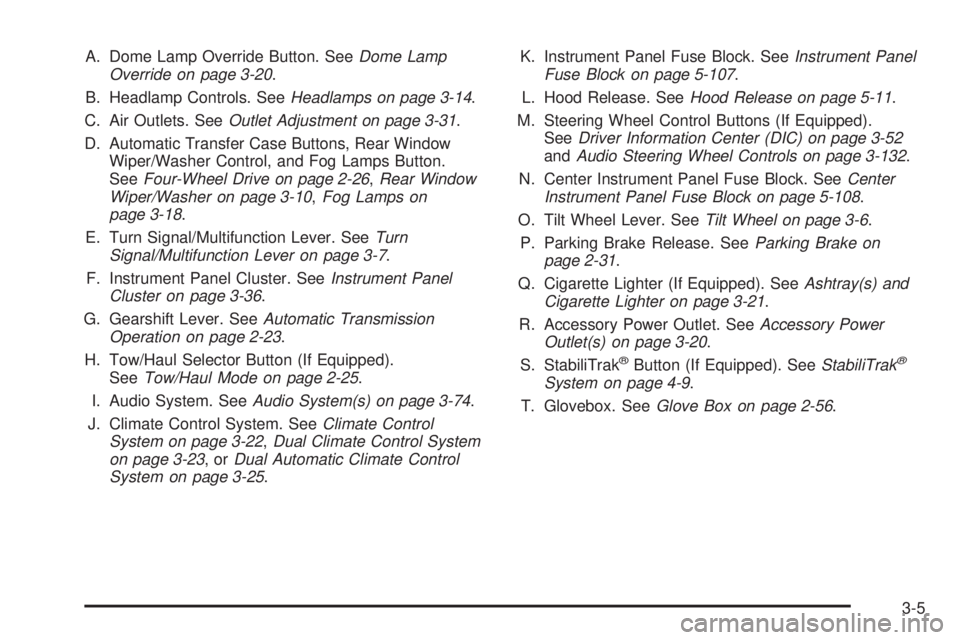
A. Dome Lamp Override Button. SeeDome Lamp
Override on page 3-20.
B. Headlamp Controls. SeeHeadlamps on page 3-14.
C. Air Outlets. SeeOutlet Adjustment on page 3-31.
D. Automatic Transfer Case Buttons, Rear Window
Wiper/Washer Control, and Fog Lamps Button.
SeeFour-Wheel Drive on page 2-26,Rear Window
Wiper/Washer on page 3-10,Fog Lamps on
page 3-18.
E. Turn Signal/Multifunction Lever. SeeTurn
Signal/Multifunction Lever on page 3-7.
F. Instrument Panel Cluster. SeeInstrument Panel
Cluster on page 3-36.
G. Gearshift Lever. SeeAutomatic Transmission
Operation on page 2-23.
H. Tow/Haul Selector Button (If Equipped).
SeeTow/Haul Mode on page 2-25.
I. Audio System. SeeAudio System(s) on page 3-74.
J. Climate Control System. SeeClimate Control
System on page 3-22,Dual Climate Control System
on page 3-23,orDual Automatic Climate Control
System on page 3-25.K. Instrument Panel Fuse Block. SeeInstrument Panel
Fuse Block on page 5-107.
L. Hood Release. SeeHood Release on page 5-11.
M. Steering Wheel Control Buttons (If Equipped).
SeeDriver Information Center (DIC) on page 3-52
andAudio Steering Wheel Controls on page 3-132.
N. Center Instrument Panel Fuse Block. SeeCenter
Instrument Panel Fuse Block on page 5-108.
O. Tilt Wheel Lever. SeeTilt Wheel on page 3-6.
P. Parking Brake Release. SeeParking Brake on
page 2-31.
Q. Cigarette Lighter (If Equipped). SeeAshtray(s) and
Cigarette Lighter on page 3-21.
R. Accessory Power Outlet. SeeAccessory Power
Outlet(s) on page 3-20.
S. StabiliTrak
®Button (If Equipped). SeeStabiliTrak®
System on page 4-9.
T. Glovebox. SeeGlove Box on page 2-56.
3-5
Page 166 of 540

Hazard Warning Flashers
Your hazard warning ashers let you warn others.
They also let police know you have a problem. Your
front and rear turn signal lamps will ash on and off.
The hazard warning
asher button is located on
top of the steering column.
Your hazard warning ashers work no matter what
position your key is in, and even if the key is not in the
ignition.
Press the button to make the front and rear turn signal
lamps ash on and off. Press the button again to
turn the ashers off.
When the hazard warning ashers are on, your turn
signals will not work.
Other Warning Devices
If you carry reective triangles, you can set them up at
the side of the road about 300 feet (100 m) behind
your vehicle.
Horn
To sound the horn, press the center pad on the
steering wheel.
Tilt Wheel
Your vehicle is equipped with a tilt wheel, it will allow
you to adjust the steering wheel before you drive.
You can raise it to the highest level to give your legs
more room when you exit and enter your vehicle.
3-6
Page 167 of 540
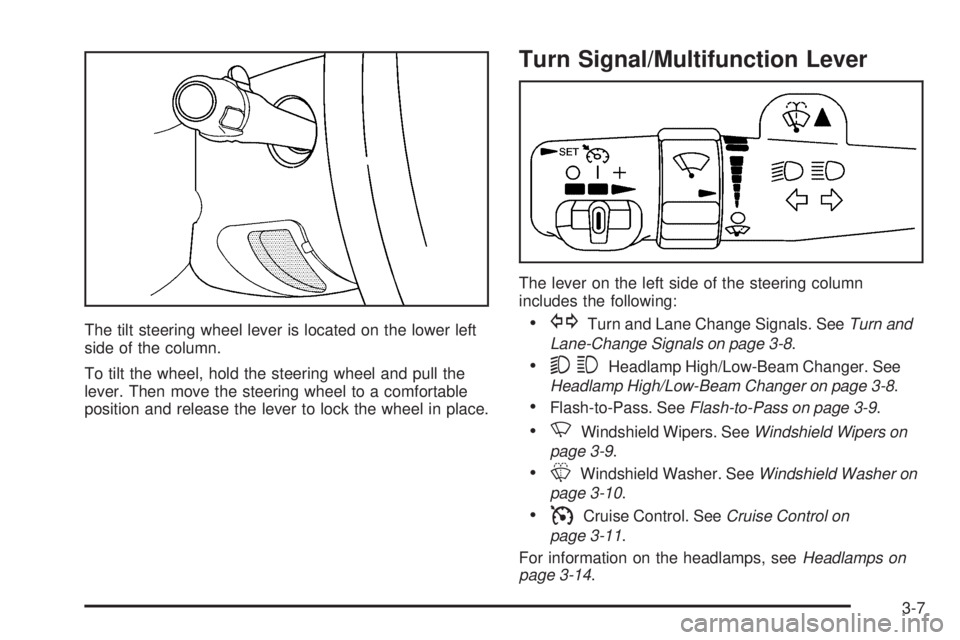
The tilt steering wheel lever is located on the lower left
side of the column.
To tilt the wheel, hold the steering wheel and pull the
lever. Then move the steering wheel to a comfortable
position and release the lever to lock the wheel in place.
Turn Signal/Multifunction Lever
The lever on the left side of the steering column
includes the following:
GTurn and Lane Change Signals. SeeTurn and
Lane-Change Signals on page 3-8.
53Headlamp High/Low-Beam Changer. See
Headlamp High/Low-Beam Changer on page 3-8.
Flash-to-Pass. SeeFlash-to-Pass on page 3-9.
NWindshield Wipers. SeeWindshield Wipers on
page 3-9.
LWindshield Washer. SeeWindshield Washer on
page 3-10.
ICruise Control. SeeCruise Control on
page 3-11.
For information on the headlamps, seeHeadlamps on
page 3-14.
3-7
Page 170 of 540
Windshield Washer
L(Washer Fluid):There is a paddle marked with the
windshield washer symbol at the top of the multifunction
lever. To spray washer uid on the windshield, push
the paddle. The wipers will clear the window and then
either stop or return to your preset speed.
{CAUTION:
In freezing weather, do not use your washer
until the windshield is warmed. Otherwise the
washer uid can form ice on the windshield,
blocking your vision.
Rear Window Wiper/Washer
{CAUTION:
In freezing weather, do not use your washer
until the windshield is warmed. Otherwise the
washer uid can form ice on the windshield,
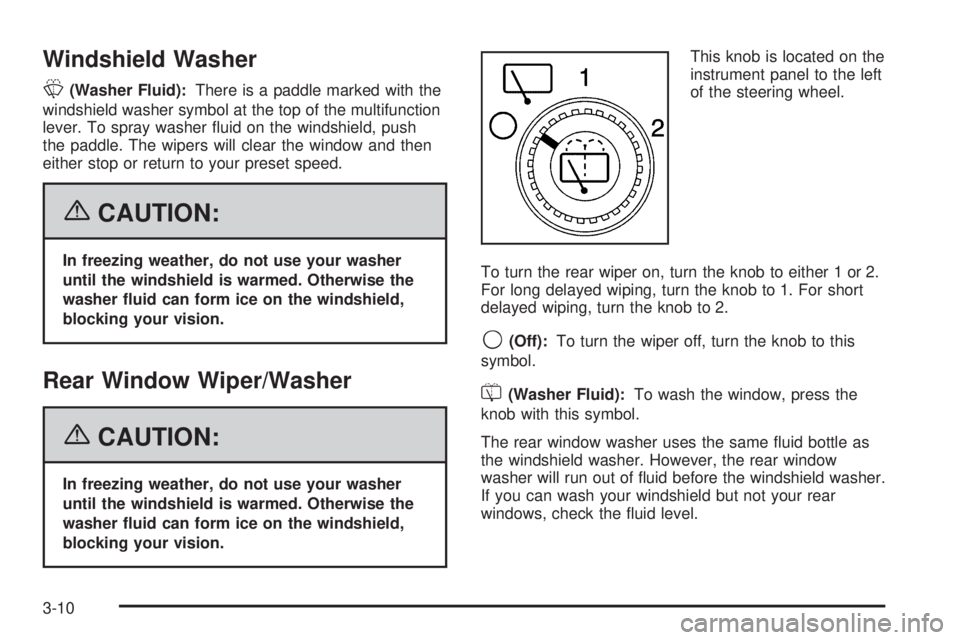
blocking your vision.This knob is located on the
instrument panel to the left
of the steering wheel.
To turn the rear wiper on, turn the knob to either 1 or 2.
For long delayed wiping, turn the knob to 1. For short
delayed wiping, turn the knob to 2.
9(Off):To turn the wiper off, turn the knob to this
symbol.
=(Washer Fluid):To wash the window, press the
knob with this symbol.
The rear window washer uses the same uid bottle as
the windshield washer. However, the rear window
washer will run out of uid before the windshield washer.
If you can wash your windshield but not your rear
windows, check the uid level.
3-10