tow GMC YUKON 2006 Owner's Guide
[x] Cancel search | Manufacturer: GMC, Model Year: 2006, Model line: YUKON, Model: GMC YUKON 2006Pages: 540, PDF Size: 3.14 MB
Page 169 of 540
Flash-to-Pass
This feature lets you use your high-beam headlamps to
signal a driver in front of you that you want to pass.
It works even if your headlamps are in the automatic
position.
To use it, pull the turn signal lever toward you, then
release it.
If your headlamps are in the automatic position or on
low beam, your high-beam headlamps will turn on.
They’ll stay on as long as you hold the lever toward you.
The high-beam indicator on the instrument panel
cluster will come on. Release the lever to return to
normal operation.
Windshield Wipers
Be sure to clear ice and snow from the wiper blades
before using them. If they are frozen to the windshield,
gently loosen or thaw them. Damaged wiper blades may
not clear the windshield well, making it harder to see and
drive safely. If the blades do become damaged, install
new blades or blade inserts. For more information, see
Windshield Wiper Blade Replacement on page 5-56.
Heavy snow or ice can overload the wiper motor.
A circuit breaker will stop the motor until it cools down.
Clear away snow or ice to prevent an overload.You control the windshield wipers by turning the band
with the wiper symbol on it.
8(Mist):For a single wiping cycle, turn the band to
mist. Hold it there until the wipers start. Then let go.
The wipers will stop after one wipe. If you want
more wipes, hold the band on mist longer.
N(Delay):You can set the wiper speed for a long or
short delay between wipes. This can be very useful
in light rain or snow. Turn the band to choose the delay
time. The closer to the top of the lever, the shorter
the delay.
6(Low Speed):For steady wiping at low speed,
turn the band away from you to the rst solid band past
the delay settings. For high-speed wiping, turn the
band further, to the second solid band past the delay
settings. To stop the wipers, move the band to off.
1(High Speed):For high-speed wiping, turn
the band further, to the second solid band past the
delay settings.
9(Off):To stop the wipers, move the band to off.
3-9
Page 175 of 540
The headlamp control has four positions:
9(Off):Turning the control to this position turns off
the Daytime Running Lamps (DRL) and the automatic
headlamps.
AUTO (Automatic):Turning the control to this position
puts the system into automatic headlamp mode.
;(Parking Lamps):Turning the control to this
position turns on the parking lamps, together with the
following:
Sidemarker Lamps
Taillamps
License Plate Lamps
Instrument Panel Lights
Roof Marker Lamps (If Equipped)
5(Headlamps):Turning the control to this position
turns on the headlamps, together with the previously
listed lamps and lights.
You can switch your headlamps from high to low-beam
by pushing the turn signal/high-beam lever towards
the instrument panel.
A circuit breaker protects your headlamps. If you have
an electrical overload, your headlamps will icker on
and off. Have your headlamp wiring checked right away
if this happens.
Headlamps on Reminder
A reminder chime will sound when your headlamps or
parking lamps are manually turned on and your ignition is
off, in LOCK, ACCESSORY, or a door is open. To disable
the chime, turn the light off then back on.
3-15
Page 182 of 540
Climate Controls
Climate Control System
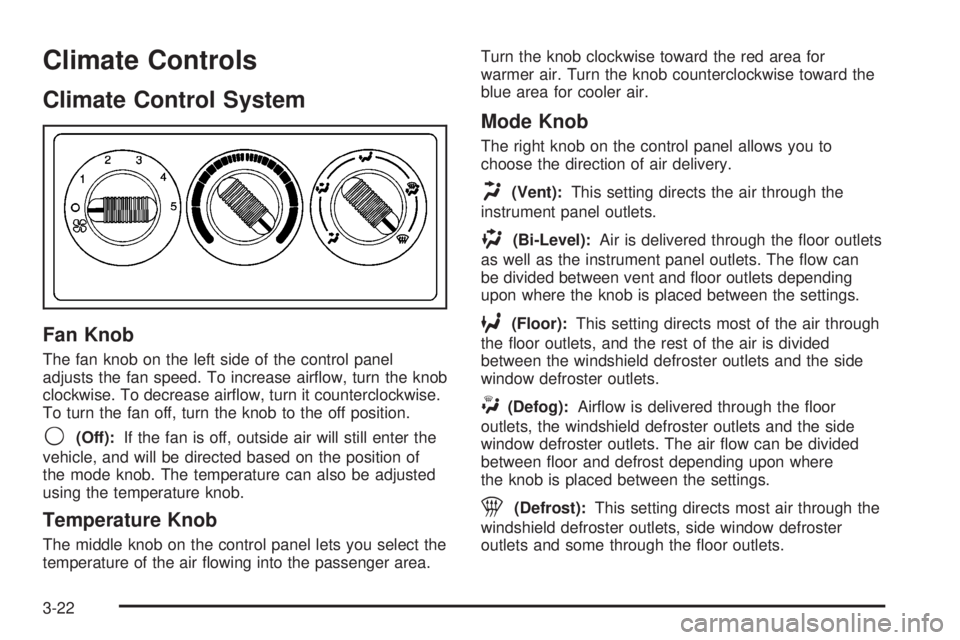
Fan Knob
The fan knob on the left side of the control panel
adjusts the fan speed. To increase airow, turn the knob
clockwise. To decrease airow, turn it counterclockwise.
To turn the fan off, turn the knob to the off position.
9(Off):If the fan is off, outside air will still enter the
vehicle, and will be directed based on the position of
the mode knob. The temperature can also be adjusted
using the temperature knob.
Temperature Knob
The middle knob on the control panel lets you select the
temperature of the air owing into the passenger area.Turn the knob clockwise toward the red area for
warmer air. Turn the knob counterclockwise toward the
blue area for cooler air.
Mode Knob
The right knob on the control panel allows you to
choose the direction of air delivery.
H(Vent):This setting directs the air through the
instrument panel outlets.
)(Bi-Level):Air is delivered through the oor outlets
as well as the instrument panel outlets. The ow can
be divided between vent and oor outlets depending
upon where the knob is placed between the settings.
6(Floor):This setting directs most of the air through
the oor outlets, and the rest of the air is divided
between the windshield defroster outlets and the side
window defroster outlets.
W(Defog):Airow is delivered through the oor
outlets, the windshield defroster outlets and the side
window defroster outlets. The air ow can be divided
between oor and defrost depending upon where
the knob is placed between the settings.
1(Defrost):This setting directs most air through the
windshield defroster outlets, side window defroster
outlets and some through the oor outlets.
3-22
Page 183 of 540
Dual Climate Control System
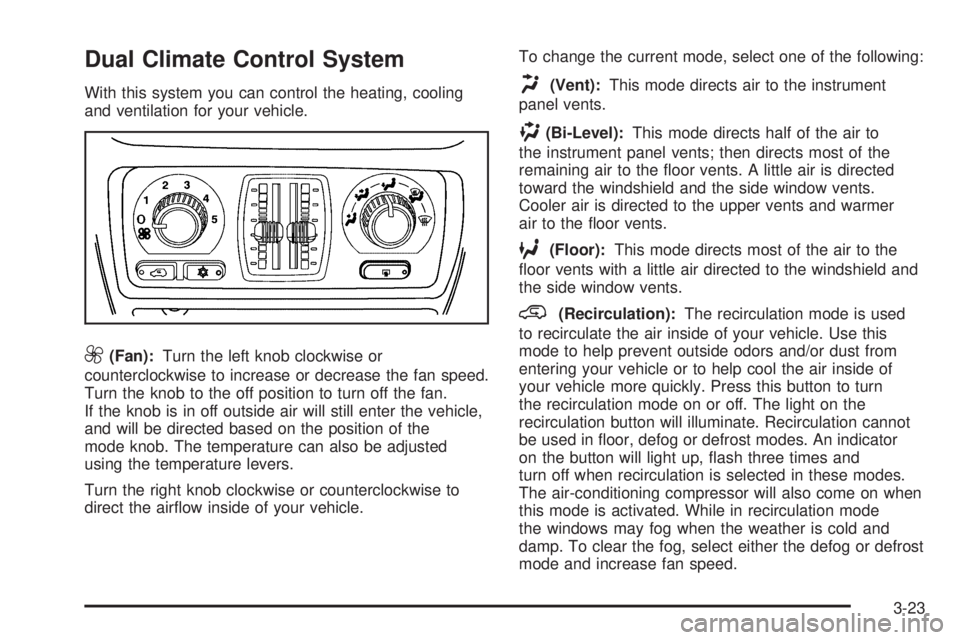
With this system you can control the heating, cooling
and ventilation for your vehicle.
9(Fan):Turn the left knob clockwise or
counterclockwise to increase or decrease the fan speed.
Turn the knob to the off position to turn off the fan.
If the knob is in off outside air will still enter the vehicle,
and will be directed based on the position of the
mode knob. The temperature can also be adjusted
using the temperature levers.
Turn the right knob clockwise or counterclockwise to
direct the airow inside of your vehicle.To change the current mode, select one of the following:
H(Vent):This mode directs air to the instrument
panel vents.
)(Bi-Level):This mode directs half of the air to
the instrument panel vents; then directs most of the
remaining air to the oor vents. A little air is directed
toward the windshield and the side window vents.
Cooler air is directed to the upper vents and warmer
air to the oor vents.
6(Floor):This mode directs most of the air to the
oor vents with a little air directed to the windshield and
the side window vents.
@(Recirculation):The recirculation mode is used
to recirculate the air inside of your vehicle. Use this
mode to help prevent outside odors and/or dust from
entering your vehicle or to help cool the air inside of
your vehicle more quickly. Press this button to turn
the recirculation mode on or off. The light on the
recirculation button will illuminate. Recirculation cannot
be used in oor, defog or defrost modes. An indicator
on the button will light up, ash three times and
turn off when recirculation is selected in these modes.
The air-conditioning compressor will also come on when
this mode is activated. While in recirculation mode
the windows may fog when the weather is cold and
damp. To clear the fog, select either the defog or defrost
mode and increase fan speed.
3-23
Page 192 of 540
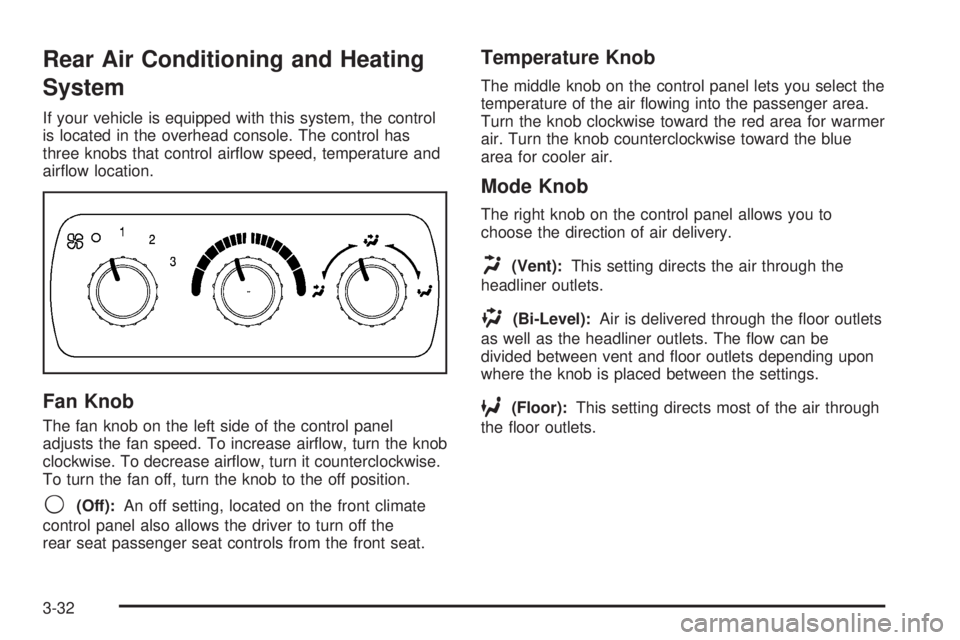
Rear Air Conditioning and Heating
System
If your vehicle is equipped with this system, the control
is located in the overhead console. The control has
three knobs that control airow speed, temperature and
airow location.
Fan Knob
The fan knob on the left side of the control panel
adjusts the fan speed. To increase airow, turn the knob
clockwise. To decrease airow, turn it counterclockwise.
To turn the fan off, turn the knob to the off position.
9(Off):An off setting, located on the front climate
control panel also allows the driver to turn off the
rear seat passenger seat controls from the front seat.
Temperature Knob
The middle knob on the control panel lets you select the
temperature of the air owing into the passenger area.
Turn the knob clockwise toward the red area for warmer
air. Turn the knob counterclockwise toward the blue
area for cooler air.
Mode Knob
The right knob on the control panel allows you to
choose the direction of air delivery.
H(Vent):This setting directs the air through the
headliner outlets.
)(Bi-Level):Air is delivered through the oor outlets
as well as the headliner outlets. The ow can be
divided between vent and oor outlets depending upon
where the knob is placed between the settings.
6(Floor):This setting directs most of the air through
the oor outlets.
3-32
Page 193 of 540
Rear Air Conditioning and Heating
System and Electronic Climate
Controls
With this system, the front or rear passengers can
control the air temperature, airow and fan speed for
the rear seat passengers. The climate control has
an overhead control near the driver and a control on the
back of the center console.
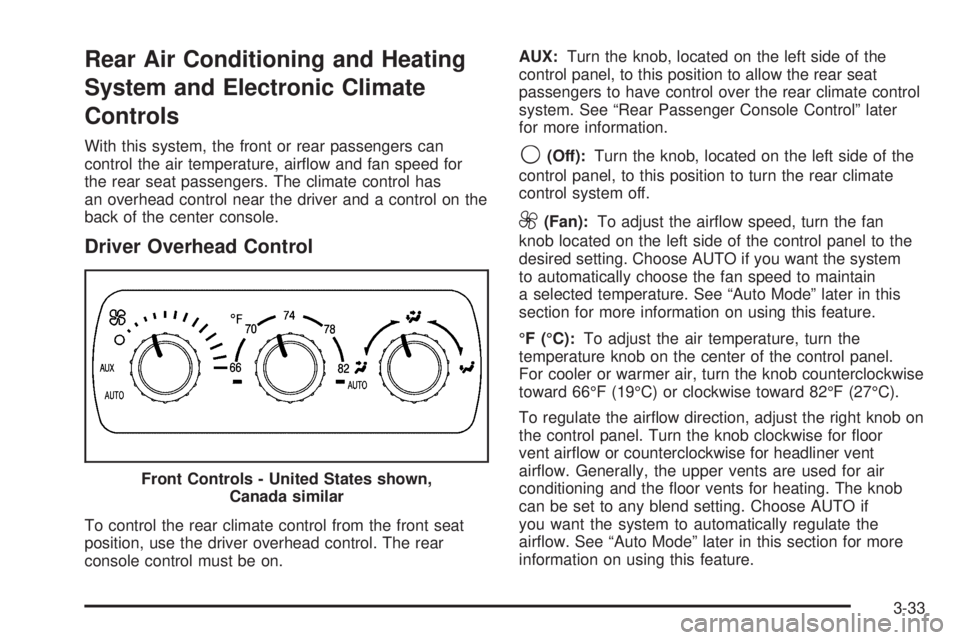
Driver Overhead Control
To control the rear climate control from the front seat
position, use the driver overhead control. The rear
console control must be on.AUX:Turn the knob, located on the left side of the
control panel, to this position to allow the rear seat
passengers to have control over the rear climate control
system. See “Rear Passenger Console Control” later
for more information.
9(Off):Turn the knob, located on the left side of the
control panel, to this position to turn the rear climate
control system off.
9(Fan):To adjust the airow speed, turn the fan
knob located on the left side of the control panel to the
desired setting. Choose AUTO if you want the system
to automatically choose the fan speed to maintain
a selected temperature. See “Auto Mode” later in this
section for more information on using this feature.
°F (°C):To adjust the air temperature, turn the
temperature knob on the center of the control panel.
For cooler or warmer air, turn the knob counterclockwise
toward 66°F (19°C) or clockwise toward 82°F (27°C).
To regulate the airow direction, adjust the right knob on
the control panel. Turn the knob clockwise for oor
vent airow or counterclockwise for headliner vent
airow. Generally, the upper vents are used for air
conditioning and the oor vents for heating. The knob
can be set to any blend setting. Choose AUTO if
you want the system to automatically regulate the
airow. See “Auto Mode” later in this section for more
information on using this feature. Front Controls - United States shown,
Canada similar
3-33
Page 202 of 540
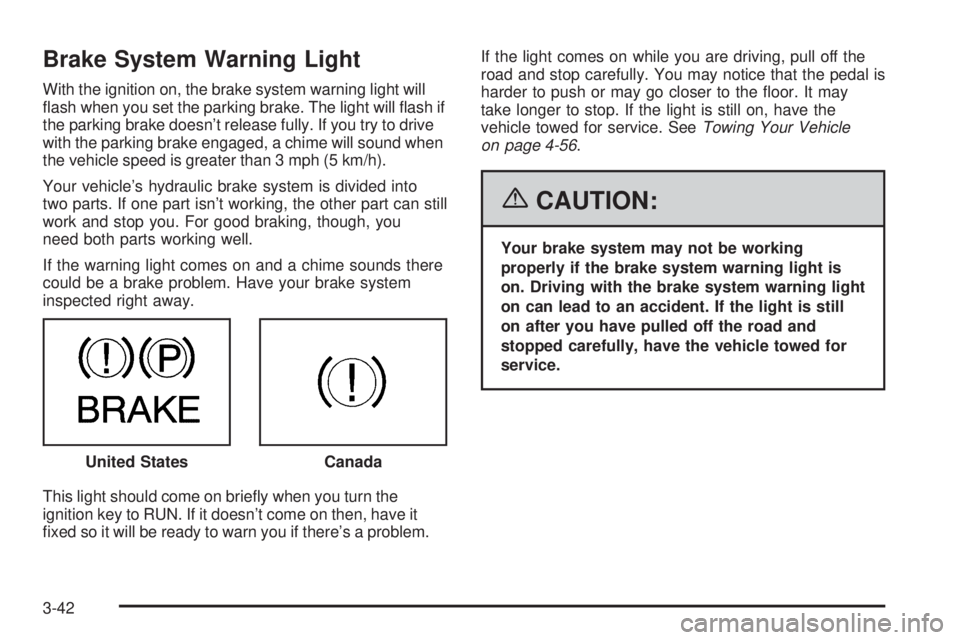
Brake System Warning Light
With the ignition on, the brake system warning light will
ash when you set the parking brake. The light will ash if
the parking brake doesn’t release fully. If you try to drive
with the parking brake engaged, a chime will sound when
the vehicle speed is greater than 3 mph (5 km/h).
Your vehicle’s hydraulic brake system is divided into
two parts. If one part isn’t working, the other part can still
work and stop you. For good braking, though, you
need both parts working well.
If the warning light comes on and a chime sounds there
could be a brake problem. Have your brake system
inspected right away.
This light should come on briey when you turn the
ignition key to RUN. If it doesn’t come on then, have it
xed so it will be ready to warn you if there’s a problem.If the light comes on while you are driving, pull off the
road and stop carefully. You may notice that the pedal is
harder to push or may go closer to the oor. It may
take longer to stop. If the light is still on, have the
vehicle towed for service. SeeTowing Your Vehicle
on page 4-56.
{CAUTION:
Your brake system may not be working
properly if the brake system warning light is
on. Driving with the brake system warning light
on can lead to an accident. If the light is still
on after you have pulled off the road and
stopped carefully, have the vehicle towed for
service.
United States
Canada
3-42
Page 205 of 540
Notice:If you drive your vehicle with the
transmission temperature gage above normal
operating range, you can damage the transmission.
This could lead to costly repairs that would not
be covered by your warranty. Do not drive your
vehicle while the transmission temperature gage
reading is above normal. See your dealer for service.
The following situations can cause the transmission to
operate at higher temperatures:
Towing a trailer
Hot outside air temperatures
Hauling a large or heavy load
Vehicle overloading
Low transmission uid level
High transmission uid level
Restricted air ow to the radiator and the auxiliary
transmission oil cooler (if equipped).
A temporary solution to hotter transmission operating
temperatures may be to let the transmission cool down.
If the transmission is operated at higher temperatures
on a frequent basis, seeScheduled Maintenance
on page 6-4for the proper transmission maintenance
intervals.
Tire Pressure Light
If your vehicle is equipped
with the Tire Pressure
Monitor system, this light
will come on if the
system detects low tire
pressure.
A CHECK TIRE PRESSURE DIC message will
accompany the light.
This light will also come on briey as you start the
engine.
SeeTire Pressure Monitor System on page 5-64for
more information.
For more information on your tires, seeTires on
page 5-57.
3-45
Page 207 of 540
If the Light is Flashing
The following may prevent more serious damage to
your vehicle:
Reducing vehicle speed
Avoiding hard accelerations
Avoiding steep uphill grades
If you are towing a trailer, reduce the amount of
cargo being hauled as soon as it is possible
If the light stops ashing and remains on steady,
see “If the Light Is On Steady” following.
If the light continues to ash, when it is safe to do so,
stop the vehicle. Find a safe place to park your vehicle.
Turn the key off, wait at least 10 seconds and restart
the engine. If the light remains on steady, see “If the
Light Is On Steady” following. If the light is still ashing,
follow the previous steps, and see your dealer for
service as soon as possible.
If the Light Is On Steady
You may be able to correct the emission system
malfunction by considering the following:
Did you recently put fuel into your vehicle?
If so, reinstall the fuel cap, making sure to fully
install the cap. SeeFilling the Tank on page 5-8.The diagnostic system can determine if the fuel cap has
been left off or improperly installed. A loose or missing
fuel cap will allow fuel to evaporate into the atmosphere.
A few driving trips with the cap properly installed
should turn the light off.
Did you just drive through a deep puddle of water?
If so, your electrical system may be wet. The condition
will usually be corrected when the electrical system
dries out. A few driving trips should turn the light off.
Have you recently changed brands of fuel?
If so, be sure to fuel your vehicle with quality fuel.
SeeGasoline Octane on page 5-5. Poor fuel quality
will cause your engine not to run as efficiently as
designed. You may notice this as stalling after start-up,
stalling when you put the vehicle into gear, misring,
hesitation on acceleration, or stumbling on acceleration.
(These conditions may go away once the engine is
warmed up.) This will be detected by the system and
cause the light to turn on.
If you experience one or more of these conditions,
change the fuel brand you use. It will require at least
one full tank of the proper fuel to turn the light off.
If none of the above steps have made the light turn off,
your dealer can check the vehicle. Your dealer has
the proper test equipment and diagnostic tools to x any
mechanical or electrical problems that may have
developed.
3-47
Page 210 of 540
Highbeam On Light
This light will come on
when the high-beam
headlamps are in use.
SeeHeadlamp High/Low-Beam Changer on page 3-8.
Four-Wheel-Drive Light
The four-wheel-drive
indicator will light up
when the vehicle is in
four-wheel drive.
SeeFour-Wheel Drive on page 2-26for more
information.
Tow/Haul Mode Light
This light is displayed
when the Tow/Haul mode
has been activated.
For more information, seeTowing a Trailer on
page 4-60.
3-50