wheel GMC YUKON 2007 User Guide
[x] Cancel search | Manufacturer: GMC, Model Year: 2007, Model line: YUKON, Model: GMC YUKON 2007Pages: 608, PDF Size: 3.06 MB
Page 140 of 608
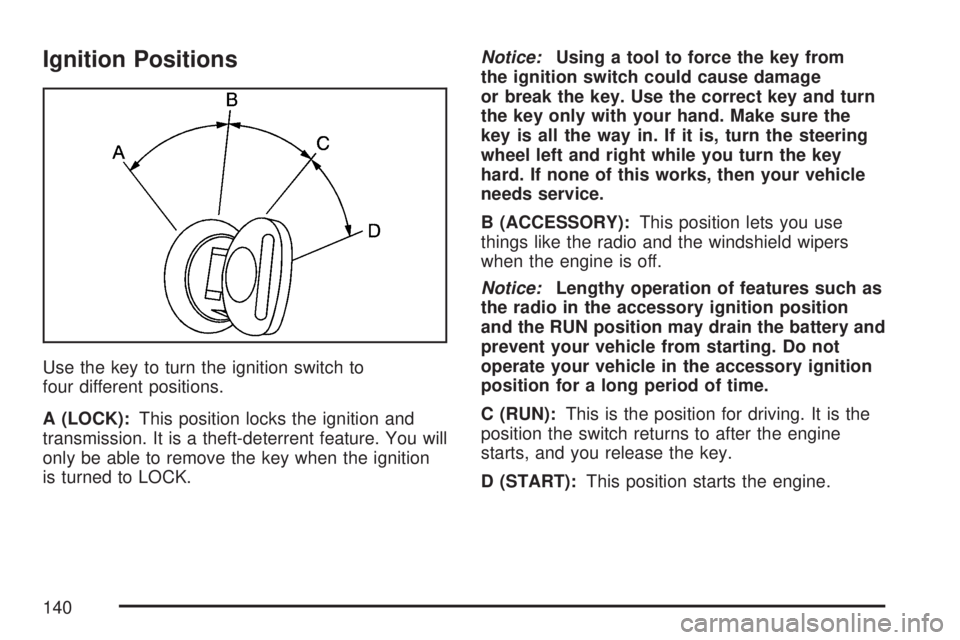
Ignition Positions
Use the key to turn the ignition switch to
four different positions.
A (LOCK):This position locks the ignition and
transmission. It is a theft-deterrent feature. You will
only be able to remove the key when the ignition
is turned to LOCK.Notice:Using a tool to force the key from
the ignition switch could cause damage
or break the key. Use the correct key and turn
the key only with your hand. Make sure the
key is all the way in. If it is, turn the steering
wheel left and right while you turn the key
hard. If none of this works, then your vehicle
needs service.
B (ACCESSORY):This position lets you use
things like the radio and the windshield wipers
when the engine is off.
Notice:Lengthy operation of features such as
the radio in the accessory ignition position
and the RUN position may drain the battery and
prevent your vehicle from starting. Do not
operate your vehicle in the accessory ignition
position for a long period of time.
C (RUN):This is the position for driving. It is the
position the switch returns to after the engine
starts, and you release the key.
D (START):This position starts the engine.
140
Page 146 of 608

PARK (P):This position locks your rear wheels. It
is the best position to use when you start your
engine because your vehicle cannot move easily.
When parked on a hill, especially when the
vehicle has a heavy load, you may notice an
increase in the effort to shift out of Park.
See Torque Lock (Automatic Transmission) under
Shifting Into Park (P) on page 153for more
information.
{CAUTION:
It is dangerous to get out of your vehicle
if the shift lever is not fully in PARK (P)
with the parking brake rmly set. Your
vehicle can roll.
Do not leave your vehicle when the engine
is running unless you have to. If you have
left the engine running, the vehicle can
move suddenly. You or others could be
injured. To be sure your vehicle will not
move, even when you are on fairly level
ground, always set your parking brake
and move the shift lever to PARK (P). See
Shifting Into Park (P) on page 153.Ifyou
are pulling a trailer, seeTowing a Trailer
on page 400.
146
Page 147 of 608

REVERSE (R):Use this gear to back up.
Notice:Shifting to REVERSE (R) while your
vehicle is moving forward could damage
the transmission. The repairs would not
be covered by your warranty. Shift to
REVERSE (R) only after your vehicle is
stopped.
To rock your vehicle back and forth to get out
of snow, ice, or sand without damaging your
transmission, seeIf Your Vehicle is Stuck in Sand,
Mud, Ice, or Snow on page 390.
NEUTRAL (N):In this position, your engine does
not connect with the wheels. To restart when
you are already moving, use NEUTRAL (N) only.
Also, use NEUTRAL (N) when your vehicle is
being towed.
{CAUTION:
Shifting into a drive gear while your
engine is running at high speed is
dangerous. Unless your foot is rmly on
the brake pedal, your vehicle could move
very rapidly. You could lose control and
hit people or objects. Do not shift into a
drive gear while your engine is running at
high speed.
Notice:Shifting out of PARK (P) or
NEUTRAL (N) with the engine running at high
speed may damage the transmission. The
repairs would not be covered by your warranty.
Be sure the engine is not running at high
speed when shifting your vehicle.
147
Page 166 of 608

OnStar®Steering Wheel Controls
Your vehicle is equipped
with a Talk/Mute button
that can be used to
interact with OnStar
®.
SeeAudio Steering Wheel Controls on page 335
for more information.
When calling into voice mail systems or to dial
directory numbers, press this button once, wait for
the response, say the number(s) to be dialed,
wait for the number(s) to be repeated and then
say “dial.”
See the OnStar
®Owner’s guide for more
information.
Universal Home Remote
System
Universal Home Remote System
(With Three Round LED)
The Universal Home Remote System provides
a way to replace up to three hand-held
radio-frequency (RF) transmitters used to activate
devices such as garage door openers, security
systems, and home lighting.
This device complies with Part 15 of the FCC
Rules. Operation is subject to the following
two conditions:
1. This device may not cause harmful
interference.
2. This device must accept any interference
received, including interference that may
cause undesired operation.
166
Page 179 of 608
Center Console Storage Area
Your vehicle has a console compartment between
the bucket seats.
To open it, press the button on the front of the
console and swing the console cover open.
The console may be equipped with an accessory
power outlet inside. SeeAccessory Power
Outlet(s) on page 213.
The rear of the console also has a cupholder
that swings down for the rear seat passengers
to use.
Luggage Carrier
You can load things on top of your vehicle with
this feature.
The luggage carrier has slats and siderails
attached to the roof and crossrails which can be
moved back and forth to help secure cargo. Tie the
load to the siderails or siderail supports.Notice:Loading cargo on the luggage carrier
that weighs more than 200 lbs (91 kg) or
hangs over the rear or sides of the vehicle
may damage your vehicle. Load cargo so that
it rests on the slats as far forward as
possible and against the side rails, making
sure to fasten it securely.
Don’t exceed the maximum vehicle capacity when
loading your vehicle. For more information on
vehicle capacity and loading, seeLoading Your
Vehicle on page 392.
To prevent damage or loss of cargo as you’re
leaving, check now and then to make sure
the luggage and cargo are still securely fastened.
Be sure the cargo is properly loaded.If small heavy objects are placed on the roof,
place the load in the area over the rear
wheels (behind the rear side door on
Yukon XL Denali models). If you need to, cut
a piece of 3/8 inch plywood to t inside
the crossrails and siderails to spread the load.
If plywood is used, tie it to the siderail
supports.
179
Page 181 of 608

Cargo Cover
{CAUTION:
An improperly stored cargo cover could
be thrown about the vehicle during a
collision or sudden maneuver. You or
others could be injured. If you remove the
cover, always store it in the proper
storage location. When you put it back,
always be sure that it is securely
reattached.
If you have a cargo cover, you can use it to cover
items in the cargo area of your vehicle.
To use the cover, do the following:
1. Pull the cover handle toward the rear of the
vehicle.
2. Latch the cover posts into the retaining
sockets on the cargo area trim panels.To return the cover to the retracted position, do
the following:
1. Pull up on the cover handle to release the
cover posts from the retaining sockets.
2. Let the cover move forward to the full retracted
position.
To remove the cover, from a regular wheelbase
model, do the following:
1. Let the cover go all the way into the holder.
2. Then, grasping the driver’s side cover endcap,
push the cover endcap toward the passenger’s
side of the vehicle.
3. Swing the cover rearward and take it out of
the vehicle.
To put the cover in the vehicle, do the following:
1. Make sure the cover slot in the holder
faces rearward with the round surface
facing down.
2. Then, hold the cover at an angle and place
the cover endcap into the slot in the
passenger’s side trim panel.
3. Move the other end of the cover forward and
hold it next to the driver’s side trim panel slot.
181
Page 182 of 608
4. Press the endcaps in, this will allow the cover
to t into the trim slot.
5. Lightly pull on the cover holder to make sure
it is secure.
On the extended wheelbase models there are
two cover positions. The slots furthest forward
allow the cover to be used if the third seat is
removed or folded down. The cover can be
installed and removed from either side.
Cargo Tie Downs
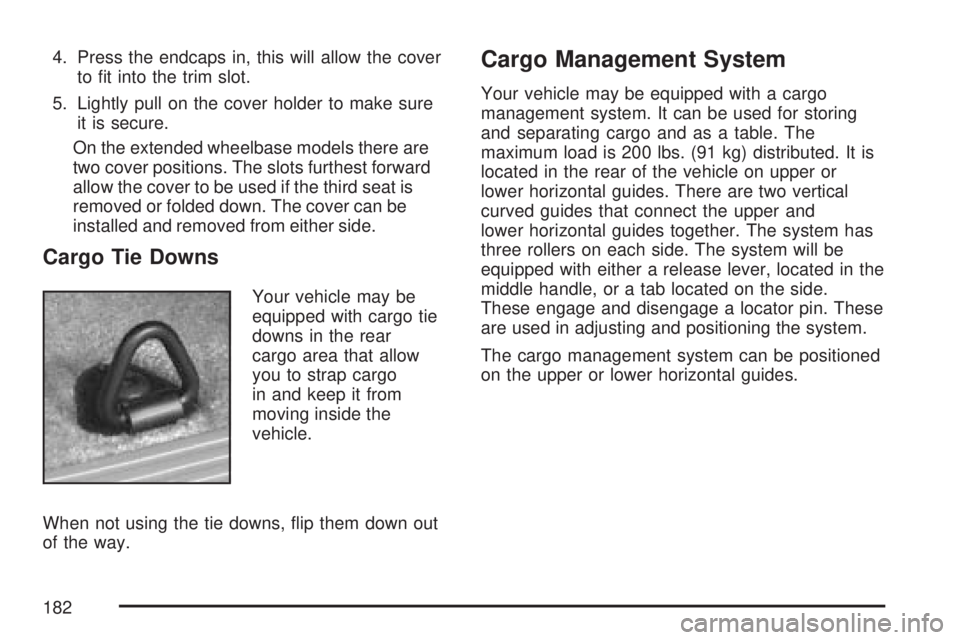
Your vehicle may be
equipped with cargo tie
downs in the rear
cargo area that allow
you to strap cargo
in and keep it from
moving inside the
vehicle.
When not using the tie downs, ip them down out
of the way.
Cargo Management System
Your vehicle may be equipped with a cargo
management system. It can be used for storing
and separating cargo and as a table. The
maximum load is 200 lbs. (91 kg) distributed. It is
located in the rear of the vehicle on upper or
lower horizontal guides. There are two vertical
curved guides that connect the upper and
lower horizontal guides together. The system has
three rollers on each side. The system will be
equipped with either a release lever, located in the
middle handle, or a tab located on the side.
These engage and disengage a locator pin. These
are used in adjusting and positioning the system.
The cargo management system can be positioned
on the upper or lower horizontal guides.
182
Page 187 of 608
Instrument Panel Overview........................ 190
Hazard Warning Flashers.......................... 192
Other Warning Devices............................. 192
Horn.......................................................... 192
Tilt Wheel.................................................. 193
Turn Signal/Multifunction Lever.................. 193
Turn and Lane-Change Signals................. 194
Headlamp High/Low-Beam Changer.......... 195
Flash-to-Pass............................................ 195
Windshield Wipers..................................... 196
Rainsense™ II Wipers............................... 197
Windshield Washer.................................... 198
Rear Window Wiper/Washer...................... 199
Cruise Control........................................... 200
Exterior Lamps.......................................... 203
Headlamps on Reminder........................... 205
Daytime Running Lamps (DRL)................. 205
Automatic Headlamp System..................... 205
Fog Lamps................................................ 206
Instrument Panel Brightness...................... 207
Dome Lamps............................................. 207
Dome Lamp Override................................ 207
Entry Lighting............................................ 207
Exit Lighting.............................................. 207Front Reading Lamps................................ 208
Battery Run-Down Protection..................... 208
Ultrasonic Rear Parking Assist (URPA)...... 208
Accessory Power Outlet(s)........................ 213
Ashtray(s) and Cigarette Lighter................ 214
Climate Controls......................................... 214
Dual Automatic Climate Control System....... 214
Outlet Adjustment...................................... 222
Rear Air Conditioning and Heating
System and Electronic Climate
Controls................................................. 223
Warning Lights, Gages, and Indicators..... 225
Instrument Panel Cluster........................... 226
Speedometer and Odometer...................... 227
Trip Odometer........................................... 227
Tachometer............................................... 227
Safety Belt Reminder Light........................ 228
Passenger Safety Belt Reminder Light....... 228
Airbag Readiness Light............................. 229
Passenger Airbag Status Indicator............. 230
Charging System Light.............................. 232
Voltmeter Gage......................................... 232
Brake System Warning Light..................... 233
Section 3 Instrument Panel
187
Page 188 of 608
Anti-Lock Brake System Warning Light...... 234
StabiliTrak®Indicator Light......................... 235
Engine Coolant Temperature Gage............ 236
Tire Pressure Light.................................... 236
Malfunction Indicator Lamp........................ 237
Oil Pressure Gage..................................... 240
Oil Pressure Light..................................... 241
Security Light............................................ 241
Fog Lamp Light......................................... 242
Cruise Control Light.................................. 242
Highbeam On Light................................... 242
Tow/Haul Mode Light................................ 242
Fuel Gage................................................. 243
Low Fuel Warning Light............................ 244
Driver Information Center (DIC).................. 244
DIC Operation and Displays
(Using DIC Buttons)............................... 245
DIC Operation and Displays
(Using Trip Odometer Reset Stem)........ 250
DIC Warnings and Messages.................... 252
DIC Vehicle Customization
(With DIC Buttons)................................. 262Audio System(s)......................................... 272
Setting the Time (Radio with a
Six-Disc CD Player)............................... 274
Setting the Time (Radio with a
Single CD and DVD Player)................... 275
Radio with Six-Disc CD (MP3)................... 276
Radio with CD and DVD........................... 294
XM Radio Messages................................. 319
Navigation/Radio System........................... 321
Rear Seat Entertainment System............... 321
Rear Seat Audio (RSA)............................. 333
Theft-Deterrent Feature............................. 335
Audio Steering Wheel Controls.................. 335
Radio Reception........................................ 336
Care of Your CDs and DVDs.................... 338
Care of the CD and DVD Player............... 338
Rear Side Window Antenna....................... 338
XM™ Satellite Radio Antenna System....... 339
Section 3 Instrument Panel
188
Page 191 of 608
A. Air Outlets. SeeOutlet Adjustment on
page 222.
B. Turn Signal/Multifunction Lever. SeeTurn
Signal/Multifunction Lever on page 193.
C. Instrument Panel Cluster. SeeInstrument Panel
Cluster on page 226.
D. Gearshift Lever. SeeAutomatic Transmission
Operation on page 145.
E. Tow/Haul Selector Button. SeeTow/Haul Mode
on page 150.
F. Driver Information Center Controls. SeeDriver
Information Center (DIC) on page 244.
G. Audio System. SeeAudio System(s) on
page 272.
H. Exterior Lamps Control. SeeExterior Lamps on
page 203.
I. Dome Lamp Override Button. SeeDome Lamp
Override on page 207.J. Cruise Control Buttons. SeeAudio Steering
Wheel Controls on page 335.
K. Tilt Wheel Lever. SeeTilt Wheel on page 193.
L. Horn. SeeHorn on page 192.
M. Audio Steering Wheel Controls. SeeAudio
Steering Wheel Controls on page 335.
N. Dual Automatic Climate Controls. SeeDual
Automatic Climate Control System on
page 214.
O. Accessory Power Outlets. SeeAccessory
Power Outlet(s) on page 213. Cigarette Lighter
(If Equipped). SeeAshtray(s) and Cigarette
Lighter on page 214.
P. StabiliTrak
®Button. SeeStabiliTrak®System
on page 349. Rear Park Aid Disable Button.
SeeUltrasonic Rear Parking Assist (URPA) on
page 208.
Q. Glovebox. SeeGlove Box on page 178.
191