air condition GMC YUKON 2010 Owner's Guide
[x] Cancel search | Manufacturer: GMC, Model Year: 2010, Model line: YUKON, Model: GMC YUKON 2010Pages: 614, PDF Size: 3.55 MB
Page 245 of 614
Manual Operation
D C(Fan Control):Press these buttons to increase or
decrease the fan speed.
Pressing either fan button while in automatic control
places the fan under manual control. The fan setting
remains displayed and the AUTO light turns off. The air
delivery mode remains under automatic control.
H G(Air Delivery Mode Control): Press these buttons
to change the direction of the airflow in the vehicle.
Repeatedly press either button until the desired mode
appears on the display. Pressing either mode button
while the system is off changes the air delivery mode
without turning the system on. Pressing either mode
button while in automatic control places the mode
under manual control.
The air delivery mode setting is displayed and the
AUTO light turns off. The fan remains under automatic
control.
H(Vent): Air is directed to the instrument panel
outlets.
)(Bi-Level): Air is divided between the instrument
panel and floor outlets. Some air is directed towards the
windshield and side window outlets.
6(Floor): Air is directed to the floor outlets, with some
to the windshield, side window outlets, and second row
floor outlets. In this mode, the system automatically
selects outside air.
-(Defog): This mode clears the windows of fog or
moisture. Air is directed to the windshield, floor outlets,
and side window vents. In this mode, the system
turns off recirculation and runs the air conditioning
compressor unless the outside temperature is close
to freezing. The recirculation mode cannot be selected
while in the defog mode.
0(Defrost): This mode removes fog or frost from
the windshield more quickly. Air is directed to the
windshield and side window vents, with some
directed to the floor vents. In this mode, the system
automatically forces outside air into the vehicle and
runs the air conditioning compressor unless the outside
temperature is close to freezing. The recirculation mode
cannot be selected while in the defrost mode.
The passenger temperature control cannot be activated
while in defrost mode. If the PASS button is pressed,
the button indicator flashes three times and will not
work. If the passenger temperature buttons are
adjusted, the driver temperature indicator changes.
The passenger temperature will not be displayed.
If vent, bi-level, or floor mode is selected again,
the climate control system displays the previous
temperature settings.
Do not drive the vehicle until all the windows are clear.
4-23
Page 246 of 614

#(Air Conditioning):Press to turn the air
conditioning (A/C) compressor on and off. An indicator
light comes on to show that the air conditioning is on.
If this button is pressed when the air conditioning
compressor is unavailable, the indicator flashes three
times and then turns off. If the air conditioning is on
and the outside temperature drops below a temperature
which is too cool for air conditioning to be effective,
the air conditioning light turns off to show that the air
conditioning mode has been canceled.
On hot days, open the windows long enough to let hot
inside air escape. This helps to reduce the time it takes
for the vehicle to cool down. It also helps the system to
operate more efficiently.
The air conditioning system removes moisture from
the air, so a small amount of water might drip under
the vehicle while idling or after turning off the engine.
This is normal.@(Recirculation): Press to turn the recirculation
mode on or off. An indicator light comes on to show that
the recirculation is on.
This mode recirculates and helps to quickly cool the
air inside the vehicle. It can be used to help prevent
outside air and odors from entering the vehicle.
The recirculation mode cannot be used with floor, defog,
or defrost modes. If recirculation is selected with one
of those modes, the indicator light flashes three times
and then turns off. The air conditioning compressor
also comes on when this mode is activated. While in
recirculation mode the windows may fog when the
weather is cold and damp. To clear the fog, select either
the defog or defrost mode and increase the fan speed.
The recirculation mode can also be turned off by turning
off the ignition.
REAR: For vehicles with the rear heat and air
conditioning controls. Press to turn the rear climate
control system on or off. See Rear Air Conditioning and
Heating System and Electronic Climate Controls
on
page 4‑28.
4-24
Page 248 of 614

The interior temperature sensors located in the
headliner above the driver side seat and if equipped, in
the headliner above the second row seats measure the
temperature of the air inside the vehicle.
There is also an exterior temperature sensor located
behind the front grille. This sensor reads the outside air
temperature and helps maintain the temperature inside
the vehicle. Any cover on the front of the vehicle could
cause a false reading in the displayed temperature.
The climate control system uses the information from
these sensors to maintain your comfort setting by
adjusting the outlet temperature, fan speed, and
the air delivery mode. The system may also supply
cooler air to the side of the vehicle facing the sun.
The recirculation mode will also be used as needed
to maintain cool outlet temperatures.
Outlet Adjustment
Use the air outlets located in the center and on the side
of the instrument panel to direct the airflow.
Operation Tips
.Keep the hood and front air inlets free of ice,
snow, or any other obstruction (such as leaves).
The heater and defroster will work far better,
reducing the chance of fogging the inside of the
windows.
.When you enter a vehicle in cold weather, press
the fan up button to the maximum fan level before
driving. This helps clear the intake ducts of snow
and moisture, and reduces the chance of fogging
the inside of the window.
.Keep the air path under the front seats clear of
objects. This helps air to circulate throughout the
vehicle.
.Adding outside equipment to the front of the
vehicle, such as hood-air deflectors, may affect the
performance of the heating and air conditioning
system. Check with your dealer before adding
equipment to the outside of the vehicle.
4-26
Page 249 of 614
Rear Air Conditioning and Heating
System
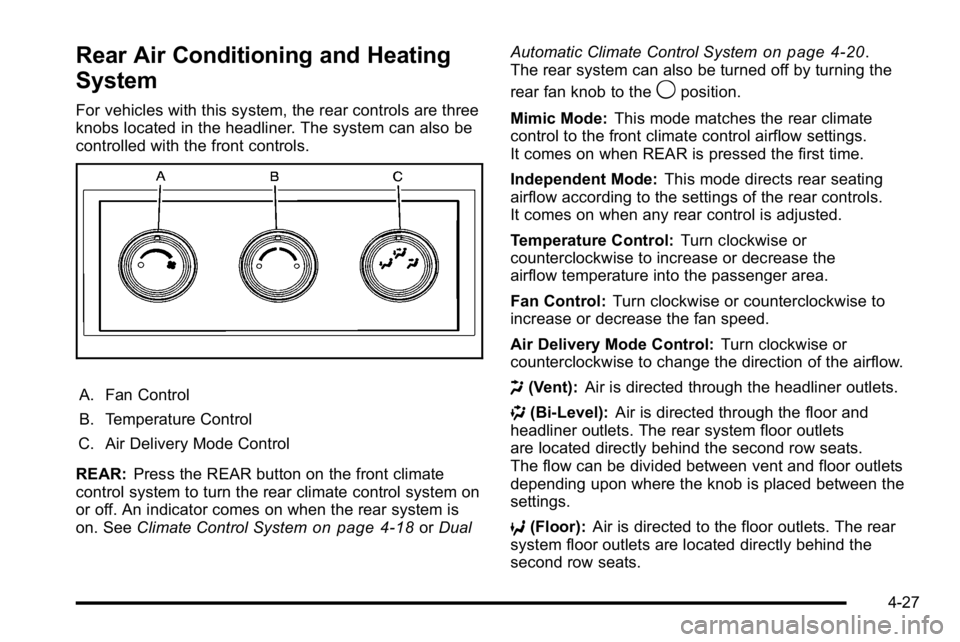
For vehicles with this system, the rear controls are three
knobs located in the headliner. The system can also be
controlled with the front controls.
A. Fan Control
B. Temperature Control
C. Air Delivery Mode Control
REAR: Press the REAR button on the front climate
control system to turn the rear climate control system on
or off. An indicator comes on when the rear system is
on. See Climate Control System
on page 4‑18orDual Automatic Climate Control System
on page 4‑20.
The rear system can also be turned off by turning the
rear fan knob to the
9position.
Mimic Mode: This mode matches the rear climate
control to the front climate control airflow settings.
It comes on when REAR is pressed the first time.
Independent Mode: This mode directs rear seating
airflow according to the settings of the rear controls.
It comes on when any rear control is adjusted.
Temperature Control: Turn clockwise or
counterclockwise to increase or decrease the
airflow temperature into the passenger area.
Fan Control: Turn clockwise or counterclockwise to
increase or decrease the fan speed.
Air Delivery Mode Control: Turn clockwise or
counterclockwise to change the direction of the airflow.
H (Vent): Air is directed through the headliner outlets.
) (Bi-Level): Air is directed through the floor and
headliner outlets. The rear system floor outlets
are located directly behind the second row seats.
The flow can be divided between vent and floor outlets
depending upon where the knob is placed between the
settings.
6 (Floor): Air is directed to the floor outlets. The rear
system floor outlets are located directly behind the
second row seats.
4-27
Page 250 of 614
Rear Air Conditioning and Heating
System and Electronic Climate
Controls
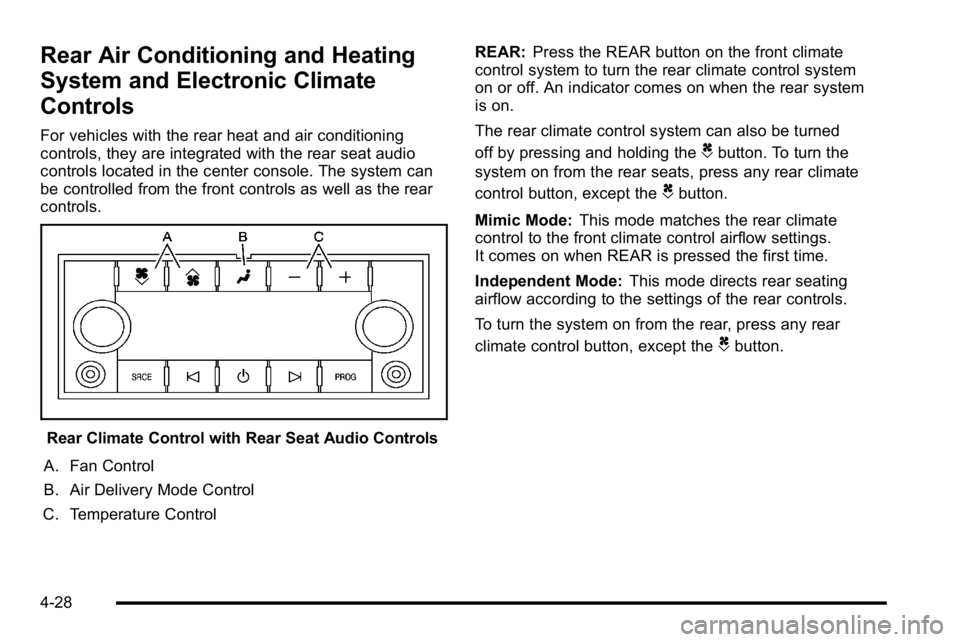
For vehicles with the rear heat and air conditioning
controls, they are integrated with the rear seat audio
controls located in the center console. The system can
be controlled from the front controls as well as the rear
controls.
Rear Climate Control with Rear Seat Audio Controls
A. Fan Control
B. Air Delivery Mode Control
C. Temperature Control REAR:
Press the REAR button on the front climate
control system to turn the rear climate control system
on or off. An indicator comes on when the rear system
is on.
The rear climate control system can also be turned
off by pressing and holding the
Cbutton. To turn the
system on from the rear seats, press any rear climate
control button, except the
Cbutton.
Mimic Mode: This mode matches the rear climate
control to the front climate control airflow settings.
It comes on when REAR is pressed the first time.
Independent Mode: This mode directs rear seating
airflow according to the settings of the rear controls.
To turn the system on from the rear, press any rear
climate control button, except the
Cbutton.
4-28
Page 256 of 614
If the word ON or the on symbol is lit on the passenger
airbag status indicator, it means that the right front
passenger frontal airbag is enabled (may inflate).
If the word OFF or the off symbol is lit on the airbag
status indicator, it means that the passenger sensing
system has turned off the right front passenger frontal
airbag.
If, after several seconds, both status indicator lights
remain on, or if there are no lights at all, there may be
a problem with the lights or the passenger sensing
system. See your dealer for service.
{WARNING:
If the airbag readiness light ever comes on and
stays on, it means that something may be wrong
with the airbag system. To help avoid injury to
yourself or others, have the vehicle serviced right
away. SeeAirbag Readiness Light
on page 4‑32
for more information, including important safety
information.
Charging System Light
This light comes on briefly
when the ignition key is
turned to START, but the
engine is not running,
as a check to show it is
working.
If it does not, have the vehicle serviced by your dealer.
The light should go out once the engine starts. If it stays
on, or comes on while driving, there could be a problem
with the charging system. A charging system message
in the Driver Information Center (DIC) can also appear.
See DIC Warnings and Messages
on page 4‑61for
more information. This light could indicate that there are
problems with a generator drive belt, or that there is an
electrical problem. Have it checked right away. If the
vehicle must be driven a short distance with the light
on, turn off accessories, such as the radio and air
conditioner.
4-34
Page 262 of 614
If the check engine light comes on and stays on, while
the engine is running, this indicates that there is an
OBD II problem and service is required.
Malfunctions often are indicated by the system before
any problem is apparent. Being aware of the light
can prevent more serious damage to the vehicle.
This system assists the service technician in correctly
diagnosing any malfunction.
Notice:If the vehicle is continually driven with this
light on, after a while, the emission controls might
not work as well, the vehicle's fuel economy might
not be as good, and the engine might not run as
smoothly. This could lead to costly repairs that
might not be covered by the vehicle warranty.
Notice: Modifications made to the engine,
transmission, exhaust, intake, or fuel system
of the vehicle or the replacement of the original
tires with other than those of the same Tire
Performance Criteria (TPC) can affect the vehicle's
emission controls and can cause this light to come
on. Modifications to these systems could lead to
costly repairs not covered by the vehicle warranty.
This could also result in a failure to pass a required
Emission Inspection/Maintenance test. See
Accessories and Modifications on page 6‑4. This light comes on during a malfunction in one of
two ways:
Light Flashing:
A misfire condition has been detected.
A misfire increases vehicle emissions and could
damage the emission control system on the vehicle.
Diagnosis and service might be required.
To prevent more serious damage to the vehicle:
.Reduce vehicle speed.
.Avoid hard accelerations.
.Avoid steep uphill grades.
.If towing a trailer, reduce the amount of cargo
being hauled as soon as it is possible.
If the light continues to flash, when it is safe to do so,
stop the vehicle. Find a safe place to park the vehicle.
Turn the vehicle off, wait at least 10 seconds, and
restart the engine. If the light is still flashing, follow the
previous steps and see your dealer for service as soon
as possible.
4-40
Page 284 of 614
CHECK TRAILER WIRING
On vehicles with the Integrated Trailer Brake Control
(ITBC) system, this message may display and a chime
may sound when one of the following conditions exists:
.A trailer with electric brakes becomes
disconnected from the vehicle.
‐If the disconnect occurs while the vehicle is
stopped, this message clears itself after a
short time.
‐ If the disconnect occurs while the vehicle is
moving, this message stays on until the ignition
is turned off.
.There is a short in the wiring to the electric trailer
brakes.
When this message displays, power is no longer
available to the trailer brakes.
As soon as it is safe to do so, carefully pull your
vehicle over to the side of the road and turn the ignition
off. Check the wiring connection to the trailer and turn
the ignition back on. This message clears if the trailer
is reconnected. This message also clears if you
acknowledge it. If this message still displays, either your
vehicle or the trailer needs service. See your dealer.
See “Integrated Trailer Brake Control System” under
Towing a Trailer
on page 5‑49for more information.
DRIVER DOOR OPEN
This message displays and a chime sounds if the driver
door is not fully closed and the vehicle is shifted out of
P (Park). Stop and turn off the vehicle, check the door
for obstructions, and close the door again. Check to see
if the message still appears on the DIC.
ENGINE HOT A/C (Air Conditioning)
TURNED OFF
This message displays when the engine coolant
becomes hotter than the normal operating temperature.
See Engine Coolant Temperature Gauge
on
page 4‑38. To avoid added strain on a hot engine,
the air conditioning compressor automatically turns off.
When the coolant temperature returns to normal, the
air conditioning compressor turns back on. You can
continue to drive your vehicle.
If this message continues to appear, have the system
repaired by your dealer as soon as possible to avoid
damage to the engine.
ENGINE OIL HOT IDLE ENGINE
This message displays when the engine oil becomes
hotter than the normal operating temperature. Stop and
allow the vehicle to idle until it cools down. See Engine
Coolant Temperature Gauge
on page 4‑38.
4-62
Page 370 of 614
Traction Control Operation
The traction control system is part of the StabiliTrak
system. Traction control limits wheel spin by
reducing engine power to the wheels (engine speed
management) and by applying brakes to each individual
wheel (brake-traction control) as necessary.
The traction control system is enabled automatically
when the vehicle is started. It will activate and the
StabiliTrak light will flash if it senses that any of the
wheels are spinning or beginning to lose traction
while driving. If traction control is turned off, only the
brake-traction control portion of traction control will
work. The engine speed management will be disabled.
In this mode, engine power is not reduced automatically
and the driven wheels can spin more freely. This can
cause the brake-traction control to activate constantly.
Notice:If the wheel(s) of one axle is allowed to spin
excessively while the StabiliTrak, ABS and brake
warning lights and any relevant DIC messages are
displayed, the transfer case could be damaged.
The repairs would not be covered by the vehicle
warranty. Reduce engine power and do not spin
the wheel(s) excessively while these lights and
messages are displayed. The traction control system may activate on dry or
rough roads or under conditions such as heavy
acceleration while turning or abrupt upshifts/downshifts
of the transmission. When this happens, a reduction in
acceleration may be noticed, or a noise or vibration may
be heard. This is normal.
If cruise control is being used when the system
activates, the StabiliTrak light will flash and cruise
control will automatically disengage. Cruise control
may be reengaged when road conditions allow.
See
Cruise Control on page 4‑7.
StabiliTrak may also turn off automatically if it
determines that a problem exists with the system.
If the problem does not clear itself after restarting
the vehicle, see your dealer for service.
Locking Rear Axle
Vehicles with a locking rear axle can give more traction
on snow, mud, ice, sand or gravel. It works like a
standard axle most of the time, but when traction is low,
this feature will allow the rear wheel with the most
traction to move the vehicle.
5-8
Page 374 of 614
Of course, traction is reduced when water, snow, ice,
gravel, or other material is on the road. For safety, slow
down and adjust your driving to these conditions. It is
important to slow down on slippery surfaces because
stopping distance will be longer and vehicle control
more limited.
While driving on a surface with reduced traction,
try your best to avoid sudden steering, acceleration,
or braking, including reducing vehicle speed by shifting
to a lower gear. Any sudden changes could cause the
tires to slide. You may not realize the surface is slippery
until the vehicle is skidding. Learn to recognize warning
clues—such as enough water, ice, or packed snow on
the road to make a mirrored surface —and slow down
when you have any doubt.
Remember: Antilock brakes help avoid only the
braking skid.
Off-Road Driving
Vehicles with four-wheel drive can be used for off-road
driving. Vehicles without four-wheel drive and vehicles
with 20‐inch tire/wheel assemblies should not be driven
off-road except on a level, solid surface. The airbag system is designed to work properly under
a wide range of conditions, including off‐road usage.
Always wear your safety belt and observe safe driving
speeds, especially on rough terrain.
Drinking and driving can be very dangerous on any
road and this is certainly true for off-road driving. At the
very time you need special alertness and driving skills,
your reflexes, perceptions, and judgment can be
affected by even a small amount of alcohol. You could
have a serious
—or even fatal —accident if you drink
and drive or ride with a driver who has been drinking.
Off-roading can be great fun but has some definite
hazards. The greatest of these is the terrain itself. When
off-road driving, traffic lanes are not marked, curves are
not banked, and there are no road signs. Surfaces can
be slippery, rough, uphill, or downhill.
Avoid sharp turns and abrupt maneuvers. Failure to
operate the vehicle correctly off‐road could result in loss
of vehicle control or vehicle rollover.
Off-roading involves some new skills. That is why it is
very important that you read these driving tips and
suggestions to help make off-road driving safer and
more enjoyable.
5-12