climate control GMC YUKON 2011 User Guide
[x] Cancel search | Manufacturer: GMC, Model Year: 2011, Model line: YUKON, Model: GMC YUKON 2011Pages: 528, PDF Size: 6.36 MB
Page 46 of 528

Black plate (10,1)GMC Yukon/Yukon XL Owner Manual - 2011
2-10 Keys, Doors and Windows
Doors
Liftgate (Manual)
{WARNING
It can be dangerous to drive
with the liftglass or liftgate open
because carbon monoxide (CO)
gas can come into your vehicle.
You cannot see or smell CO.
It can cause unconsciousness
and even death.
If you must drive with the
liftglass or liftgate open, or if
electrical wiring or other cable
connections must pass through
the seal between the body and
the liftglass or liftgate:
.Make sure all other windows
are shut.
.Turn the fan on your heating
or cooling system to its
highest speed with the(Continued)
WARNING (Continued)
recirculation mode off. That
will force outside air into your
vehicle. SeeClimate Control
Systems on page 8‑1 orDual
Automatic Climate Control
System on page 8‑4.
.If you have air outlets on or
under the instrument panel,
open them all the way.
.If your vehicle has a power
liftgate, disable the power
liftgate function.
See Engine Exhaust on
page 9‑36.
Press
Kon the Remote Keyless
Entry (RKE) transmitter or use the
power door lock switches to unlock
the liftgate. See Remote Keyless
Entry (RKE) System Operation on
page 2‑3.
On vehicles with a liftglass, press
the button on the underside of the
license pocket applique (A) to open
it. The liftglass can also be opened
by pressing
mon the RKE
transmitter.
To open the entire liftgate, press the
touchpad on the underside of the
liftgate handle (B). The vehicle must
be in PARK (P) to open the liftgate.
To close the liftgate, use the pull
cup or pull strap.
Page 47 of 528

Black plate (11,1)GMC Yukon/Yukon XL Owner Manual - 2011
Keys, Doors and Windows 2-11
The liftgate or liftglass cannot be
opened if the rear wipers are in
motion. Attempting to open the
liftgate or liftglass while the rear
wipers are in motion will cause the
release of the liftglass or liftgate to
delay until the wipers are moved off
the liftglass.
Both the liftglass and liftgate have
an electric latch. If the battery is
disconnected or has low voltage,
the liftglass and liftgate will not
open. The liftglass and liftgate will
resume operation when the battery
is reconnected and charged.Liftgate (Power)
Power Liftgate Operation
{WARNING
Exhaust gases can enter the
vehicle if it is driven with the
liftgate, trunk/hatch open, or with
any objects that pass through the
seal between the body and the
trunk/hatch or liftgate. Engine
exhaust contains Carbon
Monoxide (CO) which cannot be
seen or smelled. It can cause
unconsciousness and even death.
If the vehicle must be driven with
the liftgate, or trunk/hatch open:
.Close all of the windows.
.Fully open the air outlets on
or under the instrument
panel.(Continued)
WARNING (Continued)
.Adjust the Climate Control
system to a setting that
brings in only outside air
and set the fan speed to the
highest setting. See Climate
Control System in the Index.
.If the vehicle is equipped with
a power liftgate, disable the
power liftgate function.
For more information about
carbon monoxide, see Engine
Exhaust on page 9‑36.
On vehicles with a power liftgate the
button is on the overhead console.
The vehicle must be in P (Park) to
use the power liftgate feature.
&: Press the top of the button to
open or close the power liftgate.
OFF: Press the bottom of the
button for manual operation of the
power liftgate.
Page 50 of 528

Black plate (14,1)GMC Yukon/Yukon XL Owner Manual - 2011
2-14 Keys, Doors and Windows
Power Assist Steps
The vehicle may have power assist
steps.
The switch used to disable the
power assist steps is located on the
center console below the climate
control system.
The power assist steps
automatically extend from beneath
the vehicle on the side in which the
door has been opened. Once the
door is closed, the assist steps
automatically move back under
the vehicle after a brief delay. The
vehicle must not be moving for the
assist steps to extend or retract.
The assist steps cannot be disabled
in the extended position.
Vehicle Security
This vehicle has theft-deterrent
features; however, they do not make
it impossible to steal.
Anti-Theft Alarm System
Your vehicle has a content
theft-deterrent alarm system.
This is the security light.
To arm the theft-deterrent system:
1. Open the door.
2. Lock the door with the RemoteKeyless Entry (RKE) transmitter
or the power door lock switch.
The security light will come on to
inform the driver the system is arming. If a door is open when
the doors are locked, the
security light will flash.
If the delayed locking feature is
turned on, the theft‐deterrent
system will not start the arming
process until the last door is
closed and the delay timer has
expired. See
Delayed Locking
on page 2‑9.
3. Close all doors. The security light should go off after about
30 seconds. The alarm is not
armed until the security light
goes off.
If a locked driver door is opened
without using the RKE transmitter,
a 10-second pre-alarm will occur.
The horn will chirp and the lights
will flash. If the key is not placed in
the ignition and turned to START or
the door is not unlocked by pressing
the unlock button on the RKE
transmitter during the 10-second
pre-alarm, the alarm will go off.
Page 55 of 528
Black plate (19,1)GMC Yukon/Yukon XL Owner Manual - 2011
Keys, Doors and Windows 2-19
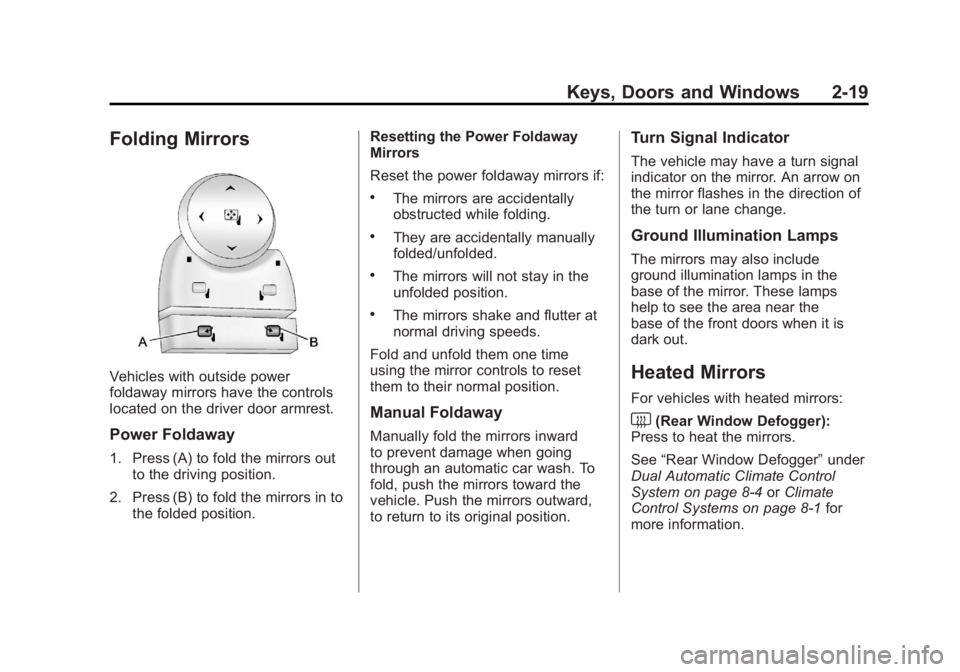
Folding Mirrors
Vehicles with outside power
foldaway mirrors have the controls
located on the driver door armrest.
Power Foldaway
1. Press (A) to fold the mirrors outto the driving position.
2. Press (B) to fold the mirrors in to the folded position. Resetting the Power Foldaway
Mirrors
Reset the power foldaway mirrors if:
.The mirrors are accidentally
obstructed while folding.
.They are accidentally manually
folded/unfolded.
.The mirrors will not stay in the
unfolded position.
.The mirrors shake and flutter at
normal driving speeds.
Fold and unfold them one time
using the mirror controls to reset
them to their normal position.
Manual Foldaway
Manually fold the mirrors inward
to prevent damage when going
through an automatic car wash. To
fold, push the mirrors toward the
vehicle. Push the mirrors outward,
to return to its original position.
Turn Signal Indicator
The vehicle may have a turn signal
indicator on the mirror. An arrow on
the mirror flashes in the direction of
the turn or lane change.
Ground Illumination Lamps
The mirrors may also include
ground illumination lamps in the
base of the mirror. These lamps
help to see the area near the
base of the front doors when it is
dark out.
Heated Mirrors
For vehicles with heated mirrors:
<(Rear Window Defogger):
Press to heat the mirrors.
See “Rear Window Defogger” under
Dual Automatic Climate Control
System on page 8‑4 orClimate
Control Systems on page 8‑1 for
more information.
Page 147 of 528

Black plate (7,1)GMC Yukon/Yukon XL Owner Manual - 2011
Instruments and Controls 5-7
3. Press the set/reset button toscroll through and select the
appropriate variance zone.
4. Press the trip/fuel button until the vehicle heading,
for example, N for North, is
displayed in the DIC. Or, if the
vehicle does not have DIC
buttons, press and hold the
trip odometer reset stem for
two seconds to select the next
available variance zone. Repeat
this step until the appropriate
variance zone is displayed.
5. If calibration is necessary, calibrate the compass. See
“Compass Calibration
Procedure” following.
Compass Calibration
The compass can be manually
calibrated. Only calibrate the
compass in a magnetically clean
and safe location, such as an
open parking lot, where driving the
vehicle in circles is not a danger. It is suggested to calibrate away
from tall buildings, utility wires,
manhole covers, or other industrial
structures, if possible.
If CAL should ever appear in the
DIC display, the compass should be
calibrated.
If the DIC display does not show a
heading, for example, N for North,
or the heading does not change
after making turns, there may be a
strong magnetic field interfering with
the compass. Such interference
may be caused by a magnetic CB
or cell phone antenna mount, a
magnetic emergency light, magnetic
note pad holder, or any other
magnetic item. Turn off the vehicle,
move the magnetic item, then turn
on the vehicle and calibrate the
compass.
To calibrate the compass, use the
following procedure:
Compass Calibration Procedure
1. Before calibrating the compass,
make sure the compass zone
is set to the variance zone in
which the vehicle is located.
See “Compass Variance (Zone)
Procedure” earlier in this
section.
Do not operate any switches
such as window, sunroof,
climate controls, or seats during
the calibration procedure.
2. Press the vehicle information button until PRESS
VTO
CALIBRATE COMPASS
displays. Or, if the vehicle
does not have DIC buttons,
press the trip odometer reset
stem until CALIBRATE
COMPASS displays.
Page 149 of 528
Black plate (9,1)GMC Yukon/Yukon XL Owner Manual - 2011
Instruments and Controls 5-9
Power Outlets
The accessory power outlets can be
used to plug in electrical equipment,
such as a cell phone or MP3 player.
There are two under the climate
controls, one inside the center
floor console, one on the rear
of the center floor console and
one accessory power outlet in
the rear cargo area on the
passenger side.
Remove the cover to access and
replace when not in use.
The accessory power outlets are
powered, even with the ignition
off. Continuing to use accessory
power outlets while the ignition is in
LOCK/OFF may cause the vehicle's
battery to run down.{WARNING
Power is always supplied to the
outlets. Do not leave electrical
equipment plugged in when the
vehicle is not in use because the
vehicle could catch fire and cause
injury or death.
Notice: Leaving electrical
equipment plugged in for an
extended period of time while
the vehicle is off will drain the
battery. Always unplug electrical
equipment when not in use and
do not plug in equipment that
exceeds the maximum 20 ampere
rating. Certain accessory plugs may not
be compatible with the accessory
power outlet and could overload
adapter or vehicle fuses. If a
problem is experienced, see your
dealer.
When adding electrical
equipment, be sure to follow the
proper installation instructions
included with the equipment. Do
not use equipment exceeding the
maximum amperage rating of
20 amperes. See
Add-On Electrical
Equipment on page 9‑94.
Notice: Hanging heavy
equipment from the power
outlet can cause damage not
covered by the vehicle warranty.
The power outlets are designed
for accessory power plugs only,
such as cell phone charge cords.
Page 178 of 528
Black plate (38,1)GMC Yukon/Yukon XL Owner Manual - 2011
5-38 Instruments and Controls
Battery Voltage and
Charging Messages
BATTERY LOW START
VEHICLE
When the vehicle’s battery is
severely discharged, this message
will display and four chimes
will sound. Start the vehicle
immediately. If the vehicle is not
started and the battery continues
to discharge, the climate controls,
heated seats, and audio systems
will shut off and the vehicle may
require a jump start. These systems
will function again after the vehicle
is started.
SERVICE BATTERY
CHARGING SYSTEM
On some vehicles, this message
displays if there is a problem
with the battery charging system.
Under certain conditions, the
charging system light may also turn
on in the instrument panel cluster. See
Charging System Light on
page 5‑20. Driving with this problem
could drain the battery. Turn off all
unnecessary accessories. Have the
electrical system checked as soon
as possible. See your dealer.
Brake System Messages
SERVICE BRAKE SYSTEM
This message displays along with
the brake system warning light if
there is a problem with the brake
system. See Brake System Warning
Light on page 5‑23. If this message
appears, stop as soon as possible
and turn off the vehicle. Restart the
vehicle and check for the message
on the DIC display. If the message
is still displayed or appears again
when you begin driving, the brake
system needs service as soon as
possible. See your dealer.
SERVICE BRAKES SOON
This message displays if there is a
problem with the brake system.
If this message appears, stop as
soon as possible and turn off the
vehicle. Restart the vehicle and
check for the message on the
DIC display. If the message is still
displayed or appears again when
you begin driving, the brake system
needs service. See your dealer.
SERVICE TRAILER BRAKE
SYSTEM
On vehicles with the Integrated
Trailer Brake Control (ITBC) system,
this message displays and a chime
sounds when there is a problem
with the ITBC system.
When this message displays, power
is no longer available to the trailer
brakes.
Page 211 of 528

Black plate (9,1)GMC Yukon/Yukon XL Owner Manual - 2011
Lighting 6-9
Lighting Features
Entry Lighting
The vehicle has an illuminated entry
feature.
When the doors are opened, the
dome lamps will come on if the
dome override button is in the
extended position. If the dome
override button is pressed in, the
lamps will not come on.
Exit Lighting
The interior lamps come on when
the key is removed from the ignition.
They turn off automatically in
20 seconds. The lights do not come
on if the dome override button is
pressed in.
Battery Load
Management
The vehicle has Electric Power
Management (EPM) that estimates
the battery's temperature and state
of charge. It then adjusts the voltage
for best performance and extended
life of the battery.
When the battery's state of charge
is low, the voltage is raised slightly
to quickly bring the charge back up.
When the state of charge is high,
the voltage is lowered slightly to
prevent overcharging. If the vehicle
has a voltmeter gauge or a voltage
display on the Driver Information
Center (DIC), you may see the
voltage move up or down. This is
normal. If there is a problem, an
alert will be displayed.The battery can be discharged at
idle if the electrical loads are very
high. This is true for all vehicles.
This is because the generator
(alternator) may not be spinning fast
enough at idle to produce all the
power that is needed for very high
electrical loads.
A high electrical load occurs when
several of the following are on,
such as: headlamps, high beams,
fog lamps, rear window defogger,
climate control fan at high speed,
heated seats, engine cooling fans,
trailer loads, and loads plugged into
accessory power outlets.
EPM works to prevent excessive
discharge of the battery. It does this
by balancing the generator's output
and the vehicle's electrical needs.
It can increase engine idle speed
to generate more power, whenever
needed. It can temporarily reduce
the power demands of some
accessories.
Page 267 of 528
Black plate (1,1)GMC Yukon/Yukon XL Owner Manual - 2011
Climate Controls 8-1
Climate Controls
Climate Control Systems
Climate Control Systems . . . . . . 8-1
Dual Automatic Climate ControlSystem . . . . . . . . . . . . . . . . . . . . . . 8-4
Rear Climate Control System (Rear Climate
Control Only) . . . . . . . . . . . . . . . 8-10
Rear Climate Control System (Rear Climate with Rear Seat
Audio) . . . . . . . . . . . . . . . . . . . . . . 8-11
Air Vents
Air Vents . . . . . . . . . . . . . . . . . . . . . 8-13
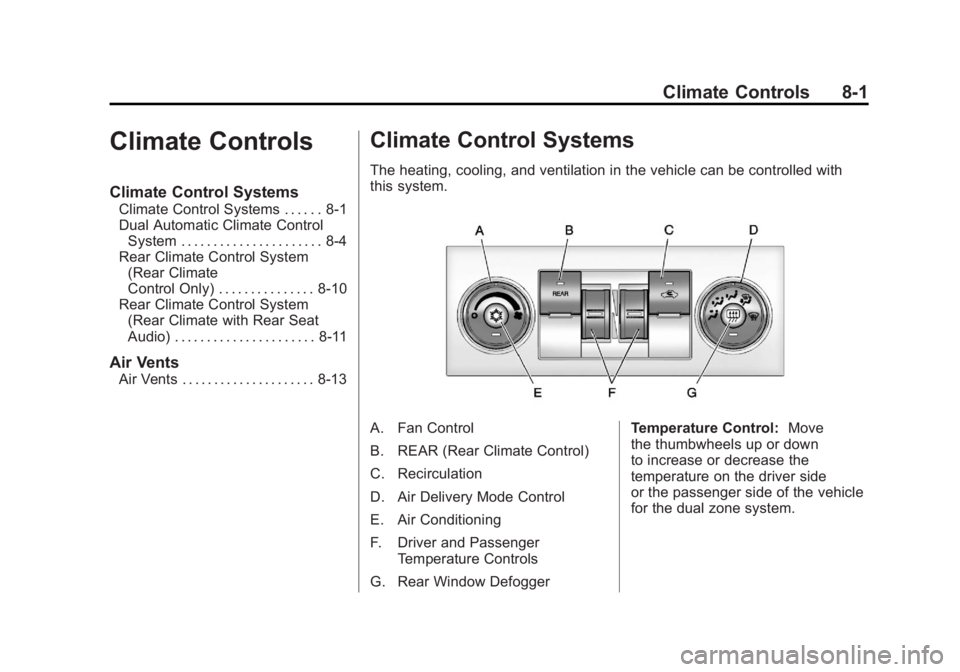
Climate Control Systems
The heating, cooling, and ventilation in the vehicle can be controlled with
this system.
A. Fan Control
B. REAR (Rear Climate Control)
C. Recirculation
D. Air Delivery Mode Control
E. Air Conditioning
F. Driver and Passenger
Temperature Controls
G. Rear Window Defogger Temperature Control:
Move
the thumbwheels up or down
to increase or decrease the
temperature on the driver side
or the passenger side of the vehicle
for the dual zone system.
Page 268 of 528
Black plate (2,1)GMC Yukon/Yukon XL Owner Manual - 2011
8-2 Climate Controls
9(Fan Control):Turn the left
knob clockwise or counterclockwise
to increase or decrease the fan
speed. Turn the knob all the way
counterclockwise to turn the front
system off.
Air Delivery Mode Control: Turn
clockwise or counterclockwise to
change the airflow direction inside
the vehicle. By positioning the knob
between two modes, a combination
of those modes is selected.
Select from the following modes:
H(Vent): Air is directed to the
instrument panel outlets.
)(Bi-Level): Air is divided
between the instrument panel and
floor outlets. Some air is directed
towards the windshield and side
window outlets. Cooler air is
directed to the upper outlets and
warmer air to the floor outlets.
6(Floor): Air is directed to the
floor outlets, with some of the air
directed to the windshield, side
window, and second row floor
outlets. In this mode, the system
automatically selects outside air.
Recirculation cannot be selected
when in Floor Mode.
-(Defog): The defog mode is
used to clear the windows of fog
or moisture. Air is directed to the
windshield, floor outlets, and side
window vents. In this mode, the
system turns off recirculation and
runs the air conditioning compressor
unless the outside temperature is
close to freezing. The recirculation
mode cannot be selected while in
the defog mode.
0(Defrost): The defrost mode
is used to remove fog or frost from
the windshield more quickly. Air is
directed to the windshield and side
window vents, with some directed
to the floor vents. In this mode, the
system automatically forces outside
air into the vehicle. The recirculation
mode cannot be selected while
in the defrost mode. The air
conditioning compressor runs
automatically in this setting, unless
the outside temperature is close to
freezing.
Do not drive the vehicle until all the
windows are clear.
#(Air Conditioning): Press this
button to turn the air conditioning
system on or off. An indicator
light comes on to show that the
air conditioning is on. The air
conditioning can be selected in
any mode as long as the fan switch
is on.