lock GMC YUKON 2011 User Guide
[x] Cancel search | Manufacturer: GMC, Model Year: 2011, Model line: YUKON, Model: GMC YUKON 2011Pages: 528, PDF Size: 6.36 MB
Page 21 of 528
Black plate (15,1)GMC Yukon/Yukon XL Owner Manual - 2011
In Brief 1-15
Interior Lighting
Dome Lamps
The dome lamps are located in the
overhead console.
They come on when any door is
opened and turn off after all the
doors are closed.
Turn the instrument panel
brightness knob located below
the dome lamp override button,
clockwise to the farthest position to
manually turn on the dome lamps.
The dome lamps remain on until the
knob is turned counterclockwise.Dome Lamp Override
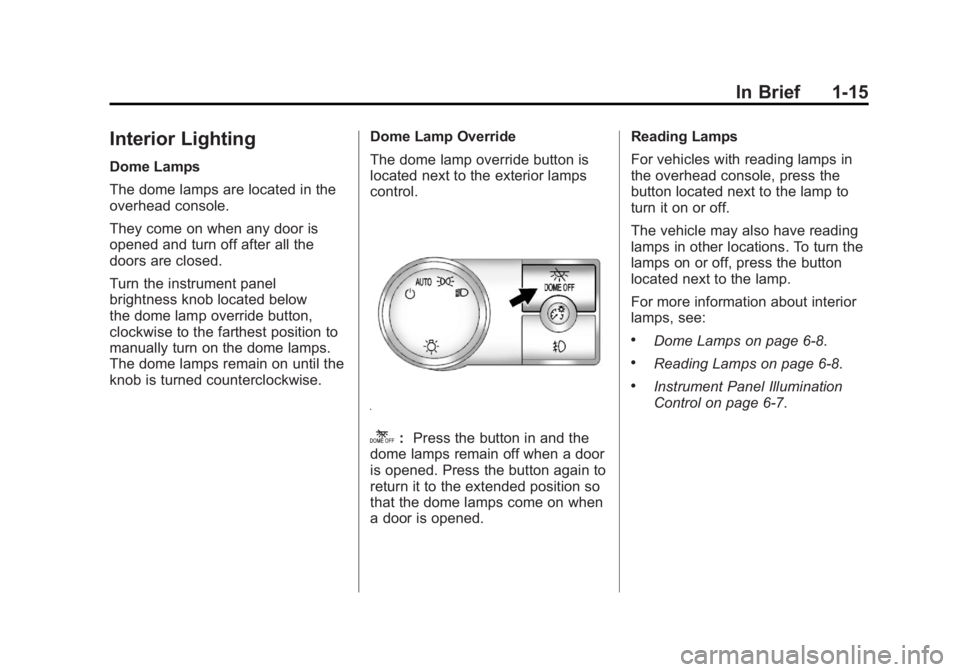
The dome lamp override button is
located next to the exterior lamps
control.
k:
Press the button in and the
dome lamps remain off when a door
is opened. Press the button again to
return it to the extended position so
that the dome lamps come on when
a door is opened. Reading Lamps
For vehicles with reading lamps in
the overhead console, press the
button located next to the lamp to
turn it on or off.
The vehicle may also have reading
lamps in other locations. To turn the
lamps on or off, press the button
located next to the lamp.
For more information about interior
lamps, see:
.Dome Lamps on page 6‑8.
.Reading Lamps on page 6‑8.
.Instrument Panel Illumination
Control on page 6‑7.
Page 27 of 528
Black plate (21,1)GMC Yukon/Yukon XL Owner Manual - 2011
In Brief 1-21
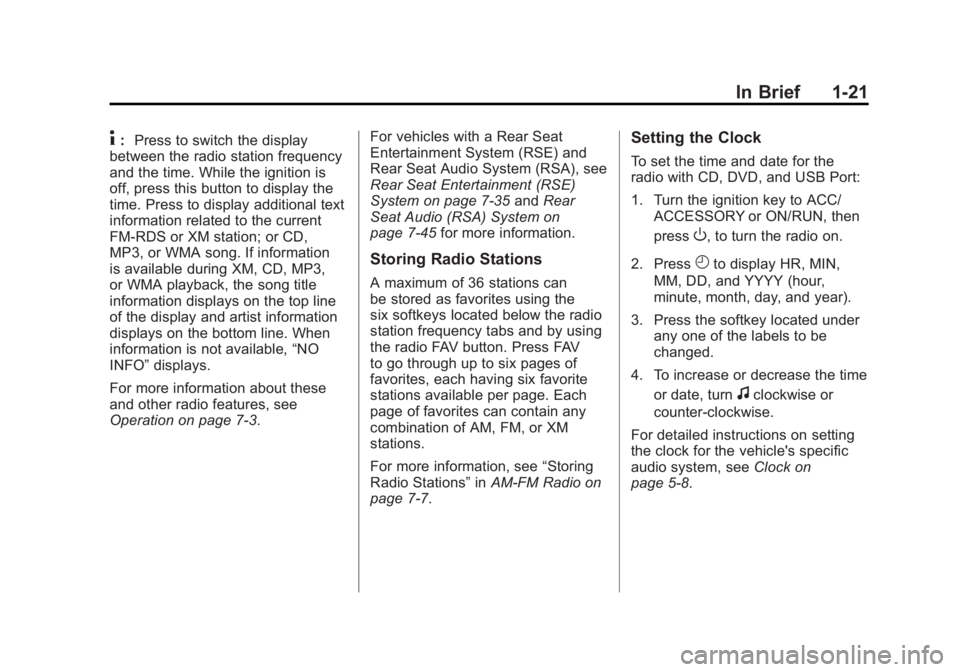
4:Press to switch the display
between the radio station frequency
and the time. While the ignition is
off, press this button to display the
time. Press to display additional text
information related to the current
FM-RDS or XM station; or CD,
MP3, or WMA song. If information
is available during XM, CD, MP3,
or WMA playback, the song title
information displays on the top line
of the display and artist information
displays on the bottom line. When
information is not available, “NO
INFO” displays.
For more information about these
and other radio features, see
Operation on page 7‑3. For vehicles with a Rear Seat
Entertainment System (RSE) and
Rear Seat Audio System (RSA), see
Rear Seat Entertainment (RSE)
System on page 7‑35
andRear
Seat Audio (RSA) System on
page 7‑45 for more information.
Storing Radio Stations
A maximum of 36 stations can
be stored as favorites using the
six softkeys located below the radio
station frequency tabs and by using
the radio FAV button. Press FAV
to go through up to six pages of
favorites, each having six favorite
stations available per page. Each
page of favorites can contain any
combination of AM, FM, or XM
stations.
For more information, see “Storing
Radio Stations” inAM-FM Radio on
page 7‑7.
Setting the Clock
To set the time and date for the
radio with CD, DVD, and USB Port:
1. Turn the ignition key to ACC/ ACCESSORY or ON/RUN, then
press
O, to turn the radio on.
2. Press
Hto display HR, MIN,
MM, DD, and YYYY (hour,
minute, month, day, and year).
3. Press the softkey located under any one of the labels to be
changed.
4. To increase or decrease the time or date, turn
fclockwise or
counter‐clockwise.
For detailed instructions on setting
the clock for the vehicle's specific
audio system, see Clock on
page 5‑8.
Page 30 of 528

Black plate (24,1)GMC Yukon/Yukon XL Owner Manual - 2011
1-24 In Brief
The navigation system provides
detailed maps of most major
freeways and roads. After a
destination has been set, the
system provides turn-by-turn
instructions for reaching the
destination. In addition, the system
can help locate a variety of points
of interest (POIs), such as banks,
airports, restaurants, and more.
See the Navigation System Manual
for more information.
Side Blind Zone
Alert (SBZA)
If available, this feature will alert you
to vehicles located in the vehicle's
side blind zone. When the system
detects a vehicle in the side blind
zone, an amber SBZA display will
light up in the corresponding outside
side mirror.
The system is enabled at every
vehicle startup. It can be disabled
through the Driver Information
Center (DIC).If the message SIDE BLIND ZONE
SYSTEM UNAVAILABLE appears
on the DIC, the system has been
disabled because the sensor is
blocked and cannot detect vehicles
in the blind zone. The sensor may
be blocked by mud, dirt, snow, ice,
slush, or even heavy rainstorms.
This message may also activate
during heavy rain or due to road
spray. The vehicle does not need
service.
See
Side Blind Zone Alert (SBZA)
on page 9‑60 for more information.Rear Vision
Camera (RVC)
If available, the rear vision camera
displays a view of the area behind
the vehicle when the vehicle is
shifted into R (Reverse). The
display will appear on either the
inside rearview mirror or navigation
screen, if equipped. To clean the camera lens, located
above the license plate, rinse it with
water and wipe it with a soft cloth.
See
Rear Vision Camera (RVC) on
page 9‑63.
Ultrasonic Parking Assist
If available, Ultrasonic Rear Parking
Assist (URPA) uses sensors on the
rear bumper to detect objects while
parking the vehicle. URPA comes
on automatically when the shift lever
is moved into R (Reverse) and
operates at speeds less than 8 km/h
(5 mph). URPA uses audio beeps
to provide distance and system
information.
Keep the sensors on the vehicle's
rear bumper clean to ensure proper
operation.
The system can be disabled by
pressing the rear park aid disable
button located next to the radio.
See Ultrasonic Parking Assist on
page 9‑58 for more information.
Page 31 of 528
Black plate (25,1)GMC Yukon/Yukon XL Owner Manual - 2011
In Brief 1-25
Power Outlets
The accessory power outlets can be
used to plug in electrical equipment,
such as a cell phone or MP3 player.
There are two under the climate
controls, one inside the center floor
console, one on the rear of the
center floor console and one
accessory power outlet in the rear
cargo area on the passenger side.
The accessory power outlets are
powered, even with the ignition
off. Continuing to use accessory
power outlets while the ignition is in
LOCK/OFF may cause the vehicle's
battery to run down.
SeePower Outlets on page 5‑9.
Universal Remote System
This system provides a way to
replace up to three remote control
transmitters used to activate
devices such as garage door
openers, security systems, and
home automation devices.
Read the instructions completely
before attempting to program the
transmitter. Because of the steps
involved, it may be helpful to
have another person assist with
programming the transmitter.
SeeUniversal Remote System on
page 5‑55.
Sunroof
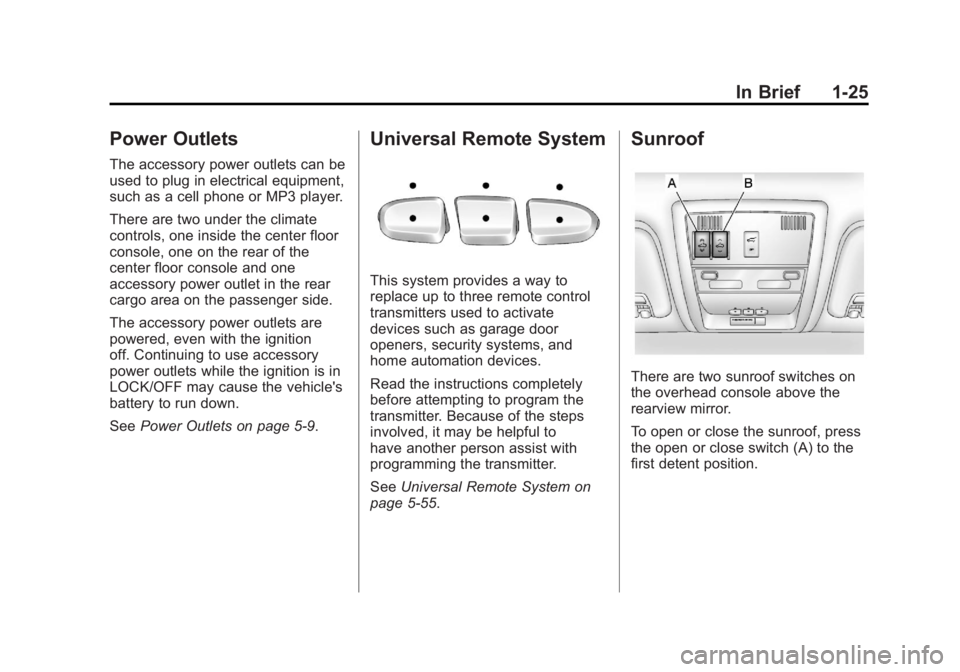
There are two sunroof switches on
the overhead console above the
rearview mirror.
To open or close the sunroof, press
the open or close switch (A) to the
first detent position.
Page 32 of 528
Black plate (26,1)GMC Yukon/Yukon XL Owner Manual - 2011
1-26 In Brief
To express open or close the
sunroof, press the open or close
switch (A) to the second detent
position and release. To stop the
movement, press the switch again.
To automatically vent or close the
sunroof, press the vent open or
close switch (B).
The sunroof also has a sunshade
that you can pull forward to block
the rays of the sun. The sunshade
must be opened and closed
manually.
SeeSunroof on page 2‑23.Performance and
Maintenance
StabiliTrak®System
If equipped, the vehicle has a
traction control system that limits
wheel spin and the StabiliTrak
system that assists with directional
control of the vehicle in difficult
driving conditions. Both systems
turn on automatically every time the
vehicle is started.
.To turn off traction control,
press and release
5on the
instrument panel.
Filluminates
and the appropriate DIC
message displays. See Ride
Control System Messages on
page 5‑43.
.To turn off both traction control
and StabiliTrak, press and
hold
5untilFilluminates and
the appropriate DIC message
displays. See Ride Control
System Messages on page 5‑43.
.Press and release5again to
turn on both systems.
For more information, see
StabiliTrak
®System on page 9‑52.
Tire Pressure Monitor
This vehicle may have a Tire
Pressure Monitor System (TPMS).
The TPMS warning light alerts you
to a significant loss in pressure of
one of the vehicle's tires. If the
warning light comes on, stop as
soon as possible and inflate the
tires to the recommended pressure
shown on the Tire and Loading
Information label. See Vehicle Load
Limits on page 9‑23. The warning
light will remain on until the tire
pressure is corrected.
Page 35 of 528
Black plate (29,1)GMC Yukon/Yukon XL Owner Manual - 2011
In Brief 1-29
OnStar®
OnStar uses several innovative
technologies and live Advisors to
provide a wide range of safety,
security, navigation, diagnostics,
and calling services.
Automatic Crash Response
In a crash, built‐in sensors can
automatically alert an OnStar
Advisor who is immediately
connected to the vehicle to see if
you need help.
How OnStar Service Works
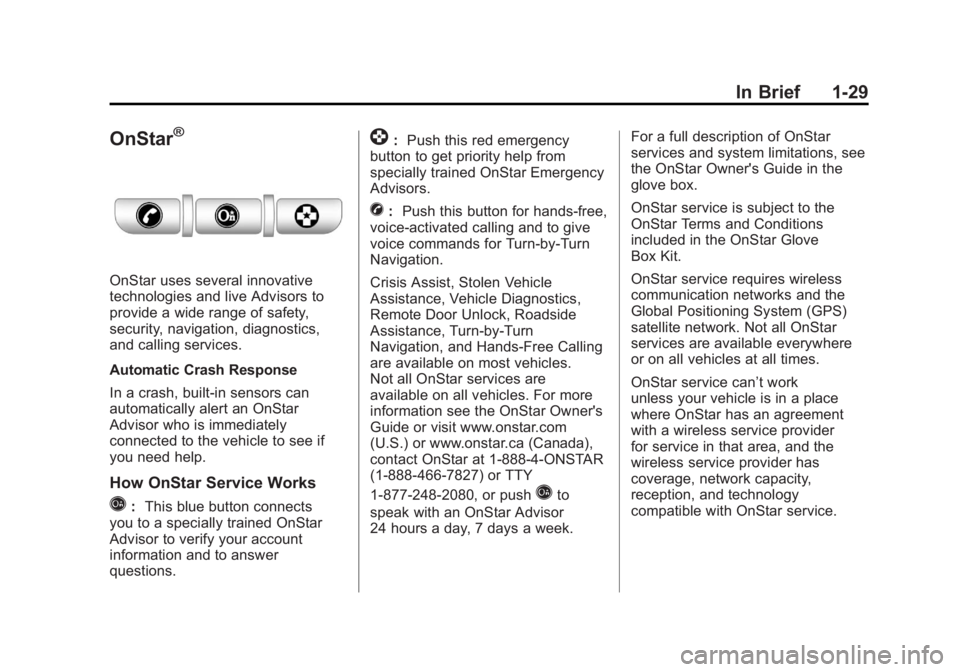
Q:This blue button connects
you to a specially trained OnStar
Advisor to verify your account
information and to answer
questions.
]: Push this red emergency
button to get priority help from
specially trained OnStar Emergency
Advisors.
X: Push this button for hands‐free,
voice‐activated calling and to give
voice commands for Turn‐by‐Turn
Navigation.
Crisis Assist, Stolen Vehicle
Assistance, Vehicle Diagnostics,
Remote Door Unlock, Roadside
Assistance, Turn‐by‐Turn
Navigation, and Hands‐Free Calling
are available on most vehicles.
Not all OnStar services are
available on all vehicles. For more
information see the OnStar Owner's
Guide or visit www.onstar.com
(U.S.) or www.onstar.ca (Canada),
contact OnStar at 1-888-4-ONSTAR
(1‐888‐466‐7827) or TTY
1‐877‐248‐2080, or push
Qto
speak with an OnStar Advisor
24 hours a day, 7 days a week. For a full description of OnStar
services and system limitations, see
the OnStar Owner's Guide in the
glove box.
OnStar service is subject to the
OnStar Terms and Conditions
included in the OnStar Glove
Box Kit.
OnStar service requires wireless
communication networks and the
Global Positioning System (GPS)
satellite network. Not all OnStar
services are available everywhere
or on all vehicles at all times.
OnStar service can’t work
unless your vehicle is in a place
where OnStar has an agreement
with a wireless service provider
for service in that area, and the
wireless service provider has
coverage, network capacity,
reception, and technology
compatible with OnStar service.
Page 37 of 528
Black plate (1,1)GMC Yukon/Yukon XL Owner Manual - 2011
Keys, Doors and Windows 2-1
Keys, Doors and
Windows
Keys and Locks
Keys . . . . . . . . . . . . . . . . . . . . . . . . . . 2-2
Remote Keyless Entry (RKE)System . . . . . . . . . . . . . . . . . . . . . . 2-2
Remote Keyless Entry (RKE) System Operation . . . . . . . . . . . 2-3
Remote Vehicle Start . . . . . . . . . 2-5
Door Locks . . . . . . . . . . . . . . . . . . . 2-8
Power Door Locks . . . . . . . . . . . . 2-8
Delayed Locking . . . . . . . . . . . . . . 2-9
Automatic Door Locks . . . . . . . . . 2-9
Lockout Protection . . . . . . . . . . . . 2-9
Safety Locks . . . . . . . . . . . . . . . . . . 2-9
Doors
Liftgate (Manual) . . . . . . . . . . . . . 2-10
Liftgate (Power) . . . . . . . . . . . . . . 2-11
Power Assist Steps . . . . . . . . . . 2-14
Vehicle Security
Vehicle Security . . . . . . . . . . . . . . 2-14
Anti-Theft Alarm System . . . . . 2-14
Immobilizer . . . . . . . . . . . . . . . . . . 2-15
Immobilizer Operation . . . . . . . 2-16
Exterior Mirrors
Convex Mirrors . . . . . . . . . . . . . . 2-17
Manual Mirrors . . . . . . . . . . . . . . . 2-17
Trailer-Tow Mirrors . . . . . . . . . . . 2-17
Power Mirrors . . . . . . . . . . . . . . . . 2-18
Folding Mirrors . . . . . . . . . . . . . . . 2-19
Heated Mirrors . . . . . . . . . . . . . . . 2-19
Automatic Dimming Mirror . . . 2-20
Park Tilt Mirrors . . . . . . . . . . . . . . 2-20
Interior Mirrors
Manual Rearview Mirror . . . . . . 2-20
Automatic Dimming Rearview Mirror . . . . . . . . . . . . . . . . . . . . . . . 2-20
Windows
Windows . . . . . . . . . . . . . . . . . . . . . 2-21
Power Windows . . . . . . . . . . . . . 2-22
Sun Visors . . . . . . . . . . . . . . . . . . . 2-23
Roof
Sunroof . . . . . . . . . . . . . . . . . . . . . . 2-23
Page 38 of 528
Black plate (2,1)GMC Yukon/Yukon XL Owner Manual - 2011
2-2 Keys, Doors and Windows
Keys and Locks
Keys
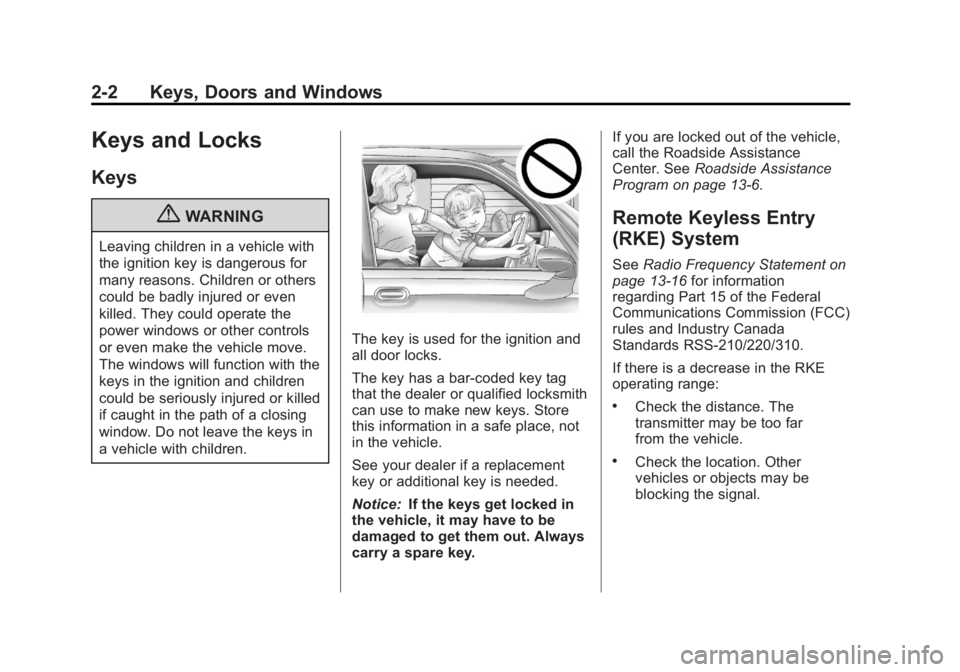
{WARNING
Leaving children in a vehicle with
the ignition key is dangerous for
many reasons. Children or others
could be badly injured or even
killed. They could operate the
power windows or other controls
or even make the vehicle move.
The windows will function with the
keys in the ignition and children
could be seriously injured or killed
if caught in the path of a closing
window. Do not leave the keys in
a vehicle with children.
The key is used for the ignition and
all door locks.
The key has a bar-coded key tag
that the dealer or qualified locksmith
can use to make new keys. Store
this information in a safe place, not
in the vehicle.
See your dealer if a replacement
key or additional key is needed.
Notice:If the keys get locked in
the vehicle, it may have to be
damaged to get them out. Always
carry a spare key. If you are locked out of the vehicle,
call the Roadside Assistance
Center. See
Roadside Assistance
Program on page 13‑6.
Remote Keyless Entry
(RKE) System
See Radio Frequency Statement on
page 13‑16 for information
regarding Part 15 of the Federal
Communications Commission (FCC)
rules and Industry Canada
Standards RSS-210/220/310.
If there is a decrease in the RKE
operating range:
.Check the distance. The
transmitter may be too far
from the vehicle.
.Check the location. Other
vehicles or objects may be
blocking the signal.
Page 39 of 528

Black plate (3,1)GMC Yukon/Yukon XL Owner Manual - 2011
Keys, Doors and Windows 2-3
.Check the transmitter's battery.
See“Battery Replacement” later
in this section.
.If the transmitter is still not
working correctly, see your
dealer or a qualified technician
for service.
Remote Keyless Entry
(RKE) System Operation
The Remote Keyless Entry (RKE)
transmitter functions work up to
60 m (195 ft) away from the vehicle.
There are other conditions which
can affect the performance of the
transmitter. See Remote Keyless
Entry (RKE) System on page 2‑2.
With Remote Start and Liftglass
With Remote Start and Power
Liftgate and Liftglass The following functions may be
available if your vehicle has the
RKE system:
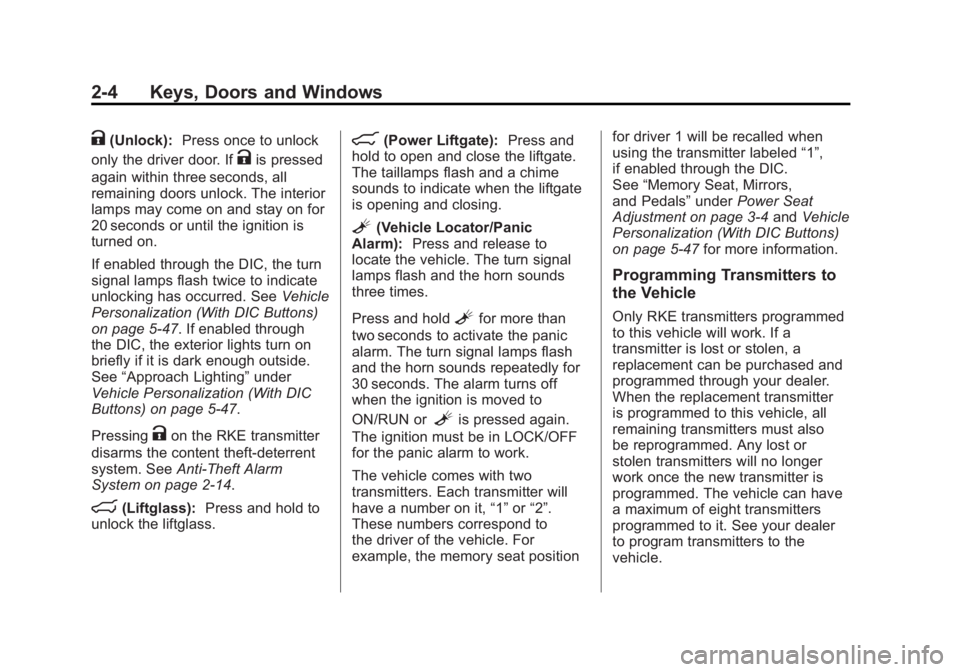
/(Remote Vehicle Start):
For
vehicles with this feature, press to
start the engine from outside the
vehicle using the RKE transmitter.
See Remote Vehicle Start on
page 2‑5 for additional information.
Q(Lock):Press to lock all the
doors.
If enabled through the Driver
Information Center (DIC), the turn
signal lamps flash once to indicate
locking has occurred. If enabled
through the DIC, the horn chirps
when the lock button is pressed
again within three seconds. See
Vehicle Personalization (With DIC
Buttons) on page 5‑47 for additional
information.
Pressing
Qarms the content
theft‐deterrent system. See
Anti-Theft Alarm System on
page 2‑14.
Page 40 of 528
Black plate (4,1)GMC Yukon/Yukon XL Owner Manual - 2011
2-4 Keys, Doors and Windows
K(Unlock):Press once to unlock
only the driver door. If
Kis pressed
again within three seconds, all
remaining doors unlock. The interior
lamps may come on and stay on for
20 seconds or until the ignition is
turned on.
If enabled through the DIC, the turn
signal lamps flash twice to indicate
unlocking has occurred. See Vehicle
Personalization (With DIC Buttons)
on page 5‑47. If enabled through
the DIC, the exterior lights turn on
briefly if it is dark enough outside.
See “Approach Lighting” under
Vehicle Personalization (With DIC
Buttons) on page 5‑47.
Pressing
Kon the RKE transmitter
disarms the content theft‐deterrent
system. See Anti-Theft Alarm
System on page 2‑14.
m(Liftglass): Press and hold to
unlock the liftglass.
&(Power Liftgate): Press and
hold to open and close the liftgate.
The taillamps flash and a chime
sounds to indicate when the liftgate
is opening and closing.
L(Vehicle Locator/Panic
Alarm): Press and release to
locate the vehicle. The turn signal
lamps flash and the horn sounds
three times.
Press and hold
Lfor more than
two seconds to activate the panic
alarm. The turn signal lamps flash
and the horn sounds repeatedly for
30 seconds. The alarm turns off
when the ignition is moved to
ON/RUN or
Lis pressed again.
The ignition must be in LOCK/OFF
for the panic alarm to work.
The vehicle comes with two
transmitters. Each transmitter will
have a number on it, “1”or“2”.
These numbers correspond to
the driver of the vehicle. For
example, the memory seat position for driver 1 will be recalled when
using the transmitter labeled
“1”,
if enabled through the DIC.
See “Memory Seat, Mirrors,
and Pedals” underPower Seat
Adjustment on page 3‑4 andVehicle
Personalization (With DIC Buttons)
on page 5‑47 for more information.
Programming Transmitters to
the Vehicle
Only RKE transmitters programmed
to this vehicle will work. If a
transmitter is lost or stolen, a
replacement can be purchased and
programmed through your dealer.
When the replacement transmitter
is programmed to this vehicle, all
remaining transmitters must also
be reprogrammed. Any lost or
stolen transmitters will no longer
work once the new transmitter is
programmed. The vehicle can have
a maximum of eight transmitters
programmed to it. See your dealer
to program transmitters to the
vehicle.