maintenance GMC YUKON 2011 User Guide
[x] Cancel search | Manufacturer: GMC, Model Year: 2011, Model line: YUKON, Model: GMC YUKON 2011Pages: 528, PDF Size: 6.36 MB
Page 166 of 528
Black plate (26,1)GMC Yukon/Yukon XL Owner Manual - 2011
5-26 Instruments and Controls
The light flashes if the system is
active and is working to assist the
driver with directional control of the
vehicle in difficult driving conditions.
SeeStabiliTrak
®System on
page 9‑52 for more information.
If the vehicle is a hybrid, see the
hybrid supplement for more
information.
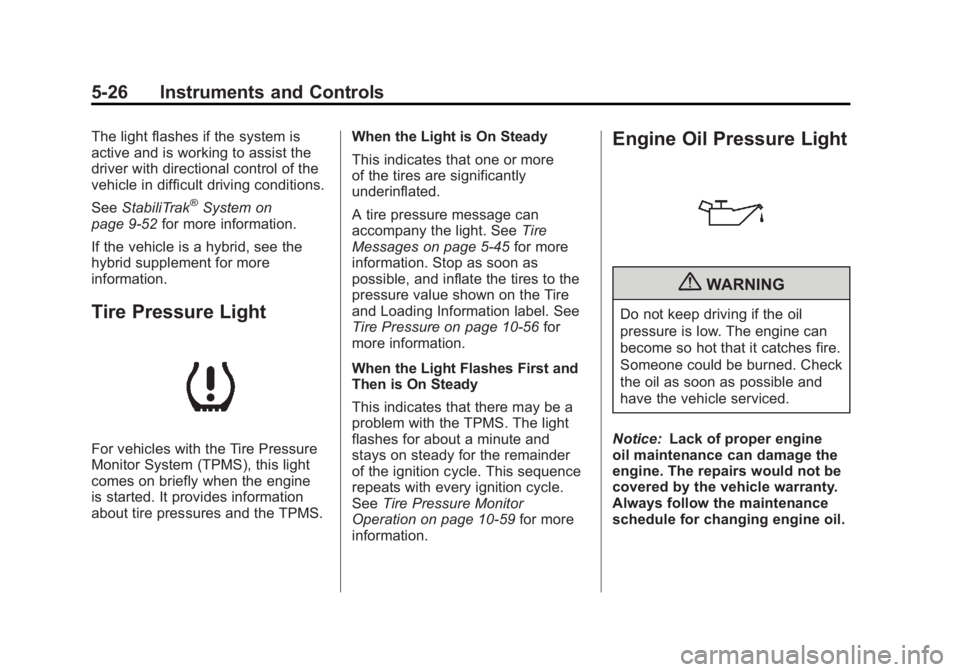
Tire Pressure Light
For vehicles with the Tire Pressure
Monitor System (TPMS), this light
comes on briefly when the engine
is started. It provides information
about tire pressures and the TPMS. When the Light is On Steady
This indicates that one or more
of the tires are significantly
underinflated.
A tire pressure message can
accompany the light. See
Tire
Messages on page 5‑45 for more
information. Stop as soon as
possible, and inflate the tires to the
pressure value shown on the Tire
and Loading Information label. See
Tire Pressure on page 10‑56 for
more information.
When the Light Flashes First and
Then is On Steady
This indicates that there may be a
problem with the TPMS. The light
flashes for about a minute and
stays on steady for the remainder
of the ignition cycle. This sequence
repeats with every ignition cycle.
See Tire Pressure Monitor
Operation on page 10‑59 for more
information.
Engine Oil Pressure Light
{WARNING
Do not keep driving if the oil
pressure is low. The engine can
become so hot that it catches fire.
Someone could be burned. Check
the oil as soon as possible and
have the vehicle serviced.
Notice: Lack of proper engine
oil maintenance can damage the
engine. The repairs would not be
covered by the vehicle warranty.
Always follow the maintenance
schedule for changing engine oil.
Page 172 of 528

Black plate (32,1)GMC Yukon/Yukon XL Owner Manual - 2011
5-32 Instruments and Controls
This display shows the
instantaneous fuel economy in
liters per 100 kilometers (L/100 km)
or miles per gallon (mpg). Unlike
average economy, this screen
cannot be reset.
An Active Fuel Management
indicator will display on the right
side of the DIC, while INST ECON
displays on the left side. Active
Fuel Management allows the
engine to operate on either four or
eight cylinders, depending on your
driving demands. When Active
Fuel Management is active, V4 will
display on the DIC. When Active
Fuel Management is inactive,
V8 will display. SeeActive Fuel
Management
®on page 9‑35 for
more information.
Blank Display
This display shows no information.
Vehicle Information Menu
Items (With DIC Buttons)
T(Vehicle Information): Press
to scroll through the following menu
items:
Oil Life
Press the vehicle information
button until OIL LIFE REMAINING
displays. This display shows an
estimate of the oil's remaining
useful life. If you see 99% OIL LIFE
REMAINING on the display, that
means 99% of the current oil life
remains. The engine oil life system
will alert you to change the oil on
a schedule consistent with your
driving conditions. When the remaining oil life is low,
the CHANGE ENGINE OIL SOON
message will appear on the display.
See
“CHANGE ENGINE OIL SOON”
under Engine Oil Messages on
page 5‑41. You should change the
oil as soon as you can. See Engine
Oil on page 10‑7. In addition to the
engine oil life system monitoring the
oil life, additional maintenance is
recommended in the Maintenance
Schedule in this manual. See
Scheduled Maintenance on
page 11‑2 for more information.
Remember, you must reset the OIL
LIFE display yourself after each oil
change. It will not reset itself. Also,
be careful not to reset the OIL LIFE
display accidentally at any time
other than when the oil has just
been changed. It cannot be reset
accurately until the next oil change.
To reset the engine oil life system,
see Engine Oil Life System on
page 10‑10.
Page 177 of 528

Black plate (37,1)GMC Yukon/Yukon XL Owner Manual - 2011
Instruments and Controls 5-37
Oil Life
To access this display, the vehicle
must be in P (Park). Press the trip
odometer reset stem until OIL LIFE
REMAINING displays. This display
shows an estimate of the oil's
remaining useful life. If you see
99% OIL LIFE REMAINING on
the display, that means 99% of
the current oil life remains. The
engine oil life system will alert you
to change the oil on a schedule
consistent with your driving
conditions.
When the remaining oil life is low,
the CHANGE ENGINE OIL SOON
message will appear on the display.
See“CHANGE ENGINE OIL SOON”
under Engine Oil Messages on
page 5‑41. You should change the
oil as soon as you can. See Engine
Oil on page 10‑7. In addition to the
engine oil life system monitoring the
oil life, additional maintenance is
recommended in the Maintenance
Schedule in this manual. See
Scheduled Maintenance on
page 11‑2 for more information. Remember, you must reset the OIL
LIFE display yourself after each oil
change. It will not reset itself. Also,
be careful not to reset the OIL LIFE
display accidentally at any time
other than when the oil has just
been changed. It cannot be reset
accurately until the next oil change.
To reset the engine oil life system,
see
Engine Oil Life System on
page 10‑10.
Relearn Tire Positions
Your vehicle may have this display.
To access this display, the vehicle
must be in P (Park). If your vehicle
has the Tire Pressure Monitor
System (TPMS), after rotating the
tires or after replacing a tire or
sensor, the system must re-learn
the tire positions. To re-learn the tire
positions, see Tire Pressure Monitor
System on page 10‑58. See Tire
Inspection on page 10‑62, Tire
Rotation on page 10‑62 andTire
Messages on page 5‑45 for more
information.Vehicle Messages
Messages displayed on the DIC
indicate the status of the vehicle or
some action may be needed to
correct a condition. Multiple
messages may appear one after
another.
The messages that do not
require immediate action can be
acknowledged and cleared by
pressing
V(Set/Reset) or the trip
odometer reset stem.
The messages that require
immediate action cannot be cleared
until that action is performed.
All messages should be taken
seriously and clearing the message
does not correct the problem.
The following are the possible
messages and some information
about them.
Page 181 of 528
Black plate (41,1)GMC Yukon/Yukon XL Owner Manual - 2011
Instruments and Controls 5-41
Engine Oil Messages
CHANGE ENGINE OIL SOON
This message displays when the
engine oil needs to be changed.
When you change the engine oil, be
sure to reset the CHANGE ENGINE
OIL SOON message. SeeEngine
Oil Life System on page 10‑10 for
information on how to reset the
message. See Engine Oil on
page 10‑7 andScheduled
Maintenance on page 11‑2 for
more information.
ENGINE OIL HOT IDLE
ENGINE
This message displays when the
engine oil becomes hotter than the
normal operating temperature. Stop
and allow the vehicle to idle until it
cools down. See Engine Coolant
Temperature Gauge on page 5‑16.
OIL PRESSURE LOW STOP
ENGINE
Notice: If you drive the vehicle
while the engine oil pressure is
low, severe engine damage may
occur. If a low oil pressure
warning appears on the Driver
Information Center (DIC), stop the
vehicle as soon as possible. Do
not drive the vehicle until the
cause of the low oil pressure is
corrected. See Engine Oil on
page 10‑7 for more information.
This message displays if low oil
pressure levels occur. Stop the
vehicle as soon as safely possible
and do not operate it until the cause
of the low oil pressure has been
corrected. Check the oil as soon
as possible and have the vehicle
serviced by your dealer. See Engine
Oil on page 10‑7.
Engine Power Messages
ENGINE POWER IS REDUCED
This message displays and a chime
sounds when the cooling system
temperature gets too hot and the
engine further enters the engine
coolant protection mode. See
Engine Overheating on page 10‑21
for further information.
This message also displays when
the engine power is reduced.
Reduced engine power can affect
the vehicle's ability to accelerate.
If this message is on, but there
is no reduction in performance,
proceed to your destination. The
performance may be reduced the
next time the vehicle is driven. The
vehicle may be driven at a reduced
speed while this message is on,
but acceleration and speed may be
reduced. Anytime this message
stays on, the vehicle should be
taken to your dealer for service as
soon as possible.
Page 288 of 528
Black plate (8,1)GMC Yukon/Yukon XL Owner Manual - 2011
9-8 Driving and Operating
Before You Go Off-Roading
.Have all necessary maintenance
and service work done.
.Make sure there is enough fuel,
that fluid levels are where they
should be, and that the spare
tire, if the vehicle has one, is
fully inflated.
.Be sure to read all the
information about
four-wheel-drive vehicles
in this manual.
.Make sure all underbody
shields, if the vehicle has them,
are properly attached.
.Know the local laws that apply
to off-roading where you will
be driving or check with law
enforcement people in the area.
.Be sure to get the necessary
permission if you will be on
private land.If you think you will need some
more ground clearance at the front
of your vehicle, you can remove the
front fascia lower air dam. The air
dam is held in place by two bolts
and 10 snaps accessible from
underneath the front fascia.
To remove the air dam:
1. Remove the two outboard air
dam bolts.
2. With a flat‐blade tool, disengage the snaps.
3. After the bolts are removed and the snaps are disengaged, push
forward on the air dam until it
is free.
Notice: Operating your vehicle
for extended periods without
the front fascia lower air dam
installed can cause improper air
flow to the engine. Always be
sure to replace the front fascia
air dam when you are finished
off-road driving. After off-roading, be sure to reinstall
the air dam:
1. Line up the snaps and push the
air dam rearward to engage the
snaps.
2. Install the two outboard bolts.
Loading Your Vehicle for
Off-Road Driving
{WARNING
.Cargo on the load floor piled
higher than the seatbacks
can be thrown forward during
a sudden stop. You or your
passengers could be injured.
Keep cargo below the top of
the seatbacks.
.Unsecured cargo on the
load floor can be tossed
about when driving over
rough terrain. You or your
passengers can be struck
by flying objects. Secure the
cargo properly. (Continued)
Page 297 of 528
Black plate (17,1)GMC Yukon/Yukon XL Owner Manual - 2011
Driving and Operating 9-17
Driving in Water
{WARNING
Driving through rushing water can
be dangerous. Deep water can
sweep your vehicle downstream
and you and your passengers
could drown. If it is only shallow
water, it can still wash away the
ground from under your tires, and
you could lose traction and roll
the vehicle over. Do not drive
through rushing water.
Heavy rain can mean flash flooding,
and flood waters demand extreme
caution. Find out how deep the water is
before driving through it. Do not try
it if it is deep enough to cover the
wheel hubs, axles, or exhaust
pipe
—you probably will not get
through. Deep water can damage
the axle and other vehicle parts.
If the water is not too deep, drive
slowly through it. At faster speeds,
water splashes on the ignition
system and the vehicle can stall.
Stalling can also occur if you get the
tailpipe under water. If the tailpipe is
under water, you will never be able
to start the engine. When going
through water, remember that when
the brakes get wet, it might take
longer to stop. See Driving on Wet
Roads on page 9‑18.
After Off-Road Driving
Remove any brush or debris that
has collected on the underbody,
chassis, or under the hood. These
accumulations can be a fire hazard.
After operation in mud or sand,
have the brake linings cleaned and
checked. These substances can
cause glazing and uneven braking.
Check the body structure, steering,
suspension, wheels, tires, and
exhaust system for damage and
check the fuel lines and cooling
system for any leakage.
The vehicle requires more frequent
service due to off-road use. Refer
to the Maintenance Schedule for
additional information.
Page 348 of 528
Black plate (68,1)GMC Yukon/Yukon XL Owner Manual - 2011
9-68 Driving and Operating
Fuel
Use of the recommended fuel is
an important part of the proper
maintenance of this vehicle. To help
keep the engine clean and maintain
optimum vehicle performance, we
recommend the use of gasoline
advertised as TOP TIER Detergent
Gasoline.
Look for the TOP TIER label on the
fuel pump to ensure gasoline meets
enhanced detergency standards
developed by auto companies. A list
of marketers providing TOP TIER
Detergent Gasoline can be found at
www.toptiergas.com.
The eighth digit of the Vehicle
Identification Number (VIN) shows
the code letter or number that
identifies the vehicle's engine.
The VIN is at the top left of the
instrument panel. SeeVehicle
Identification Number (VIN) on
page 12‑1. Vehicles that have a FlexFuel badge
and a yellow fuel cap can use either
unleaded gasoline or ethanol fuel
containing up to 85% ethanol (E85).
See
Fuel E85 (85% Ethanol) on
page 9‑70. For all other vehicles,
use only the unleaded gasoline
described under Recommended
Fuel on page 9‑68.
Recommended Fuel
Use regular unleaded gasoline with
a posted octane rating of 87 or
higher. If the octane rating is less
than 87, an audible knocking noise,
commonly referred to as spark
knock, might be heard when driving.
If this occurs, use a gasoline rated
at 87 octane or higher as soon
as possible. If heavy knocking is
heard when using gasoline rated
at 87 octane or higher, the engine
needs service.
Page 359 of 528
Black plate (79,1)GMC Yukon/Yukon XL Owner Manual - 2011
Driving and Operating 9-79
Leaving After Parking on a Hill
1. Apply and hold the brake pedal.
2. Start the engine.
3. Shift into a gear.
4. Release the parking brake.
5. Let up on the brake pedal.
6. Drive slowly until the trailer isclear of the chocks.
7. Stop and have someone pick up and store the chocks.
Maintenance When Trailer
Towing
The vehicle needs service more
often when pulling a trailer. See this
manual's Maintenance Schedule or
Index for more information. Things
that are especially important in
trailer operation are automatic
transmission fluid, engine oil, axle
lubricant, belts, cooling system and
brake system. It is a good idea to
inspect these before and during
the trip. Check periodically to see that all
hitch nuts and bolts are tight.
Trailer Towing
If the vehicle has a hybrid engine,
see the Hybrid supplement for more
information.
Do not tow a trailer during break‐in.
See
New Vehicle Break-In on
page 9‑28 for more information.
{WARNING
The driver can lose control when
pulling a trailer if the correct
equipment is not used or the
vehicle is not driven properly.
For example, if the trailer is
too heavy, the brakes may not
work well—or even at all. The
driver and passengers could be
seriously injured. The vehicle may
also be damaged; the resulting
repairs would not be covered by
the vehicle warranty. Pull a trailer
(Continued)
WARNING (Continued)
only if all the steps in this section
have been followed. Ask your
dealer for advice and information
about towing a trailer with the
vehicle.
Notice: Pulling a trailer
improperly can damage the
vehicle and result in costly
repairs not covered by the
vehicle warranty. To pull a trailer
correctly, follow the advice in this
section and see your dealer for
important information about
towing a trailer with the vehicle.
To identify the trailering capacity of
the vehicle, read the information in
“Weight of the Trailer” that appears
later in this section.
Page 382 of 528
Black plate (4,1)GMC Yukon/Yukon XL Owner Manual - 2011
10-4 Vehicle Care
Vehicle Checks
Doing Your Own
Service Work
If the vehicle is a hybrid, see the
hybrid supplement for more
information.
{WARNING
You can be injured and the
vehicle could be damaged if you
try to do service work on a vehicle
without knowing enough about it.
.Be sure you have sufficient
knowledge, experience,
the proper replacement
parts, and tools before
attempting any vehicle
maintenance task.(Continued)
WARNING (Continued)
.Be sure to use the proper
nuts, bolts, and other
fasteners. Metric and English
fasteners can be easily
confused. If the wrong
fasteners are used, parts
can later break or fall off.
You could be hurt.
If doing some of your own service
work, use the proper service
manual. It tells you much more
about how to service the vehicle
than this manual can. To order the
proper service manual, see Service
Publications Ordering Information
on page 13‑12. This vehicle has an airbag system.
Before attempting to do your own
service work, see
Airbag System
Check on page 3‑53.
Keep a record with all parts receipts
and list the mileage and the date
of any service work performed.
See Maintenance Records on
page 11‑10.
Page 390 of 528
Black plate (12,1)GMC Yukon/Yukon XL Owner Manual - 2011
10-12 Vehicle Care
Automatic Transmission
Fluid
When to Check and Change
Automatic Transmission Fluid
It is usually not necessary to
check the transmission fluid level.
The only reason for fluid loss is a
transmission leak or overheated
transmission. If a small leak is
suspected, then use the following
checking procedures to check the
fluid level. However, if there is a
large leak, then it may be necessary
to have the vehicle towed to a
dealer service department and have
it repaired before driving the vehicle
further.
Notice:Use of the incorrect
automatic transmission fluid
may damage the vehicle, and the
damages may not be covered by
the vehicle warranty. Always use
the automatic transmission fluid
listed in Recommended Fluids
and Lubricants on page 11‑7. Change the fluid and filter at the
scheduled maintenance intervals
listed in
Scheduled Maintenance on
page 11‑2. Be sure to use the
transmission fluid listed in
Recommended Fluids and
Lubricants on page 11‑7.
How to Check Automatic
Transmission Fluid
Notice: Too much or too
little fluid can damage the
transmission. Too much can
mean that some of the fluid could
come out and fall on hot engine
parts or exhaust system parts,
starting a fire. Too little fluid
could cause the transmission
to overheat. Be sure to get an
accurate reading if checking the
transmission fluid. Before checking the fluid level,
prepare the vehicle as follows:
1. Start the engine and park the
vehicle on a level surface. Keep
the engine running.
2. Apply the parking brake and place the shift lever in P (Park).
3. With your foot on the brake pedal, move the shift lever
through each gear range,
pausing for about three seconds
in each range. Then, move the
shift lever back to P (Park).
4. Allow the engine to idle (500 –800 rpm) for at least
1 minute. Slowly release the
brake pedal.
5. Keep the engine running and press the Trip/Fuel button or
trip odometer reset stem until
TRANS TEMP (Transmission
Temperature) displays on the
Driver Information Center (DIC).