5-43 GMC YUKON 2015 User Guide
[x] Cancel search | Manufacturer: GMC, Model Year: 2015, Model line: YUKON, Model: GMC YUKON 2015Pages: 455, PDF Size: 4.72 MB
Page 50 of 455
Black plate (17,1)GMC Yukon/Yukon XL Owner Manual (GMNA-Localizing-U.S./Canada/
Mexico-7063682) - 2015 - crc - 6/5/14
Keys, Doors, and Windows 2-17
Automatic Door Locks
The vehicle may have an automatic
lock/unlock feature. This feature can
be programmed using the Driver
Information Center (DIC). See
Vehicle Personalization on
page 5-43.
Lockout Protection
If the driver side power door lock
switch is pressed when the driver
door is open and the key is in the
ignition, all of the doors will lock and
then the driver door will unlock.
This feature may be turned off and
on through vehicle personalization.
SeeVehicle Personalization on
page 5-43.
Safety Locks
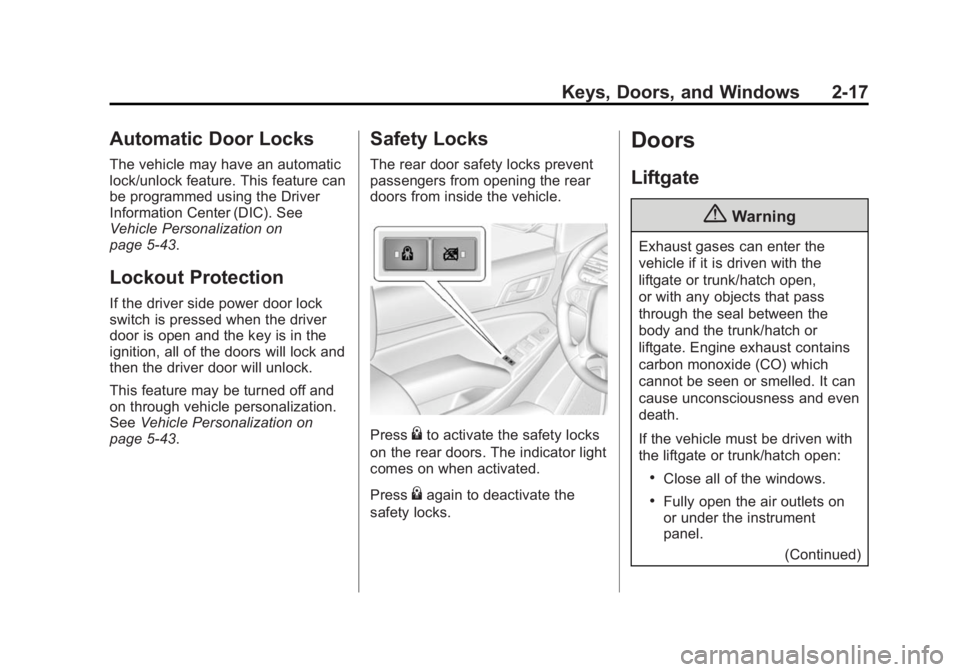
The rear door safety locks prevent
passengers from opening the rear
doors from inside the vehicle.
Press{to activate the safety locks
on the rear doors. The indicator light
comes on when activated.
Press
{again to deactivate the
safety locks.
Doors
Liftgate
{Warning
Exhaust gases can enter the
vehicle if it is driven with the
liftgate or trunk/hatch open,
or with any objects that pass
through the seal between the
body and the trunk/hatch or
liftgate. Engine exhaust contains
carbon monoxide (CO) which
cannot be seen or smelled. It can
cause unconsciousness and even
death.
If the vehicle must be driven with
the liftgate or trunk/hatch open:
.Close all of the windows.
.Fully open the air outlets on
or under the instrument
panel.
(Continued)
Page 62 of 455
Black plate (29,1)GMC Yukon/Yukon XL Owner Manual (GMNA-Localizing-U.S./Canada/
Mexico-7063682) - 2015 - crc - 6/5/14
Keys, Doors, and Windows 2-29
1. When the approaching vehicle isa long distance away, the image
in the main mirror is small and
near the inboard edge of the
mirror.
2. As the vehicle gets closer, the image in the main mirror gets
larger and moves outboard.
3. As the vehicle enters the blind zone, the image transitions from
the main mirror to the blind spot
mirror.
4. When the vehicle is in the blind zone, the image only appears in
the blind spot mirror.
Using the Outside Mirror with
the Blind Spot Mirror
1. Set the main mirror so that theside of the vehicle can just be
seen and the blind spot mirror
has an unobstructed view.
2. When checking for traffic or before changing a lane, look at
the main driver/passenger side
mirror to observe traffic in the
adjacent lane, behind your vehicle. Check the blind spot
mirror for a vehicle in the blind
zone. Then, glance over your
shoulder to double check before
moving slowly into the
adjacent lane.
Reverse Tilt Mirrors
If equipped, the exterior mirrors tilt
to a preselected position when the
vehicle is in R (Reverse). This
feature lets the driver view the curb
when parallel parking. The mirrors
return to the original position when
the vehicle is shifted out of
R (Reverse) or when the ignition is
turned off.
This feature can be programed
through the Driver Information
Center (DIC). See
Vehicle
Personalization on page 5-43 for
more information.
Interior Mirrors
Interior Rearview Mirrors
Adjust the rearview mirror for a clear
view of the area behind your
vehicle.
If equipped with OnStar, the vehicle
may have three control buttons at
the bottom of the mirror. See your
dealer for more information about
OnStar and how to subscribe to it.
See OnStar Overview on page 14-1.
Do not spray glass cleaner directly
on the mirror. Use a soft towel
dampened with water.
Manual Rearview Mirror
If equipped with a manual rearview
mirror, push the tab forward for
daytime use and pull it for nighttime
use to avoid glare from the
headlamps from behind.
Page 74 of 455
Black plate (7,1)GMC Yukon/Yukon XL Owner Manual (GMNA-Localizing-U.S./Canada/
Mexico-7063682) - 2015 - crc - 6/5/14
Seats and Restraints 3-7
SeeVehicle Personalization on
page 5-43.
To stop recall movement, press one
of the memory, power mirror,
or power seat controls; press the
power tilt and telescoping steering
column control (if equipped); or
press the adjustable pedal control (if
equipped).
If something has blocked the driver
seat, power tilt and telescoping
steering column, and/or the
adjustable pedals while recalling a
memory position, the recall may
stop. Remove the obstruction; then
press and hold the appropriate
manual control for the memory item
that is not recalling for two seconds.
Try recalling the memory position
again by opening the driver door
and pressing
Kon the RKE
transmitter. If the memory position is
still not recalling, see your dealer for
service. Easy Exit Recall
If programmed on in the vehicle
personalization menu, the easy exit
feature automatically moves the
driver seat, power tilt and
telescoping steering column (if
equipped), adjustable pedals (if
equipped), and outside mirrors on
some vehicles to the memory
positions saved to the
B(Exit)
button. See “Storing Memory
Positions” listed previously. See
also Vehicle Personalization on
page 5-43.
Easy exit recall automatically
activates when one of the following
occurs:
.The vehicle is turned off and the
driver door is opened within a
short time.
.The vehicle is turned off with the
driver door open.
If something has blocked the driver
seat, power tilt and telescoping
steering column, and/or adjustable
pedals (if equipped) while recalling the exit position, the recall may
stop. Remove the obstruction; then
press and hold the appropriate
manual control for the exit feature
not recalling for two seconds. Try
recalling the exit position again.
If the exit position is still not
recalling, see your dealer for
service.
Heated and Cooled Front
Seats
If equipped, the vehicle may have
heated or heated and cooled seats.
{Warning
If you cannot feel temperature
change or pain to the skin, the
seat heater may cause burns. To
reduce the risk of burns, people
with such a condition should use
care when using the seat heater,
especially for long periods of
time. Do not place anything on
(Continued)
Page 76 of 455
Black plate (9,1)GMC Yukon/Yukon XL Owner Manual (GMNA-Localizing-U.S./Canada/
Mexico-7063682) - 2015 - crc - 6/5/14
Seats and Restraints 3-9
The heated or cooled seat indicator
lights do not turn on during a remote
start.
The temperature performance of an
unoccupied seat may be reduced.
This is normal.
The heated or cooled seats will not
turn on during a remote start unless
they are enabled in the vehicle
personalization menu. SeeRemote
Vehicle Start on page 2-14 and
Vehicle Personalization on
page 5-43.Rear Seats
Heated Rear Seats
{Warning
If you cannot feel temperature
change or pain to the skin, the
seat heater may cause burns.
See the Warning under Heated
and Cooled Front Seats on
page 3-7.
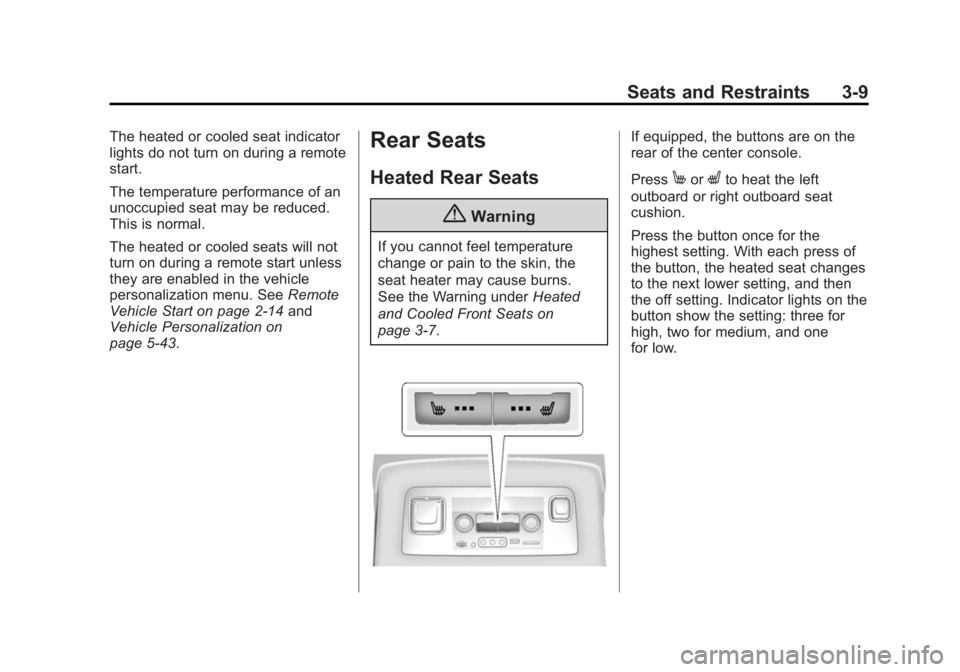
If equipped, the buttons are on the
rear of the center console.
Press
MorLto heat the left
outboard or right outboard seat
cushion.
Press the button once for the
highest setting. With each press of
the button, the heated seat changes
to the next lower setting, and then
the off setting. Indicator lights on the
button show the setting: three for
high, two for medium, and one
for low.
Page 134 of 455
Black plate (1,1)GMC Yukon/Yukon XL Owner Manual (GMNA-Localizing-U.S./Canada/
Mexico-7063682) - 2015 - crc - 6/5/14
Storage 4-1
Storage
Storage Compartments
Storage Compartments . . . . . . . 4-1
Instrument Panel Storage . . . . . 4-1
Glove Box . . . . . . . . . . . . . . . . . . . . 4-1
Cupholders . . . . . . . . . . . . . . . . . . . 4-1
Sunglasses Storage . . . . . . . . . . 4-2
Armrest Storage . . . . . . . . . . . . . . 4-2
Rear Storage . . . . . . . . . . . . . . . . . 4-2
Center Console Storage . . . . . . 4-2
Additional Storage Features
Cargo Cover Panels . . . . . . . . . . 4-3
Roof Rack System
Roof Rack System . . . . . . . . . . . . 4-4
Storage
Compartments
{Warning
Do not store heavy or sharp
objects in storage compartments.
In a crash, these objects may
cause the cover to open and
could result in injury.
Instrument Panel Storage
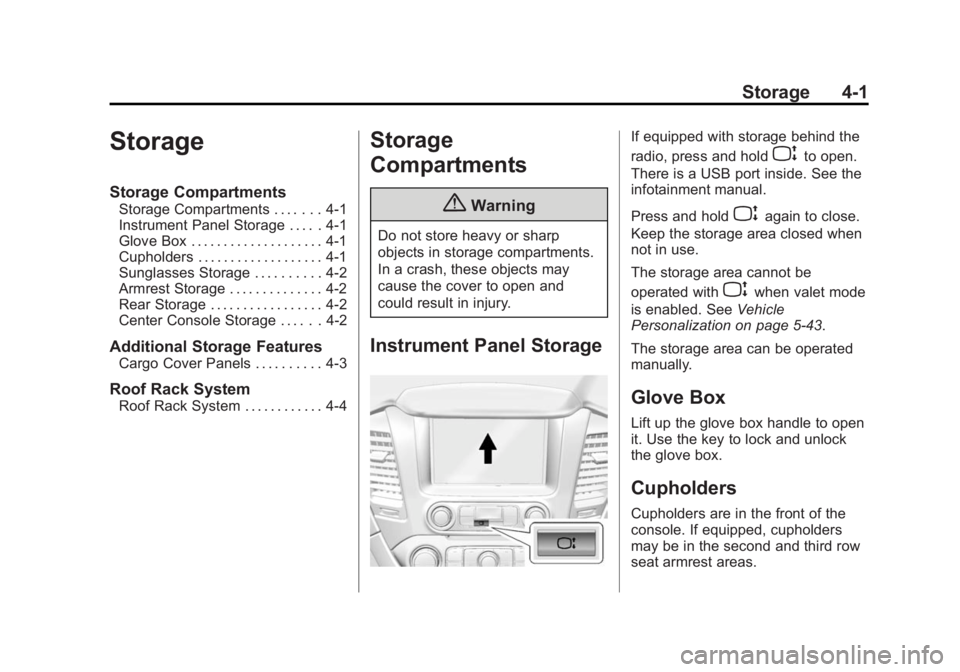
If equipped with storage behind the
radio, press and hold
Pto open.
There is a USB port inside. See the
infotainment manual.
Press and hold
Pagain to close.
Keep the storage area closed when
not in use.
The storage area cannot be
operated with
Pwhen valet mode
is enabled. See Vehicle
Personalization on page 5-43.
The storage area can be operated
manually.
Glove Box
Lift up the glove box handle to open
it. Use the key to lock and unlock
the glove box.
Cupholders
Cupholders are in the front of the
console. If equipped, cupholders
may be in the second and third row
seat armrest areas.
Page 139 of 455
Black plate (2,1)GMC Yukon/Yukon XL Owner Manual (GMNA-Localizing-U.S./Canada/
Mexico-7063682) - 2015 - crc - 6/5/14
5-2 Instruments and Controls
Steering SystemMessages . . . . . . . . . . . . . . . . . . 5-39
Tire Messages . . . . . . . . . . . . . . . 5-39
Transmission Messages . . . . . 5-40
Vehicle Reminder Messages . . . . . . . . . . . . . . . . . . 5-42
Vehicle Speed Messages . . . . 5-42
Washer Fluid Messages . . . . . 5-43
Vehicle Personalization
Vehicle Personalization . . . . . . 5-43
Universal Remote System
Universal Remote System . . . 5-50
Universal Remote System Programming . . . . . . . . . . . . . . . 5-50
Universal Remote System Operation . . . . . . . . . . . . . . . . . . 5-53
Controls
Steering Wheel
Adjustment
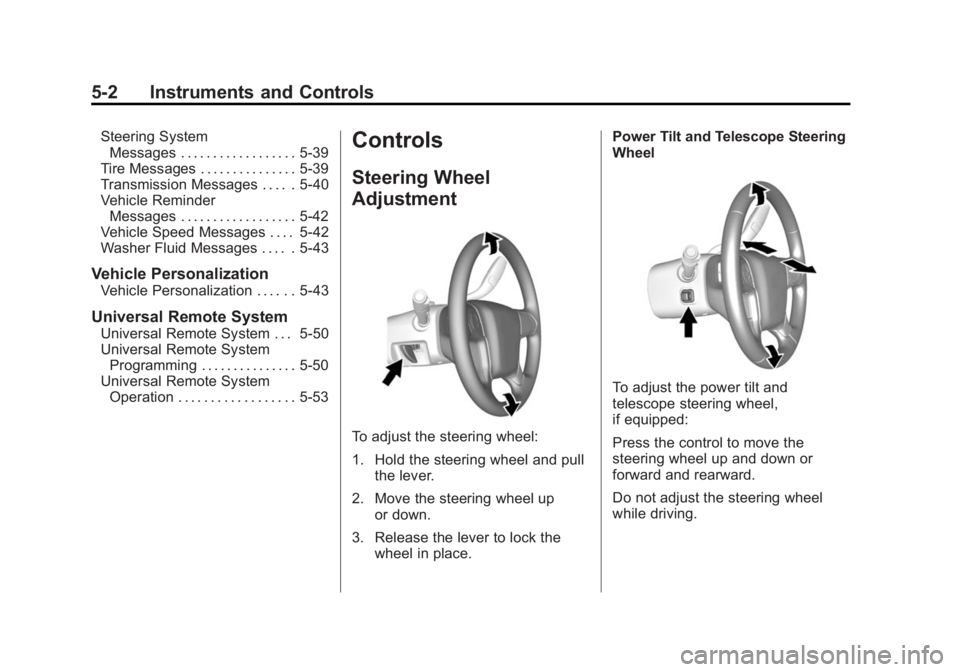
To adjust the steering wheel:
1. Hold the steering wheel and pull
the lever.
2. Move the steering wheel up or down.
3. Release the lever to lock the wheel in place. Power Tilt and Telescope Steering
Wheel
To adjust the power tilt and
telescope steering wheel,
if equipped:
Press the control to move the
steering wheel up and down or
forward and rearward.
Do not adjust the steering wheel
while driving.
Page 180 of 455
Black plate (43,1)GMC Yukon/Yukon XL Owner Manual (GMNA-Localizing-U.S./Canada/
Mexico-7063682) - 2015 - crc - 6/5/14
Instruments and Controls 5-43
Washer Fluid Messages
WASHER FLUID LOW ADD
FLUID
This message displays when the
windshield washer fluid is low. Fill
the windshield washer fluid reservoir
as soon as possible. SeeEngine
Compartment Overview on
page 10-5 for the location of the
windshield washer fluid reservoir.
Also, see Washer Fluid on
page 10-20 for more information.
Vehicle
Personalization
Use the audio system controls to
access the personalization menus
for customizing vehicle features.
The following are all possible
personalization features. Depending
on the vehicle, some may not be
available.
Radio Audio System Controls
1. Press the desired feature to
display a list of available
options.
2. Press to select the desired feature setting.
3. Press
oBACK on the faceplate
or the
0screen button to return
to the previous menu or exit.
Turn the vehicle to ON/RUN to
access the Settings menu, then
select SETTINGS from the Home
Page on the infotainment system
display. Personalization Menus
The following list of menu items may
be available:
.Time and Date
.Language [Language]
.Valet Mode
.Radio
.Vehicle
.Bluetooth
.Voice
.Display
.Rear Camera
.Return to Factory Settings
.Software Information
Detailed information for each menu
follows.
Time and Date
Manually set the time and date. See
Clock on page 5-6.
Page 198 of 455
Black plate (7,1)GMC Yukon/Yukon XL Owner Manual (GMNA-Localizing-U.S./Canada/
Mexico-7063682) - 2015 - crc - 6/5/14
Lighting 6-7
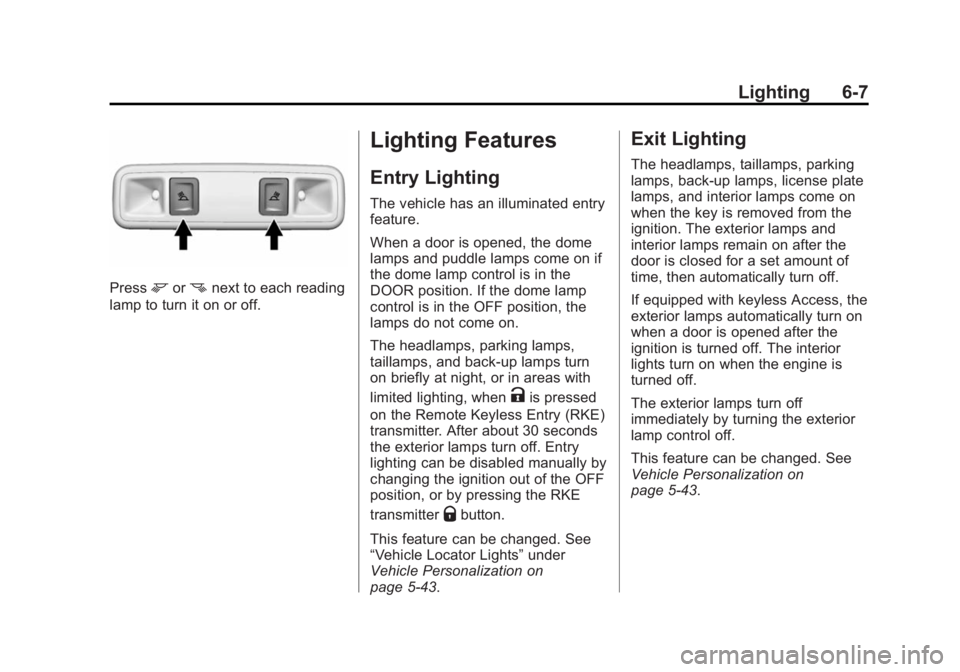
Pressmornnext to each reading
lamp to turn it on or off.
Lighting Features
Entry Lighting
The vehicle has an illuminated entry
feature.
When a door is opened, the dome
lamps and puddle lamps come on if
the dome lamp control is in the
DOOR position. If the dome lamp
control is in the OFF position, the
lamps do not come on.
The headlamps, parking lamps,
taillamps, and back-up lamps turn
on briefly at night, or in areas with
limited lighting, when
Kis pressed
on the Remote Keyless Entry (RKE)
transmitter. After about 30 seconds
the exterior lamps turn off. Entry
lighting can be disabled manually by
changing the ignition out of the OFF
position, or by pressing the RKE
transmitter
Qbutton.
This feature can be changed. See
“Vehicle Locator Lights” under
Vehicle Personalization on
page 5-43.
Exit Lighting
The headlamps, taillamps, parking
lamps, back-up lamps, license plate
lamps, and interior lamps come on
when the key is removed from the
ignition. The exterior lamps and
interior lamps remain on after the
door is closed for a set amount of
time, then automatically turn off.
If equipped with keyless Access, the
exterior lamps automatically turn on
when a door is opened after the
ignition is turned off. The interior
lights turn on when the engine is
turned off.
The exterior lamps turn off
immediately by turning the exterior
lamp control off.
This feature can be changed. See
Vehicle Personalization on
page 5-43.
Page 202 of 455
Black plate (1,1)GMC Yukon/Yukon XL Owner Manual (GMNA-Localizing-U.S./Canada/
Mexico-7063682) - 2015 - crc - 6/5/14
Climate Controls 8-1
Climate Controls
Climate Control Systems
Dual Automatic Climate ControlSystem . . . . . . . . . . . . . . . . . . . . . . 8-1
Rear Climate Control System . . . . . . . . . . . . . . . . . . . . . . 8-5
Air Vents
Air Vents . . . . . . . . . . . . . . . . . . . . . . 8-6
Maintenance
Passenger Compartment AirFilter . . . . . . . . . . . . . . . . . . . . . . . . . 8-7
Service . . . . . . . . . . . . . . . . . . . . . . . 8-8
Climate Control
Systems
Dual Automatic Climate
Control System
With this system the heating,
cooling, and ventilation in the
vehicle can be controlled. Some
climate control settings can be
changed. See “Climate and Air
Quality” underVehicle
Personalization on page 5-43.
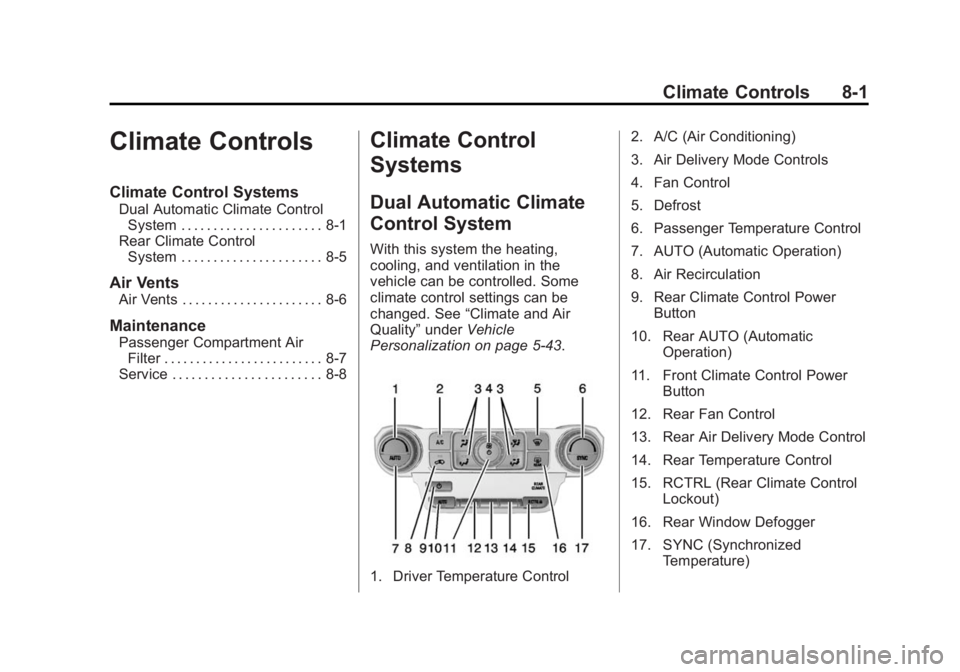
1. Driver Temperature Control 2. A/C (Air Conditioning)
3. Air Delivery Mode Controls
4. Fan Control
5. Defrost
6. Passenger Temperature Control
7. AUTO (Automatic Operation)
8. Air Recirculation
9. Rear Climate Control Power
Button
10. Rear AUTO (Automatic Operation)
11. Front Climate Control Power Button
12. Rear Fan Control
13. Rear Air Delivery Mode Control
14. Rear Temperature Control
15. RCTRL (Rear Climate Control Lockout)
16. Rear Window Defogger
17. SYNC (Synchronized Temperature)
Page 204 of 455
Black plate (3,1)GMC Yukon/Yukon XL Owner Manual (GMNA-Localizing-U.S./Canada/
Mexico-7063682) - 2015 - crc - 6/5/14
Climate Controls 8-3
Changing the mode cancels the
automatic operation and the system
goes into manual mode. Press
AUTO to return to automatic
operation.
Y(Vent):Air is directed to the
instrument panel outlets.
\(Bi-Level): Air is divided
between the instrument panel and
floor outlets.
[(Floor): Air is directed to the
floor outlets, with some to the
windshield, side window outlets, and
second row floor outlets.
-(Defog): This mode clears the
windows of fog or moisture. Air is
directed to the windshield, floor
outlets, and side window vents.
0(Defrost): Press to clear the
windshield of fog or frost more
quickly. Air is directed to the
windshield and the side window
vents. The system automatically
forces outside air into the vehicle and the air conditioning compressor
will run, unless the outside
temperature is close to freezing.
Do not drive the vehicle until all
windows are clear.
See
Air Vents on page 8-6.
A/C (Air Conditioning): Press to
turn the air conditioning system on
or off. An indicator light comes on to
show that the air conditioning is
enabled. If the fan is turned off, the
air conditioner will not run. The A/C
light will stay on even if the outside
temperatures are below freezing.
@(Recirculation): Press to turn
on recirculation. An indicator light
comes on. Air is recirculated to
quickly cool the inside of the
vehicle. It can also be used to help
reduce outside air and odors that
enter the vehicle. The air
conditioning compressor also comes
on when this mode is activated.
Auto Defog: The climate control
system may have a sensor to
automatically detect high humidity inside the vehicle. When high
humidity is detected, the climate
control system may adjust to
outside air supply and turn on the
air conditioner. If the climate control
system does not detect possible
window fogging, it returns to normal
operation. To turn Auto Defog off or
on, see
“Climate and Air Quality”
under Vehicle Personalization on
page 5-43.
Rear Window Defogger
The rear window defogger uses a
warming grid to remove fog from the
rear window.
K(Rear Window Defogger):
Press to turn the rear window
defogger on or off. An indicator light
on the button comes on to show that
the rear window defogger is on.
The rear window defogger only
works when the ignition is in ON/
RUN. The rear window defogger
stays on for approximately
10 minutes after the button is first
pressed. With each subsequent
press, the rear window defogger