lock GMC YUKON 2018 Repair Manual
[x] Cancel search | Manufacturer: GMC, Model Year: 2018, Model line: YUKON, Model: GMC YUKON 2018Pages: 431, PDF Size: 6.08 MB
Page 149 of 431
GMC Yukon/Yukon XL/Denali Owner Manual (GMNA-Localizing-U.S./
Canada/Mexico-11349262) - 2018 - CRC - 11/3/17
148 Instruments and Controls
before the system is ready for
inspection. This can happen if
the 12-volt battery has recently
been replaced or run down, or if
the vehicle has been recently
serviced.
See your dealer if the vehicle will
not pass or cannot be made ready
for the test.
Brake System Warning
Light
The vehicle brake system consists
of two hydraulic circuits. If one
circuit is not working, the remaining
circuit can still work to stop the
vehicle. For normal braking
performance, both circuits need to
be working.
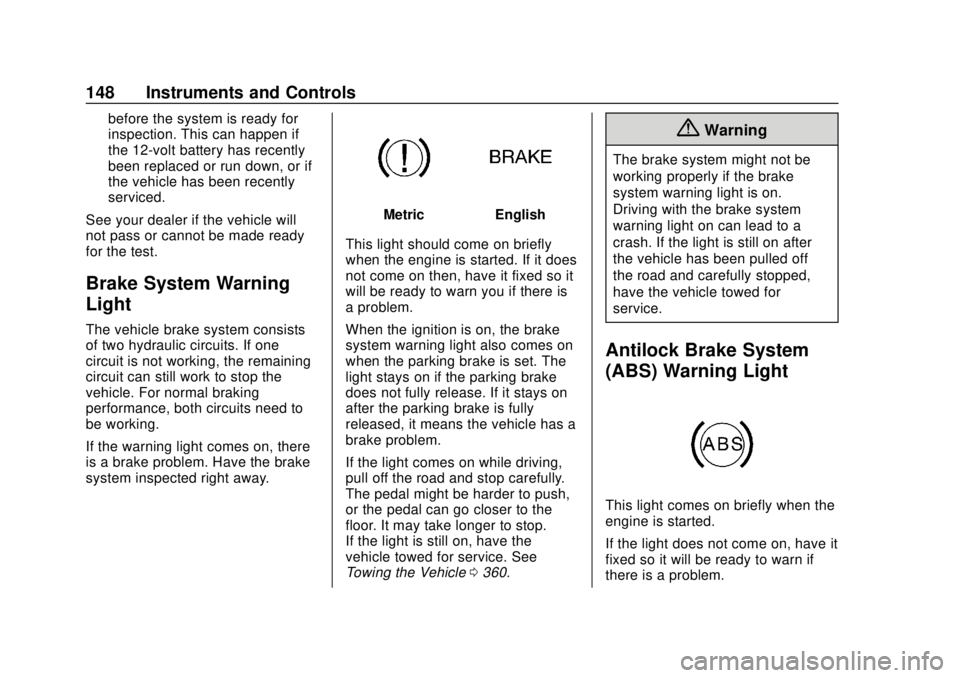
If the warning light comes on, there
is a brake problem. Have the brake
system inspected right away.
MetricEnglish
This light should come on briefly
when the engine is started. If it does
not come on then, have it fixed so it
will be ready to warn you if there is
a problem.
When the ignition is on, the brake
system warning light also comes on
when the parking brake is set. The
light stays on if the parking brake
does not fully release. If it stays on
after the parking brake is fully
released, it means the vehicle has a
brake problem.
If the light comes on while driving,
pull off the road and stop carefully.
The pedal might be harder to push,
or the pedal can go closer to the
floor. It may take longer to stop.
If the light is still on, have the
vehicle towed for service. See
Towing the Vehicle 0360.
{Warning
The brake system might not be
working properly if the brake
system warning light is on.
Driving with the brake system
warning light on can lead to a
crash. If the light is still on after
the vehicle has been pulled off
the road and carefully stopped,
have the vehicle towed for
service.
Antilock Brake System
(ABS) Warning Light
This light comes on briefly when the
engine is started.
If the light does not come on, have it
fixed so it will be ready to warn if
there is a problem.
Page 150 of 431
GMC Yukon/Yukon XL/Denali Owner Manual (GMNA-Localizing-U.S./
Canada/Mexico-11349262) - 2018 - CRC - 11/3/17
Instruments and Controls 149
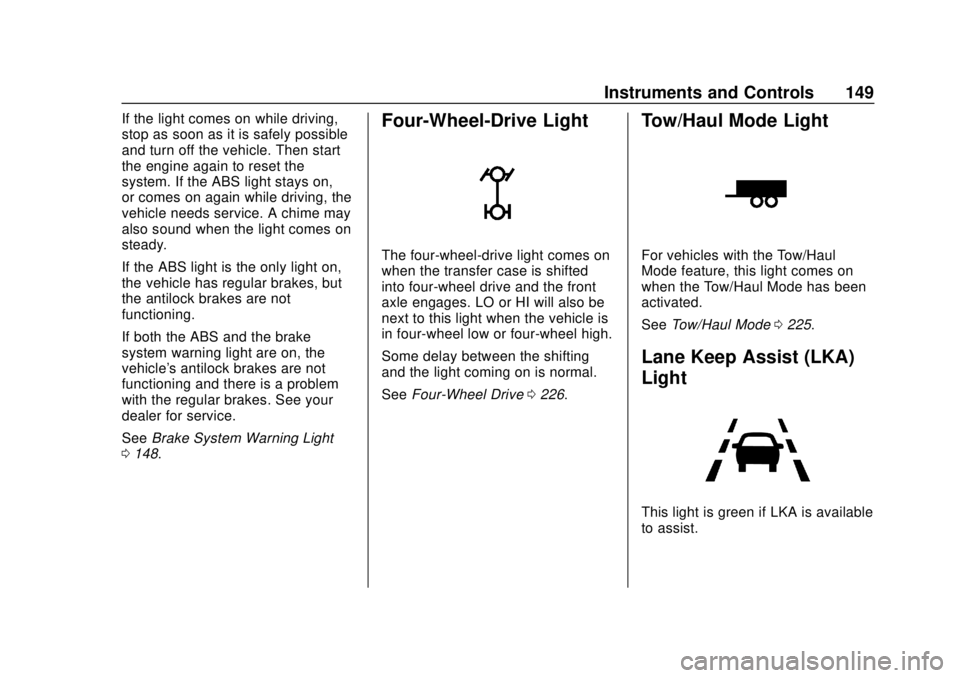
If the light comes on while driving,
stop as soon as it is safely possible
and turn off the vehicle. Then start
the engine again to reset the
system. If the ABS light stays on,
or comes on again while driving, the
vehicle needs service. A chime may
also sound when the light comes on
steady.
If the ABS light is the only light on,
the vehicle has regular brakes, but
the antilock brakes are not
functioning.
If both the ABS and the brake
system warning light are on, the
vehicle's antilock brakes are not
functioning and there is a problem
with the regular brakes. See your
dealer for service.
SeeBrake System Warning Light
0 148.Four-Wheel-Drive Light
The four-wheel-drive light comes on
when the transfer case is shifted
into four-wheel drive and the front
axle engages. LO or HI will also be
next to this light when the vehicle is
in four-wheel low or four-wheel high.
Some delay between the shifting
and the light coming on is normal.
See Four-Wheel Drive 0226.
Tow/Haul Mode Light
For vehicles with the Tow/Haul
Mode feature, this light comes on
when the Tow/Haul Mode has been
activated.
See Tow/Haul Mode 0225.
Lane Keep Assist (LKA)
Light
This light is green if LKA is available
to assist.
Page 164 of 431
GMC Yukon/Yukon XL/Denali Owner Manual (GMNA-Localizing-U.S./
Canada/Mexico-11349262) - 2018 - CRC - 11/3/17
Instruments and Controls 163
Time and Date
Manually set the time and date. See
Clock0129.
Rear Seat Reminder
This allows for a chime and a
message when the rear door has
been opened before or during
operation of the vehicle.
Select Off or On.
Language
Select Language, then select from
the available language(s).
The selected language will display
on the system, and voice
recognition (if equipped) will reflect
the selected language.
Video Voice-Over
When activated, the RSI will read
aloud menu titles, menu listings,
pop-ups, alerts, and file titles from
audio and video media.
Select Off or On.
Valet Mode
This will lock the infotainment
system and steering wheel controls.
It may also limit access to vehicle
storage locations, if equipped.
To enable valet mode:
1. Enter a four-digit code on the keypad.
2. Select Enter to go to the confirmation screen.
3. Re-enter the four-digit code.
Touch Lock or Unlock to lock or
unlock the system. Touch Back to
go back to the previous menu.
Teen Driver
See “Teen Driver” under“Settings”
in the infotainment manual.
Radio
Select and the following may
display:
. Manage Favorites
. Number of Favorites Shown
. Audible Touch Feedback .
Bose AudioPilot
. Auto Volume
. Maximum Startup Volume
. Audio Cue Volume
Manage Favorites
This allows favorites to be edited.
See “Manage Favorites” in
“Settings” under“Radio” in the
infotainment manual.
Number of Favorites Shown
Select to set the number of favorites
to display.
Select the desired number or select
Auto and the infotainment system
will automatically adjust the number
of favorites shown.
Audible Touch Feedback
This allows Audible Touch
Feedback to be turned on or off.
Select Off or On.
Bose AudioPilot
This allows Bose AudioPilot to be
turned on or off.
Page 165 of 431
GMC Yukon/Yukon XL/Denali Owner Manual (GMNA-Localizing-U.S./
Canada/Mexico-11349262) - 2018 - CRC - 11/3/17
164 Instruments and Controls
Select Off or On.
Auto Volume
This feature adjusts the volume
based on vehicle speed and
ambient noise.
Select Off, Low, Medium-Low,
Medium, Medium-High, or High.
Maximum Startup Volume
This feature sets the maximum
startup volume. If the vehicle is
started and the volume is greater
than this level, the volume is
adjusted to this level. To set the
maximum startup volume, touch +
or−to increase or decrease.
Audio Cue Volume
This feature sets the volume of
audio files played at system startup
and shutdown.
Select On, then touch + or −to
increase or decrease the volume.
Vehicle
Select and the following may
display:
. Climate and Air Quality .
Collision/Detection Systems
. Comfort and Convenience
. Lighting
. Power Door Locks
. Remote Lock, Unlock, Start
Climate and Air Quality
Select and the following may
display:
.Auto Fan Speed
. Auto Defog
. Auto Rear Defog
Auto Fan Speed
This feature will set the auto fan
speed.
Select Low, Medium, or High.
Auto Defog
When set to On, the auto defog
comes on when the climate control
sensor detects high interior
humidity. Air will be directed to the
windshield.
Select Off or On. Auto Rear Defog
This feature will automatically turn
on the rear window defogger when
the vehicle is first started in cold
weather and turn off when the
vehicle is warmed.
Select Off or On.Collision/Detection Systems
Select and the following may
display:
.
Alert Type
. Forward Collision System
. Adaptive Cruise Go Notifier
. Park Assist
. Side Blind Zone Alert
. Rear Cross Traffic Alert
. Lane Change Alert
Alert Type
This feature will set crash alerts to
beeps or seat vibrations. This
setting affects all crash alerts
including Forward Collision Alert,
Lane Departure Warning, and Park
Assist alerts.
Page 167 of 431
GMC Yukon/Yukon XL/Denali Owner Manual (GMNA-Localizing-U.S./
Canada/Mexico-11349262) - 2018 - CRC - 11/3/17
166 Instruments and Controls
Chime Volume
This allows the selection of the
chime volume level.
Touch + or−to adjust the volume.
Hands Free Liftgate Control
The liftgate may be operated with a
kicking motion under the rear
bumper. See Liftgate045.
Select Off, On-Open and Close,
or On-Open Only.
Reverse Tilt Mirror
When on, the driver and/or
passenger mirrors will tilt downward
when the vehicle is shifted to
R (Reverse) to improve visibility of
the ground near the rear wheels.
See Reverse Tilt Mirrors 057.
Select Off, On - Driver and
Passenger, On - Driver, or On -
Passenger.
Auto Mirror Folding
When on, the outside mirrors will
automatically fold or unfold when
the Remote Keyless Entry (RKE) transmitterQorKbutton is
pressed and held. See Folding
Mirrors 055.
Select Off or On.
Auto Wipe in Reverse Gear
When on and the front wiper is on
and wiping, the rear wiper will
automatically activate when the
vehicle is shifted to R (Reverse).
Select Off or On.
Lighting
Select the Lighting menu and the
following may display:
. Vehicle Locator Lights
. Exit Lighting
Vehicle Locator Lights
This feature will flash the exterior
lamps and allows some of the
exterior lamps and most of the
interior lamps to turn on briefly
when
Kon the Remote Keyless
Entry (RKE) transmitter is pressed
to locate the vehicle.
Select On or Off. Exit Lighting
This allows the selection of how
long the exterior lamps stay on
when leaving the vehicle when it is
dark outside.
Select Off, 30 Seconds, 60 Seconds,
or 120 Seconds.
Power Door Locks
Select Power Door Locks and the
following may display:
.
Unlocked Door Anti-Lockout
. Auto Door Unlock
. Delayed Door Lock
Unlocked Door Anti-Lockout
When on, this feature will keep the
driver door from locking when the
door is open and the key is in the
ignition. If Off is selected, the
Delayed Door Lock menu will be
available.
Select Off or On.
Page 168 of 431
GMC Yukon/Yukon XL/Denali Owner Manual (GMNA-Localizing-U.S./
Canada/Mexico-11349262) - 2018 - CRC - 11/3/17
Instruments and Controls 167
Auto Door Unlock
This allows selection of which of the
doors will automatically unlock when
the vehicle is shifted into P (Park).
Select Off, All Doors, or Driver Door.
Delayed Door Lock
When on, this feature will delay the
locking of the doors. To override the
delay, press the power door lock
switch on the door.
Select Off or On.
Remote Lock, Unlock, Start
Select and the following may
display:
.Remote Unlock Light Feedback
. Remote Lock Feedback
. Remote Door Unlock
. Remote Start Auto Cool Seats
. Remote Start Auto Heat Seats
. Passive Door Unlock
. Passive Door Lock
. Remote Left in Vehicle Alert Remote Unlock Light Feedback
When on, the exterior lamps will
flash when unlocking the vehicle
with the RKE transmitter.
Select Off or Flash Lights.
Remote Lock Feedback
This allows selection of what type of
feedback is given when locking the
vehicle with the RKE transmitter.
Select Off, Lights and Horn, Lights
Only, or Horn Only.
Remote Door Unlock
This allows selection of which doors
will unlock when pressing
Kon the
RKE transmitter.
Select All Doors or Driver Door.
Remote Start Auto Cool Seats
If turned on, this feature will turn the
ventilated seats on when using
remote start on warm days.
Select Off or On. Remote Start Auto Heat Seats
If turned on, this feature will turn the
heated seats on when using remote
start on cold days.
Select Off or On.
Passive Door Unlock
This allows the selection of what
doors will unlock when using the
button on the driver door to unlock
the vehicle.
Select All Doors or Driver Door.
Passive Door Lock
This allows passive locking to be
turned on or off and selects
feedback. See
Remote Keyless
Entry (RKE) System Operation (Key
Access) 033 orRemote Keyless
Entry (RKE) System Operation
(Keyless Access) 035.
Select Off, On with Horn
Chirp, or On.
Page 177 of 431
GMC Yukon/Yukon XL/Denali Owner Manual (GMNA-Localizing-U.S./
Canada/Mexico-11349262) - 2018 - CRC - 11/3/17
176 Lighting
.The vehicle's speed drops below
20 km/h (12 mph).
. The IntelliBeam system can be
disabled by the High/Low-Beam
Changer or the Flash-to-Pass
feature. If this happens, the
High/Low-Beam Changer must
be activated on then off within
two seconds to reactivate the
IntelliBeam system. The
instrument cluster light will
come on to indicate the
IntelliBeam is reactivated.
See Headlamp High/Low-Beam
Changer 0176 and
Flash-to-Pass 0176.
The high beams may not turn off
automatically if the system cannot
detect another vehicle's lamps
because of any of the following:
. The other vehicle's lamps are
missing, damaged, obstructed
from view, or otherwise
undetected.
. The other vehicle's lamps are
covered with dirt, snow, and/or
road spray. .
The other vehicle's lamps cannot
be detected due to dense
exhaust, smoke, fog, snow, road
spray, mist, or other airborne
obstructions.
. The vehicle's windshield is dirty,
cracked, or obstructed by
something that blocks the view
of the light sensor.
. The vehicle is loaded such that
the front end points upward,
causing the light sensor to aim
high and not detect headlamps
and taillamps.
. The vehicle is being driven on
winding or hilly roads.
The automatic high-beam
headlamps may need to be disabled
if any of the above conditions exist.
Exterior Lamps Off
Reminder
A reminder chime sounds when the
headlamps or parking lamps are
manually turned on, the ignition is
off, and a door is open. To disable
the chime, turn the lamps off.
Headlamp High/
Low-Beam Changer
Push the turn signal lever toward
the instrument panel to change the
headlamps from low to high beam.
Pull the turn signal lever toward you
and release it to return to low-beam
headlamps.
When the high-beam headlamps are
on, this indicator light on the
instrument cluster will also be on.
Flash-to-Pass
This feature lets you use the
high-beam headlamps to signal a
driver in front of you that you want
to pass. It works even if the
headlamps are in the automatic
position.
Page 185 of 431
GMC Yukon/Yukon XL/Denali Owner Manual (GMNA-Localizing-U.S./
Canada/Mexico-11349262) - 2018 - CRC - 11/3/17
184 Climate Controls
Climate Controls
Climate Control Systems
Dual Automatic ClimateControl System . . . . . . . . . . . . . 184
Rear Climate Control System . . . . . . . . . . . . . . . . . . . . . . 188
Air Vents
Air Vents . . . . . . . . . . . . . . . . . . . . . 189
Maintenance
Passenger Compartment AirFilter . . . . . . . . . . . . . . . . . . . . . . . . 190
Service . . . . . . . . . . . . . . . . . . . . . . . 191
Climate Control
Systems
Dual Automatic Climate
Control System
With this system the heating,
cooling, and ventilation in the
vehicle can be controlled. Some
climate control settings can be
changed. See “Climate and Air
Quality” underVehicle
Personalization 0162.
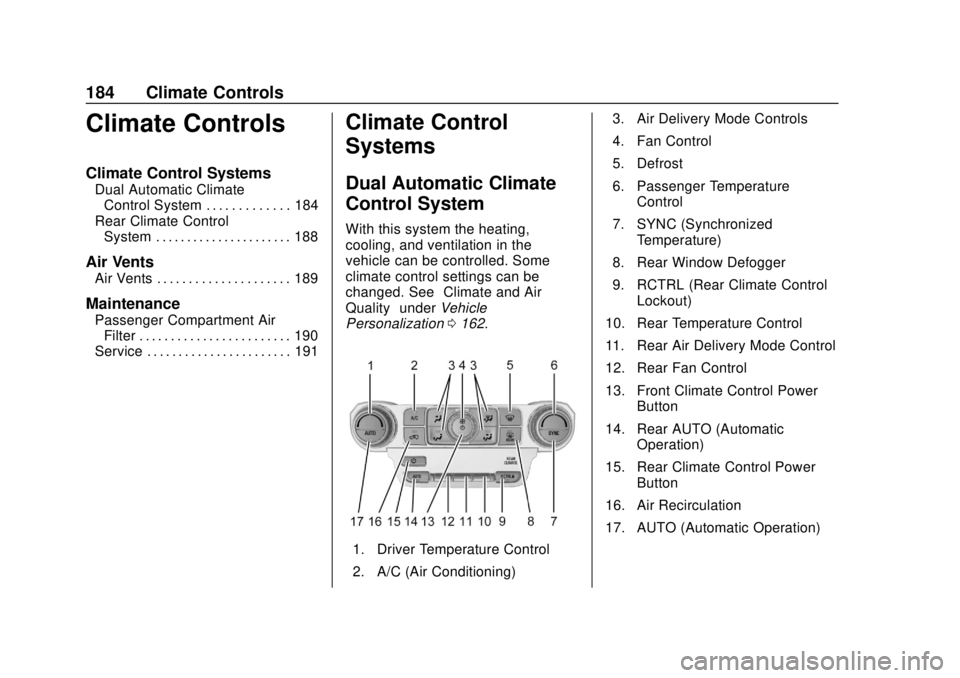
1. Driver Temperature Control
2. A/C (Air Conditioning) 3. Air Delivery Mode Controls
4. Fan Control
5. Defrost
6. Passenger Temperature
Control
7. SYNC (Synchronized Temperature)
8. Rear Window Defogger
9. RCTRL (Rear Climate Control Lockout)
10. Rear Temperature Control
11. Rear Air Delivery Mode Control
12. Rear Fan Control
13. Front Climate Control Power Button
14. Rear AUTO (Automatic Operation)
15. Rear Climate Control Power Button
16. Air Recirculation
17. AUTO (Automatic Operation)
Page 186 of 431
GMC Yukon/Yukon XL/Denali Owner Manual (GMNA-Localizing-U.S./
Canada/Mexico-11349262) - 2018 - CRC - 11/3/17
Climate Controls 185
Front Climate Controls
Automatic Operation
The system automatically controls
the fan speed, air delivery, air
conditioning, and recirculation in
order to heat or cool the vehicle to
the desired temperature.
When AUTO is lit, all four functions
operate automatically. Each function
can also be manually set and the
setting is displayed. Functions not
manually set will continue to be
automatically controlled, even if the
AUTO indicator is not lit.
To place the system in
automatic mode:1. Press AUTO.
2. Set the driver and passenger temperature.
To find your comfort setting,
start with 22 °C (72 °F) and
allow the system time to
stabilize. Then adjust the
temperature as needed for best
comfort. To improve fuel efficiency and to
cool the vehicle faster, recirculation
may be automatically selected in
warm weather.
The recirculation light will not come
on when automatically controlled.
Press
@to manually select
recirculation; press it again to select
outside air.
Do not cover the solar sensor on the
top of the instrument panel near the
windshield. This sensor regulates
air temperature based on sun load.
See “Sensors” later in this section.
Manual Operation
O:Press to turn the climate control
system on or off. When off is
selected, the system will stop air
from flowing into the cabin. If on is
selected, a button is pressed, or a
knob is turned, the climate control
system will turn on and operate at
the current setting.
9: Turn clockwise or
counterclockwise to increase or
decrease the fan speed. Press
AUTO to return to automatic
operation.
The maximum auto fan speed can
be adjusted. See “Climate and Air
Quality” underVehicle
Personalization 0162.
Driver and Passenger
Temperature Control : The
temperature can be adjusted
separately for the driver and
passenger.
Turn the knob clockwise or
counterclockwise to increase or
decrease the driver or passenger
temperature setting.
SYNC : Press to link the passenger
and rear climate temperature
settings to the driver setting. The
SYNC indicator light will turn on.
When the passenger or rear climate
settings are adjusted, the SYNC
indicator light turns off.
Page 188 of 431
GMC Yukon/Yukon XL/Denali Owner Manual (GMNA-Localizing-U.S./
Canada/Mexico-11349262) - 2018 - CRC - 11/3/17
Climate Controls 187
warmed. To turn Auto Rear Defog
on or off, see“Climate and Air
Quality” underVehicle
Personalization 0162.
Caution
Using a razor blade or sharp
object to clear the inside rear
window can damage the rear
window defogger. Repairs would
not be covered by the vehicle
warranty. Do not clear the inside
rear window with sharp objects.
Heated Mirror : If equipped with
heated outside mirrors, the mirrors
heat to help clear fog or frost from
the surface of the mirror when the
rear window defog button is
pressed. See Heated Mirrors 056.
Rear Climate Controls
O:Press to turn the rear climate
control system on or off.
AUTO : Press AUTO to control the
rear passenger temperature, air
delivery, and fan speed. AUTO
appears in the display when automatic operation is active. If any
of the climate control settings
except rear temperature are
manually adjusted, this cancels full
automatic operation.
Fan Control :
Press up or down to
increase or decrease the rear
passenger area fan speed.
Air Delivery Mode Control : Press
up or down to change the direction
of the rear passenger airflow.
Repeatedly press the switch until
the desired mode appears on the
display. Multiple presses will cycle
through the delivery selections.
Temperature Control : Press up or
down to increase or decrease the
airflow temperature into the rear
passenger area.
RCTRL : Press to lock or unlock
control of the rear climate control
system from the rear seat
passengers. When locked, the rear
climate control can only be adjusted
from the front seat. Remote Start Climate Control
Operation
If equipped with the remote start
feature, the climate control system
will come on when the vehicle is
started remotely, depending on the
outside temperature. The rear
window defogger and heated seats,
if equipped, may also come on.
See
Remote Vehicle Start 041 and
Heated and Ventilated Front Seats
0 69.
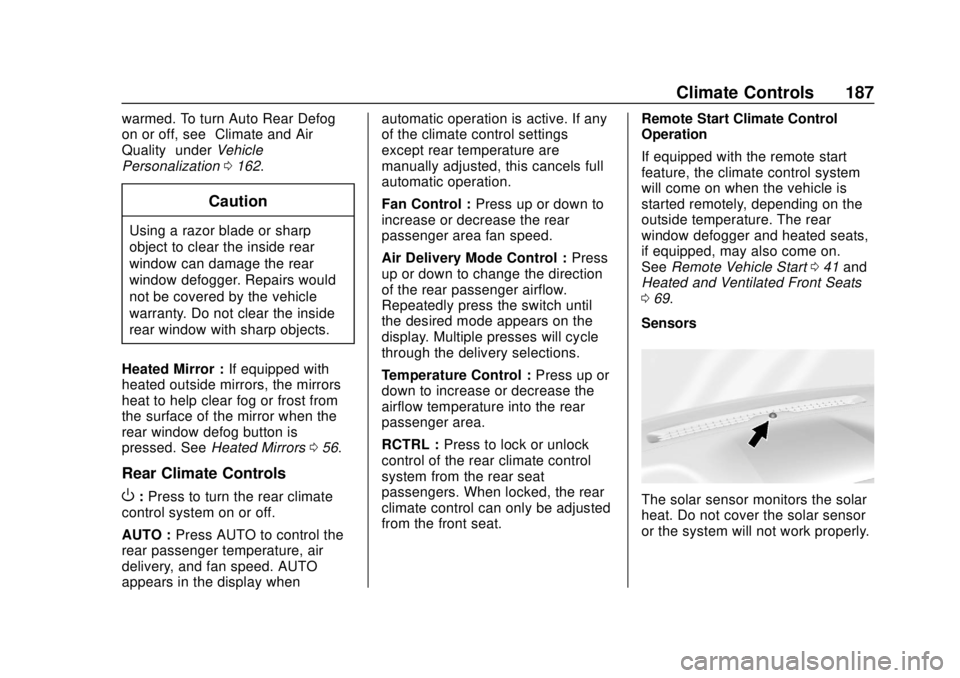
SensorsThe solar sensor monitors the solar
heat. Do not cover the solar sensor
or the system will not work properly.