Enter GMC YUKON 2019 User Guide
[x] Cancel search | Manufacturer: GMC, Model Year: 2019, Model line: YUKON, Model: GMC YUKON 2019Pages: 450, PDF Size: 6.5 MB
Page 41 of 450
GMC Yukon/Yukon XL/Denali Owner Manual (GMNA-Localizing-U.S./
Canada/Mexico-12460267) - 2019 - crc - 9/11/18
40 Keys, Doors, and Windows
Battery Replacement
Replace the battery in the
transmitter soon if the DIC displays
REPLACE BATTERY IN
REMOTE KEY.
Caution
When replacing the battery, do
not touch any of the circuitry on
the transmitter. Static from your
body could damage the
transmitter.
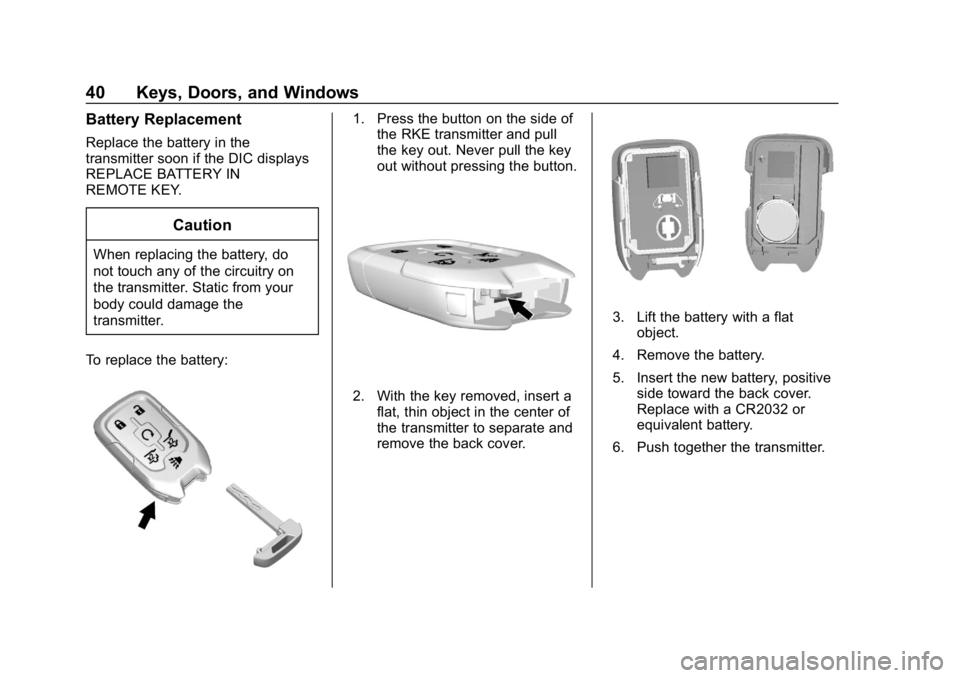
To replace the battery:
1. Press the button on the side of the RKE transmitter and pull
the key out. Never pull the key
out without pressing the button.
2. With the key removed, insert a
flat, thin object in the center of
the transmitter to separate and
remove the back cover.
3. Lift the battery with a flatobject.
4. Remove the battery.
5. Insert the new battery, positive side toward the back cover.
Replace with a CR2032 or
equivalent battery.
6. Push together the transmitter.
Page 43 of 450
GMC Yukon/Yukon XL/Denali Owner Manual (GMNA-Localizing-U.S./
Canada/Mexico-12460267) - 2019 - crc - 9/11/18
42 Keys, Doors, and Windows
Press and hold7for more than
three seconds to activate the panic
alarm. The turn signal lamps flash
and the horn sounds repeatedly for
30 seconds. The alarm turns off
when the ignition is turned on or
7
is pressed again. The ignition must
be off for the panic alarm to work.
Programming Transmitters to
the Vehicle
Only RKE transmitters programmed
to this vehicle will work. If a
transmitter is lost or stolen, a
replacement can be purchased and
programmed through your dealer.
Each vehicle can have up to
eight transmitters programmed to it.
See your dealer for transmitter
programming.
Battery Replacement
Replace the battery in the
transmitter soon if the Driver
Information Center displays
REPLACE BATTERY IN
REMOTE KEY.
Caution
When replacing the battery, do
not touch any of the circuitry on
the transmitter. Static from your
body could damage the
transmitter.
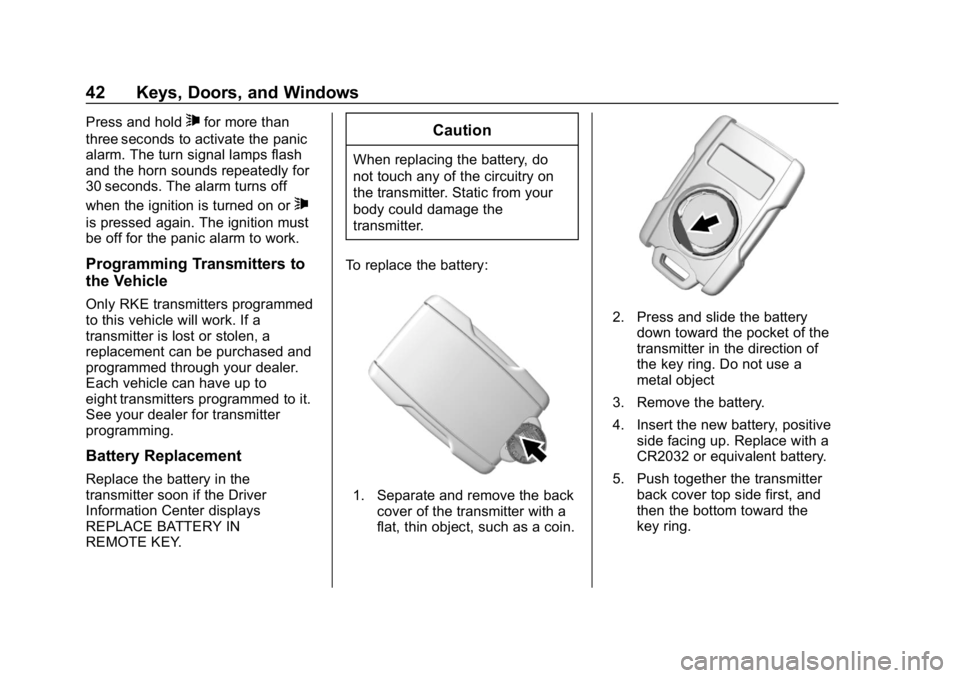
To replace the battery:
1. Separate and remove the back cover of the transmitter with a
flat, thin object, such as a coin.
2. Press and slide the batterydown toward the pocket of the
transmitter in the direction of
the key ring. Do not use a
metal object
3. Remove the battery.
4. Insert the new battery, positive side facing up. Replace with a
CR2032 or equivalent battery.
5. Push together the transmitter back cover top side first, and
then the bottom toward the
key ring.
Page 45 of 450
GMC Yukon/Yukon XL/Denali Owner Manual (GMNA-Localizing-U.S./
Canada/Mexico-12460267) - 2019 - crc - 9/11/18
44 Keys, Doors, and Windows
Canceling a Remote Start
To cancel a remote start, do one of
the following:
.Press and hold
/until the
parking lamps turn off.
. Turn on the hazard warning
flashers.
. Turn the ignition on and then off.
Door Locks
{Warning
Unlocked doors can be
dangerous.
. Passengers, especially
children, can easily open
the doors and fall out of a
moving vehicle. The doors
can be unlocked and
opened while the vehicle is
moving. The chance of
being thrown out of the
vehicle in a crash is
increased if the doors are
not locked. So, all
(Continued)
Warning (Continued)
passengers should wear
seat belts properly and the
doors should be locked
whenever the vehicle is
driven.
. Young children who get into
unlocked vehicles may be
unable to get out. A child
can be overcome by
extreme heat and can suffer
permanent injuries or even
death from heat stroke.
Always lock the vehicle
whenever leaving it.
. Outsiders can easily enter
through an unlocked door
when you slow down or stop
the vehicle. Locking the
doors can help prevent this
from happening.
To lock or unlock the doors from
outside the vehicle:
. Press
QorKon the Remote
Keyless Entry (RKE) transmitter. .
Use the key in the driver door.
To lock or unlock the doors from
inside the vehicle:
. Press
QorKon the power door
lock switch.
. Pushing down the manual lock
knob on the driver door will lock
all doors. Pushing down the
manual lock knob on a
passenger door will lock only
that door.
. Pulling an interior door handle
will unlock the door. Pulling the
door handle again unlatches it.
Keyless Access
If equipped, the RKE transmitter
must be within 1 m (3 ft) of the
liftgate or door being opened. Press
the button on the door handle to
open. See “Keyless Access
Operation” inRemote Keyless Entry
(RKE) System Operation (Keyless
Access) 034 orRemote Keyless
Entry (RKE) System Operation (Key
Access) 041.
Page 48 of 450
GMC Yukon/Yukon XL/Denali Owner Manual (GMNA-Localizing-U.S./
Canada/Mexico-12460267) - 2019 - crc - 9/11/18
Keys, Doors, and Windows 47
Doors
Liftgate
{Warning
Exhaust gases can enter the
vehicle if it is driven with the
liftgate or trunk/hatch open,
or with any objects that pass
through the seal between the
body and the trunk/hatch or
liftgate. Engine exhaust contains
carbon monoxide (CO) which
cannot be seen or smelled. It can
cause unconsciousness and even
death.
If the vehicle must be driven with
the liftgate or trunk/hatch open:. Close all of the windows.
. Fully open the air outlets on
or under the instrument
panel.
(Continued)
Warning (Continued)
.Adjust the climate control
system to a setting that
brings in only outside air
and set the fan speed to the
highest setting. See
“Climate Control Systems”
in the Index.
. If the vehicle is equipped
with a power liftgate, disable
the power liftgate function.
See Engine Exhaust 0227.
Caution
To avoid damage to the liftgate or
liftgate glass, make sure the area
above and behind the liftgate is
clear before opening it.
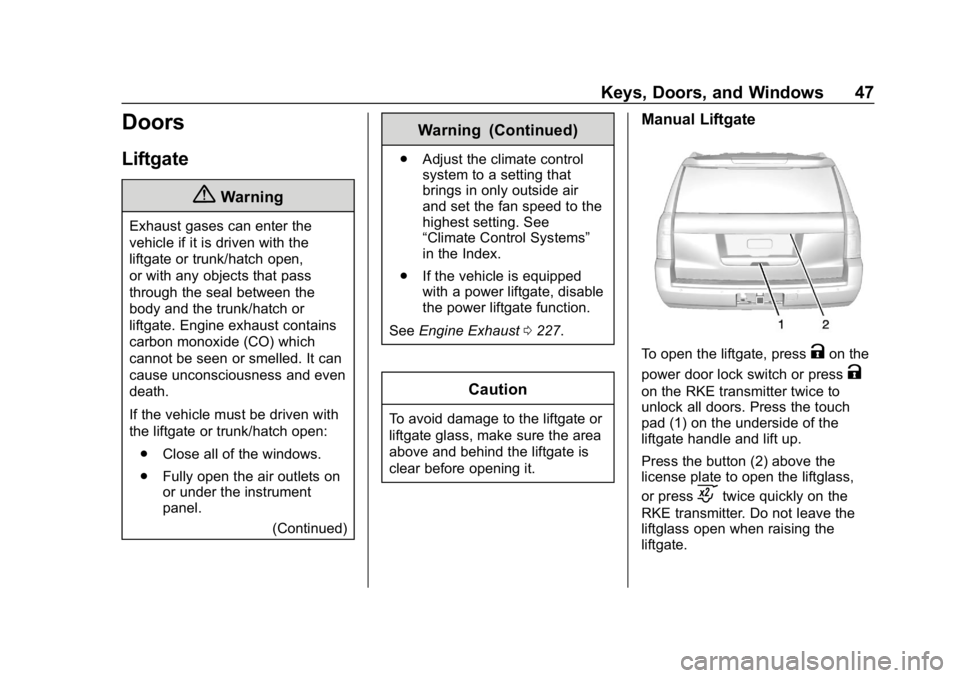
Manual Liftgate
To open the liftgate, pressKon the
power door lock switch or press
K
on the RKE transmitter twice to
unlock all doors. Press the touch
pad (1) on the underside of the
liftgate handle and lift up.
Press the button (2) above the
license plate to open the liftglass,
or press
ctwice quickly on the
RKE transmitter. Do not leave the
liftglass open when raising the
liftgate.
Page 50 of 450
GMC Yukon/Yukon XL/Denali Owner Manual (GMNA-Localizing-U.S./
Canada/Mexico-12460267) - 2019 - crc - 9/11/18
Keys, Doors, and Windows 49
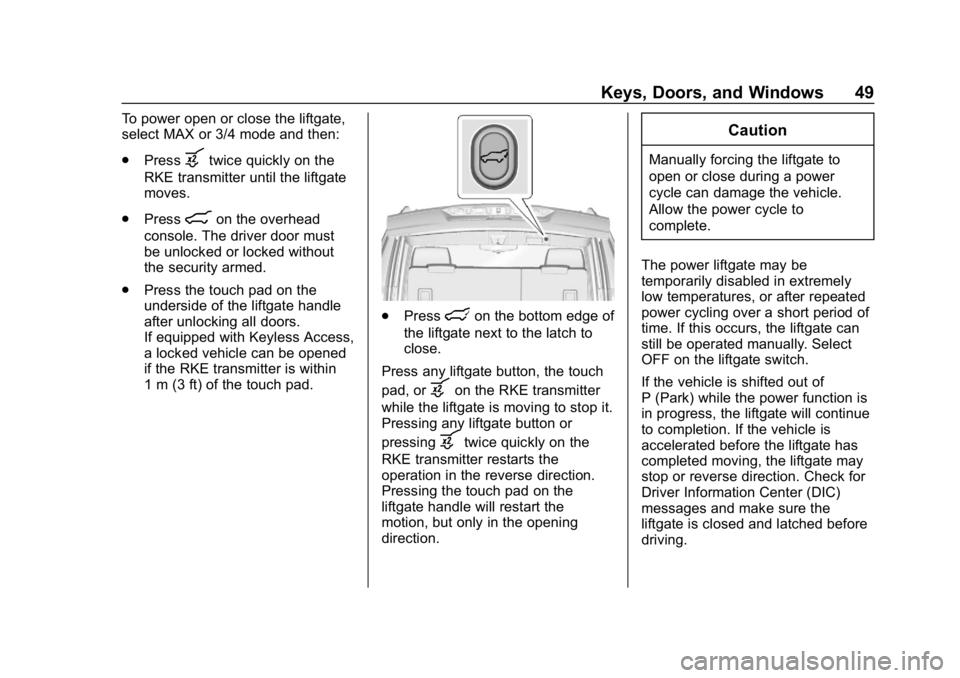
To power open or close the liftgate,
select MAX or 3/4 mode and then:
.Press
btwice quickly on the
RKE transmitter until the liftgate
moves.
. Press
8on the overhead
console. The driver door must
be unlocked or locked without
the security armed.
. Press the touch pad on the
underside of the liftgate handle
after unlocking all doors.
If equipped with Keyless Access,
a locked vehicle can be opened
if the RKE transmitter is within
1 m (3 ft) of the touch pad.
.Presslon the bottom edge of
the liftgate next to the latch to
close.
Press any liftgate button, the touch
pad, or
bon the RKE transmitter
while the liftgate is moving to stop it.
Pressing any liftgate button or
pressing
btwice quickly on the
RKE transmitter restarts the
operation in the reverse direction.
Pressing the touch pad on the
liftgate handle will restart the
motion, but only in the opening
direction.
Caution
Manually forcing the liftgate to
open or close during a power
cycle can damage the vehicle.
Allow the power cycle to
complete.
The power liftgate may be
temporarily disabled in extremely
low temperatures, or after repeated
power cycling over a short period of
time. If this occurs, the liftgate can
still be operated manually. Select
OFF on the liftgate switch.
If the vehicle is shifted out of
P (Park) while the power function is
in progress, the liftgate will continue
to completion. If the vehicle is
accelerated before the liftgate has
completed moving, the liftgate may
stop or reverse direction. Check for
Driver Information Center (DIC)
messages and make sure the
liftgate is closed and latched before
driving.
Page 53 of 450

GMC Yukon/Yukon XL/Denali Owner Manual (GMNA-Localizing-U.S./
Canada/Mexico-12460267) - 2019 - crc - 9/11/18
52 Keys, Doors, and Windows
To operate, move your foot in a
forward kicking motion under the
center of the rear bumper, then pull
it back.
Caution
Splashing water may cause the
liftgate to open. Keep the RKE
transmitter away from the rear
bumper detection area or turn the
liftgate mode to OFF when
cleaning or working near the rear
bumper to avoid accidental
opening.
. Do not sweep your foot side
to side.
. Do not keep your foot under the
bumper; the liftgate will not
activate.
. Do not touch the liftgate until it
has stopped moving.
. This feature may be temporarily
disabled under some conditions.
If the liftgate does not respond to
the kick, open or close the liftgate by another method or
start the vehicle. The feature will
be re-enabled.
When closing the liftgate using this
feature, there will be a short delay.
The rear lights will flash and a
chime will sound. Step away from
the liftgate before it starts moving.
Power Assist Steps
{Warning
To avoid personal injury or
property damage, before entering
or exiting the vehicle, be sure the
power assist step is fully
extended. Do not step on the
power assist step while it is
moving. Never place hands or
other body parts between the
extended power assist step and
the vehicle.
If equipped, the power assist steps
will deploy when the door is opened
and automatically retract
three seconds after the door is closed. The power assist steps will
retract immediately if the vehicle
starts moving.
Disable the power assist steps
before jacking or placing any object
under the vehicle. Too much ice
buildup may prevent deployment of
the power assist steps. Check the
step position before exiting the
vehicle. If this happens, disable the
power assist steps, clear the ice,
then enable the assist steps and
confirm normal function prior to use.
Keep hands, children, pets, objects,
and clothing clear of the power
assist steps when in motion. The
steps will reverse direction if they
encounter an obstruction when
opening or closing. Remove the
obstruction, then open and close the
door on the same side to complete
the motion of the assist steps. If the
obstruction is not cleared, the assist
steps remain extended while driving.
Page 60 of 450
GMC Yukon/Yukon XL/Denali Owner Manual (GMNA-Localizing-U.S./
Canada/Mexico-12460267) - 2019 - crc - 9/11/18
Keys, Doors, and Windows 59
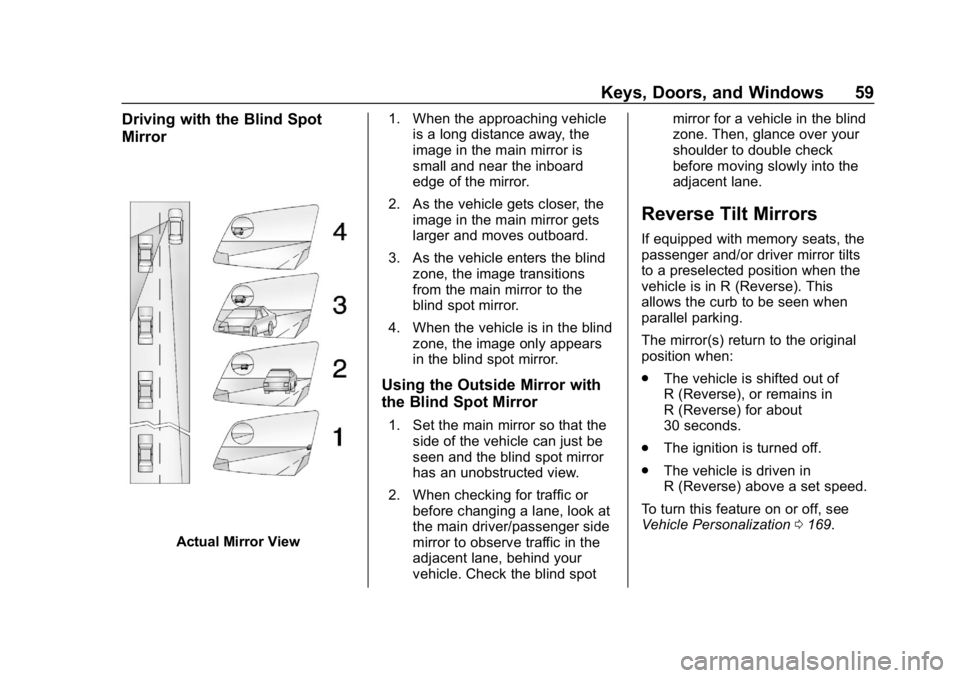
Driving with the Blind Spot
Mirror
Actual Mirror View1. When the approaching vehicle
is a long distance away, the
image in the main mirror is
small and near the inboard
edge of the mirror.
2. As the vehicle gets closer, the image in the main mirror gets
larger and moves outboard.
3. As the vehicle enters the blind zone, the image transitions
from the main mirror to the
blind spot mirror.
4. When the vehicle is in the blind zone, the image only appears
in the blind spot mirror.
Using the Outside Mirror with
the Blind Spot Mirror
1. Set the main mirror so that theside of the vehicle can just be
seen and the blind spot mirror
has an unobstructed view.
2. When checking for traffic or before changing a lane, look at
the main driver/passenger side
mirror to observe traffic in the
adjacent lane, behind your
vehicle. Check the blind spot mirror for a vehicle in the blind
zone. Then, glance over your
shoulder to double check
before moving slowly into the
adjacent lane.
Reverse Tilt Mirrors
If equipped with memory seats, the
passenger and/or driver mirror tilts
to a preselected position when the
vehicle is in R (Reverse). This
allows the curb to be seen when
parallel parking.
The mirror(s) return to the original
position when:
.
The vehicle is shifted out of
R (Reverse), or remains in
R (Reverse) for about
30 seconds.
. The ignition is turned off.
. The vehicle is driven in
R (Reverse) above a set speed.
To turn this feature on or off, see
Vehicle Personalization 0169.
Page 63 of 450
GMC Yukon/Yukon XL/Denali Owner Manual (GMNA-Localizing-U.S./
Canada/Mexico-12460267) - 2019 - crc - 9/11/18
62 Keys, Doors, and Windows
Briefly press or pull the window
switch in the same direction to stop
that window’s express movement.
Window Automatic Reversal
System
The express-close feature will
reverse window movement if it
comes in contact with an object.
Extreme cold or ice could cause the
window to auto-reverse. The
window will operate normally after
the object or condition is removed.
Automatic Reversal System
Override
{Warning
If automatic reversal system
override is active, the window will
not reverse automatically. You or
others could be injured and the
window could be damaged.
Before using automatic reversal
system override, make sure that
all people and obstructions are
clear of the window path.When the engine is on, override the
automatic reversal system by pulling
and holding the window switch if
conditions prevent it from closing.
Programming the Power
Windows
Programming may be necessary if
the vehicle battery has been
disconnected or discharged. If the
window is unable to express-up,
program each express-close
window:
1. Close all doors.
2. Turn the ignition on or to ACC/ ACCESSORY.
3. Partially open the window to be programmed. Then close it and
continue to pull the switch
briefly after the window has
fully closed.
4. Open the window and continue to press the switch briefly after
the window has fully opened.
Remote Window Operation
If equipped, this feature allows the
windows to be opened remotely.
If enabled in vehicle personalization,
press and hold
Kon the RKE
transmitter. See Vehicle
Personalization 0169.
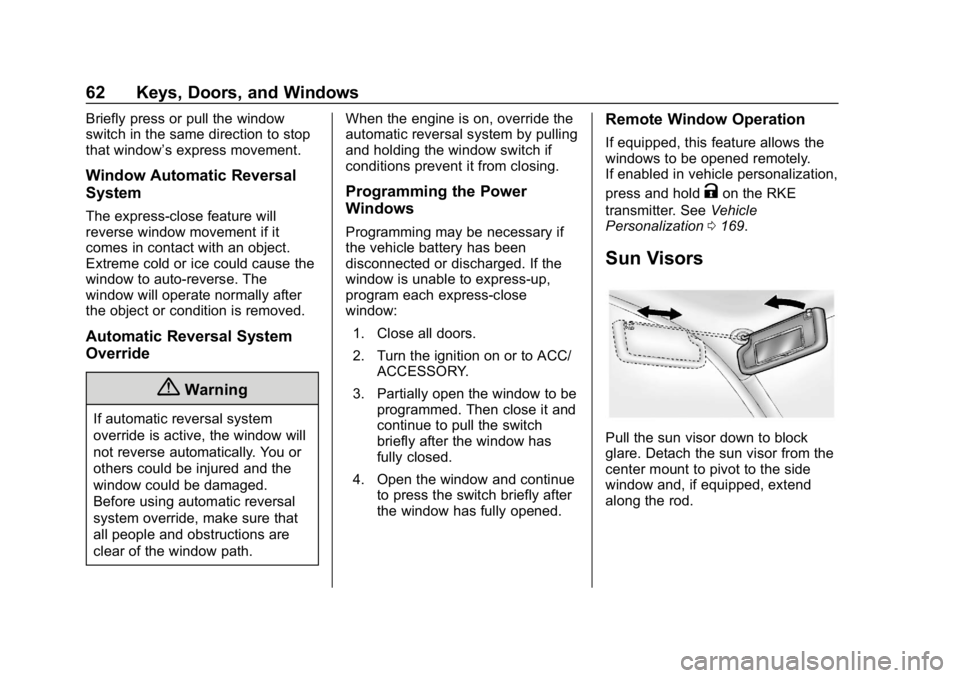
Sun Visors
Pull the sun visor down to block
glare. Detach the sun visor from the
center mount to pivot to the side
window and, if equipped, extend
along the rod.
Page 66 of 450
GMC Yukon/Yukon XL/Denali Owner Manual (GMNA-Localizing-U.S./
Canada/Mexico-12460267) - 2019 - crc - 9/11/18
Seats and Restraints 65
Seats and
Restraints
Head Restraints
Head Restraints . . . . . . . . . . . . . . . 66
Front Seats
Center Seat . . . . . . . . . . . . . . . . . . . . 67
Power Seat Adjustment . . . . . . . . 67
Lumbar Adjustment . . . . . . . . . . . . 68
Reclining Seatbacks . . . . . . . . . . . 69
Memory Seats . . . . . . . . . . . . . . . . . 69
Heated and Ventilated FrontSeats . . . . . . . . . . . . . . . . . . . . . . . . . 72
Rear Seats
Rear Seats . . . . . . . . . . . . . . . . . . . . 74
Heated Rear Seats (IfEquipped) . . . . . . . . . . . . . . . . . . . . 74
Second Row Seats . . . . . . . . . . . . 75
Third Row Seats . . . . . . . . . . . . . . . 79
Seat Belts
Seat Belts . . . . . . . . . . . . . . . . . . . . . 81
How to Wear Seat Belts Properly . . . . . . . . . . . . . . . . . . . . . . 82
Lap-Shoulder Belt . . . . . . . . . . . . . 84
Seat Belt Use During Pregnancy . . . . . . . . . . . . . . . . . . . . 88 Lap Belt . . . . . . . . . . . . . . . . . . . . . . . 89
Seat Belt Extender . . . . . . . . . . . . . 90
Safety System Check . . . . . . . . . . 90
Seat Belt Care . . . . . . . . . . . . . . . . . 90
Replacing Seat Belt System
Parts after a Crash . . . . . . . . . . . 91
Airbag System
Airbag System . . . . . . . . . . . . . . . . . 91
Where Are the Airbags? . . . . . . . 93
When Should an AirbagInflate? . . . . . . . . . . . . . . . . . . . . . . . 95
What Makes an Airbag Inflate? . . . . . . . . . . . . . . . . . . . . . . . 96
How Does an Airbag Restrain? . . . . . . . . . . . . . . . . . . . . . 96
What Will You See after an
Airbag Inflates? . . . . . . . . . . . . . . 97
Passenger Sensing System . . . 98
Servicing the Airbag-Equipped Vehicle . . . . . . . . . . . . . . . . . . . . . . 102
Adding Equipment to the Airbag-Equipped Vehicle . . . . 103
Airbag System Check . . . . . . . . 104
Replacing Airbag System Parts after a Crash . . . . . . . . . . . . . . . . 104
Child Restraints
Older Children . . . . . . . . . . . . . . . . 104
Infants and Young Children . . . 106
Child Restraint Systems . . . . . . 108 Where to Put the Restraint . . . . 110
Lower Anchors and Tethers for
Children (LATCH System) . . . 111
Replacing LATCH System Parts After a Crash . . . . . . . . . 120
Securing Child Restraints (With the Seat Belt in the
Rear Seat) . . . . . . . . . . . . . . . . . . 120
Securing Child Restraints (With the Seat Belt in the Center
Front Seat) . . . . . . . . . . . . . . . . . . 122
Securing Child Restraints (With the Seat Belt in the Front
Passenger Seat) . . . . . . . . . . . . 123
Page 68 of 450
GMC Yukon/Yukon XL/Denali Owner Manual (GMNA-Localizing-U.S./
Canada/Mexico-12460267) - 2019 - crc - 9/11/18
Seats and Restraints 67
Second Row Seats
The vehicle's second row seats
have head restraints in the outboard
seating positions that cannot be
adjusted.
The second row seat outboard head
restraints are not removable.
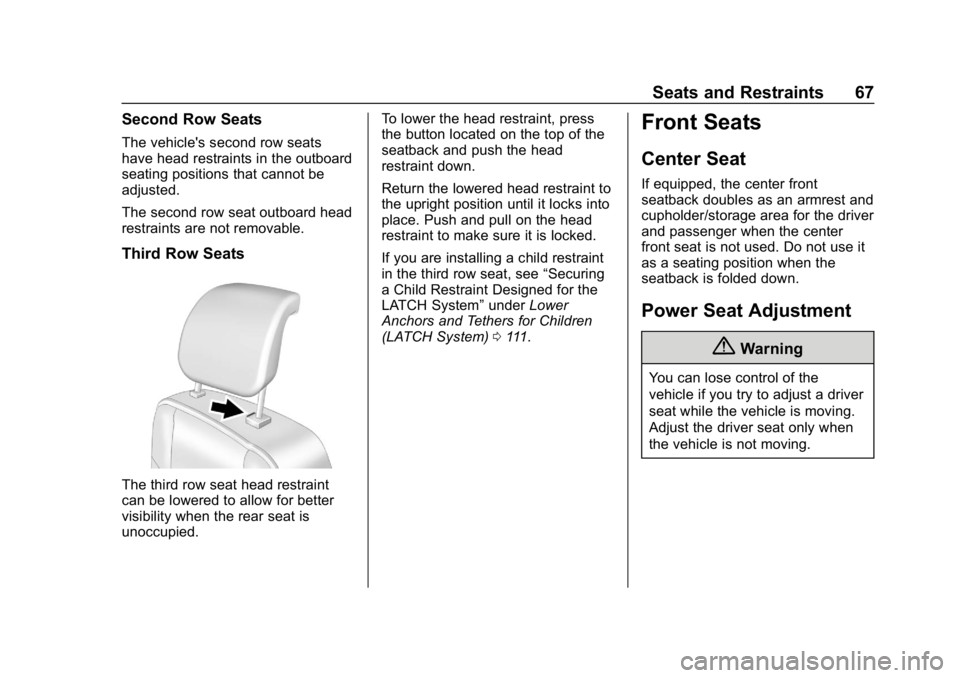
Third Row Seats
The third row seat head restraint
can be lowered to allow for better
visibility when the rear seat is
unoccupied.To lower the head restraint, press
the button located on the top of the
seatback and push the head
restraint down.
Return the lowered head restraint to
the upright position until it locks into
place. Push and pull on the head
restraint to make sure it is locked.
If you are installing a child restraint
in the third row seat, see
“Securing
a Child Restraint Designed for the
LATCH System” underLower
Anchors and Tethers for Children
(LATCH System) 0111.
Front Seats
Center Seat
If equipped, the center front
seatback doubles as an armrest and
cupholder/storage area for the driver
and passenger when the center
front seat is not used. Do not use it
as a seating position when the
seatback is folded down.
Power Seat Adjustment
{Warning
You can lose control of the
vehicle if you try to adjust a driver
seat while the vehicle is moving.
Adjust the driver seat only when
the vehicle is not moving.