adaptive cruise GMC YUKON 2019 Owner's Manual
[x] Cancel search | Manufacturer: GMC, Model Year: 2019, Model line: YUKON, Model: GMC YUKON 2019Pages: 450, PDF Size: 6.5 MB
Page 8 of 450

GMC Yukon/Yukon XL/Denali Owner Manual (GMNA-Localizing-U.S./
Canada/Mexico-12460267) - 2019 - crc - 9/11/18
In Brief 7
1.Air Vents 0196.
2. Head-Up Display (HUD) 0164
(If Equipped).
3.
gTraction Control/Electronic
Stability Control 0242.
jPower Assist Steps 052 (If
Equipped).
XPark Assist Button (If
Equipped). See Assistance
Systems for Parking or Backing
0 256.
ALane Departure Warning
(LDW) 0266 (If Equipped).
0Pedal Adjust Switch (If
Equipped). See Adjustable
Throttle and Brake Pedal
0 216.
4. Turn Signal Lever. See Turn
and Lane-Change Signals
0 185.
Windshield Wiper/Washer
0 133. 5. Favorite Switches (Out of
View). See “Steering Wheel
Controls” in the infotainment
manual.
Volume Switches (Out of View).
See “Steering Wheel Controls”
in the infotainment manual.
6. Hazard Warning Flashers
0185.
7. Instrument Cluster 0143.
8. Shift Lever. See Automatic
Transmission 0228.
Tow/Haul Selector Button. See
Tow/Haul Mode 0233.
Range Selection Mode (If
Equipped). See Manual Mode
0 231.
9. Light Sensor. See Automatic
Headlamp System 0184.
10. Infotainment 0190.
11. Dual Automatic Climate Control
System 0191.
12. Heated and Ventilated Front
Seats 072 (If Equipped). 13. Rear Climate Control Buttons.
SeeRear Climate Control
System 0195.
14. Ignition Positions (Key Access)
0217 orIgnition Positions
(Keyless Access) 0219.
15. Steering Wheel Controls. See the infotainment manual.
16. Horn 0133.
17. Steering Wheel Adjustment
0132.
18. Hood Release. See Hood
0 298.
19. Cruise Control 0245.
Adaptive Cruise Control 0248
(If Equipped).
Forward Collision Alert (FCA)
System 0260 (If Equipped).
Heated Steering Wheel 0133
(If Equipped).
20. Trailer Brake Control Panel (If Equipped). See Towing
Equipment 0284.
Page 23 of 450
GMC Yukon/Yukon XL/Denali Owner Manual (GMNA-Localizing-U.S./
Canada/Mexico-12460267) - 2019 - crc - 9/11/18
22 In Brief
accelerate. If cruise control is
already active, use to increase
vehicle speed.
*:Press to disengage cruise
control without erasing the set
speed from memory.
See Cruise Control 0245 or
Adaptive Cruise Control 0248 (If
Equipped).
Driver Information
Center (DIC)
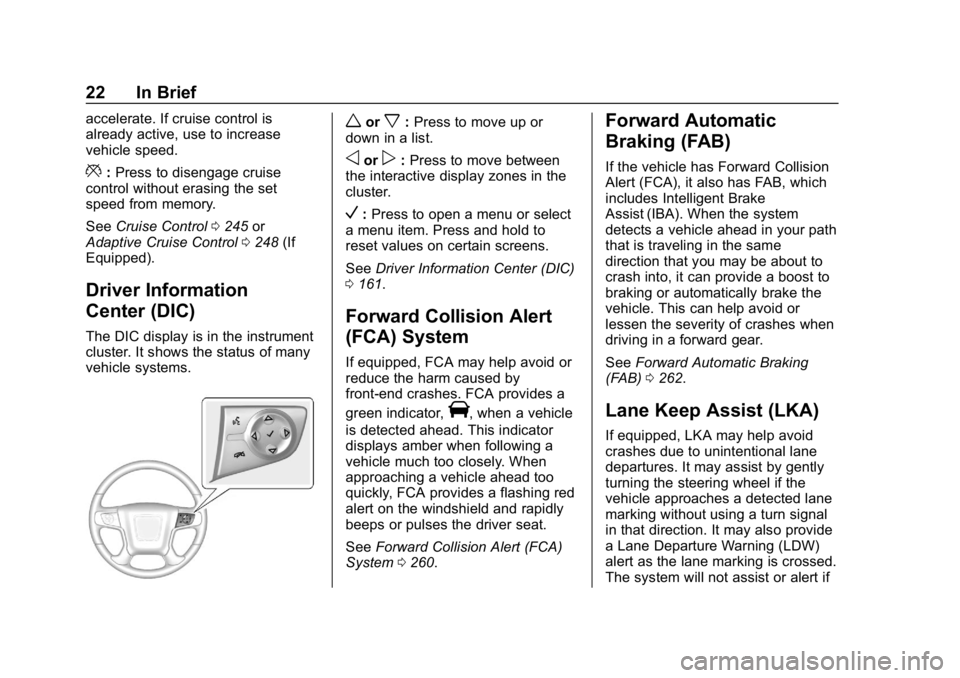
The DIC display is in the instrument
cluster. It shows the status of many
vehicle systems.
worx: Press to move up or
down in a list.
oorp: Press to move between
the interactive display zones in the
cluster.
V: Press to open a menu or select
a menu item. Press and hold to
reset values on certain screens.
See Driver Information Center (DIC)
0 161.
Forward Collision Alert
(FCA) System
If equipped, FCA may help avoid or
reduce the harm caused by
front-end crashes. FCA provides a
green indicator,
V, when a vehicle
is detected ahead. This indicator
displays amber when following a
vehicle much too closely. When
approaching a vehicle ahead too
quickly, FCA provides a flashing red
alert on the windshield and rapidly
beeps or pulses the driver seat.
See Forward Collision Alert (FCA)
System 0260.
Forward Automatic
Braking (FAB)
If the vehicle has Forward Collision
Alert (FCA), it also has FAB, which
includes Intelligent Brake
Assist (IBA). When the system
detects a vehicle ahead in your path
that is traveling in the same
direction that you may be about to
crash into, it can provide a boost to
braking or automatically brake the
vehicle. This can help avoid or
lessen the severity of crashes when
driving in a forward gear.
See Forward Automatic Braking
(FAB) 0262.
Lane Keep Assist (LKA)
If equipped, LKA may help avoid
crashes due to unintentional lane
departures. It may assist by gently
turning the steering wheel if the
vehicle approaches a detected lane
marking without using a turn signal
in that direction. It may also provide
a Lane Departure Warning (LDW)
alert as the lane marking is crossed.
The system will not assist or alert if
Page 162 of 450
GMC Yukon/Yukon XL/Denali Owner Manual (GMNA-Localizing-U.S./
Canada/Mexico-12460267) - 2019 - crc - 9/11/18
Instruments and Controls 161
Cruise Control Light
The cruise control light is white
when the cruise control is on and
ready, and turns green when the
cruise control is set and active.
SeeCruise Control 0245.
Adaptive Cruise Control Light
This light is white when the Adaptive
Cruise Control (ACC, if equipped) is
on and ready, and turns green when
the ACC is set and active. See
Adaptive Cruise Control 0248.
Door Ajar Light
This light comes on when a door is
open or not securely latched. Before
driving, check that all doors are
properly closed.
Information Displays
Driver Information
Center (DIC)
The DIC displays are shown in the
center of the instrument cluster in
the Info app. See Instrument Cluster
0 143. The displays show the status
of many vehicle systems. The
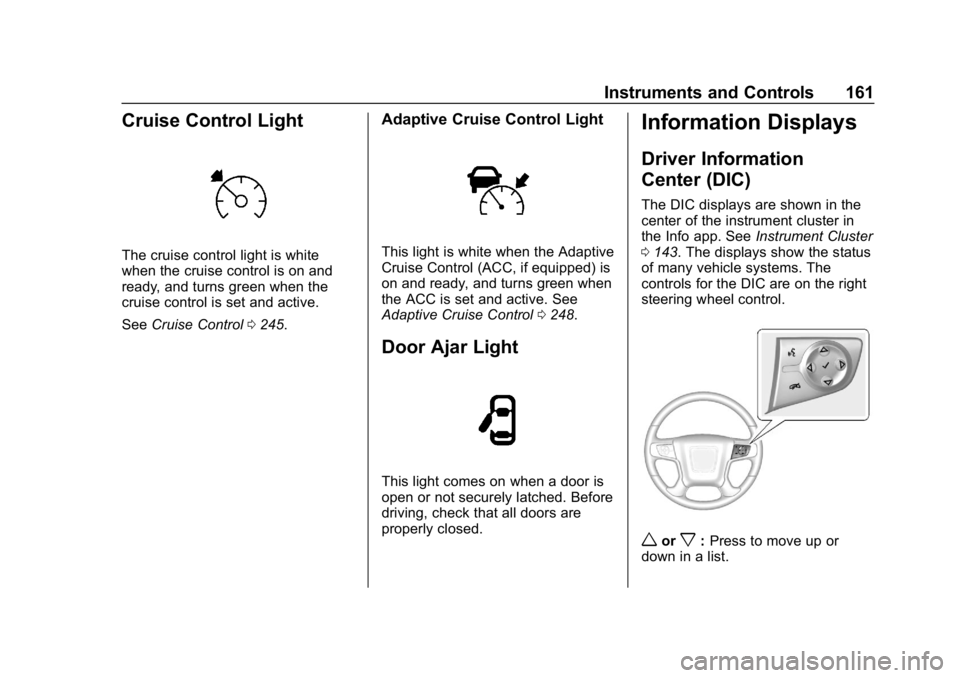
controls for the DIC are on the right
steering wheel control.
worx: Press to move up or
down in a list.
Page 166 of 450
GMC Yukon/Yukon XL/Denali Owner Manual (GMNA-Localizing-U.S./
Canada/Mexico-12460267) - 2019 - crc - 9/11/18
Instruments and Controls 165
onto the windshield. The information
is projected through the HUD lens
on the driver side of the instrument
panel and focused out toward the
front of the vehicle.
Caution
If you try to use the HUD image
as a parking aid, you may
misjudge the distance and
damage your vehicle. Do not use
the HUD image as a parking aid.
The HUD information can be
displayed in various languages. The
speedometer reading and other
numerical values can be displayed
in either English or metric units.
The language selection is changed
through the radio and the units of
measurement is changed through
the instrument cluster. See Vehicle
Personalization 0169 and "Options"
under Instrument Cluster 0143.
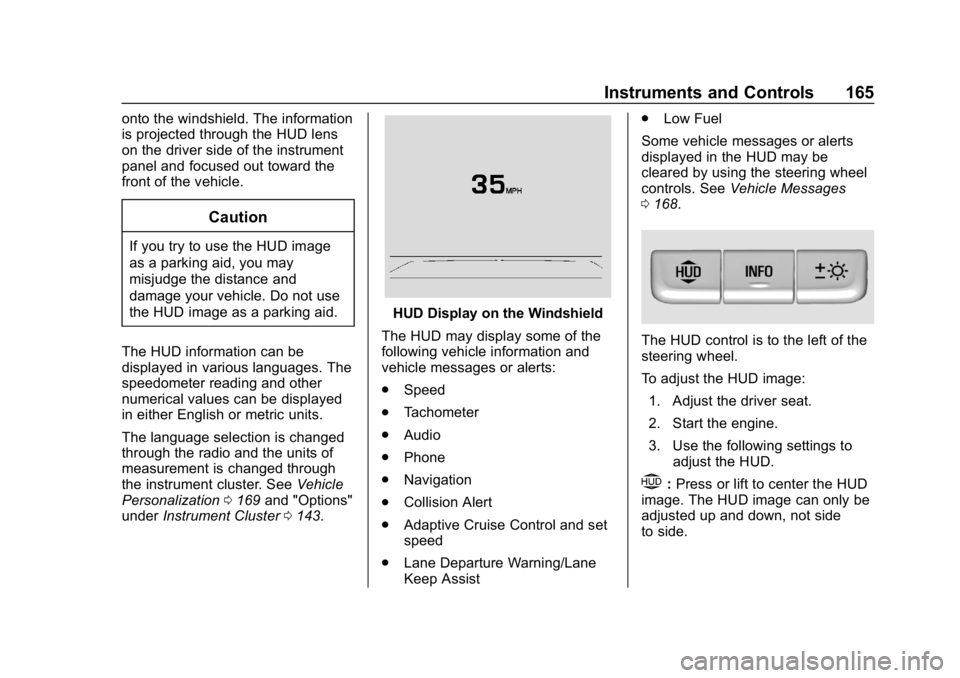
HUD Display on the Windshield
The HUD may display some of the
following vehicle information and
vehicle messages or alerts:
. Speed
. Tachometer
. Audio
. Phone
. Navigation
. Collision Alert
. Adaptive Cruise Control and set
speed
. Lane Departure Warning/Lane
Keep Assist .
Low Fuel
Some vehicle messages or alerts
displayed in the HUD may be
cleared by using the steering wheel
controls. See Vehicle Messages
0 168.
The HUD control is to the left of the
steering wheel.
To adjust the HUD image:
1. Adjust the driver seat.
2. Start the engine.
3. Use the following settings to adjust the HUD.
$:Press or lift to center the HUD
image. The HUD image can only be
adjusted up and down, not side
to side.
Page 167 of 450
GMC Yukon/Yukon XL/Denali Owner Manual (GMNA-Localizing-U.S./
Canada/Mexico-12460267) - 2019 - crc - 9/11/18
166 Instruments and Controls
!:Press to select the display
view. Each press will change the
display view.
D: Lift and hold to brighten the
display. Press and hold to dim the
display. Continue to hold to turn the
display off.
The HUD image will automatically
dim and brighten to compensate for
outside lighting. The HUD
brightness control can also be
adjusted as needed.
The HUD image can temporarily
light up depending on the angle and
position of sunlight on the HUD
display. This is normal.
Polarized sunglasses could make
the HUD image harder to see.
Head-Up Display (HUD) Rotation
Option
This feature allows for adjusting the
angle of the HUD image.
If equipped, this feature allows for
adjusting the angle of the HUD
image. Press
pon the steering
wheel controls while Head-up Display Rotation is highlighted to
enter Adjust Mode. Press
worx
to adjust the angle of the HUD
display. Press
Vto confirm and
save the setting. To cancel the
setting, press
o. The vehicle must
be in P (Park). See Instrument
Cluster 0143.
HUD Views
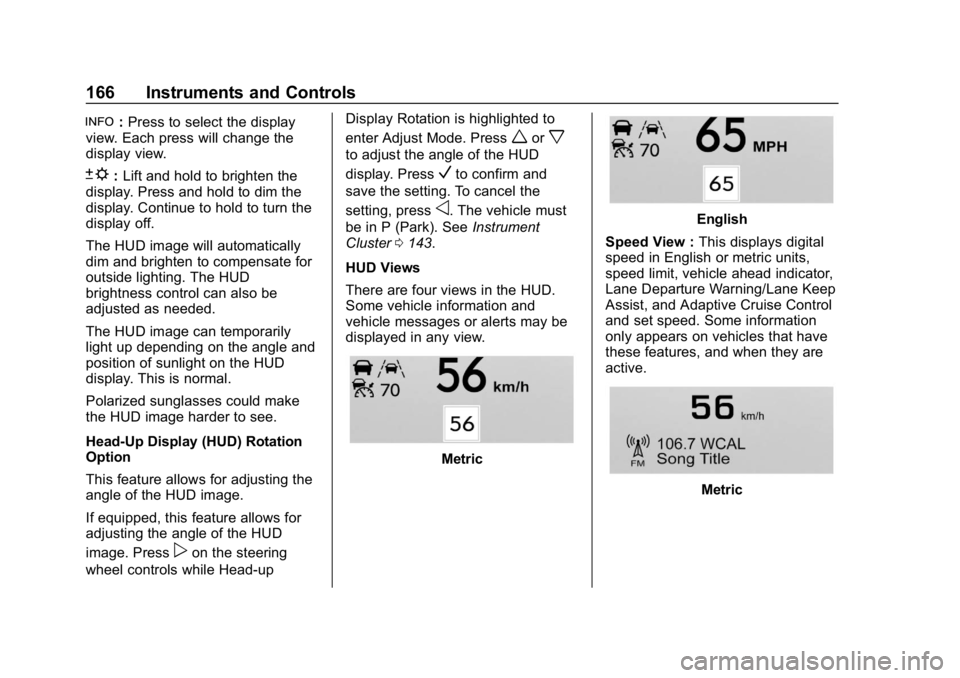
There are four views in the HUD.
Some vehicle information and
vehicle messages or alerts may be
displayed in any view.
Metric
English
Speed View : This displays digital
speed in English or metric units,
speed limit, vehicle ahead indicator,
Lane Departure Warning/Lane Keep
Assist, and Adaptive Cruise Control
and set speed. Some information
only appears on vehicles that have
these features, and when they are
active.
Metric
Page 172 of 450
GMC Yukon/Yukon XL/Denali Owner Manual (GMNA-Localizing-U.S./
Canada/Mexico-12460267) - 2019 - crc - 9/11/18
Instruments and Controls 171
Select Off or On.
Auto Volume
This feature adjusts the volume
based on vehicle speed and
ambient noise.
Select Off, Low, Medium-Low,
Medium, Medium-High, or High.
Maximum Startup Volume
This feature sets the maximum
startup volume. If the vehicle is
started and the volume is greater
than this level, the volume is
adjusted to this level. To set the
maximum startup volume, touch +
or−to increase or decrease.
Audio Cue Volume
This feature sets the volume of
audio files played at system startup
and shutdown.
Select On, then touch + or −to
increase or decrease the volume.
Vehicle
Select and the following may
display:
. Climate and Air Quality .
Collision/Detection Systems
. Comfort and Convenience
. Lighting
. Power Door Locks
. Remote Lock, Unlock, Start
Climate and Air Quality
Select and the following may
display:
.Auto Fan Speed
. Auto Defog
. Auto Rear Defog
Auto Fan Speed
This feature will set the auto fan
speed.
Select Low, Medium, or High.
Auto Defog
When set to On, the auto defog
comes on when the climate control
sensor detects high interior
humidity. Air will be directed to the
windshield.
Select Off or On. Auto Rear Defog
This feature will automatically turn
on the rear window defogger when
the vehicle is first started in cold
weather and turn off when the
vehicle is warmed.
Select Off or On.Collision/Detection Systems
Select and the following may
display:
.
Alert Type
. Forward Collision System
. Adaptive Cruise Go Notifier
. Park Assist
. Side Blind Zone Alert
. Rear Cross Traffic Alert
. Lane Change Alert
Alert Type
This feature will set crash alerts to
beeps or seat vibrations. This
setting affects all crash alerts
including Forward Collision Alert,
Lane Departure Warning, and Park
Assist alerts.
Page 173 of 450
GMC Yukon/Yukon XL/Denali Owner Manual (GMNA-Localizing-U.S./
Canada/Mexico-12460267) - 2019 - crc - 9/11/18
172 Instruments and Controls
Select Beeps or Safety Alert Seat.
Forward Collision System
This feature will turn on or off
Forward Collision Alert (FCA) and
Forward Automatic Braking (FAB).
The Off setting disables all FCA and
FAB functions. With the Alert and
Brake setting, both FCA and FAB
are available. The Alert setting
disables FAB. SeeForward
Automatic Braking (FAB) 0262.
Select Off, Alert, or Alert and Brake.
Adaptive Cruise Go Notifier
This feature will give a reminder that
Adaptive Cruise Control provides
when it has brought the vehicle to a
complete stop behind another
stopping vehicle, and then that
vehicle drives on.
Select Off or On.
Park Assist
This allows the feature to be turned
on or off. See Assistance Systems
for Parking or Backing 0256.
Select Off, On, or On with Towbar
Attached. Side Blind Zone Alert
This allows the feature to be turned
on or off. See
Side Blind Zone Alert
(SBZA) 0264.
Select Off or On.
Rear Cross Traffic Alert
This allows the feature to be turned
on or off. See Assistance Systems
for Parking or Backing 0256.
Select Off or On.
Lane Change Alert
This allows the feature to be turned
on or off. See Lane Change Alert
(LCA) 0264.
Select Off or On.
Comfort and Convenience
Select and the following may
display:
. Auto Running Boards
. Auto Memory Recall
. Easy Exit Options
. Chime Volume
. Hands Free Liftgate Control .
Reverse Tilt Mirror
. Auto Mirror Folding
. Auto Wipe in Reverse Gear
Auto Running Boards
This allows the feature to be turned
on or off. See Power Assist Steps
0 52.
Select Off, On, or Extended.
Auto Memory Recall
This feature automatically recalls
the current driver ’s previously stored
1 or 2 button positions when the
ignition is changed from off to on or
ACC/ACCESSORY. See Memory
Seats 069.
Select Off or On.
Easy Exit Options
This feature automatically recalls
the previously stored Exit button
position when exiting the vehicle.
See Memory Seats 069.
Select Off or On.
Page 200 of 450
GMC Yukon/Yukon XL/Denali Owner Manual (GMNA-Localizing-U.S./
Canada/Mexico-12460267) - 2019 - crc - 9/11/18
Driving and Operating 199
Driving and
Operating
Driving Information
Distracted Driving . . . . . . . . . . . . 200
Defensive Driving . . . . . . . . . . . . . 201
Drunk Driving . . . . . . . . . . . . . . . . . 201
Control of a Vehicle . . . . . . . . . . . 201
Braking . . . . . . . . . . . . . . . . . . . . . . . 201
Steering . . . . . . . . . . . . . . . . . . . . . . 202
Off-Road Recovery . . . . . . . . . . . 202
Loss of Control . . . . . . . . . . . . . . . 203
Off-Road Driving . . . . . . . . . . . . . 203
Driving on Wet Roads . . . . . . . . 208
Hill and Mountain Roads . . . . . 209
Winter Driving . . . . . . . . . . . . . . . . 209
If the Vehicle Is Stuck . . . . . . . . . 211
Vehicle Load Limits . . . . . . . . . . . 212
Starting and Operating
New Vehicle Break-In . . . . . . . . . 216
Adjustable Throttle and BrakePedal . . . . . . . . . . . . . . . . . . . . . . . 216
Ignition Positions (Key Access) . . . . . . . . . . . . . . . . . . . . . 217
Ignition Positions (Keyless Access) . . . . . . . . . . . . . . . . . . . . . 219
Starting the Engine . . . . . . . . . . . 221 Engine Heater . . . . . . . . . . . . . . . . 223
Retained Accessory
Power (RAP) . . . . . . . . . . . . . . . . 224
Shifting Into Park . . . . . . . . . . . . . 224
Shifting out of Park . . . . . . . . . . . 226
Parking over Things That Burn . . . . . . . . . . . . . . . . . . . 226
Active Fuel Management . . . . . 226
Extended Parking . . . . . . . . . . . . 226
Engine Exhaust
Engine Exhaust . . . . . . . . . . . . . . 227
Running the Vehicle While Parked . . . . . . . . . . . . . . . . . . . . . . 228
Automatic Transmission
Automatic Transmission . . . . . . 228
Manual Mode . . . . . . . . . . . . . . . . . 231
Tow/Haul Mode . . . . . . . . . . . . . . . 233
Drive Systems
Four-Wheel Drive . . . . . . . . . . . . . 234
Brakes
Antilock BrakeSystem (ABS) . . . . . . . . . . . . . . . 239
Parking Brake . . . . . . . . . . . . . . . . 240
Brake Assist . . . . . . . . . . . . . . . . . . 241
Hill Start Assist (HSA) . . . . . . . . 241
Ride Control Systems
Traction Control/Electronic Stability Control . . . . . . . . . . . . . 242
Hill Descent Control (HDC) . . . 244
Magnetic Ride Control . . . . . . . . 244
Locking Rear Axle . . . . . . . . . . . . 245
Automatic Level Control . . . . . . 245
Cruise Control
Cruise Control . . . . . . . . . . . . . . . . 245
Adaptive Cruise Control . . . . . . 248
Driver Assistance Systems
Driver Assistance Systems . . . 255
Assistance Systems for Parking or Backing . . . . . . . . . . 256
Assistance Systems for Driving . . . . . . . . . . . . . . . . . . . . . . 260
Forward Collision Alert (FCA) System . . . . . . . . . . . . . . . . . . . . . . 260
Forward Automatic Braking (FAB) . . . . . . . . . . . . . . . 262
Side Blind Zone Alert (SBZA) . . . . . . . . . . . . . . . . 264
Lane Change Alert (LCA) . . . . . 264
Lane Departure Warning (LDW) . . . . . . . . . . . . . 266
Lane Keep Assist (LKA) . . . . . . 266
Fuel
Top Tier Fuel . . . . . . . . . . . . . . . . . 268
Page 249 of 450

GMC Yukon/Yukon XL/Denali Owner Manual (GMNA-Localizing-U.S./
Canada/Mexico-12460267) - 2019 - crc - 9/11/18
248 Driving and Operating
.Shift the transmission to
N (Neutral).
. To turn off cruise control,
press
5.
Erasing Speed Memory
The cruise control set speed is
erased from memory if
5is pressed
or if the ignition is turned off.
Adaptive Cruise Control
If equipped with Adaptive Cruise
Control (ACC), it allows for selecting
the cruise control set speed and
following gap. Read this entire
section before using this system.
ACC uses a camera and radar
sensors to detect other vehicles.
See Radio Frequency Statement
0 421. The following gap is the
following time (or distance) between
your vehicle and a vehicle detected
directly ahead in your path, moving
in the same direction. If no vehicle
is detected in your path, ACC works
like regular cruise control. If a vehicle is detected in your path,
ACC can speed up the vehicle or
apply limited, moderate braking to
maintain the selected following gap.
To disengage ACC, apply the brake.
If the Traction Control System (TCS)
or electronic stability control system
activates while ACC is engaged,
ACC may automatically disengage.
See
Traction Control/Electronic
Stability Control 0242. When road
conditions allow ACC to be safely
used, the ACC can be turned
back on.
ACC will not engage if the TCS or
electronic stability control system is
disabled.
{Warning
ACC has limited braking ability
and may not have time to slow
the vehicle down enough to avoid
a collision with another vehicle
you are following. This can occur
when vehicles suddenly slow or
stop ahead, or enter your lane.
(Continued)
Warning (Continued)
Also see“Alerting the Driver” in
this section. Complete attention is
always required while driving and
you should be ready to take
action and apply the brakes. See
Defensive Driving 0201.
{Warning
ACC will not detect or brake for
children, pedestrians, animals,
or other objects.
Do not use ACC when:
. On winding and hilly roads
or when the sensors are
blocked by snow, ice, or dirt.
The system may not detect
a vehicle ahead. Keep the
entire front of the vehicle
clean.
(Continued)
Page 250 of 450
GMC Yukon/Yukon XL/Denali Owner Manual (GMNA-Localizing-U.S./
Canada/Mexico-12460267) - 2019 - crc - 9/11/18
Driving and Operating 249
Warning (Continued)
.Visibility is low, such as in
fog, rain, or snow
conditions. ACC
performance is limited under
these conditions.
. On slippery roads where
fast changes in tire traction
can cause excessive
wheel slip.
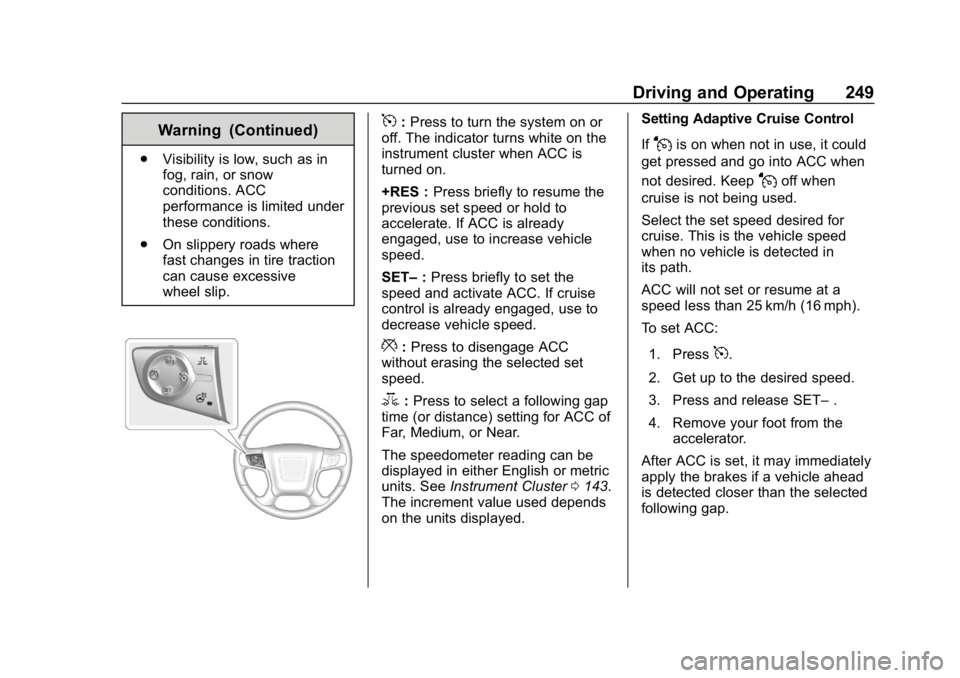
5:Press to turn the system on or
off. The indicator turns white on the
instrument cluster when ACC is
turned on.
+RES : Press briefly to resume the
previous set speed or hold to
accelerate. If ACC is already
engaged, use to increase vehicle
speed.
SET– :Press briefly to set the
speed and activate ACC. If cruise
control is already engaged, use to
decrease vehicle speed.
*: Press to disengage ACC
without erasing the selected set
speed.
3: Press to select a following gap
time (or distance) setting for ACC of
Far, Medium, or Near.
The speedometer reading can be
displayed in either English or metric
units. See Instrument Cluster 0143.
The increment value used depends
on the units displayed. Setting Adaptive Cruise Control
If
Jis on when not in use, it could
get pressed and go into ACC when
not desired. Keep
Joff when
cruise is not being used.
Select the set speed desired for
cruise. This is the vehicle speed
when no vehicle is detected in
its path.
ACC will not set or resume at a
speed less than 25 km/h (16 mph).
To set ACC:
1. Press
5.
2. Get up to the desired speed.
3. Press and release SET– .
4. Remove your foot from the accelerator.
After ACC is set, it may immediately
apply the brakes if a vehicle ahead
is detected closer than the selected
following gap.