rear wiper GMC YUKON 2020 Owner's Manual
[x] Cancel search | Manufacturer: GMC, Model Year: 2020, Model line: YUKON, Model: GMC YUKON 2020Pages: 434, PDF Size: 6.45 MB
Page 7 of 434

GMC Yukon/Yukon XL/Denali Owner Manual (GMNA-Localizing-U.S./
Canada/Mexico-13566587) - 2020 - CRC - 4/15/19
6 Introduction
1.Air Vents 0180.
2. Head-Up Display (HUD) 0147
(If Equipped).
3.
gTraction Control/Electronic
Stability Control 0226.
jPower Assist Steps 032 (If
Equipped).
XPark Assist Button (If
Equipped). See Assistance
Systems for Parking or Backing
0 242.
ALane Keep Assist (LKA)
0 251 (If Equipped).
0Pedal Adjust Switch (If
Equipped). See Adjustable
Throttle and Brake Pedal
0 201.
4. Turn Signal Lever. See Turn
and Lane-Change Signals
0 169.
Windshield Wiper/Washer
0 116. 5. Favorite Switches (Out of
View). See “Steering Wheel
Controls” in the infotainment
manual.
Volume Switches (Out of View).
See “Steering Wheel Controls”
in the infotainment manual.
6. Hazard Warning Flashers
0168.
7. Instrument Cluster 0126.
8. Shift Lever. See Automatic
Transmission 0213.
Tow/Haul Selector Button. See
Tow/Haul Mode 0218.
Range Selection Mode (If
Equipped). See Manual Mode
0 216.
9. Light Sensor. See Automatic
Headlamp System 0167.
10. Infotainment 0174.
11. Dual Automatic Climate Control
System 0175.
12. Heated and Ventilated Front
Seats 054 (If Equipped). 13. Rear Climate Control Buttons.
SeeRear Climate Control
System 0179.
14. Ignition Positions (Keyless
Access) 0202 or
Ignition Positions (Key Access)
0 204.
15. Steering Wheel Controls. See the infotainment manual.
16. Horn 0116.
17. Steering Wheel Adjustment
0115.
18. Hood Release. See Hood
0 284.
19. Cruise Control 0230.
Adaptive Cruise Control 0232
(If Equipped).
Forward Collision Alert (FCA)
System 0245 (If Equipped).
Heated Steering Wheel 0116
(If Equipped).
20. Trailer Brake Control Panel (If Equipped). See Towing
Equipment 0270.
Page 29 of 434
GMC Yukon/Yukon XL/Denali Owner Manual (GMNA-Localizing-U.S./
Canada/Mexico-13566587) - 2020 - CRC - 4/15/19
28 Keys, Doors, and Windows
There will be a delay in the release
of the liftglass if there is an attempt
to open it while the rear wiper is in
motion.
Use the pull cup to lower and close
the liftgate. Do not press the touch
pad while closing the liftgate. This
will cause the liftgate to be
unlatched.
The liftgate can be opened when
locked if the RKE transmitter is
within 1 m (3 ft) of the touch pad.
SeeRemote Keyless Entry (RKE)
System Operation (Key Access)
0 13 or
Remote Keyless Entry (RKE)
System Operation (Keyless Access)
0 16.
The liftgate has an electric latch.
If the battery is disconnected or has
low voltage, the liftgate will not
open. The liftgate will resume
operation when the battery is
reconnected and charged.Power Liftgate Operation
{Warning
You or others could be injured if
caught in the path of the power
liftgate. Make sure there is no one
in the way of the liftgate as it is
opening and closing.
Caution
Driving with an open and
unsecured liftgate may result in
damage to the power liftgate
components.
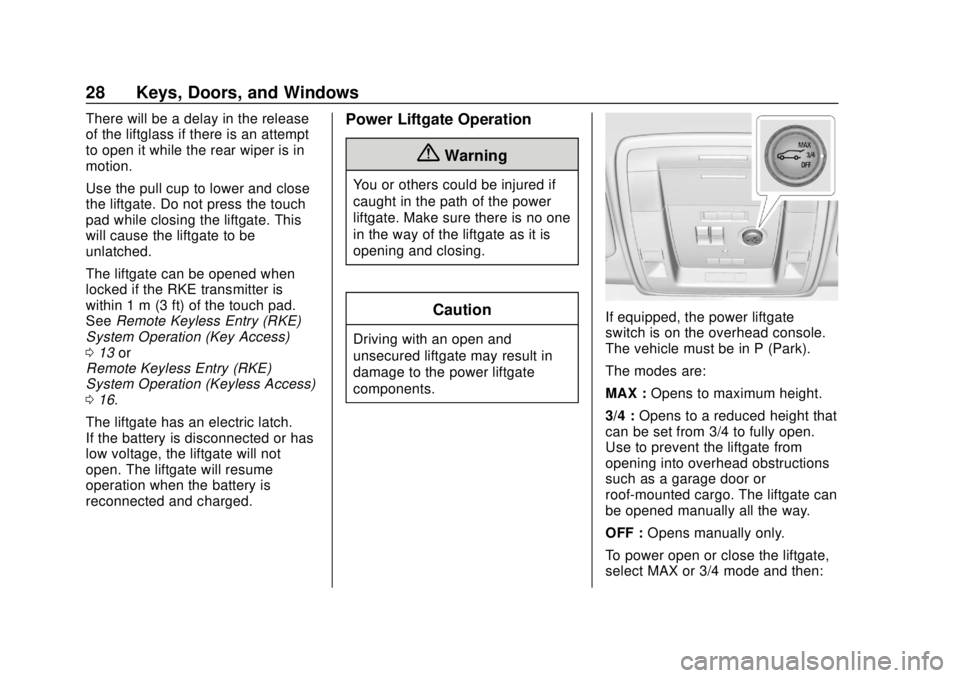
If equipped, the power liftgate
switch is on the overhead console.
The vehicle must be in P (Park).
The modes are:
MAX : Opens to maximum height.
3/4 : Opens to a reduced height that
can be set from 3/4 to fully open.
Use to prevent the liftgate from
opening into overhead obstructions
such as a garage door or
roof-mounted cargo. The liftgate can
be opened manually all the way.
OFF : Opens manually only.
To power open or close the liftgate,
select MAX or 3/4 mode and then:
Page 115 of 434
GMC Yukon/Yukon XL/Denali Owner Manual (GMNA-Localizing-U.S./
Canada/Mexico-13566587) - 2020 - CRC - 4/15/19
114 Instruments and Controls
Instruments and
Controls
Controls
Steering Wheel Adjustment . . . 115
Steering Wheel Controls . . . . . . 116
Heated Steering Wheel . . . . . . . 116
Horn . . . . . . . . . . . . . . . . . . . . . . . . . . 116
Windshield Wiper/Washer . . . . 116
Rear Window Wiper/Washer . . . . . . . . . . . . . . . . . . . . . . 118
Compass . . . . . . . . . . . . . . . . . . . . . 119
Clock . . . . . . . . . . . . . . . . . . . . . . . . . 119
Power Outlets . . . . . . . . . . . . . . . . 120
Wireless Charging . . . . . . . . . . . . 122
Warning Lights, Gauges, and
Indicators
Warning Lights, Gauges, and Indicators . . . . . . . . . . . . . . . . . . . 125
Instrument Cluster . . . . . . . . . . . . 126
Speedometer . . . . . . . . . . . . . . . . . 129
Odometer . . . . . . . . . . . . . . . . . . . . . 129
Trip Odometer . . . . . . . . . . . . . . . . 129
Tachometer . . . . . . . . . . . . . . . . . . . 129
Fuel Gauge . . . . . . . . . . . . . . . . . . . 130
Engine Oil Pressure
Gauge . . . . . . . . . . . . . . . . . . . . . . 130 Engine Coolant Temperature
Gauge . . . . . . . . . . . . . . . . . . . . . . 131
Transmission Temperature Gauge . . . . . . . . . . . . . . . . . . . . . . 132
Voltmeter Gauge . . . . . . . . . . . . . 133
Seat Belt Reminders . . . . . . . . . 133
Airbag Readiness Light . . . . . . . 134
Passenger Airbag Status
Indicator . . . . . . . . . . . . . . . . . . . . 135
Charging System Light . . . . . . . 135
Malfunction Indicator Lamp (Check Engine Light) . . . . . . . . 136
Brake System Warning Light . . . . . . . . . . . . . . . . . . . . . . . . 138
Antilock Brake System (ABS) Warning Light . . . . . . . . . . . . . . . 138
Four-Wheel-Drive Light . . . . . . . 139
Tow/Haul Mode Light . . . . . . . . . 139
Lane Keep Assist (LKA) Light . . . . . . . . . . . . . . . . . . . . . . . . 139
Vehicle Ahead Indicator . . . . . . 140
Traction Off Light . . . . . . . . . . . . . 140
StabiliTrak OFF Light . . . . . . . . . 140
Traction Control System (TCS)/ StabiliTrak Light . . . . . . . . . . . . . 141
Engine Coolant Temperature Warning Light . . . . . . . . . . . . . . . 141
Tire Pressure Light . . . . . . . . . . . 141
Engine Oil Pressure Light . . . . 142
Low Fuel Warning Light . . . . . . 142 Security Light . . . . . . . . . . . . . . . . . 143
High-Beam On Light . . . . . . . . . . 143
Front Fog Lamp Light . . . . . . . . . 143
Lamps On Reminder . . . . . . . . . 143
Cruise Control Light . . . . . . . . . . 144
Door Ajar Light . . . . . . . . . . . . . . . 144
Information Displays
Driver Information
Center (DIC) . . . . . . . . . . . . . . . . 144
Head-Up Display (HUD) . . . . . . 147
Vehicle Messages
Vehicle Messages . . . . . . . . . . . . 151
Engine Power Messages . . . . . 151
Vehicle Speed Messages . . . . . 152
Vehicle Personalization
Vehicle Personalization . . . . . . . 152
Universal Remote System
Universal Remote System . . . . 160
Universal Remote System Programming . . . . . . . . . . . . . . . 160
Universal Remote System Operation . . . . . . . . . . . . . . . . . . . 163
Page 118 of 434
GMC Yukon/Yukon XL/Denali Owner Manual (GMNA-Localizing-U.S./
Canada/Mexico-13566587) - 2020 - CRC - 4/15/19
Instruments and Controls 117
{Warning
Before driving the vehicle, always
clear snow and ice from the hood,
windshield, roof, and rear of the
vehicle, including all lamps and
windows. Reduced visibility from
snow and ice buildup could lead
to a crash.
Wiper Parking
If the ignition is turned off while the
wipers are on
w,1, or3INT,
they will immediately stop.
If
zFRONT is then moved to
OFF before the driver door is
opened or within 10 minutes, the
wipers will restart and move to the
base of the windshield.
If the ignition is turned off while the
wipers are performing wipes due to
windshield washing or Rainsense,
the wipers continue to run until they
reach the base of the windshield.
Rainsense
If equipped with Rainsense, a
sensor near the top center of the
windshield detects the amount of
water on the windshield and
controls the frequency of the
windshield wiper.
Keep this area of the windshield
clear of debris to allow for best
system performance.
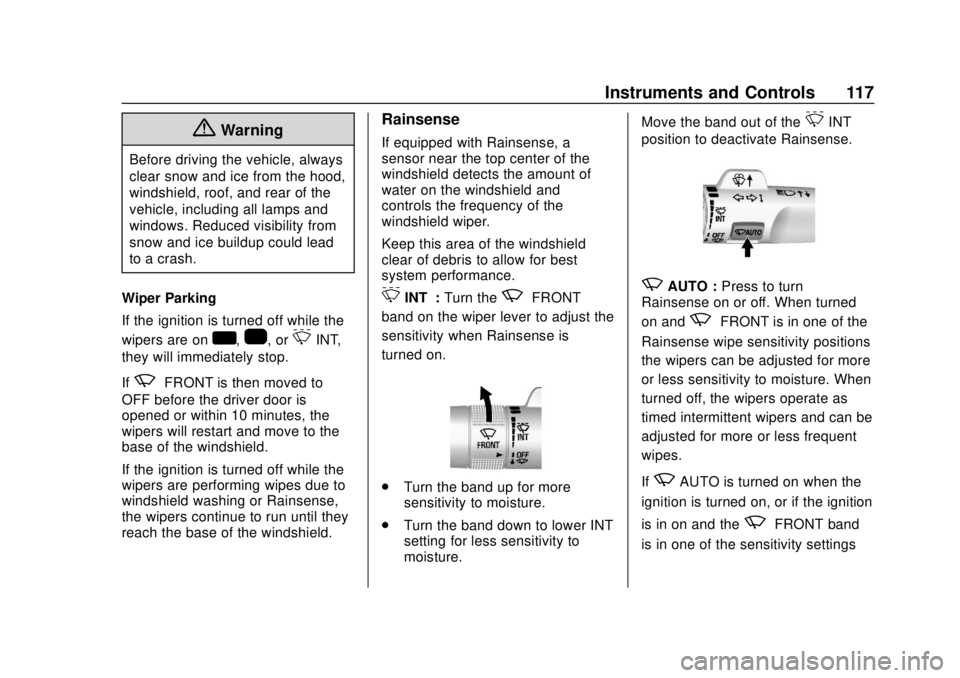
3INT : Turn thezFRONT
band on the wiper lever to adjust the
sensitivity when Rainsense is
turned on.
. Turn the band up for more
sensitivity to moisture.
. Turn the band down to lower INT
setting for less sensitivity to
moisture. Move the band out of the
3INT
position to deactivate Rainsense.
zAUTO : Press to turn
Rainsense on or off. When turned
on and
zFRONT is in one of the
Rainsense wipe sensitivity positions
the wipers can be adjusted for more
or less sensitivity to moisture. When
turned off, the wipers operate as
timed intermittent wipers and can be
adjusted for more or less frequent
wipes.
If
zAUTO is turned on when the
ignition is turned on, or if the ignition
is in on and the
zFRONT band
is in one of the sensitivity settings
Page 119 of 434
GMC Yukon/Yukon XL/Denali Owner Manual (GMNA-Localizing-U.S./
Canada/Mexico-13566587) - 2020 - CRC - 4/15/19
118 Instruments and Controls
whenzAUTO is turned on or off,
a message may display indicating if
Rainsense was turned on or off.
If the ignition is in on and
z
FRONT is not in one of the
sensitivity settings when
zAUTO
is turned on, a message may
display indicating that the wiper
band must be in one of the
sensitivity settings for Rainsense to
operate.
Wiper Arm Assembly Protection
When using an automatic car wash,
move the windshield wiper lever to
OFF. This disables the automatic
Rainsense windshield wipers.
With Rainsense, if the transmission
is in N (Neutral) and the vehicle
speed is very slow, the wipers will
automatically stop at the base of the
windshield.
The wiper operations return to
normal when the transmission is no
longer in N (Neutral) or the vehicle
speed has increased.
Windshield Washer
L m:Push the paddle marked with
the windshield washer symbol at the
top of the turn signal lever to spray
washer fluid and activate the wipers.
The wipers will continue until the
paddle is released or the maximum
wash time is reached. When the
paddle is released, additional wipes
may occur depending on how long
the windshield washer had been
activated. See Washer Fluid0302
for information on filling the
windshield washer fluid reservoir.
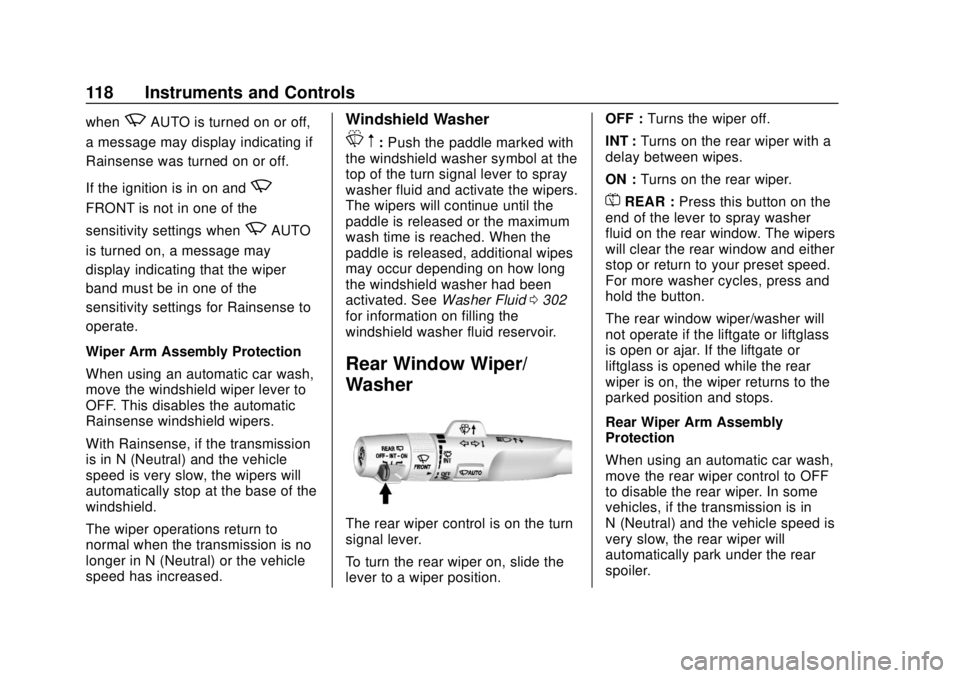
Rear Window Wiper/
Washer
The rear wiper control is on the turn
signal lever.
To turn the rear wiper on, slide the
lever to a wiper position. OFF :
Turns the wiper off.
INT : Turns on the rear wiper with a
delay between wipes.
ON : Turns on the rear wiper.
=REAR : Press this button on the
end of the lever to spray washer
fluid on the rear window. The wipers
will clear the rear window and either
stop or return to your preset speed.
For more washer cycles, press and
hold the button.
The rear window wiper/washer will
not operate if the liftgate or liftglass
is open or ajar. If the liftgate or
liftglass is opened while the rear
wiper is on, the wiper returns to the
parked position and stops.
Rear Wiper Arm Assembly
Protection
When using an automatic car wash,
move the rear wiper control to OFF
to disable the rear wiper. In some
vehicles, if the transmission is in
N (Neutral) and the vehicle speed is
very slow, the rear wiper will
automatically park under the rear
spoiler.
Page 120 of 434
GMC Yukon/Yukon XL/Denali Owner Manual (GMNA-Localizing-U.S./
Canada/Mexico-13566587) - 2020 - CRC - 4/15/19
Instruments and Controls 119
The wiper operations return to
normal when the transmission is no
longer in N (Neutral) or the vehicle
speed has increased.
Reverse Gear Wipes
If the rear wiper control is off, the
rear wiper will automatically operate
continuously when the shift lever is
in R (Reverse), and the front
windshield wiper is performing low
or high speed wipes. If the rear
wiper control is off, the shift lever is
in R (Reverse), and the front
windshield wiper is performing
interval wipes, then the rear wiper
automatically performs interval
wipes.
This feature can be turned on or off.
SeeVehicle Personalization 0152.
The windshield washer reservoir is
used for the windshield and the rear
window. Check the fluid level in the
reservoir if either washer is not
working. See Washer Fluid 0302.Compass
The vehicle may have a compass
display on the Driver Information
Center (DIC). The compass receives
its heading and other information
from the Global Positioning
System (GPS) antenna, StabiliTrak/
Electronic Stability Control (ESC),
and vehicle speed information.
The compass system is designed to
operate for a certain number of
miles or degrees of turn before
needing a signal from the GPS
satellites. When the compass
display shows CAL, drive the
vehicle for a short distance in an
open area where it can receive a
GPS signal. The compass system
will automatically determine when a
GPS signal is restored and provide
a heading again.
Clock
Setting the Time and Date with
Center Stack Controls
To set the time or date:
1. Select SETTINGS from the Home Page, then select Time
and Date.
2. Select the desired function.
3. Turn the MENU knob to increase or decrease the value.
4. Press the MENU knob to go to the next value. After the last
value is selected, the system
will update and return to the
Settings menu. Press
oBACK
to go to the last menu and
save the changes.
Auto Set requires an active OnStar
or connected service plan.
If auto timing is set, the time
displayed on the clock may not
update immediately when driving
into a new time zone.
Page 157 of 434
GMC Yukon/Yukon XL/Denali Owner Manual (GMNA-Localizing-U.S./
Canada/Mexico-13566587) - 2020 - CRC - 4/15/19
156 Instruments and Controls
Hands Free Liftgate Control
The liftgate may be operated with a
kicking motion under the rear
bumper. SeeLiftgate027.
Select Off, On-Open and Close,
or On-Open Only.
Reverse Tilt Mirror
When on, the driver and/or
passenger mirrors will tilt downward
when the vehicle is shifted to
R (Reverse) to improve visibility of
the ground near the rear wheels.
See Reverse Tilt Mirrors 040.
Select Off, On - Driver and
Passenger, On - Driver, or On -
Passenger.
Auto Mirror Folding
When on, the outside mirrors will
automatically fold or unfold when
the Remote Keyless Entry (RKE)
transmitter
QorKbutton is
pressed and held. See Folding
Mirrors 038.
Select Off or On. Auto Wipe in Reverse Gear
When on and the front wiper is on
and wiping, the rear wiper will
automatically activate when the
vehicle is shifted to R (Reverse).
Select Off or On.
Lighting
Select the Lighting menu and the
following may display:
.
Vehicle Locator Lights
. Exit Lighting
Vehicle Locator Lights
This feature will flash the exterior
lamps and allows some of the
exterior lamps and most of the
interior lamps to turn on briefly when
Kon the Remote Keyless Entry
(RKE) transmitter is pressed to
locate the vehicle.
Select On or Off.
Exit Lighting
This allows the selection of how
long the exterior lamps stay on
when leaving the vehicle when it is
dark outside. Select Off, 30 Seconds, 60 Seconds,
or 120 Seconds.
Power Door Locks
Select Power Door Locks and the
following may display:
.
Unlocked Door Anti-Lockout
. Auto Door Unlock
. Delayed Door Lock
Unlocked Door Anti-Lockout
When on, this feature will keep the
driver door from locking when the
door is open and the key is in the
ignition. If Off is selected, the
Delayed Door Lock menu will be
available.
Select Off or On.
Auto Door Unlock
This allows selection of which of the
doors will automatically unlock when
the vehicle is shifted into P (Park).
Select Off, All Doors, or Driver Door.
Page 169 of 434

GMC Yukon/Yukon XL/Denali Owner Manual (GMNA-Localizing-U.S./
Canada/Mexico-13566587) - 2020 - CRC - 4/15/19
168 Lighting
The system may also turn on the
headlamps when driving through a
parking garage or tunnel.
If the vehicle is started in a dark
garage, the automatic headlamp
system comes on immediately. If it
is light outside when the vehicle
leaves the garage, there is a slight
delay before the automatic
headlamp system changes to the
DRL. During that delay, the
instrument cluster may not be as
bright as usual. Make sure the
instrument panel brightness control
is in the full bright position. See
Instrument Panel Illumination
Control0170.
When it is bright enough outside,
the headlamps will turn off or may
change to Daytime Running
Lamps (DRL).
The automatic headlamp system
turns off when the exterior lamp
control is turned to
Oor the ignition
is off.
Lights On with Wipers
If the windshield wipers are
activated in daylight with the engine
on, and the exterior lamp control is
in AUTO, the headlamps, parking
lamps, and other exterior lamps
come on. The transition time for the
lamps coming on varies based on
wiper speed. When the wipers are
not operating, these lamps turn off.
Move the exterior lamp control to
O
or;to disable this feature.
Hazard Warning Flashers
|: Press this button to make the
front and rear turn signal lamps
flash on and off. Press again to turn
the flashers off.
When the hazard warning flashers
are on, the vehicle's turn signals will
not work.
Page 282 of 434
GMC Yukon/Yukon XL/Denali Owner Manual (GMNA-Localizing-U.S./
Canada/Mexico-13566587) - 2020 - CRC - 4/15/19
Vehicle Care 281
Vehicle Care
General Information
General Information . . . . . . . . . . 282
California Proposition65 Warning . . . . . . . . . . . . . . . . . 282
California Perchlorate Materials Requirements . . . . . 283
Accessories and Modifications . . . . . . . . . . . . . . . . 283
Vehicle Checks
Doing Your OwnService Work . . . . . . . . . . . . . . . 283
Hood . . . . . . . . . . . . . . . . . . . . . . . . . 284
Engine Compartment Overview . . . . . . . . . . . . . . . . . . . . 286
Engine Oil . . . . . . . . . . . . . . . . . . . . 289
Engine Oil Life System . . . . . . . 291
Automatic Transmission Fluid (6-Speed Transmission) . . . . . 292
Automatic Transmission Fluid (10-Speed Transmission) . . . 295
Engine Air Cleaner/Filter . . . . . . 296
Cooling System . . . . . . . . . . . . . . 297
Engine Overheating . . . . . . . . . . 300
Engine Fan . . . . . . . . . . . . . . . . . . . 302
Washer Fluid . . . . . . . . . . . . . . . . . 302
Brakes . . . . . . . . . . . . . . . . . . . . . . . 303 Brake Fluid . . . . . . . . . . . . . . . . . . . 304
Battery - North America . . . . . . 305
Four-Wheel Drive . . . . . . . . . . . . . 305
Front Axle . . . . . . . . . . . . . . . . . . . . 306
Rear Axle . . . . . . . . . . . . . . . . . . . . 306
Noise Control System . . . . . . . . 306
Starter Switch Check . . . . . . . . . 308
Automatic Transmission Shift
Lock Control Function
Check . . . . . . . . . . . . . . . . . . . . . . . 308
Ignition Transmission Lock Check . . . . . . . . . . . . . . . . . . . . . . . 308
Park Brake and P (Park) Mechanism Check . . . . . . . . . . 309
Wiper Blade Replacement . . . . 309
Glass Replacement . . . . . . . . . . 310
Windshield Replacement . . . . . 310
Gas Strut(s) . . . . . . . . . . . . . . . . . . 310
Headlamp Aiming
Headlamp Aiming . . . . . . . . . . . . 312
Bulb Replacement
Bulb Replacement . . . . . . . . . . . . 312
High Intensity Discharge (HID) Lighting . . . . . . . . . . . . . . . . . . . . . 312
LED Lighting . . . . . . . . . . . . . . . . . 312
Fog Lamps . . . . . . . . . . . . . . . . . . . 312
Back-Up Lamps . . . . . . . . . . . . . . 313
License Plate Lamp . . . . . . . . . . 314
Electrical System
Electrical System Overload . . . 314
Fuses and Circuit Breakers . . . 315
Engine Compartment Fuse Block . . . . . . . . . . . . . . . . . . . . . . . . 315
Instrument Panel Fuse Block
(Right) . . . . . . . . . . . . . . . . . . . . . . 320
Instrument Panel Fuse Block (Left) . . . . . . . . . . . . . . . . . 323
Rear Compartment Fuse Block . . . . . . . . . . . . . . . . . . . . . . . . 325
Wheels and Tires
Tires . . . . . . . . . . . . . . . . . . . . . . . . . . 326
All-Season Tires . . . . . . . . . . . . . . 327
Winter Tires . . . . . . . . . . . . . . . . . . 328
Low-Profile Tires . . . . . . . . . . . . . 328
All-Terrain Tires . . . . . . . . . . . . . . . 328
Tire Sidewall Labeling . . . . . . . . 329
Tire Designations . . . . . . . . . . . . . 330
Tire Terminology andDefinitions . . . . . . . . . . . . . . . . . . 331
Tire Pressure . . . . . . . . . . . . . . . . . 333
Tire Pressure for High-Speed Operation . . . . . . . . . . . . . . . . . . . 334
Tire Pressure Monitor System . . . . . . . . . . . . . . . . . . . . . . 335
Tire Pressure Monitor Operation . . . . . . . . . . . . . . . . . . . 336
Tire Inspection . . . . . . . . . . . . . . . . 340
Page 311 of 434
GMC Yukon/Yukon XL/Denali Owner Manual (GMNA-Localizing-U.S./
Canada/Mexico-13566587) - 2020 - CRC - 4/15/19
310 Vehicle Care
4. Remove the wiper blade.
5. Reverse Steps 1–3 for wiperblade replacement.
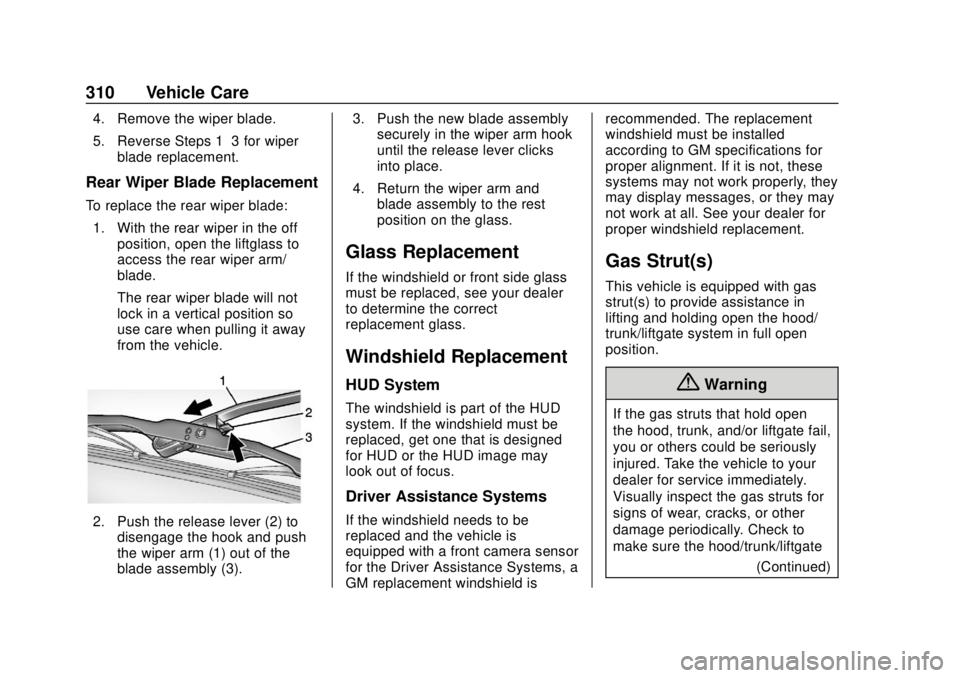
Rear Wiper Blade Replacement
To replace the rear wiper blade:
1. With the rear wiper in the off position, open the liftglass to
access the rear wiper arm/
blade.
The rear wiper blade will not
lock in a vertical position so
use care when pulling it away
from the vehicle.
2. Push the release lever (2) todisengage the hook and push
the wiper arm (1) out of the
blade assembly (3). 3. Push the new blade assembly
securely in the wiper arm hook
until the release lever clicks
into place.
4. Return the wiper arm and blade assembly to the rest
position on the glass.
Glass Replacement
If the windshield or front side glass
must be replaced, see your dealer
to determine the correct
replacement glass.
Windshield Replacement
HUD System
The windshield is part of the HUD
system. If the windshield must be
replaced, get one that is designed
for HUD or the HUD image may
look out of focus.
Driver Assistance Systems
If the windshield needs to be
replaced and the vehicle is
equipped with a front camera sensor
for the Driver Assistance Systems, a
GM replacement windshield is recommended. The replacement
windshield must be installed
according to GM specifications for
proper alignment. If it is not, these
systems may not work properly, they
may display messages, or they may
not work at all. See your dealer for
proper windshield replacement.
Gas Strut(s)
This vehicle is equipped with gas
strut(s) to provide assistance in
lifting and holding open the hood/
trunk/liftgate system in full open
position.
{Warning
If the gas struts that hold open
the hood, trunk, and/or liftgate fail,
you or others could be seriously
injured. Take the vehicle to your
dealer for service immediately.
Visually inspect the gas struts for
signs of wear, cracks, or other
damage periodically. Check to
make sure the hood/trunk/liftgate
(Continued)