wheel GMC YUKON DENALI 2003 Owner's Manual
[x] Cancel search | Manufacturer: GMC, Model Year: 2003, Model line: YUKON DENALI, Model: GMC YUKON DENALI 2003Pages: 447, PDF Size: 21.97 MB
Page 159 of 447
The fog lamps will be cancelled after the ignition is
turned
off. If you still want to use the fog lamps after you
restart the vehicle, you will need
to press the fog
lamp button again.
Interior Lamps
Instrument Panel Brightness
The thumbwheel for this feature is located next to the
exterior lamps control.
G:~ (Instrument Panel Lights): Turn the thumbwheel,
located next
to the exterior lamps control, up or
down to brighten or dim the instrument panel lights and
the radio display. This will only work
if the headlamps
or parking lamps are on.
To turn on the dome lamps, with the vehicle doors
closed, turn the thumbwheel all the way up.
Dome Lamps
The dome lamps will come on when you open a door
and will slowly dim
to off when all doors are closed.
You can also turn the dome lamps on by turning
the thumbwheel, located next to the exterior lamp
control, all the way up. In this position, the dome lamps
will remain on whether a door is opened or closed.
(Dome Override): Press this button, located below
the exterior lamp control,
to set the dome lamps to
come on automatically when a door is opened, or remain
off. To turn the lamps off, press the button into the in
position. With the button in this position, the dome lamps
will remain
off when the doors are open. To return the
lamps
to automatic operation, press the button again
and return it
to the out position. With the button in this
position, the dome lamps will come on when you
open a door.
Entry Lighting
Your vehicle is equipped with an illuminated entry
feature.
When a door is opened, the dome lamps and puddle
lamps will come
on if the dome override button is in the
out position. If the dome override button is pressed
in, the lamps will not come on.
Exit Lighting
With exit lighting, the interior lamps will come on when
you remove the key from the ignition. The lamps
will not come on
if the dome override button is
pressed in.
3-1 6
Page 168 of 447
Outlet Adjustment
Use the air outlets located in the center and on the side
of your instrument panel to direct the airflow.
Your vehicle has air outlets that allow you to adjust the
direction and amount of airflow inside the vehicle.
Move the louvers up or down. Use the thumbwheel next
to or underneath the outlet
to close the louvers. For
the most efficient airflow and temperature control, keep
the outlet in the fully opened position.
Operation Tips
e
e
Keep the hood and front air inlets free of ice, snow,
or any other obstruction (such as leaves). The
heater and defroster will work far better, reducing
the chance of fogging the inside of your windows.
Keep the air path under the front seats clear
of objects. This helps air to circulate throughout
your vehicle.
Adding outside equipment
to the front of your
vehicle, such as hood-air deflectors, etc., may affect
the performance of the heating and air conditioning
system. Check with your dealer before adding
equipment to the outside of your vehicle.
Rear Climate Control System
With this system the front or rear passengers can
control the air temperature, air flow and fan speed for
the rear seat passengers. The climate control has
an overhead control near the driver and a control on the
back of the center console.
Driver Overhead Control
I/
I
Front Controls
To control the rear climate control from the front seat
position, use the driver overhead control. The rear
console control must be on.
3-25
Page 186 of 447
Driver Information Center (DIC)
The DIC display is located on the instrument panel
cluster above the steering wheel. The DIC can display
information such as the trip odometer, fuel economy and
personalization features.
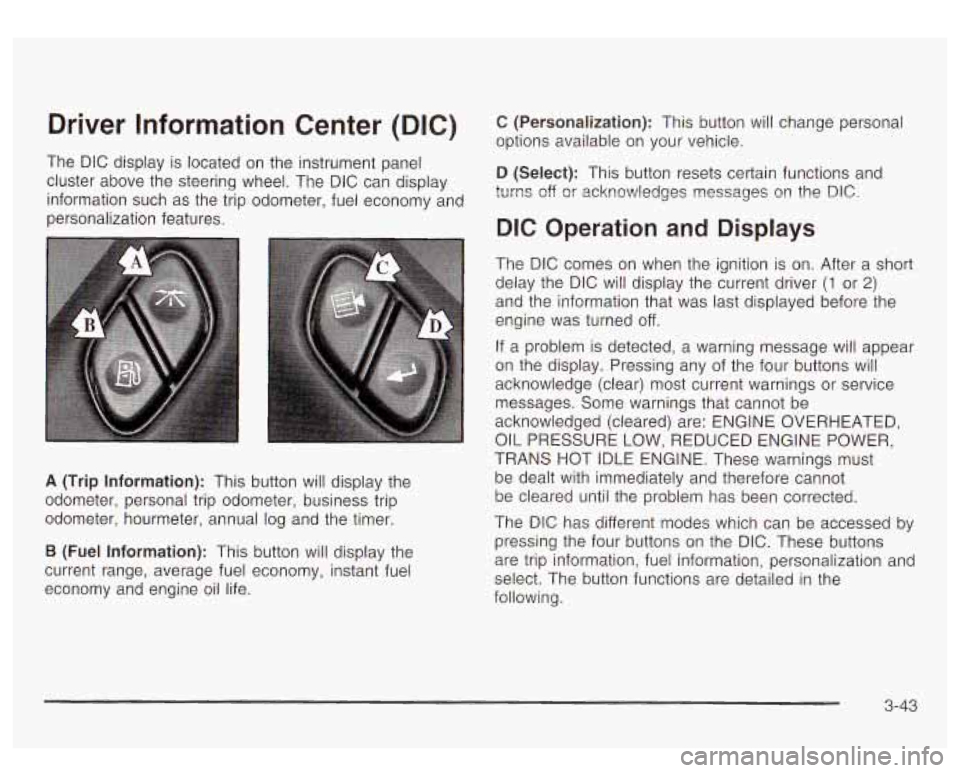
A (Trip Information): This button will display the
odometer, personal trip odometer, business trip
odometer, hourmeter, annual log and the timer.
B (Fuel Information): This button will display the
current range, average fuel economy, instant fuel
economy and engine oil life.
C (Personalization): This button will change personal
options available on your vehicle.
D (Select): This button resets certain functions and
turns off
or acknowledges nessages on the DIC.
DIC Operation and Displays
The DIC comes on when the ignition is on. After a short
delay the DIC will display the current driver
(1 or 2)
and the information that was last displayed before the
engine was turned off.
If a problem is detected, a warning message will appear
on the display. Pressing any of the four buttons will
acknowledge (clear) most current warnings or service
messages. Some warnings that cannot be
acknowledged (cleared) are: ENGINE OVERHEATED,
OIL PRESSURE LOW, REDUCED ENGINE POWER,
TRANS HOT IDLE ENGINE. These warnings must
be dealt with immediately and therefore cannot
be cleared until the problem has been corrected.
The DIC has different modes which can be accessed
by
pressing the four buttons on the DIC. These buttons
are trip information, fuel information, personalization and
select. The button functions are detailed in the
following.
3-43
Page 197 of 447
BATTERY
If the battery is not charging during operation, this
message will appear
on the DIG. Driving with this
problem could drain your battery. Have the electrical
system checked as soon as possible. Pressing the
select button will acknowledge this message and clear
it
from the DIC display.
SERVlCE AIR
If there is a problem with the air bag system, this
message will be displayed on the DIC. Have a qualified
technician inspect the system for problems. Pressing
the select button will acknowledge this message
and clear
it from the DIC display.
SERVICE BRAKE SYSTE
If a problem occurs with the brake system, this message
will appear on the DIC. If this message appears, stop
as soon as possible and turn
off the vehicle. Restart the
vehicle and check for the message
on the DIC display.
If the message is still displayed, or appears again when
you begin driving, the brake system needs service.
SERVICE 4W
If a problem occurs with the all-wheel drive system? this
message will appear on the DIG.
If this message
appears, stop as
soon as possible and turn off the
vehicle. Restart the vehicle and check for the message
3-54
on the DIC display. If the message is still displayed, or
appears again when you begin driving, the four
wheel drive system needs service.
ONTROL
If a problem occurs with the suspension system, this
message will appear on the DIC.
If this message
appears, stop and turn
off the vehicle. Restart the
vehicle and check for the message on the
DIC display.
If the message is still displayed, or appears again
when you begin driving, the suspension system needs
service.
TURN SIGNAL ON
If a turn signal is left on for 3/4 of a mile (1.2 km), this
message will appear on the display and you will hear a
chime. Move the turn signal/multifunction lever
to the
off position. Pressing the select button will acknowledge
this message and clear
it from the DIC display.
If the liftgate is open while the ignition is in
RUN, this
message will appear on the DIC and you will hear
a chime. Turn
off the vehicle and check the liftgate.
Restart the vehicle and check for the message on the
DlC display. Pressing the select button will acknowledge
this message and clear it from the
DIC display.
Page 200 of 447
When the system activates, you may hear a noise or
feel a vibration in the brake pedal. This is normal. When
the STABILITY SYS ACTIVE message is on, you
should continue
to steer in the direction you want to go.
The system is designed
to help you in bad weather
or other difficult driving situations by making the most of
whatever road conditions will permit.
SERVICE STABILITY
If you ever see the SERVICE STABILITY message, it
means there may be a problem with your
StabiIitrak@system. If you see this message
try to reset
the system (stop; turn
off the engine; then start the
engine again). If the SERVICE STABILITY message still
comes on, it means there is a problem. You should
see your dealer for service. The vehicle is safe to drive,
however, you do not have the benefit of Stabilitrak@,
so reduce your speed and drive accordingly.
STABILITY SYS DISABLED
The STABILITY SYS DISABLED message will turn on
when you press the Stabilitrak@button, or when the
stability control has been automatically disabled. To limit
wheel spin and realize the full benefits of the stability
enhancement system, you should normally leave
Stabilitrak@on. However, you should turn Stabilitrak@off
if your vehicle gets stuck in sand, mud, ice or snow and you want to “rock”
your vehicle
to attempt to free it,
or if you are driving in extreme off-road conditions
and require more wheel spin. See If
You Are Stuck: In
Sand, Mud, Ice or
Snow on page 4-41. To turn the
Stabilitrak@system back on press the Stabilitrak@button
again. There are four conditions that can cause this
message
to appear. One condition is overheating, which
could occur
if Stabilitrak@activates continuously for an
extended period of time. The message will
also be
displayed
if the brake system warning light is on. See
Brake System Warning Light
on page 3-34. The
message could be displayed
if the stability system takes
longer than usual to complete its diagnostic checks
due to driving conditions. Also,
if an engine or vehicle
related problem has been detected, and the vehicle
needs service, the message will appear.
The message will turn off as soon as the conditions that
caused the message to be displayed are no longer
present.
TRACTION ACTIVE
When the traction control system has detected that any
of the vehicle’s wheels are slipping, the traction
control system will activate and this message will appear
on the DIC. See StabiIitrakO System
on page 4-9 for
more information.
3-57
Page 229 of 447
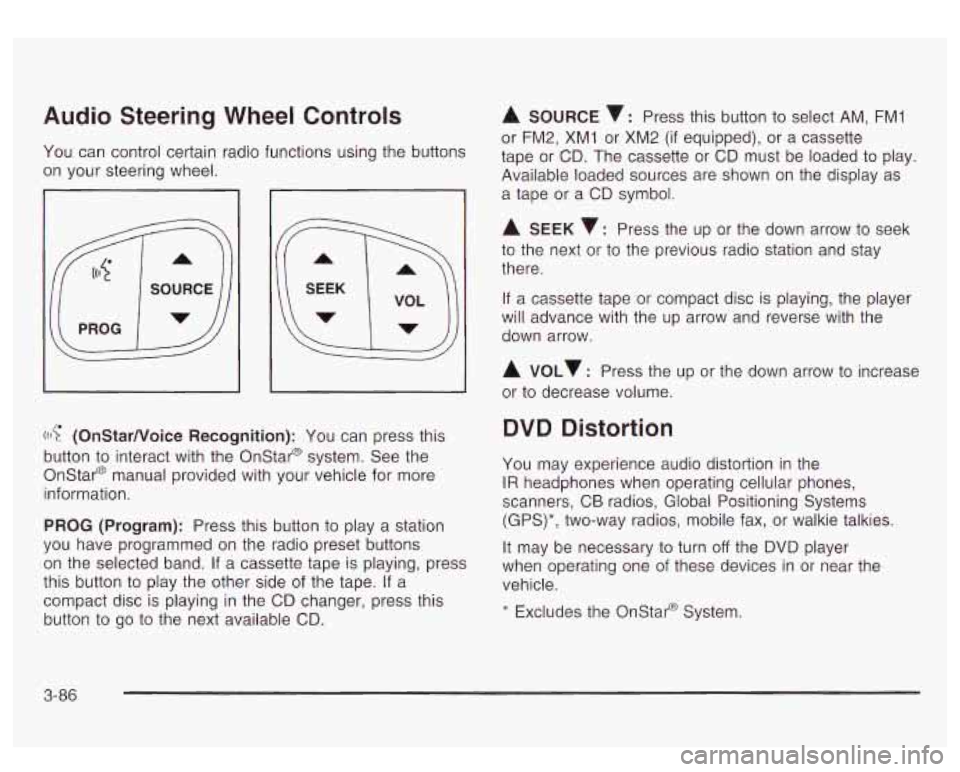
Audio Steering Wheel Controls
You can control certain radio functions using the buttons
on your steering wheel.
I
((I? (OnStarNoice Recognition): You can press this
button
to interact with the Onstar@ system. See the
Onstar@ manual provided with your vehicle for more
information.
PROG (Program): Press this button to play a station
you have programmed on the radio preset buttons
on the selected band. If a cassette tape is playing, press
this button to play the other side of the tape. If a
compact disc is playing
in the CD changer, press this
button to
go to the next available CD.
A SOURCE v: Press this button to select AM, FMI
or FM2, XM1 or XM2 (if equipped), or a cassette
tape or CD. The cassette or CD must be loaded to play.
Available loaded sources are shown on the display as
a tape or a CD symbol.
A SEEK 7: Press the up or the down arrow to seek
to the next or
to the previous radio station and stay
there.
If a cassette tape or compact disc is playing, the player
will advance with the up arrow and reverse with the
down arrow.
A VOLv : Press the up or the down arrow to increase
or to decrease volume.
DVD Distortion
You may experience audio distortion in the
IR headphones when operating cellular phones,
scanners, CB radios, Global Positioning Systems
(GPS)*, two-way radios, mobile fax, or walkie talkies.
It may be necessary to turn
off the DVD player
when operating one of these devices in or near the
vehicle.
* Excludes the Onstat-@ System.
3-86
Page 234 of 447
Section 4 Driving Your Vehicle
Your Driving. the Road. and Your Vehicle .......... 4-2
Defensive Driving
........................................... 4.2
Drunken Driving
............................................. 4-2
Control of a Vehicle
........................................ 4-5
Braking
......................................................... 4-6
Stabilitrak@ System
......................................... 4-9
Steering
...................................................... 4-11
Off-Road Recovery
....................................... 4-13
Passing
....................................................... 4-13
Loss of Control ............................................. 4-15
Operating Your All-Wheel-Drive Vehicle Off
Paved Roads
............................................ 4-16
Driving at Night
............................................ 4-28
Driving in Rain and on Wet Roads
.................. 4-29 City Driving
.................................................. 4-32
Before Leaving on a Long Trip
....................... 4-34
Highway Hypnosis
........................................ 4-35
Winter Driving
.............................................. 4.37
Towing .......................................................... 4.44
Towing Your Vehicle
..................................... 4-44
Recreational Vehicle Towing
........................... 4-44
Loading Your Vehicle
........... ................. 4.44
AutorideTM
.............................. ............. 4-46
Trailer Recommendations
............................... 4-47
Towing a Trailer
...................... ...... 4-47
Freeway Driving
4-33 -r ...........................................
Hill and Mountain Roads ................................ 4-35
If You Are Stuck: In Sand, Mud, Ice or Snow
........ 4-41
4-
1
Page 240 of 447
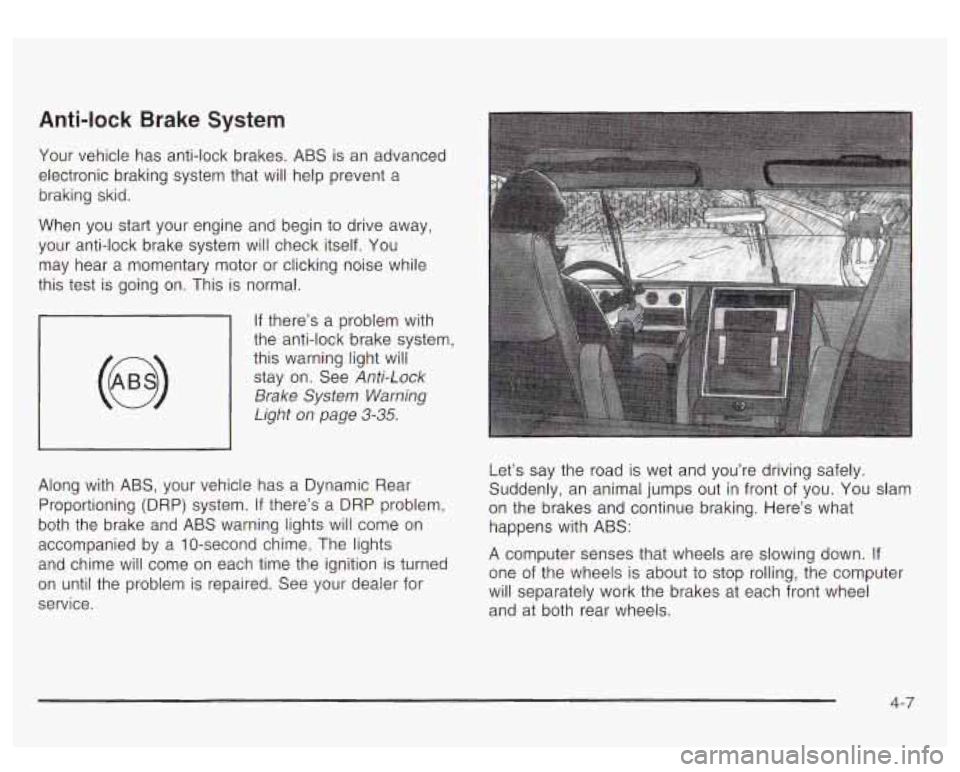
Anti-lock Brake System
Your vehicle has anti-lock brakes. ABS is an advanced
electronic braking system that will help prevent a
braking skid.
When you start your engine and begin to drive away,
your anti-lock brake system will check itself. You
may hear a momentary motor or clicking noise while
this test is going on. This is normal.
If there’s a problem with
the anti-lock brake system, this warning light
will
stay on. See Anti-Lock
Brake System Warning
Light
on page 3-35.
Along with ABS, your vehicle has a Dynamic Rear
Proportioning (DRP) system.
If there’s a DRP problem,
both the brake and ABS warning lights will come
on
accompanied by a IO-second chime. The lights
and chime will come
on each time the ignition is turned
on until the problem is repaired. See your dealer for
service. Let’s say
the road is wet and you’re driving safely.
Suddenly, an animal jumps out in front of you. You slam
on the brakes and continue braking. Here’s what
happens with ABS:
A computer senses that wheels are slowing down. If
one of the wheels is about to stop rolling, the computer
will separately work the brakes at each front wheel
and at both rear wheels.
4-7
Page 241 of 447
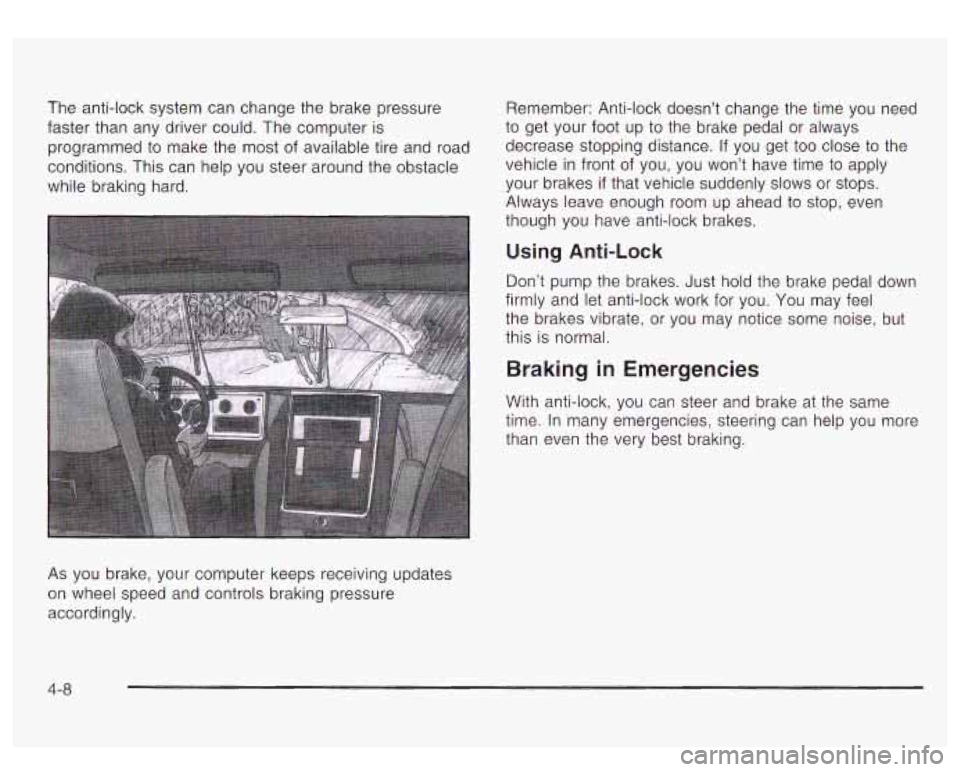
As you brake, your computer keeps receiving updates
on wheel speed and controls braking pressure
accordingly.
4-8
Page 243 of 447
When the Stabilitrak@system has been turned off you
may still hear system noises as a result of the
brake-traction control coming on.
It is recommended to leave the system on for normal
driving conditions, but it may be necessary
to turn
the system
off if your vehicle is stuck in sand, mud, ice
or snow, and you want
to “rock” your vehicle to
attempt to free it. It may also be necessary to turn off
the system when driving in extreme off-road conditions
where high wheel spin is required. See If
You Are
Stuck: In Sand, Mud, Ice or Snow on page
4-4 1.
Traction Control Operation
The traction control system is part of the
Stabilitrak@system. Traction control limits wheel spin by
reducing engine power
to the wheels (engine speed
management) and by applying brakes
to each individual
wheel (brake-traction control) as necessary.
The traction control system is enabled automatically
when you start your vehicle, and it will activate
and display the TRACTION ACTIVE message in the
Driver Information Center (DIC)
if it senses that any of
the wheels are spinning or beginning to lose traction
while driving. If you turn
off Stabilitrak@, only the
brake-traction control portion
of traction control will
work. The engine speed management will be disabled.
In this state, engine power is not reduced automatically
and the driven wheels can spin more freely. This
can cause the brake-traction control
to activate
constantly. For more information on the traction active
message, see Driver Information Center (DIC) on
page
3-43.
Notice: If the traction off light comes on due to
heavy braking and/or because the traction control
system has been continuously active, do not allow
the wheel@) of one axle to spin excessively.
If you
do, you may be causing damage to your transfer
case. This could lead to costly repairs not covered by
your warranty.
If the brake-traction control system activates constantly
or
if the brakes have heated up due to high speed
braking, the brake-traction control will be automatically
disabled. The system will come back on after the
brakes have cooled. This can take up
to two minutes ot
longer depending on brake usage.
Notice: Don’t allow the wheel(s) of one axle to spin
excessively when the traction
off, ABS and brake
lights are on and the
SERVICE STABILITY MESSAGE
is displayed. In this situation, damage to the transfer
case
is possible. This could lead to costly repairs not
covered by your warranty. You should immediately
reduce engine power until the lights and messages
are no longer displayed.
4-1 0