tow GMC YUKON DENALI 2003 Owner's Guide
[x] Cancel search | Manufacturer: GMC, Model Year: 2003, Model line: YUKON DENALI, Model: GMC YUKON DENALI 2003Pages: 447, PDF Size: 21.97 MB
Page 182 of 447
Light On Steady - An emission control system
malfunction has been detected on your vehicle.
Dealer or qualified service center diagnosis
and service may be required.
If the Light is Flashing
The following may prevent more serious damage to
your vehicle:
Reducing vehicle speed.
Avoiding hard accelerations.
Avoiding steep uphill grades.
If you are towing a trailer, reduce the amount of
cargo being hauled as soon as it is possible.
If the light stops flashing and remains on steady, see “If
the Light
Is On Steady” following.
If the light continues to flash, when
it is safe to do so,
stop the vehicle. Find a safe place to park your vehicle.
Turn the key
off, wait at least 10 seconds and restart
the engine. If the light remains on steady, see
“If
the Light Is On Steady” following. If the light is still
flashing, follow the previous steps, and drive the vehicle
to your dealer or qualified service center for service.
If the Light Is On Steady
You may be able to correct the emission system
malfunction by considering the following:
Did
you recently put fuel into your vehicle?
If so, reinstall the fuel cap, making sure to fully install
the cap. See Filling
Your Tank on page 5-7. The
diagnostic system can determine
if the fuel cap has
been left
off or improperly installed. A loose or missing
fuel cap will allow fuel to evaporate into the atmosphere.
A few driving trips with the cap properly installed
should turn the light
off.
Did you just drive through a deep puddle of water?
If so, your electrical system may be wet. The condition
will usually be corrected when the electrical system
dries out. A few driving trips should turn the light
off.
Have you recently changed brands of fuel?
If so, be sure to fuel your vehicle with quality fuel. See
Gasoline Octane
on page 5-5. Poor fuel quality will
cause your engine not to run as efficiently as designed.
You may notice this as stalling after start-up, stalling
when you put the vehicle into gear, misfiring, hesitation
on acceleration or stumbling on acceleration. (These
conditions may go away once the engine is warmed up.)
This will be detected by the system and cause the
light to turn on.
If you experience one or more of these conditions,
change the fuel brand you use. It will require at least
one full tank
of the proper fuel to turn the light off.
Page 184 of 447
A reading in the low pressure zone may be caused by a
dangerously low oil level or some other problem
causing
low oil pressure. Check your oil as soon as
possible. See
Engine Oil on page 5-13.
DL.. t kc-> dl - - jng if -..3 oil pressure is IOL- If
you do, your engine can become
so hot that it
catches fire. You or others could be burned.
Check your oil as soon as possible and have
your vehicle serviced.
Notice: Damage to your engine from neglected oil
problems can be costly and is not covered by
your warranty.
Security Light
1 This light will come on
I'
brieflywhen you turn the
key toward START.
The light will stay on until
the engine starts.
If the light flashes, the Passlock@ system has entered a
tamper mode. If the vehicle fails
to start, see Passlock@
on page
2- 17.
If the iight comes on continuously while driving and
stays on, there may be a problem with the Passlock@
system. Your vehicle will not be protected by Passlock@,
and you should see your dealer.
Also, see Content Theft-Deterrent on page 2- 16 for
additional information regarding the security light.
Cruise Control Light
The cruise light comes on
whenever you
set your
cruise control. See Cruise
Control under Turn
SignaVMultifunction Lever
on page 3-7.
3-4 1
Page 185 of 447
Tow/HauI Mode Light
I
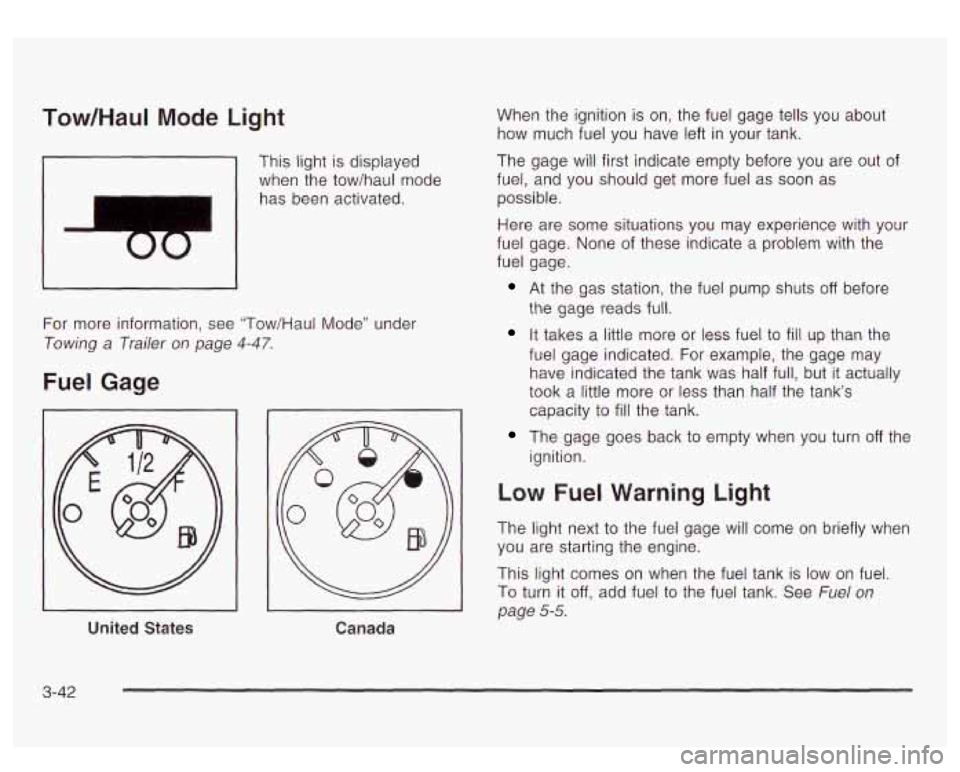
This light is displayed
when the tow/haul mode
has been activated.
For more information, see "Tow/Haul Mode" under
Towing a Trailer on page 4-47.
Fuel Gage
United States
Canada
When the ignition is on, the fuel gage tells you about
how much fuel you have left in your tank.
The gage will first indicate empty before you are out of
fuel, and you should get more fuel as
soon as
possible.
Here are some situations you may experience with your
fuel gage. None of these indicate a problem with the
fuel gage.
At the gas station, the fuel pump shuts off before
the gage reads full.
It takes a little more or less fuel to fill up than the
fuel gage indicated. For example, the gage may
have indicated the tank was half full, but
it actually
took a little more or less than half the tank's
capacity to
fill the tank.
The gage goes back to empty when you turn off the
ignition.
Low Fuel Warning Light
The light next to the fuel gage will come on briefly when
you are starting the engine.
This light comes on when the fuel tank is
low on fuel.
To turn it off, add fuel to the fuel tank. See Fuel on
page 5-5.
3-42
Page 198 of 447

FUEL LEVEL LOW
If the fuel level is low, this message will appear on the
DIC and you will hear a chime. Refuel as soon as
possible. Pressing the select button will acknowledge
this message immediately and clear it from the DIC
display. It will also clear itself after
10 seconds until the
next ignition cycle. The low fuel light near the fuel
gage will still remain on in either case.
CHECK WASHER FLUID
If the washer fluid level is low, this message will appear
on the DIC. Adding washer fluid will clear the message.
Pressing the select button will acknowledge this
message and clear it from the DIC display. This
message will clear itself after
10 seconds until the next
igntion cycle.
TRANSMISSION HOT
If the transmission fluid temperature becomes high, the
message center will display this message.
When the transmission enters the protection mode, you
may notice a change in the transmission shifting
patterns. When the transmission fluid temperature
returns
to normal, the display will turn off and the
transmission shifting patterns will return
to normal.
Notice: If you keep driving your vehicle with the
transmission
TRANS FLUID HOT message
displayed, you can damage the transmission. This
could lead to costly repairs that may not be covered
under your warranty.
The following situations can cause the transmission to
operate at higher temperatures:
Towing a trailer
@ Hot outside air temperatures
Hauling a large or heavy load
Low transmission fluid level
High transmission fluid level
Restricted air flow to the radiator.
A temporary solution
to hotter transmission operating
temperatures may be
to let the transmission cool down.
If the transmission is operated at higher temperatures
on a frequent basis, see Scheduled Maintenance
on page 6-5 for the proper transmission maintenance
intervals.
TRANS HOT IDLE ENGINE
If the transmission fluid in the vehicle gets hot, this
message will appear on the DIC along with a continuous
chime. Driving with the transmission fluid temperature
high can cause damage
to the vehicle.
3-55
Page 206 of 447
Adjusting the Speakers (Balance/Fade)
AUDIO: To adjust the balance between the right
and the left speakers, push and release the AUDIO
knob
until BAL appears on the disp!ay. Turr! the knob to
move the sound toward the right or the left speakers.
To adjust the fade between the front and the rear
speakers, push and release the AUDIO knob until FADE
appears on the display. Turn the knob to move the
sound toward the front or the rear speakers.
To adjust the balance and fade
to the middle position,
push the AUDIO knob then push it again and hold it until
the radio produces one beep. The balance and fade
will be adjusted
to the middle position and the display
will show the speaker balance.
To adjust all tone and speaker controls to the middle
position, push and hold the AUDIO knob when no tone
or speaker control is displayed. The radio will produce
one beep and display ALL with the level display in
the middle position.
Finding a PTY Station (RDS and XMTM)
To select and find a desired PTY perform the following:
1. Turn the P-TYPE LIST knob. TYPE and a PTY
will appear on the display.
3. Once the desired category is displayed, press the
SEEK TYPE button or one of the SEEK arrows
to
take you to the category’s first station.
4. If you want to go to another station within that
category and the category
is displajieb, press
the SEEK TYPE button once. If the category is not
displayed, press the SEEK TYPE button twice
to display the category and then
to go to another
station.
If the radio cannot find the desired program type, NONE
will appear on the display and the radio will return to
the last station you were listening
to.
SCAN: You can also scan through the channels within
a category by performing the following:
1. Turn the P-TYPE LIST knob. TYPE and a PTY will
2. Select a category by turning the P-TYPE
appear
on the display.
LIST knob.
3. Once the desired category is displayed, press either
SCAN arrow, and the radio will begin scanning
within your chosen category.
4. Press wither SCAN arrow again to stop scanning.
2. Select a category by turning the P-TYPE LIST
knob.
3-63
Page 223 of 447
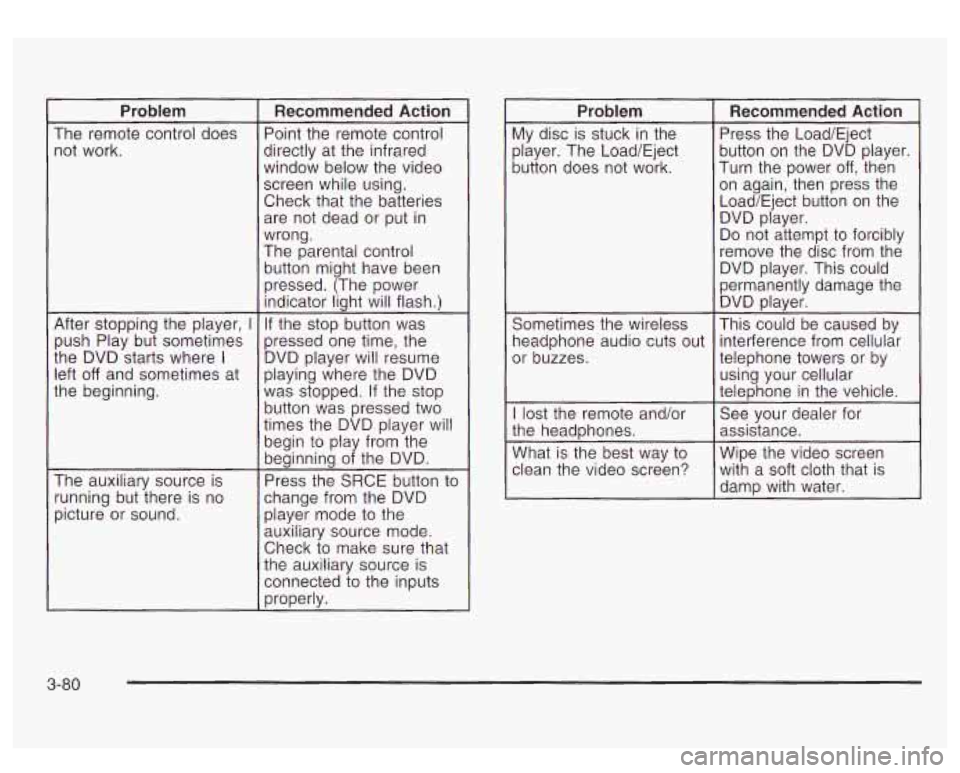
Problem
The remote control does not work.
After stopping the player,
I
push Play but sometimes
the DVD starts where
I
left off and sometimes at
the beginning.
The auxiliary source is
running but there is no
picture or sound.
Recommended Action
Point the remote control
directly at the infrared
window below the video
screen while using.
Check that the batteries are not dead or put in
wrong.
The parental control
button might have been
pressed. (The power indicator light will flash.)
If the stop button was
pressed one time, the
DVD player will resume
playing where the DVD
was stopped. If the stop
button was pressed two
times the DVD player will
begin to play from the
beginning of the DVD.
Press the SRCE button to
change from the DVD player mode
to the
auxiliary source mode.
Check to make sure that
the auxiliary source is
connected to the inputs
properly.
Problem
My disc is stuck in the
player. The Load/Eject
button does not work.
Sometimes the wireless
headphone audio cuts out
or buzzes.
I lost the remote and/or
the headphones.
What is the best way
to
clean the video screen?
Recommended Action
Press the Load/Eject
button on the DVD player.
Turn the power
off, then
on again, then press the
Load/Eject button on the DVD player.
Do not attempt
to forcibly
remove the disc from the
DVD player. This could
permanently damage the DVD player.
This could be caused by
interference from cellular
telephone towers or by
using your cellular
telephone in the vehicle.
See your dealer for
assistance.
Wipe the video screen with a soft cloth that
is
damp with water.
3-80
Page 234 of 447
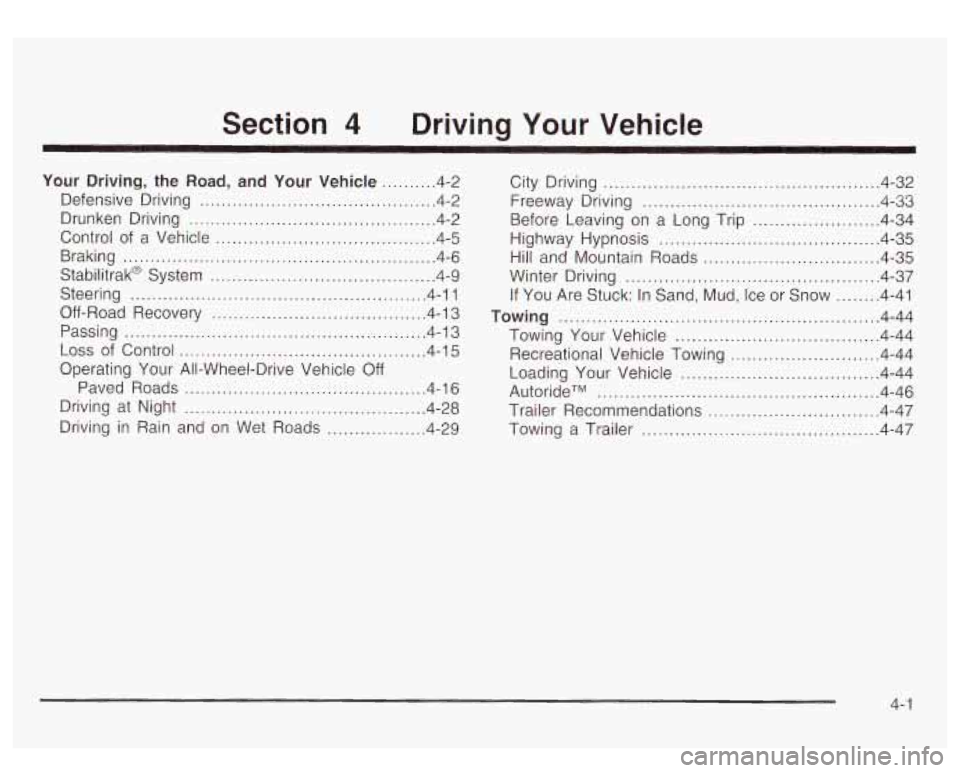
Section 4 Driving Your Vehicle
Your Driving. the Road. and Your Vehicle .......... 4-2
Defensive Driving
........................................... 4.2
Drunken Driving
............................................. 4-2
Control of a Vehicle
........................................ 4-5
Braking
......................................................... 4-6
Stabilitrak@ System
......................................... 4-9
Steering
...................................................... 4-11
Off-Road Recovery
....................................... 4-13
Passing
....................................................... 4-13
Loss of Control ............................................. 4-15
Operating Your All-Wheel-Drive Vehicle Off
Paved Roads
............................................ 4-16
Driving at Night
............................................ 4-28
Driving in Rain and on Wet Roads
.................. 4-29 City Driving
.................................................. 4-32
Before Leaving on a Long Trip
....................... 4-34
Highway Hypnosis
........................................ 4-35
Winter Driving
.............................................. 4.37
Towing .......................................................... 4.44
Towing Your Vehicle
..................................... 4-44
Recreational Vehicle Towing
........................... 4-44
Loading Your Vehicle
........... ................. 4.44
AutorideTM
.............................. ............. 4-46
Trailer Recommendations
............................... 4-47
Towing a Trailer
...................... ...... 4-47
Freeway Driving
4-33 -r ...........................................
Hill and Mountain Roads ................................ 4-35
If You Are Stuck: In Sand, Mud, Ice or Snow
........ 4-41
4-
1
Page 275 of 447
Rocking Your Vehicle To Get It Out
First, turn your steering wheel left and right. That will
clear the area around your front wheels. If your vehicle
has the Stabilitrak@System, turn the system off by
pressing the Stabilitrak@button
so that the STABILITY
SYS DISABLED message and the traction off light
are illuminated on the instrument panel cluster. Then
shift back and forth between REVERSE (R) and
a
forward gear, spinning the wheels as little as possible.
Release the accelerator pedal while you shift, and press
lightly on the accelerator pedal when the transmission
is in gear. By slowly spinning your wheels in the forward
and reverse directions, you will cause a rocking
motion that may free your vehicle.
If that doesn’t get
you out after a few tries, you may need to be towed out.
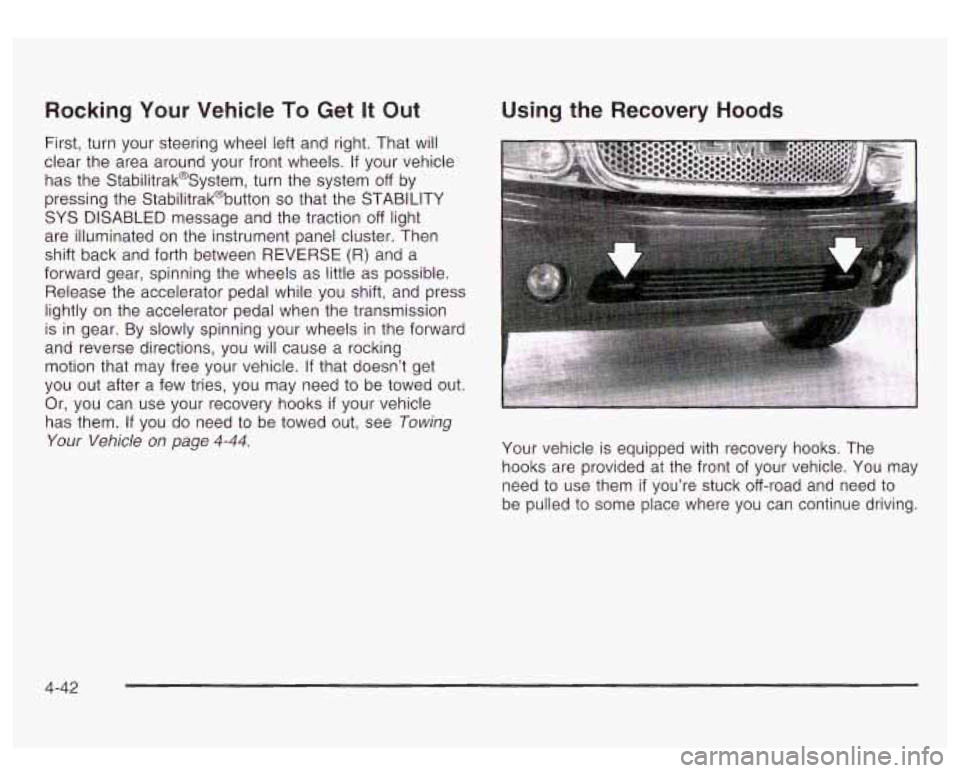
Or, you can use your recovery hooks
if your vehicle
has them. If you do need to be towed out, see Towing
Your Vehicle on page 4-44.
Using the Recovery Hoods
Your vehicle is equipped with recovery hooks. The
hooks are provided at the front
of your vehicle. You may
need to use them
if you’re stuck off-road and need to
be pulled to some place where you can continue driving.
4-42
Page 276 of 447
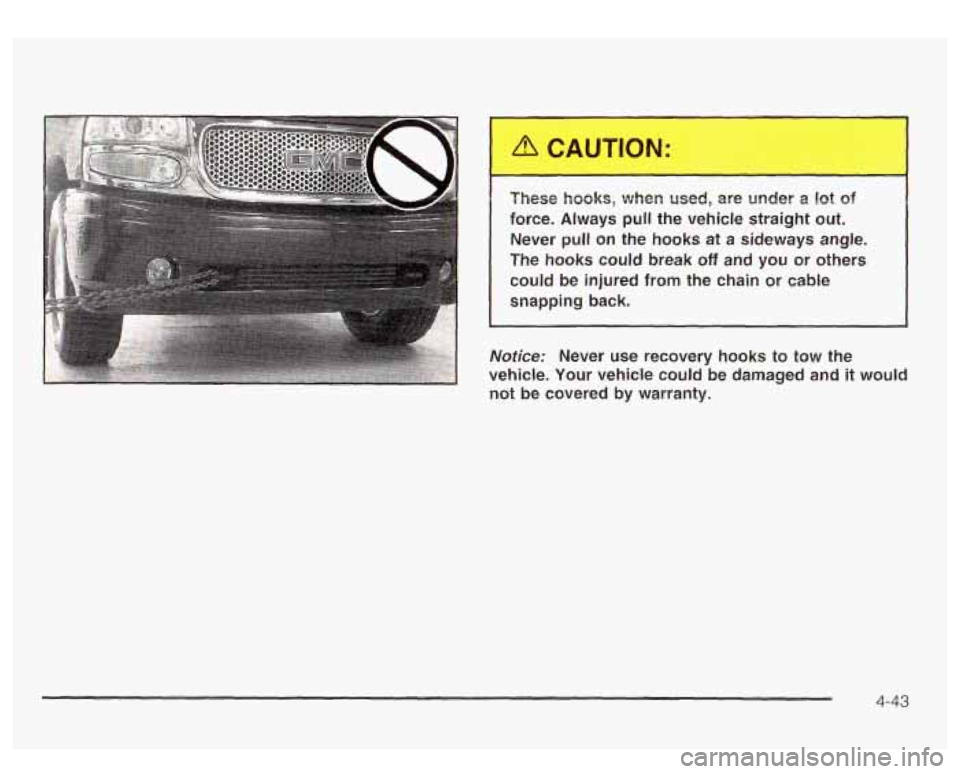
I These hooks, when used, are under a 1st of
force. Always pull the vehicle straight out. Never
pull on the hooks at a sideways angle.
The hooks could break
off and you or others
could be injured
from the chain or cable
snapping back.
Notice: Never use recovery hooks to tow the
vehicle. Your vehicle could be damaged and
it would
not be covered by warranty.
4-43
Page 277 of 447
Towing Loading Your Vehicle
Towing Your Vehicle
Consult your dealer or a professional towing service if
you need to have your disabled vehicle towed. See
Roadside Assistance Program on page
7-5.
If you want to tow your vehicle behind another vehicle
for recreational purposes (such as behind a motorhome),
see “Recreational Vehicle Towing” following.
Recreational Vehicle Towing
Recreational vehicle towing means towing your vehicle
behind another vehicle
- such as behind a motorhome.
The two most common types of recreational vehicle
towing are known as “dinghy towing” (towing your vehicle
with all four wheels on the ground) and “dolly towing”
(towing your vehicle with two wheels
on the ground and
two wheels
up on a device known as a “dolly”).
Your vehicle was not designed
to be towed with any of
its wheels on the ground.
If your vehicle must be
towed, see Towing Your Vehicle on page
4-44.
Notices Towing an all-wheel-drive vehicle with all
four wheels on the ground, or even with only two
of
its wheels on the ground, will damage drivetrain
components. Don’t tow an all-wheel-drive vehicle
if
any of its wheels will be on the ground.
II II
GAWR FRT GAWR RR
!E mNERS MANUAL FOR ADDITIONAL INFORMATION[-]
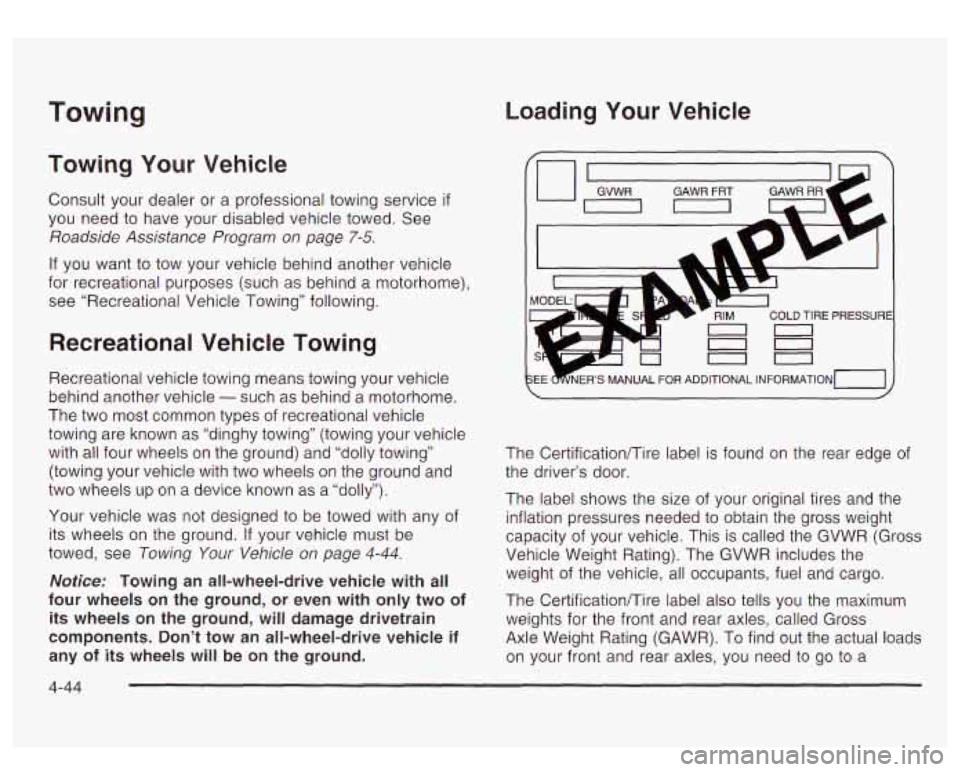
The Certificationmire label is found on the rear edge of
the driver’s door.
The label shows the size of your original tires and the
inflation pressures needed
to obtain the gross weight
capacity of your vehicle. This is called the GVWR (Gross
Vehicle Weight Rating). The GVWR includes the
weight of the vehicle, all occupants, fuel and cargo.
The Certificationmire label also tells you the maximum
weights for the front and rear axles, called Gross
Axle Weight Rating (GAWR). To find out the actual loads
on your front and rear axles, you need to go
to a
4-44