heating GMC YUKON DENALI 2003 Owners Manual
[x] Cancel search | Manufacturer: GMC, Model Year: 2003, Model line: YUKON DENALI, Model: GMC YUKON DENALI 2003Pages: 447, PDF Size: 21.97 MB
Page 161 of 447
Notice: Adding some electrical equipment to your
vehicle can damage it or keep other things from
working as they should. This wouldn’t be covered by
your warranty. Check with your dealer before
adding electrical equipment, and never use anything
that exceeds the amperage rating.
Certain power accessory plugs may not be compatible
to the accessory power outlets and could result in
blown vehicle or adapter fuses.
If you experience a
problem, see your dealer for additional information on
the accessory power plugs.
Notice: Power outlets are designed for accessory
plugs only. Do not hang any type of accessory
or accessory bracket from the plug. Improper use of
the power outlet can cause damage not covered
by your warranty.
Ashtrays and Cigarette Lighter
The front ashtray and lighter are located in the center
console near the cupholders. Press
on the access door
to open it and use the ashtray and lighter.
Notice: Don’t put papers or other flammable
items into your ashtrays. Hot cigarettes or other
smoking materials could ignite them, causing
a damaging fire.
To remove the ashtray, pull
it from the center console.
Slide it back in and push down
to be sure it is secure.
To use the cigarette lighter, push
it in all the way, and let
go. When it’s ready,
it will pop back out by itself.
Notice: Don’t hold a cigarette lighter in with your
hand while
it is heating. If you do, it won’t be able to
back away from the heating element when it’s
ready. That can make it overheat, damaging the
lighter and the heating element.
3-1 8
Page 162 of 447
Climate Controls
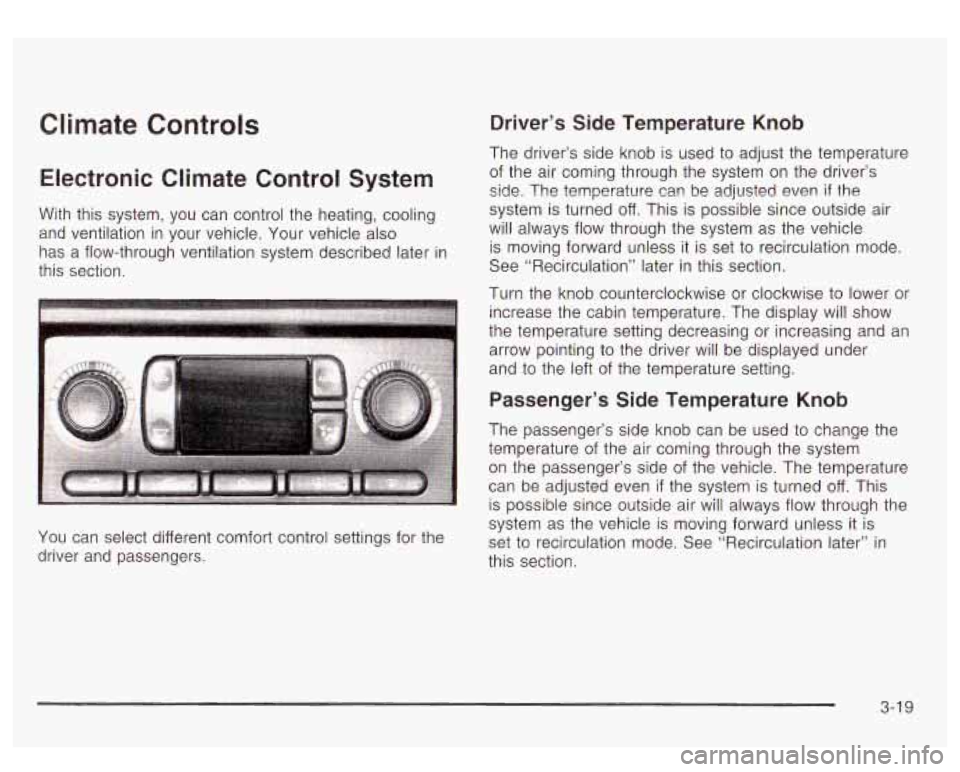
Electronic Climate Control System
With this system, you can control the heating, cooling
and ventilation in your vehicle. Your vehicle also
has a flow-through ventilation system described later in
this section.
You can select different comfort control settings for the
driver and passengers.
Driver’s Side Temperature Knob
The driver’s side knob is used to adjust the temperature
of the air coming through the system on the driver’s
side. The temperature can be adjusted even if the
system is turned off. This is possible since outside air
will always
flow through the system as the vehicle
is moving forward unless it is set
to recirculation mode.
See “Recirculation” later in this section.
Turn the knob counterclockwise or clockwise
to lower or
increase the cabin temperature. The display will show
the temperature setting decreasing or increasing and an
arrow pointing
to the driver will be displayed under
and
to the left of the temperature setting.
Passenger’s Side Temperature Knob
The passenger’s side knob can be used to change the
temperature of the air coming through the system
on the passenger’s side
of the vehicle. The temperature
can be adjusted even
if the system is turned off. This
is possible since outside air will always flow through the
system as the vehicle is moving forward unless
it is
set
to recirculation mode. See “Recirculation later” in
this section.
3-1 9
Page 166 of 447
If the driver’s and passenger’s temperature settings are
the same when AUTO
is pressed, the temperature
setting and both arrows will be displayed for five
seconds along with the automatic air delivery mode and
fan speed. After the five second update, the display
will change to show the temperature setting, both arrows
and AUTO.
Air Conditioning
a (Air Conditioning): Press this button to turn the air
conditioning compressor on and
off.
% (Air Conditioning Off): When you turn the air
conditioning
off, this symbol will appear on the display.
When air conditioning is selected or in AUTO mode,
the system will run the air conditioning automatically to
cool and dehumidify the air entering the vehicle.
If
you select A/C off while in front defrost or defog, the
A/C off symbol will flash to let you know this is not
allowed. This is
to prevent fogging.
On hot days, open the windows long enough to let hot
inside air escape. This reduces the time it takes for
your vehicle to cool down. Then keep your windows
closed for the air conditioner to work its best. On
cool, but sunny days while using manual operation
of the automatic system, use bi-level
to deliver warm
air to the floor and cooler air to the instrument
panel outlets. To warm or cool the air delivered, turn the
temperature knob to the desired setting.
In AUTO mode the system will cool and dehumidify the
air inside the vehicle. Also while in AUTO mode, the
system will maximize its performance by using
recirculation as necessary.
Heating
On cold days when using manual operation of the
automatic system, choose floor mode to deliver air to
the floor outlets. To warm or cool the air delivered, turn
the temperature knob to the desired setting.
If you want to use the automatic mode, press
AUTO and adjust the temperature by turning the
temperature knob.
The heater works best
if you keep the windows closed
while using it.
3-23
Page 168 of 447
Outlet Adjustment
Use the air outlets located in the center and on the side
of your instrument panel to direct the airflow.
Your vehicle has air outlets that allow you to adjust the
direction and amount of airflow inside the vehicle.
Move the louvers up or down. Use the thumbwheel next
to or underneath the outlet
to close the louvers. For
the most efficient airflow and temperature control, keep
the outlet in the fully opened position.
Operation Tips
e
e
Keep the hood and front air inlets free of ice, snow,
or any other obstruction (such as leaves). The
heater and defroster will work far better, reducing
the chance of fogging the inside of your windows.
Keep the air path under the front seats clear
of objects. This helps air to circulate throughout
your vehicle.
Adding outside equipment
to the front of your
vehicle, such as hood-air deflectors, etc., may affect
the performance of the heating and air conditioning
system. Check with your dealer before adding
equipment to the outside of your vehicle.
Rear Climate Control System
With this system the front or rear passengers can
control the air temperature, air flow and fan speed for
the rear seat passengers. The climate control has
an overhead control near the driver and a control on the
back of the center console.
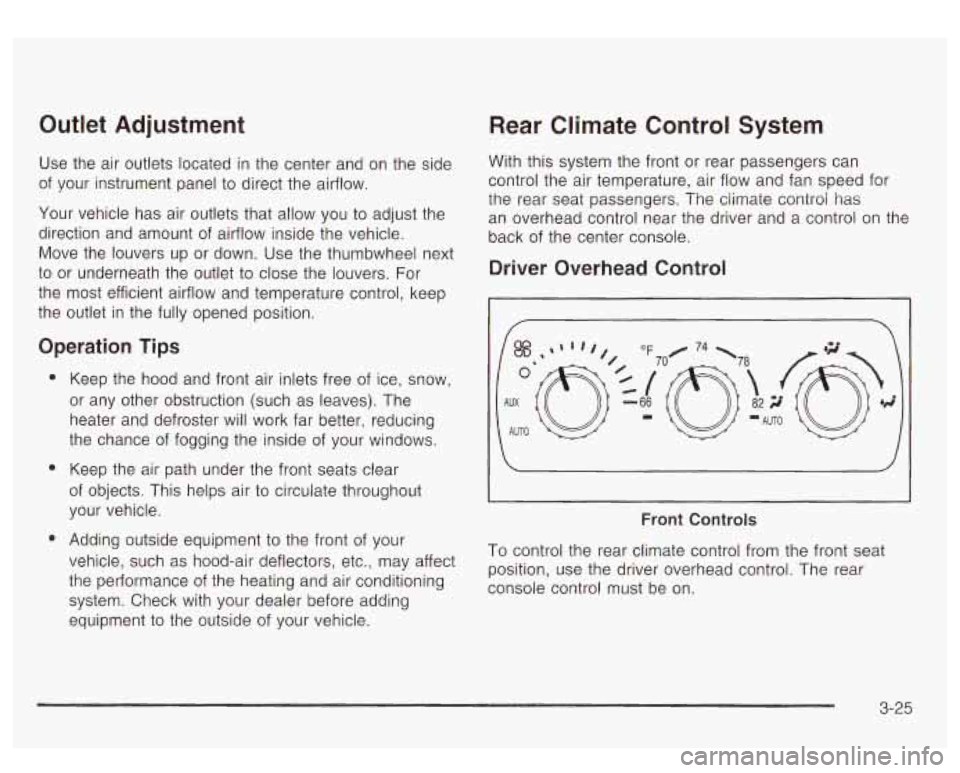
Driver Overhead Control
I/
I
Front Controls
To control the rear climate control from the front seat
position, use the driver overhead control. The rear
console control must be on.
3-25
Page 169 of 447
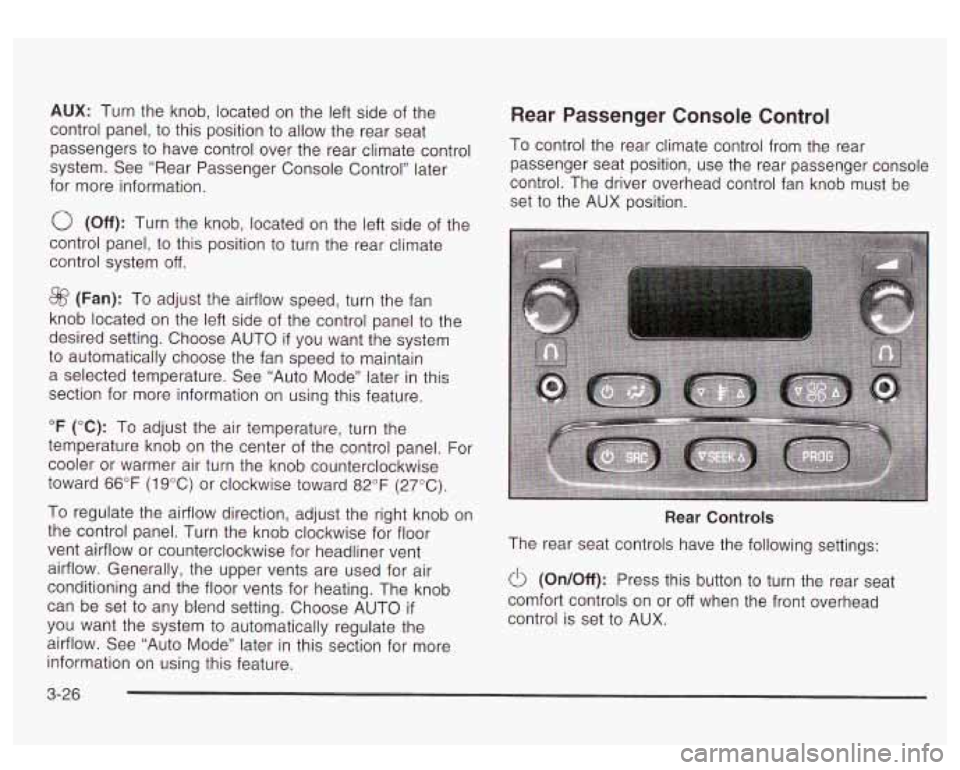
AUX: Turn the knob, located on the left side of the
control panel, to this position
to allow the rear seat
passengers
to have control over the rear climate control
system. See “Rear Passenger Console Control’’ later
for more information.
0 (Off): Turn the knob, located on the left side of the
control panel,
to this position to turn the rear climate
control system
off.
@ (Fan): To adjust the airflow speed, turn the fan
knob located on the left side of the control panel
to the
desired setting. Choose AUTO
if you want the system
to automatically choose the fan speed to maintain
a selected temperature. See “Auto Mode” later in this
section for more information on using this feature.
“F (“C): To adjust the air temperature, turn the
temperature knob on the center of the control panel. For
cooler or warmer air turn the knob counterclockwise
toward
66°F (1 9°C) or clockwise toward 82°F (27°C).
To regulate the airflow direction, adjust the right knob on
the control panel. Turn the knob clockwise for floor
vent airflow or counterclockwise for headliner vent
airflow. Generally, the upper vents are used for air
conditioning and the floor vents for heating. The knob
can be set
to any blend setting. Choose AUTO if
you want the system to automatically regulate the
airflow. See “Auto Mode” later in this section for more
information on using this feature.
Rear Passenger Console Control
To control the rear climate control from the rear
passenger seat position, use the rear passenger console
control. The driver overhead control fan knob must be
set
to the AUX position.
Rear Controls
The rear seat controls have the following settings:
0 (OnIOff): Press this button to turn the rear seat
Comfort controls on or
off when the front overhead
control is set
to AUX.
3-26
Page 179 of 447
If the light stays on, or comes on when you’re driving,
your vehicle needs service. You will also hear a
chime sound when the light is on steady.
If the regular
brake system warning light isn’t on, you still have
brakes, but you don’t have anti-lock brakes.
If the
regular brake system warning light is also on you don’t
have anti-lock brakes and there’s a problem with
your regular brakes. In addition to both lights, you will
also hear a chime sound on the first occurrence of
a problem and each time the car is shut off and then
restarted. See Brake System Warning Light on
page
3-34.
Traction Off Light
If you have the
Stabilitrak@system, this
light should come on briefly
when you turn the
ignition to
RUN.
If the light doesn’t come on then, the system may
require service; have it fixed
so it will be there to warn
you
if the system is turned off.
For more information on the traction off light, see
Stabilitrak@
System on page 4-9.
3-36
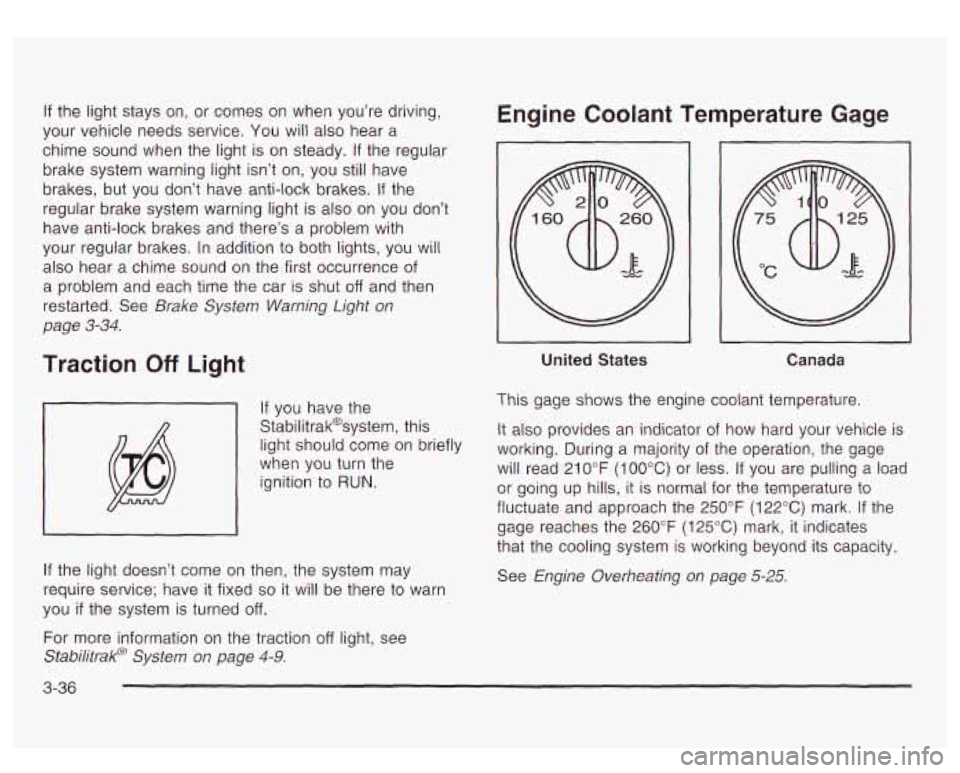
Engine Coolant Temperature Gage
~~ ~
United States
I I
Canada
This gage shows the engine coolant temperature.
It also provides an indicator
of how hard your vehicle is
working. During a majority of the operation, the gage
will read 21
0°F (100°C) or less. If you are pulling a load
or going up hills, it is normal for the temperature to
fluctuate and approach the 250°F (122°C) mark.
If the
gage reaches the 260°F
(125°C) mark, it indicates
that the cooling system
is working beyond its capacity.
See Engine Overheating on page
5-25.
Page 196 of 447

OIL LIFE RESET ENGINE COOLANT HOT
This message will appear on the display for about
10 seconds after resetting the change engine oil
message.
OIL PRESSURE LOW
If low oil pressure levels occur, this message will be
displayed on the DIC and a chime will sound. Stop the
vehicle as soon as safely possible and do not operate
it until the cause of the low oil pressure has been
corrected. Check your oil as soon as possible and have
your vehicle serviced.
CHECK OIL LEVEL
If the oil level in the vehicle is low, this message will
appear on the DIC. Check the oil level and correct it as
necessary. You may need
to let the vehicle cool or
warm up and cycle the ignition
to be sure this message
will clear. Once the problem is corrected, pressing
the select button will clear this message from the DIC
display. This message will clear itself after
10 seconds
until the next igntion cycle.
LOW COOLANT LEVEL
If the engine coolant level is low, this message will
appear on the DIC. Adding coolant will clear the
message. This message will clear itself after
10 seconds
until the next igntion cycle. If
the cooling system temperature gets hot, this message
will appear in the DIC. Stop the vehicle and
let the
engine idle in PARK
(P) to allow the coolant to reach a
safe temperature. This message will clear when the
coolant temperature drops
to a safe operating
temperature.
ENGINE OVERHEATED
If the engine cooling system reaches unsafe
temperatures for operation, this message will appear in
the DIC and you will hear a chime. Stop and turn
off
the vehicle as soon as it is safe to do so to avoid severe
damage. This message will clear when the engine
has cooled
to a safe operating temperature.
REDUCED ENGINE POWER
This message is displayed and you will hear a chime
when the cooling system temperature gets too hot
and the engine further enters the engine coolant
protection mode.
See
Engine Overheating on page 5-25 for further
information.
3-53
Page 200 of 447
When the system activates, you may hear a noise or
feel a vibration in the brake pedal. This is normal. When
the STABILITY SYS ACTIVE message is on, you
should continue
to steer in the direction you want to go.
The system is designed
to help you in bad weather
or other difficult driving situations by making the most of
whatever road conditions will permit.
SERVICE STABILITY
If you ever see the SERVICE STABILITY message, it
means there may be a problem with your
StabiIitrak@system. If you see this message
try to reset
the system (stop; turn
off the engine; then start the
engine again). If the SERVICE STABILITY message still
comes on, it means there is a problem. You should
see your dealer for service. The vehicle is safe to drive,
however, you do not have the benefit of Stabilitrak@,
so reduce your speed and drive accordingly.
STABILITY SYS DISABLED
The STABILITY SYS DISABLED message will turn on
when you press the Stabilitrak@button, or when the
stability control has been automatically disabled. To limit
wheel spin and realize the full benefits of the stability
enhancement system, you should normally leave
Stabilitrak@on. However, you should turn Stabilitrak@off
if your vehicle gets stuck in sand, mud, ice or snow and you want to “rock”
your vehicle
to attempt to free it,
or if you are driving in extreme off-road conditions
and require more wheel spin. See If
You Are Stuck: In
Sand, Mud, Ice or
Snow on page 4-41. To turn the
Stabilitrak@system back on press the Stabilitrak@button
again. There are four conditions that can cause this
message
to appear. One condition is overheating, which
could occur
if Stabilitrak@activates continuously for an
extended period of time. The message will
also be
displayed
if the brake system warning light is on. See
Brake System Warning Light
on page 3-34. The
message could be displayed
if the stability system takes
longer than usual to complete its diagnostic checks
due to driving conditions. Also,
if an engine or vehicle
related problem has been detected, and the vehicle
needs service, the message will appear.
The message will turn off as soon as the conditions that
caused the message to be displayed are no longer
present.
TRACTION ACTIVE
When the traction control system has detected that any
of the vehicle’s wheels are slipping, the traction
control system will activate and this message will appear
on the DIC. See StabiIitrakO System
on page 4-9 for
more information.
3-57
Page 286 of 447
Driving with a Trailer
If you have a rear-most window open and you
pull a trailer with your vehicle, carbon
monoxide (CO) could come into your vehicle.
You can’t see or smell CO.
It can cause
unconsciousness or death. See “Engine
Exhaust” in the Index.
To maximize your safety
when towing a trailer:
Have your exhaust system inspected for
leaks, and make necessary repairs before
starting on your trip.
Keep the rear-most windows closed.
If exhaust does come into your vehicle
through a window in the rear or another
opening, drive with your front, main
heating or cooling system on and with the
fan on any speed. This will bring fresh,
outside air into your vehicle.
Do not use
the comfort control setting for maximum
air because
it only recirculates the air
inside your vehicle. See “Comfort
1 Controls” in the Index. Towing a trailer requires a certain amount
of experience.
Before setting out for the open road, you’ll want to get
to know your rig. Acquaint yourself with the feel of
handling and braking with the added weight of the trailer.
And always keep
in mind that the vehicle you are
driving is now a good deal longer and not nearly as
responsive as your vehicle is by itself.
Before you start, check the trailer hitch and platform
(and attachments), safety chains, electrical connector,
lamps, tires and mirror adjustment.
If the trailer has
electric brakes, start your vehicle and trailer moving and
then apply the trailer brake controller by hand to be
sure the brakes are working. This lets you check your
electrical connection at the same time.
During your trip, check occasionally to be sure that the
load is secure, and that the lamps and any trailer
brakes are still working.
Following Distance
Stay at least twice as far behind the vehicle ahead a5
you would when driving your vehicle without a trailer.
This can help you avoid situations that require
heavy braking and sudden turns.
Passing
You’ll need more passing distance up ahead when
you’re towing a trailer. And, because you’re a good deal
longer, you’ll need to go much farther beyond the
passed vehicle before you can return to your lane.
4-53
Page 287 of 447
Backing Up
Hold the bottom of the steering wheel with one hand.
Then,
to move the trailer to the left, just move that hand
to the left. To move the trailer to the right, move your
hand
to the right. Always back up slowly and, if possible,
have someone guide you.
Making Turns
Notice: Making very sharp turns while trailering
could
cause the trailer to come in contact with the
vehicle. Your vehicle could
be damaged. Avoid
making very sharp turns while trailering.
When you’re turning with a trailer, make wider turns
than normal.
Do this so your trailer won’t strike
soft shoulders, curbs, road signs, trees or other objects.
Avoid jerky or sudden maneuvers. Signal well in
advance.
Turn Signals When Towing a Trailer
The arrows on your instrument panel will flash whenever
you signal a turn or lane change. Properly hooked up,
the trailer lamps will also flash, telling other drivers
you’re about
to turn, change lanes or stop.
When towing a trailer, the arrows on your instrument panel will flash for turns even
if the bulbs on the trailer
are burned out. Thus, you may think drivers behind
4-54
you are seeing your signal when they are not. It’s
important to check occasionally to be sure the trailer
bulbs are still working.
Driving On Grades
Reduce speed and shift to a lower gear before you start
down a long or steep downgrade.
If you don’t shift
down, you might have to use your brakes
so much that
they would get hot and no longer work well.
You can tow in
DRIVE (D). You may want to shift the
transmission
to THIRD (3) or, if necessary, a lower gear
selection
if the transmission shifts too often
(e.g., under heavy loads and/or hilly conditions).
You may also want
to activate the tow/haul mode if the
transmission shifts
too often. See “Tow/Haul Mode”
under Towing a Trailer
on page 4-47.
When towing at high altitude on steep uphill grades,
consider the following: Engine coolant will boil at a lower
temperature than at normal altitudes.
If you turn your
engine
off immediately after towing at high altitude
on steep uphill grades, your vehicle may show signs
similar
to engine overheating. To avoid this, let the
engine run while parked (preferably on level ground)
with the automatic transmission in PARK (P) for a
few minutes before turning the engine
off. If you do get
the overheat warning, see Engine Overheating
on
page 5-25.