ignition GMC YUKON DENALI 2004 Manual PDF
[x] Cancel search | Manufacturer: GMC, Model Year: 2004, Model line: YUKON DENALI, Model: GMC YUKON DENALI 2004Pages: 468, PDF Size: 3.18 MB
Page 373 of 468
TPM Sensor Identi®cation Codes
Each TPM sensor has a unique identi®cation code.
Any time you rotate your vehicle's tires or replace one
or more of the TPM sensors, the identi®cation codes will
need to be matched to the new tire/wheel position.
Each tire/wheel position is matched to a sensor,
by increasing or decreasing the tire's air pressure.
The sensors are matched to the tire/wheel positions in
the following order: left front (LF); right front (RF);
right rear (RR) and left rear (LR).
You will have one minute to match the ®rst tire/wheel
position, and ®ve minutes overall to match all four
tire/wheel positions. If it takes longer than one minute,
to match the ®rst tire and wheel, or more than ®ve
minutes to match all four tire and wheel positions the
matching process stops and you will need to start over.
The TPM sensor matching process is outlined below:
1. Set the Parking brake.
2. Turn the ignition switch to RUN with the engine off.
3. Turn the exterior lamp switch from ªOffº to ªOnº
four times within 3 seconds. A double horn chirp
will sound and the TPM low tire warning light
will begin to ¯ash. The double horn chirp and¯ashing TPM warning light indicate that the TPM
matching process has started. The TPM warning
light should continue ¯ashing throughout the
matching procedure. The SERVICE TIRE
MONITOR message will be displayed on the Driver
Information Center (DIC).
4. Start with the left (driver's side) front tire.
5. Remove the valve cap from the valve cap stem.
Activate the TPM sensor by increasing or
decreasing the tire's air pressure for 10 seconds,
then stop and listen for a single horn chirp.
The single horn chirp should sound within 15
seconds, con®rming that the sensor identi®cation
code has been matched to this tire and wheel
position. If you do not hear the con®rming single
horn chirp, you will need to start over with step
number one. To let air-pressure out of a tire you can
use the pointy end of the valve cap, a pencil-style
air pressure gage or a key.
6. Proceed to the right (passenger's side) front tire,
and repeat the procedure in step 5.
7. Proceed to the right (passenger's side) rear tire,
and repeat the procedure in step 5.
8. Proceed to the left (driver's side) rear tire, and
repeat the procedure in step 5.
5-65
Page 374 of 468
9. After hearing the con®rming horn chirp for the left
rear tire, check to see if the TPM warning light is
still ¯ashing. If yes, turn the ignition switch to OFF.
10. Set all four tires to the recommended air pressure
level as indicated on the Certi®cation/Tire label or
the Tire and Loading Information label.
11. Put the valve caps back on the valve stems
The spare tire does not have a TPM sensor. If you
replace one of the road tires with the spare, the CHECK
TIRE PRESSURE message will be displayed on the DIC
screen. This message should go off once you re-install
the road tire containing the TPM sensor. The SERVICE
TIRE MONITOR message is displayed when the TPM
system is malfunctioning. One or more missing or
inoperable TPM sensors will cause the service tire
monitor message to be displayed. See your dealer for
service.
Federal Communications Commission and
Industry and Science Canada
The TPM system operates on a radio frequency subject
to Federal Communications Commission (FCC) Rules
and with Industry and Science Canada.
This device complies with Part 15 of the FCC Rules and
with RSS-210 of Industry and Science Canada.
Operation is subject to the following two conditions:
(1) This device may not cause harmful interference, and(2) this device must accept any interference received
including interference that may cause undesired
operation of the device.
Changes or modi®cations to this system by other than
an authorized service facility could void authorization to
use this equipment.
Tire Inspection and Rotation
Tires should be rotated every 5,000 to 8,000 miles
(8 000 to 13 000 km).
Any time you notice unusual wear, rotate your tires as
soon as possible and check wheel alignment. Also
check for damaged tires or wheels. See
When It Is Time
for New Tires on page 5-68andWheel Replacement
on page 5-71for more information.
Make sure the spare tire is stored securely. Push, pull,
and then try to rotate or turn the tire. If it moves,
use the ratchet/wheel wrench to tighten the cable.
See
Changing a Flat Tire on page 5-74.
The purpose of regular rotation is to achieve more
uniform wear for all tires on the vehicle. The ®rst rotation
is the most important. See
Scheduled Maintenance
on page 6-4.
5-66
Page 385 of 468
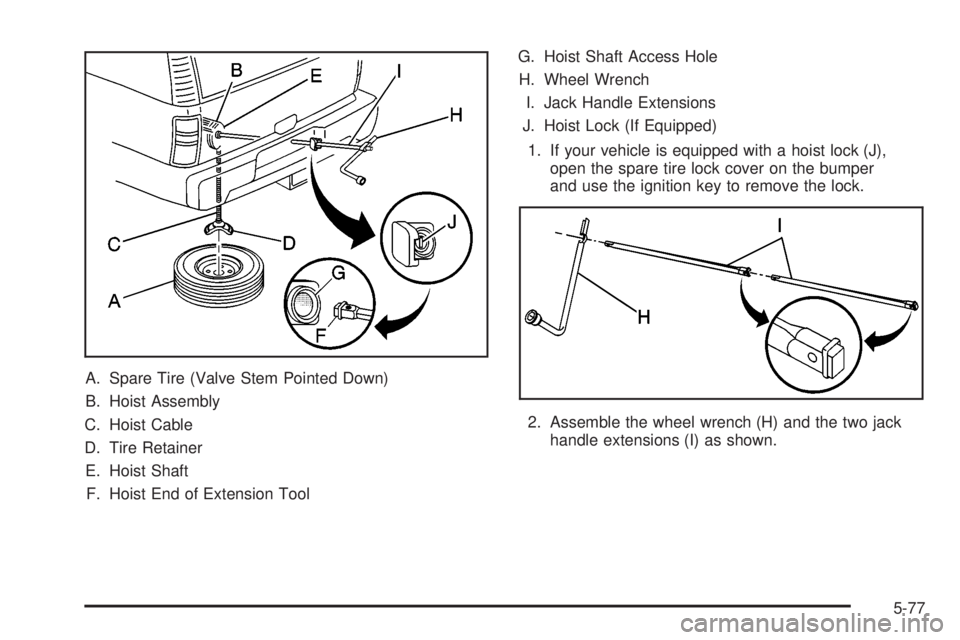
A. Spare Tire (Valve Stem Pointed Down)
B. Hoist Assembly
C. Hoist Cable
D. Tire Retainer
E. Hoist Shaft
F. Hoist End of Extension ToolG. Hoist Shaft Access Hole
H. Wheel Wrench
I. Jack Handle Extensions
J. Hoist Lock (If Equipped)
1. If your vehicle is equipped with a hoist lock (J),
open the spare tire lock cover on the bumper
and use the ignition key to remove the lock.
2. Assemble the wheel wrench (H) and the two jack
handle extensions (I) as shown.
5-77
Page 413 of 468
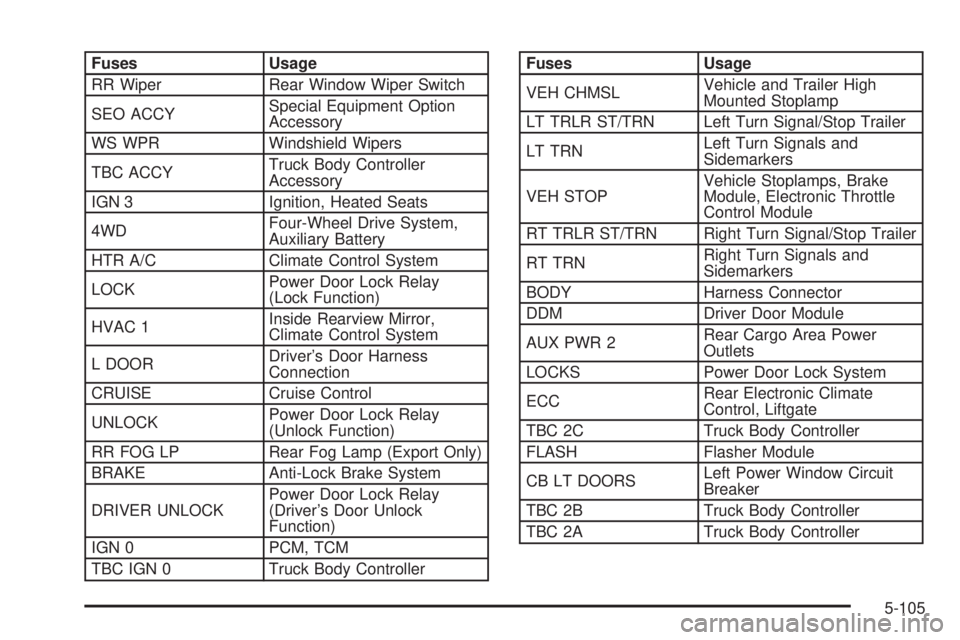
Fuses Usage
RR Wiper Rear Window Wiper Switch
SEO ACCYSpecial Equipment Option
Accessory
WS WPR Windshield Wipers
TBC ACCYTruck Body Controller
Accessory
IGN 3 Ignition, Heated Seats
4WDFour-Wheel Drive System,
Auxiliary Battery
HTR A/C Climate Control System
LOCKPower Door Lock Relay
(Lock Function)
HVAC 1Inside Rearview Mirror,
Climate Control System
L DOORDriver's Door Harness
Connection
CRUISE Cruise Control
UNLOCKPower Door Lock Relay
(Unlock Function)
RR FOG LP Rear Fog Lamp (Export Only)
BRAKE Anti-Lock Brake System
DRIVER UNLOCKPower Door Lock Relay
(Driver's Door Unlock
Function)
IGN 0 PCM, TCM
TBC IGN 0 Truck Body ControllerFuses Usage
VEH CHMSLVehicle and Trailer High
Mounted Stoplamp
LT TRLR ST/TRN Left Turn Signal/Stop Trailer
LT TRNLeft Turn Signals and
Sidemarkers
VEH STOPVehicle Stoplamps, Brake
Module, Electronic Throttle
Control Module
RT TRLR ST/TRN Right Turn Signal/Stop Trailer
RT TRNRight Turn Signals and
Sidemarkers
BODY Harness Connector
DDM Driver Door Module
AUX PWR 2Rear Cargo Area Power
Outlets
LOCKS Power Door Lock System
ECCRear Electronic Climate
Control, Liftgate
TBC 2C Truck Body Controller
FLASH Flasher Module
CB LT DOORSLeft Power Window Circuit
Breaker
TBC 2B Truck Body Controller
TBC 2A Truck Body Controller
5-105
Page 417 of 468
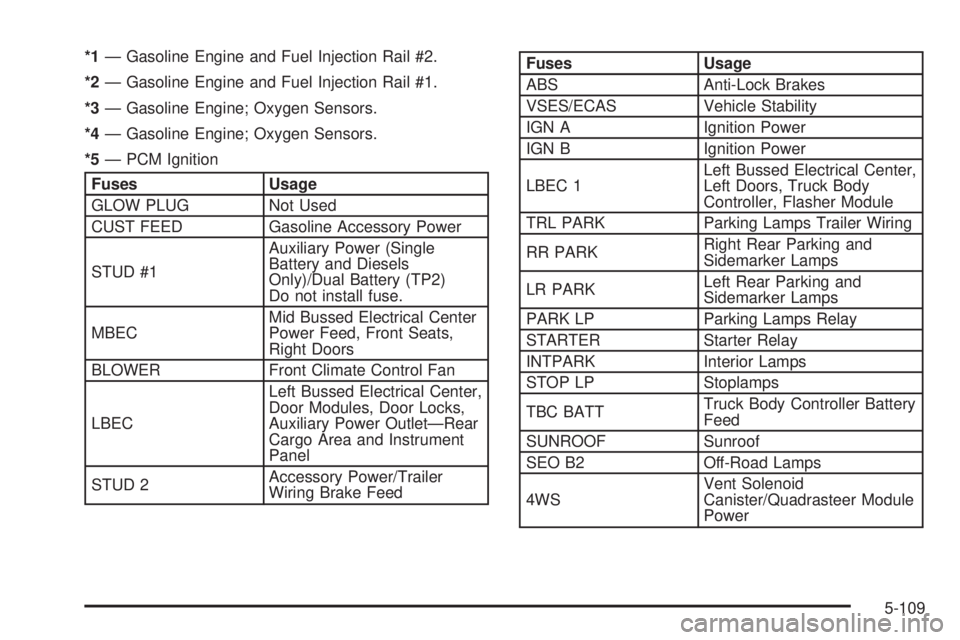
*1Ð Gasoline Engine and Fuel Injection Rail #2.
*2Ð Gasoline Engine and Fuel Injection Rail #1.
*3Ð Gasoline Engine; Oxygen Sensors.
*4Ð Gasoline Engine; Oxygen Sensors.
*5Ð PCM Ignition
Fuses Usage
GLOW PLUG Not Used
CUST FEED Gasoline Accessory Power
STUD #1Auxiliary Power (Single
Battery and Diesels
Only)/Dual Battery (TP2)
Do not install fuse.
MBECMid Bussed Electrical Center
Power Feed, Front Seats,
Right Doors
BLOWER Front Climate Control Fan
LBECLeft Bussed Electrical Center,
Door Modules, Door Locks,
Auxiliary Power OutletÐRear
Cargo Area and Instrument
Panel
STUD 2Accessory Power/Trailer
Wiring Brake Feed
Fuses Usage
ABS Anti-Lock Brakes
VSES/ECAS Vehicle Stability
IGN A Ignition Power
IGN B Ignition Power
LBEC 1Left Bussed Electrical Center,
Left Doors, Truck Body
Controller, Flasher Module
TRL PARK Parking Lamps Trailer Wiring
RR PARKRight Rear Parking and
Sidemarker Lamps
LR PARKLeft Rear Parking and
Sidemarker Lamps
PARK LP Parking Lamps Relay
STARTER Starter Relay
INTPARK Interior Lamps
STOP LP Stoplamps
TBC BATTTruck Body Controller Battery
Feed
SUNROOF Sunroof
SEO B2 Off-Road Lamps
4WSVent Solenoid
Canister/Quadrasteer Module
Power
5-109
Page 418 of 468
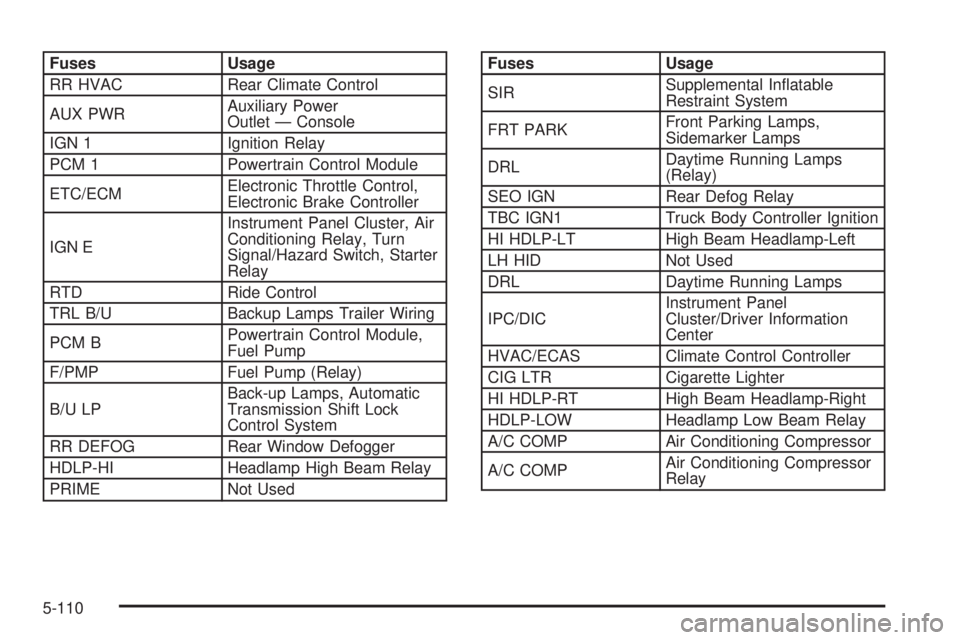
Fuses Usage
RR HVAC Rear Climate Control
AUX PWRAuxiliary Power
Outlet Ð Console
IGN 1 Ignition Relay
PCM 1 Powertrain Control Module
ETC/ECMElectronic Throttle Control,
Electronic Brake Controller
IGN EInstrument Panel Cluster, Air
Conditioning Relay, Turn
Signal/Hazard Switch, Starter
Relay
RTD Ride Control
TRL B/U Backup Lamps Trailer Wiring
PCM BPowertrain Control Module,
Fuel Pump
F/PMP Fuel Pump (Relay)
B/U LPBack-up Lamps, Automatic
Transmission Shift Lock
Control System
RR DEFOG Rear Window Defogger
HDLP-HI Headlamp High Beam Relay
PRIME Not UsedFuses Usage
SIRSupplemental In¯atable
Restraint System
FRT PARKFront Parking Lamps,
Sidemarker Lamps
DRLDaytime Running Lamps
(Relay)
SEO IGN Rear Defog Relay
TBC IGN1 Truck Body Controller Ignition
HI HDLP-LT High Beam Headlamp-Left
LH HID Not Used
DRL Daytime Running Lamps
IPC/DICInstrument Panel
Cluster/Driver Information
Center
HVAC/ECAS Climate Control Controller
CIG LTR Cigarette Lighter
HI HDLP-RT High Beam Headlamp-Right
HDLP-LOW Headlamp Low Beam Relay
A/C COMP Air Conditioning Compressor
A/C COMPAir Conditioning Compressor
Relay
5-110
Page 433 of 468
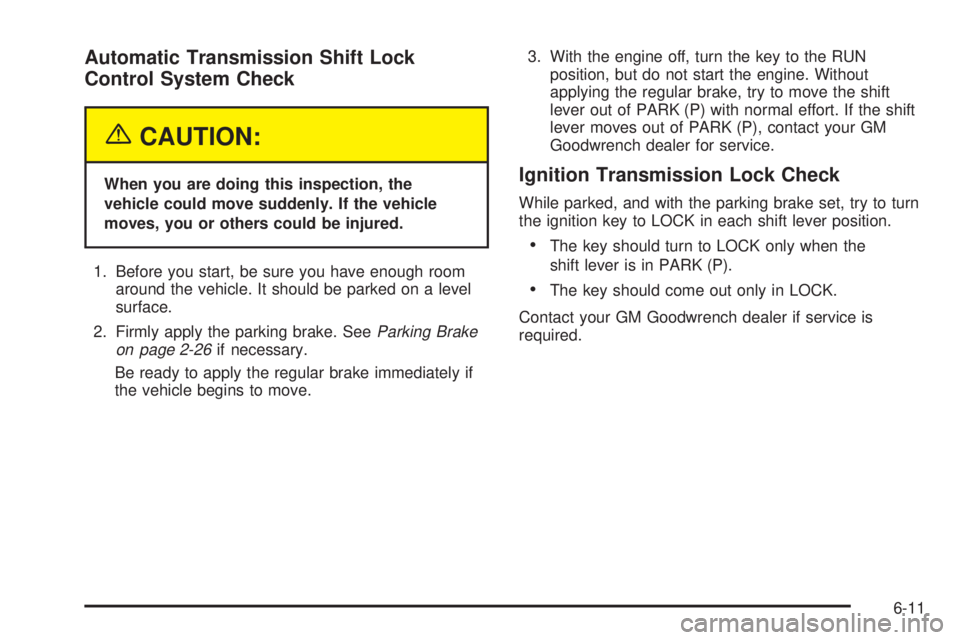
Automatic Transmission Shift Lock
Control System Check
{CAUTION:
When you are doing this inspection, the
vehicle could move suddenly. If the vehicle
moves, you or others could be injured.
1. Before you start, be sure you have enough room
around the vehicle. It should be parked on a level
surface.
2. Firmly apply the parking brake. See
Parking Brake
on page 2-26if necessary.
Be ready to apply the regular brake immediately if
the vehicle begins to move.3. With the engine off, turn the key to the RUN
position, but do not start the engine. Without
applying the regular brake, try to move the shift
lever out of PARK (P) with normal effort. If the shift
lever moves out of PARK (P), contact your GM
Goodwrench dealer for service.
Ignition Transmission Lock Check
While parked, and with the parking brake set, try to turn
the ignition key to LOCK in each shift lever position.
·The key should turn to LOCK only when the
shift lever is in PARK (P).
·The key should come out only in LOCK.
Contact your GM Goodwrench dealer if service is
required.
6-11
Page 460 of 468
If You Are Stuck in Sand, Mud, Ice or Snow.......4-41
If You Do Decide To Pull A Trailer.....................4-52
Ignition Positions.............................................2-19
Illuminated Visor Vanity Mirrors.........................2-16
Infants and Young Children, Restraints...............1-50
In¯ation - Tire Pressure...................................5-62
Instrument Panel
Cluster.......................................................3-31
Overview..................................................... 3-4
Instrument Panel Brightness.............................3-17
Instrument Panel Fuse Block..........................5-104
Interior Lamps................................................3-17
J
Jump Starting.................................................5-40
K
KEYFOB X BATTERY LOW.............................3-59
Keyless Entry System....................................... 2-4
Keys............................................................... 2-3
L
Lamps
Exterior......................................................3-14
Interior.......................................................3-17Lamps On Reminder.......................................3-15
Lap-Shoulder Belt...........................................1-31
LATCH System
Child Restraints...........................................1-61
Securing a Child Restraint Designed for the
LATCH System........................................1-63
Leaving Your Vehicle With the Engine Running......2-28
LEFT REAR DOOR AJAR................................3-59
Liftgate/Liftglass..............................................2-13
Liftglass/Liftgate..............................................2-13
Light
Air Bag Readiness.......................................3-32
Anti-Lock Brake System Warning...................3-37
Brake System Warning.................................3-36
Charging System.........................................3-35
Cruise Control.............................................3-44
Low Fuel Warning.......................................3-45
Malfunction Indicator....................................3-40
Passenger Air Bag Status Indicator................3-34
Safety Belt Reminder...................................3-32
Security.....................................................3-44
Tire Pressure..............................................3-40
Tow/Haul Mode...........................................3-44
Traction Off................................................3-38
Listening to a DVD.........................................3-79
Loading Your Vehicle.......................................4-44
Loading Your Vehicle for Off-Road Driving..........4-16
Lockout Protection..........................................2-13
Lock-Out Switch.............................................2-15
8