lock GMC YUKON DENALI 2005 Owners Manual
[x] Cancel search | Manufacturer: GMC, Model Year: 2005, Model line: YUKON DENALI, Model: GMC YUKON DENALI 2005Pages: 468, PDF Size: 2.67 MB
Page 400 of 468
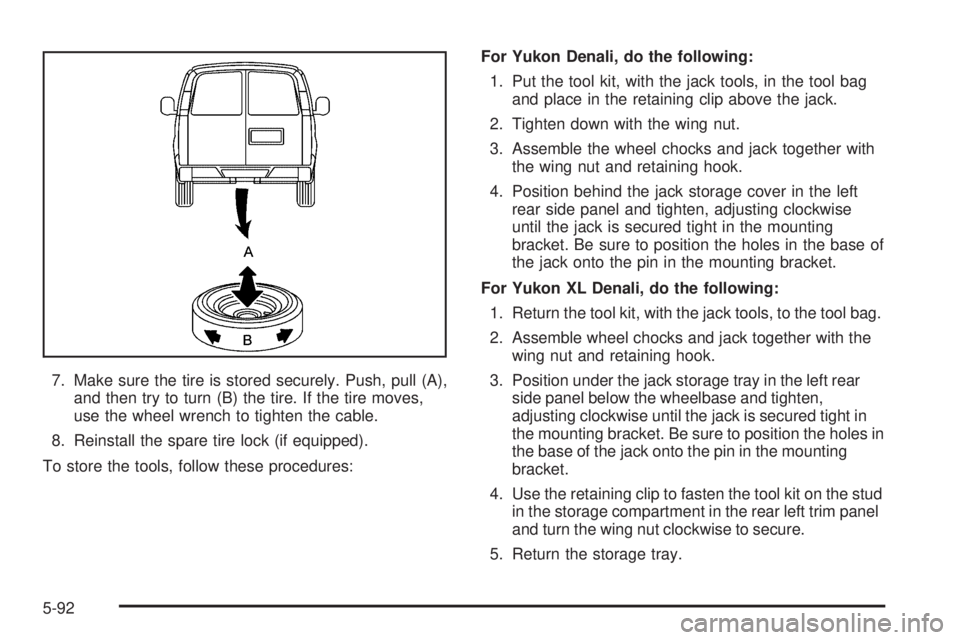
7. Make sure the tire is stored securely. Push, pull (A),
and then try to turn (B) the tire. If the tire moves,
use the wheel wrench to tighten the cable.
8. Reinstall the spare tire lock (if equipped).
To store the tools, follow these procedures:For Yukon Denali, do the following:
1. Put the tool kit, with the jack tools, in the tool bag
and place in the retaining clip above the jack.
2. Tighten down with the wing nut.
3. Assemble the wheel chocks and jack together with
the wing nut and retaining hook.
4. Position behind the jack storage cover in the left
rear side panel and tighten, adjusting clockwise
until the jack is secured tight in the mounting
bracket. Be sure to position the holes in the base of
the jack onto the pin in the mounting bracket.
For Yukon XL Denali, do the following:
1. Return the tool kit, with the jack tools, to the tool bag.
2. Assemble wheel chocks and jack together with the
wing nut and retaining hook.
3. Position under the jack storage tray in the left rear
side panel below the wheelbase and tighten,
adjusting clockwise until the jack is secured tight in
the mounting bracket. Be sure to position the holes in
the base of the jack onto the pin in the mounting
bracket.
4. Use the retaining clip to fasten the tool kit on the stud
in the storage compartment in the rear left trim panel
and turn the wing nut clockwise to secure.
5. Return the storage tray.
5-92
Page 401 of 468
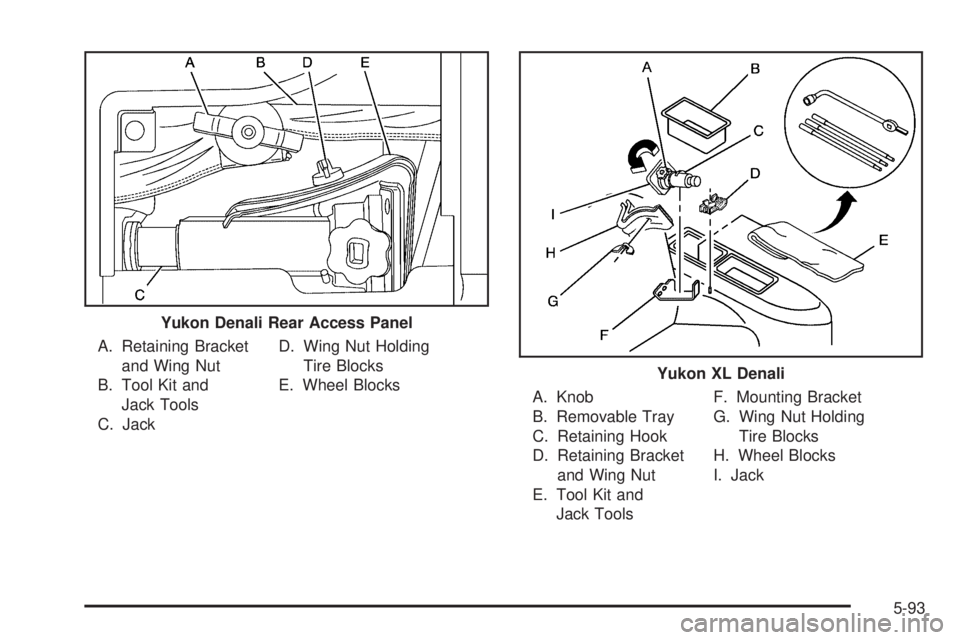
A. Retaining Bracket
and Wing Nut
B. Tool Kit and
Jack Tools
C. JackD. Wing Nut Holding
Tire Blocks
E. Wheel Blocks
A. Knob
B. Removable Tray
C. Retaining Hook
D. Retaining Bracket
and Wing Nut
E. Tool Kit and
Jack ToolsF. Mounting Bracket
G. Wing Nut Holding
Tire Blocks
H. Wheel Blocks
I. Jack Yukon Denali Rear Access Panel
Yukon XL Denali
5-93
Page 414 of 468
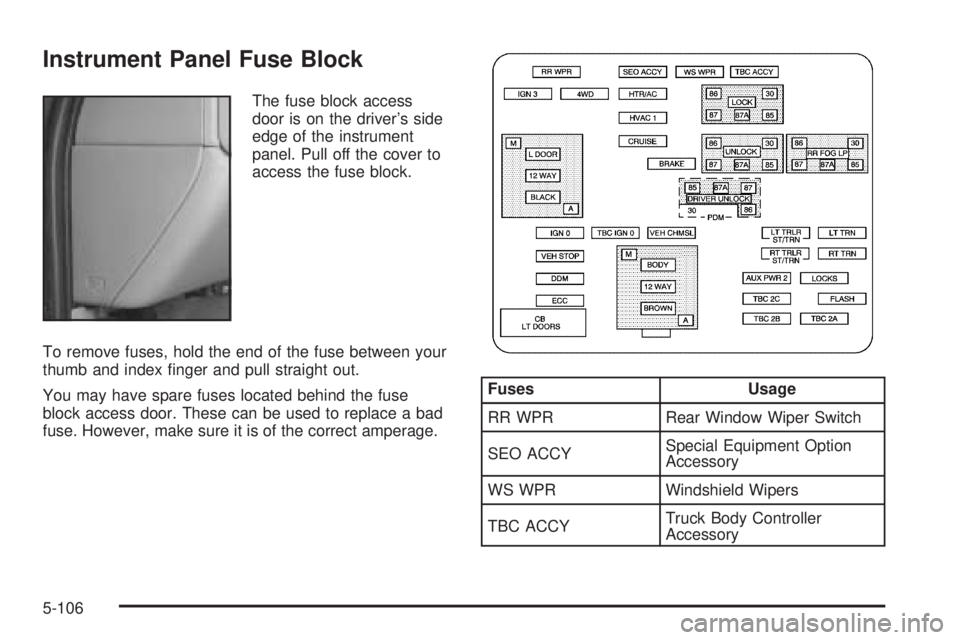
Instrument Panel Fuse Block
The fuse block access
door is on the driver’s side
edge of the instrument
panel. Pull off the cover to
access the fuse block.
To remove fuses, hold the end of the fuse between your
thumb and index nger and pull straight out.
You may have spare fuses located behind the fuse
block access door. These can be used to replace a bad
fuse. However, make sure it is of the correct amperage.
Fuses Usage
RR WPR Rear Window Wiper Switch
SEO ACCYSpecial Equipment Option
Accessory
WS WPR Windshield Wipers
TBC ACCYTruck Body Controller
Accessory
5-106
Page 415 of 468
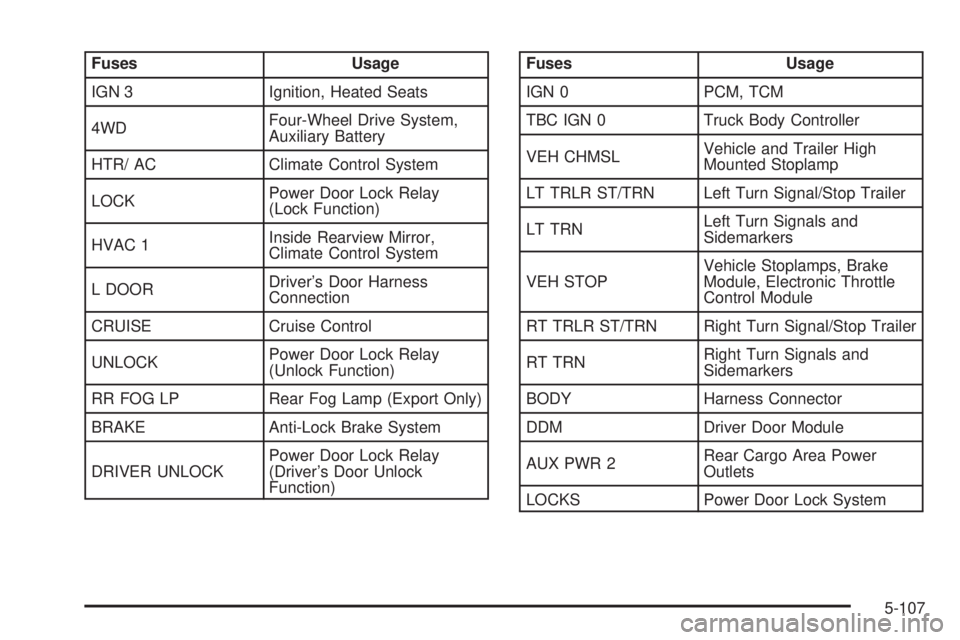
Fuses Usage
IGN 3 Ignition, Heated Seats
4WDFour-Wheel Drive System,
Auxiliary Battery
HTR/ AC Climate Control System
LOCKPower Door Lock Relay
(Lock Function)
HVAC 1Inside Rearview Mirror,
Climate Control System
L DOORDriver’s Door Harness
Connection
CRUISE Cruise Control
UNLOCKPower Door Lock Relay
(Unlock Function)
RR FOG LP Rear Fog Lamp (Export Only)
BRAKE Anti-Lock Brake System
DRIVER UNLOCKPower Door Lock Relay
(Driver’s Door Unlock
Function)Fuses Usage
IGN 0 PCM, TCM
TBC IGN 0 Truck Body Controller
VEH CHMSLVehicle and Trailer High
Mounted Stoplamp
LT TRLR ST/TRN Left Turn Signal/Stop Trailer
LT TRNLeft Turn Signals and
Sidemarkers
VEH STOPVehicle Stoplamps, Brake
Module, Electronic Throttle
Control Module
RT TRLR ST/TRN Right Turn Signal/Stop Trailer
RT TRNRight Turn Signals and
Sidemarkers
BODY Harness Connector
DDM Driver Door Module
AUX PWR 2Rear Cargo Area Power
Outlets
LOCKS Power Door Lock System
5-107
Page 416 of 468
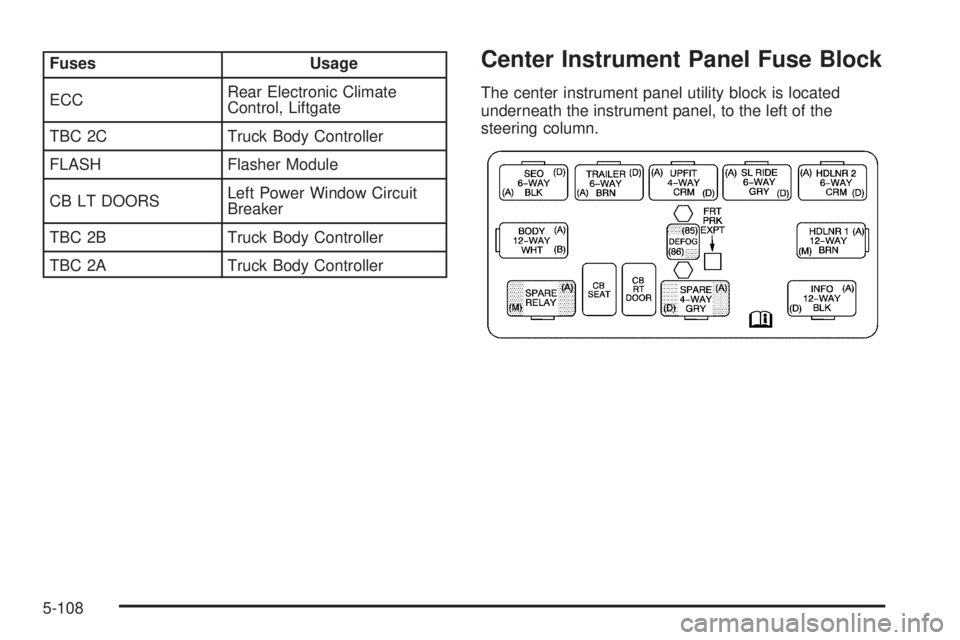
Fuses Usage
ECCRear Electronic Climate
Control, Liftgate
TBC 2C Truck Body Controller
FLASH Flasher Module
CB LT DOORSLeft Power Window Circuit
Breaker
TBC 2B Truck Body Controller
TBC 2A Truck Body ControllerCenter Instrument Panel Fuse Block
The center instrument panel utility block is located
underneath the instrument panel, to the left of the
steering column.
5-108
Page 417 of 468
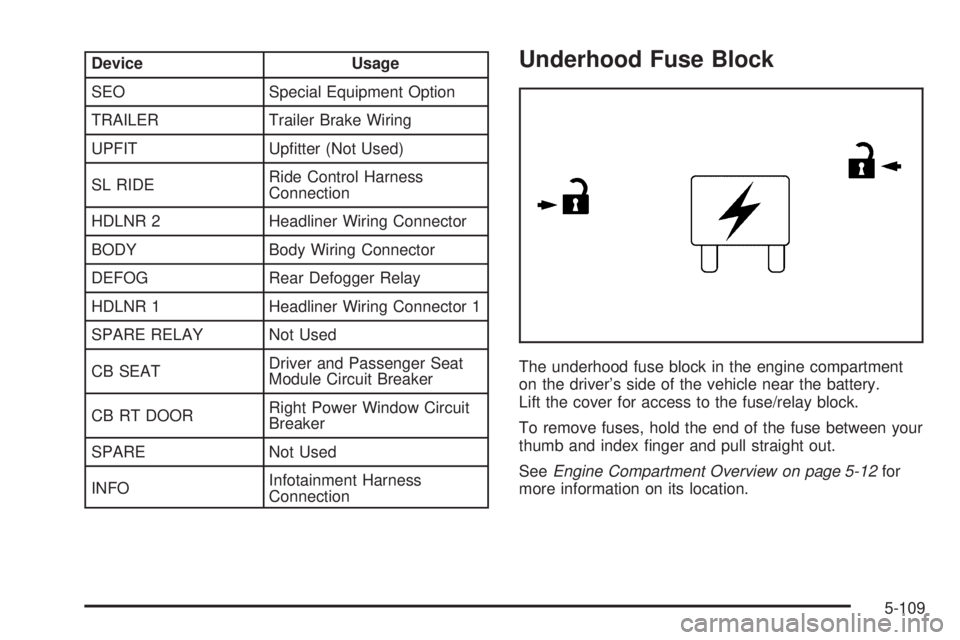
Device Usage
SEO Special Equipment Option
TRAILER Trailer Brake Wiring
UPFIT Uptter (Not Used)
SL RIDERide Control Harness
Connection
HDLNR 2 Headliner Wiring Connector
BODY Body Wiring Connector
DEFOG Rear Defogger Relay
HDLNR 1 Headliner Wiring Connector 1
SPARE RELAY Not Used
CB SEATDriver and Passenger Seat
Module Circuit Breaker
CB RT DOORRight Power Window Circuit
Breaker
SPARE Not Used
INFOInfotainment Harness
ConnectionUnderhood Fuse Block
The underhood fuse block in the engine compartment
on the driver’s side of the vehicle near the battery.
Lift the cover for access to the fuse/relay block.
To remove fuses, hold the end of the fuse between your
thumb and index nger and pull straight out.
SeeEngine Compartment Overview on page 5-12for
more information on its location.
5-109
Page 419 of 468
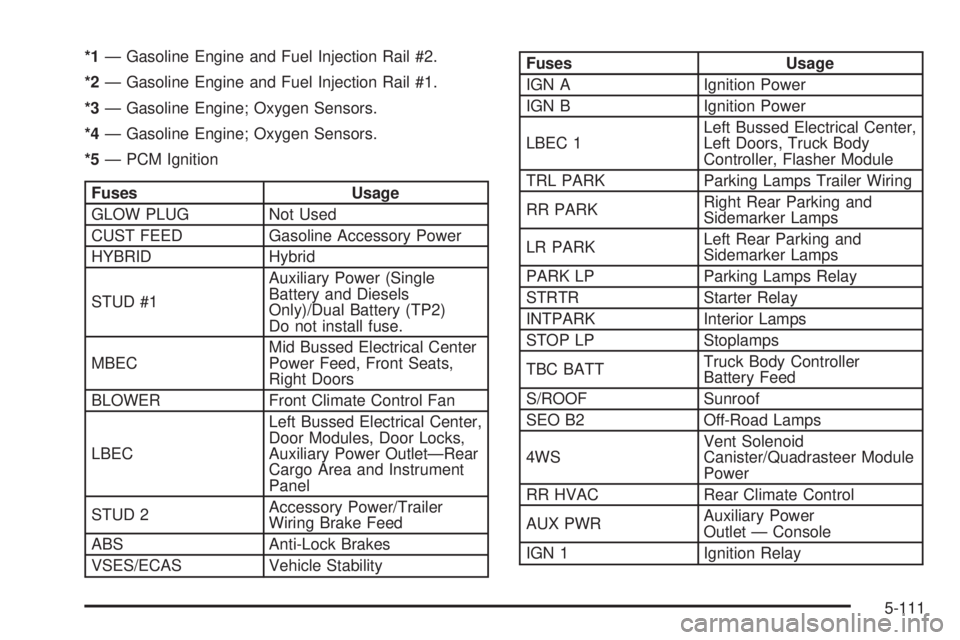
*1— Gasoline Engine and Fuel Injection Rail #2.
*2— Gasoline Engine and Fuel Injection Rail #1.
*3— Gasoline Engine; Oxygen Sensors.
*4— Gasoline Engine; Oxygen Sensors.
*5— PCM Ignition
Fuses Usage
GLOW PLUG Not Used
CUST FEED Gasoline Accessory Power
HYBRID Hybrid
STUD #1Auxiliary Power (Single
Battery and Diesels
Only)/Dual Battery (TP2)
Do not install fuse.
MBECMid Bussed Electrical Center
Power Feed, Front Seats,
Right Doors
BLOWER Front Climate Control Fan
LBECLeft Bussed Electrical Center,
Door Modules, Door Locks,
Auxiliary Power Outlet—Rear
Cargo Area and Instrument
Panel
STUD 2Accessory Power/Trailer
Wiring Brake Feed
ABS Anti-Lock Brakes
VSES/ECAS Vehicle Stability
Fuses Usage
IGN A Ignition Power
IGN B Ignition Power
LBEC 1Left Bussed Electrical Center,
Left Doors, Truck Body
Controller, Flasher Module
TRL PARK Parking Lamps Trailer Wiring
RR PARKRight Rear Parking and
Sidemarker Lamps
LR PARKLeft Rear Parking and
Sidemarker Lamps
PARK LP Parking Lamps Relay
STRTR Starter Relay
INTPARK Interior Lamps
STOP LP Stoplamps
TBC BATTTruck Body Controller
Battery Feed
S/ROOF Sunroof
SEO B2 Off-Road Lamps
4WSVent Solenoid
Canister/Quadrasteer Module
Power
RR HVAC Rear Climate Control
AUX PWRAuxiliary Power
Outlet — Console
IGN 1 Ignition Relay
5-111
Page 420 of 468
Fuses Usage
PCM 1 Powertrain Control Module
ETC/ECMElectronic Throttle Control,
Electronic Brake Controller
IGN EInstrument Panel Cluster, Air
Conditioning Relay, Turn
Signal/Hazard Switch, Starter
Relay
RTD Ride Control
TRL B/U Backup Lamps Trailer Wiring
PCM BPowertrain Control Module,
Fuel Pump
F/PMP Fuel Pump (Relay)
B/U LPBack-up Lamps, Automatic
Transmission Shift Lock
Control System
RR DEFOG Rear Window Defogger
HDLP-HI Headlamp High Beam Relay
PRIME Not Used
AIRBAGSupplemental Inatable
Restraint System
FRT PARKFront Parking Lamps,
Sidemarker Lamps
DRLDaytime Running Lamps
(Relay)
SEO IGN Rear Defog Relay
TBC IGN1 Truck Body Controller IgnitionFuses Usage
HI HDLP-LT High Beam Headlamp-Left
LH HID Not Used
DRL Daytime Running Lamps
RVC Regulated Voltage Control
IPC/DICInstrument Panel
Cluster/Driver Information
Center
HVAC/ECAS Climate Control Controller
CIG LTR Cigarette Lighter
HI HDLP-RT High Beam Headlamp-Right
HDLP-LOW Headlamp Low Beam Relay
A/C COMP Air Conditioning Compressor
A/C COMPAir Conditioning Compressor
Relay
RR WPR Rear Wiper/Washer
RADIO Audio System
SEO B1Mid Bussed Electrical Center,
HomeLink, Rear Heated
Seats
LO HDLP-LT Headlamp Low Beam-Left
BTSIBrake Transmission Shift
Interlock System
CRNK Starting System
LO HDLP-RT Headlamp Low Beam-Right
FOG LP Fog Lamp Relay
5-112
Page 421 of 468
Fuses Usage
FOG LP Fog Lamps
HORN Horn Fuse
HORN Horn Relay
W/S WASHWindshield and Rear Window
Washer Pump Relay
W/S WASHWindshield and Rear Window
Washer Pump
INFOOnStar
®/Rear Seat
Entertainment
RADIO AMP Radio Amplier
RH HID Not Used
EAP Electric Adjustable Pedals
TREC All-Wheel Drive Module
SBA Supplemental Brake Assist
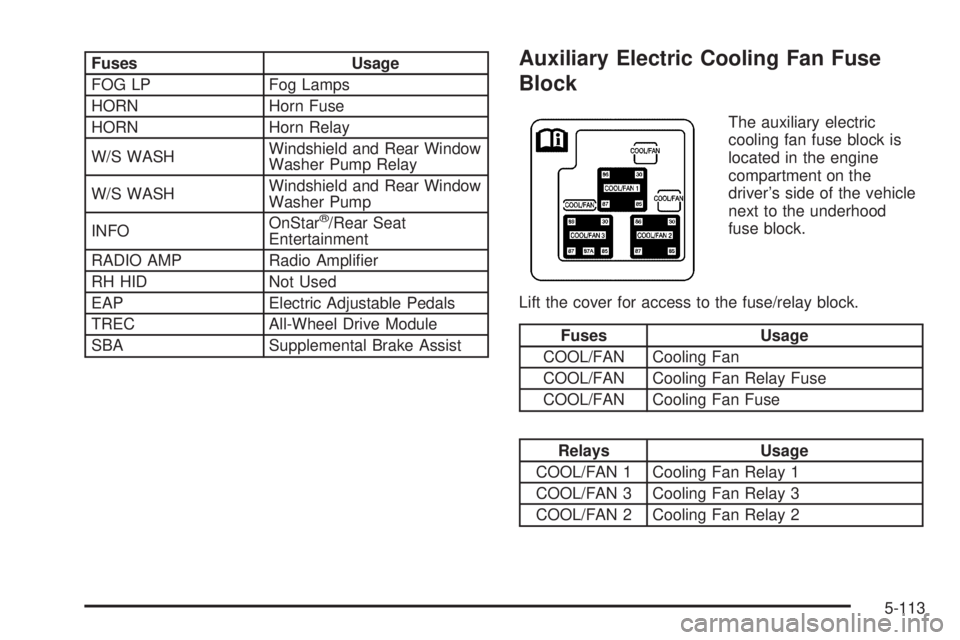
Auxiliary Electric Cooling Fan Fuse
Block
The auxiliary electric
cooling fan fuse block is
located in the engine
compartment on the
driver’s side of the vehicle
next to the underhood
fuse block.
Lift the cover for access to the fuse/relay block.
Fuses Usage
COOL/FAN Cooling Fan
COOL/FAN Cooling Fan Relay Fuse
COOL/FAN Cooling Fan Fuse
Relays Usage
COOL/FAN 1 Cooling Fan Relay 1
COOL/FAN 3 Cooling Fan Relay 3
COOL/FAN 2 Cooling Fan Relay 2
5-113
Page 430 of 468
(c)Visually inspect hoses and have them replaced if they
are cracked, swollen or deteriorated. Inspect all pipes,
ttings and clamps; replace with genuine GM parts as
needed. To help ensure proper operation, a pressure test
of the cooling system and pressure cap and cleaning the
outside of the radiator and air conditioning condenser is
recommended at least once a year.
(d)Visually inspect wiper blades for wear or cracking.
Replace blade inserts that appear worn or damaged
or that streak or miss areas of the windshield.
(e)Make sure the safety belt reminder light and all your
belts, buckles, latch plates, retractors and anchorages
are working properly. Look for any other loose or
damaged safety belt system parts. If you see anything
that might keep a safety belt system from doing its
job, have it repaired. Have any torn or frayed safety belts
replaced. Also look for any opened or broken airbag
coverings, and have them repaired or replaced.
(The airbag system does not need regular maintenance.)
(f)Lubricate all key lock cylinders, hood latch assembly,
secondary latch, pivots, spring anchor, release pawl,
door hinges, liftgate hinge, liftgate linkage, liftgate handle
pivot points, latch bolt, fuel door hinge, locks and
folding seat hardware. More frequent lubrication may be
required when exposed to a corrosive environment.
Applying silicone grease on weatherstrips with a clean
cloth will make them last longer, seal better and not stick
or squeak.(g)Inspect system. Check all fuel and vapor lines and
hoses for proper hook-up, routing and condition.
Check that the purge valve works properly (if equipped).
Replace as needed.
(h)Change automatic transmission uid and lter if the
vehicle is mainly driven under one or more of these
conditions:
In heavy city traffic where the outside temperature
regularly reaches 90°F (32°C) or higher.
In hilly or mountainous terrain.
When doing frequent trailer towing.
Uses such as found in taxi, police or delivery
service.
(i)Drain, ush and rell cooling system. This service
can be complex; you should have your dealer perform
this service. See Engine Coolant on page 5-25 for
what to use. Inspect hoses. Clean radiator, condenser,
pressure cap and ller neck. Pressure test the cooling
system and pressure cap.
(j)A uid loss in any vehicle system could indicate a
problem. Have the system inspected and repaired and
the uid level checked. Add uid if needed.
(k)If you drive regularly under dusty conditions, inspect
the lter at each engine oil change.
6-8