light GMC YUKON DENALI 2007 Owners Manual
[x] Cancel search | Manufacturer: GMC, Model Year: 2007, Model line: YUKON DENALI, Model: GMC YUKON DENALI 2007Pages: 608, PDF Size: 2.92 MB
Page 327 of 608
Remote Control
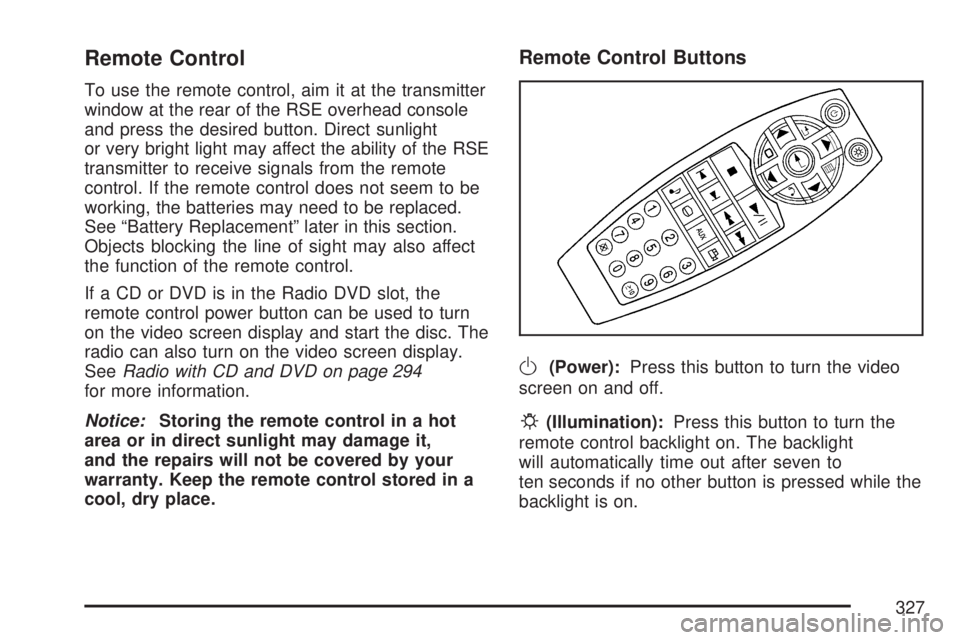
To use the remote control, aim it at the transmitter
window at the rear of the RSE overhead console
and press the desired button. Direct sunlight
or very bright light may affect the ability of the RSE
transmitter to receive signals from the remote
control. If the remote control does not seem to be
working, the batteries may need to be replaced.
See “Battery Replacement” later in this section.
Objects blocking the line of sight may also affect
the function of the remote control.
If a CD or DVD is in the Radio DVD slot, the
remote control power button can be used to turn
on the video screen display and start the disc. The
radio can also turn on the video screen display.
SeeRadio with CD and DVD on page 294
for more information.
Notice:Storing the remote control in a hot
area or in direct sunlight may damage it,
and the repairs will not be covered by your
warranty. Keep the remote control stored in a
cool, dry place.
Remote Control Buttons
O(Power):Press this button to turn the video
screen on and off.
P(Illumination):Press this button to turn the
remote control backlight on. The backlight
will automatically time out after seven to
ten seconds if no other button is pressed while the
backlight is on.
327
Page 328 of 608
v(Title):Press this button to return the DVD to
the main menu of the DVD. This function may
vary for each disc.
y(Main Menu):Press this button to access the
DVD menu. The DVD menu is different on
every DVD. Use the up, down, left, and right arrow
buttons to move the cursor around the DVD
menu. After making a selection press the enter
button. This button only operates when using
a DVD.
n,q,p,o(Menu Navigation Arrows):Use
the arrow buttons to navigate through a menu.
r(Enter):Press this button to select the choice
that is highlighted in any menu.
z(Display Menu):Press this button to adjust
the brightness, screen display mode (normal,
full, or zoom), and display the language menu.
q(Return):Press this button to exit the current
active menu and return to the previous menu.
This button will operate only when the display
menu or a DVD menu is active.
c(Stop):Press this button to stop playing,
rewinding, or fast forwarding a DVD. Press
this button twice to return to the beginning of
the DVD.
s(Play/Pause):Press this button to start
playing a DVD. Press this button while a DVD is
playing to pause it. Press it again to continue
playing the DVD.
When the DVD is playing, depending on the radio,
you may be able to do slow play by pressing
the pause button then pressing the fast forward
button. The DVD will continue playing in a
slow play mode. You may also, depending on the
radio, perform reverse slow play by pressing
the pause button and then pressing the fast
reverse button. To cancel slow play mode, press
the play/pause button.
328
Page 335 of 608
Theft-Deterrent Feature
THEFTLOCK®is designed to discourage theft
of your vehicle’s radio. The feature works
automatically by learning a portion of the Vehicle
Identication Number (VIN). If the radio is
moved to a different vehicle, it will not operate
and LOCKED will appear on the display.
When the radio and vehicle are turned off, the
blinking red light indicates that THEFTLOCK
®is
armed.
With THEFTLOCK
®activated, the radio will not
operate if stolen.
Audio Steering Wheel Controls
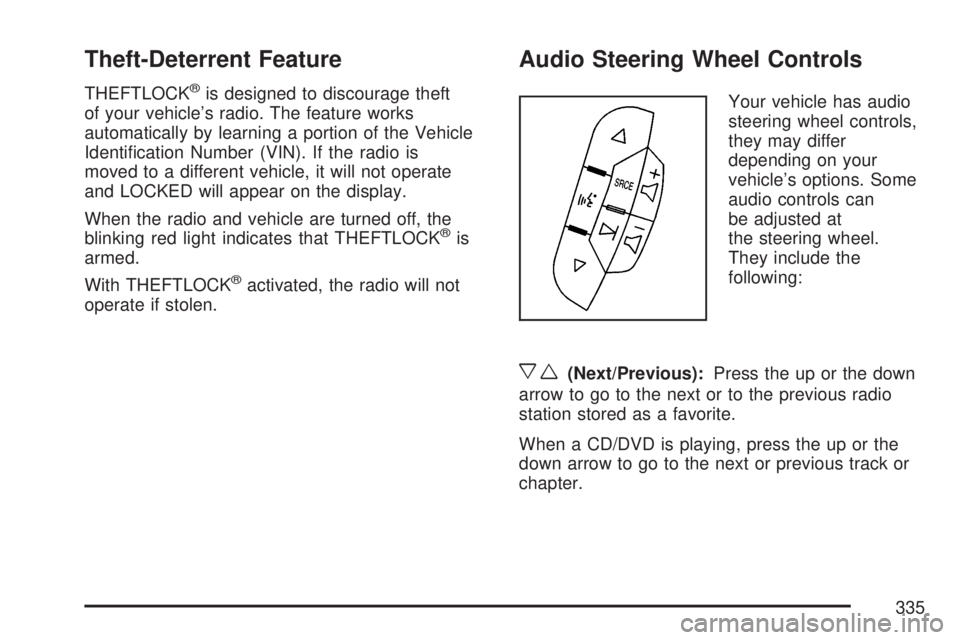
Your vehicle has audio
steering wheel controls,
they may differ
depending on your
vehicle’s options. Some
audio controls can
be adjusted at
the steering wheel.
They include the
following:
xw(Next/Previous):Press the up or the down
arrow to go to the next or to the previous radio
station stored as a favorite.
When a CD/DVD is playing, press the up or the
down arrow to go to the next or previous track or
chapter.
335
Page 338 of 608
Care of Your CDs and DVDs
Handle CDs carefully. Store them in their original
cases or other protective cases and away from
direct sunlight and dust. The CD player scans the
bottom surface of the disc. If the surface of a
CD is damaged, such as cracked, broken,
or scratched, the CD will not play properly or not
at all. If the surface of a CD is soiled, take a
soft, lint free cloth or dampen a clean, soft cloth in
a mild, neutral detergent solution mixed with
water, and clean it. Make sure the wiping process
starts from the center to the edge.
Do not touch the bottom side of a CD while
handling it; this could damage the surface. Pick up
CDs by grasping the outer edges or the edge of
the hole and the outer edge.
Care of the CD and DVD Player
The use of CD lens cleaners for CDs is not
advised, due to the risk of contaminating the lens
of the CD optics with lubricants internal to the
CD mechanism.
Rear Side Window Antenna
Your AM-FM antenna is located in the passenger
rear side window. Be sure that the inside
surfaces of the rear side window is not scratched
and that the lines on the glass are not damaged.
If the inside surfaces are damaged, they could
interfere with radio reception.
Notice:Using a razor blade or sharp object to
clear the inside of the rear side windows
may affect radio reception or damage the
antenna. Repairs would not be covered by your
warranty. Do not clear the inside of the rear
side windows with sharp objects.
338
Page 346 of 608
Control of a Vehicle
You have three systems that make your vehicle
go where you want it to go. They are the
brakes, the steering, and the accelerator. All
three systems have to do their work at the places
where the tires meet the road.
Sometimes, as when you are driving on snow or
ice, it is easy to ask more of those control systems
than the tires and road can provide. That means
you can lose control of your vehicle.
Adding non-GM accessories can affect your
vehicle’s performance. SeeAccessories and
Modications on page 421.
Braking
SeeBrake System Warning Light on page 233.
Braking action involves perception time and
reaction time.
First, you have to decide to push on the brake
pedal. That is perception time. Then you
have to bring up your foot and do it. That is
reaction time.Average reaction time is about three-fourths of a
second. But that is only an average. It might
be less with one driver and as long as two or
three seconds or more with another. Age, physical
condition, alertness, coordination, and eyesight
all play a part. So do alcohol, drugs, and
frustration. But even in three-fourths of a second,
a vehicle moving at 60 mph (100 km/h) travels
66 feet (20 m). That could be a lot of distance in an
emergency, so keeping enough space between
your vehicle and others is important.
And, of course, actual stopping distances vary
greatly with the surface of the road, whether it is
pavement or gravel; the condition of the road,
whether it is wet, dry, or icy; tire tread; the
condition of your brakes; the weight of the vehicle;
and the amount of brake force applied.
346
Page 347 of 608
Avoid needless heavy braking. Some people drive
in spurts — heavy acceleration followed by
heavy braking — rather than keeping pace with
traffic. This is a mistake. Your brakes may
not have time to cool between hard stops. Your
brakes will wear out much faster if you do a lot of
heavy braking. If you keep pace with the traffic
and allow realistic following distances, you
will eliminate a lot of unnecessary braking. That
means better braking and longer brake life.
If your engine ever stops while you are driving,
brake normally but do not pump your brakes. If you
do, the pedal may get harder to push down. If
your engine stops, you will still have some power
brake assist. But you will use it when you
brake. Once the power assist is used up, it may
take longer to stop and the brake pedal will
be harder to push.
Adding non-GM accessories can affect your
vehicle’s performance. SeeAccessories and
Modications on page 421.Anti-Lock Brake System (ABS)
Your vehicle has the Anti-Lock Brake System
(ABS), an advanced electronic braking system that
will help prevent a braking skid.
When you start your engine and begin to drive
away, ABS will check itself. You may hear a
momentary motor or clicking noise while this test
is going on. This is normal.
If there is a problem
with ABS, this warning
light will stay on.
SeeAnti-Lock Brake
System Warning
Light on page 234.
Along with ABS, your vehicle has a Dynamic Rear
Proportioning (DRP) system. If there is a DRP
problem, both the brake and ABS warning lights
will come on accompanied by a 10-second
chime. The lights and chime will come on each
time the ignition is turned on until the problem is
repaired. See your dealer for service.
347
Page 350 of 608
If the system fails to turn on or activate, the
StabiliTrak®light along with one of the following
messages will be displayed on the Driver
Information Center (DIC): TRACTION CONTROL
OFF, SERVICE TRACTION CONTROL,
STABILITRAK OFF, SERVICE STABILITRAK. If
these DIC messages appear, make sure the
StabiliTrak
®system has not been turned off using
the StabiliTrak®on/off button. Then turn the
steering wheel clockwise from the nine o’clock
position to the three o’clock position. If this clears
the message(s), your vehicle does not need
servicing. If this does not clear the message(s),
then turn the vehicle off, wait 15 seconds, and then
turn it back on again to reset the system. If any
of these messages still appear on the Driver
Information Center (DIC), your vehicle should be
taken in for service. For more information on
the DIC messages, seeDriver Information Center
(DIC) on page 244.The StabiliTrak
®light
will ash on the
instrument panel cluster
when the system is
both on and activated.
You may also feel or hear the system working;
this is normal.
The traction control
disable button is located
on the instrument
panel below the climate
controls.
The traction control part of StabiliTrak
®can
be turned off by pressing and releasing the
StabiliTrak
®button if both systems (traction control
and StabiliTrak®) were previously on. To disable
both traction control and StabiliTrak®, press
and hold the button for ve seconds.
350
Page 351 of 608
Traction control and StabiliTrak®can be turned
on by pressing and releasing the StabiliTrak®
button if not automatically shut off for any other
reason.
When the TCS or StabiliTrak
®system is turned
off, the StabiliTrak®light and the appropriate TCS
off or StabiliTrak®off message will be displayed
on the DIC to warn the driver. Your vehicle will still
have brake-traction control when traction control
is off, but will not be able to use the engine speed
management system. See “Traction Control
Operation” next for more information.
When the traction control system has been turned
off, you may still hear system noises as a result
of the brake-traction control coming on.It is recommended to leave the system on for
normal driving conditions, but it may be necessary
to turn the system off if your vehicle is stuck in
sand, mud, ice or snow, and you want to
“rock” your vehicle to attempt to free it. It may also
be necessary to turn off the system when driving
in extreme off-road conditions where high
wheel spin is required. SeeIf Your Vehicle is
Stuck in Sand, Mud, Ice, or Snow on page 390.
When the transfer case is in 4LO, the stability
system is automatically disabled, the StabiliTrak
®
light will come on and the STABILITRAK OFF
message will appear on the DIC. Both traction
control and StabiliTrak
®are automatically disabled
in this condition.
351
Page 352 of 608
Traction Control Operation
The traction control system is part of the
StabiliTrak®system. Traction control limits wheel
spin by reducing engine power to the wheels
(engine speed management) and by applying
brakes to each individual wheel (brake-traction
control) as necessary.
The traction control system is enabled
automatically when you start your vehicle. It will
activate and the StabiliTrak
®light will ash if
it senses that any of the wheels are spinning or
beginning to lose traction while driving. If you turn
off traction control, only the brake-traction
control portion of traction control will work. The
engine speed management will be disabled. In this
mode, engine power is not reduced automatically
and the driven wheels can spin more freely.
This can cause the brake-traction control to
activate constantly.
Notice:If you allow the wheel(s) of one axle
to spin excessively while the StabiliTrak
®, ABS
and brake warning lights and the SERVICE
STABILITRAK message are displayed,
you could damage the transfer case. The
repairs would not be covered by your warranty.Reduce engine power and do not spin the
wheel(s) excessively while these lights and this
message are displayed.
The traction control system may activate on
dry or rough roads or under conditions such as
heavy acceleration while turning or abrupt
upshifts/downshifts of the transmission. When
this happens, you may notice a reduction in
acceleration, or may hear a noise or vibration.
This is normal.
If your vehicle is in cruise control when the system
activates, the StabiliTrak
®light will ash and the
cruise control will automatically disengage.
When road conditions allow you to use cruise
again, you may re-engage the cruise control. See
Cruise Control on page 200.
StabiliTrak
®may also turn off automatically if it
determines that a problem exists with the system.
If the problem does not clear itself after restarting
the vehicle, you should see your dealer for
service.
352
Page 355 of 608
An emergency like this requires close attention and
a quick decision. If you are holding the steering
wheel at the recommended 9 and 3 o’clock
positions, you can turn it a full 180 degrees very
quickly without removing either hand. But you
have to act fast, steer quickly, and just as quickly
straighten the wheel once you have avoided the
object.
The fact that such emergency situations are
always possible is a good reason to practice
defensive driving at all times and wear safety belts
properly.
Off-Road Recovery
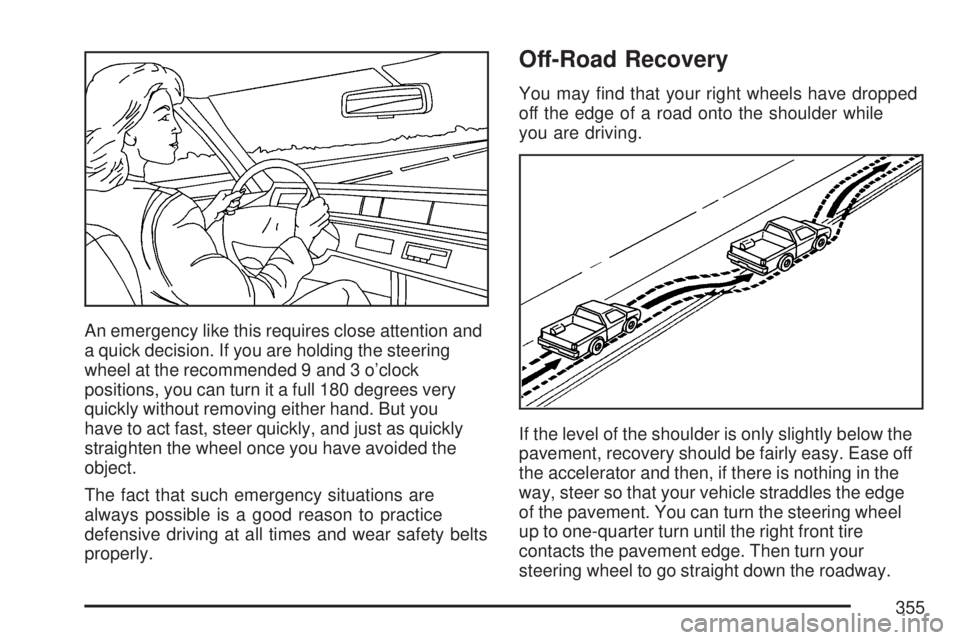
You may nd that your right wheels have dropped
off the edge of a road onto the shoulder while
you are driving.
If the level of the shoulder is only slightly below the
pavement, recovery should be fairly easy. Ease off
the accelerator and then, if there is nothing in the
way, steer so that your vehicle straddles the edge
of the pavement. You can turn the steering wheel
up to one-quarter turn until the right front tire
contacts the pavement edge. Then turn your
steering wheel to go straight down the roadway.
355