brake GMC YUKON DENALI 2007 User Guide
[x] Cancel search | Manufacturer: GMC, Model Year: 2007, Model line: YUKON DENALI, Model: GMC YUKON DENALI 2007Pages: 608, PDF Size: 2.92 MB
Page 154 of 608
Torque Lock
If you are parking on a hill and you do not shift
your transmission into PARK (P) properly,
the weight of the vehicle may put too much force
on the parking pawl in the transmission. You
may nd it difficult to pull the shift lever out
of PARK (P). This is called torque lock. To prevent
torque lock, set the parking brake and then shift
into PARK (P) properly before you leave the
driver’s seat. To nd out how, seeShifting Into
Park (P) on page 153.
When you are ready to drive, move the shift lever
out of PARK (P) before you release the parking
brake.
If torque lock does occur, you may need to have
another vehicle push yours a little uphill to
take some of the pressure from the parking pawl
in the transmission, then you will be able to
pull the shift lever out of PARK (P).
Shifting Out of Park (P)
Your vehicle has an automatic transmission shift
lock control system which locks the shift lever
in PARK (P) when the ignition is in the LOCK.
You have to fully apply your regular brakes before
you can shift from PARK (P) when the ignition
is in RUN. SeeAutomatic Transmission Operation
on page 145.
If you cannot shift out of PARK (P), ease pressure
on the shift lever and push the shift lever all the
way up into PARK (P) as you maintain brake
application. Then, move the shift lever into
the desired gear.
154
Page 157 of 608
Running the Engine While Parked
It is better not to park with the engine running.
But if you ever have to, here are some things
to know.
{CAUTION:
Idling the engine with the climate control
system off could allow dangerous exhaust
into your vehicle. See the earlier caution
underEngine Exhaust on page 156.
Also, idling in a closed-in place can let
deadly carbon monoxide (CO) into your
vehicle even if the climate control fan is at
the highest setting. One place this can
happen is a garage. Exhaust — with
CO — can come in easily. NEVER park in
a garage with the engine running.
Another closed-in place can be a blizzard.
SeeWinter Driving on page 386.
{CAUTION:
It can be dangerous to get out of your
vehicle if the shift lever is not fully in
PARK (P) with the parking brake rmly
set. Your vehicle can roll. Do not leave
your vehicle when the engine is running
unless you have to. If you have left the
engine running, the vehicle can move
suddenly. You or others could be injured.
To be sure your vehicle will not move,
even when you are on fairly level ground,
always set your parking brake and move
the shift lever to PARK (P).
Follow the proper steps to be sure your vehicle
will not move. SeeShifting Into Park (P) on
page 153.
If you are pulling a trailer, seeTowing a Trailer on
page 400.
157
Page 187 of 608
Instrument Panel Overview........................ 190
Hazard Warning Flashers.......................... 192
Other Warning Devices............................. 192
Horn.......................................................... 192
Tilt Wheel.................................................. 193
Turn Signal/Multifunction Lever.................. 193
Turn and Lane-Change Signals................. 194
Headlamp High/Low-Beam Changer.......... 195
Flash-to-Pass............................................ 195
Windshield Wipers..................................... 196
Rainsense™ II Wipers............................... 197
Windshield Washer.................................... 198
Rear Window Wiper/Washer...................... 199
Cruise Control........................................... 200
Exterior Lamps.......................................... 203
Headlamps on Reminder........................... 205
Daytime Running Lamps (DRL)................. 205
Automatic Headlamp System..................... 205
Fog Lamps................................................ 206
Instrument Panel Brightness...................... 207
Dome Lamps............................................. 207
Dome Lamp Override................................ 207
Entry Lighting............................................ 207
Exit Lighting.............................................. 207Front Reading Lamps................................ 208
Battery Run-Down Protection..................... 208
Ultrasonic Rear Parking Assist (URPA)...... 208
Accessory Power Outlet(s)........................ 213
Ashtray(s) and Cigarette Lighter................ 214
Climate Controls......................................... 214
Dual Automatic Climate Control System....... 214
Outlet Adjustment...................................... 222
Rear Air Conditioning and Heating
System and Electronic Climate
Controls................................................. 223
Warning Lights, Gages, and Indicators..... 225
Instrument Panel Cluster........................... 226
Speedometer and Odometer...................... 227
Trip Odometer........................................... 227
Tachometer............................................... 227
Safety Belt Reminder Light........................ 228
Passenger Safety Belt Reminder Light....... 228
Airbag Readiness Light............................. 229
Passenger Airbag Status Indicator............. 230
Charging System Light.............................. 232
Voltmeter Gage......................................... 232
Brake System Warning Light..................... 233
Section 3 Instrument Panel
187
Page 188 of 608
Anti-Lock Brake System Warning Light...... 234
StabiliTrak®Indicator Light......................... 235
Engine Coolant Temperature Gage............ 236
Tire Pressure Light.................................... 236
Malfunction Indicator Lamp........................ 237
Oil Pressure Gage..................................... 240
Oil Pressure Light..................................... 241
Security Light............................................ 241
Fog Lamp Light......................................... 242
Cruise Control Light.................................. 242
Highbeam On Light................................... 242
Tow/Haul Mode Light................................ 242
Fuel Gage................................................. 243
Low Fuel Warning Light............................ 244
Driver Information Center (DIC).................. 244
DIC Operation and Displays
(Using DIC Buttons)............................... 245
DIC Operation and Displays
(Using Trip Odometer Reset Stem)........ 250
DIC Warnings and Messages.................... 252
DIC Vehicle Customization
(With DIC Buttons)................................. 262Audio System(s)......................................... 272
Setting the Time (Radio with a
Six-Disc CD Player)............................... 274
Setting the Time (Radio with a
Single CD and DVD Player)................... 275
Radio with Six-Disc CD (MP3)................... 276
Radio with CD and DVD........................... 294
XM Radio Messages................................. 319
Navigation/Radio System........................... 321
Rear Seat Entertainment System............... 321
Rear Seat Audio (RSA)............................. 333
Theft-Deterrent Feature............................. 335
Audio Steering Wheel Controls.................. 335
Radio Reception........................................ 336
Care of Your CDs and DVDs.................... 338
Care of the CD and DVD Player............... 338
Rear Side Window Antenna....................... 338
XM™ Satellite Radio Antenna System....... 339
Section 3 Instrument Panel
188
Page 200 of 608
Cruise Control
{CAUTION:
Cruise control can be dangerous where
you cannot drive safely at a steady speed.
So, do not use your cruise control on
winding roads or in heavy traffic.
Cruise control can be dangerous on
slippery roads. On such roads, fast
changes in tire traction can cause
excessive wheel slip, and you could lose
control. Do not use cruise control on
slippery roads.
With cruise control, you can maintain a speed
of about 25 mph (40 km/h) or more without
keeping your foot on the accelerator. This can
really help on long trips. Cruise control does not
work at speeds below about 25 mph (40 km/h).When you apply your brakes, cruise control is
turned off.
If your vehicle has the StabiliTrak
®system and
begins to limit wheel spin while you are using
cruise control, the cruise control will automatically
disengage. SeeStabiliTrak
®System on
page 349. When road conditions allow you to
safely use it again, you may turn the cruise
control back on.
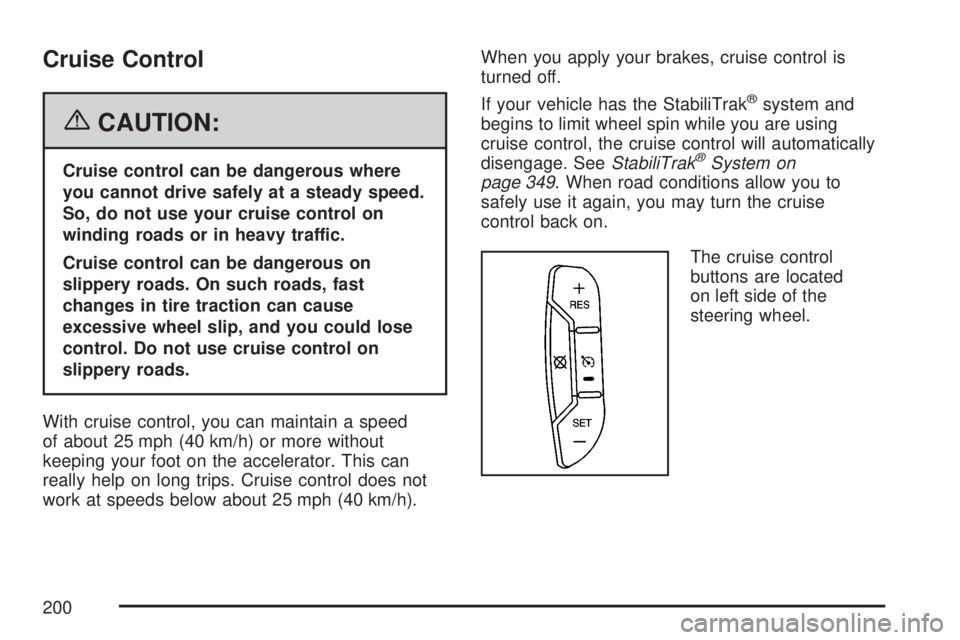
The cruise control
buttons are located
on left side of the
steering wheel.
200
Page 201 of 608
T(On/Off):This button can both activate and
turn off the system. The indicator light is on
when cruise control is on and turns off when cruise
control is off.
+ RES (Resume/Accelerate):Press this button
to make the vehicle accelerate or resume to
a previously set speed.
SET−(Set/Coast):Press this button to set the
speed or make the vehicle decelerate.
[(Cancel):Press this button to cancel cruise
control without erasing the set speed from
memory.
Setting Cruise Control
Cruise control will not work if your parking brake is
set, or if the master cylinder brake uid level is low.
The cruise control light on the instrument panel
cluster will come on after the cruise control
has been set to the desired speed.
{CAUTION:
If you leave your cruise control on when
you are not using cruise, you might hit a
button and go into cruise when you do
not want to. You could be startled and
even lose control. Keep the cruise control
switch off until you want to use cruise
control.
1. Press the cruise control On/Off button.
2. Get up to the desired speed you want.
3. Press the SET−button located on the steering
wheel and release it.
4. Take your foot off the accelerator.
201
Page 202 of 608
Resuming a Set Speed
Suppose you set your cruise control at a desired
speed and then you apply the brake. This shuts off
the cruise control. But you do not need to reset it.
Once you are driving about 25 mph (40 km/h) or
more, press the +RES button on your steering
wheel. The vehicle will go back to the previous set
speed and stay there.
Increasing Speed While Using Cruise
Control
To increase the cruise speed while using cruise
control:
Press and hold the +RES button on the
steering wheel until you reach your new
desired speed, then release it.
To increase vehicle speed in small increments,
press the +RES button. Each time you do this,
you will go about 1 mph (1.6 km/h) faster.
Reducing Speed While Using Cruise
Control
To reduce your speed while using cruise control:
Press and hold the SET– button on the
steering wheel until the desired lower speed is
reached, then release it.
To slow down in very small amounts, press
the SET– button on the steering wheel
briey. Each time you do this, the vehicle will
go about 1 mph (1.6 km/h) slower.
Passing Another Vehicle While Using
Cruise Control
Use the accelerator pedal to increase your speed.
When you take your foot off the pedal, your vehicle
will slow down to the previous set cruise speed.
202
Page 203 of 608
Using Cruise Control on Hills
How well your cruise control will work on hills
depends upon your speed, load, and the
steepness of the hills. When going up steep hills,
you may have to step on the accelerator pedal
to maintain the vehicle’s speed. When going
downhill, you may have to brake or shift to a
lower gear to keep the vehicle’s speed down.
Of course, applying the brake takes you out
of cruise control. Many drivers nd this to be too
much trouble and do not use cruise control on
steep hills.
Ending Cruise Control
There are three ways to end cruise control:
Step lightly on the brake pedal.
Press the cancel button on the steering wheel.
Press the On/Off button on the steering
wheel.
Erasing Speed Memory
When you turn off the cruise control or the ignition,
your cruise control set speed memory is erased.
Exterior Lamps
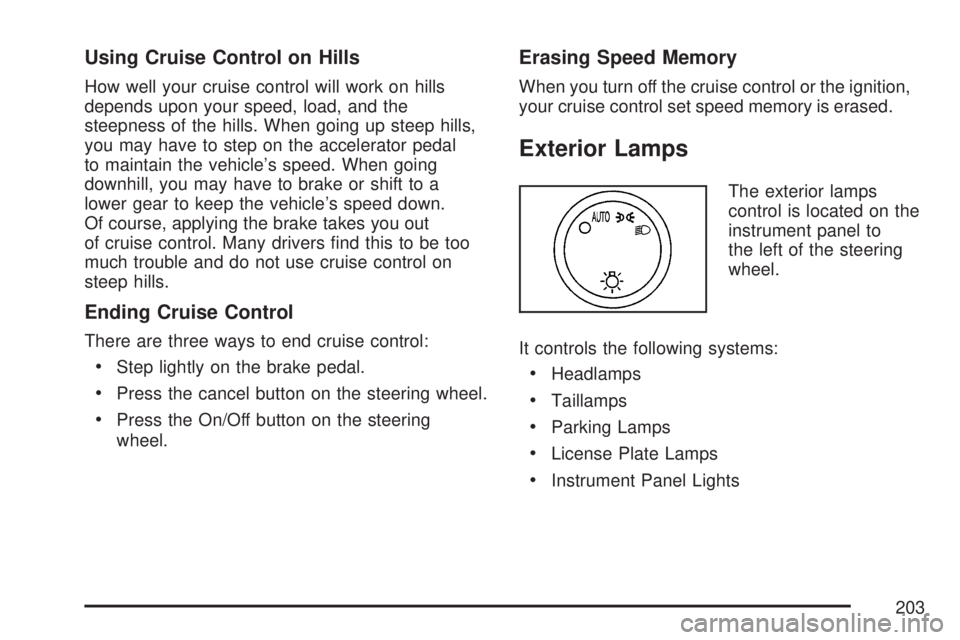
The exterior lamps
control is located on the
instrument panel to
the left of the steering
wheel.
It controls the following systems:
Headlamps
Taillamps
Parking Lamps
License Plate Lamps
Instrument Panel Lights
203
Page 211 of 608
How the System Works when Backing
If the shift lever is in REVERSE (R), URPA detects
objects close to the rear bumper. The rst time an
object is detected a single beep will sound. If an
object is detected at a REVERSE (R) speed
between 0 mph (0 km/h) and 5 mph (8 km/h), the
following describes what will occur based on your
distance to a detected object located behind the
vehicle:
At distances between 40 inches (1 m) and
8 ft (2.5 m), a single amber light will come on.
At distances between 23 inches (0.6 m) and
40 inches (1 m), both amber lights will be on.
At distances between 12 inches (0.3 m) and
23 inches (0.6 m), all three lights (amber/
amber/red) will be on.
At distances less than 12 inches (0.3 m), a
beeping sound will repeat for a short time and
all three lights (amber/amber/red) will be on and
ashing.
When the System Does Not Seem to
Work Properly
If the URPA system will not activate due to a
temporary condition, the message PARKING
ASSIST OFF will be displayed on the DIC and a
red light will be shown on the rear URPA
display when the shift lever is moved into
REVERSE (R). This occurs under the following
conditions:
The driver disables the system. SeeDIC
Operation and Displays (Using DIC Buttons)
on page 245orDIC Operation and Displays
(Using Trip Odometer Reset Stem) on
page 250.
The parking brake pedal is depressed.
211
Page 212 of 608
A trailer was attached to your vehicle, or a
bicycle or an object was hanging out of your
trunk during your last drive when you turned off
the vehicle. If the attached objects are removed
from your vehicle before the start of your next
drive, the system will return to normal operation
unless an object is detected when the vehicle is
shifted into REVERSE (R). If this occurs, URPA
assumes the object is still attached, so you will
have to wait until the vehicle is driven forward
above 15 mph (25 km/h) before URPA will
return to normal operation.
The ultrasonic sensors are not kept clean. So,
be sure to keep your vehicle’s rear bumper free
of mud, dirt, snow, ice, and slush. For cleaning
instructions, seeWashing Your Vehicle on
page 530. If the DIC still displays the PARKING
ASSIST OFF message after cleaning the
bumper and driving forward at a speed of at
least 15 mph (25 km/h), see your dealer.
Other conditions that may affect system
performance include vibrations from a
jackhammer or the compression of air brakes
on a very large truck or other mechanical
devices that interfere with URPA performance.
When URPA is disabled without driver action
and the driver attempts to turn URPA back on
using the Driver Information Center (DIC), the
PARKING ASSIST ON option will not be
selectable if the necessary conditions stated
above for normal system operation are not met.
As always, drivers should use care when backing
up a vehicle. Always look behind you, being
sure to check for other vehicles, obstructions and
blind spots.
For Driver Information Center messages related
to URPA, seeDIC Warnings and Messages
on page 252.
If the bumper is damaged, your URPA system
may not work properly. Take the vehicle to
your dealer to repair the system.
212