door lock GMC YUKON DENALI 2007 Owner's Guide
[x] Cancel search | Manufacturer: GMC, Model Year: 2007, Model line: YUKON DENALI, Model: GMC YUKON DENALI 2007Pages: 608, PDF Size: 2.92 MB
Page 263 of 608
DISPLAY LANGUAGE
This feature allows you to select the language in
which the DIC messages will appear.
Press the customization button until the DISPLAY
LANGUAGE screen appears on the DIC display.
Press the set/reset button once to access the
settings for this feature. Then press the
customization button to scroll through the following
settings:
ENGLISH (default):All messages will appear
in English.
FRANCAIS (French):All messages will appear
in French.
ESPANOL (Spanish):All messages will appear
in Spanish.
NO CHANGE:No change will be made to this
feature. The current setting will remain.
Choose one of the available settings and press
the set/reset button while it is displayed on the DIC
to select it.You can also change the language by pressing
the trip odometer reset stem. See “Language”
under DIC Operation and Displays (Without DIC
Buttons) earlier in this section for more information.
AUTO DOOR LOCK
This feature allows you to select when the
vehicle’s doors will automatically lock. See
Programmable Automatic Door Locks on page 124
for more information.
Press the customization button until AUTO DOOR
LOCK appears on the DIC display. Press the
set/reset button once to access the settings for this
feature. Then press the customization button to
scroll through the following settings:
SHIFT OUT OF PARK (default):The doors will
automatically lock when the vehicle is shifted out of
PARK (P).
AT VEHICLE SPEED:The doors will
automatically lock when the vehicle speed is
above 8 mph (13 km/h) for three seconds.
263
Page 264 of 608
NO CHANGE:No change will be made to this
feature. The current setting will remain.
Choose one of the available settings and press
the set/reset button while it is displayed on the DIC
to select it.
AUTO DOOR UNLOCK
This feature allows you to select whether or not
to turn off the automatic door unlocking feature.
It also allows you to select which doors and
when the doors will automatically unlock. See
Programmable Automatic Door Locks on page 124
for more information.
Press the customization button until AUTO DOOR
UNLOCK appears on the DIC display. Press
the set/reset button once to access the settings
for this feature. Then press the customization
button to scroll through the following settings:
OFF:None of the doors will automatically unlock.
DRIVER AT KEY OUT:Only the driver’s door
will unlock when the key is taken out of the
ignition.DRIVER IN PARK:Only the driver’s door will
unlock when the vehicle is shifted into PARK (P).
ALL AT KEY OUT:All of the doors will unlock
when the key is taken out of the ignition.
ALL IN PARK (default):All of the doors will
unlock when the vehicle is shifted into PARK (P).
NO CHANGE:No change will be made to this
feature. The current setting will remain.
Choose one of the available settings and press
the set/reset button while it is displayed on the DIC
to select it.
REMOTE DOOR LOCK
This feature allows you to select the type of
feedback you will receive when locking the vehicle
with the Remote Keyless Entry (RKE) transmitter.
You will not receive feedback when locking
the vehicle with the RKE transmitter if the doors
are open. SeeRemote Keyless Entry System
Operation on page 116for more information.
264
Page 265 of 608
Press the customization button until REMOTE
DOOR LOCK appears on the DIC display. Press
the set/reset button once to access the settings
for this feature. Then press the customization
button to scroll through the following settings:
OFF:There will be no feedback when you press
the lock button on the RKE transmitter.
LIGHTS ONLY:The exterior lamps will ash
when you press the lock button on the RKE
transmitter.
HORN ONLY:The horn will sound on the second
press of the lock button on the RKE transmitter.
HORN & LIGHTS (default):The exterior
lamps will ash when you press the lock button
on the RKE transmitter, and the horn will
sound when the lock button is pressed again
within ve seconds of the previous command.
NO CHANGE:No change will be made to
this feature. The current setting will remain.
Choose one of the available settings and press
the set/reset button while it is displayed on the
DIC to select it.REMOTE DOOR UNLOCK
This feature allows you to select the type of
feedback you will receive when unlocking the
vehicle with the Remote Keyless Entry (RKE)
transmitter. You will not receive feedback when
unlocking the vehicle with the RKE transmitter
if the doors are open. SeeRemote Keyless
Entry System Operation on page 116for more
information.
Press the customization button until REMOTE
DOOR UNLOCK appears on the DIC display.
Press the set/reset button once to access
the settings for this feature. Then press the
customization button to scroll through the following
settings:
LIGHTS OFF:The exterior lamps will not ash
when you press the unlock button on the
RKE transmitter.
LIGHTS ON (default):The exterior lamps will
ash when you press the unlock button on
the RKE transmitter.
265
Page 266 of 608
NO CHANGE:No change will be made to this
feature. The current setting will remain.
Choose one of the available settings and press
the set/reset button while it is displayed on the
DIC to select it.
DELAY DOOR LOCK
This feature allows you to select whether or not
the locking of the vehicle’s doors and liftgate
will be delayed. When locking the doors and
liftgate with the power door lock switch or the
Remote Keyless Entry (RKE) transmitter and
a door or the liftgate is open, this feature will delay
locking the doors and liftgate until ve seconds
after the last door is closed. You will hear
three chimes to signal that the delayed locking
feature is in use. The key must be out of the
ignition for this feature to work. You can
temporarily override delayed locking by pressing
the power door lock switch or the RKE transmitter
a second time. SeeDelayed Locking on
page 123for more information.Press the customization button until DELAY
DOOR LOCK appears on the DIC display. Press
the set/reset button once to access the settings
for this feature. Then press the customization
button to scroll through the following settings:
OFF:There will be no delayed locking of
the vehicle’s doors.
ON (default):The doors will not lock until
ve seconds after the last door or the liftgate is
closed.
NO CHANGE:No change will be made to this
feature. The current setting will remain.
Choose one of the available settings and press
the set/reset button while it is displayed on the
DIC to select it.
266
Page 392 of 608
Loading Your Vehicle
It is very important to know how much weight your
vehicle can carry. This weight is called the
vehicle capacity weight and includes the weight of
all occupants, cargo and all nonfactory-installed
options. Two labels on your vehicle show how
much weight it was designed to carry, the Tire
and Loading Information label and the
Certication/Tire label.
{CAUTION:
Do not load your vehicle any heavier than
the Gross Vehicle Weight Rating (GVWR),
or either the maximum front or rear Gross
Axle Weight Rating (GAWR). If you do,
parts on your vehicle can break, and it
can change the way your vehicle handles.
These could cause you to lose control
and crash. Also, overloading can shorten
the life of your vehicle.
Tire and Loading Information Label
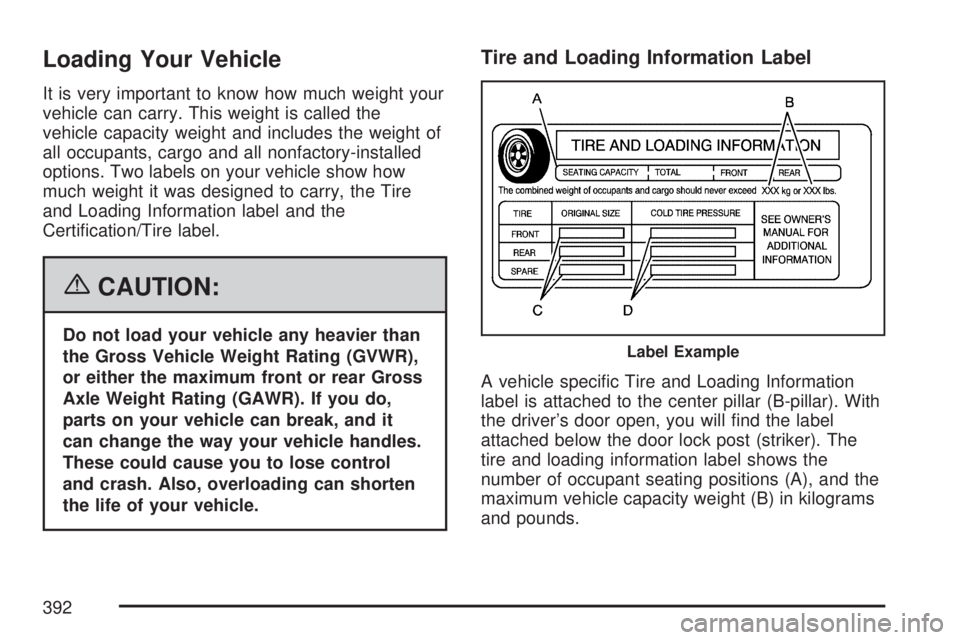
A vehicle specic Tire and Loading Information
label is attached to the center pillar (B-pillar). With
the driver’s door open, you will nd the label
attached below the door lock post (striker). The
tire and loading information label shows the
number of occupant seating positions (A), and the
maximum vehicle capacity weight (B) in kilograms
and pounds.
Label Example
392
Page 426 of 608
Filling the Tank
{CAUTION:
Fuel vapor burns violently and a fuel re
can cause bad injuries. To help avoid
injuries to you and others, read and follow
all the instructions on the pump island.
Turn off your engine when you are
refueling. Do not smoke if you are near
fuel or refueling your vehicle. Keep
sparks, ames, and smoking materials
away from fuel. Do not leave the fuel
pump unattended when refueling your
vehicle. This is against the law in some
places. Keep children away from the fuel
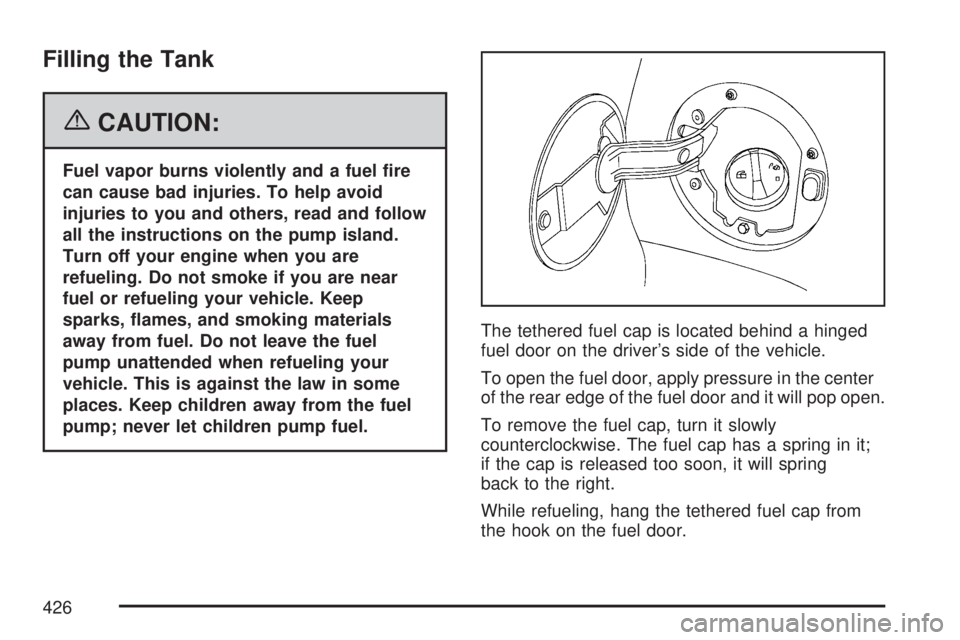
pump; never let children pump fuel.The tethered fuel cap is located behind a hinged
fuel door on the driver’s side of the vehicle.
To open the fuel door, apply pressure in the center
of the rear edge of the fuel door and it will pop open.
To remove the fuel cap, turn it slowly
counterclockwise. The fuel cap has a spring in it;
if the cap is released too soon, it will spring
back to the right.
While refueling, hang the tethered fuel cap from
the hook on the fuel door.
426
Page 488 of 608
Ination - Tire Pressure
Tires need the correct amount of air pressure to
operate effectively.
Notice:Do not let anyone tell you that
under-ination or over-ination is all right.
It is not. If your tires do not have enough air
(under-ination), you can get the following:
Too much exing
Too much heat
Tire overloading
Premature or irregular wear
Poor handling
Reduced fuel economy
If your tires have too much air (over-ination),
you can get the following:
Unusual wear
Poor handling
Rough ride
Needless damage from road hazardsA Tire and Loading Information label is attached
to the vehicle’s center pillar (B-pillar), below
the driver’s door lock post (striker). This label lists
your vehicle’s original equipment tires and their
recommended cold tire ination pressures.
The recommended cold tire ination pressure,
shown on the label, is the minimum amount of
air pressure needed to support your vehicle’s
maximum load carrying capacity.
For additional information regarding how much
weight your vehicle can carry, and an example
of the tire and loading information label, see
Loading Your Vehicle on page 392.
488
Page 538 of 608
Fuses and Circuit Breakers
The wiring circuits in your vehicle are protected
from short circuits by a combination of fuses,
circuit breakers and fusible thermal links.
This greatly reduces the chance of res caused
by electrical problems.
Look at the silver-colored band inside the fuse.
If the band is broken or melted, replace the fuse.
Be sure you replace a bad fuse with a new
one of the identical size and rating.
If you ever have a problem on the road and don’t
have a spare fuse, you can borrow one that has the
same amperage. Just pick some feature of your
vehicle that you can get along without – like the
radio or cigarette lighter – and use its fuse, if it is the
correct amperage. Replace it as soon as you can.
Instrument Panel Fuse Block
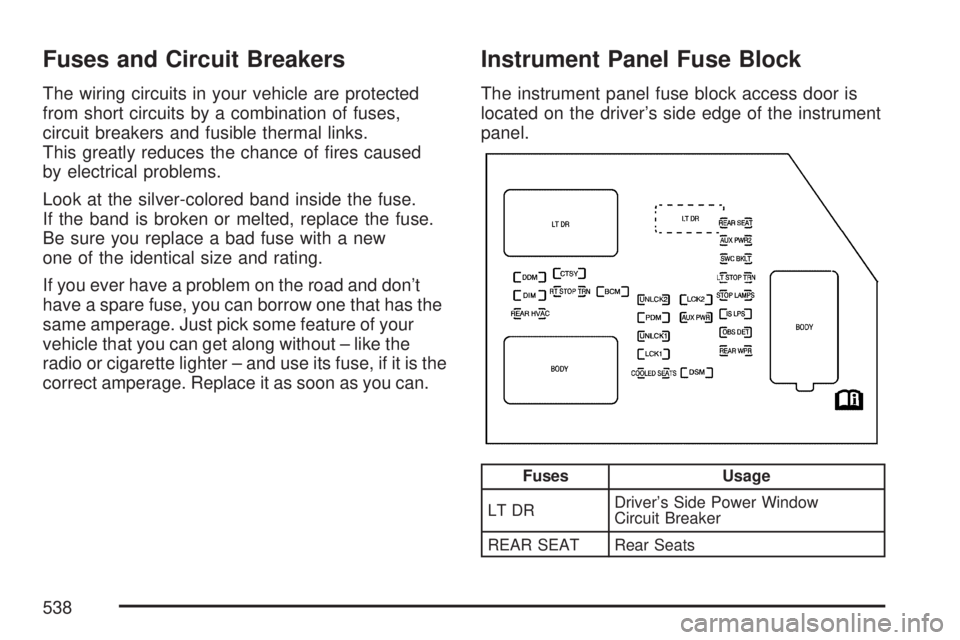
The instrument panel fuse block access door is
located on the driver’s side edge of the instrument
panel.
Fuses Usage
LT DRDriver’s Side Power Window
Circuit Breaker
REAR SEAT Rear Seats
538
Page 539 of 608
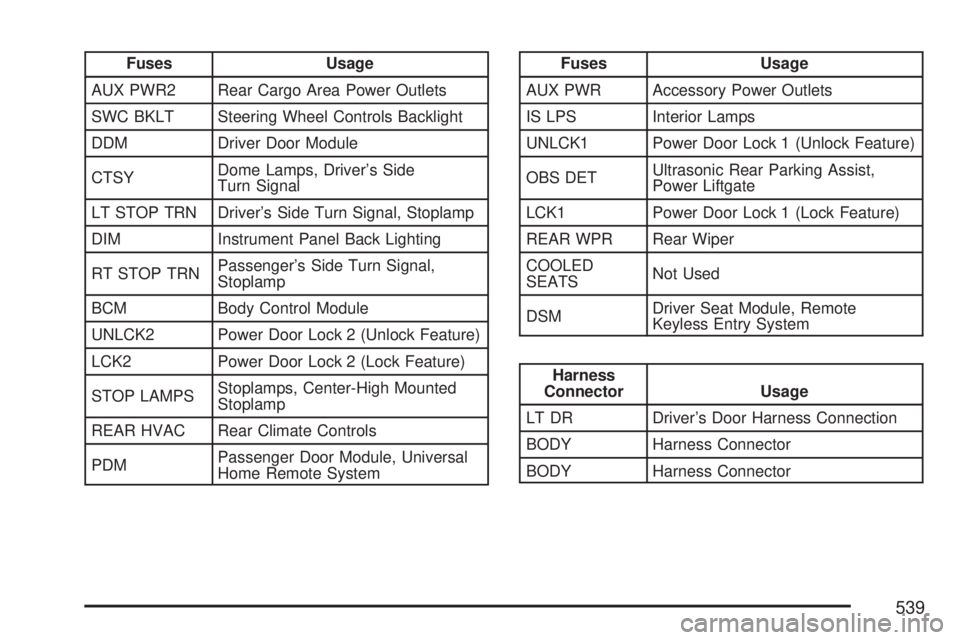
Fuses Usage
AUX PWR2 Rear Cargo Area Power Outlets
SWC BKLT Steering Wheel Controls Backlight
DDM Driver Door Module
CTSYDome Lamps, Driver’s Side
Turn Signal
LT STOP TRN Driver’s Side Turn Signal, Stoplamp
DIM Instrument Panel Back Lighting
RT STOP TRNPassenger’s Side Turn Signal,
Stoplamp
BCM Body Control Module
UNLCK2 Power Door Lock 2 (Unlock Feature)
LCK2 Power Door Lock 2 (Lock Feature)
STOP LAMPSStoplamps, Center-High Mounted
Stoplamp
REAR HVAC Rear Climate Controls
PDMPassenger Door Module, Universal
Home Remote SystemFuses Usage
AUX PWR Accessory Power Outlets
IS LPS Interior Lamps
UNLCK1 Power Door Lock 1 (Unlock Feature)
OBS DETUltrasonic Rear Parking Assist,
Power Liftgate
LCK1 Power Door Lock 1 (Lock Feature)
REAR WPR Rear Wiper
COOLED
SEATSNot Used
DSMDriver Seat Module, Remote
Keyless Entry System
Harness
Connector Usage
LT DR Driver’s Door Harness Connection
BODY Harness Connector
BODY Harness Connector
539
Page 556 of 608
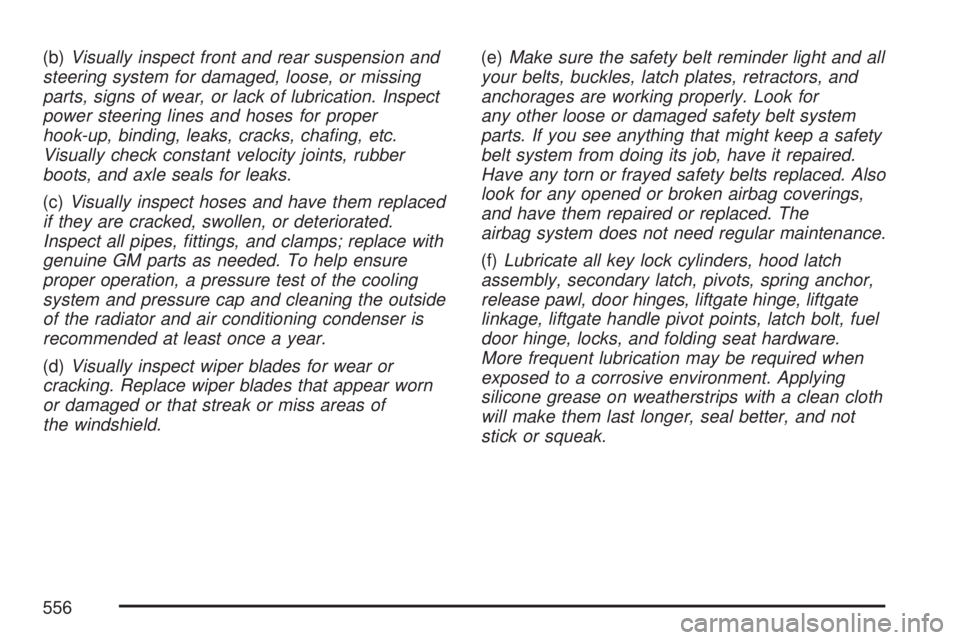
(b)Visually inspect front and rear suspension and
steering system for damaged, loose, or missing
parts, signs of wear, or lack of lubrication. Inspect
power steering lines and hoses for proper
hook-up, binding, leaks, cracks, chang, etc.
Visually check constant velocity joints, rubber
boots, and axle seals for leaks.
(c)Visually inspect hoses and have them replaced
if they are cracked, swollen, or deteriorated.
Inspect all pipes, ttings, and clamps; replace with
genuine GM parts as needed. To help ensure
proper operation, a pressure test of the cooling
system and pressure cap and cleaning the outside
of the radiator and air conditioning condenser is
recommended at least once a year.
(d)Visually inspect wiper blades for wear or
cracking. Replace wiper blades that appear worn
or damaged or that streak or miss areas of
the windshield.(e)Make sure the safety belt reminder light and all
your belts, buckles, latch plates, retractors, and
anchorages are working properly. Look for
any other loose or damaged safety belt system
parts. If you see anything that might keep a safety
belt system from doing its job, have it repaired.
Have any torn or frayed safety belts replaced. Also
look for any opened or broken airbag coverings,
and have them repaired or replaced. The
airbag system does not need regular maintenance.
(f)Lubricate all key lock cylinders, hood latch
assembly, secondary latch, pivots, spring anchor,
release pawl, door hinges, liftgate hinge, liftgate
linkage, liftgate handle pivot points, latch bolt, fuel
door hinge, locks, and folding seat hardware.
More frequent lubrication may be required when
exposed to a corrosive environment. Applying
silicone grease on weatherstrips with a clean cloth
will make them last longer, seal better, and not
stick or squeak.
556