mirror GMC YUKON DENALI 2008 User Guide
[x] Cancel search | Manufacturer: GMC, Model Year: 2008, Model line: YUKON DENALI, Model: GMC YUKON DENALI 2008Pages: 502, PDF Size: 6.18 MB
Page 138 of 502
Mirrors
Automatic Dimming Rearview Mirror
with OnStar
®, Compass and
Temperature Display
When on, an automatic dimming mirror automatically
dims to the proper level to minimize glare from
lights behind you after dark.
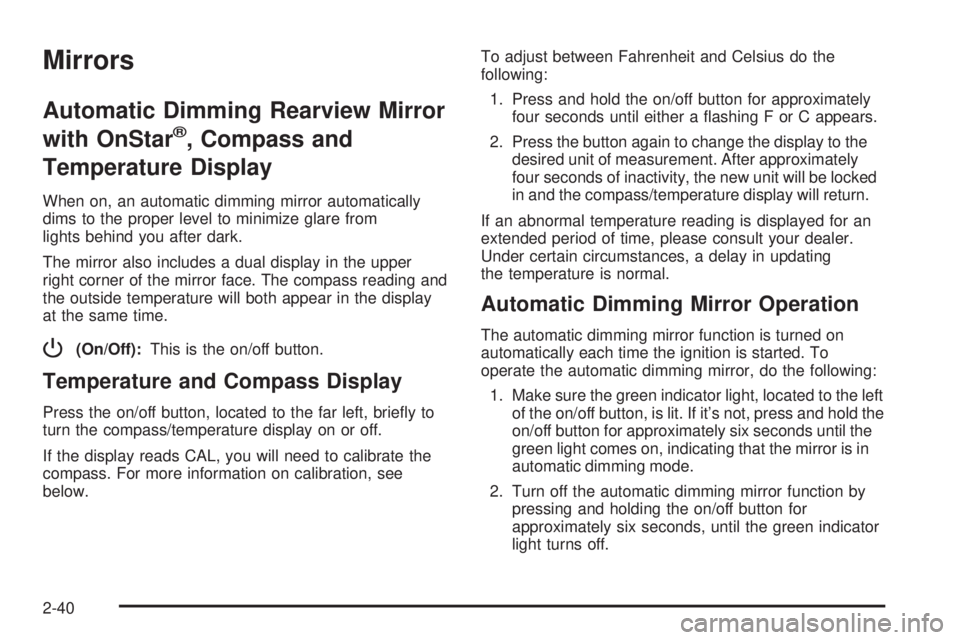
The mirror also includes a dual display in the upper
right corner of the mirror face. The compass reading and
the outside temperature will both appear in the display
at the same time.
P(On/Off):This is the on/off button.
Temperature and Compass Display
Press the on/off button, located to the far left, briey to
turn the compass/temperature display on or off.
If the display reads CAL, you will need to calibrate the
compass. For more information on calibration, see
below.To adjust between Fahrenheit and Celsius do the
following:
1. Press and hold the on/off button for approximately
four seconds until either a ashing F or C appears.
2. Press the button again to change the display to the
desired unit of measurement. After approximately
four seconds of inactivity, the new unit will be locked
in and the compass/temperature display will return.
If an abnormal temperature reading is displayed for an
extended period of time, please consult your dealer.
Under certain circumstances, a delay in updating
the temperature is normal.
Automatic Dimming Mirror Operation
The automatic dimming mirror function is turned on
automatically each time the ignition is started. To
operate the automatic dimming mirror, do the following:
1. Make sure the green indicator light, located to the left
of the on/off button, is lit. If it’s not, press and hold the
on/off button for approximately six seconds until the
green light comes on, indicating that the mirror is in
automatic dimming mode.
2. Turn off the automatic dimming mirror function by
pressing and holding the on/off button for
approximately six seconds, until the green indicator
light turns off.
2-40
Page 139 of 502
Compass Variance
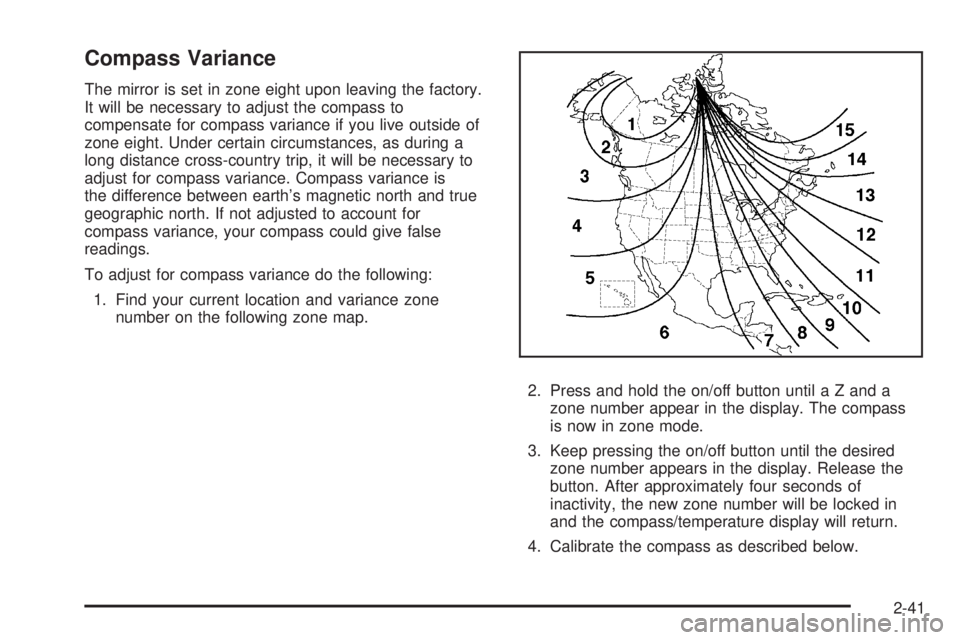
The mirror is set in zone eight upon leaving the factory.
It will be necessary to adjust the compass to
compensate for compass variance if you live outside of
zone eight. Under certain circumstances, as during a
long distance cross-country trip, it will be necessary to
adjust for compass variance. Compass variance is
the difference between earth’s magnetic north and true
geographic north. If not adjusted to account for
compass variance, your compass could give false
readings.
To adjust for compass variance do the following:
1. Find your current location and variance zone
number on the following zone map.
2. Press and hold the on/off button until a Z and a
zone number appear in the display. The compass
is now in zone mode.
3. Keep pressing the on/off button until the desired
zone number appears in the display. Release the
button. After approximately four seconds of
inactivity, the new zone number will be locked in
and the compass/temperature display will return.
4. Calibrate the compass as described below.
2-41
Page 140 of 502
Compass Calibration
The compass may need calibration if one of the
following occurs:
After approximately ve seconds, the display does
not show a compass heading (N for North, for
example), there may be a strong magnetic eld
interfering with the compass. Such interference may
be caused by a magnetic antenna mount, magnetic
note pad holder or a similar magnetic item.
The compass does not display the correct heading
and the compass zone variance is set correctly.
In order to calibrate, CAL must be displayed in the
mirror compass windows. If CAL is not displayed, push
the on/off button for approximately 12 seconds or
until CAL is displayed.
The compass can be calibrated by driving the vehicle in
circles at 5 mph (8 km/h) or less until the display
reads a direction.
Cleaning the Mirror
When cleaning the mirror, use a paper towel or similar
material dampened with glass cleaner. Do not spray
glass cleaner directly on the mirror as that may cause
the liquid cleaner to enter the mirror housing.
Outside Power Foldaway Mirrors
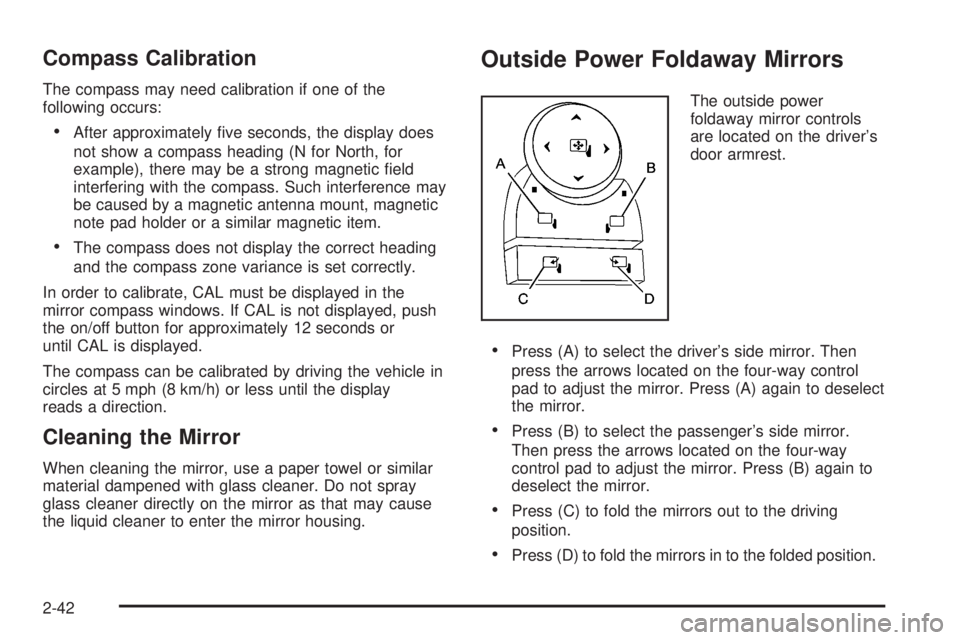
The outside power
foldaway mirror controls
are located on the driver’s
door armrest.
Press (A) to select the driver’s side mirror. Then
press the arrows located on the four-way control
pad to adjust the mirror. Press (A) again to deselect
the mirror.
Press (B) to select the passenger’s side mirror.
Then press the arrows located on the four-way
control pad to adjust the mirror. Press (B) again to
deselect the mirror.
Press (C) to fold the mirrors out to the driving
position.
Press (D) to fold the mirrors in to the folded position.
2-42
Page 141 of 502
If the mirrors are accidentally folded/unfolded manually,
they may shake or utter at normal driving speeds
and may not stay in the unfolded position. If this
happens, you will need to reset the mirrors. See
“Resetting the Power Foldaway Mirrors” next.
Resetting the Power Foldaway Mirrors
You will need to reset the power foldaway mirrors if the
following occurs:
The mirrors are accidentally obstructed while
folding.
They are accidentally manually folded/unfolded.
The mirrors will not stay in the unfolded position.
The mirrors shake and utter at normal driving
speeds.
To reset the power foldaway mirrors, fold and unfold
them one time using the mirror controls. This will reset
them to their normal position.
This mirror has the following features.
Automatic Dimming
The driver’s outside mirror will adjust for the glare of the
headlamps behind you. SeeAutomatic Dimming
Rearview Mirror with OnStar
®, Compass and
Temperature Display on page 2-40.
Curb View Assist
If your vehicle has the memory package, the outside
mirrors are able to perform the park tilt function. This
feature may be useful in allowing the driver to view the
curb when parallel parking. This feature will cause the
passenger’s and/or driver’s mirror to tilt to a preselected
position when the vehicle is in REVERSE (R).
The passenger’s and/or driver’s mirror will return to its
original position when the vehicle is shifted out of
REVERSE (R), or the ignition is turned off or to
OFF/LOCK.
This feature can be turned on or off through the Driver
Information Center (DIC). SeeDIC Vehicle
Customization (With DIC Buttons) on page 3-64.
Heated Mirrors
The button to turn the heated mirrors on or off is located
on the climate control panel. Press this button to
warm the driver’s and passenger’s outside rearview
mirrors to help clear them of ice, snow, and
condensation.
See “Rear Window Defogger” underDual Automatic
Climate Control System on page 3-23for more
information.
2-43
Page 142 of 502
Convex Mirror
{CAUTION:
A convex mirror can make things (like other
vehicles) look farther away than they really are.
If you cut too sharply into the right lane, you
could hit a vehicle on your right. Check your
inside mirror or glance over your shoulder
before changing lanes.
The passenger’s side mirror may have convex glass.
A convex mirror’s surface is curved so more can
be seen from the driver’s seat.
Your vehicle has a turn signal indicator on the mirror.
An arrow on the mirror will ash in the direction of
the turn or lane change.
Object Detection Systems
Ultrasonic Rear Parking
Assist (URPA)
If your vehicle has the Ultrasonic Rear Parking Assist
(URPA) system, it helps you park easier and avoid other
vehicles while in REVERSE (R). It operates at speeds
less than 5 mph (8 km/h). It can determine how close
objects are to the rear bumper, up to 8 feet (2.5 m)
behind your vehicle. The distance sensors are located
on the rear bumper.
2-44
Page 143 of 502
{CAUTION:
The Ultrasonic Rear Parking Assist (URPA)
system does not replace driver vision.
It cannot detect:
objects that are below the bumper,
underneath the vehicle, or if they are
too close or far from the vehicle
children, pedestrians, bicyclists, or pets.
If you do not use proper care before and while
backing; vehicle damage, injury, or death
could occur. Even with URPA, always check
behind your vehicle before backing up. While
backing, be sure to look for objects and check
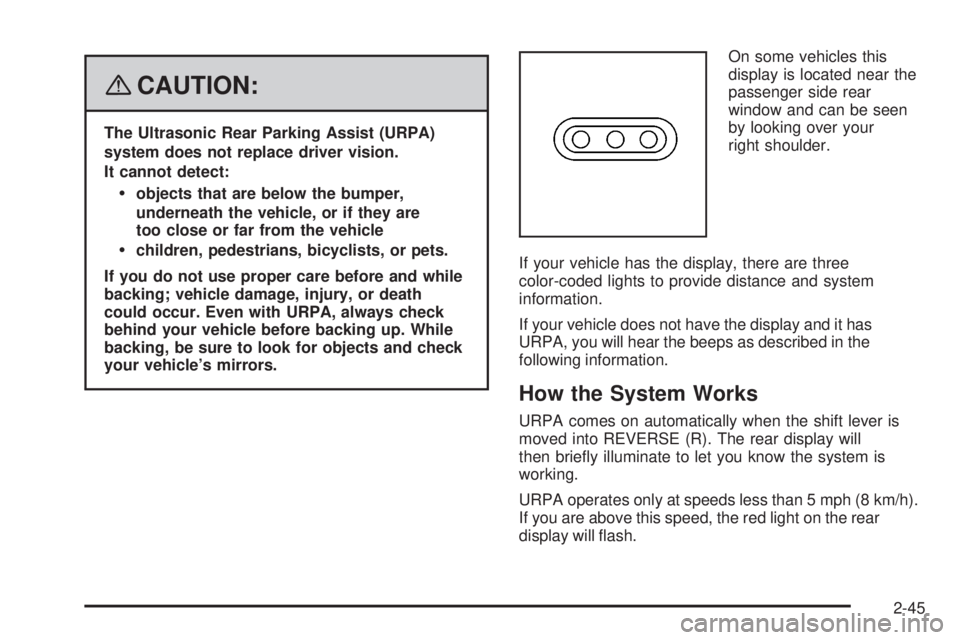
your vehicle’s mirrors.On some vehicles this
display is located near the
passenger side rear
window and can be seen
by looking over your
right shoulder.
If your vehicle has the display, there are three
color-coded lights to provide distance and system
information.
If your vehicle does not have the display and it has
URPA, you will hear the beeps as described in the
following information.
How the System Works
URPA comes on automatically when the shift lever is
moved into REVERSE (R). The rear display will
then briey illuminate to let you know the system is
working.
URPA operates only at speeds less than 5 mph (8 km/h).
If you are above this speed, the red light on the rear
display will ash.
2-45
Page 172 of 502
If your headlamps are in the automatic position or on
low beam, your high-beam headlamps will turn on. They
will stay on as long as you hold the lever toward you.
The high-beam indicator on the instrument panel cluster
will come on. Release the lever to return to normal
operation.
Windshield Wipers
Clear ice and snow from the wiper blades before using
them. If they are frozen to the windshield, gently
loosen or thaw them. Damaged wiper blades may not
clear the windshield well, making it harder to see
and drive safely. If the blades do become damaged,
install new blades or blade inserts. For more information,
seeWindshield Wiper Blade Replacement on page 5-53.
Heavy snow or ice can overload the wiper motor. A
circuit breaker will stop the motor until it cools down.
Clear away snow or ice to prevent an overload.
Turn the band with the wiper symbol to control the
windshield wipers.
8(Mist):Turn the band to mist for a single wiping
cycle. Hold it there until the wipers start. Then let
go. The wipers stop after one wipe. Hold the band on
mist longer, for more wipe cycles.
9(Off):To stop the wipers, move the band to off.
6(Delay):Turn the band to adjust the delay time. The
delay between wiping cycles becomes shorter as
the band is moved to the top of the lever. This can be
very useful in light rain or snow.
6(Low Speed):Turn the band away from you to
the rst solid band past the delay settings, for steady
wiping at low speed.
?(High Speed):Turn the band further, to the
second solid band past the delay settings, for
high-speed wiping.
Rainsense™ II Wipers
Your vehicle has Rainsense™ II windshield wipers.
These wipers automatically turn on when a sensor,
mounted next to the inside rearview mirror, detects
moisture on the windshield. When active, these wipers
are able to detect moisture on the windshield and
automatically turn on the wipers.
3-10
Page 190 of 502
Defogging and Defrosting
Fog on the inside of the windows is a result of high
humidity (moisture) condensing on the cool window
glass. This can be minimized if the climate control
system is used properly. There are two modes to clear
fog or frost from your windshield.
Use the mode up and down arrows to select the defog
or defrost modes.
-(Defog):The defog mode is used to clear the
windows of fog or moisture and warm the passengers.
This mode directs air to the windshield, oor outlets,
and side window vents. When this mode is selected, the
system turns off recirculation and runs the air
conditioning compressor unless the outside temperature
is close to freezing. The recirculation mode cannot be
selected while in the defog mode. Do not drive the
vehicle until all the windows are clear.
0(Defrost):Press this button to remove fog or frost
from the windshield more quickly. This mode directs
a portion of the air to the windshield and side window
vents and some to the oor vents. In this mode, the
system will automatically force outside air into the
vehicle. The recirculation mode cannot be selected while
in the defrost mode. The air conditioning compressor
will run automatically in this setting, unless the outside
temperature is close to freezing. Do not drive the
vehicle until all the windows are clear.
Rear Window Defogger
The rear window defogger uses a warming grid to
remove fog from the rear window.
<(Rear Window Defogger):Press this button to
turn on the rear window defogger. It will automatically
turn off several minutes after it has been activated. The
defogger can also be turned off by pressing the
button again or by turning off the engine. Do not drive
the vehicle until all the windows are clear.
If your vehicle has heated outside rearview mirrors, the
mirrors will heat to help clear fog or frost from the
surface of the mirror when the rear window defog button
is pressed.
Notice:Do not use a razor blade or sharp object to
clear the inside rear window. Do not adhere
anything to the defogger grid lines in the rear glass.
These actions may damage the rear defogger.
Repairs would not be covered by your warranty.
3-28
Page 231 of 502
CHIME VOLUME
This feature allows you to select the volume level of
the chime.
Press the customization button until CHIME VOLUME
appears on the DIC display. Press the set/reset
button once to access the settings for this feature. Then
press the customization button to scroll through the
following settings:
NORMAL:The chime volume will be set to a
normal level.
LOUD:The chime volume will be set to a loud level.
NO CHANGE:No change will be made to this feature.
The current setting will remain.
There is no default for chime volume. The volume will
stay at the last known setting.
To select a setting, press the set/reset button while the
desired setting is displayed on the DIC.
PARK TILT MIRRORS
If your vehicle has this feature, it allows you to select
whether or not the outside mirror(s) will automatically tilt
down when the vehicle is shifted into REVERSE (R).
SeeOutside Power Foldaway Mirrors on page 2-42for
more information.Press the customization button until PARK TILT
MIRRORS appears on the DIC display. Press the
set/reset button once to access the settings for
this feature. Then press the customization button to
scroll through the following settings:
OFF (default):Neither outside mirror will be tilted down
when the vehicle is shifted into REVERSE (R).
DRIVER MIRROR:The driver’s outside mirror will be
tilted down when the vehicle is shifted into
REVERSE (R).
PASSENGER MIRROR:The passenger’s outside
mirror will be tilted down when the vehicle is shifted into
REVERSE (R).
BOTH MIRRORS:The driver’s and passenger’s outside
mirrors will be tilted down when the vehicle is shifted
into REVERSE (R).
NO CHANGE:No change will be made to this feature.
The current setting will remain.
To select a setting, press the set/reset button while the
desired setting is displayed on the DIC.
3-69
Page 232 of 502
EASY EXIT SEAT
If your vehicle has this feature, it allows you to select
your preference for the automatic easy exit seat feature.
SeeMemory Seat, Mirrors, and Pedals on page 1-4
for more information.
Press the customization button until EASY EXIT SEAT
appears on the DIC display. Press the set/reset
button once to access the settings for this feature. Then
press the customization button to scroll through the
following settings:
OFF (default):No automatic seat exit recall will occur.
ON:The driver’s seat will move back when the key
is removed from the ignition.
The automatic easy exit seat movement will only occur
one time after the key is removed from the ignition. If the
automatic movement has already occurred, and you put
the key back in the ignition and remove it again, the seat
will stay in the original exit position, unless a memory
recall took place prior to removing the key again.NO CHANGE:No change will be made to this feature.
The current setting will remain.
To select a setting, press the set/reset button while the
desired setting is displayed on the DIC.
MEMORY SEAT RECALL
If your vehicle has this feature, it allows you to select
your preference for the remote memory seat recall
feature. SeeMemory Seat, Mirrors, and Pedals
on page 1-4for more information.
Press the customization button until MEMORY SEAT
RECALL appears on the DIC display. Press the set/reset
button once to access the settings for this feature.
Then press the customization button to scroll through
the following settings:
OFF (default):No remote memory seat recall will occur.
3-70