navigation GMC YUKON DENALI 2009 Owners Manual
[x] Cancel search | Manufacturer: GMC, Model Year: 2009, Model line: YUKON DENALI, Model: GMC YUKON DENALI 2009Pages: 100, PDF Size: 1.41 MB
Page 1 of 100
Overview........................................................ 1-1
Overview
.................................................. 1-2
Features and Controls..................................... 2-1
Features and Controls
................................ 2-2Navigation Audio System................................ 3-1
Navigation Audio System
............................ 3-2
Voice Recognition........................................... 4-1
Voice Recognition
...................................... 4-2
Index................................................................ 1
2009 Full-Size Truck NavigationM
Page 5 of 100
Overview.........................................................1-2
Navigation System Overview............................1-2Getting Started...............................................1-4
Cleaning the Video Screen.............................1-12
Section 1 Overview
1-1
Page 6 of 100
Overview
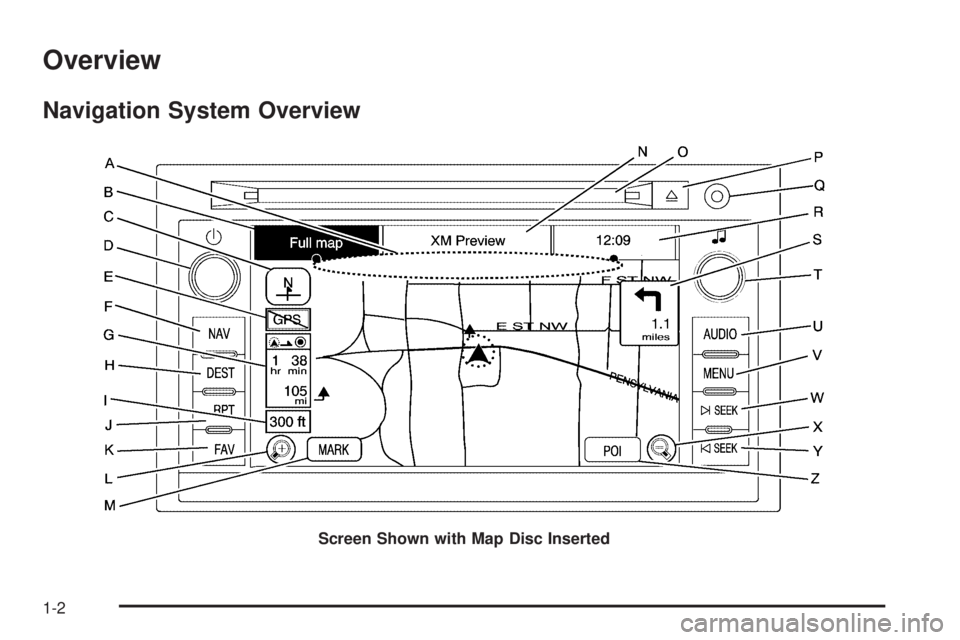
Navigation System Overview
Screen Shown with Map Disc Inserted
1-2
Page 7 of 100
A. Map Disc DVD Slot. See “Installing the Map DVD”
underMaps on page 2-4for more information.
B. FULL MAP Touch Screen Button. See “NAV” under
“Hard Keys” underUsing the Navigation System
on page 2-2for more information.
C. North Up/Heading Up Symbol. SeeSymbols on
page 2-8for more information.
D.
O(Power/Volume) Knob. SeeNavigation Audio
System on page 3-2for more information.
E. No GPS Signal Symbol. SeeSymbols on page 2-8
for more information.
F. NAV (Navigation) Hard Key. See “Hard Keys”
underUsing the Navigation System on page 2-2
for more information.
G. Distance and Time to Distance Symbol.
SeeSymbols on page 2-8for more information.
H. DEST (Destination) Hard Key. SeeDestination
on page 2-15for more information.
I. Map Scale. See “Map Scales” underMaps on
page 2-4for more information.
J. RPT (Repeat) Hard Key for Voice Guidance.
See “Hard Keys” underUsing the Navigation
System on page 2-2for more information.
K. FAV (Favorite) Hard Key. See “Storing Radio
Station Presets” underNavigation Audio System
on page 3-2for more information.L.
V(Zoom In) Touch Screen Button. See “Map
Scales” underMaps on page 2-4for more
information.
M. Mark Touch Screen Button. See “Adding
Destinations to the Address Book” underDestination
on page 2-15for more information.
N. Source (AM, FM, XM, CD, etc.) Touch Screen
Button. SeeNavigation Audio System on page 3-2
for more information.
O. Audio CD/Video DVD Slot. SeeCD Player on
page 3-11andDVD Player on page 3-17for more
information.
P.
Z(Audio CD/Video DVD Eject) Hard Key. SeeCD
Player on page 3-11andDVD Player on page 3-17
for more information.
Q. Auxiliary Input Jack. SeeAuxiliary Devices on
page 3-23for more information.
R. Clock Touch Screen Button. SeeConfigure Menu
on page 2-30for more information.
S. Distance to Next Turn Symbol. SeeSymbols on
page 2-8for more information.
T.
f(Tune/Sound) knob. SeeNavigation Audio
System on page 3-2for more information.
U. AUDIO Hard Key. SeeNavigation Audio System
on page 3-2for more information.
1-3
Page 8 of 100
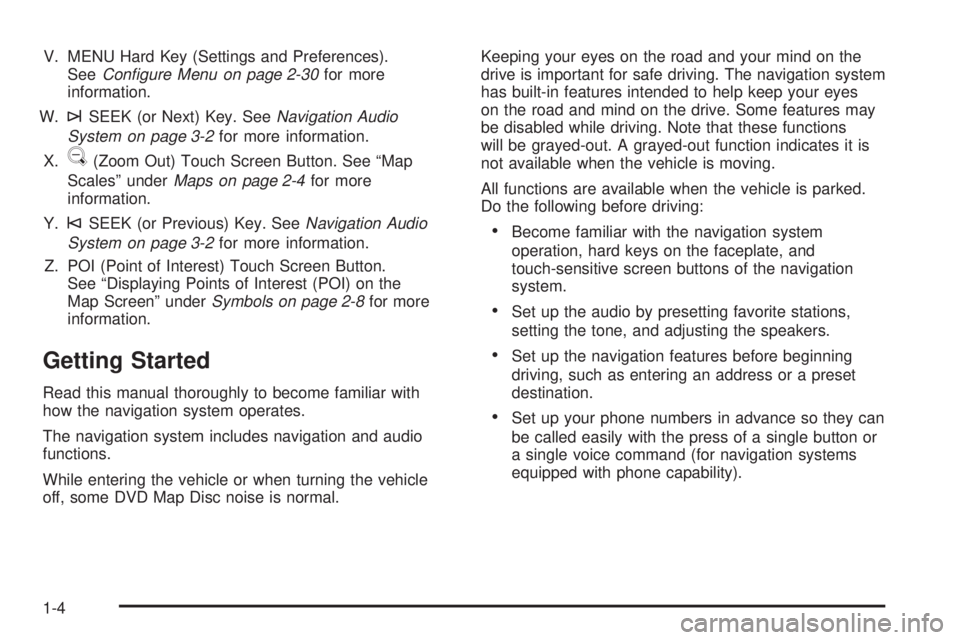
V. MENU Hard Key (Settings and Preferences).
SeeConfigure Menu on page 2-30for more
information.
W.
¨SEEK (or Next) Key. SeeNavigation Audio
System on page 3-2for more information.
X.
U(Zoom Out) Touch Screen Button. See “Map
Scales” underMaps on page 2-4for more
information.
Y.
©SEEK (or Previous) Key. SeeNavigation Audio
System on page 3-2for more information.
Z. POI (Point of Interest) Touch Screen Button.
See “Displaying Points of Interest (POI) on the
Map Screen” underSymbols on page 2-8for more
information.
Getting Started
Read this manual thoroughly to become familiar with
how the navigation system operates.
The navigation system includes navigation and audio
functions.
While entering the vehicle or when turning the vehicle
off, some DVD Map Disc noise is normal.Keeping your eyes on the road and your mind on the
drive is important for safe driving. The navigation system
has built-in features intended to help keep your eyes
on the road and mind on the drive. Some features may
be disabled while driving. Note that these functions
will be grayed-out. A grayed-out function indicates it is
not available when the vehicle is moving.
All functions are available when the vehicle is parked.
Do the following before driving:
Become familiar with the navigation system
operation, hard keys on the faceplate, and
touch-sensitive screen buttons of the navigation
system.
Set up the audio by presetting favorite stations,
setting the tone, and adjusting the speakers.
Set up the navigation features before beginning
driving, such as entering an address or a preset
destination.
Set up your phone numbers in advance so they can
be called easily with the press of a single button or
a single voice command (for navigation systems
equipped with phone capability).
1-4
Page 9 of 100
{CAUTION:
Taking your eyes off the road too long or too often
while using the navigation system could cause a
crash resulting in injury or death to you or others.
Focus your attention on driving.
{CAUTION:
Avoid looking too long or too often at the moving
map on the navigation screen. This could cause a
crash and you or others can be injured or killed.
Use the turn-by-turn voice guidance directions
whenever possible.Use the navigation system to:
Plan a route.
Select a destination using various methods and
choices.
Follow turn-by-turn route and map guidance with
voice prompts, only if permitted by traffic laws,
controls, and conditions.
You should always be alert and obey traffic and
roadway laws and instructions, regardless of the
guidance from the navigation system. Because the
navigation system uses street map information that
does not include all traffic restrictions or the latest road
changes, it may suggest using a road that is now
closed for construction or a turn that is prohibited by
signs at the intersection. Because the system uses
limited information, you must always evaluate whether
following the system’s directions is safe and legal for the
current conditions.
When the navigation system is turned on, a screen may
appear with the information below, and you must
read and acknowledge the information it contains.
1-5
Page 10 of 100
{CAUTION:
Taking your eyes off the road for extended periods
could cause a crash resulting in injury or death to
you or others.
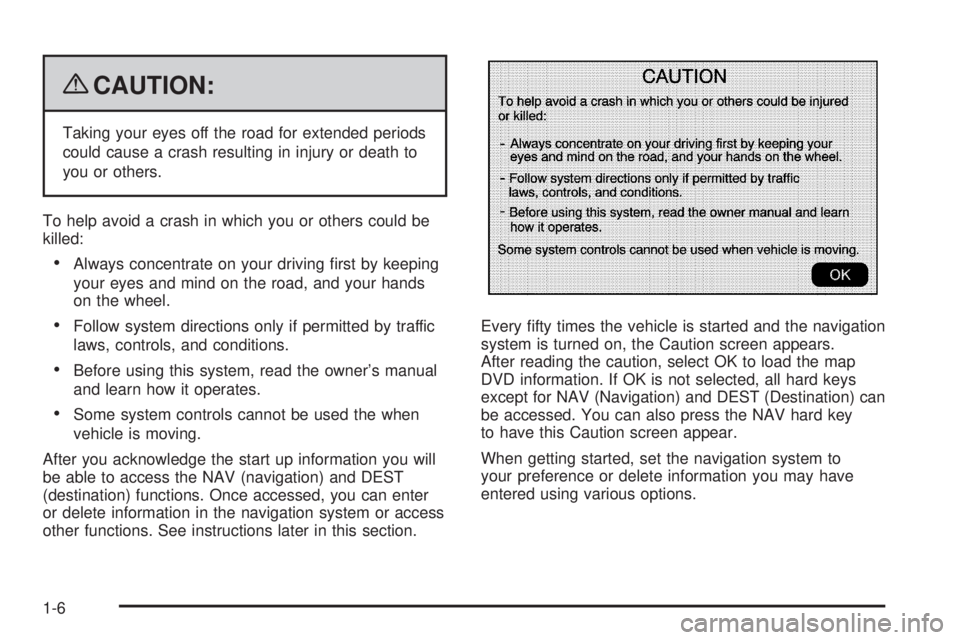
To help avoid a crash in which you or others could be
killed:
Always concentrate on your driving rst by keeping
your eyes and mind on the road, and your hands
on the wheel.
Follow system directions only if permitted by traffic
laws, controls, and conditions.
Before using this system, read the owner’s manual
and learn how it operates.
Some system controls cannot be used the when
vehicle is moving.
After you acknowledge the start up information you will
be able to access the NAV (navigation) and DEST
(destination) functions. Once accessed, you can enter
or delete information in the navigation system or access
other functions. See instructions later in this section.Every fty times the vehicle is started and the navigation
system is turned on, the Caution screen appears.
After reading the caution, select OK to load the map
DVD information. If OK is not selected, all hard keys
except for NAV (Navigation) and DEST (Destination) can
be accessed. You can also press the NAV hard key
to have this Caution screen appear.
When getting started, set the navigation system to
your preference or delete information you may have
entered using various options.
1-6
Page 11 of 100
Language — English/Metric
To change the language of the navigation screens,
see “Driver Information Center (DIC)” in your vehicle’s
owner manual index for more information.
To change the navigation screens from English or
metric, see “DIC Operation and Displays” in your
vehicle’s owner manual index for more information.
Deleting Personal Information
This navigation system can record and store personal
information such as names and addresses. At times,
such as when you are disposing of your vehicle,
you may want to delete this information. See “Edit
Address Book — Edit/View” underConfigure Menu
on page 2-30for deleting information from the
address book.
Limit Features While Driving
The navigation system may have this feature.
Touch the Limit Features While Driving screen button
to turn on and off the ability to limit functions while
driving. When this screen button is highlighted,
the following functions are limited while driving:
Music Navigator Scrolling
Radio Category Scrolling
Navigation Menu Scrolling and some functions
See “Category” underNavigation Audio System on
page 3-2for more information. See “From Map” under
Destination on page 2-15for more information.
Some functions will remain limited regardless of the
setting.
1-7
Page 12 of 100
Storing Radio Station Presets
To set preset radio stations, do the following:
1. Press the
O(power) knob to turn the system on.
2. Press the AUDIO hard key and select the desired
band (AM, FM1, FM2, XM1, or XM2 (if equipped)).
3. Use the
f(tune) knob or the SEEK arrows to tune
to the desired station.
4. Press and hold one of the ve preset screen
buttons, at the bottom of the screen, until you hear a
beep or see the station displayed on the selected
preset button.
5. Repeat the steps for each preset.
See “Storing Radio Station Presets” underNavigation
Audio System on page 3-2for more information.
Setting the Clock
To set the time, do the following:
1. Press the clock touch screen button located in the
upper right corner of the screen.
2. Press the Set screen button.
3. Press the Hours and Minutes−(minus) and
+ (plus) signs to decrease and to increase the time.
See “Setting the Clock” underConfigure Menu
on page 2-30for more information.
Setting the Search Area, Entering an
Address and Point of Interest, and
Storing Preset Destinations
Before entering an Address, Point of Interest, Home, or
Preset Destination, select the appropriate region that
contains the nal destination. Your vehicle must
be in PARK (P) to perform this operation.
Setting the Search Area
To set the search area, do the following:
1. If the radio is already on with a map disc inserted,
skip to Step 5.
2. Press the
O(power) knob to turn the system on.
3. Insert the DVD map disc. See “Installing the
Map DVD” underMaps on page 2-4for more
information.
4. A caution may appear. Touch the OK screen button
to proceed.
5. Press the DEST hard key.
6. Press the Change Search Area screen button.
7. Select the appropriate region numbered screen
button that contains your nal destination.
8. Press the Back screen button to return to the
Destination Entry menu. SeeDestination on
page 2-15for more information.
1-8
Page 17 of 100
Features and Controls......................................2-2
Using the Navigation System...........................2-2
Maps ............................................................2-4
Symbols........................................................2-8
Destination..................................................2-15
Congure Menu............................................2-30Global Positioning System (GPS)....................2-46
Vehicle Positioning........................................2-47
Problems with Route Guidance.......................2-48
If the System Needs Service..........................2-48
Ordering Map DVDs......................................2-49
Database Coverage Explanations....................2-49
Section 2 Features and Controls
2-1