change wheel GMC YUKON DENALI 2010 User Guide
[x] Cancel search | Manufacturer: GMC, Model Year: 2010, Model line: YUKON DENALI, Model: GMC YUKON DENALI 2010Pages: 560, PDF Size: 4.32 MB
Page 346 of 560
Getting Familiar with Off-Road Driving
It is a good idea to practice in an area that is safe and
close to home before you go into the wilderness.
Off-roading requires some new and different skills.
Tune your senses to different kinds of signals. Your
eyes need to constantly sweep the terrain for
unexpected obstacles. Your ears need to listen for
unusual tire or engine sounds. Use your arms, hands,
feet, and body to respond to vibrations and vehicle
bounce.
Controlling the vehicle is the key to successful off-road
driving. One of the best ways to control the vehicle is to
control the speed. At higher speeds:
.You approach things faster and have less time to
react.
.There is less time to scan the terrain for obstacles.
.The vehicle has more bounce when driving over
obstacles.
.More braking distance is needed, especially on an
unpaved surface.
{WARNING:
When you are driving off-road, bouncing and
quick changes in direction can easily throw you
out of position. This could cause you to lose
control and crash. So, whether you are driving on
or off the road, you and your passengers should
wear safety belts.
Scanning the Terrain
Off-road driving can take you over many different kinds
of terrain. Be familiar with the terrain and its many
different features.
Surface Conditions :Off-roading surfaces can be
hard-packed dirt, gravel, rocks, grass, sand, mud, snow,
or ice. Each of these surfaces affects the vehicle's
steering, acceleration, and braking in different ways.
Depending on the surface, slipping, sliding, wheel
spinning, delayed acceleration, poor traction, and longer
braking distances can occur.
5-16
Page 347 of 560
Surface Obstacles :Unseen or hidden obstacles can
be hazardous. A rock, log, hole, rut, or bump can startle
you if you are not prepared for them. Often these
obstacles are hidden by grass, bushes, snow, or even
the rise and fall of the terrain itself.
Some things to consider:
.Is the path ahead clear?
.Will the surface texture change abruptly up ahead?
.Does the travel take you uphill or downhill?
.Will you have to stop suddenly or change direction
quickly?
When driving over obstacles or rough terrain, keep a
firm grip on the steering wheel. Ruts, troughs, or other
surface features can jerk the wheel out of your hands.
When driving over bumps, rocks, or other obstacles, the
wheels can leave the ground. If this happens, even with
one or two wheels, you cannot control the vehicle as
well or at all.
Because you will be on an unpaved surface, it is
especially important to avoid sudden acceleration,
sudden turns, or sudden braking.
Off-roading requires a different kind of alertness from
driving on paved roads and highways. There are no
road signs, posted speed limits, or signal lights. Use
good judgment about what is safe and what is not.
Driving on Hills
Off-road driving often takes you up, down, or across a
hill. Driving safely on hills requires good judgment and
an understanding of what the vehicle can and cannot
do. There are some hills that simply cannot be driven,
no matter how well built the vehicle.
{WARNING:
Many hills are simply too steep for any vehicle.
If you drive up them, you will stall. If you drive
down them, you cannot control your speed. If you
drive across them, you will roll over. You could be
seriously injured or killed. If you have any doubt
about the steepness, do not drive the hill.
5-17
Page 348 of 560
Approaching a Hill
When you approach a hill, decide if it is too steep to
climb, descend, or cross. Steepness can be hard to
judge. On a very small hill, for example, there may be a
smooth, constant incline with only a small change in
elevation where you can easily see all the way to the
top. On a large hill, the incline may get steeper as you
near the top, but you might not see this because the
crest of the hill is hidden by bushes, grass, or shrubs.
Consider this as you approach a hill:
.Is there a constant incline, or does the hill get
sharply steeper in places?
.Is there good traction on the hillside, or will the
surface cause tire slipping?
.Is there a straight path up or down the hill so you
will not have to make turning maneuvers?
.Are there obstructions on the hill that can block
your path, such as boulders, trees, logs, or ruts?
.What is beyond the hill? Is there a cliff, an
embankment, a drop-off, a fence? Get out and
walk the hill if you do not know. It is the smart way
to find out.
.Is the hill simply too rough? Steep hills often have
ruts, gullies, troughs, and exposed rocks because
they are more susceptible to the effects of erosion.
Driving Uphill
Once you decide it is safe to drive up the hill:
.Use a low gear and get a firm grip on the steering
wheel.
.Get a smooth start up the hill and try to maintain
speed. Not using more power than needed can
avoid spinning the wheels or sliding.
{WARNING:
Turning or driving across steep hills can be
dangerous. You could lose traction, slide
sideways, and possibly roll over. You could be
seriously injured or killed. When driving up hills,
always try to go straight up.
.Try to drive straight up the hill if at all possible.
If the path twists and turns, you might want to find
another route.
.Ease up on the speed as you approach the top of
the hill.
.Attach a flag to the vehicle to be more visible to
approaching traffic on trails or hills.
5-18
Page 352 of 560
Stalling on an Incline
{WARNING:
Getting out on the downhill (low) side of a vehicle
stopped across an incline is dangerous. If the
vehicle rolls over, you could be crushed or killed.
Always get out on the uphill (high) side of the
vehicle and stay well clear of the rollover path.
If the vehicle stalls when crossing an incline, be sure
you, and any passengers, get out on the uphill side,
even if the door there is harder to open. If you get out
on the downhill side and the vehicle starts to roll over,
you will be right in its path.
If you have to walk down the slope, stay out of the path
the vehicle will take if it does roll over.
Driving in Mud, Sand, Snow, or Ice
When you drive in mud, snow, or sand, the wheels do
not get good traction. Acceleration is not as quick,
turning is more difficult, and braking distances are
longer.
It is best to use a low gear when in mud —the deeper
the mud, the lower the gear. In really deep mud, keep
the vehicle moving so it does not get stuck. When driving on sand, wheel traction changes. On
loosely packed sand, such as on beaches or sand
dunes, the tires will tend to sink into the sand. This
affects steering, accelerating, and braking. Drive at a
reduced speed and avoid sharp turns or abrupt
maneuvers.
Hard packed snow and ice offer the worst tire traction.
On these surfaces, it is very easy to lose control. On
wet ice, for example, the traction is so poor that you will
have difficulty accelerating. And, if the vehicle does get
moving, poor steering and difficult braking can cause it
to slide out of control.
{WARNING:
Driving on frozen lakes, ponds, or rivers can be
dangerous. Underwater springs, currents under
the ice, or sudden thaws can weaken the ice. Your
vehicle could fall through the ice and you and your
passengers could drown. Drive your vehicle on
safe surfaces only.
5-22
Page 384 of 560

5. Drive the vehicle with the trailer attached ona level road surface representative of the towing
condition and free of traffic at about 20 to 25 mph
(32 to 40 km/h) and fully apply the Manual Trailer
Brake Apply lever.
Adjusting trailer gain at speeds lower than
20 to 25 mph (32 to 40 km/h) may result in an
incorrect gain setting.
6. Adjust the Trailer Gain to just below the point of trailer wheel lock-up, indicated by trailer wheel
squeal or tire smoke when a trailer wheel locks.
Trailer wheel lock-up may not occur if towing a
heavily loaded trailer. In this case, adjust the
Trailer Gain to the highest allowable setting for the
towing condition.
7. Re-adjust Trailer Gain any time vehicle loading, trailer loading or road surface conditions change or
if trailer wheel lock-up is noticed at any time while
towingOther ITBC Related DIC Messages
In addition to displaying TRAILER GAIN and TRAILER
OUTPUT through the DIC, trailer connection and ITBC
system status is displayed in the DIC.
TRAILER CONNECTED –This message will be briefly
displayed when a trailer with electric brakes is first
connected to the vehicle. This message will
automatically turn off in about ten seconds. The driver
can also acknowledge this message before it
automatically turns off.
CHECK TRAILER WIRING –This message will be
displayed if:
1. The ITBC system first determines connection to a trailer with electric brakes and then the trailer
harness becomes disconnected from the vehicle.
If the disconnect occurs while the vehicle is
stationary, this message will automatically turn off
in about thirty seconds. This message will also turn
off if the driver acknowledges this message off or if
the trailer harness is re-connected.
If the disconnect occurs while the vehicle is
moving, this message will continue until the ignition
is turned off. This message will also turn off if the
driver acknowledges this message off or if the
trailer harness is re-connected.
5-54
Page 462 of 560

When rotating your vehicle's tires, always use the
correct rotation pattern shown here.
Do not include the spare tire in the tire rotation.
After the tires have been rotated, adjust the front
and rear inflation pressures as shown on the Tire
and Loading Information label. SeeInflation - Tire
Pressure
on page 6‑64and Loading the Vehicleon
page 5‑31
.
Reset the Tire Pressure Monitor System. See Tire
Pressure Monitor Operation
on page 6‑68. Make certain that all wheel nuts are properly
tightened. See
“Wheel Nut Torque” under
Capacities and Specifications
on page 6‑115.
{WARNING:
Rust or dirt on a wheel, or on the parts to
which it is fastened, can make wheel nuts
become loose after time. The wheel could
come off and cause an accident. When you
change a wheel, remove any rust or dirt from
places where the wheel attaches to the
vehicle. In an emergency, you can use a
cloth or a paper towel to do this; but be sure
to use a scraper or wire brush later,
if needed, to get all the rust or dirt off.
See Changing a Flat Tire
on page 6‑80.
Make sure the spare tire is stored securely.
Push, pull, and then try to rotate or turn the tire.
If it moves, tighten the cable. See Storing a Flat or
Spare Tire and Tools
on page 6‑94.
6-72
Page 469 of 560
WARNING: (Continued)
crash. Use another type of traction device only if
its manufacturer recommends it for use on the
vehicle and tire size combination and road
conditions. Follow that manufacturer's
instructions. To help avoid damage to the vehicle,
drive slowly, re‐adjust or remove the device if it is
contacting the vehicle, and do not spin the
wheels. If you do find traction devices that will fit,
install them on the rear tires.
If a Tire Goes Flat
It is unusual for a tire to blowout while you are driving,
especially if you maintain your vehicle's tires properly.
If air goes out of a tire, it is much more likely to leak out
slowly. But if you should ever have a blowout, here are
a few tips about what to expect and what to do:
If a front tire fails, the flat tire creates a drag that pulls
the vehicle toward that side. Take your foot off the
accelerator pedal and grip the steering wheel firmly.
Steer to maintain lane position, and then gently brake to
a stop well out of the traffic lane.A rear blowout, particularly on a curve, acts much like a
skid and may require the same correction you would
use in a skid. In any rear blowout remove your foot from
the accelerator pedal. Get the vehicle under control by
steering the way you want the vehicle to go. It may be
very bumpy and noisy, but you can still steer. Gently
brake to a stop, well off the road if possible.
{WARNING:
Lifting a vehicle and getting under it to do
maintenance or repairs is dangerous without
the appropriate safety equipment and training.
If a jack is provided with the vehicle, it is designed
only for changing a flat tire. If it is used for
anything else, you or others could be badly
injured or killed if the vehicle slips off the jack.
If a jack is provided with the vehicle, only use it for
changing a flat tire.
If a tire goes flat, the next part shows how to use the
jacking equipment to change a flat tire safely.
6-79
Page 470 of 560
Changing a Flat Tire
If your vehicle is a Two-mode Hybrid, see the
Two-mode Hybrid manual for more information.
If a tire goes flat, avoid further tire and wheel damage
by driving slowly to a level place. Turn on the hazard
warning flashers. SeeHazard Warning Flashers
on
page 4‑3.
{WARNING:
Changing a tire can be dangerous. The vehicle
can slip off the jack and roll over or fall on you or
other people. You and they could be badly injured
or even killed. Find a level place to change your
tire. To help prevent the vehicle from moving:
1. Set the parking brake firmly.
2. Put an automatic transmission shift lever in P (Park), or shift a manual transmission to
1 (First) or R (Reverse).
(Continued)
WARNING: (Continued)
3. Turn off the engine and do not restart whilethe vehicle is raised.
4. Do not allow passengers to remain in the vehicle.
To be even more certain the vehicle will not move,
you should put blocks at the front and rear of the
tire farthest away from the one being changed.
That would be the tire on the other side, at the
opposite end of the vehicle.
6-80
Page 471 of 560
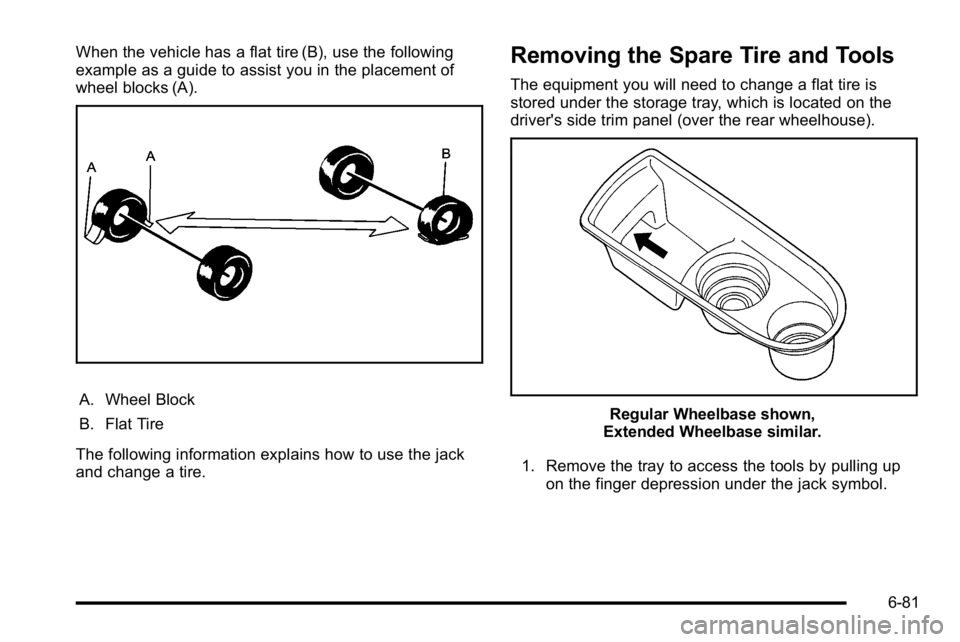
When the vehicle has a flat tire (B), use the following
example as a guide to assist you in the placement of
wheel blocks (A).
A. Wheel Block
B. Flat Tire
The following information explains how to use the jack
and change a tire.
Removing the Spare Tire and Tools
The equipment you will need to change a flat tire is
stored under the storage tray, which is located on the
driver's side trim panel (over the rear wheelhouse).
Regular Wheelbase shown,
Extended Wheelbase similar.
1. Remove the tray to access the tools by pulling up on the finger depression under the jack symbol.
6-81
Page 505 of 560
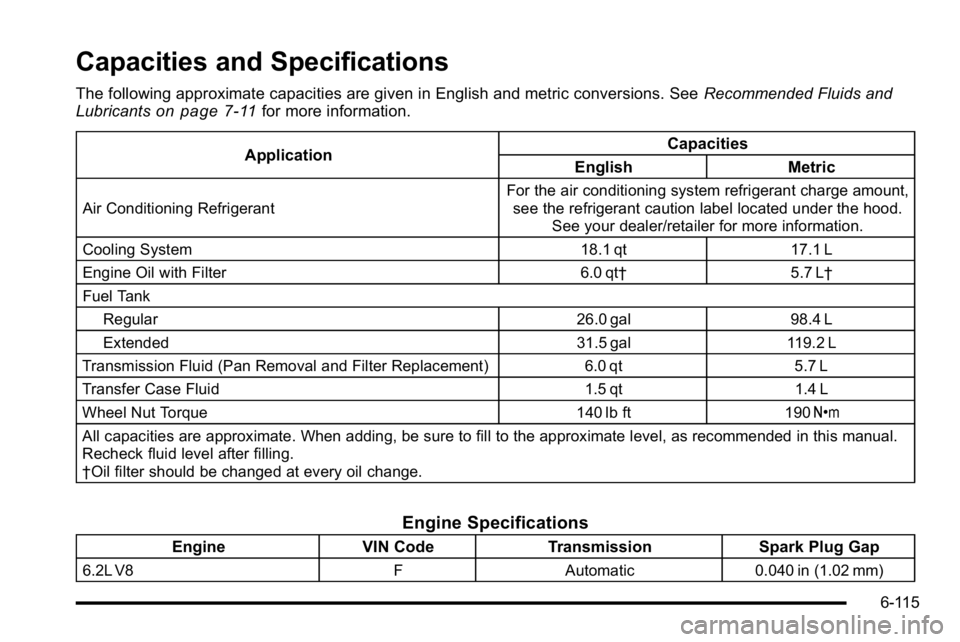
Capacities and Specifications
The following approximate capacities are given in English and metric conversions. SeeRecommended Fluids and
Lubricantson page 7‑11for more information.
Application Capacities
English Metric
Air Conditioning Refrigerant For the air conditioning system refrigerant charge amount,
see the refrigerant caution label located under the hood. See your dealer/retailer for more information.
Cooling System 18.1 qt17.1 L
Engine Oil with Filter 6.0 qt†5.7 L†
Fuel Tank Regular 26.0 gal98.4 L
Extended 31.5 gal119.2 L
Transmission Fluid (Pan Removal and Filter Replacement) 6.0 qt5.7 L
Transfer Case Fluid 1.5 qt1.4 L
Wheel Nut Torque 140 lb ft190Y
All capacities are approximate. When adding, be sure to fill to the approximate level, as recommended in this manual.
Recheck fluid level after filling.
†Oil filter should be changed at every oil change.
Engine Specifications
Engine VIN CodeTransmission Spark Plug Gap
6.2L V8 FAutomatic 0.040 in (1.02 mm)
6-115