phone GMC YUKON DENALI 2010 Owner's Manual
[x] Cancel search | Manufacturer: GMC, Model Year: 2010, Model line: YUKON DENALI, Model: GMC YUKON DENALI 2010Pages: 560, PDF Size: 4.32 MB
Page 315 of 560
Headphones
The RSE includes two 2-channel wireless headphones
that are dedicated to this system. Channel 1 is
dedicated to the DVD player, while Channel 2 is
dedicated to RSA selections. These headphones are
used to listen to media such as CDs, DVDs, MP3s,
DVDAs, radio, any auxiliary source connected to
A/V jacks, or the auxiliary input jack, if the vehicle
has this feature. The wireless headphones have an
On/Off button, channel 1/2 switch, and a volume
control.
If the vehicle has a third row video screen display,
it may have two additional headphones.
Push the power button to turn on the headphones.
An indicator light located on the headphones comes on.
If the light comes on but there is intermittent sound
and/or static on the headphones, or if the indicator light
does not come on, the batteries might need to be
replaced. See“Battery Replacement” later in this
section for more information. Switch the headphones to
Off when not in use.
Infrared transmitters are located at the rear of the
RSE overhead console. The headphones shut off
automatically to save the battery power if the RSE
system and RSA are shut off or if the headphones are out of range of the transmitters for more than
three minutes. If you move too far forward or step out
of the vehicle, the headphones lose the audio signal.
The headphones may automatically turn off after
four hours of continuous use.
To adjust the volume on the headphones, use the
volume control located on the right side.
For optimal audio performance, the headphones must
be worn correctly. Headphones should be worn with
headband over the top of the head for best audio
reception. The symbol L (Left) appears on the upper left
side, above the ear pad and should be positioned on
the left ear. The symbol R (Right) appears on the upper
right side, above the ear pad and should be positioned
on the right ear.
Notice:
Do not store the headphones in heat or
direct sunlight. This could damage the headphones
and repairs will not be covered by the warranty.
Storage in extreme cold can weaken the batteries.
Keep the headphones stored in a cool, dry place.
If the foam ear pads attached to the headphones
become worn or damaged, the pads can be replaced
separately from the headphone set. See your dealer/
retailer for more information.
4-121
Page 316 of 560
Battery Replacement
To change the batteries on the headphones:1. Turn the screw to loosen the battery door located on the left side of the headphones. Slide the
battery door open.
2. Replace the two batteries in the compartment. Make sure that they are installed correctly,
using the diagram on the inside of the battery
compartment.
3. Replace the battery door and tighten the door screw.
If the headphones are to be stored for a long period
of time, remove the batteries and keep them in a cool,
dry place.
Audio/Video (A/V) Jacks
The A/V jacks, located on the rear of the floor console,
allow audio or video signals to be connected from an
auxiliary device such as a camcorder or a video game
unit to the RSE system. Adapter connectors or cables
(not included) might be required to connect the auxiliary
device to the A/V jacks. Refer to the manufacturer ’s
instructions for proper usage.
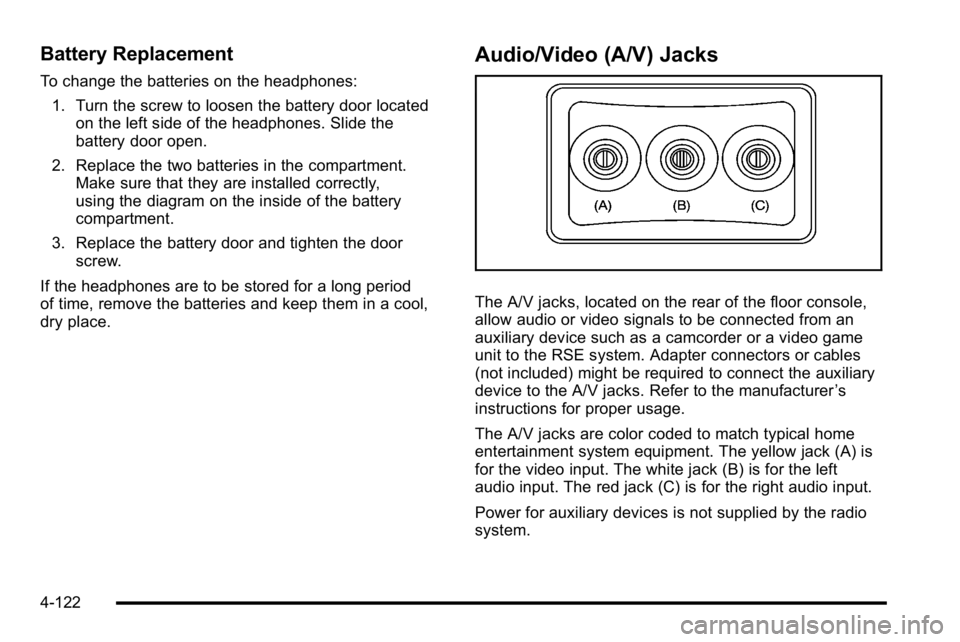
The A/V jacks are color coded to match typical home
entertainment system equipment. The yellow jack (A) is
for the video input. The white jack (B) is for the left
audio input. The red jack (C) is for the right audio input.
Power for auxiliary devices is not supplied by the radio
system.
4-122
Page 317 of 560
To use the auxiliary inputs of the RSE system, connect
an external auxiliary device to the color-coded A/V jacks
and turn both the auxiliary device and the video screen
power on. If the video screen is in the DVD player
mode, pressing the AUX (auxiliary) button on the
remote control switches the video screen from the DVD
player mode to the auxiliary device. The radio can listen
to the audio of the connected auxiliary device by
sourcing to auxiliary. SeeRadio(s)
on page 4‑77for
more information.
How to Change the RSE Video Screen
Settings
The screen display mode (normal, full, and zoom),
screen brightness, and setup menu language can be
changed from the on screen setup menu. To change
any feature:
1. Press the
z(display menu) button on the remote
control.
2. Use the remote control
n,q,p,o
(navigation) arrows and ther(enter) button to
use the setup menu.
3. Press the
zbutton again to remove the setup
menu from the screen.
Audio Output
Audio from the DVD player or auxiliary inputs can be
heard through the following possible sources:
.Wireless Headphones
.Vehicle Speakers
.Vehicle wired headphone jacks on the rear seat
audio system, if the vehicle has this feature.
The RSE system always transmits the audio signal to
the wireless headphones, if there is audio available.
See “Headphones” earlier in this section for more
information.
The DVD player is capable of outputting audio to the
wired headphone jacks on the RSA system, if the
vehicle has this feature. The DVD player can be
selected as an audio source on the RSA system.
See Rear Seat Audio (RSA)
on page 4‑130for more
information.
When a device is connected to the A/V jacks, or the
radio's auxiliary input jack, if the vehicle has this
feature, the rear seat passengers are able to hear audio
from the auxiliary device through the wireless or wired
headphones. The front seat passengers are able to
listen to playback from this device through the vehicle
speakers by selecting AUX as the source on the radio.
4-123
Page 318 of 560
Video Screen(s)
The video screen(s) are located in the overhead
console.
To use the video screen(s):1. Push the release button located on the overhead console.
2. Move the screen to the desired position.
When the video screen is not in use, push it up into its
locked position.
If a DVD is playing and the screen is raised to its locked
position, the screen remains on, this is normal, and the
DVD continues to play through the previous audio
source. Use the remote control power button or eject
the disc to turn off the screen.
The overhead console contains the infrared transmitters
for the wireless headphones and the infrared receivers
for the remote control. They are located at the rear of
the console.
Notice: Avoid directly touching the video screen,
as damage may occur. See “Cleaning the Video
Screen” later in this section for more information.
Remote Control
To use the remote control, aim it at the transmitter
window at the rear of the overhead console and press
the desired button. Direct sunlight or very bright light
could affect the ability of the RSE transmitter to receive
signals from the remote control. If the remote control
does not seem to be working, the batteries might need
to be replaced. See “Battery Replacement” later in this
section. Objects blocking the line of sight could also
affect the function of the remote control.
If a CD or DVD is in the Radio DVD slot, the remote
control power button can be used to turn on the video
screen display and start the disc. The radio can also
turn on the video screen display. See Radio(s)
on
page 4‑77for more information.
Notice: Storing the remote control in a hot area or
in direct sunlight can damage it, and the repairs will
not be covered by the warranty. Storage in extreme
cold can weaken the batteries. Keep the remote
control stored in a cool, dry place.
4-124
Page 322 of 560
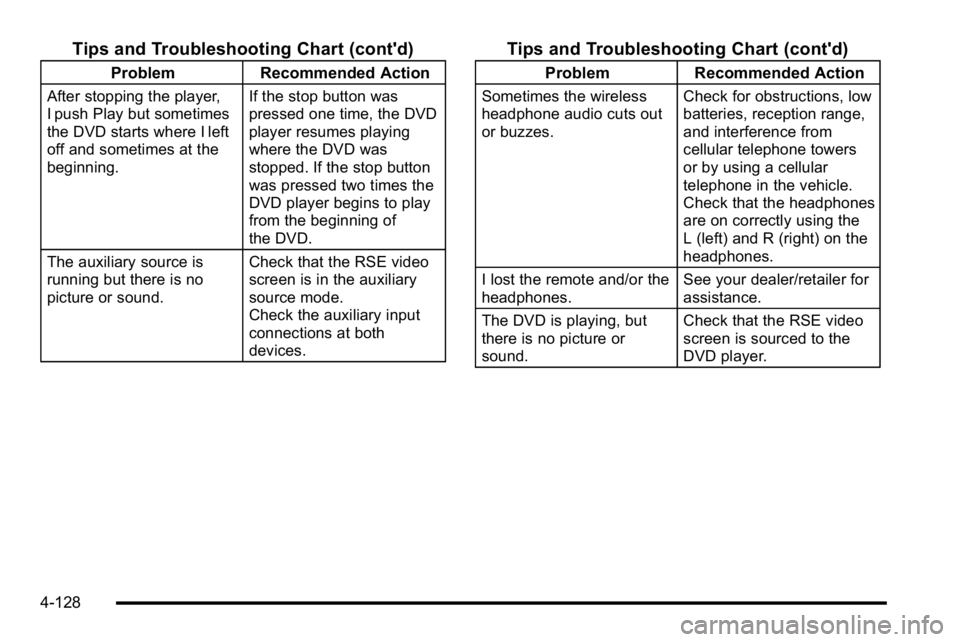
Tips and Troubleshooting Chart (cont'd)
ProblemRecommended Action
After stopping the player,
I push Play but sometimes
the DVD starts where I left
off and sometimes at the
beginning. If the stop button was
pressed one time, the DVD
player resumes playing
where the DVD was
stopped. If the stop button
was pressed two times the
DVD player begins to play
from the beginning of
the DVD.
The auxiliary source is
running but there is no
picture or sound. Check that the RSE video
screen is in the auxiliary
source mode.
Check the auxiliary input
connections at both
devices.
Tips and Troubleshooting Chart (cont'd)
Problem
Recommended Action
Sometimes the wireless
headphone audio cuts out
or buzzes. Check for obstructions, low
batteries, reception range,
and interference from
cellular telephone towers
or by using a cellular
telephone in the vehicle.
Check that the headphones
are on correctly using the
L (left) and R (right) on the
headphones.
I lost the remote and/or the
headphones. See your dealer/retailer for
assistance.
The DVD is playing, but
there is no picture or
sound. Check that the RSE video
screen is sourced to the
DVD player.
4-128
Page 323 of 560
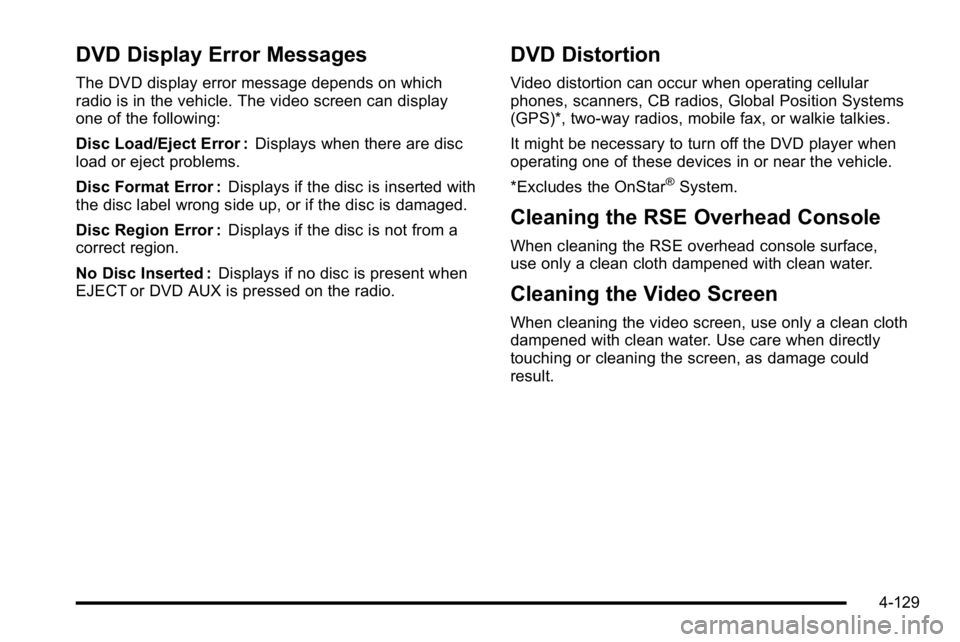
DVD Display Error Messages
The DVD display error message depends on which
radio is in the vehicle. The video screen can display
one of the following:
Disc Load/Eject Error :Displays when there are disc
load or eject problems.
Disc Format Error : Displays if the disc is inserted with
the disc label wrong side up, or if the disc is damaged.
Disc Region Error : Displays if the disc is not from a
correct region.
No Disc Inserted : Displays if no disc is present when
EJECT or DVD AUX is pressed on the radio.
DVD Distortion
Video distortion can occur when operating cellular
phones, scanners, CB radios, Global Position Systems
(GPS)*, two-way radios, mobile fax, or walkie talkies.
It might be necessary to turn off the DVD player when
operating one of these devices in or near the vehicle.
*Excludes the OnStar
®System.
Cleaning the RSE Overhead Console
When cleaning the RSE overhead console surface,
use only a clean cloth dampened with clean water.
Cleaning the Video Screen
When cleaning the video screen, use only a clean cloth
dampened with clean water. Use care when directly
touching or cleaning the screen, as damage could
result.
4-129
Page 324 of 560
Rear Seat Audio (RSA)
Vehicles with this feature allow the rear seat
passengers to listen to and control any of the music
sources: radio, CDs, DVDs, or other auxiliary sources.
However, the rear seat passengers can only control the
music sources the front seat passengers are not
listening to (except on some radios where dual control
is allowed). For example, rear seat passengers can
control and listen to a CD through the headphones,
while the driver listens to the radio through the
speakers. The rear seat passengers have control of the
volume for each set of wired headphones.
The radio functionality is controlled by both the RSA
and the front radio. Only one band can be tuned to at
one time. Changing the band on the RSA or the front
radio will change the band on the other system, if they
are both sourced to the radio.
The RSA functions operate even when the main radio is
off. The front audio system will display the headphone
icon when the RSA is on, and will disappear from the
display when it is off.
Audio can be heard through wired headphones (not
included) plugged into the jacks on the RSA. If the
vehicle has this feature, audio can also be heard on
Channel 2 of the wireless headphones.To listen to an iPod or portable audio device through the
RSA, attach the iPod or portable audio device to the
front auxiliary input (if available), on the front audio
system. Turn the iPod on, then choose the front
auxiliary input with the RSA SRCE button.
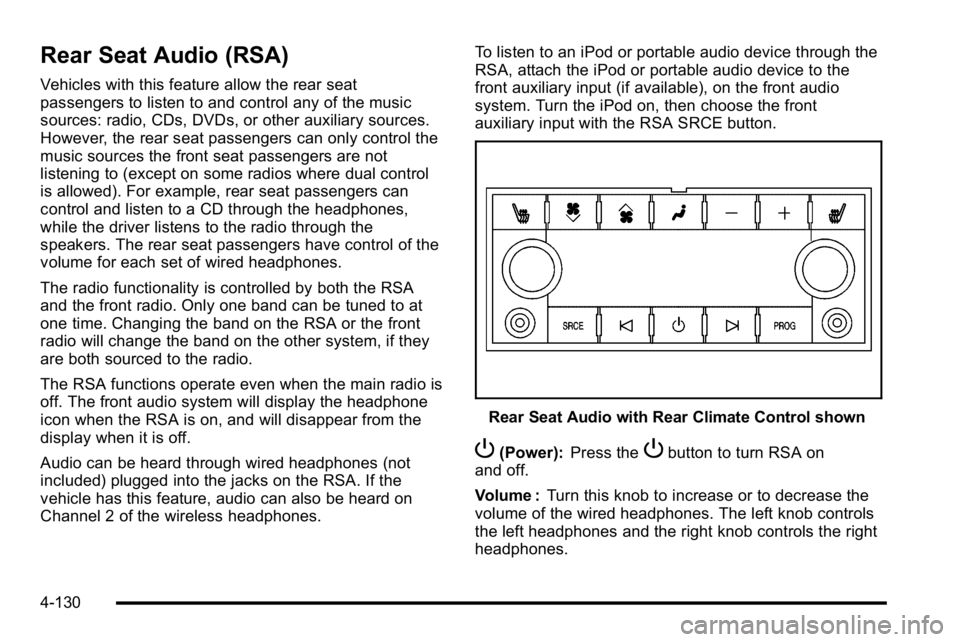
Rear Seat Audio with Rear Climate Control shown
P(Power):
Press thePbutton to turn RSA on
and off.
Volume : Turn this knob to increase or to decrease the
volume of the wired headphones. The left knob controls
the left headphones and the right knob controls the right
headphones.
4-130
Page 329 of 560
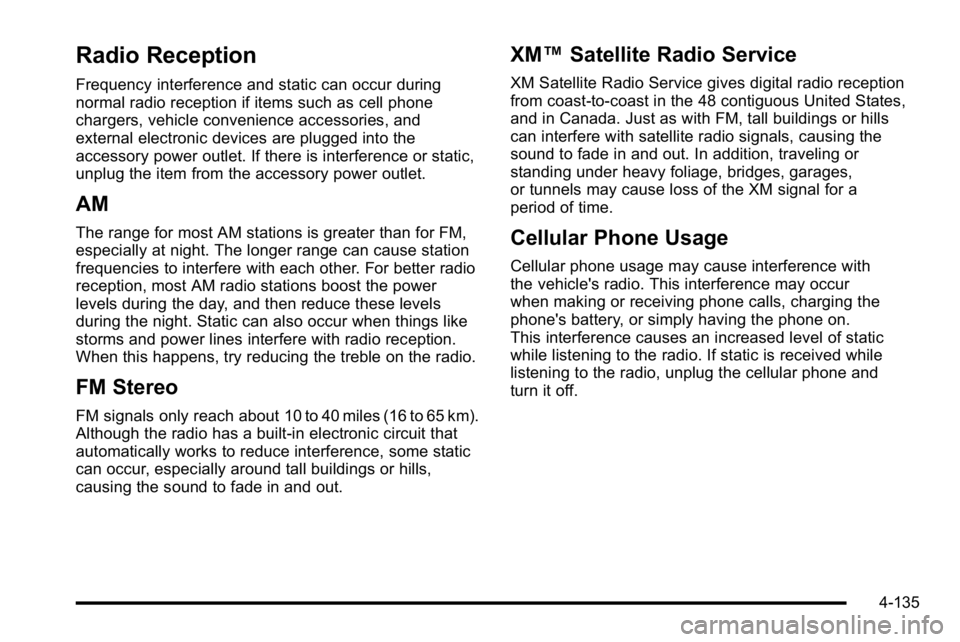
Radio Reception
Frequency interference and static can occur during
normal radio reception if items such as cell phone
chargers, vehicle convenience accessories, and
external electronic devices are plugged into the
accessory power outlet. If there is interference or static,
unplug the item from the accessory power outlet.
AM
The range for most AM stations is greater than for FM,
especially at night. The longer range can cause station
frequencies to interfere with each other. For better radio
reception, most AM radio stations boost the power
levels during the day, and then reduce these levels
during the night. Static can also occur when things like
storms and power lines interfere with radio reception.
When this happens, try reducing the treble on the radio.
FM Stereo
FM signals only reach about 10 to 40 miles (16 to 65 km).
Although the radio has a built-in electronic circuit that
automatically works to reduce interference, some static
can occur, especially around tall buildings or hills,
causing the sound to fade in and out.
XM™Satellite Radio Service
XM Satellite Radio Service gives digital radio reception
from coast-to-coast in the 48 contiguous United States,
and in Canada. Just as with FM, tall buildings or hills
can interfere with satellite radio signals, causing the
sound to fade in and out. In addition, traveling or
standing under heavy foliage, bridges, garages,
or tunnels may cause loss of the XM signal for a
period of time.
Cellular Phone Usage
Cellular phone usage may cause interference with
the vehicle's radio. This interference may occur
when making or receiving phone calls, charging the
phone's battery, or simply having the phone on.
This interference causes an increased level of static
while listening to the radio. If static is received while
listening to the radio, unplug the cellular phone and
turn it off.
4-135
Page 330 of 560
Rear Side Window Antenna
The AM-FM antenna is located in the passenger rear
side windows. Make sure the inside surfaces of the rear
side windows are not scratched and that the lines on
the glass are not damaged. If the inside surfaces are
damaged, they could interfere with radio reception.
If a cellular telephone antenna needs to be attached to
the glass, make sure that the grid lines for the AM-FM
antenna are not damaged. There is enough space
between the grid lines to attach a cellular telephone
antenna without interfering with radio reception.
Notice:Using a razor blade or sharp object to clear
the inside of the rear side windows may affect radio
reception or damage the rear side window antenna.
Repairs would not be covered by the warranty.
Do not clear the inside of the rear side windows
with sharp objects. Notice:
Do not apply aftermarket glass tinting with
metallic film. The metallic film in some tinting
materials will interfere with or distort the incoming
radio reception. Any damage caused to the antenna
due to metallic tinting materials will not be covered
by the warranty.
XM™ Satellite Radio Antenna
System
The XM Satellite Radio antenna is located on the roof of
the vehicle. Keep the antenna clear of obstructions for
clear radio reception.
If the vehicle has a sunroof, the performance of the
XM system may be affected if the sunroof is open.
4-136
Page 399 of 560
Filling the Tank
{WARNING:
Fuel vapor burns violently and a fuel fire can
cause bad injuries. To help avoid injuries to you
and others, read and follow all the instructions on
the fuel pump island. Turn off the engine when
refueling. Do not smoke near fuel or when
refueling the vehicle. Do not use cellular phones.
Keep sparks, flames, and smoking materials away
from fuel. Do not leave the fuel pump unattended
when refueling the vehicle. This is against the law
in some places. Do not re-enter the vehicle while
pumping fuel. Keep children away from the fuel
pump; never let children pump fuel.
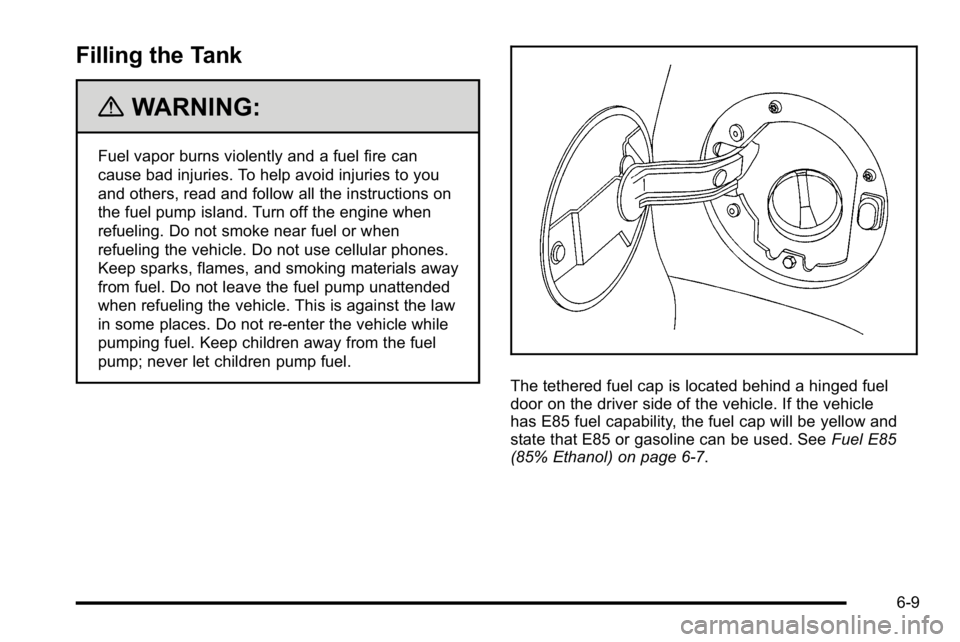
The tethered fuel cap is located behind a hinged fuel
door on the driver side of the vehicle. If the vehicle
has E85 fuel capability, the fuel cap will be yellow and
state that E85 or gasoline can be used. SeeFuel E85
(85% Ethanol) on page 6‑7.
6-9