ignition GMC YUKON DENALI 2015 Repair Manual
[x] Cancel search | Manufacturer: GMC, Model Year: 2015, Model line: YUKON DENALI, Model: GMC YUKON DENALI 2015Pages: 439, PDF Size: 6.22 MB
Page 261 of 439
Black plate (54,1)GMC 2015i Yukon Denali/Yukon XL Denali Owner Manual (GMNA-
Localizing-U.S./Canada/Mexico-8431504) - 2015 - CRC - 7/30/14
9-54 Driving and Operating
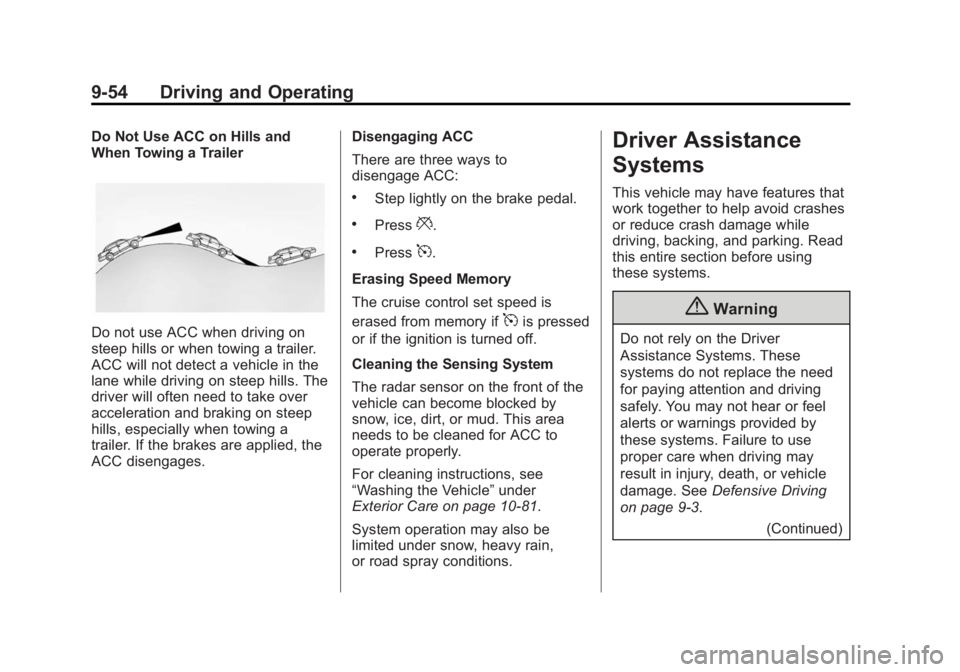
Do Not Use ACC on Hills and
When Towing a Trailer
Do not use ACC when driving on
steep hills or when towing a trailer.
ACC will not detect a vehicle in the
lane while driving on steep hills. The
driver will often need to take over
acceleration and braking on steep
hills, especially when towing a
trailer. If the brakes are applied, the
ACC disengages.Disengaging ACC
There are three ways to
disengage ACC:
.Step lightly on the brake pedal.
.Press*.
.Press5.
Erasing Speed Memory
The cruise control set speed is
erased from memory if
5is pressed
or if the ignition is turned off.
Cleaning the Sensing System
The radar sensor on the front of the
vehicle can become blocked by
snow, ice, dirt, or mud. This area
needs to be cleaned for ACC to
operate properly.
For cleaning instructions, see
“Washing the Vehicle” under
Exterior Care on page 10-81.
System operation may also be
limited under snow, heavy rain,
or road spray conditions.
Driver Assistance
Systems
This vehicle may have features that
work together to help avoid crashes
or reduce crash damage while
driving, backing, and parking. Read
this entire section before using
these systems.
{Warning
Do not rely on the Driver
Assistance Systems. These
systems do not replace the need
for paying attention and driving
safely. You may not hear or feel
alerts or warnings provided by
these systems. Failure to use
proper care when driving may
result in injury, death, or vehicle
damage. See Defensive Driving
on page 9-3.
(Continued)
Page 287 of 439
Black plate (80,1)GMC 2015i Yukon Denali/Yukon XL Denali Owner Manual (GMNA-
Localizing-U.S./Canada/Mexico-8431504) - 2015 - CRC - 7/30/14
9-80 Driving and Operating
This symbol is on the Trailer Brake
Control Panel on vehicles with an
ITBC system. The power output to
the trailer brakes is based on the
amount of brake pressure being
applied by the vehicle’s brake
system, and on the type of trailer
brakes detected. This available
power output to the trailer brakes
can be adjusted to a wide range of
trailering situations.
The ITBC system is integrated with
the vehicle’s brake, antilock brake,
and StabiliTrak systems. In trailering
conditions that cause the vehicle’s
antilock brake or StabiliTrak
systems to activate, power sent to
the trailer's brakes will be
automatically adjusted to minimize
trailer wheel lock-up. This does not
imply that the trailer has StabiliTrak.
If the vehicle’s brake, antilock brake,
or StabiliTrak systems are not
functioning properly, the ITBC
system may not be fully functional
or may not function at all. Make sure all of these systems are fully
operational to ensure full
functionality of the ITBC system.
The ITBC system is powered
through the vehicle's electrical
system. Turning the ignition off will
also turn off the ITBC system. The
ITBC system is fully functional only
when the ignition is in ON/RUN.
{Warning
Connecting a trailer that has an
air brake system may result in
reduced or complete loss of trailer
braking. There may be an
increase in stopping distance or
trailer instability which could
result in personal injury or
damage to the vehicle, trailer,
or other property. Use the ITBC
system only with electric or
electric over hydraulic trailer
brakes.
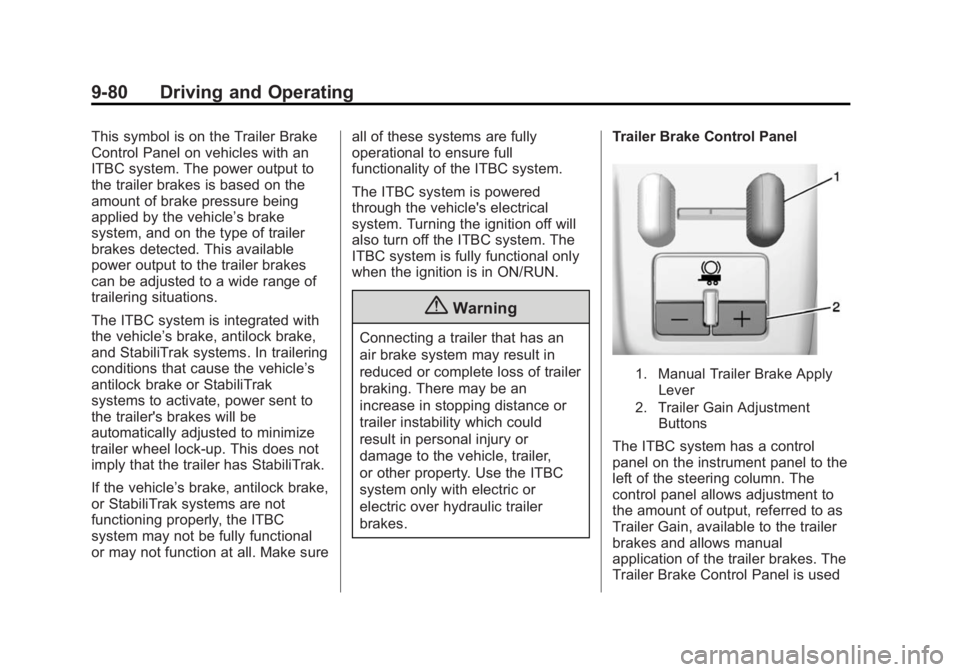
Trailer Brake Control Panel
1. Manual Trailer Brake Apply
Lever
2. Trailer Gain Adjustment Buttons
The ITBC system has a control
panel on the instrument panel to the
left of the steering column. The
control panel allows adjustment to
the amount of output, referred to as
Trailer Gain, available to the trailer
brakes and allows manual
application of the trailer brakes. The
Trailer Brake Control Panel is used
Page 290 of 439
Black plate (83,1)GMC 2015i Yukon Denali/Yukon XL Denali Owner Manual (GMNA-
Localizing-U.S./Canada/Mexico-8431504) - 2015 - CRC - 7/30/14
Driving and Operating 9-83
CHECK TRAILER WIRING: This
message will display if:
.The ITBC system first
determines connection to a
trailer with electric brakes and
then the trailer harness becomes
disconnected from the vehicle.
If the disconnect occurs while
the vehicle is stationary, this
message will automatically turn
off in about 30 seconds. This
message will also turn off if it is
acknowledged or if the trailer
harness is reconnected.
If the disconnect occurs while
the vehicle is moving, this
message will continue until the
ignition is turned off. This
message will also turn off if it is
acknowledged or if the trailer
harness is reconnected.
.There is an electrical fault in the
wiring to the trailer brakes. This
message will continue as long
as there is an electrical fault inthe trailer wiring. This message
will also turn off if it is
acknowledged.
To determine if the electrical fault is
on the vehicle side or trailer side of
the trailer wiring harness
connection:
1. Disconnect the trailer wiring harness from the vehicle.
2. Turn the ignition off.
3. Wait 10 seconds, then turn the ignition back to RUN.
4. If the CHECK TRAILER WIRING message reappears, the
electrical fault is on the
vehicle side.
If the CHECK TRAILER WIRING
message only reappears when
connecting the trailer wiring
harness to the vehicle, the
electrical fault is on the
trailer side.
SERVICE TRAILER BRAKE
SYSTEM: This message will display
when there is a problem with the
ITBC system. If this message continues over multiple ignition
cycles, there is a problem with the
ITBC system. Have the vehicle
serviced.
If either the CHECK TRAILER
WIRING or SERVICE TRAILER
BRAKE SYSTEM message displays
while driving, the ITBC system may
not be fully functional or may not
function at all. When traffic
conditions allow, carefully pull the
vehicle over to the side of the road
and turn the ignition off. Check the
wiring connection to the trailer and
turn the ignition back on. If either of
these messages continues, either
the vehicle or trailer needs service.
A GM dealer may be able to
diagnose and repair problems with
the trailer. However, any diagnosis
and repair of the trailer is not
covered under the vehicle warranty.
Contact your trailer dealer for
assistance with trailer repairs and
trailer warranty information.
Page 301 of 439
Black plate (10,1)GMC 2015i Yukon Denali/Yukon XL Denali Owner Manual (GMNA-
Localizing-U.S./Canada/Mexico-8431504) - 2015 - CRC - 7/30/14
10-10 Vehicle Care
The oil life system can also be reset
as follows:
1. Turn the ignition to ON/RUN withthe engine off.
2. Fully press the accelerator pedal slowly three times within
five seconds.
3. Display the OIL LIFE REMAINING on the DIC. If the
display shows 100%, the system
is reset.
If the vehicle has a CHANGE
ENGINE OIL SOON message and it
comes back on when the vehicle is
started and/or the OIL LIFE
REMAINING is near 0%, the engine
oil life system has not been reset.
Repeat the procedure.Automatic Transmission
Fluid
When to Check and Change
Automatic Transmission Fluid
It is usually not necessary to check
the transmission fluid level. The only
reason for fluid loss is a
transmission leak or overheated
transmission. This vehicle is not
equipped with a transmission fluid
level dipstick. There is a special
procedure for checking and
changing the transmission fluid in
these vehicles. Because this
procedure is difficult, this should be
done at the dealer. Contact the
dealer for additional information or
the procedure can be found in the
service manual. See Service
Publications Ordering Information
on page 13-11.
{Caution
Use of the incorrect automatic
transmission fluid may damage
the vehicle, and the damage may
not be covered by the vehicle
warranty. Always use the
automatic transmission fluid listed
in Recommended Fluids and
Lubricants on page 11-11.
Change the fluid and filter at the
scheduled maintenance intervals
listed in Maintenance Schedule on
page 11-3. Be sure to use the
transmission fluid listed in
Recommended Fluids and
Lubricants on page 11-11.
Engine Air Cleaner/Filter
See Engine Compartment Overview
on page 10-5 for the location of the
engine air cleaner/filter.
Page 309 of 439
Black plate (18,1)GMC 2015i Yukon Denali/Yukon XL Denali Owner Manual (GMNA-
Localizing-U.S./Canada/Mexico-8431504) - 2015 - CRC - 7/30/14
10-18 Vehicle Care
fans will change to low speed when
additional cooling is no longer
required.
The electric engine cooling fans
may run after the engine has been
turned. off. This is normal and no
service is required.
Washer Fluid
What to Use
When windshield washer fluid needs
to be added, be sure to read the
manufacturer's instructions before
use. Use a fluid that has sufficient
protection against freezing in an
area where the temperature may fall
below freezing.
Adding Washer Fluid
The vehicle has a low washer fluid
message on the DIC that comes on
when the washer fluid is low. The
message is displayed for
15 seconds at the start of each
ignition cycle. When the WASHER
FLUID LOW ADD FLUID messagedisplays, washer fluid will need to
be added to the windshield washer
fluid reservoir.
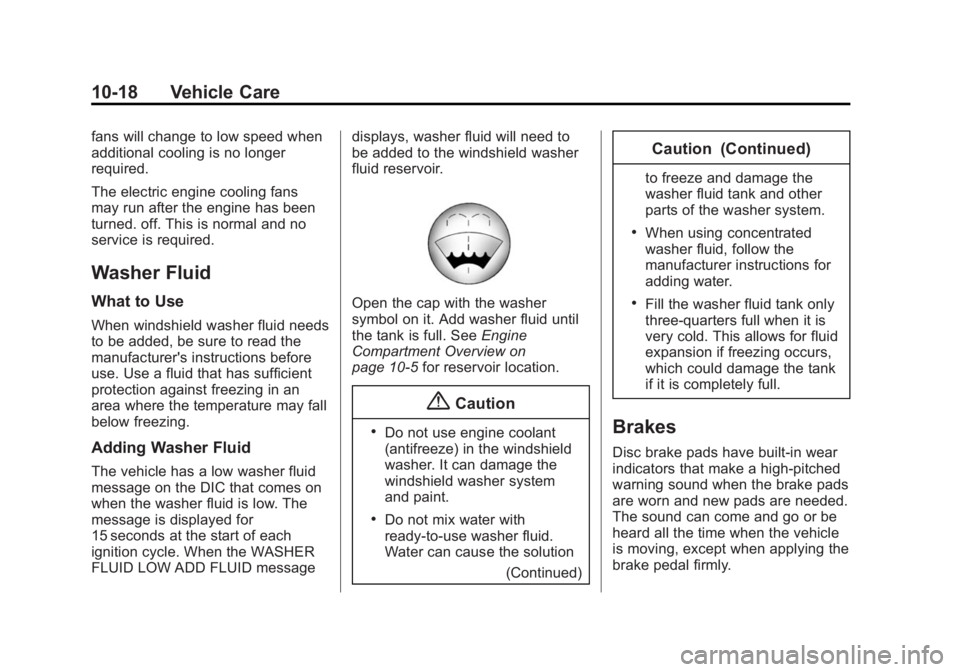
Open the cap with the washer
symbol on it. Add washer fluid until
the tank is full. See
Engine
Compartment Overview on
page 10-5 for reservoir location.
{Caution
.Do not use engine coolant
(antifreeze) in the windshield
washer. It can damage the
windshield washer system
and paint.
.Do not mix water with
ready-to-use washer fluid.
Water can cause the solution
(Continued)
Caution (Continued)
to freeze and damage the
washer fluid tank and other
parts of the washer system.
.When using concentrated
washer fluid, follow the
manufacturer instructions for
adding water.
.Fill the washer fluid tank only
three-quarters full when it is
very cold. This allows for fluid
expansion if freezing occurs,
which could damage the tank
if it is completely full.
Brakes
Disc brake pads have built-in wear
indicators that make a high-pitched
warning sound when the brake pads
are worn and new pads are needed.
The sound can come and go or be
heard all the time when the vehicle
is moving, except when applying the
brake pedal firmly.
Page 316 of 439
Black plate (25,1)GMC 2015i Yukon Denali/Yukon XL Denali Owner Manual (GMNA-
Localizing-U.S./Canada/Mexico-8431504) - 2015 - CRC - 7/30/14
Vehicle Care 10-25
Automatic Transmission
Shift Lock Control
Function Check
{Warning
When you are doing this
inspection, the vehicle could
move suddenly. If the vehicle
moves, you or others could be
injured.
1. Before starting this check, be sure there is enough room
around the vehicle. It should be
parked on a level surface.
2. Apply the parking brake. Be ready to apply the regular brake
immediately if the vehicle begins
to move.
3. With the engine off, turn the ignition on, but do not start the
engine. Without applying the
regular brake, try to move the
shift lever out of P (Park) with normal effort. If the shift lever
moves out of P (Park), contact
your dealer for service.
Park Brake and P (Park)
Mechanism Check
{Warning
When you are doing this check,
the vehicle could begin to move.
You or others could be injured
and property could be damaged.
Make sure there is room in front
of the vehicle in case it begins to
roll. Be ready to apply the regular
brake at once should the vehicle
begin to move.
Park on a fairly steep hill, with the
vehicle facing downhill. Keeping
your foot on the regular brake, set
the parking brake.
.To check the parking brake's
holding ability: With the engine
running and the transmission in
N (Neutral), slowly remove foot pressure from the regular brake
pedal. Do this until the vehicle is
held by the parking brake only.
.To check the P (Park)
mechanism's holding ability:
With the engine running, shift to
P (Park). Then release the
parking brake followed by the
regular brake.
Contact your dealer if service is
required.
Wiper Blade Replacement
Windshield wiper blades should be
inspected for wear or cracking.
For the proper type and size, see
Maintenance Replacement Parts on
page 11-13.
Front Wiper Blade
Replacement
To replace the wiper blade
assembly:
1. Pull the windshield wiper assembly away from the
windshield.
Page 324 of 439
Black plate (33,1)GMC 2015i Yukon Denali/Yukon XL Denali Owner Manual (GMNA-
Localizing-U.S./Canada/Mexico-8431504) - 2015 - CRC - 7/30/14
Vehicle Care 10-33
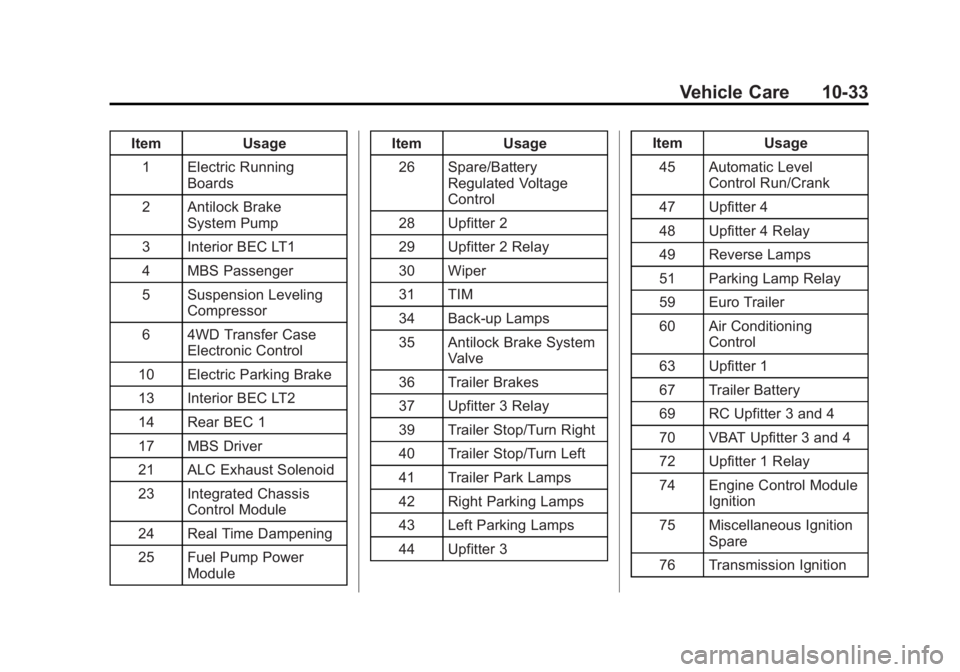
ItemUsage
1 Electric Running Boards
2 Antilock Brake System Pump
3 Interior BEC LT1
4 MBS Passenger
5 Suspension Leveling Compressor
6 4WD Transfer Case Electronic Control
10 Electric Parking Brake
13 Interior BEC LT2
14 Rear BEC 1
17 MBS Driver
21 ALC Exhaust Solenoid
23 Integrated Chassis Control Module
24 Real Time Dampening
25 Fuel Pump Power Module Item
Usage
26 Spare/Battery Regulated Voltage
Control
28 Upfitter 2
29 Upfitter 2 Relay
30 Wiper
31 TIM
34 Back-up Lamps
35 Antilock Brake System Valve
36 Trailer Brakes
37 Upfitter 3 Relay
39 Trailer Stop/Turn Right
40 Trailer Stop/Turn Left
41 Trailer Park Lamps
42 Right Parking Lamps
43 Left Parking Lamps
44 Upfitter 3 Item
Usage
45 Automatic Level Control Run/Crank
47 Upfitter 4
48 Upfitter 4 Relay
49 Reverse Lamps
51 Parking Lamp Relay
59 Euro Trailer
60 Air Conditioning Control
63 Upfitter 1
67 Trailer Battery
69 RC Upfitter 3 and 4
70 VBAT Upfitter 3 and 4
72 Upfitter 1 Relay
74 Engine Control Module Ignition
75 Miscellaneous Ignition Spare
76 Transmission Ignition
Page 327 of 439
Black plate (36,1)GMC 2015i Yukon Denali/Yukon XL Denali Owner Manual (GMNA-
Localizing-U.S./Canada/Mexico-8431504) - 2015 - CRC - 7/30/14
10-36 Vehicle Care
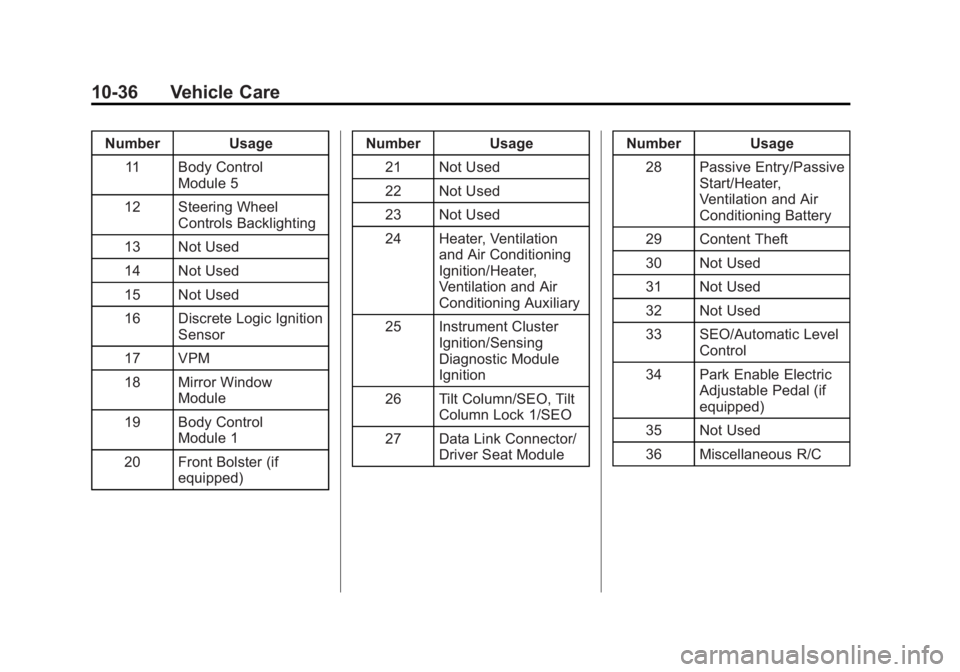
Number Usage11 Body Control Module 5
12 Steering Wheel Controls Backlighting
13 Not Used
14 Not Used
15 Not Used
16 Discrete Logic Ignition Sensor
17 VPM
18 Mirror Window Module
19 Body Control Module 1
20 Front Bolster (if equipped) Number Usage
21 Not Used
22 Not Used
23 Not Used
24 Heater, Ventilation and Air Conditioning
Ignition/Heater,
Ventilation and Air
Conditioning Auxiliary
25 Instrument Cluster Ignition/Sensing
Diagnostic Module
Ignition
26 Tilt Column/SEO, Tilt Column Lock 1/SEO
27 Data Link Connector/ Driver Seat Module Number Usage
28 Passive Entry/Passive Start/Heater,
Ventilation and Air
Conditioning Battery
29 Content Theft
30 Not Used
31 Not Used
32 Not Used
33 SEO/Automatic Level Control
34 Park Enable Electric Adjustable Pedal (if
equipped)
35 Not Used
36 Miscellaneous R/C
Page 343 of 439
Black plate (52,1)GMC 2015i Yukon Denali/Yukon XL Denali Owner Manual (GMNA-
Localizing-U.S./Canada/Mexico-8431504) - 2015 - CRC - 7/30/14
10-52 Vehicle Care
A message to check the pressure in
a specific tire displays in the Driver
Information Center (DIC). The low
tire pressure warning light and the
DIC warning message come on at
each ignition cycle until the tires are
inflated to the correct inflation
pressure. If the vehicle has DIC
buttons, tire pressure levels can be
viewed. For additional information
and details about the DIC operation
and displays, seeDriver Information
Center (DIC) on page 5-30 andTire
Messages on page 5-46.
The low tire pressure warning light
may come on in cool weather when
the vehicle is first started, and then
turn off as the vehicle is driven. This
could be an early indicator that the
air pressure is getting low and
needs to be inflated to the proper
pressure. A Tire and Loading Information label
shows the size of the original
equipment tires and the correct
inflation pressure for the tires when
they are cold. See
Vehicle Load
Limits on page 9-15, for an example
of the Tire and Loading Information
label and its location. Also see Tire
Pressure on page 10-48.
The TPMS can warn about a low
tire pressure condition but it does
not replace normal tire
maintenance. See Tire Inspection
on page 10-54, Tire Rotation on
page 10-55 andTires on
page 10-41.
{Caution
Tire sealant materials are not all
the same. A non-approved tire
sealant could damage the TPMS
sensors. TPMS sensor damage
caused by using an incorrect tire
sealant is not covered by the
vehicle warranty. Always use only
(Continued)
Caution (Continued)
the GM approved tire sealant
available through your dealer or
included in the vehicle.
TPMS Malfunction Light and
Message
The TPMS will not function properly
if one or more of the TPMS sensors
are missing or inoperable. When the
system detects a malfunction, the
low tire pressure warning light
flashes for about one minute and
then stays on for the remainder of
the ignition cycle. A DIC warning
message also displays. The
malfunction light and DIC warning
message come on at each ignition
cycle until the problem is corrected.
Some of the conditions that can
cause these to come on are:
.One of the road tires has been
replaced with the spare tire. The
spare tire does not have a
TPMS sensor. The malfunction
Page 344 of 439
Black plate (53,1)GMC 2015i Yukon Denali/Yukon XL Denali Owner Manual (GMNA-
Localizing-U.S./Canada/Mexico-8431504) - 2015 - CRC - 7/30/14
Vehicle Care 10-53
light and the DIC message
should go off after the road tire
is replaced and the sensor
matching process is performed
successfully. See "TPMS Sensor
Matching Process" later in this
section.
.The TPMS sensor matching
process was not done or not
completed successfully after
rotating the tires. The
malfunction light and the DIC
message should go off after
successfully completing the
sensor matching process. See
"TPMS Sensor Matching
Process" later in this section.
.One or more TPMS sensors are
missing or damaged. The
malfunction light and the DIC
message should go off when the
TPMS sensors are installed and
the sensor matching process is
performed successfully. See
your dealer for service.
.Replacement tires or wheels do
not match the original equipment
tires or wheels. Tires and wheels
other than those recommended
could prevent the TPMS from
functioning properly. SeeBuying
New Tires on page 10-57.
.Operating electronic devices or
being near facilities using radio
wave frequencies similar to the
TPMS could cause the TPMS
sensors to malfunction.
If the TPMS is not functioning
properly, it cannot detect or signal a
low tire condition. See your dealer
for service if the TPMS malfunction
light and DIC message come on
and stay on.
TPMS Sensor Matching
Process
Each TPMS sensor has a unique
identification code. The identification
code needs to be matched to a new
tire/wheel position after rotating the
vehicle’s tires or replacing one or
more of the TPMS sensors. Also,
the TPMS sensor matching process should be performed after replacing
a spare tire with a road tire
containing the TPMS sensor. The
malfunction light and the DIC
message should go off at the next
ignition cycle. The sensors are
matched to the tire/wheel positions,
using a TPMS relearn tool, in the
following order: driver side front tire,
passenger side front tire, passenger
side rear tire, and driver side rear.
See your dealer for service or to
purchase a relearn tool. A TPMS
relearn tool can also be purchased.
See Tire Pressure Monitor
Sensor Activation Tool at
www.gmtoolsandequipment.com
or call 1-800-GM TOOLS
(1-800-468-6657).
There are two minutes to match the
first tire/wheel position, and
five minutes overall to match all four
tire/wheel positions. If it takes
longer, the matching process stops
and must be restarted.