ignition GMC YUKON HYBRID 2010 Owners Manual
[x] Cancel search | Manufacturer: GMC, Model Year: 2010, Model line: YUKON HYBRID, Model: GMC YUKON HYBRID 2010Pages: 120, PDF Size: 1.03 MB
Page 8 of 120
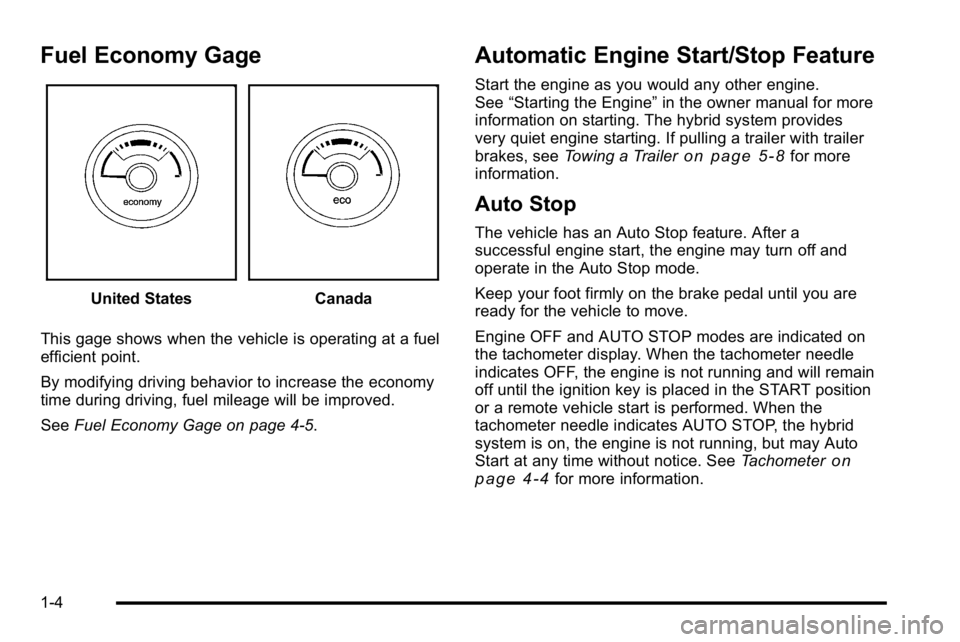
Fuel Economy Gage
United StatesCanada
This gage shows when the vehicle is operating at a fuel
efficient point.
By modifying driving behavior to increase the economy
time during driving, fuel mileage will be improved.
See Fuel Economy Gage on page 4‑5.
Automatic Engine Start/Stop Feature
Start the engine as you would any other engine.
See“Starting the Engine” in the owner manual for more
information on starting. The hybrid system provides
very quiet engine starting. If pulling a trailer with trailer
brakes, see Towing a Trailer
on page 5‑8for more
information.
Auto Stop
The vehicle has an Auto Stop feature. After a
successful engine start, the engine may turn off and
operate in the Auto Stop mode.
Keep your foot firmly on the brake pedal until you are
ready for the vehicle to move.
Engine OFF and AUTO STOP modes are indicated on
the tachometer display. When the tachometer needle
indicates OFF, the engine is not running and will remain
off until the ignition key is placed in the START position
or a remote vehicle start is performed. When the
tachometer needle indicates AUTO STOP, the hybrid
system is on, the engine is not running, but may Auto
Start at any time without notice. See Tachometer
on
page 4‑4for more information.
1-4
Page 9 of 120
A chime will sound if the driver door is opened while in
Auto Stop as a reminder that the ignition switch is not in
the LOCK/OFF position. Always turn the ignition switch
to LOCK/OFF and remove the key from the ignition
switch when exiting the vehicle.
Auto Start
The vehicle also has an Auto Start feature. The engine
will remain off while in Auto Stop mode until vehicle
conditions require the engine to run. The near-instant
starting of the engine from Auto Stop mode is called
Auto Start.
EV Mode
The vehicle also has an EV mode which uses only
the electric motor to move the vehicle. With light
acceleration, the vehicle will drive in EV mode.
EV mode is unavailable when the vehicle is out of fuel.
See Starting the Vehicle in the Two‐Mode Hybrid
supplement to the owner manual.
Regenerative Braking
Regenerative braking enables the electric drive motor
to operate as a generator when coasting or braking.
Energy from the moving vehicle recharges the hybrid
battery.
The hydraulic disc brakes work with the regenerative
braking to insure effective braking.
The braking system is computer controlled and blends
the regenerative braking with the conventional hydraulic
disc brakes to meet any requirements for deceleration.
Because the controller applies the hydraulic brakes
through its high pressure accumulator, you may
occasionally hear the motor driven pump when it
recharges the system. This is normal. In the event of a
controller problem, the brake pedal may be harder to
push and the stopping distance may be longer.
See Regenerative Braking, Warning Lights, Gages, and
Indicators and Driver Information Center (DIC) in the
owner manual.
1-5
Page 16 of 120
Storage Areas
Power Outlet Alternating Current
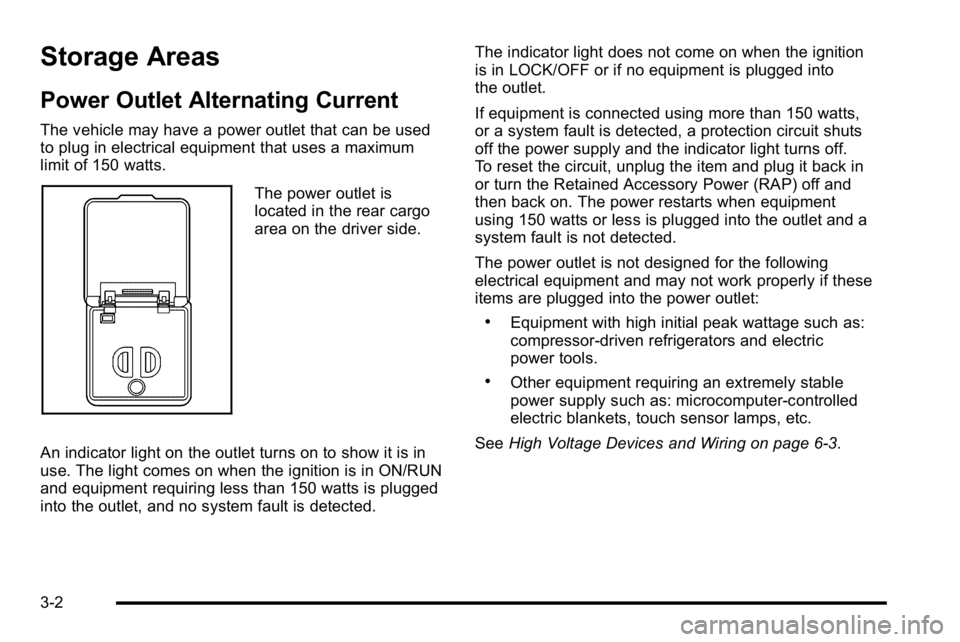
The vehicle may have a power outlet that can be used
to plug in electrical equipment that uses a maximum
limit of 150 watts.
The power outlet is
located in the rear cargo
area on the driver side.
An indicator light on the outlet turns on to show it is in
use. The light comes on when the ignition is in ON/RUN
and equipment requiring less than 150 watts is plugged
into the outlet, and no system fault is detected. The indicator light does not come on when the ignition
is in LOCK/OFF or if no equipment is plugged into
the outlet.
If equipment is connected using more than 150 watts,
or a system fault is detected, a protection circuit shuts
off the power supply and the indicator light turns off.
To reset the circuit, unplug the item and plug it back in
or turn the Retained Accessory Power (RAP) off and
then back on. The power restarts when equipment
using 150 watts or less is plugged into the outlet and a
system fault is not detected.
The power outlet is not designed for the following
electrical equipment and may not work properly if these
items are plugged into the power outlet:
.Equipment with high initial peak wattage such as:
compressor-driven refrigerators and electric
power tools.
.Other equipment requiring an extremely stable
power supply such as: microcomputer-controlled
electric blankets, touch sensor lamps, etc.
See High Voltage Devices and Wiring on page 6‑3.
3-2
Page 17 of 120
Starting and Operating Your
Vehicle
Starting the Vehicle
{WARNING:
Exiting the vehicle, without first shifting into
P (Park), may cause the vehicle to move, and you
or others can be seriously injured. Because the
vehicle has the Automatic Engine Start/Stop
feature, the vehicle’s engine might seem to be
shut off when you come to a complete stop.(Continued)
WARNING: (Continued)
However, once the brake pedal is released,
the vehicle can move. The vehicle’s engine can
also restart at any time.
Shift to P (Park) and turn the ignition to
LOCK/OFF, before exiting the vehicle.
Start the engine as you would any other engine.
See “Starting the Engine” in the owner manual for
more information on starting. If pulling a trailer with
trailer brakes, see Towing a Trailer
on page 5‑8for more information.
3-3
Page 18 of 120
Auto Stop
The vehicle has an Auto Stop feature. After a
successful engine start, the engine may turn off and
operate in the Auto Stop mode. Some of the vehicle
conditions that allow the engine to stop running and
enter the Auto Stop mode are:
.Ignition switch is in the ON/RUN position.
.The hood is closed.
.The gear selector is in P (Park), R (Reverse),
N (Neutral) or D (Drive).
.The hybrid battery is at an acceptable state of
charge.
.The hybrid battery voltage, temperature or power
limits are not exceeded. In very hot conditions,
Auto Stop may be unavailable until the hybrid
battery has cooled.
.The engine is at operating temperature.
.The vehicle may enter Auto Stop after a remote
vehicle start.
If you are on an incline, the hybrid drive motor can help
keep the vehicle from rolling backwards, even if the
engine is in Auto Stop. With your foot off the brake and the vehicle on level
ground, the hybrid drive motor may cause the vehicle
to roll slowly forward, even when the engine is in
Auto Stop.
Keep your foot firmly on the brake pedal until you are
ready for the vehicle to move.
Engine OFF and AUTO STOP modes are indicated on
the tachometer display. When the tachometer needle
indicates OFF, the engine is not running and will remain
off until the ignition key is placed in the START position
or a remote vehicle start is performed. When the
tachometer needle indicates AUTO STOP, the hybrid
system is on, the engine is not running, but may Auto
Start at any time without notice. See
Tachometer
on
page 4‑4for more information.
A chime will sound if the driver door is opened while in
Auto Stop as a reminder that the ignition switch is not in
the LOCK/OFF position. Always turn the ignition switch
to LOCK/OFF and remove the key from the ignition
switch when exiting the vehicle.
3-4
Page 24 of 120
Four-Wheel Drive
If the vehicle has four-wheel drive, you can send the
engine's driving power to all four wheels for extra
traction. Read the following before using four-wheel
drive.
Notice:Driving on clean, dry pavement in
Four-Wheel-Drive High or Four-Wheel-Drive Low for
an extended period of time may cause premature
wear on your vehicle's powertrain. Do not drive on
clean, dry pavement in Four-Wheel-Drive High or
Four-Wheel-Drive Low for extended periods of time.
While driving on clean dry pavement and during tight
turns, you may experience a vibration in the steering
system.
The vehicle has StabiliTrak
®. Shifting into
Four-Wheel-Drive Low will turn Traction Control and
StabiliTrak
®off. See StabiliTrak®System in the index
of the Owner Manual for more information.
Front Axle
The front axle engages and disengages automatically
when you shift the transfer case. Some delay for the
axle to engage or disengage is normal.
Automatic Transfer Case
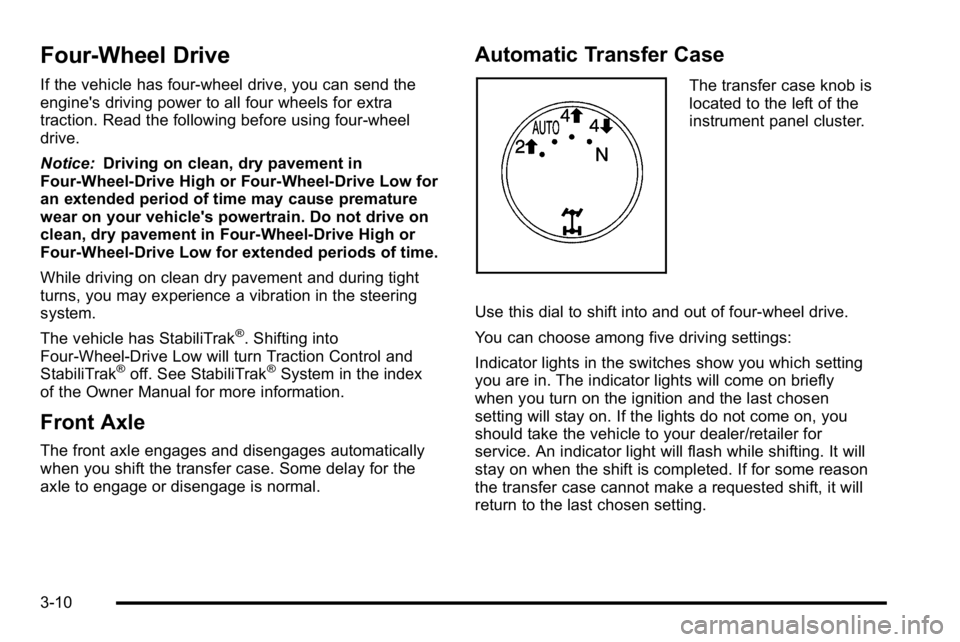
The transfer case knob is
located to the left of the
instrument panel cluster.
Use this dial to shift into and out of four-wheel drive.
You can choose among five driving settings:
Indicator lights in the switches show you which setting
you are in. The indicator lights will come on briefly
when you turn on the ignition and the last chosen
setting will stay on. If the lights do not come on, you
should take the vehicle to your dealer/retailer for
service. An indicator light will flash while shifting. It will
stay on when the shift is completed. If for some reason
the transfer case cannot make a requested shift, it will
return to the last chosen setting.
3-10
Page 26 of 120
Shifting Into Four-Wheel Drive High or
AUTO (Automatic Four-Wheel Drive)
Turn the knob to the Four-Wheel High or AUTO
position. This can be done at any speed, except when
shifting from Four-Wheel Drive Low. The indicator light
will flash while shifting. It will remain on when the shift is
completed.
Shifting Into Two-Wheel Drive High
Turn the knob to the Two-Wheel High position. This can
be done at any speed, except when shifting from
Four-Wheel Drive Low.
See“Shifting Out of Four-Wheel Drive Low” later in this
section for more information.
Shifting Into Four-Wheel Drive Low
When Four-Wheel Low is engaged, vehicle speed
should be kept below 40 mph (64 km/h). Extended
high-speed operation in 4L may damage or shorten the
life of the drivetrain.
To shift to the Four-Wheel Drive Low position, the
ignition must be in ON/RUN and the vehicle must be
stopped or moving less than 3 mph (5 km/h) with the
transmission in N (Neutral). The preferred method for shifting into Four-Wheel Drive Low is to have the
vehicle moving 1 to 2 mph (1.6 to 3.2 km/h). Turn the
knob to the Four-Wheel Drive Low position. You must
wait for the Four-Wheel Drive Low indicator light to stop
flashing and remain on before shifting the transmission
into gear.
Notice:
Shifting the transmission into gear before
the Four-Wheel Drive Low indicator light has
stopped flashing could damage the transfer case.
To help avoid damaging the vehicle, always wait for
the Four-Wheel Drive Low indicator light to stop
flashing before shifting the transmission into gear.
The vehicle may have significant engagement noise
and bump when shifting between Four-Wheel Drive Low
and Four-Wheel Drive High ranges or from N (Neutral)
while the engine is running.
If the knob is turned to the Four-Wheel Drive Low
position when the vehicle is in gear and/or moving,
the Four-Wheel Drive Low indicator light will flash for
30 seconds and not complete the shift unless the
vehicle is moving less than 3 mph (5 km/h) and the
transmission is in N (Neutral). After 30 seconds the
transfer case will shift to Four-Wheel Drive High mode.
3-12
Page 27 of 120
Shifting Out of Four-Wheel Drive Low
To shift from Four-Wheel Drive Low to Four-Wheel Drive
High, AUTO, or Two-Wheel Drive High, the vehicle must
be stopped or moving less than 3 mph (5 km/h) with the
transmission in N (Neutral) and the ignition in ON/RUN.
The preferred method for shifting out of Four-Wheel
Drive Low is to have your vehicle moving 1 to 2 mph
(1.6 to 3.2 km/h). Turn the knob to the Four-Wheel
Drive High, AUTO, or Two-Wheel Drive High position.
You must wait for the Four-Wheel Drive High, AUTO,
or Two-Wheel Drive High indicator light to stop flashing
and remain on before shifting the transmission
into gear.
Notice:Shifting the transmission into gear before
the Four-Wheel Drive Low indicator light has
stopped flashing could damage the transfer case.
To help avoid damaging the vehicle, always wait for
the Four-Wheel Drive Low indicator light to stop
flashing before shifting the transmission into gear.
The vehicle may have significant engagement noise
and bump when shifting between Four-Wheel Drive Low
and Four-Wheel Drive High ranges or from N (Neutral)
while the engine is running. If the knob is turned to the Four-Wheel Drive High,
AUTO, or Two-Wheel Drive High switch position when
the vehicle is in gear and/or moving, the Four-Wheel
Drive High, AUTO or Two-Wheel Drive High indicator
light will flash for 30 seconds but will not complete the
shift unless the vehicle is moving less than 3 mph
(5 km/h) and the transmission is in N (Neutral).
Shifting into Neutral
To shift the transfer case into N (Neutral):
1. Make sure the vehicle is parked so that it will not roll.
2. Set the parking brake and apply the regular brake pedal. See Parking Brake in the index of the
Owner Manual for more information.
3. Start the vehicle or turn the ignition to ON/RUN.
4. Put the transmission in N (Neutral).
5. Shift the transfer case to Two-Wheel Drive High.
6. Turn the transfer case dial clockwise to N (Neutral) until it stops and hold it there until the N (Neutral)
light starts blinking. This will take at least
10 seconds. Then slowly release the dial to the
Four‐Wheel Drive Low position. The N (Neutral)
light will come on when the transfer case shift to
N (Neutral) is complete.
3-13
Page 28 of 120
7. If the engine is running, verify that the transfercase is in N (Neutral) by shifting the transmission
to R (Reverse) for one second, then shift the
transmission to D (Drive) for one second.
8. Turn the ignition to ACC/ACCESSORY, which will turn the engine off.
9. Place the transmission shift lever in P (Park).
10. Release the parking brake prior to moving the vehicle.
11. Turn the ignition to LOCK/OFF.
Shifting Out of Neutral
To shift the transfer case out of N (Neutral): 1. Set the parking brake and apply the regular brake pedal.
2. Turn the ignition to ON/RUN with the engine off, and shift the transmission to N (Neutral).
3. Turn the transfer case dial to the desired transfer case shift position (Two-Wheel Drive High,
Four-Wheel Drive High, AUTO).
After the transfer case has shifted out of
N (Neutral), the N (Neutral) light will go out. 4. Release the parking brake prior to moving the
vehicle.
Notice: Shifting the transmission into gear before
the Four-Wheel Drive Low indicator light has
stopped flashing could damage the transfer case.
To help avoid damaging the vehicle, always wait for
the Four-Wheel Drive Low indicator light to stop
flashing before shifting the transmission into gear.
5. Start the engine and shift the transmission to the desired position.
Excessively shifting the transfer case into or out of the
different modes may cause the transfer case to enter
the shift protection mode. This will protect the transfer
case from possible damage and will only allow the
transfer case to respond to one shift per 10 seconds.
The transfer case may stay in this mode for up to
three minutes.
3-14
Page 29 of 120
Shifting Into Park
{WARNING:
It can be dangerous to get out of the vehicle if the
shift lever is not fully in P (Park) with the parking
brake firmly set. The vehicle can roll. If you have
left the engine running, the vehicle can move
suddenly. You or others could be injured. To be
sure the vehicle will not move, even when you are
on fairly level ground, use the steps that follow.
With four-wheel drive, if the transfer case is in
N (Neutral), the vehicle will be free to roll, even if
the shift lever is in P (Park). So, be sure the
transfer case is in a drive gear—not in
N (Neutral). If you are pulling a trailer, see Towing
a Trailer on page 5‑8. 1. Hold the brake pedal down, then set the parking
brake.
See Parking Brake in the index of the Owner
Manual for more information.
2. Move the shift lever into the P (Park) position by pulling the shift lever toward you and moving it up
as far as it will go.
3. Be sure the transfer case is in a drive gear —not
in N (Neutral).
4. Turn the ignition key to LOCK/OFF.
5. Remove the key and take it with you. If you can leave the vehicle with the ignition key in your hand,
the vehicle is in P (Park).
3-15