battery GMC YUKON XL 2007 Owner's Manual
[x] Cancel search | Manufacturer: GMC, Model Year: 2007, Model line: YUKON XL, Model: GMC YUKON XL 2007Pages: 608, PDF Size: 3.01 MB
Page 260 of 608
SERVICE BATTERY CHARGING
SYSTEM
On some vehicles, if there is a problem with the
battery charging system, this message will display.
Under certain conditions, the battery warning
light may also turn on in the instrument panel
cluster. SeeCharging System Light on page 230.
Driving with this problem could drain the battery.
Turn off all unnecessary accessories. Have
the electrical system checked as soon as possible.
See your GM dealer.
SERVICE BRAKE SYSTEM
If there is a problem with the brake system, this
message will display along with the brake system
warning light. SeeBrake System Warning Light
on page 232. If this message appears, stop
as soon as possible and turn off the vehicle.
Restart the vehicle and check for the message on
the DIC display. If the message is still displayed
or appears again when you begin driving, the
brake system needs service as soon as possible.
See your GM dealer.
SERVICE BRAKES SOON
If there is a problem with the brake system, this
message will display. If this message appears,
stop as soon as possible and turn off the vehicle.
Restart the vehicle and check for the message
on the DIC display. If the message is still displayed
or appears again when you begin driving, the
brake system needs service. See your GM dealer.
SERVICE PARK ASSIST
If your vehicle has the Ultrasonic Rear Parking
Assist (URPA) system, this message will display
if there is a problem with the URPA system. Do not
use this system to help you park. SeeUltrasonic
Rear Parking Assist (URPA) on page 205for more
information. See your GM dealer for service.
260
Page 323 of 608
Headphones
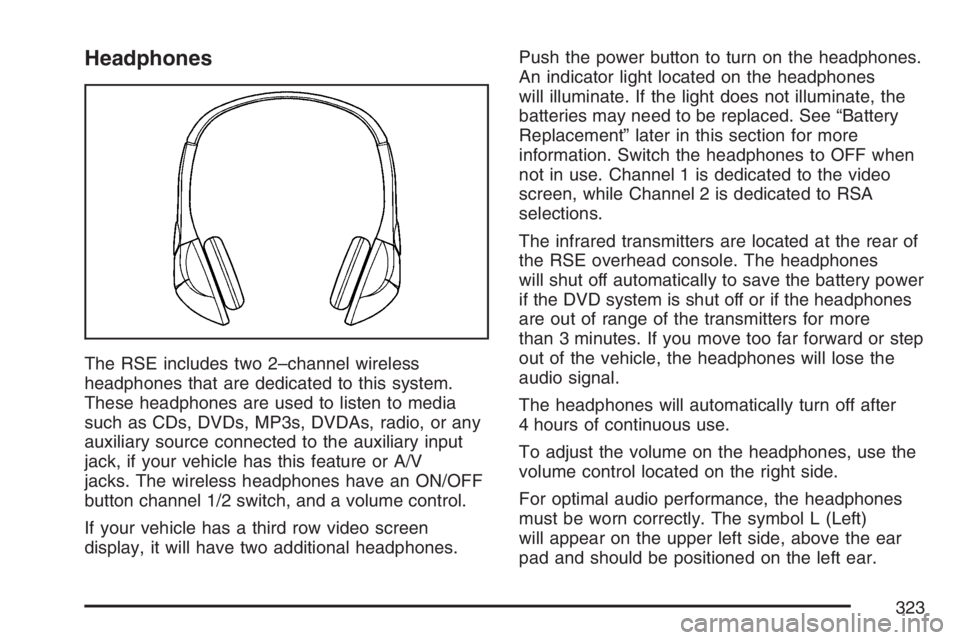
The RSE includes two 2–channel wireless
headphones that are dedicated to this system.
These headphones are used to listen to media
such as CDs, DVDs, MP3s, DVDAs, radio, or any
auxiliary source connected to the auxiliary input
jack, if your vehicle has this feature or A/V
jacks. The wireless headphones have an ON/OFF
button channel 1/2 switch, and a volume control.
If your vehicle has a third row video screen
display, it will have two additional headphones.Push the power button to turn on the headphones.
An indicator light located on the headphones
will illuminate. If the light does not illuminate, the
batteries may need to be replaced. See “Battery
Replacement” later in this section for more
information. Switch the headphones to OFF when
not in use. Channel 1 is dedicated to the video
screen, while Channel 2 is dedicated to RSA
selections.
The infrared transmitters are located at the rear of
the RSE overhead console. The headphones
will shut off automatically to save the battery power
if the DVD system is shut off or if the headphones
are out of range of the transmitters for more
than 3 minutes. If you move too far forward or step
out of the vehicle, the headphones will lose the
audio signal.
The headphones will automatically turn off after
4 hours of continuous use.
To adjust the volume on the headphones, use the
volume control located on the right side.
For optimal audio performance, the headphones
must be worn correctly. The symbol L (Left)
will appear on the upper left side, above the ear
pad and should be positioned on the left ear.
323
Page 324 of 608
The symbol R (Right) will appear on the upper
right side, above the ear pad and should be
positioned on the right ear.
Notice:Do not store the headphones in heat
or direct sunlight. This could damage the
headphones and repairs will not be covered by
your warranty. Keep the headphones stored
in a cool, dry place.
The foam ear pads attached to the headphones
may become worn or damaged if they are
not handled or stored properly. If the foam ear
pads do become damaged or worn out, the pads
can be replaced separately from the headphone
set. It is not necessary to replace the complete
headphone set. The headphone replacement foam
ear pads can be ordered in pairs. See your
dealer for more information.Battery Replacement
To change the batteries, do the following:
1. Turn the screw with a coin or screw driver to
loosen, then slide open the battery door
located on the left side of the headphones.
2. Replace the two AAA batteries in the
compartment. Make sure that they are
installed correctly, using the diagram on the
inside of the battery compartment.
3. Replace the battery door and tighten the door
screw.
If the headphones are to be stored for a long
period of time, remove the batteries and keep them
in a cool, dry place.
324
Page 327 of 608
Video Screen
The video screen is located in the RSE overhead
console.
To use the video screen, do the following:
1. Push the release button located on the RSE
overhead console.
2. Rotate the screen to the desired position.
When the video screen is not in use, push it up
into its locked position.
If a DVD is playing and the screen is raised to its
locked position, the screen will remain on, this
is normal, and the DVD will continue to play
through the previous audio source.
The RSE overhead console contains the IR
transmitters for the wireless headphones and the
IR receivers for the remote control. They are
located at the rear of the console.
Notice:Avoid directly touching the video
screen, as damage may occur. See “Cleaning
the Video Screen” later in this section for
more information.
Remote Control
To use the remote control, aim it at the transmitter
window at the rear of the RSE overhead console
and press the desired button. Direct sunlight
or very bright light may affect the ability of the RSE
transmitter to receive signals from the remote
control. If the remote control does not seem to be
working, the batteries may need to be replaced.
See “Battery Replacement” later in this section.
Objects blocking the line of sight may also affect
the function of the remote control.
If a CD or DVD is in the Radio DVD slot, the
remote control power button can be used to turn
on the video screen display and start the disc.
The radio can also turn on the video screen
display. SeeRadio with CD and DVD (MP3) on
page 295for more information.
Notice:Storing the remote control in a hot
area or in direct sunlight may damage it,
and the repairs will not be covered by your
warranty. Keep the remote control stored in a
cool, dry place.
327
Page 330 of 608
{(Subtitles):Press this button to turn ON/OFF
subtitles and to move through subtitle options
when a DVD is playing. The format and content of
this function will vary for each disc.
AUX (Auxiliary):Press this button to switch the
system between the DVD player and an auxiliary
source.
d(Camera):Press this button to change camera
angles on DVDs that have this feature when a DVD
is playing. The format and content of this function
will vary for each disc.
1 through 0 (Numeric Keypad):The numeric
keypad provides the capability of direct chapter or
track number selection.
\(Clear):Press this button within three seconds
after inputting a numeric selection, to clear all
numeric inputs.
}10 (Double Digit Entries):Press this button to
select chapter or track numbers greater than 9.
Press this button before inputting the number.
Battery Replacement
To change the remote control batteries, do the
following:
1. Remove the battery compartment door
located on the bottom of the remote control.
2. Replace the two AA batteries in the
compartment. Make sure that they are
installed correctly, using the diagram on the
inside of the battery compartment.
3. Close the battery door securely.
If the remote control is to be stored for a long
period of time, remove the batteries and keep them
in a cool, dry place.
330
Page 387 of 608
{CAUTION:
Snow can trap exhaust gases under your
vehicle. This can cause deadly CO
(carbon monoxide) gas to get inside.
CO could overcome you and kill you.
You cannot see it or smell it, so you might
not know it is in your vehicle. Clear away
snow from around the base of your
vehicle, especially any that is blocking
your exhaust pipe. And check around
again from time to time to be sure snow
does not collect there.
Open a window just a little on the side of
the vehicle that is away from the wind.
This will help keep CO out.Run your engine only as long as you must. This
saves fuel. When you run the engine, make it go a
little faster than just idle. That is, push the
accelerator slightly. This uses less fuel for the
heat that you get and it keeps the battery charged.
You will need a well-charged battery to restart
the vehicle, and possibly for signaling later on with
your headlamps. Let the heater run for a while.
Then, shut the engine off and close the window
almost all the way to preserve the heat. Start
the engine again and repeat this only when you
feel really uncomfortable from the cold. But do it as
little as possible. Preserve the fuel as long as
you can. To help keep warm, you can get out of
the vehicle and do some fairly vigorous exercises
every half hour or so until help comes.
387
Page 407 of 608
Provide the same solid shift feel when pulling
a heavy trailer or a large or heavy load as
when the vehicle is unloaded.
Improve control of vehicle speed while
requiring less throttle pedal activity when
pulling a heavy trailer or a large or heavy load.
Increase the charging system voltage to assist
in recharging a battery installed in a trailer.
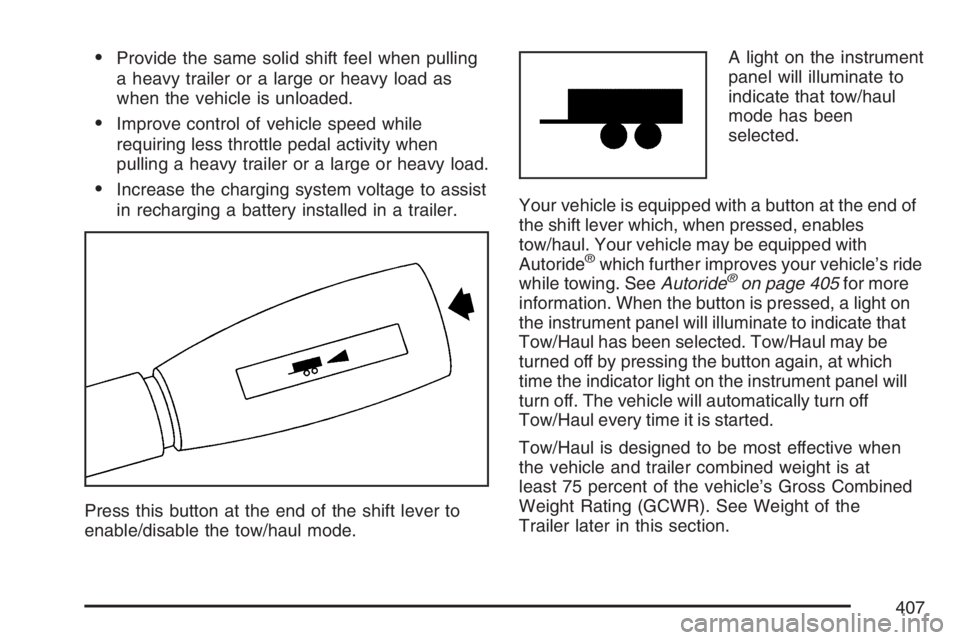
Press this button at the end of the shift lever to
enable/disable the tow/haul mode.A light on the instrument
panel will illuminate to
indicate that tow/haul
mode has been
selected.
Your vehicle is equipped with a button at the end of
the shift lever which, when pressed, enables
tow/haul. Your vehicle may be equipped with
Autoride
®which further improves your vehicle’s ride
while towing. SeeAutoride®on page 405for more
information. When the button is pressed, a light on
the instrument panel will illuminate to indicate that
Tow/Haul has been selected. Tow/Haul may be
turned off by pressing the button again, at which
time the indicator light on the instrument panel will
turn off. The vehicle will automatically turn off
Tow/Haul every time it is started.
Tow/Haul is designed to be most effective when
the vehicle and trailer combined weight is at
least 75 percent of the vehicle’s Gross Combined
Weight Rating (GCWR). See Weight of the
Trailer later in this section.
407
Page 420 of 608
Maintenance When Trailer Towing
Your vehicle will need service more often when
you’re pulling a trailer. See the Maintenance
Schedule for more on this. Things that are
especially important in trailer operation are
automatic transmission uid (don’t overll), engine
oil, axle lubricant, belts, cooling system and
brake system. Each of these is covered in this
manual, and the Index will help you nd them
quickly. If you’re trailering, it’s a good idea
to review these sections before you start your trip.
Check periodically to see that all hitch nuts and
bolts are tight.
Trailer Wiring Harness
Your vehicle is equipped with the following wiring
harnesses for towing a trailer.
Basic Trailer Wiring
The trailer wiring harness, with a seven-pin
connector, is located at the rear of the vehicle and
is tied to the vehicle’s frame. The harness
connector can be plugged into a seven-pin
universal heavy-duty trailer connector available
through your dealer.
The seven-wire harness contains the following
trailer circuits:
Yellow: Left Stop/Turn Signal
Dark Green: Right Stop/Turn Signal
Brown: Taillamps
White: Ground
Light Green: Back-up Lamps
Red: Battery Feed*
Dark Blue: Trailer Brake*
*The fuses for these two circuits are installed in
the underhood electrical center, but the wires
are not connected. They should be connected by
your dealer or a qualied service center.
420
Page 421 of 608
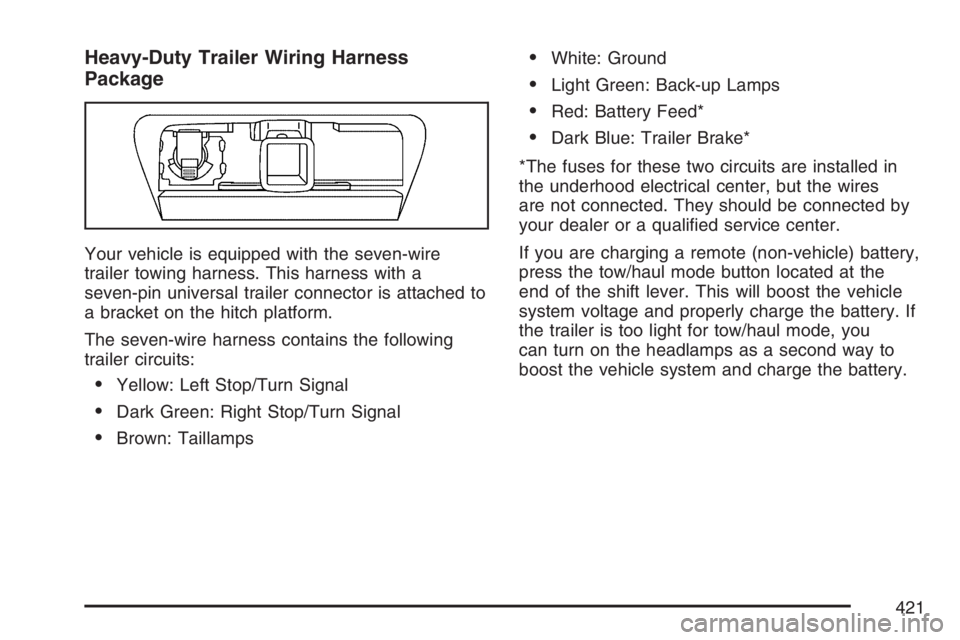
Heavy-Duty Trailer Wiring Harness
Package
Your vehicle is equipped with the seven-wire
trailer towing harness. This harness with a
seven-pin universal trailer connector is attached to
a bracket on the hitch platform.
The seven-wire harness contains the following
trailer circuits:
Yellow: Left Stop/Turn Signal
Dark Green: Right Stop/Turn Signal
Brown: Taillamps
White: Ground
Light Green: Back-up Lamps
Red: Battery Feed*
Dark Blue: Trailer Brake*
*The fuses for these two circuits are installed in
the underhood electrical center, but the wires
are not connected. They should be connected by
your dealer or a qualied service center.
If you are charging a remote (non-vehicle) battery,
press the tow/haul mode button located at the
end of the shift lever. This will boost the vehicle
system voltage and properly charge the battery. If
the trailer is too light for tow/haul mode, you
can turn on the headlamps as a second way to
boost the vehicle system and charge the battery.
421
Page 422 of 608
Electric Brake Control Wiring
Provisions
These wiring provisions are included with your
vehicle as part of the trailer wiring package. These
provisions are for an electric brake controller. The
instrument panel contains blunt cut wires near the
data link connector for the trailer brake controller.
The harness contains the following wires:
Dark Blue: Brake Signal to Trailer Connector
Red/Black: Battery
Light Blue/White: Brake Switch
White: Ground
It should be installed by your dealer or a qualied
service center.
Power Winches
If you wish to use a power winch on your vehicle,
only use it when your vehicle is stationary or
anchored.
Trailer Recommendations
You must subtract your hitch loads from the Cargo
Weight Rating (CWR) for your vehicle. CWR is
the maximum weight of the load your vehicle can
carry. It doesn’t include the weight of the people
inside. But you can gure about 150 lbs. (68 kg) for
each seat. The total cargo load must not be
more than your vehicle’s CWR.
Weigh your vehicle with the trailer attached, so
that you won’t go over the GVWR or GAWR. If you
are using a weight-distributing hitch, weigh the
vehicle without the spring bars in place.
You’ll get the best performance if you spread out
the weight of your load the right way, and if
you choose the correct hitch and trailer brakes.
For more information, seeTowing a Trailer
on page 405.
422